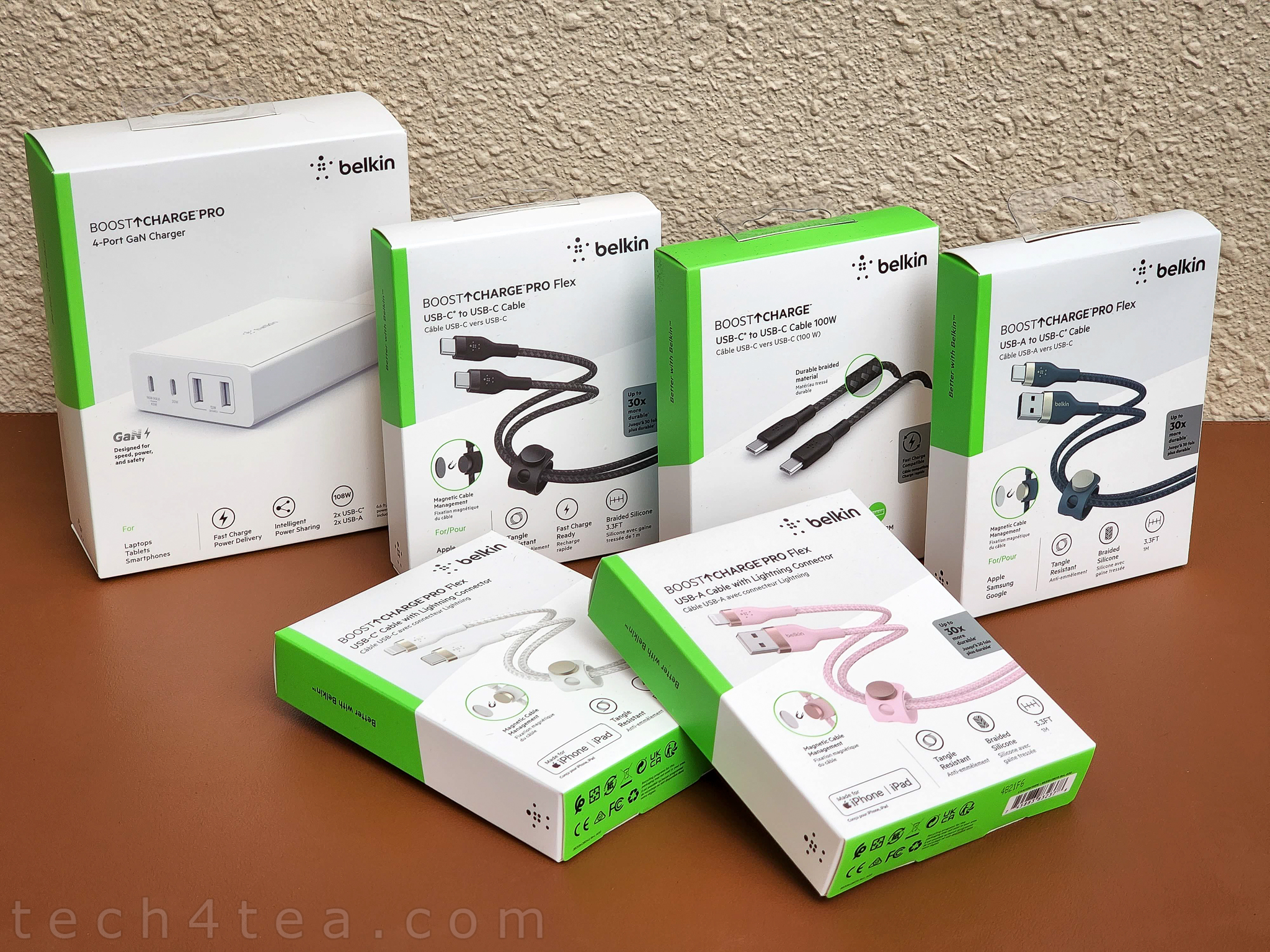
Over the weekend, I got these two cables for my nephew who is an Apple fan.
Belkin BoostCharge Pro Flex USB-A Cable with Lightning Connector
Belkin BoostCharge Pro Flex USB-C Cable with Lightning Connector
Why use these cables instead of those generic cables that came with the devices?
Because of greater durability and flexibility.
Belkin boasts that the BoostCharge Pro Flex USB cables are up to 30x more durable than ordinary cables, so that they are more resistant to tangling, fraying and kinks.
Tech-U-Can-Use (TUCU): This compact and fast GaN charger takes care of the charging needs of all my smartphones, tablets and laptops at home and on my travels.
The charger includes 2x USB-C and 2x USB-A ports to power a laptop and three additional devices, using USB-C PD and GaN technologies to provide a high-powered and efficient charge.
Combinations for simultaneously charging different devices on the four ports.
It can charge my Asus laptop at full speed or fast charge a Samsung S22 Ultra and an iPad while charging two additional devices such as the Sony LinkBuds S earbuds and the Huawei Watch GT 3 Pro smartwatch.
Tech-U-Can-Use (TUCU): In preparing for the resumption of travel, I got myself a 4-Port 108W GaN charger from Belkin as well as an assortment of USB cables.
My renewed charging toolkit for hitting the road. I tend to use proper cables from a brand I can trust when traveling instead of the free generic charging cables that come in the box together with devices. And that 4-Port GaN Charger is really something to get excited about!
In anticipation of a few upcoming trips, I’m re-equipping myself with devices and accessories for traveling.
One of the most stressful chores during travel is charging the plethora of electronic devices that we bring along for business trips and family vacations.
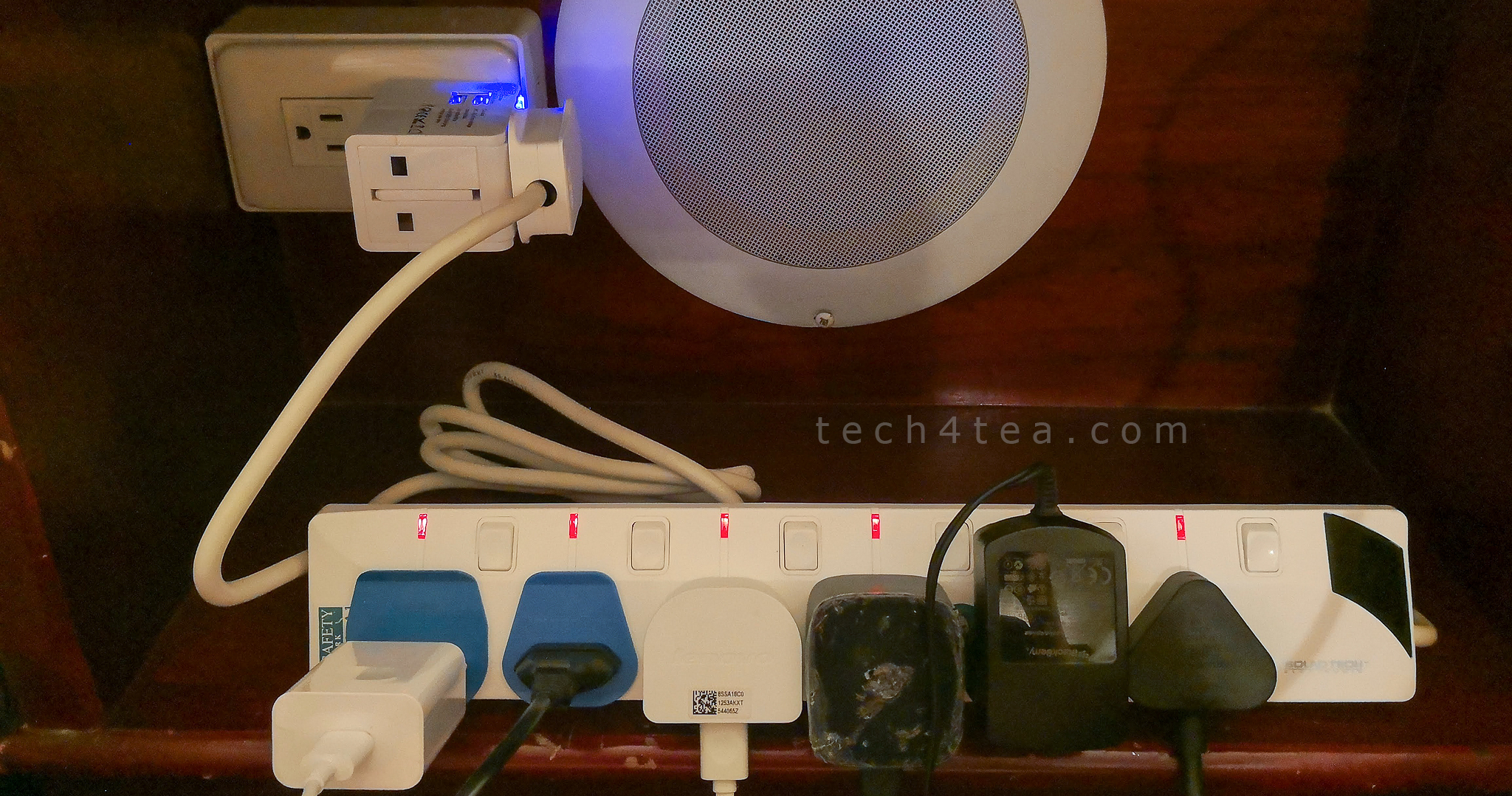
My top tip for people traveling with lots of electronic devices is to bring along a plug power bank, because many hotel rooms do not have enough wall outlets to plug in all our electronic gadgets.
It also helps reduce the number of plug adaptors for countries that do not use the same 2-pin or 3-pin sockets as we do here.
To cut back on the number of charging plugs, I got myself a Belkin BoostCharge Pro 4-Port 108W GaN Charger.
#tech4travel: My top tip for people traveling with lots of electronic devices is to bring along a plug bank. Sounds simple or overkill? It’s my personal travel best practice!
Back in 2018, this room in a tiny rustic village in Taiwan had only two wall outlets, crammed under the side table. Imagine charging the phones, tablets, camera batteries overnight for a family of four. And you have laptops that plug while in use or being charged. The plug power bank is a life-saver!
Travel is resuming slowly and steadily despite the pandemic.
One of the most stressful chores during travel is charging the plethora of electronic devices that we tend to bring along for the trip.
The bulk of carrying loads of chargers and charging cables alone can contribute to the bulk and weight of the luggage, especially since I tend to carry them in the carry-on luggage.
For greater peace of mind, I use this APC power bank by Schneider Electric that has surge protection for your gadgets, with six three-pin sockets and two USB-A ports.
That’s because if a charger is lost or delayed in the checked-in luggage for the flight, the associated gadget becomes unavailable for the trip – until I go shopping for a replacement charger/cable – which is a great inconvenience in terms of time and effort.
What’s the home printer of choice for my #WorkFromHome setup? It’s the ApeosPrint C325 dw colour laser printer from FUJIFILM Business Innovation Corp.
The compact ApeosPrint C325 dw single-function duplex and wireless colour laser printer from FUJIFILM Innovation Corp makes a suitable printer for a #WorkFromHomeworkspace and at front-facing counter-tops of businesses.
First off, FUJIFILM Business Innovation Corp is actually the new name for the former Fuji Xerox after the joint venture company (between FUJIFILM and Xerox) came under FUJIFILM.
As you may know, Fuji Xerox was a global leader in laser printers, especially for enterprises and business users.
My Take
The ApeosPrint C325 dw single-function laser printer is a suitable printer for #WorkFromHome and small businesses.
Its print quality and speed, ink economy, ease of use, as well as compactness, duplex and wireless capability make it a versatile printer for the home and at customer-facing counters.
The ApeosPrint C325 dw single-function printer is the smallest and lightest printer model in their lineup and is targeted towards counter services, clinics and small businesses.
I have been using the printer for the past few months and find it a suitable printer for the #WFH workspace considering its performance, economy, ease-of-use, reliability and compact footprint.
The key requirements I have for a home printer (for work) is print quality and compactness, as well as the ability to print colour, double-sided, and from a wireless network.
Naturally, factors like print speed, ink/toner economy, and maintainability also weigh in.
Tech-U-Can-Use (TUCU): Need a wireless charging stand to charge your iPhone 13 or iPhone 12 so you can continue using the phone while it’s still charging? Guest reviewer Jennifer Lee checks out the 7.5W BoostCharge magnetic wireless charger stand from Belkin for her iPhone 13 Pro Max.
#tech4xmas: This BoostCharge wireless charger stand from Belkinmakes a suitable Christmas present for iPhone 12 and iPhone 13 owners. Photo credit: Jennifer Lee.
The magnetic wireless charger stand is MagSafe compatible for iPhone 13 and iPhone 12.
The wireless charger stand is available in black or white.
With MagSafe, it was easy to place my iPhone 13 Pro Max onto the stand – it snaps into place and there is no worries that the placement is misaligned.
There is an LED safety indicator that comes on when the charging commences.
The magnetic attachment is strong enough to hold the iPhone securely.
The stand is great for zoom calls or FaceTime – it holds the phone upright either in portrait or landscape mode.
A 20W USB-C Power Delivery 3.0 power adapter is included in the box.
In addition, the charge pad is protected by a Belkin Connected Equipment Warranty.
The new Huawei Watch GT 3 is the company’s latest smartwatch and offers a staggering 14 days battery life as well as more accurate measurements of vital statistics to monitor health and fitness, and to instrument sports performance for in-depth analysis and more effective training.
Unboxing the Huawei Watch GT 3 health/fitness/sports smartwatch.
It offers improvements which includes features that had debuted with the flagship Huawei Watch 3 and Watch 3 Pro which was released for APAC in July this year.
The new Huawei Watch GT 3
First unveiled last month in October and launched for Singapore less than two weeks ago, the Huawei Watch GT 3 series will hit the shelves on 18 December, with pre-orders beginning today(until 17 December).
#tech4xmas: This will make an ideal Christmas gift for those keen on fitness and good health.
Major improvements over its predecessor in the sporty GT (Gran Turismo or Grand Tourer) line include an upgrade of the operating system from the Lite OS to HarmonyOS 2.1.0, an Apps grid replacing a scrolling menu, additional sensors, more accuracy in measurements and a rotatable crown.
Compared to the muscular flagship Watch 3 Pro, the new Huawei Watch GT 3 feels lighter and is slightly smaller though both watch faces measure 46mm.
The Watch GT 3 does not have the eSIM & Wi-Fi capabilities of the Watch 3 Pro, but has a much longer 14 days battery life.
tech4xmas 2021: The Q Series Quantum Edition (QE) Pro series are the flagship Android TVs by Singapore brand PRISM+. I tried the Q65-QE Pro and found that it indeed offered excellent value-for-money. Quality that’s almost as good as the flagship of established brands – but at a fraction of the price.
The PRISM+ Q65-QE Pro standing pretty in front of my Samsung 55-inch TV. The image quality isn’t far behind but the price is like half. Super value-for-money.
Appearance-wise, the Q65-QE Pro looks really smart with almost no bezel on three edges – left, right and top sides.
Along the bottom of the TV is a 1-cm bezel as well as the brand logo and LED status light on a thin extension below the centre of that bezel.
PRISM+ Q Series QE Pro TVs
PRISM+ makes three sizes for the Q Series QE Pro 4K UHD Android TVs.
86-inch: S$2,999
65-inch: S$1,199
55-inch: S$999
Apart from their different sizes and price tags, all three TVs share the same specifications.
All are bezel-less Quantum IPS panels with 4K UHD (3,840 x 2,160) resolution offering 1.07 billion colours, running the latest Android TV OS 10.0 with Google Play Store, and 3 years onsite full warranty.
Features include Active HDR10, Dolby Vision, Dolby Atmos, DTS TruSurround, Digital TV, and in-built Chromecast Google Assistant for hands-free voice control.
The TVs are also bundled with free subscriptions with meWATCH (12 mths) and Viu (3 mths).
Connectivity is excellent with 3 x HDMI 2.0, 2 x USB 2.0, Composite AV, Optical Audio (SPDIF) out, RF in, Bluetooth 5.0, Ethernet LAN, and Wi-Fi (2.4GHz/5GHz).
Excluding the stand, the panel measures 1447 x 827 x 85 mm with a weight of 19.9kg
Including the stand which is very stable, the TV measures 1447 x 904 x 290 mm, with a weight of 20.15kg.
The TV can also be mounted on the wall with a mounting measuring 400 x 200mm.
Picture quality-wise, Dolby Vision’s HDR technology provides good natural colours, with better tone definition, contrast management and greater detail.
The IPS panel accords a wide viewing angle (178 degrees), while the Quantum Color backlit technology of the series further enhances overall brightness and contrast, as well as greater colour volume and accuracy than similarly priced TVs.
Compared to its predecessors (Q-series), the Q65-QE definitely offers a wider colour gamut and higher dynamic range.
In fact, I find the image quality quite almost as good as my own Samsung 55” TV, which is priced roughly twice the Q65-QE Pro.
Audio wise, I find the 2 x 10W output adequate – I don’t think an external soundbar is necessary, except perhaps to boost the bass.
Tech-U-Can-Use (TUCU): Guest reviewer Jennifer Lee just received her new iPhone 13 Pro Max so in order to protect it, she got herself the Belkin SCREENFORCE UltraGlass screen protector and applied it herself to the phone. Here’s her experience.
#tech4xmas: This SCREENFORCE UltraGlass screen protectorfrom Belkinmakes an ideal Christmas present for the iPhone 13 Pro Max owner.
I am amazed at how easy the application was.
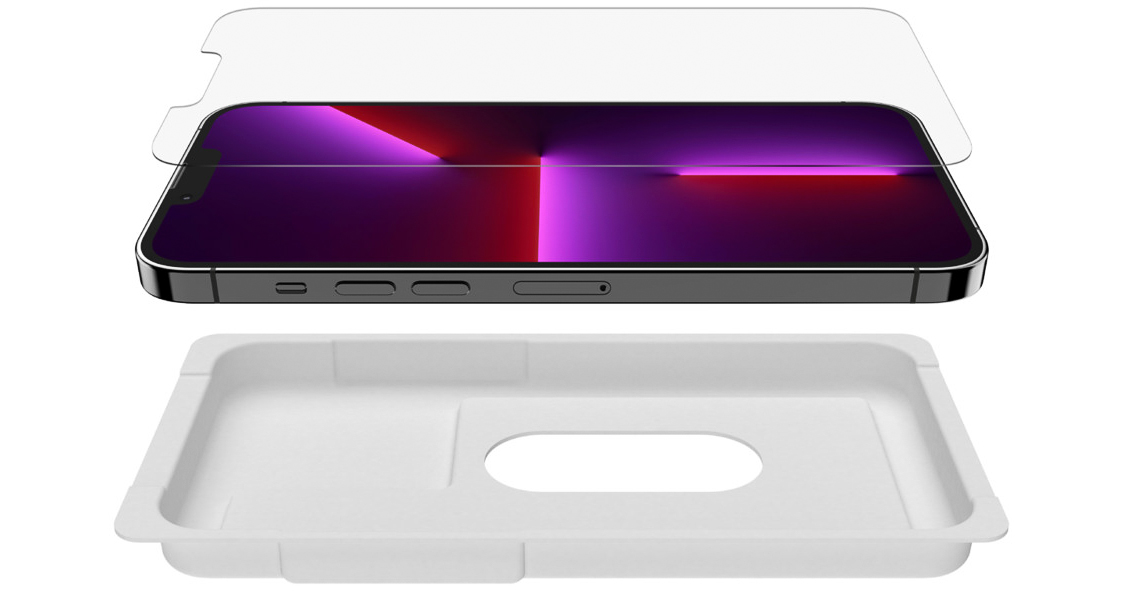
No fuss, just follow the very simple step by step visual guide (included) using the Easy Align Tray.
Belkin makes it easy and fuss-free to self-apply the SCREENFORCE UltraGlass screen protector DIY, as the reviewer tried out.
Unlike most screen protectors, the Belkin Ultraglass application was flawless, precise and bubble-free even at the first attempt.
The Ultraglass feels seamless on the screen, without any curves or bends and you won’t realise there is another layer of screen protector on top.
Tech-U-Can-Use (TUCU): My mom’s in-box power supply for her phone died on her, so I got her a replacement wall charger – as a replacement and upgrade.
The Belkin BoostCharge USB-C PD 3.0 PPS Wall Charger 25W is an intelligent charger for those new phones that doesn’t include chargers in the box, as a second charger at the office, or simply as a spare/backup charger.
The main features of Belkin’s BoostCharge 25W wall charger can be gleaned from its lengthy name.
It’s a wall charger, it can charge at up to 25W max power, it uses USB-C, it is PD 3.0 certified, and it is equipped with PPS technology.