Archive for September, 2011

Singapore loves Facebook most in the world

Friday, September 30th, 2011

An international analysis on the use of social networks by Experian shows that Singapore users spend the longest time on Facebook in August 2011, with an average of 38 minutes and 46 seconds spent per session.

Country Average time spent per session on Facebook in Aug 2011
Singapore 38 min 46 sec
New Zealand 30 min 31 sec
Australia 26 min 27 sec
UK 25 min 33 sec
France 21 min 53 sec
US 20 min 46 sec
India 20 min 21 sec
Brazil 18 min 19 sec

This is longer than the average time spent per session in countries such as UK, US and Australia.

Experian further reveals that Facebook has managed to sustain its popularity with Singapore Internet users despite the emergence of Google+ this year. The social networking site managed to increase share of visits by 0.39% between August 2010 and August 2011.

Singapore Internet users also showed more interest in YouTube, evidenced by a 3.24% increase in share of visits between August 2010 and August 2011.

New storage products: 7 SanDisk memory devices

Thursday, September 29th, 2011

SanDisk launched seven new memory storage devices today, targeted mainly at consumers who are photographers/videographers, smartphone/tablet and general computer users.

SanDisk Corporation produces flash memory storage solutions.The new products feature higher capacities and higher speeds and include SDXC SD and micro SDXC cards, USB thumbdrives, a USB 3.0 card reader, and two SSD drives for daily and long term storage.

Note that the SDXC memory cards will require SDXC compatible devices to use their full capacity beyond 32GB. They can be used for non-SDXC devices but can only be formatted to a maximum capacity of 32GB for SDHC devices.

The new devices are tabulated below.

Memory device Price & Description
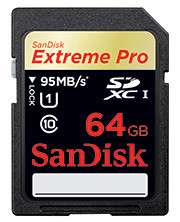
64GB SanDisk Extreme Pro SDXC UHS-I Card  S$529 64GB SanDisk Extreme Pro SDXC UHS-I Card
(S$529)
 

  • Double the performance and capacity, targeted at photo/video pros.
  • Up to 90 MB/s write speed and 95 MB/s read speed.
  • Good for Full HD videos and burst mode photography recording to RAW + JPEG.
  • 8GB – 64GB: S$69 – S$529
  • Available Q4 2011
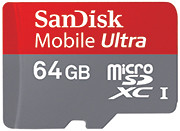
64GB SanDisk Mobile Ultra microSDXC Card S$285 64GB SanDisk Mobile Ultra microSDXC Card
(S$285)
 

  • Double the capacity of smartphones and tablets
  • Up to 30 MB/s transfer speeds.
  • Good for Full HD videos
  • Available Q4 2011
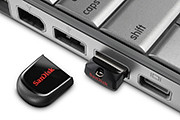
Cruzer Fit USB Flash Drive Cruzer Fit USB Flash Drive
(4 GB – 16 GB: S$12 – S$36)
 

  • Tiny and compact.
  • It’s only the size of a 10 cents coin.
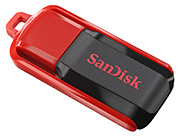
Cruzer Switch USB Flash Drive Cruzer Switch USB Flash Drive
(4 GB – 16 GB: S$12 – S$36)
 

  • No more worries about losing the cap.
  • Good for computers and tablets with USB ports.
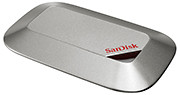
SanDisk Memory Vault SanDisk Memory Vault
(S$ TBA)
 

  • 8GB and 16GB capacities available – not for large scale file backup.
  • Preserve files for up to 100 years. Good as photo albums.
  • Available Q4 2011
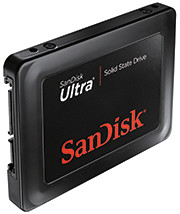
SanDisk Ultra SSD SanDisk Ultra SSD
(60GB: S$230)

(120GB: S$415)
(240GB: S$790) 

  • Solid State Drive (SSD) for the retail market instead of OEM.
  • Up to 280/270 MB/s in read/write speeds.
  • Offers low power consumption, silent and quick launch.
  • Good for replacing ageing internal hard-disks of old laptops/desktops.
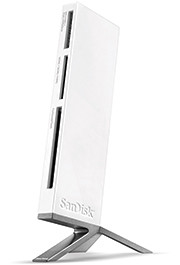
ImageMate All-in-One USB 3.0 Reader/Writer ImageMate All-in-One USB 3.0 Reader/Writer
(S$65)
 

  • USB 3.0 interface offers up to 500 MB/s performance.
  • Four card slots for all major card formats.
  • Backwards compatible with USB 2.0 devices.
  • Good for intensive photo and video transfer.

New smartphone: Samsung Omnia W

Wednesday, September 28th, 2011

Samsung’s first Mango-based smartphone features a vivid Super AMOLED display as well as People Hub – which provides enriched content and social communication experience.

The Omnia W will be available in Singapore by the end of the year for S$498 (incl 7% GST), without line contract.

Samsung Omnia W, based on Windows Phone 7.5 Mango.

Samsung Omnia W, based on Windows Phone 7.5 Mango.

Based on the latest release of Microsoft’s Windows Phone, code-named Mango, the phone sports a 3.7” Super AMOLED display, a 1.4 GHz processor and 14.4 Mbps HASPA connectivity.

The design thrust of the Omnia W is to put people at the centre of everything, with emphasis placed on social networking and sharing. Internet Explorer 9 and Bing are integrated into the entire experience.

Windows Phone 7.5

Mango’s unique and intuitive user interface lays out applications in mosaic ‘Live Tiles’ which flow and move in response to users’ touch on the screen. Six specialized Microsoft applications provide an engaging content and communication experience.

Samsung Electronics Co LtdWindows Phone People Hub is integrated with built-in social networking services like Windows Live, Facebook, Twitter and LinkedIn, for users to stay connected with their social community constantly.

Office Hub provides enhanced productivity on-the-go and includes access to Windows Live Sky Drive, which provides 25GB of free storage and allows documents and media files to be easily stored and accessed. Users can also create and edit documents through mobile versions of Microsoft Office Excel, Word and PowerPoint, as well as utilize One Note, a note-taking platform that allows easy sharing and storage of voice memos, images and text-based notes.

Stylish, slim metal finish for the Samsung Omnia W

Stylish, slim metal finish for the Samsung Omnia W

Seamless access to entertainment is enhanced by the integration of a Picture Hub, Music & Video Hub – powered by Microsoft Zune – and Game Hub, which provides the latest in social gaming experiences through Xbox live, for friends to chat with each other while gaming. Windows Phone Marketplace provides access to over 30,000 apps to meet customer needs across entertainment or productivity.

Samsung differentiation

The overall Windows Phone experience is significantly enhanced with the inclusion of Samsung-exclusive productivity apps. This includes Samsung AllShare, which provides seamless content transfer between the smartphone and other DLNA-enabled devices such as HDTV’s, monitors and digital cameras.

The Samsung Omnia W tries to put people and social networking at the centre of its experience.

The Samsung Omnia W tries to put people and social networking at the centre of its experience.

Video Call is an easy-to-use app which allows ultra-fast vivid 3G video conversations with friends and family. Additionally, Mini Diary enables users to capture their experiences in multimedia formats and create their own personalized digital journal while on the go. An upgraded Samsung eBook client is also available from Samsung Zone.

Users can stay up-to-date with the latest news and events with Now 2.0 app, which provides up-to-the minute current affairs, stock market and weather information. RSS Time allows RSS feeds for newspapers, magazines and blogs to be downloaded onto the device and read in an easily digestible format, while eye-catching articles can be instantly shared via email or Facebook.

The device features enhanced social network integration, with Twitter and LinkedIn weaved throughout the Omnia W in addition to Facebook, for photos and videos to be instantly shared across a variety of social networking sites hassle-free.

Detailed specifications of the Omnia W are tabulated below:

(more…)

Hands-on with the Wacom Cintiq 24HD

Wednesday, September 28th, 2011

Wacom’s newest flagship Cintiq 24HD tablet-cum-display was launched on 13 September 2011. The only piece available in Southeast Asia was brought in for yesterday’s launch event for the Bamboo graphics tablet.

Priced at S$4269 (incl 7% GST), it will be available in mid-October.

Wacom Cintiq 24 HD in an "hangover" position.

Wacom Cintiq 24 HD in an "hangover" position.

The Cintiq line of graphics tablet is Wacom’s highest end range for creative professionals. Used with a pen stylus, artists work directly on the surface of an LCD screen for an intuitive and direct feel. The tablet-cum-display is plugged into a computer with the necessary graphics software.

The tablet cum display flush with the table top.

The tablet cum display flush with the table top.

The Cintiq 24HD is the newest flagship product for Wacom, featuring a 24-inch HD widescreen display (1920 x 1200 pixels).

The display has a much improved colour gamut compared to its 21-inch and 12-inch siblings, promising 92% of the Adobe RGB colour space – an improvement almost 50%. Users of the Cintiq 21UX and 12 WX frequently set up a separate colour monitor to check for colour accuracy Wiith the 24HD, this is not necessary anymore because of the improved colour accuracy.

Elevated position, with space for keyboard.

Elevated position, with space for keyboard.

I did find the display not as pin-sharp as expected but my guess is that this particular display unit has been toted around more often than it’s been designed for – it’s not meant to be a portable device after all. Yet, physically, the screen was built to withstand the hard with the pen tip – the person giving the brief punched it many times with his knuckles to illustrate this point.

The touch-and-feel of drawing on the tablet was fantastic, as can be expected from a high-end product targeted at the professional market. I did not detect any lag between physical pen movement and the line on the screen below the pen-tip. It painted exactly where I wanted it to, and the 2048 pressure levels made a indelible difference when painting strokes of varying pressure.

Customisable buttons and control ring on both sides.

Customisable buttons and control ring on both sides.

The frame around the screen is deliberately designed to be thick to serve as arm rests. Customisable control rings and buttons can be found on both sides of the frame. They can be set to control brush sizes etc.

The cantilever holder behind the screen is a new design. The tablet can be put in a number of positions: vertical or horizontal, or slanted with one edge resting ON the table, JUST ABOVE a keyboard, or HANGING OVER the table’s edge – whatever position the artist is comfortable with.

For stability, the tablet and the base counterweight weighs some 40 kg. But changing between the positions was simple and fast, and did not require a lot of strength.

Wacom launches new Bamboo graphics pen tablets

Tuesday, September 27th, 2011

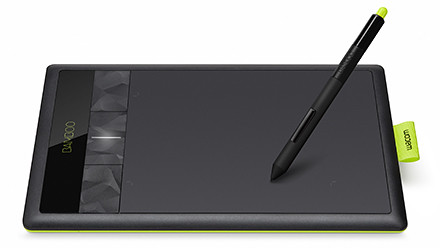
Three re-styled and improved models of the entry-level tablets – Pen, Pen & Touch, and Fun has been launched globally today and is available at S$135, S$185, and S$335 (all incl 7% GST).

Wacom Bamboo graphics tablet

Wacom Bamboo graphics tablet

The 29-year-old Japanese company is the market leader in graphics tablets, enjoying more than 80% of the market share.

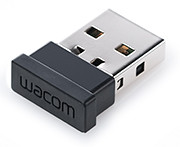
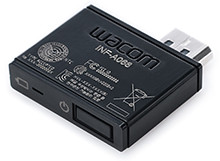
Wireless dongle for Wacom Bamboo

Wireless dongle for Wacom Bamboo

The Bamboo series is the entry level line of tablets for the company, while the Intuos is the mid-tier line, with the Cintiq line the high-end tablet cum LCD display for the heavy-lifting.

This is the third generation of the Bamboo series. The aesthetic design has been restyled to feature a lime green highlight around the edge and a reduced bevel around the tablet’s working area.

All support 1024 pressure levels in the stylus pen tip and a resolution of 2540 pixels. Both the basic Pen and core Touch & Pen models are small sized tablets while the most pricey Fun is medium sized.

The wireless module inserted in the tablet

The wireless module inserted in the tablet

The Touch & Pen and the Fun models both feature four customisable ExpressKeys, supports the use of both pen and finger-touch, supports wireless usage through an optional wireless accessory kit for an extra S$65. The kit may not be available in some countries though.

The Pen model does not have any ExpressKeys nor the wireless ability.

Bundled software for the three models are also slightly different. Both Mac and Windows PCs are supported. The main specifications are tabulated below:

(more…)

Setting up and using the Seagate GoFlex Home storage system

Monday, September 26th, 2011

GoFlex Home is a consumer network attached storage (NAS) hard drive for the home. Easy to set up and use, it allows the access, sharing, streaming, and backup of files and media for computers, network TVs, media players and game consoles connected to the home wireless network.

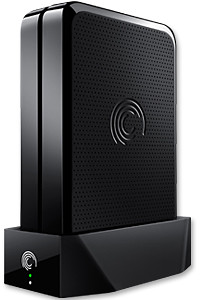
The Seagate GoFlex Home comprises a drive dock and a hard drive.

The Seagate GoFlex Home comprises a drive dock and a hard drive.

Secure access can also be opened to computers and iOS/Android tablets and smartphones over the Internet.

Over the weekend, I helped my friend set up an NAS drive for his desktop, netbook, two laptops, iPhone and Android tablet. He had bought the Seagate GoFlex Home 3 TB storage drive during the recent COMEX 2011 but hadn’t had the time to set it up yet.

I helped by using eye-power because he decided to give it a go himself and actually got the thing working in less than 15 minutes. That was the reason why I recommended the drive in the first place, it works with most consumer home Wi-Fi routers with little set-up or configuration needed.

The GoFlex Home comes with two cables and an software installation CD. The following steps were all that was needed to get the personal storage cloud going:

1. Connect the GoFlex Home drive dock to the Wi-Fi router by using the provided Ethernet cable.

2. Pop the GoFlex hard drive into the GoFlex drive dock and plug the power supply into the drive dock and the wall outlet. Switch on the GoFlex Home by pressing the Power button on the drive dock.

3. Pop the CD (or download from Seagate’s website) into the computer (can be a Mac or Windows PC) to install the software needed to access the hard drive. Simply select a language, key in the product information found on the drive, give the drive a name and register it. The name has to be unique globally since it will be used to identify the drive should you access it from the Internet.

4. Install the software on other computers that require access to the shared drive. Up to 5 people/computers on the home network can access the GoFlex Home. By paying to subscribe to the Seagate Share Pro, you get access for an unlimited number of people/computers to the GoFlex Home.

There are three ways to access the drive. One is to use the installed Seagate Dashboard software (on Windows PCs), which allows all features of the drive to be configured and managed. You can add computers and user accounts, backup, access and share files as well.

Use Seagate Dashboard software to configure and manage GoFelx Home

Use Seagate Dashboard software to configure and manage GoFelx Home

The other way is to use a browser-based Seagate Share either for a computer in the home network or out in the Internet.

Seagate GoFlexAccess App

Free iOS/Android app

Both are easy to use with a simple interface, using drag-and-drop or standard dialog boxes we’re familar with.

The third method is via the appropriate free app on a iOS/Android smartphone or tablet, also over the Internet.

The GoFlex Home comes with a USB port which is very useful. You can connect an additional external hard drive to expand the capacity of the original GoFlex hard drive. You can also connect a USB hub for connecting more than one USB device.

In my friend’s case, he connected his printer to the USB port and all his computers on the Wi-Fi network got to share that printer. USB port on the drive dock for a HDD, printer or USB hubNo more plugging/unplugging the old printer from one computer to another.

The included backup software allows up to three connected computers to be automatically backed up to the GoFlex Home. Upgrade to Premium Backup ($49.95) to back up an unlimited Seagate GoFlex Home home network attached storagenumber of computers on the GoFlex Home network. You can upgrade at the Application Store that can be accessed through the Seagate Dashboard software.
For each user account set up on the GoFlex Home, three folders are created – a Public, Personal, and Backup folder. The Public folder holds files that can be stored and accessed by everyone on your home network. The Personal and Backup folders can only be accessed by the the user.

What I like about the sharing is the granular control available for the files shared. You can specify who you want to share files with, choose to share just certain files or entire folders, set passwords, and set expiry dates for the shares. Administration is intuitive and easy to pick up. You can send a URL of a shared file via email.

Stream media to other computers and media players on the network.

Stream media to other computers and media players on the home wireless network.


Music, photos and video can also be shared and streamed to media players, game consoles or network TVs that support UPnP-AV, DLNA or Windows Media Connect. A wide range of file types are supported.

The GoFlex Home is available in 1TB (S$179), 2TB (S$239) and 3TB (S$339) capacities.

Setting up a home shared network hard drive

Sunday, September 25th, 2011

Over time, as we get new computers and leave the old still-functional computer as a second or third machine, and we still utilise the different machines, the files we create and work on can get distributed amidst the hard disk drives of the various computers.

A shared network hard drive can bring order back to an increasingly chaotic situation.

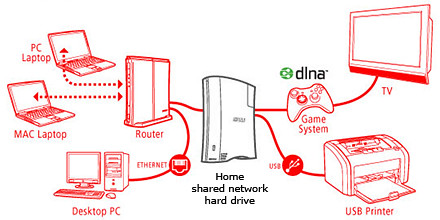
A network attached external hard drive can share files and media amongst computers and media players in the home

A network attached external hard drive can share files and media (illustration modified from www.buffalotech.com)

The above scenario was what happened to some of my friends and me. Computers and laptops today can last for a long time (if you look after them well) and most often then not, they’re still perfectly functionable when we get a new machine so it seems quite a waste to get rid of the old machine, especially since it can serve as a back up.

And if a member of the family is on the new laptop, others can use the spare computer. So over time, working files, photos, music and video can get distributed over a few computers. At first, it’s easy to remember and keep track of which file is in which computer and do the occasional transfer using an USB thumbdrive.

But over time, as the number of files grow, things can get out of hand – the convenience of being able to work on a few computers turns into a bane.

Now that cloud computing is catching on and we can save files and media on the Internet, this mess can be ameliorated. But those personal and confidential files and humongous video files are still best kept in local storage.

The NAS solution

Schematic of an NAS solution

Schematic of an NAS solution

So over the weekend, I helped my friend rig a similar solution that I use at home – set up a simple external hard drive that can be shared and accessed by a few different computers at home over a local Wi-Fi network.

Those files that are stored on the network attached storage (NAS) drive can then remain accessible no matter which computer you’re working on. It can be used to back up the computers connected.

Some NAS drives allow you to stream media to TVs, media players and game consoles connected to the home network.

In fact, some even enable access to be opened out to the Internet, so that when you’re outstation – in the office, on the road, or overseas – you can still securely access the files stored in the hard drive. This can be done via a browser on a laptop connected to the Internet, or via an app on a smartphone or tablet.

It’s like setting up your personal cloud storage. There are many consumer NAS drives in the market from makers such as Seagate, Western Digital and Buffalo.

They’re all designed to be easily set up by the layman who does not have a PhD in computer science. These NAS drives are connected directly to the router rather than a specific computer acting as a file server.

Any computer connected to the network via the router can access the NAS drive at any time.

Because these NAS drives are more intelligent than the regular dumb external hard drive, they do cost a slight premium over the latter. The NAS drives can manage network access by computers on the network and implement security, access and rights control as well.

Seagate GoFlex Home comes in capacities of 1TB, 2TB and 3TB

Seagate GoFlex Home comes in capacities of 1TB, 2TB and 3TB

Since I’m familiar with the Seagate GoFlex Home, that was what I recommended my friend, who brought home a 3 TB version from the recent COMEX 2011 for S$299.

Tomorrow we’ll see how he managed to tame his growing diaspora of media and files.

Did you shanzhai today?

Saturday, September 24th, 2011

As part of the NUS-ISS Innovation Update Seminar series, two speakers will cover – on 7 October 2011 –  a common form of innovation in China now. “Shanzhai” refers to the production of high-quality, very rapid imitation of new, branded products by low-cost, no-brand competitors.

Free NUS-ISS seminar on "Shanzhai" on Friday 7 October 2011

Free NUS-ISS seminar on "Shanzhai" on Friday 7 October 2011

According to the e-brochure, “the shanzhai innovation phenomenon parallels Linux’s cathedral and bazzar movement, a term coined by software architect Eric Raymond to describe the open source movement where the Cathedral model is restricted to an exclusive group as contrasted to the Bazaar model where developers self-organize in view of the public.”The seminar promises to review new products churned out by the shanzhai movement, and the rapid evolution of the aggressive shanzhai-style manufacturers – all pointing to the underlying vibrant entrepreneurial ecosystem.

If you’re looking to keep up with the latest in innovation, register for this FREE seminar by 3 October 2011.

The seminar is presented by the Institute of Systems Science (ISS), a specialist training institute of the National University of Singapore (NUS) offering professional information technology upgrading, conversion and continuing education and training programmes to managers and IT practitioners and technologists.

Date 7 October 2011 (Friday)
Time 8:45 am to 11:30 am
Venue Institute of Systems Science (ISS)
Address 25 Heng Mui Keng Terrace, Singapore 119615

The two speakers at the seminar are Benjamin Joffe, CEO of +8*, and Dr. Virginia Cha, Senior Programme Director of Innovation at ISS.

The detailed agenda and biographies of the speakers can be found in this e-brochure.

New mainframe application tuner from CA Technologies

Friday, September 23rd, 2011

The new mainframe application tuner helps simplify application performance management through automated detection that helps IT control costs by resolving problems before they impact users.

CA Technologies is an IT management software and solutions company.CA Technologies has announced the CA Mainframe Application Tuner, which combines two application performance management (APM) tools with new integration capabilities to help IT organizations proactively pinpoint and resolve performance issues that could reduce user productivity and consume extra system resources.

“We are very pleased with the new functionality in CA Mainframe Application Tuner that helps us prevent problems before our users are impacted,” said Mike Bouros, VP of IT, Mainframe Systems Performance at Morgan Stanley & Co. “We are also excited about its integration into the large CA Technologies portfolio of IT solutions, which will significantly enhance and simplify our application development and performance analysis processes.”CA Mainframe Application Tuner combines the advanced performance analysis and tuning capabilities of TRILOGexpert TriTune with the automated performance management of TRILOGexpert APC for TriTune.

CA Technologies has a non-exclusive, worldwide source agreement to develop, market and support this technology, thus facilitating innovation beyond its previous capabilities.

The new integration in CA Mainframe Application Tuner helps performance managers more quickly and easily identify and mitigate the root causes of application performance inefficiencies in z/OS-based systems to improve response times and lower CPU consumption.

To help streamline APM, development and testing activities, CA Mainframe Application Tuner integrates with other CA Technologies software including:

a. CA Technologies cross-platform APM solution, by automatically providing drill-down details about mainframe performance issues to IT analysts and insulating them from complexities of the applications and operating system.

b. CA Endevor Software Change Manager and key testing solutions including CA InterTest™ and CA SymDump, by automating and simplifying the process by which developers can view and update their programs, and helping to prevent manual errors.

c. CA Mainframe Software Manager, by significantly streamlining the acquisition, installation, deployment and maintenance of CA Mainframe Application Tuner.

New compact camera: Samsung MultiView MV800

Thursday, September 22nd, 2011

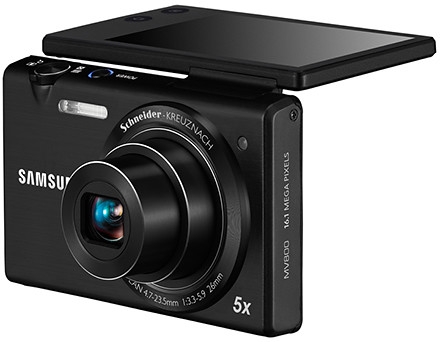
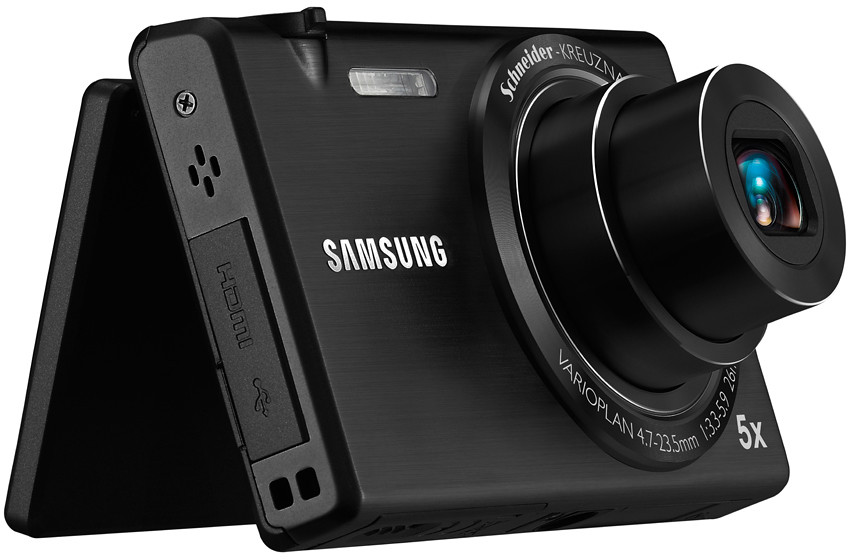
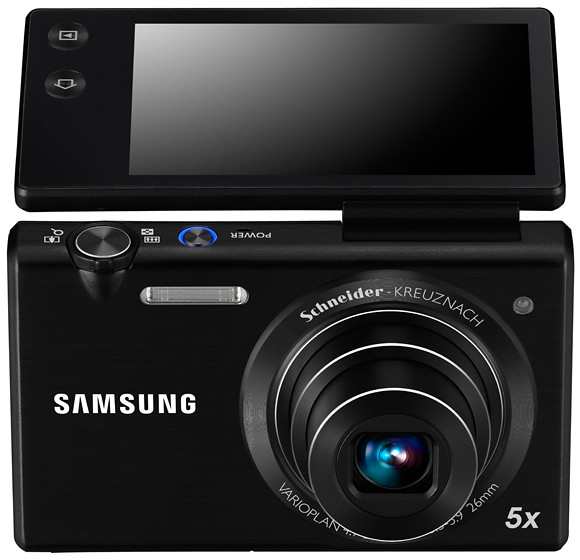
The MV800 features a 3.0-inch wide flip-out touch display and is available in Black, White and Red at S$499.

MultiView MV800, the new compact digital camera from Samsung.

MultiView MV800, the new compact digital camera from Samsung.

The flip-out touch screen of Samsung’s new ultra slim compact digital camera enables photographers to snap shots from difficult angles and awkward positions.

Such situations include snapping high-angle shots over the crowd to capture a street performance, and dramatic low-angle shots at ground level. The display can also be folded back to frame the shot when taking self-portraits. Samsung Electronics Co LtdThe screen can be tilted up or down for framing snapshots prior to taking them.

The MV800 pairs a Schneider-Kreuznach lens with a 16.1 megapixel CCD sensor. The 5x zoom Lens ranges goes from a wide angle of 26 mm (35mm equivalent focal length) to a maximum of 130 mm.

Schneider-Kreuznach lens with 5x zoom from 26 to 130 mm (35mm equiv)

Schneider-Kreuznach lens with 5x zoom from 26 to 130 mm (35mm equiv)

The Live Panorama function enables easy photography of large groups by simply holding down the shutter button, and previewing the entire scene that has been captured on the LCD screen. By connecting the MV800 to a 3D HDTV, images and panoramic shots can be viewed in 3D.

The MV800 has a recording time of up to twice as long as the standard MPEG4. The zoom noise reduction technology promises to record only the sound of the subject and not the whirring of the zoom.

The Smart Touch 3.0 with Wallpaper user interface allows users to drag and scroll through menu options to launch features, instead of using traditional clumsy buttons on the camera’s body.

In-camera creative software features

16.1 megapixels and a 3.0-inch wide flip-out touch display.

16.1 megapixels and a 3.0-inch wide flip-out touch display.

The Magic Frame feature includes 12 fun background templates for snapshots, as well as the ability to customise their backgrounds. A Picture-in-Picture function also allows users to insert and combine one image with another.

The Smart Filter function has a selection of 14 artistic effects, including the newly added Water Paint for a stylish watercolour finish or the Cartoon capability that transforms any photo into a fun animated film format. Funny Face allows you to bend, stretch and manipulate portraits by tapping and dragging to radically distort facial characteristics for a good laugh.