Archive for the ‘Opinion’ Category
Saturday, January 23rd, 2016
As part of the National Cloud Computing Distinguished Speaker Series, Serguei Beloussov – Co-founder, CEO & Chairman of the Board for Acronis – will be addressing the challenges that the explosion of data poses for the technology landscape in the future, and what it takes for technology workers to be prepared. Admission: Free.

The talk is on 17 February, 6-8pm. Register online (click on image above). Venue: Seminar Room 1 (COM1-02-06), NUS School of Computing, 13 Computing Drive, Singapore 117417.
The talk is co-organised by IDA Singapore and Acronis, and supported by the National University of Singapore, Singapore Computer Society (SCS) and the Singapore Infocomm Technology Federation (SITF).
Abstract and speaker’s biodata below.
(more…)
Tags:Acronis, backup, Big Data, brief, events, recruitment, Serguei Beloussov, software, talks
Posted in Acronis, Big Data, Brief, Events, events, Internet, Opinion, Promotions, Seminars, Software, software, Technology | No Comments »
Wednesday, August 5th, 2015
Here’s Part 2 of the three-part series on tips for shooting fireworks photos – on what settings to use in your camera. Contributed by Canon Imaging Academy.

Ever wondered what camera settings to use for shooting fireworks? Check out the recommendations from the Canon Imaging Academy. Photo credit: Canon Imaging Academy.
Here are some settings that are optimal for shooting fireworks.
Editor’s note
Many cameras, including compact ones have a dedicated Scene mode for shooting fireworks where many of the camera settings highlighted below are automatically set to appropriate levels generally suitable for fireworks.
However, because the settings are pre-canned and generally shooting most fireworks, you can’t change the settings to custom-fit the exact lighting situations or to realise your specific artistic expression.
If you want the best shots, try out the settings suggested below by the Canon Imaging Academy.
(more…)
Tags:cameras, Canon, Canon Imaging Academy, Fireworks, howto, jubilee, National Day Parade, NDP, photography, SG50, tips
Posted in Cameras, Canon, Compact camera, DSLR, Gadgets, Howtos, MIL, Opinion, Photography, Photos, POTD, Reference, Tips | No Comments »
Tuesday, August 4th, 2015
The National Day Parade usually sees a spectacular display of fireworks at the end of the display. Canon Imaging Academy shares three tips to capturing great photos of fireworks.

Shooting great snapshots of fireworks is not difficult, as long as you spend a little time preparing ahead. Today’s tip is on what to prepare and how to go about it. Photo credit: Canon Imaging Academy.
This year being Singapore’s 50th anniversary for independence, the fireworks will be unprecedented, with daily fireworks displays throughout the Jubilee Weekend.
If you’re planning to shoot the fireworks next Sunday on 9 August, check out three quick tips that the Canon Imaging Academy has shared.
The details for these tips will be posted as a three-part series over three days, with the first tip covered today.
So read on…
(more…)
Tags:cameras, Canon, Canon Imaging Academy, EOS, Fireworks, howto, IXUS, jubilee, National Day Parade, NDP, photography, SG50, tips
Posted in Cameras, cameras, Canon, Compact camera, DSLR, EOS, Gadgets, gadgets, Howtos, IXUS, MIL, Opinion, Photography, Photos, Reference, Tips | No Comments »
Wednesday, July 1st, 2015
Shaun Wormald, Senior Director of Unified Communications, InterCall Asia Pacific shares six ways to boost meeting productivity during video conferences. This guest blog was contributed by Wormald.

Shaun Wormald, Senior Director of Unified Communications, InterCall Asia Pacific.
The benefits of using video conferencing solutions from an organisational perspective is very clear – it helps businesses achieve their targets while being cost efficient.
While these bottom lines and costs may not directly concern you as an end user, video conferences can actually work to your advantage and help you accomplish tasks – if you know how to do them right.
Six tips to enhance video conferencing efficiency
- Be prepared
- Be early and test the application
- Join the video conference, then mute your microphone
- Speak clearly but don’t shout
- Make yourself presentable
- Focus
To help you realise how prevalent video conferences are in a business setting, a recent Research and Markets study reports that the global video conferencing market is expected to reach US$ 6.40 billion by 2020.
Asia Pacific also sees a similar trend.
While it’s tempting to join video meetings in a way that’s convenient for you, doing so affects not only your ability to contribute to the discussion, but also those of the other attendees.
This wastes what could have been a great opportunity to collaborate.
To make sure your next video conferences will be productive, may I share some tips with you below.
(more…)
Tags:byline, guest blog, InterCall, opinion, Shaun Wormald, UC, unified communications
Posted in audioVisual, Brief, Business IT, Enterprise IT, Interview, Opinion, Technology, Video | No Comments »
Saturday, May 30th, 2015
Reuben Verghese, Global Head of Multiscreen Solutions & Vice President of Asia at Accedo and BroadcastAsia2015 exhibitor and conference speaker shares his top technology predictions for the broadcasting industry. This guest blog was contributed by Verghese.

Reuben Verghese, Global Head of Multiscreen Solutions & Vice President of Asia at Accedo and BroadcastAsia2015 exhibitor and conference speaker.
Asia Pacific has a unique broadcasting market dynamic that boasts a new generation of the Connected Consumer.
4 key broadcasting trends in 2015
- Audience fragmentation
- Varying degrees of infrastructure
- Content partnership
- Data & Analytics
With fast growing economy and a lack of fixed infrastructure in the developing countries, mobility is crucial to many consumers and businesses in the region.
The broadcasting industry will impact enterprises as it adapts to the changing consumer preferences.
Below I share my views on four key trends set to transform the broadcasting industry in 2015.
1. Audience fragmentation
With the proliferation of smart connected display devices, there is a shift in the way consumers and enterprises consume and deliver video.
(more…)
Tags:BroadcastAsia, BroadcastAsia2015, CommunicAsia, CommunicAsia2015, conferences, exhibitions, MBS, Singapore, trade shows
Posted in audioVisual, Brief, Business IT, Enterprise IT, Entertainment, Interview, Opinion, Shows, Technology | No Comments »
Friday, May 29th, 2015
Andrew Milroy, Senior Vice President, ICT Practice, Asia Pacific at Frost & Sullivan and CommunicAsia2015 Summit speaker shares his top technology predictions that will transform the digital landscape in 2015. This guest blog was contributed by Milroy.

Andrew Milroy, Senior Vice President, ICT Practice, Asia Pacific at Frost & Sullivan and CommunicAsia2015 Summit speaker.
Asia Pacific is dynamic, engaged, and more connected than ever, proving that the Internet has revolutionised the way individuals, communities and businesses communicate.
Three technology trends in 2015
- Internet of Things (IoT)
- Proliferation of wearables
- Software Defined Everything
Both immense opportunities and pressures have been created for businesses to tap into and keep up with the rapid adoption of all things digital.
Below I share my view on three technology trends set to transform the digital landscape in 2015, and their impacts on enterprises and consumers of today.
1. Internet of Things (IoT) gets real
The IoT is a network of IT enabled devices communicating to each other.
(more…)
Tags:CommunicAsia, CommunicAsia2015, conferences, EnterpriseIT, EnterpriseIT2015, exhibitions, MBS, Singapore, trade shows
Posted in Brief, Business IT, Enterprise IT, Internet, Interview, Opinion, Tech Focus, Technology | No Comments »
Sunday, May 24th, 2015
The mid-tier 5-inch all-touch smartphone is now available in Singapore for S$389 from M1, Singtel and StarHub.

The new BlackBerry Leap is an all-touch alternative to the mid-tier BlackBerry Classic.
BlackBerry Leap is basically the all-touch version of the Classic – the other BlackBerry mid-tier smartphone – for those who prefer an onscreen keyboard over the traditional QWERTY keyboard in the similarly-priced sibling.
Pricing and Availability
BlackBerry Leap will be on sale in Singapore (S$389) from May 23, through M1Shop outlets island-wide, as well as via the enterprise sales teams of carriers M1, Singtel and StarHub.
Like the Classic, the new Leap is targeted mainly at the business user whose main priority is to get work done – effectively and efficiently – while on the go.
BlackBerry Leap features the latest BlackBerry 10.3.1 operating system, an edge-to-edge five-inch HD display and more than a full day’s battery power.
First look
I had a quick hands-on with the new BlackBerry Leap last week when John Sims, BlackBerry’s President of of Global Sales was in town last week to brief the deployment of a new automated fare collection system in Southeast Asia that’s based on the company’s QNX Neutrino OS.
Check out the first impressions below that I had from trying out the phone over lunch.
(more…)
Tags:availability, BlackBerry, Business IT, Classic, first looks, launch, Leap, Singapore, smartphones
Posted in Availability, BlackBerry, BlackBerry 10, Brief, Business IT, Enterprise IT, Events, Gadgets, newArrivals, Opinion, Phones, Prices, RIM, smartphones, Specifications | No Comments »
Sunday, May 17th, 2015
Celebrity photographer Russel Wong shared some of his tips on portrait photography using a smartphone in a workshop at the OPPO Concept Store in Suntec City Tower 3. Here are three of the tips attendees found most useful.

Celebrity photographer, Russel Wong sharing his experiences of taking portraiture using a smartphone.
Russel Wong is one of the most profiled photographers in Singapore and Asia.
Described as a “celebrity photographer who also photographs celebrities”, Wong enjoys the acclaim of being the first Singaporean to break into the notoriously difficult Hollywood movie industry.
Below are 3 smartphone portraiture photography tips that Wong shared during the workshop using the OPPO N3 smartphone that was launched in Singapore back in end October 2014.
1. Hold the camera as vertical as possbile
(more…)
Tags:Amber Valetta, Andy Lau, Anna Sui, Black Eyed Peas, Chow Yuen Fatt, Cindy Crawford, Claudia Schiffer, Gong Li, Jacky Chan, Jet Li, Joan Chen, JPEG, Ken Watanabe, Lee Kuan Yew, Maggie Cheung, Michelle Yeoh, Naomi Campbell, OPPO, OPPO N3, Pavarotti, photography, photos, RAW, Richard Gere, Russel Wong, smartphones, Takeshi Kaneshiro, Tang Wei, Tony Leung, Wang Lee Hom, Yo Yo Ma, Zhang Ziyi
Posted in Cameras, cameras, Events, events, Gadgets, gadgets, Howtos, Interview, Opinion, OPPO, Phones, Photography, Photos, Seminars, smartphones | No Comments »
Monday, May 11th, 2015
If you’re a small growing business looking for an easy-to-use and affordable NAS storage solution that keeps your data secure and always available, this Seagate NAS 4-bay 20TB (S$1,899) could well be your answer.
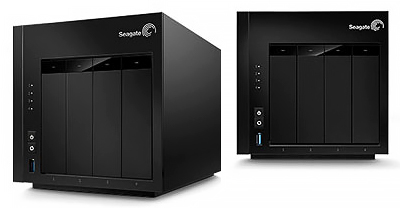
Seagate NAS 4-Bay 20TB.
The NAS 4-bay 20TB is one of many configurations (see sidebar below) that Seagate introduced as part of its Network Attached Storage (NAS) product line refresh that saw the replacement of its previous Business Storage series with the NAS and NAS Pro lines of product.
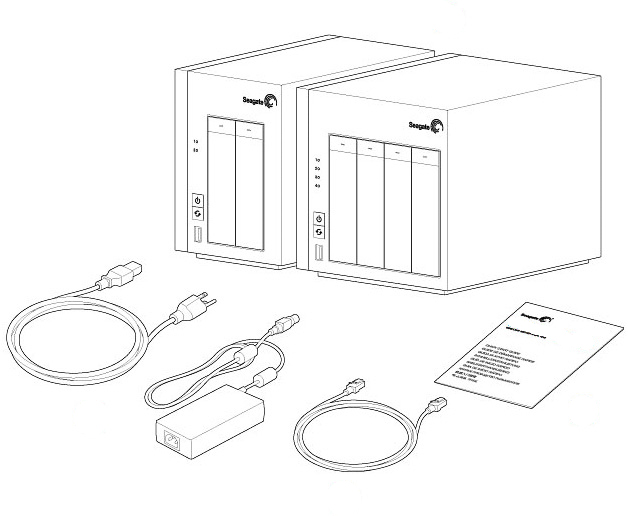
In the box: Seagate NAS, power supply cable, Ethernet cable, Quick Start Guide.
With pre-installed hard disk drives (HDD) and pre-configured RAID disks, as well as its latest operating system – NAS 0S 4 – Seagate offers storage simplicity for SOHOs (Small Office Home Office) and small businesses with ease of use and private cloud access over the Internet.
The ease of use and set-up is particularly attractive to small companies without dedicated IT resources, while the cloud access is especially useful for organisations with mobile workers requiring secure remote access to vital documents, data and resources from the field.
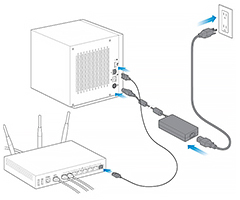
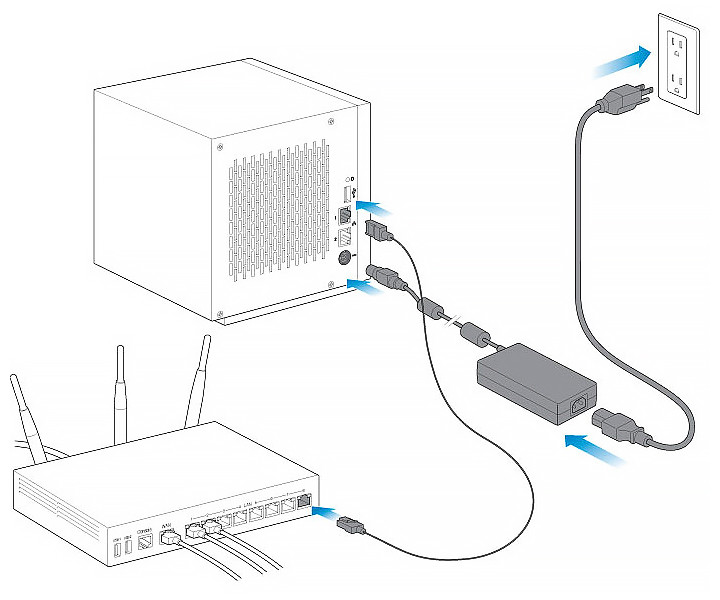
Connection is easy: Simply connect the Ethernet cable to the NAS and the router. Then connect the power cable to the NAS and the outlet and you’re ready to go. You can connect a second Ethernet cable for redundancy or performance.
The easy-to-navigate HTML user-interface is driven by the new LINUX-based NAS OS 4, which now comes with a redesigned Device Manager, enabling users to manage preferences and configure settings from a single location.
It includes useful features such as App Manager and Seagate Sdrive for remote access – some of the most demanded features of NAS users in general.
I found the NAS device management effortless from a desktop, laptop, tablet, or even a smartphone.
I was also impressed by how silent the internal fan of the NAS was – you can just leave the NAS on and hardly notice any noise.
My take:
“Seagate’s NAS 4-bay 20TB offers an excellent affordable and reliable network attached storage solution for home and small business businesses with up to 25 employees – with easy set-up and usage, as well as cloud access from anywhere with an Internet connection, from mobile devices including tablets and smartphones.”
(more…)
Tags:2-Bay, 4-Bay, 6-Bay, hard disks, HDD, LaCie, NAS, NAS Pro, network, reviews, Seagate, storage
Posted in Accessories, Business IT, Enterprise IT, Gadgets, gadgets, Linux, Opinion, Prices, Review, Seagate, Security, Specifications, storage drive | No Comments »
Monday, February 16th, 2015
The ASUS Fonepad 8 is one of the largest and most affordable phablet on the market. At only S$299, it provides you with all the features and functionality that you need out of a tablet/phone combo.

ASUS designed the Fonepad series with affordability in mind. The Fonepad 6 and Fonepad 7 were released in 2013, while the Fonepad 8 were launched in late 2014.
The dual-SIM gives you much needed flexibility especially when you’re travelling and wants to slot in a cheap local SIM, but still wants to remain contactable on your regular number.
Two features which impressed me was the dual-SIM capability and long battery life of the ASUS Fonepad 8 phablet.
It is easy to slot in/out the two micro-SIM cards as both slots are in a special compartment on the left side of the phablet, along with the microSD card slot, that allows you to expand the 8 or 16GB internal storage of the Fonepad 8 by up to another 64GB.

Top right corner of the Fonepad 8.
The phone supports 3G for both SIM cards but not 4G/LTE.
I found usage of dual SIM straightforward like in other dual-SIM Android phones.
The internal, non-removable 4,000mAh battery provided long hours of usage without worry of running dry.
Even with intense usage and video viewing, the Fonepad 8 easily lasted an entire day and then some.
On my more typical day, there was usually at least 20-30 percent battery left at the end of the day.

Fonepad 8 is available in four colours—black, white, red and gold. White and gold models include white bezels, while the black and red models feature a black fascia. Out of the box, the pre-loaded ZenUI color scheme matches the device’s back cover color, which is plastic and features a non-slip diamond-pattern coating.
ASUS rates the battery life to 14.2 hours of Wi-Fi Web browsing, 12 hours of HD video playback, and 21 hours of 3G talk time.
(more…)
Tags:Android, Android 4, Asus, Fonepad, Fonepad 8, KitKat, mobile, phablets, reviews, smartphones, tablets
Posted in Accessories, Android, Asus, battery, Gadgets, gadgets, Opinion, Phones, Prices, Review, smartphones, Specifications, Tablets, tablets | No Comments »