If you’re a small growing business looking for an easy-to-use and affordable NAS storage solution that keeps your data secure and always available, this Seagate NAS 4-bay 20TB (S$1,899) could well be your answer.

Seagate NAS 4-Bay 20TB.
The NAS 4-bay 20TB is one of many configurations (see sidebar below) that Seagate introduced as part of its Network Attached Storage (NAS) product line refresh that saw the replacement of its previous Business Storage series with the NAS and NAS Pro lines of product.
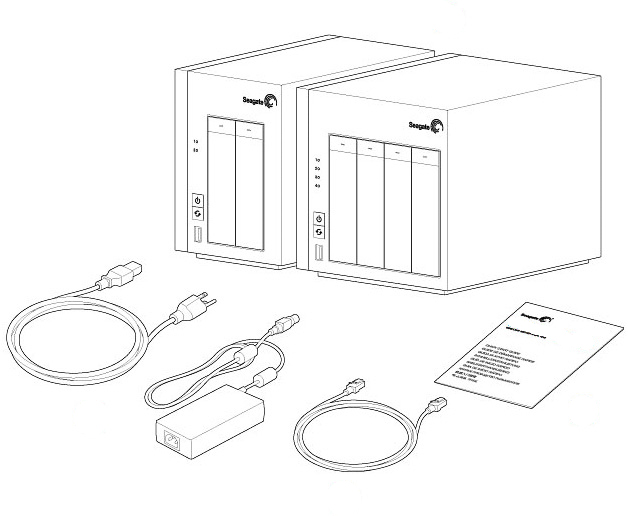
In the box: Seagate NAS, power supply cable, Ethernet cable, Quick Start Guide.
With pre-installed hard disk drives (HDD) and pre-configured RAID disks, as well as its latest operating system – NAS 0S 4 – Seagate offers storage simplicity for SOHOs (Small Office Home Office) and small businesses with ease of use and private cloud access over the Internet.
The ease of use and set-up is particularly attractive to small companies without dedicated IT resources, while the cloud access is especially useful for organisations with mobile workers requiring secure remote access to vital documents, data and resources from the field.
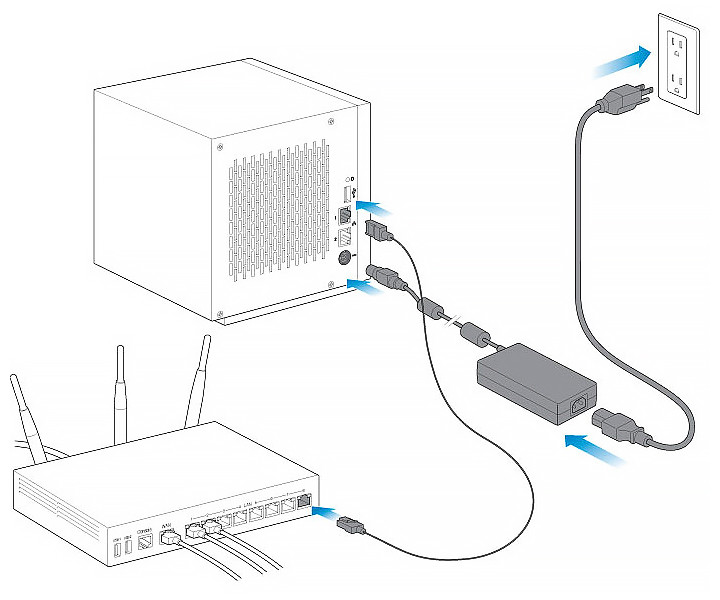
Connection is easy: Simply connect the Ethernet cable to the NAS and the router. Then connect the power cable to the NAS and the outlet and you’re ready to go. You can connect a second Ethernet cable for redundancy or performance.
The easy-to-navigate HTML user-interface is driven by the new LINUX-based NAS OS 4, which now comes with a redesigned Device Manager, enabling users to manage preferences and configure settings from a single location.
It includes useful features such as App Manager and Seagate Sdrive for remote access – some of the most demanded features of NAS users in general.
I found the NAS device management effortless from a desktop, laptop, tablet, or even a smartphone.
I was also impressed by how silent the internal fan of the NAS was – you can just leave the NAS on and hardly notice any noise.
My take:
“Seagate’s NAS 4-bay 20TB offers an excellent affordable and reliable network attached storage solution for home and small business businesses with up to 25 employees – with easy set-up and usage, as well as cloud access from anywhere with an Internet connection, from mobile devices including tablets and smartphones.”
Physical design and appearance
Seagate’s NAS line of network attached storage is housed in an understated but classy chassis designed with clean lines.

The minimalist but handsome appearance make it look good on the study table or office cabinet.
The Seagate NAS 4-bay 20TB comes in a square, matt-black box with white activity/status LEDs, backlit buttons (power and copy), and a USB 3.0 port (for one-touch backups) on the front.
At the rear is another USB 3.0 port, as well as two ethernet ports that can be linked for load balancing and automatic failover.
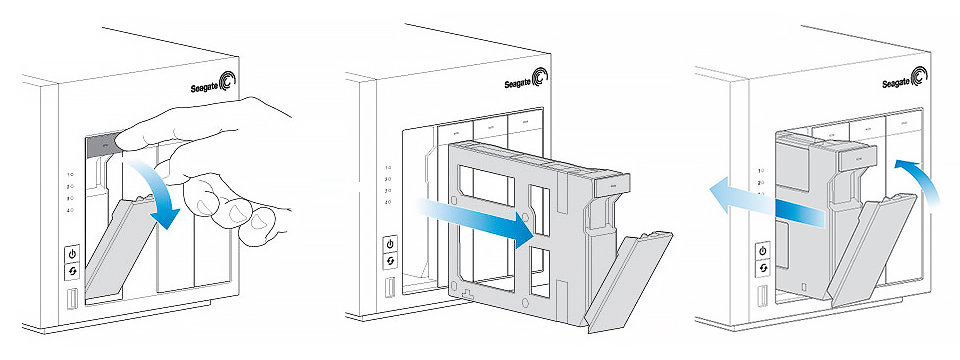
The drive trays is easily removed by pressing on a release button at the top of the tray, and then pulling out the handle that springs out. Push in the handle to return the tray back.
The power socket, recessed reset button and a Kensington lock is also at the rear.
Off the shelf and ready to run
You can purchase the Seagate NAS 4-bay and NAS 2-bay, as well as NAS Pro 2-bay, 4-bay and 6-bay without any hard disks; and then install your own hard disks from other makers.
Performance test
The Seagate NAS 4-bay 20TB is powered by a 1.2GHz Marvell ARM processor and 512MB of DDR3 RAM, with 128MB flash memory.
With a 8GB mix of folders and files, the NAS wrote at 31.7MBps and read the whole lot back at 87.1MBps.
When I used a single 8GB file, its write/read speeds increased to 35.9MBps and 111MBps respectively.
These may not be fastest read/write speeds on the market but far exceeds the needs of the SOHO or small businesses that the NAS 4-Bay is targeting.
If you need faster speeds and performances, you can check out Seagate’s NAS Pro which is based on Intel dual-core processors and which come with higher specs.
Or you can just get the complete NAS solution in a box with the internal hard drives from Seagate, with individual capacities of up to 5TB.
The advantage of getting the NAS 4-bay with Seagate drives is that the entire solution – in terms of NAS hardware, software and drives – is developed by the company with tight integration built-in and tested.
You have a single point-of-contact in terms of technical support so you don’t get the potential runaround between the NAS maker and hard disk maker if they are from different brands.
The NAS 4-bay 20TB I reviewed comes with four hot-swappable 5TB hard disk drives made by Seagate.
Because the data volume has already been created at the factory, you can complete the set up within minutes.
Seagate NAS and Seagate NAS Pro
The Seagate NAS product line comes in 2-bay and 4-bay boxes with capacities from 2TB to 20TB – targeted at home businesses and small businesses with up to 25 employees.
The Seagate NAS Pro product line comes in 2-bay, 4-bay and 6-bay boxes with capacities from 2TB to 30TB – catering to businesses with up to 50 employees.
The NAS ships preconfigured using the RAID5-like SimplyRAID technology built into NAS OS 4, saving setup time and ensuring complete data recovery if a single drive fails.
Seagate’s SimplyRAID software lets you mix drives with different capacities without wasting storage.
SimplyRAID enables multiple volumes to span/share a drive, making it easy to expand the array without losing data even when the array contains mixed-capacity disks.
Seagate’s 4-bay NAS also supports RAID 1, 5, 6, and 10 as well as JBOD.
Once out of the box, simply connect the Ethernet cable, power cable, and press the power button and you are good to go.

I found the web-based interface of the NAS OS 4 intuitive and easy-to-use, with powerful controls to monitor and manage the NAS.
After logging in, you see a web-based home screen with icons for Device Manager, File Browser, Download Manager, Backup Manager, and App Manager.
The home screen allows you to put the device to sleep, restart or switch between NAS.
Using the 4-Bay NAS as a media streamer
Apart from making backups and enabling file sharing, the 4-Bay NAS can also be used as a media streamer.
Simply activate either the UPnP/DLNA or iTunes servers to access them from compatible media players and devices on your network.
Just make sure that the directory where the media is stored is configured to be part of the media server.
You should then be able to access your music and video library via a smart TV, Windows Media Player, or iTunes client.
Using the Device Manager, you can look under the “Maintenance” section in the menu to the left of the screen and click on the “Monitoring” option to examine the health of the device, and view statistics such as percentage of use of RAM, CPU, network, and fan speed.
If you choose the “Drive” tab, you can see the total capacity, the temperature and the SMART status of each drive.
To check network settings – such as network connections, IP addresses, status and speed – click on “Network” option in the “Customize” section of the left menu.
Simply by exploring the Device Manager, it is easy to get the hang of monitoring the status of the NAS and tweaking it, even if you’re new to NAS in general.
Easy Remote Access Via Private Cloud
With the Seagate NAS 4-bay, I was able to easily set up a private cloud to enable secure access to files from a centralised location, while providing shared access for other users I choose to give access to – such as clients and partners.
Prices and capacities
The Seagate NAS 2-Bay is available in 0TB, 2TB (S$429), 4TB, 8TB and 10TB (S$1,099) capacities.
The Seagate NAS 4-Bay is available in 0TB, 4TB (S$759), 8TB, 16TB and 20TB (S$1,899) capacities.
For reference, prices for the NAS Pro ranges from S$699 for the entry-level NAS Pro 2-Bay 2TB to S$3,699 for the top end NAS Pro 6-Bay 30TB.
The Seagate Sdrive software sets up a private cloud that physically resides on Seagate NAS 4-bay.
With Sdrive, I found access to the private cloud as seamless and intuitive as saving files to an external drive.
Files on Sdrive are also accessible from a smartphone or tablet with free mobile apps.
App Manager
Another key feature of Seagate NAS OS 4 is support for add-on apps from both Seagate and third parties.
This is still a new feature so the number of apps is a bit thin but I expect more to be added over time.
Below are the five apps that was available for the Seagate NAS (and NAS Pro) when the Seagate NAS was first launched..
- Seagate Antivirus: an app that scans the files stored on the NAS to help safeguard against viruses and malware.
- Seagate Surveillance Manager: compatible with thousands of models of IP cameras, offering event and schedule-based recording and mobile apps for remote viewing.
- WordPress: a free open-source publishing platform with sophisticated design features, which allows one to easily create a blog.
- Own Cloud: an app that provides universal access to one’s files via the web, a computer or from mobile devices from locations outside of the network.
- BitTorrent Sync: a tool to enable synching and sharing of unlimited files and folders across all trusted devices in a secure manner.
Since then, new apps from Seagate and third-party developers are being added to the list. Those that have been released so far include Seagate Cloud Backup, Plex Media Server, Busit, ElephantDrive and Pydio.
Tags: 2-Bay, 4-Bay, 6-Bay, hard disks, HDD, LaCie, NAS, NAS Pro, network, reviews, Seagate, storage