Archive for May, 2011

Professional Edition of Adobe Digital Publishing Suite Now Available

Saturday, May 21st, 2011

Adobe Systems has announced the immediate availability of the Professional Edition of Adobe Digital Publishing Suite, a turnkey solution that includes hosted services and viewer technology that allow a spectrum of publishers to cost-efficiently publish content to Android tablets, BlackBerry PlayBook and Apple iPad.

Aimed at publishing houses, business publishers, and education institutions that require an off-the-shelf tablet publishing solution, the Professional Edition taps the huge interest in digital publishing across a range of industries – including retail, banking, financial services, healthcare and education – where companies and brands want to publish a new genre of engaging publications on tablets, as part of their digital publishing and mobile marketing strategies.

The Enterprise and Professional editions of Digital Publishing Suite is targeted at producing more engaging applications from both media and business publishers.

The Adobe Digital Publishing Suite tightly integrates with Adobe InDesign CS5.5 and Adobe Creative Suite 5.5 software, empowering designers with industry-standard page layout capabilities for creating highly designed, engaging digital content that includes a new class of interactivity.

Used in conjunction with the Folio Producer tools in InDesign CS5.5, Digital Publishing Suite provides a robust end-to-end publishing solution for creation, distribution, commercialization and analysis of high-value content including traditional magazines and newspapers as well as corporate publications including magazines, annual reports, product guides and retail catalogs consumed on desktops and tablets.

The Professional Edition provides media and business publishers as well as educational institutes with an expedient tablet publishing solution that offers creation of rich reading experiences; amplification of brand across mobile channels, distribution and monetization of content across leading mobile marketplaces and tablet devices; as well as availability to deeper reader insights through pre-built analytic reports, based on the Adobe Online Marketing Suite powered by Omniture.

Adobe is targeted at supporting all levels of customers who require a comprehensive tablet publishing solution. In addition to the immediate availability of both the Professional and Enterprise Editions, Adobe expects to allow organizations to purchase Digital Publishing Suite through an expanded set of agency partners.

Pricing and Availability

The Professional Edition of Digital Publishing Suite is available immediately, with pricing consisting of both a platform and service fee.

The estimated platform fee for professional-edition customers is US$495 per month (or US$5,940 per year), which provides access to core Digital Publishing services including hosting of an unlimited number of titles per individual publisher and bundled Gold technical support.

The service fee scales based on the total number of issues downloaded per year. A customer purchases an annual commitment level of issue downloads that range from 25,000 to 500,000 downloads per year:

25,000 issue downloads ($0.22/issue) for US$5,500 per year
250,000 issue downloads ($0.15/issue) for US$37,500 per year
500,000 issue downloads ($0.12/issue) for US$60,000 per year

Adobe Creative Suite 5.5 Now Available Across Southeast Asia

Friday, May 20th, 2011

Adobe Creative Suite 5.5 features advances in HTML5 and Flash authoring for web designers and developers for both content and applications; as well as enhancements in video production and editing.

For digital publishing, content can be delivered to multiple platforms, operating systems, web browsers, smartphones and tablets — including Android, BlackBerry Tablet OS, and Apple iOS devices.

The new Creative Suite product lineup is headlined by Adobe Creative Suite 5.5 Master Collection, which includes, in a single package, all of Adobe’s industry-defining creative tools, such as Photoshop, Illustrator, InDesign, Acrobat, Flash Builder, Flash Catalyst, Flash Professional, Dreamweaver, Adobe Premiere Pro and After Effects.

These products are available separately or as components of one or more of the five Creative Suite editions. The complete Creative Suite 5.5 lineup and their estimated street prices are tabulated below. Upgrade pricing, volume licensing and education pricing are also available.

Creative Suite 5.5 Master Collection: US$3159
Creative Suite 5.5 Design Premium: US$2309
Creative Suite 5.5 Web Premium: US$2185
Creative Suite 5.5 Production Premium: US$2065
Creative Suite 5.5 Design Standard: US$1579

Adobe now plans to have milestone Creative Suite product introductions at 24-month intervals and – starting with Creative Suite 5.5 – major mid-cycle releases between the milestone versions. The major mid-cycle update was announced on April 12 and is available now in Southeast Asia.

Mobile App Development and New HTML5 Capabilities

Focused on the latest wave of mobile devices, this release of Creative Suite gives web designers and developers a complete software solution that allows them to produce stunning HTML5 content in the browser and deliver high-impact mobile applications through sweeping advances in Flash tooling.

Creative Suite 5.5 Web Premium Suite is packed with innovations in HTML5 and Flash authoring tools, empowering customers to create, deliver and monetize rich content and applications for virtually any screen.

Designers and developers can create rich browser-based content across screens using HTML5. Adobe Flash Professional CS5.5, Flash Builder 4.5 Premium and the Flex 4.5 framework allow users to quickly and easily develop, test and deploy high-performance mobile applications for Android, BlackBerry Tablet OS and Apple iOS.

Digital Publishing

Over the last year Adobe and leading publishers, including Condé Nast and Martha Stewart Living Omnimedia, have worked to develop new digital publishing workflows based on Creative Suite and Adobe InDesign.

Creative Suite 5.5 will enable print publishers to create beautiful interactive publications on the latest tablet platforms.

Using Adobe InDesign CS5.5, in combination with the integrated Folio Producer toolset, designers can add new levels of interactivity to their page layouts targeted at tablet devices.

Adobe has also announced the immediate availability of the Professional Edition of Adobe® Digital Publishing Suite, a turnkey solution that includes hosted services and viewer technology that allow publishers to cost-efficiently publish content to Android tablets, BlackBerry PlayBook and Apple iPad.

In addition to advances in mobile authoring and digital publishing, Creative Suite 5.5 Production Premium Suite promises “breakthrough performance, workflow improvements, creative innovations and powerful new audio editing capabilities” to video and audio professionals, broadcasters and filmmakers.

Radically changed new Cabinet for Singapore announced by PM Lee

Thursday, May 19th, 2011

Prime Minister Lee Hsien Loong announced the new Cabinet last night. The previous 21-member cabinet has been reduced to 15, with the departure of 9 ministers and introduction of 3 new faces, which includes two freshly elected Members of Parliament.

At the same time, PM Lee has accepted the resignations of SM Goh and MM Lee from the Cabinet.
21 <– ministers in the previous cabinet.

ministers in the new cabinet –>  15

9 <– ministers that are leaving
new faces joining the new cabinet –>  3
2 <– former prime ministers quit
new MPs entering cabinet –> 2

LensPen products to be sold in Singapore

Wednesday, May 18th, 2011
Schmidt Marketing, distributor of camera accessories, has secured the distributorship in Singapore for LensPen products, which includes compact cleaners used for camera lenses, laptop screens and gadgets with sensitive glass components.

Invented in Canada, LensPen uses advanced, proprietary carbon‐based technology to ensure that lenses and optical glass remain in pristine condition when cleaned by its products. The brand gained international recognition when it was selected for use on the International Space Station and on US Space Shuttle missions.

“The unique technology ensures effective and totally safe cleaning of what is often a very expensive piece of equipment and we are delighted to add this brand to our growing range of camera equipment and accessories,” said Mr Chris Lim, Regional Director, Schmidt Marketing (Singapore) Pte Ltd.

The LensPen range of products are tabulate below. They are available at the Schmidt Marketing’s flagship store at Ngee Ann City Tower A, #05‐33.

Lenspen LP1 

Lenspen LP1

• Lens cleaning pen for cleaning camera lenses, binocular lenses, spotting scopes, telescopes, eyepieces and other optical lenses. 

• Patented non‐liquid cleaning tip.

• Retractable brush removes dust.

SGD $ 14

Vidimax VM1 

Vidimax VM1

• Combines a handy super‐soft dust brush and optical quality chamois pad. 

• Can be used on LCD, Plasma, and other computer and television screens.

• Effectively gets rid of dust and fingerprint marks.

SGD $ 25

MiniPro II MP2 

MiniPro II MP2

• Retractable brush removes dust. 

• Patented LensPen cleaning tip is flexible and compact.

• Compact design fits easily into digital camera cases.

SGD $ 14

SensorKlear SK1 

SensorKlear SK1

• Unique shaped cleaning tip for those hard to reach CCD sensors. 

• No sprays, liquids, chemicals or residue.

• Convenient, portable, environmentally safe.

SGD $ 28

DigiKlear DK1 

DigiKlear DK1

• Digital display cleaning pen for cleaning digital glass and LCD screens on digital cameras, camcorders etc. 

• Special semi‐triangular shaped tip for cleaning into corners.

• Retractable brush removes dust.

SGD $ 14

Lap Top Pro LTP1 

Lap Top Pro LTP1

• Screen and Keyboard cleaning system. 

• Special LensPen pad cleans screens.

• One brush removes dust from screen, the other cleans between keys.

SGD $ 25

Going down nostalgia lane

Tuesday, May 17th, 2011
Did you see the front page of The Sunday Times on 15 May? The portraits of MM Lee and SM Lee were splashed across half the front page in sepia – that faded brown tint that adds a sense of nostalgia to photos because of the association of that toning effect with photographic print techniques from a bygone era.

Lee Kuan Yew (photo from BBC) Lee Kuan Yew - in sepia tone

Old Photo filter in GIMP applied with Defocus and Sepia options selected but without Mottle nor faded border effect.

Minister Mentor Lee Kuan Yew and Senior Minister Goh Chok Tong are two former Prime Ministers of Singapore who had tendered their resignations on Saturday, May 14 to quit the Cabinet – in order to make way for a clean slate for the current Prime Minister Lee Hsien Loong to reform the ruling PAP government.

Goh Chok Tong (photo from BBC) Goh Chok Tong - in sepia tone

Old Photo filter in GIMP applied with Defocus, Sepia and Mottle options selected together with faded border effect.

The first and second Prime Ministers of the island nation, both brought Singapore from a fledgling, newly-independent, former-colonial state barely able to survive – to the modern nation it is today. Despite handing over their Prime Ministership to their successors, both had been actively involved in the government.

So it was surprising to see, so soon and suddenly, both their portraits published in sepia – suggesting they have become part of a bygone era.

Sepia toning


Select the Filters > Decor > Old Photo command from the main menu

Select the Filters > Decor > Old Photo command from the main menu

“Beginning in the 1880s, sepia was produced by adding a pigment, called sepia, made from the Sepia officinalis cuttlefish found in the English channel,to the positive print of a photograph,” according to Wikipedia. The specialized treatment gave the photograph a warmer tone and enhanced the archival qualities of the prints.

Simulating a sepia effect in GIMP

It is easy to simulate a sepia effect to a digital photo using photo-editing software.

In GIMP, open the digital photo to be modified and select the Filters > Decor > Old Photo command from the main menu. The “Old Photo” dialog box pops up with options to control how the photo is to be “aged”.

The Old Photo filter comes with options to age the look of a photo.

The Old Photo filter comes with options to age the look of a photo.

You can “Defocus” the photo to make it slightly blur, add a faded white border, apply a “Sepia” tone, or “Mottle” the photo to simulate the blobs of pigment you see in old photos. Checking the “Sepia” checkbox will tell GIMP to desaturate the image, reduce brightness and contrast, and modify the color balance to apply the sepia effect.

Once you click “OK”, GIMP gets to work on the photo.

If you just want to get a black-and-white version of the photo, or tint in a different colour from sepia, or want more control over how the final result looks like, check out the  “Black-and-white and Sepia” tutorial that was part of the 14-part Basic GIMP Series of tutorials.

My chiropractor loves tablets … the electronic kind

Monday, May 16th, 2011
Overheard at a chiropractor’s session: the chiropractor was seeing more and more people for pains arising from usage of tablets.

Couldn’t help overhearing the chiropractor talking to a fellow patient in an adjacent cubicle as I was being put through the interferential electrotherapy treatment.

Do chiropractors love tablets?The guy started by commenting that many people going through their mid-life crisis are jumping into marathons without realising what it was going to do to their bodies many years downstream when they grow old – especially if they did not go through the necessary build-up training and if they’ve never gone through a marathon in their younger days before.

Then he went on to observe how he is seeing more and more people for pains and aches arising from the use of tablets. His chiropractic business has seen a pick up from the number of people coming in to see him since tablets started becoming popular.

Something about the weight of the device and having to hold/prop it up in one hand for prolonged periods of time while gesturing with the other hand. Now that more tablets are being introduced by the day and people are buying more and more tablets, this chiropractor must be laughing to the bank, going by his anecdotal correlation between the proliferation of tablets and the health of his business.

Maybe I should reconsider that marathon and think twice about that sleek tablet I’d just read about yesterday …

Using Curves to enhance brightness and contrast in GIMP (Final Part 14 of 14)

Sunday, May 15th, 2011
Both the rudimentary Brightness-Contrast command and the handy Levels command allows you to enhance the tonal balance of a photo and for correcting colour balance. But the Curves command gives you ultimate control over how specific tones are to be tweaked in your digital photo.

The Levels command allows the user to adjust the three main tonal ranges of a photo – the shadows, midtones and highlights. The Curves tool, however, allows you to target any tone or tonal range in the photo to tweak their brightness and contrast.

Using the Curves command

With the photo open in GIMP, choose the Colors > Curves command (or Tools > Color Tools > Curves)  from the main menu. An “Adjust Color Curves” dialog box pops up showing a square grid with a straight diagonal line. The histogram of the photo can be seen in the background of the grid for reference.

As for the Levels command, an understanding and analysis of the histogram of the photo is the basis for using the Curves command.

The horizontal X-axis of the grid represents the initial brightness values – from zero (black) to 255 (white) – of the pixels in the photo before the Curves command is applied. The vertical Y-axis represents the brightness values that each pixel is to be mapped into after the adjustments have been applied. It also ranges from zero to 255.

The lower left corner of the grid represents the black point (for pixels with brightness value zero) while the upper right corner represents the white point (for pixels with the maximum brightness value of 255).

Adjusting brightness

To begin adjusting the photo, click anywhere on the diagonal line in the grid. An anchor point is added to the line. You can drag the anchor point around with the mouse.

Drag the point downwards to make the photo darker. The straight diagonal line turns into a curve passing through the anchor point and the black and white points. A faint straight diagonal line is still visible in the grid – it serves as reference for an unadjusted photo.

When the cursor is inside the grid, you can see the X (input) and Y (output) values of the cursor at the top left hand corner of the grid. Mouse-over the anchor point that you’ve just dragged. In the example, you can see that the brightness of any pixel with original value 128 (X-value) will be reduced to 160 (Y-value). Pixels with brightness close to 128 will also be darkened. You can eyeball the effects of the adjustments by looking at the photo itself in the image window.

To lighten the photo, drag the anchor point down below the faint diagonal guide. Now pixels with brightness 128 will be darkened to 90, while the pixels of similar brightness will be darkened as well.

To remove an anchor point, simply drag it off the side of the grid. You can add as many as 14 anchor points (excluding the original black and white points) to the curve. This allows you to target up to 16 specific brightness values in the photo for brightening or darkening. However, you seldom need more than a handful anchor points to get the job done.

Adjusting contrast

If the histogram is bunched up the towards the middle, drag the black or points inwards horizontally to where the histogram begins and ends respectively. This is similar to dragging the black and white points of the Levels command inwards to maximise the tonal range of the photo.

The steeper gradient of the line indicates that the contrast of the photo is increased.

A typical Curves adjustment that can be applied to most photos is the “S-Curve”. This curve tends to enhance most photos by increasing the overall contrast and making the photo “pop” with vivid shadows and highlights.

To apply an “S-Curve” adjustment, add two points on the Curve – the first to lower the brightness of pixels of brightness 64, the second to increase the brightness of pixels of brightness 192. The above numbers are just guides – drag the adjustment points around with the mouse while eyeballing the photo.

The S-Curve suppresses the shadows and highlights while increasing the contrast of the mid-tones, where the main subject usually is. Add a third point with brightness of roughly 128 to increase or decrease the brightness of the midtones.

In addition to these adjustment points, you can add additional adjustment points to tweak specific tones in the photo – such as skin tones.

With some practice, you will be able to control and enhance any particular tone that appears in your photo.

MM and SM resign from Singapore Cabinet

Saturday, May 14th, 2011
A week after a General Election that the ruling PAP won but would rather forget, the two former Prime Ministers have tendered their resignations to leave the Cabinet. PM Lee Hsien Loong has yet to accept their resignations but will give his answer by Monday.

Minister Mentor Lee Kuan Yew, Singapore's first Prime Minister from 1959 to 1990Minister Mentor Lee Kuan Yew was the first Prime Minister of Singapore for 31 years from 5 June 1959 – 28 November 1990, while Senior Minister Goh Chok Tong led Singapore for 14 years from 1990 till 12 August, 2004.

Lee Kuan Yew was appointed to the newly created post of Ministor Mentor on 12 August 2004. He is the founding father of Singapore and brought Singapore from a fledgling, newly-independent, former-colonial state barely able to survive – to a modern society able to hold its own.

Goh Chok Tong further brought Singapore forward and steered the nation through the choppy waters of the Asian Financial Crisis.

The 7-day old General Election was a “watershed” election for the PAP in the groundswell of vociferous resentment against the ruling party, especially on the Web. The anger towards a party widely perceived to have become arrogant and who have lost touch with the populace translated on polling day to the lowest overall percentage of support for the party since the independence of the country in 1965.

Although the PAP still won an overwhelming majority in terms of number of seats in Parliament (81 out of 87), the party brought in only 60.1% of the votes nation wide.

MM Lee Kuan Yew

MM Lee had enjoyed the only walkover in this General Election – their would-be opponents having been ruled out of contest for submitting their paperwork 35 seconds late. However, he had drawn the ire of the Malay community through his comments about the Malays in a book he had published just months prior to the election.

MM Lee also drew much flak for his comments during the hustings that the voters in the hotly contested Aljunied GRC (Group Representation Constituency) would have five years to “repent” if they voted out the incumbent PAP team of MPs.

The contesting team of heavyweights from the Workers’ Party won the GRC by a large margin of 10% – the first time an opposition party has been able to oust a PAP team in a GRC.

SM Goh Chok Tong

Senior Minister Goh Chok Tong, Prime Minister from 1990 to 2004SM Goh has always enjoyed extremely strong support from the electorate. In the 1991 General Election, he brought in 77% of the vote for his Marine Parade GRC. In the by-election in 1992, he repeated the resounding victory with 73% of the votes. Since then, he has enjoyed walkovers in the next three Generel Elections in 1997, 2001, and 2006 as Opposition candidates shy-ed away from his stronghold.

This election, however, saw voter support for the team of candidates led by him whittled down to 57%, one of the lowest amongst PAP’s candidates. A large part of the plunge in popularity for the team can be attributed to the popularity of one Nicole Seah of the opposing team, and the correspondingly unpopularity of Tin Pei Ling – a member of SM Goh’s team.

Both Nicole Seah and Tin Pei Ling were the youngest candidates in the opposition and ruling parties respectively – roped in to appeal and connect to the young generation of vociferous voters unafraid to voice their political convictions openly on the Web.

Whilst 24-year-old Seah captured the imagination and support of the populace, the 28-year-old Tin was reviled for her perceived relative immaturity.

It did not help his GRC team when some perceived SM Goh as resorting to personal attacks on his former PPS (Principal Private Secretary) who had joined the opposition. Netizens also pointed out that in so doing, SM Goh had violated his earlier statement of not commenting on candidates outside of Marine Parade.

His dismissal of the opposition team in Marine Parade as coming from the No-Substance-Party (pun on their actual party name National Solidarity Party) was also atypical of his image as a kindly and benign statesmen way beyond the name-calling and mud-slinging tactics of lesser politicians.

Turning of the tide

Against this slew of mis-steps were the national issues that the Opposition candidates brought to the fore during the campaign.

These issues include: high costs of living, high costs of public housing, high ministerial pay, overcrowded public transportation system, influx of foreign talent, mistakes such as the under-budgeting of the Youth Olympics Games and escape of terrorist Mas Selamat, the need for more opposition voices in the Parliament, and the perceived arrogance of the ruling party.

Midway through the hustings, the ruling party must have realised that the tide had turned against them. The slew of attacks from PAP candidates – calling the opposition “poison mushrooms”, labelling a potential coalition government as an ineffective “rojak” parliament, questioning an opposition town council’s accounts in the midst of hustings to throw suspicion on their trustworthiness – were not only failing to alienate the electorate from opposition candidates, but were possibly driving voters to support the opposition.

Lee Hsien Loong Prime Minister of Singapore from 2004As a last ditch attempt to salvage whatever votes that could be saved, the Prime Minister himself issued an unprecedented apology during a lunch-time rally in the business district for past mistakes and promised to try better. This change of strategy was taken up by other PAP candidates who suddenly adopted a contrite attitude and started to appear modest, apologising profusely and promising to work harder.

I’m sure this helped, in no small measure, to stem the flow of votes to the opposition and I commend the PM for being responsive enough and having the leadership and gumption to pull off this change in strategy so quickly and abruptly. It seemed that he even managed to gag the MM from making further damaging comments after the latter’s “repent” remarks.

Starting from a clean slate

Now that the General Election is behind us, all eyes are on the ruling party – whether it would be able to transform itself into one that genuinely cared and listened to the electorate.

People within and outside the PAP know that this is critical in ensuring the dominance – or even survival – of the ruling party in the next election. And the PM has promised change. The question is whether the mammoth of a party can really change, or will it be old wine in a new bottle.

I am guessing these two resignations are not individually motivated, but have been discussed at length within the PAP, as part of a slew of changes for the party. MM Lee’s departure would hopefully placate the Malays in the populace and convince people that PM Lee has a free hand to reform the party.

SM Goh’s departure? Probably a face-saving move to avoid having MM make a lonesome exit. At any rate, the two will probably continue to be employed as consultants to oversee areas of responsibilities they’ve been responsible for all this while. And that’s being wise considering the extensive experience and competencies embodied in these two senior statesmen, and the networks they have built up over the years.

What remuneration they would get in place of the unpopular but transparent ministerial pays they have been drawing would certainly draw keen public interest.

At any rate, it is a significant and symbolic move by PM Lee to signal how seriously the party is in transforming the party into one that is caring and connected to the people.

Full press statement

Below is the joint-email statement to the media from the two leaders and former Prime Ministers in full:

“We have studied the new political situation and thought how it can affect the future. We have made our contributions to the development of Singapore. The time has come for a younger generation to carry Singapore forward in a more difficult and complex situation. The Prime Minister and his team of younger leaders should have a fresh clean slate. A younger generation, besides having a non-corrupt and meritocratic government and a high standard of living, wants to be more engaged in the decisions which affect them. After a watershed general election, we have decided to leave the cabinet and have a completely younger team of ministers to connect to and engage with this young generation in shaping the future of our Singapore.

But the younger team must always have in mind the interests of the older generation. This generation who has contributed to Singapore must be well-looked after.”

Nubox opens 10th store at Junction 8 today

Friday, May 13th, 2011
Nubox opened its 10th store in Singapore at Junction 8 Shopping Centre today. A number of in-store promotions will be available at the 1447 sq ft Apple Premium Reseller store over the weekend from May 13 to 15.

Together with Nubox@nex at Serangoon which opened in November 2010, the new store, Nubox@Junction 8 is targeted at shoppers in the northern part of Singapore. Junction 8 Shopping Centre is located right beside Bishan MRT station.

Crowd moving in for the in-store promotions at the new Nubox outlet at Bishan Junction 8.

Crowd moving in for the in-store promotions at the new Nubox outlet at Bishan Junction 8.

Other Nubox stores are located at:

Outlet Unit num Tel (+65)
Jurong Point Shopping Centre #B01-09 6790 8813
Raffles City Shopping Centre #03-25 6334 8132
Tampines Mall #01-49 6587 7130
Funan Digitalife Mall #03-21 6334 3531
Causeway Point #04-32 6767 0351
Sim Lim Square #03-82 6332 9396
Sim Lim Square #01-41 6334 9560
NEX Shopping Mall #02-45/46 6634 6180
Marina Bay Link Mall #B2-33/34 6634 4825

Nubox’s first store was opened in 2008 at Sim Lim Square. All Nubox stores are open from 11.00 am to 9.30 pm (except the Sim Lim and Funan outlets that close at 8 pm).

Nubox has plans to open another three Apple Premium Reseller stores by end 2011. They will be at Causeway Point in Woodlands (reopening), 112 Katong in Katong and JCube in Jurong.

Nubox is an arm of Newstead Technologies and sells the entire range of Apple products from Macs, iPods, iPhones and iPads to a wide range of accessories.

Acer Chromebook with Google Chrome OS

Thursday, May 12th, 2011

Google has unveiled its first two Chrome-based notebooks from Acer and Samsung at the Google I/O conference in San Francisco. They will be available for order online from June 15.

Acer’s Wi-Fi only Chromebook will cost $349, while the Samsung Chromebook will cost $429 for the Wi-Fi only version and $499 for the 3G version.

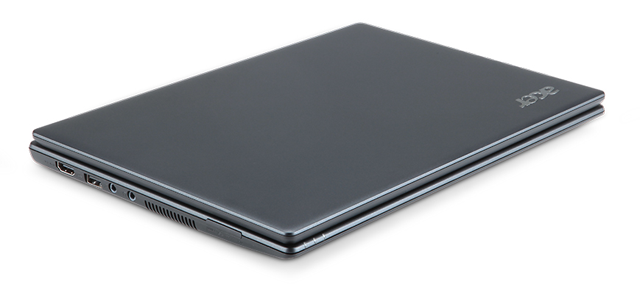
The Acer Chromebook is a netbook running Google’s Chrome OS. It has an 11.6 inch display, 1.66 GHz dual-core Intel Atom N570 processor, 16 GB SSD drive and 2 GB RAM, with 6 hours battery life. It is available in black.

Acer Chromebook running Google's Chrome OS

Acer Chromebook

The price of $349 is for the Wi-Fi only version. 3G will be an additional optional configuration.

Chromebooks will be available online June 15 in the U.S., U.K., France, Germany, Netherlands, Italy and Spain. More countries will follow in the coming months. In the U.S., Chromebooks will be available from Amazon and Best Buy and internationally from leading retailers.

Here are the main specifications:

  • 11.6″ HD (1,366×768) 16:9 Widescreen CineCrystalTM LED-backlit LCD
  • 1.66 GHz dual-core Intel Atom N570 processor
  • Acer Chromebook running Goolge's Chrome OS2GB RAM
  • 16GB SSD drive
  • 6 to 8 hours battery life
  • stereo speakers
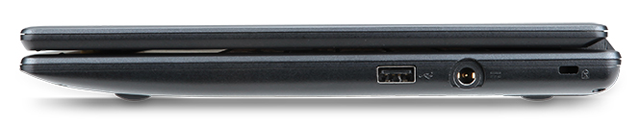
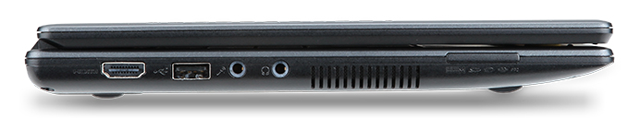
  • 2 USB 2.0 ports
  • Acer Chromebook running Google's Chrome OS4-in-1 memory card slot
  • HDMI port
  • 11.6 x 8.6 x 0.8 inches
  • Acer Chromebook running Google Chrome OS2.95 lbs / 1.34 kg
  • A full-size keyboard
  • Multitouch touch pad
  • Built in dual-band 802.11 b/g/n Wi-Fi and World-mode 3G (optional)
  • 1.3 megapixel HD Webcam with noise cancelling microphone
  • Instant-on from standby, and an 8-second boot time