Archive for May, 2011

Akamai helps visualize World IPv6 Day

Tuesday, May 31st, 2011

Akamai has announced that it will provide a real-time data visualization of IPv6 Web traffic served from its global platform on World IPv6 Day on 8 June 2011. The visualization will show the pattern of traffic served during the 24-hour period.

Akamai is the leading global service provider for accelerating content and business processes online.Hundreds of websites and Internet service providers around the world are joining Facebook, Google, Yahoo, Akamai, and Limelight Networks as participants in World IPv6 Day for the first global-scale trial of the new Internet Protocol, IPv6, being organized by the Internet Society.

During World IPv6 Day on 8 June 2011, more than 225 participating organizations from every part of the globe will enable IPv6 on their main services for 24 hours. With IPv4 addresses running out this year, the industry must act quickly to accelerate full IPv6 adoption or risk increased costs and limited functionality online for Internet users everywhere.

World IPv6 Day participants are coming together to help motivate organizations across the industry—Internet service providers, hardware manufacturers, operating system vendors and other web companies—to prepare their services for the transition.

“We see this test flight as an important step towards ensuring the global Internet can continue to grow and evolve so that it can connect billions of new users and devices,” said Leslie Daigle, Chief Internet Technology Officer for the Internet Society.One of the goals of World IPv6 Day is to expose potential issues under controlled conditions and address them as soon as possible. Given the diversity of technology that powers the Internet, the global nature of the trial is crucial to identify unforeseen problems.

The vast majority of users should be able to access services as usual, but in rare cases, misconfigured or misbehaving network equipment, particularly in home networks, may impair access to participating websites during the trial.
“We’ve been working to make Google services publicly accessible over IPv6 since 2008, because we believe it’s critical to the long-term prosperity of the open Internet,” said Erik Kline, IPv6 Software Engineer at Google.
Current estimates are that 99.95% of users will experience no problems connecting to web services on IPv6 Day, and participating organizations will be working together with operating system manufacturers, home router vendors and ISPs to minimize the number of users affected.

The Internet Society is supporting World IPv6 Day as part of its efforts to accelerate IPv6 deployment. IPv6, the successor to the protocol currently used on the Internet, was designed in the late 1990s but has not seen deployment on a global scale. With IPv4 address space running out, the industry cannot afford to wait much longer.


Computex Taipei 2011 draws tablet watchers and stake holders

Monday, May 30th, 2011

The 5-day annual trade show in Taipei will see more tablet models based on Google’s Android and a preview of Microsoft’s next Windows platform for tablets – one year after Apple’s game changing iPads grab the lion’s share of the tablet market.

COMPUTEX Taipei, or Taipei International Information Technology Show (台北國際電腦展), will be held from May 31 to June 4, 2011 in Taipei. Taiwan based Acer and Asustek had first showed off their low-cost but trend-setting netbooks at the Computex in 2007 and 2008.

Investors and analysts will be watching to see if new Android based tablets can challenge Apple’s iPad. Non-iPad tablet competitors are expected to halve Apple’s 100 percent dominance of the tablet market to 50 percent next year, iSuppli predicted on April 21. The iPad had cordoned off the entire tablet market when it was first launched in June last year because of the absence of competitors.

Computex Taipei 2011 from May 31 to June 4, 2011

Computex Taipei 2011 from May 31 to June 4, 2011.

Both Google and Microsoft will send executives to the event to brief the media on their plans. Intel, the world’s largest chipmaker, and ARM, whose chip designs are licensed by Qualcomm and Nvidia to power tablets, will also be vying for tablet manufacturers to select their chips.

Global shipments of tablets will increase almost twelve times to 215 million units in 2015 from 17 million last year, Toni Sacconaghi, a New York-based analyst at Sanford C. Bernstein & Co., wrote in a May 26 report.

Computer sales growth will be reduced by 2 percent annually between 2010 and 2015, Sacconaghi wrote, because fifteen percent of all tablets will cannibalize the sale of consumer PCs.

Bloomberg reports that Microsoft will “preview its operating system designed for tablets this week, using hardware with ARM-based chips”. The current Windows 7 operating system from Microsoft is not compatible with the ARM chips used in tablets from manufacturers such as Samsung and Motorola.

Turn your action sequence shots into a film strip

Sunday, May 29th, 2011

Use GIMP to turn photos into film slides and then join them together into a film strip.

That's the future Usain Bolt doing the 100m sprint

That's the future Usain Bolt doing the 100m sprint

The most straightforward way of conveying recording motion is to shoot video. However, photos can also be used to convey a sense of motion.

One way is to use a fast shuttle speed to freeze motion. Usually the posture of a sprinting man or the midair position of a mountain bike tells a story someone or something in motion frozen in that split second of exposure.

The other way is to do a panning shot. The photographer uses a relatively slower shuttle speed and moves camera such that the moving subject is kept at within the same location in the viewfinder. This is much trickier but the results can be dramatic. Only the moving subject is in focus while the surrounding background is blurred in motion blur. This effect can sometimes be simulated using a photo editor.

Yet another way is to shoot a sequence of photos of the moving subject. The photos in the sequence show the moving subject at various stages of movement. Many compact cameras today feature a burst mode for shooting action. Once the camera is focused on the moving subject, press down the shuttle release button and hold it down. The camera shoots in rapid succession a series of shots of the moving subject.

Combining the sequence into a film strip

Last week, we saw how the Slide filter in GIMP can modify a digital photo to make it look as if it is mounted onto a film slide.

To make a film strip, simply apply the Slide filter separately to each photo in the sequence, and then join them together into a single film strip. Photos in landscape orientation will result in a horizontal film strip while photos in portrait orientation will result in a vertical film strip.

Use the Slide filter in GIMP to turn each photo into a film slide Use the Slide filter in GIMP to turn each photo into a film slide Use the Slide filter in GIMP to turn each photo into a film slide

Use the Slide filter in GIMP to turn each photo into a film slide

Below are a few points to note while combining the slides into a strip:

All the photos in the sequence should be of the same size, so that they can be joined together seamlessly.

When the Slide filter is applied to a photo, the resulting photo that with the slide frame comprises three layers: the original photo (cropped to 3:2 aspect ratio), the slide frame  (with the sprocket holes and the text labels), and a coloured background (which shows through the, the sprocket holes of the slide frame).

Sequence of photos taken in burst mode using a Sony SLT-A55V

Sequence of photos taken in burst mode using a Sony SLT-A55V

Use the Image > Flatten Image command from the main menu to flatten the layers into a single layer to make it easier to drag and transfer it to another image window.

After each of the film slides have been flattened, drag and drop each of them the image window containing one of the film slides. This will become the workspace for joining the separate film slides into a single film strip.

Select the  Image > Canvas Size command from the main menu. A “Set Image Canvas Size” dialog box pops up.  First click the chain link between the Width and Height text fields so that one value can be changed independently of the other. If the film strip is to be horizontal, increase the Width, if the film strip is to be vertical, increase the Height.

To save the trouble of doing manual calculations, change the units in the dropdown box from “pixels” to “percent”. Then change the Width or Height field to the appropriate multiple: if there are to be two photos in the film strip, increase from 100 to 200 percent; if there are to be three photos, increase to 300 percent. Press the “Resize” button to confirm the change.

The image window shows only one of the film slides, the others are hidden directly below it. Select the Move Tool in the Toolbox. Drag the top film slide to move it. Hold down the Ctrl key on the keyboard while dragging to constrain the movement of the film slide to strictly horizontal or vertical movements.

Drag the film slides until they are positioned end-to-end with each other, and forms a horizontal or vertical film strip.

You can use the arrow keys on the keyboard to nudge the film slides so that the edges are seamless and doesn’t show any gaps in between.

Save the file and you have your film strip.

Akamai and Riverbed accelerate cloud applications

Saturday, May 28th, 2011

Akamai and Riverbed unite their respective strengths in Internet optimisation and WAN optimisation to accelerate applications over hybrid cloud networks. The joint offering is expected to be available early in 2012.

Akamai is the leading global service provider for accelerating content and business processes online.Akamai Technologies, a leading provider of cloud optimisation services, and Riverbed Technology, an IT performance company, will be working together to design solutions to overcome the application performance bottlenecks facing enterprises that leverage public cloud services.

“Enterprises are increasingly deploying a mix of both in-house and cloud-based applications,” said Joe Skorupa, research vice president, data center transformation, at Gartner. “As this shift to hybrid networks occurs, ensuring application performance and end-user productivity is critical, creating a need to integrate access to corporate applications, as well as SaaS, in a single pervasive framework.”Today’s enterprises are increasingly adopting public cloud computing services to avoid costly infrastructure build out, and to bring efficiency to business models such as software as a service (SaaS).

As a result, business applications in the cloud, having once resided within the corporate network, are being accessed over an often unpredictable public Internet. New solutions are required to overcome the performance, availability, scalability and security issues introduced by this hybrid network environment.

Both companies will develop a joint application acceleration solution for hybrid cloud networks that leverages a combination of Internet optimisation and wide area network (WAN) optimisation. The planned solution would be designed to accelerate cloud-based applications.

“Accelerating software as a service across a hybrid cloud environment helps businesses increase application adoption. We believe that greater adoption means improved business results, operating and infrastructure savings, and user productivity,” said Eric Wolford, executive vice president of Marketing and Business Development, Riverbed.In creating a joint offering, Akamai and Riverbed intend to focus on technology integration designed to solve the new application performance challenges introduced by hybrid cloud networks. Akamai Internet optimisation software would be integrated within Riverbed Steelhead appliances with the goal of extending Internet optimisations into enterprise networks, thereby extending Akamai’s edge from close proximity to the data center to directly within the enterprise.

In addition, Riverbed WAN optimisation software would be integrated within Akamai edge servers with the goal of extending WAN optimisation into the public cloud, thereby extending Riverbed’s edge from the data center to close proximity to cloud data centers.

Thailand arrests and charges US citizen for lèse majesté

Friday, May 27th, 2011

The Thai-born US citizen is being charged with insulting the monarchy after he posted material deemed offensive on his blog and put a link to a banned book, authorities said today.

Even though he had committed those acts while he was in the US, Thailand is proceeding against him.

Thailand arrests 54 year old Thai-born US citizenLerpong Wichaikhammat, 54, is also known as Joe W. Gordon and holds dual US and Thai citizenship. He was arrested earlier this week in Korat (Nakhon Ratchasima province in northeast Thailand) by the Department of Special Investigation (DSI) – Thailand’s equivalent of the FBI in the United States.

“He translated articles which are deemed insulting to the monarchy and posted them on his blog. Also he provided a link to a book perceived as critical of the royal family”, divulged police Lieutenant Colonel Kovit Tardmee.

Wichaikhammat is currently being held at Bangkok Remand Prison. He has been denied bail during a hearing on Thursday. A spokesman for the U.S. embassy in Bangkok said he has been receiving consular assistance as of today.

Thailand arrests and charges US citizen for lèse majesté“He was charged with lèse majesté, subversion and uploading or linking to false information under the Computer Crime Act,” an official at Thailand’s Criminal Court told AFP on condition of anonymity.

Wichaikhammat had left Thailand when he was 35 and had returned for medical treatment in November 2009. He had planned to return to the US in December 2011. The US embassy said that it was providing consular assistance to the man.

The monarchy is an extremely sensitive subject in politically divided Thailand, which is preparing for an election on July 3. Lese-majeste, or insulting the monarchy, is a very serious offence in Thailand, with each offence punishable by up to 15 years in prison.

King Bhumibol Adulyadej, 83, the world’s longest-reigning monarch and revered as a demi-god by many Thais, has been in hospital since September 2009, making an appearance only on rare occasions.

ACD Systems releases ACDSee Pro 4

Thursday, May 26th, 2011

Seattle based ACD Systems announced the availability of the latest version of its all-in-one photo editing and management product. The US$239.99 ACDSee Pro 4 promises to reduce time, cost and complexity for the professional photographer.

ACDSee Pro 4 allows photographers to manage, edit and distribute/share their photos within one application. Below are the main features of Pro 4 as described by ACDSee:

Manage

Pro 4 gives photographers the freedom to organize photos and their digital workspace according to their individual needs and preferences. They can customize their application toolbars and layout to reflect the way they naturally work with their images—Manage, View, Process and publish Online.

ACDSee Pro 4 photo editing and catalogueing softwarePhotographers can view and manage a wide range of file types. ACDSee’s catalog-based technology stores key identifying metadata for each image, including date, location, and equipment used. This makes it fast and simple to perform tasks such as search according to keywords, dates and other important information, and to drag and drop images to compare characteristics and tags with other images.

Photographers do not have to import or export images into a vendor-controlled database resulting in a virtual view. Unlike other solutions, Pro 4 allows users to edit photographs in real-time, directly from the source – whether it is a camera memory card, hard drive or computer system — and then save those changes to the original equipment.

Edit

The patent-pending LCE (Lighting and Contrast Enhancement) and single exposure HDR (High Dynamic Range) algorithms are built into Pro 4’s RAW technology. The technology was developed to give users a simple and efficient means of dramatically improving lighting and contrast in photos.

ACDSee Pro 4 photo editing and catalogueing softwarePhotos are fine-tuned to more accurately reflect the subject, and if desired, enhance the representation of the original subject. With LCE, photographers can increase the exposure of dark (underexposed) photos, increase the contrast and vibrancy of dull photos, correct uneven lighting, correct backlit photos, selectively brighten dark areas and darken bright areas (automatic dodge and burn), and create an HDR image from a single exposure.

Original RAW images are rendered in full-size and at high speed. Lighting and exposure problems, including high contrast and backlit scenes, insufficient flash, dull images, and under and overexposure are corrected in seconds. The traditional alternative – multi-exposure HDR – is extremely labor intensive and requires additional, specialized software. It can also result in motion blur, as well as process and capture complexity.

ACDSee Pro 4 photo editing and catalogueing softwareEdits can be seen in real-time and previewed in full screen. Batch processing is intuitive and fast. Photographers can experiment freely, knowing that the originals are always safe with Pro 4’s non-destructive editing capabilities.

Photographers can use his own editing tool together with Pro 4. For example, they can use editing products such as Photoshop and then import their images into Pro 4 for management and distribution.

Distribute and share

ACDSee Pro 4 photo editing and catalogueing softwarePhotographers can quickly and easily share photographs using ACDSeeonline.com, a free, cloud-based photo sharing site. Privacy controls are set by the photographer, to ensure control and security.

Pro 4 allows selected contacts to download password protected full resolution images. Photographers can also share images on the most popular social media sites such as Facebook, Twitter, Flickr, SmugMug and Zenfolio, and/or via their own websites.

Release of Free File Opener v7

Wednesday, May 25th, 2011

Minneapolis based Free File Opener LLC announced the release of the latest version of its flagship product, with enhancements in terms of usability, performance and functionality.

Free File Opener is a versatile and feature-rich file viewer and editor capable of working with files of over 200 different formats, from simple text and MP3 files to multi-layer PSD documents, high-definition videos and Microsoft Office documents.

Free File OpenerThe new version of Free File Opener now supports over 80 new file formats and is capable of cross-converting images to 15 different formats. The program core has become considerably faster, thus making it easier to work with large files and “heavy” folders containing hundreds or thousands of files. Images and photos can also be edited using built-in tools with full support of RAW image files.

An optional paid upgrade unlocks additional features, such as an ability to save and print files, edit Word documents and Excel spreadsheets and convert Excel spreadsheets into the PDF format for easy sharing and distribution.

Free File OpenerThe program works on all major Windows versions, requires no third-party components or libraries and takes seconds to download on a typical broadband connection.

The regular version is free to download and allows users to open and view over 200 different types of files. The company also offers a paid upgrade for users who also want the ability to print and save changes to files they have edited.

The full version of Free File Opener costs only $19.

IBM overtakes Microsoft in market capitalisation

Tuesday, May 24th, 2011

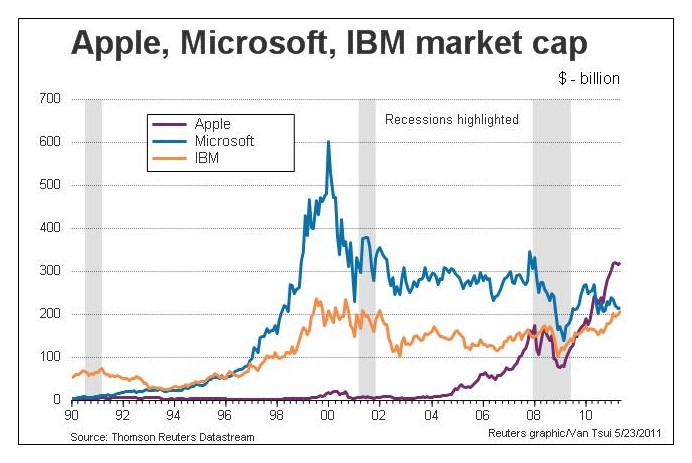
For the first time in 15 years, since 1996, IBM has overtaken Microsoft in market value. It is now the second largest US tech company behind Apple, while Microsoft has dropped to third.

Only a year after Apple had surged past Microsoft in market value, IBM has also powered past Microsoft.

Market capitalisation of Apple, IBM and Microsoft over the past 20 years

Market capitalisation of Apple, IBM and Microsoft over the past 20 years

IBM had been the dominant company in the computer industry for decades until it selected Microsoft to supply the operating system for its personal computers in the eary 80s. Bill Gates managed to turn that opportunity into a dominance of the operating systems market.

Rank Company Market cap 

(billion)

1 Exxon Mobil $397.4
2 Apple $309.2
3 General Electric $205.6
4 IBM $203.8
5 Microsoft $203.7

At its zenith just before the turn of the millennium, Microsoft’s market capitalisation was three times that of IBM’s. It was also the biggest US company then. Now it is the third biggest technology company and fifth biggest US company.

Microsoft is facing challenges in many of its business sectors. Its dominance of the operating systems market, is being challenged by the advent of tablets and Google’s newly introduced Chrome OS, while it has lost its market share in the smartphone market to RIM’s BlackBerry devices, Apple’s iPhones and recently Android based phones.

Microsoft’s decline since 2000 coincides with the burst of the Internet technology bubble and the tenure of Bill Gates’ successor Steve Ballmer as the CEO.

IBM, on the other hand, has reinvented itself from being a predominantly hardware manufacturer into a specialist in enterprise software, servers and consulting. It has even offloaded its PC business to Lenovo in 2002.

Bill Rigby of Reuters observes that “an investor putting $100,000 into both stocks 10 years ago would now have about $143,000 in IBM stock and about $69,000 in Microsoft stock.”

Seagate introduce GoFlexAccess app

Monday, May 23rd, 2011

The free GoFlexAccess app allows the iPhone, iPad and Android smartphones to access media shared on the Seagate’s GoFlex Home network storage system.

Seagate Technology LLCThe free app is now available for download from the iTunes Store and Android Market. The application can be found by searching for “Seagate” or “GoFlex” in either storefront using the computer or the app store on a iPad, iPhone, iPod touch or Android compatible mobile device.

Seagate’s GoFlex Home network storage server is designed as a simple to set up shared storage drive, which provides back up and sharing capabilities within a home network and is also accessible using remote access from a personal computer.

Seagate GoFlexAccess AppSeagate GoFlexAccess App

With the introduction of the GoFlexAccess app, the GoFlex Home network can be accessed from mobile devices as well.
  • The possibilities enabled by the GoFlexAccess  app include:
  • Access photos, movies, music and documents stored in the GoFlex Home network from an iPad, iPhone or Android smart phone.
  • Create slideshows from photos in the network drive and play music at the same time to accompany it.
  • Stream music or video to mobile devices over 3G/4G and WiFi.
  • large number of files and file types.
  • Album art support for music files.
  • Access Excel, PowerPoint, Word documents and PDFs etc.
  • The app features content type filters, to simplify access to content that may contain a large number of files and file types
Capacity SRP
1 TB S$219
2 TB S$319
3 TB S$379

Available in 1TB, 2TB and 3TB capacities, the GoFlex Home storage system allows files to be centrally stored, easily accessed and continuously backed up wirelessly from computers on the home network running either Windows or Mac OS X operating systems.

Storage capactiy of GoFlex Home system can be increased simply by connecting additional drives to the USB port. What’s more, this USB port can be used to wirelessly share a USB printer with all computers on the network.

Turn your photo into a film slide

Sunday, May 22nd, 2011

Tired of simple white borders for your digital photos? GIMP has a simple filter that adds a frame around the photo to make it look like it is a film slide – complete with black frame, sprocket holes, and labels.

Turn your digital photo into a film slide using the Slide filter in GIMP.

Turn your digital photo into a film slide using the Slide filter in GIMP.

Adding a border around a digital photo adds visual interest to make it look more interesting, and can focus the viewer’s attention on the main subject as well. If you’re feeling fanciful, you can easily add a decorative border around your photo to turn it into a film slide. Here’s how.

The original photo in landscape orientation. Photo from morguefile.com.

The original photo in landscape orientation. Photo from morguefile.com.

With your photo open in GIMP, select the Filters > Decor > Slide command from the main menu.

The pop-up dialog box for the Slide filter.

The pop-up dialog box for the Slide filter.

The “Slide” dialog box for the filter pops up with various options to customise the appearance of the slide.

The original photo in portrait orientationTurned into film slide

The Slide filter can also be applied to a photo in portrait orientation.

Filter options

The “Text” option allows you to enter a label for the slide. You can use it to caption your photo. Or you could type in “Kodak” to emulate a real slide. For “Number”, type a number from 1 to 37.

The “Font” and “Font color” options lets you specify the font face and colour of the text and numbers adorning the slides of the slide. Leaving them to the default values produces the most realistic results.

Leave the “Work on copy” option checked so that a duplicate copy of the photo will be used for the slide effect and the original is left unchanged. Press the “OK” button and GIMP churns out your slide as a new image which you can save as a JPEG file under a different name.

Points to note

If the original photo is in landscape orientation, the black frames with sprocket holes and labels will be added to the top and bottom sides of the photo. If the original photo is in portrait orientation, the frames will be added to the left and right sides.

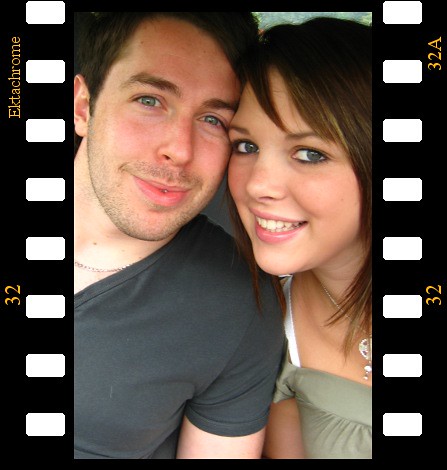
Original photo is too close-cropped

The colour of the sprocket holes will be based on the current background colour in the colour swatches in the Toolbox. So if you want the holes to be white, remember to reset the background colour to white by pressing “D” on the keyboard, before applying the filter.

If the aspect ratio of the photo is anything other than 3:2, it will be cropped into that ratio. If you want to control exactly how the photo is to be cropped, crop it yourself to 3:2 first before applying the filter. This will ensure you don’t end up with half a face being cropped out of the photo.

Letting the filter crop to 3:2 aspect ratio may have a blinding effect

Letting the filter crop to 3:2 aspect ratio may have a blinding effect.

Use the crop tool to do your own cropping to crop it exactly the way you want it.

Use the crop tool to do your own cropping to crop it exactly the way you want it.