Archive for April, 2011
Saturday, April 30th, 2011
Compact digital cameras took up seven out of 40 categories evaluated by the 29-member magazines of the Technical Image Press Association (TIPA) this year. Winners include Nikon, Canon, Olympus, Samsung, Fujifilm and Panasonic.
Compared to the four categories for DSLR cameras, there were seven categories for compact digital cameras.
Founded in 1991, the Technical Image Press Association (TIPA) comprises 29 independent photo & imaging magazines from nine European countries plus Australia, Canada, China, USA and South Africa.
This is the 21st installment of the annual awards.
The winners for the seven compact digital camera categories are tabulated below.
| Category / Winner |
TIPA citation |
| Best General Compact Camera

Nikon
COOLPIX P300 |
The Nikon COOLPIX P300 is a stylish compact camera with a remarkably powerful f/1.8 lens, starting at 24mm (35mm equivalent) with 4.2x optical zoom. High Refraction Index glass further ensures sharp images with high contrast. Combined with its powerful 12.2 Megapixel back-illuminated CMOS sensor, this camera gives excellent image quality even in dim lighting conditions. The P300 can film in Full HD (1080p), but also in slow motion with a recording speed of up to 120fps. |
| Best Expert Compact Camera

Olympus
XZ-1 |
The Olympus XZ-1 has one of the fastest zoom lenses in its class, the iZuiko f1.8-2.5 6.0-24mm (28-112mm equivalent angle of view in 35mm cameras.) Rather than succumb to the continuing Megapixel race, the light-reception area of each pixel of the 1/1.63-inch, 10 Megapixel CCD has been doubled. The XZ-1’s AF illuminator, Dual Image Stabilisation, Low-Light mode that automatically adjusts the ISO sensitivity up to ISO 3200 and the compact size all add up to an exciting “candid” camera that also offers advanced manual controls. |
| Best Premium Camera

Fujifilm
FinePix X100 |
Fujifilm’s FinePix X100 offers unrivalled image quality for a compact camera, thanks to its APS-C format CMOS sensor and Fujinon 23mm f/2.0 lens. The Hybrid Viewfinder uniquely combines the ‘bright frame’ window-type optical viewfinder found in high-end film cameras, and the electronic viewfinder system of fixed single lens or digital compact system cameras, offering the user ‘the best of both worlds’. Added to the package is a newly-developed EXR Processor, which combines all the latest Fujifilm image processing technology. |
Best Compact System Camera
Entry Level

Samsung
NX100 |
The Samsung NX100’s new body design drastically revises the ‘DSLR look-alike’ concept found in other compact interchangeable lens cameras, and is a bold step from the company’s previous NX10/11 designs. This brings it into direct competition with other Compact System Cameras. Impressive features include a vivid 3-inch AMOLED screen, an APS-C size sensor and a line of high-tech iFunction lenses. This promising new series of optics blazes new viewing and camera control paths by allowing the user to program numerous functions right from the lens. |
Best Compact System Camera
Expert

Panasonic
Lumix DMC-GH2 |
The Panasonic Lumix DMC-GH2 is a true ‘hybrid’ photo and video camera, where video is no longer just an additional function. The DMC-GH2 features full HD 1920×1080, 60i (NTSC) / 50i (PAL) smooth, high quality video recording with 60p (NTSC) / 50p (PAL) output in addition to the high quality photo, a world’s first for cameras in this category. The DMC-GH2 can be operated through an intuitive touch control screen. For example, just tapping a subject on the screen will make the camera focus with a speed that rivals the best DSLR’s on the market. |
| Best Superzoom Camera

Canon
PowerShot
SX230 HS |
The Canon PowerShot SX230 HS features a 12.1-Megapixel HS System with high-sensitivity CMOS sensor, and a 14x optical zoom (28-392mm equivalent) with optical image stabilisation. A 3-inch LCD screen, with 100% frame coverage, makes for easy viewing and menu control. TIPA members were impressed with features such as Full HD 1080p video with Dynamic Image Stabilizer, a new GPS function (including supplied Map Utility software) and a high-sensitivity CMOS sensor coupled with Canon’s DIGIC 4 processor that reduces noise levels even at the higher ranges (up to ISO 3200). |
| Best Rugged Compact Camera

Panasonic
Lumix DMC-FT3 / DMC-TS3 |
The Panasonic Lumix DMC-TS3/FT3 is waterproof to a depth of 12m and dust-proof equivalent to the IPX8 and IP6X standard. It has an integrated GPS function, ideal for photographers who want to shoot in the great outdoors and record their exact position during that shoot. The camera has a built-in compass, altimeter and barometer to show and record altitude, barometric pressure and orientation data. The barometer also works as indicator for depth underwater. Thanks to its location awareness, the internal clock of the camera is automatically adjusted to the local time. |
Tags:award, cameras, Canon, compact, Fujifilm, Nikon, Olympus, Panasonic, Samsung, XZ-1
Posted in Cameras, Canon, Compact camera, Fujifilm, Gadgets, Nikon, Olympus, Panasonic, Samsung | 3 Comments »
Friday, April 29th, 2011
The latest 10.1 inch Android 3.0 tablet from Asus arrived in Singapore today at the launch event at Zirca in Clarke Quay. The 16GB Wi-Fi only version (Eee Pad + Docking keyboard) is priced at S$898.
But as part of its launch promotion, you can get a S$99 discount at S$799. If you choose to purchase only the pad and not the docking station, you can get the 16GB Wi-Fi only version at the launch promotion price of S$699.

The Asus Eee Pad Transformer TF101 arrived in Singapore on April 29, 2011
What are the biggest grouses of tablet users today? No Flash, short battery life, no keyboard, no USB ports and card readers. Asus tries to address all these shortcomings in the Asus Eee Pad Transformer TF101.
The optional docking station provides a full QWERTY keyboard for work involving intensive typing. It costs S$199 if you purchase it separately, but purchased together with the pad, you need only top up S$100 for it. The docking station makes available an additional 24.4 Wh battery that extends the pad’s 9.5 hours battery life to 16 hours instead.
A card reader (MMC/SD/SDHC) and two USB 2.0 ports are also available on the keyboard. The keyboard also props up the docked pad as a stand.
And finally, Adobe Flash 10.2 is supported, so you can visit all those glitzy sites running Flash animations and video.
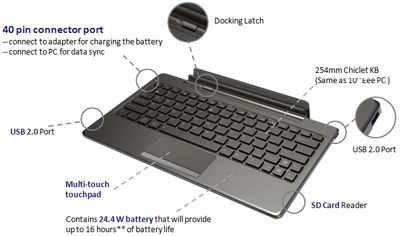
The docking station is a full QWERTY keyboard that doubles up as a stand and contains an extra battery to extend the 9.5 hours battery life of the pad to 16 hours. It also contains USB ports and a card reader.
I played with the Eee Pad on display and found the IPS (In-plane switching) LED backlight screen brilliant and sharp at with 1280×800 pixels packed into the 10.1 inch panel, offering a wide viewing angle of 178 degrees – I could still view the screen display from the side.

The touch screen senses up to 10 fingers for multi-touch - seen here with the Piano app from Android Market.
The pad feels slightly heavier than the iPad 2 but comfortable to hold. The book reader app included with the pad was standard fare – offering animated page turning, highlighting and bookmarking etc.
Photos and videos taken with the camera was clear even though the ambient lighting was dark.
Prices and configurations
The 16GB Wi-Fi only tablet is the only configuration available at the moment. Together with the docking station (keyboard), it sells for S$898 at the major retailers in Singapore – Challenger, Best Denki, Harvey Norman etc.
During this launch period, the promotional price for the 16GB Wi-Fi only Transformer sells for S$799 (Eee Pad + Docking station) and S$699 (Eee Pad only). Currently, the docking stations are out of stock and will only be available from the week of May 9 onwards.
The 32GB Wi-Fi only version will also only be available later in May.
“The 3G version is being tested now and will likely be launched in the second or third week of June,” Bernard Wen, Business Operation Manager of Asus Technology told me. “In the meantime, we’ve tested the Pad with USB dongles from SingTel, Starhub and M1 and found that they are all compatible,” he added.
Tags:Adobe, Android, Asus, tablets
Posted in Android, Asus, Eee Pad Transformer TF101, Gadgets, Prices, Specifications, Tablets | 2 Comments »
Friday, April 29th, 2011
The update to the TomTom App for iPhone offers TomTom’s latest release of the maps of Malaysia and Singapore. Current owners of the TomTom App can update to the new version for no additional charge.
 For new users, the updated TomTom App (Version 1.7) for iPhone is now available in the App Store for USD $59.99. The app is available on iPhone 4, iPhone 3GS & iPod touch 3rd Gen running iOS4.
Tags:Apple, Apps, GPS, TomTom
Posted in Gadgets, GPS, iOS, iPhone, TomTom | No Comments »
Thursday, April 28th, 2011
Another tablet arrives in Singapore tomorrow – this time from Asus, the Taiwanese company that created the netbook niche. This Android-based tablet tries to redefine the tablet experience by packaging it with a docking keyboard cum extra battery.
Will update on the actual use and feel after the launch event tomorrow.
The Asus Eee Pad Transformer has a 10.1″ LED backlight WXGA (1280×800) screen and a docking QWERTY keyboard which also serves as a tablet stand, provides USB ports and contains an extra 24.4 Wh battery that extends the 9.5 hours battery life of the tablet to 16 hours.
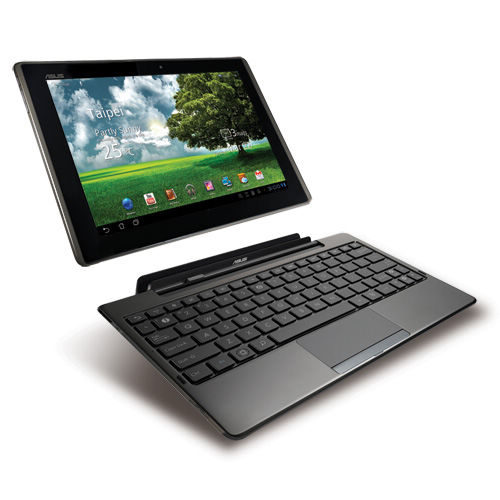
The screen is IPS (In-plane switching) Panel which typically has a wider view angle than a traditional LCD screen – Asus boast a wide view angle of 178° for this screen. Apple’s iPad also uses an IPS panel.
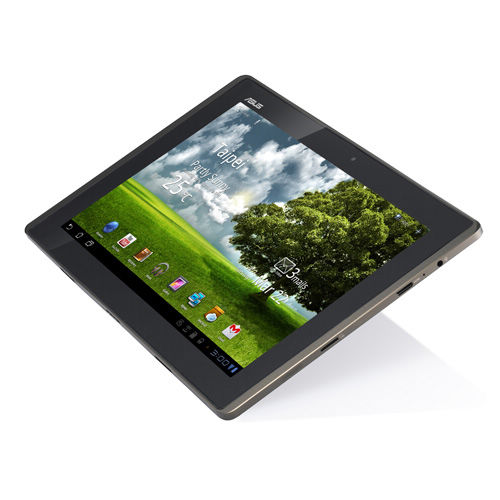 There is a 1.2M pixel front Camera and a 5M pixel rear Camera. The standard range of sensors are included: G-Sensor, Light Sensor, Gyroscope, E-Compass, GPS.
The Transformer is based on the Android 3.0 Honeycomb OS and supports Adobe Flash 10.2. It has an NVIDIA Tegra 2 1.0GHz dual-core CPU which provides multitasking and 1080p video playback.
Memory-wise, it has 1 GB RAM and comes in either 16 or 32 GB versions for permanent storage. Unlimited ASUS Webstorage is included free for a year.
Network-wise, it is fairly standard with WLAN 802.11 b/g/n at 2.4GHz and Bluetooth V2.1+EDR. What is conspicuously missing is a 3G version so you’ll probably need a mobile broadband USB dongle or a Wi-Fi network to access the Internet.
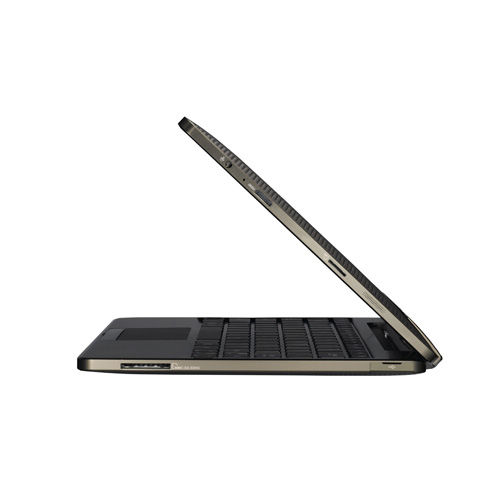 The docking keyboard comes with two USB 2.0 ports, one card reader (MMC/SD/SDHC) and a touch pad. It can be purchased in the UK for an additional £50 and in the US for an additional US$149 over the base price of the tablet alone.
The tablet itself contains one 2-in-1 Audio Jack (Headphone/Mic-in), one Micro SD Card Reader, and one mini HDMI 1.3a for outputting the display onto an external HD screen. Stereo speakers are built in.
Physically, the tablet measures 271 x 171 x 12.98 mm and weighs 680 g.
The Transformer was first launched in Taiwan on March 25, then in the UK on March 30, and two days ago in the US on April 26. Prices in the US are $100 less than the “equivalent” iPad model.
US Prices
- 16 GB: US$399
- 32 GB: US$499
- Keyboard: US$149
Tags:Android, Asus, keyboard, tablets
Posted in Android, Asus, Eee Pad Transformer TF101, Events, Gadgets, Launch, Tablets, Tech news | 2 Comments »
Wednesday, April 27th, 2011
The iPad 2 debuts in Asia tomorrow in Japan and will arrive in 11 other countries including Singapore on Friday. China will only see the iPad 2 on May 6 one week later.

The
iPad 2 was first launched in the US on March 2 and released in 25 more largely European countries on March 25. Tomorrow, it will debut in Japan – the first Asian country to launch it. On Friday, it will arrive in Singapore together with 10 other largely Asian countries. China will only see the iPad 2 with only Wi-Fi on May 6.
Compared to the original iPad, the iPad 2 is 33 percent thinner and up to 15 percent lighter, while sporting the same 9.7-inch LED-backlit LCD screen. iPad 2 features Apple’s new dual-core A5 processor for faster performance and stunning graphics and now includes two cameras, a front-facing VGA camera for FaceTime and Photo Booth, and a rear-facing camera that captures 720p HD video, bringing the FaceTime feature to iPad users for the first time. The iPad 2 promises the same 10 hours of battery life as its predecessor.
Prices and configurations in Singapore
 1. Wi-Fi only versions:
- 16GB: S$668
- 32GB: S$798
- 64GB: S$928
2. Wi-Fi/3G devices:
- 16GB: S$848
- 32GB: S$978
- 64GB: S$1108
iMovie and GarageBand for iPad apps are available for US$4.99 each from the App Store on iPad or www.itunes.com/appstore. The Smart Cover is available in a range of colors in vibrant polyurethane for S$54 or rich leather for S$98.
The iPad 2 will be available in Singapore at select Apple Authorised Resellers, and online through the online Apple Store beginning at 1am local time.
 The 10 other countries getting the iPad 2 together with Singapore on Friday are: Hong Kong, India, Israel, Korea, Macau, Malaysia, Philippines, South Africa, Turkey and UAE.
For those interested, the earlier 25 countries who got their iPad 2 on March 25 are: Australia, Austria, Belgium, Canada, Czech Republic, Denmark, Finland, France, Germany, Greece, Hungary, Iceland, Ireland, Italy, Luxembourg, Mexico, Netherlands, New Zealand, Norway, Poland, Portugal, Spain, Sweden, Switzerland and the UK.
Tags:Apple, iPad, launch, prices, Singapore
Posted in Apple, Gadgets, iPad, Launch, Prices, Tablets | No Comments »
Tuesday, April 26th, 2011
The much anticipated white iPhone will become available on Thursday. Originally planned to be launched together with the black version during the iPhone 4 launch in June 2010, the availability of the white version has been delayed until now by production complexities.

The Cupertino company had stated earlier that “white models of Apple’s new iPhone 4 have proven more challenging to manufacture than expected.”
In addition to Singapore, the white model of the iPhone 4 will debut on Thursday in 27 other countries: Austria, Australia, Belgium, Canada, China, Czech Republic, Denmark, Finland, France, Germany, Hong Kong, Ireland, Italy, Japan, Luxembourg, Macau, Netherlands, New Zealand, Norway, South Korea, Spain, Switzerland, Sweden, Taiwan, Thailand, UK and the US.
In Singapore, the recommended retail price tag (without contract) for the 16GB model is S$888, while the price for the 32GB model is S$1048.
Purchases can be made through the online Apple Store, and select Apple Authorised Resellers in Singapore, such as EpiCentre, Nubox, istudio, Juzzl and Multimedia Integrated.
Tags:Apple, iPhone, launch, Singapore, white
Posted in Apple, Gadgets, iPhone, Phones | No Comments »
Monday, April 25th, 2011
The flagship compact digital camera from Olympus has won the Best Expert Compact Camera award at the annual XXI TIPA 2011 awards.
 The 29 member magazines of the Technical Image Press Association (TIPA) awarded the award for the “Best Expert Compact Camera” category to the Olympus XZ-1.
Into its twenty-first year, the annual awards recognised the best photo and imaging products in 2011 in 40 categories. TIPA has member magazines from nine European countries plus Australia, Canada, China, USA and South Africa.
In its citation, it lauded the XZ-1 for its fast lens, as well its larger sensor area for each pixel – which translates to greater sensitivity, lower noise and better image quality.
“The Olympus XZ-1 has one of the fastest zoom lenses in its class, the iZuiko f1.8-2.5 6.0-24mm (28-112mm equivalent angle of view in 35mm cameras). Rather than succumb to the continuing Megapixel race, the light-reception area of each pixel of the 1/1.63-inch, 10 Megapixel CCD has been doubled. The XZ-1’s AF illuminator, Dual Image Stabilisation, Low-Light mode that automatically adjusts the ISO sensitivity up to ISO 3200 and the compact size all add up to an exciting “candid” camera that also offers advanced manual controls.” – Citation for XXI TIPA Awards for “Best Expert Compact Camera”
In Singapore, the Olympus XZ-1 is available at a suggested retail price of S$748 (incl GST & bundled with a 8GB SD Card).
Tags:award, cameras, Olympus, XZ-1
Posted in Cameras, Compact camera, Gadgets, Olympus, Review, Specifications, Tech news | 1 Comment »
Sunday, April 24th, 2011
The four categories for DSLRs were won by Canon, Nikon, Olympus and Pentax at this year’s TIPA awards.
Founded in 1991, the Technical Image Press Association (TIPA) comprises 29 independent photo & imaging magazines from nine European countries plus Australia, Canada, China, USA and South Africa.
This is the 21st installment of the annual awards.
Out of 40 categories of photo and imaging products for this year’s TIPA awards, four were for DSLRs. The winners for the four DSLR categories are tabulated below.
| Category / Winner |
TIPA citation |
Best DSLR
Entry Level
Canon
EOS 600D |
The EOS 600D continues the legacy of easy operation and high functionality. TIPA members were very impressed with the features such as the 18.0 Megapixel CMOS image sensor, full HD video recording, Live View shooting, Wireless flash photography and a Vari-angle 3-inch LCD monitor. Offering 3.7 frames-per-second shooting rate, a top 1/4000 second shutter speed and up to 6400 ISO sensitivity (plus 12,800 H), the camera allows for the full DSLR experience with ease of operation that makes for a great first camera for those seeking to ‘step up’ from compact cameras. |
Best DSLR
Advanced
Nikon
D7000 |
The Nikon D7000 impressed us as the definition of a state-of-the-art DX-format DSLR (APS-C size) with a 16.2 MP CMOS sensor, six frames-per-second framing rate for up to 100 shots and full 1080p HD movies with full-time AF. With twin SD card slots, a 100% viewfinder and bright 3-inch LCD for Live View operation, the camera is extremely versatile in the field. The magnesium alloy top and rear covers, special weather and dust seals plus 150,000 cycle-rated shutter system give it a pro feel. |
Best DSLR
Expert
Olympus
E-5 |
For a very reasonable price, the Olympus E-5 provides benefits that rival those found in some professional SLRs: complete weather-sealing, comprehensive functions, excellent responsiveness, 100% viewfinder, good noise control, dual CF/SD slots, built-in image stabilisation, all in a rugged magnesium-alloy body. Add to this Olympus’ Dust Reduction System, which has proven to be among the most effective solutions in the market. The 12.3 Megapixel Live MOS sensor, combined with the ‘TruePic V+’ image engine produces images that rival competitors with substantially higher pixel counts. |
Best DSLR
Professional
PENTAX
645D |
TIPA members appreciated the design, build and feature specs of this 40 Megapixel medium format digital camera. The magnesium alloy body is fully weather-sealed, making it a great choice for outdoor and location photographers, plus the all-glass trapezoid pentaprism finder makes for a dazzling capture experience. Perhaps most impressive is lens compatibility, which encompasses both the new D FA autofocus lenses as well as older 645 lenses. |
Tags:award, Canon, DSLR, Nikon, Olympus, Pentax
Posted in Cameras, Canon, DSLR, Gadgets, Nikon, Olympus, Pentax, Tech news | 2 Comments »
Saturday, April 23rd, 2011
The histogram of a photograph tells you whether a photo is too bright, too dark or too flat and lacking in contrast.
It forms the basis of more advanced and powerful tools – such as Levels and Curves – to enhance the brightness and contrast of a photo.
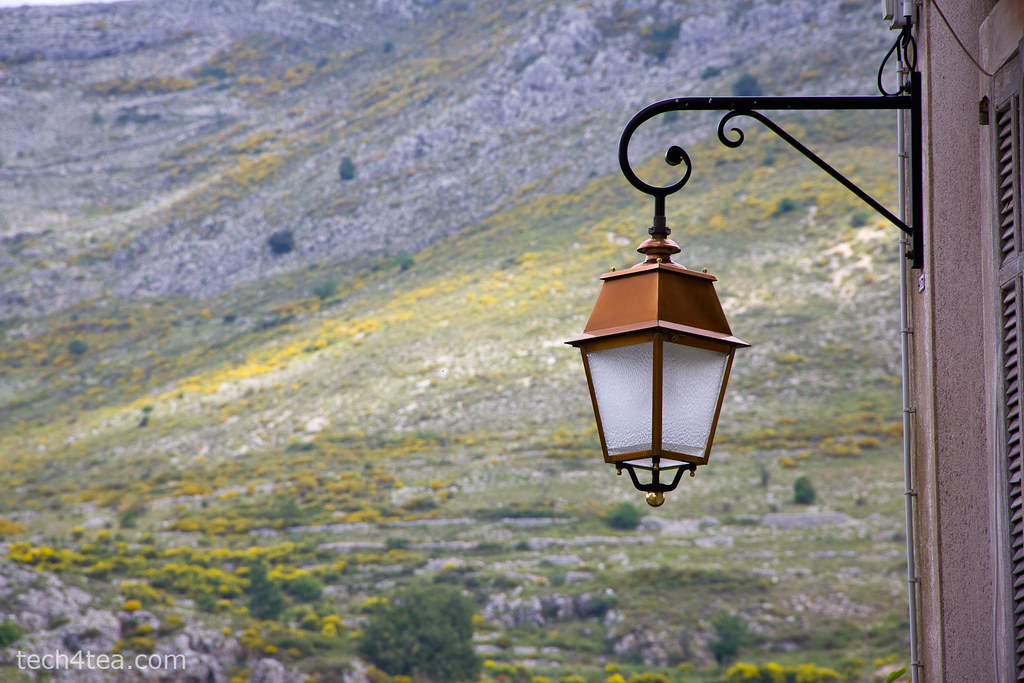
Pict 1: Metalwork lantern in French Provence. Exposure was well-balanced, as indicated by the histogram below.
Many digital cameras today can display histograms on their LCD screens in both the review and preview modes. The histogram helps the photographer to assess whether the exposure settings for an image are optimal. This is most useful when bright sunlight makes it difficult to judge – just by viewing the photo preview/review on the LCD screen – whether a photo is too bright or dark.
If the histogram indicates that the photo is too dark or bright, the photographer can adjust the exposure settings to get a better shot.
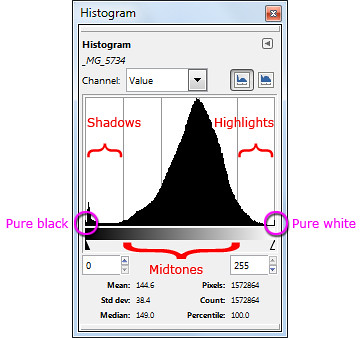
Pict 2: Different parts of a histogram. The photo of the metal work lantern was well-exposed.
What is a histogram?
The histogram is basically a graph of the brightness levels of all the pixels in a photograph – from pure black (brightness value zero) on the left edge to pure white (brightness value 255) on the right edge.
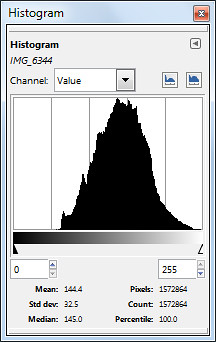
Pict 4: An overexposed photo has its histogram bunched up to the right.

Pict 3: Lavenders in the French Riviera - overexposed.
The number of pixels in each of the 256 levels of brightness are counted and plotted on the Y axis as a bar chart to provide an idea of the tonal distribution of a photograph and its possible problems.
The region around the left edge of the histogram represents the shadows (dark tones) in the photo while the pixels near the right edge represents the highlights (bright tones). The middle region represents the midtones.
Analysing a histogram
When a photo is opened in GIMP, you can view the photo’s histogram by selecting the Windows > Dockable Dialogs > Histogram command from the main menu. By analysing the histogram, you can better decide how to use the tools in GIMP to enhance a photo’s brightness and contrast.

Pict 5: Flowers at Gourdon - underexposed.

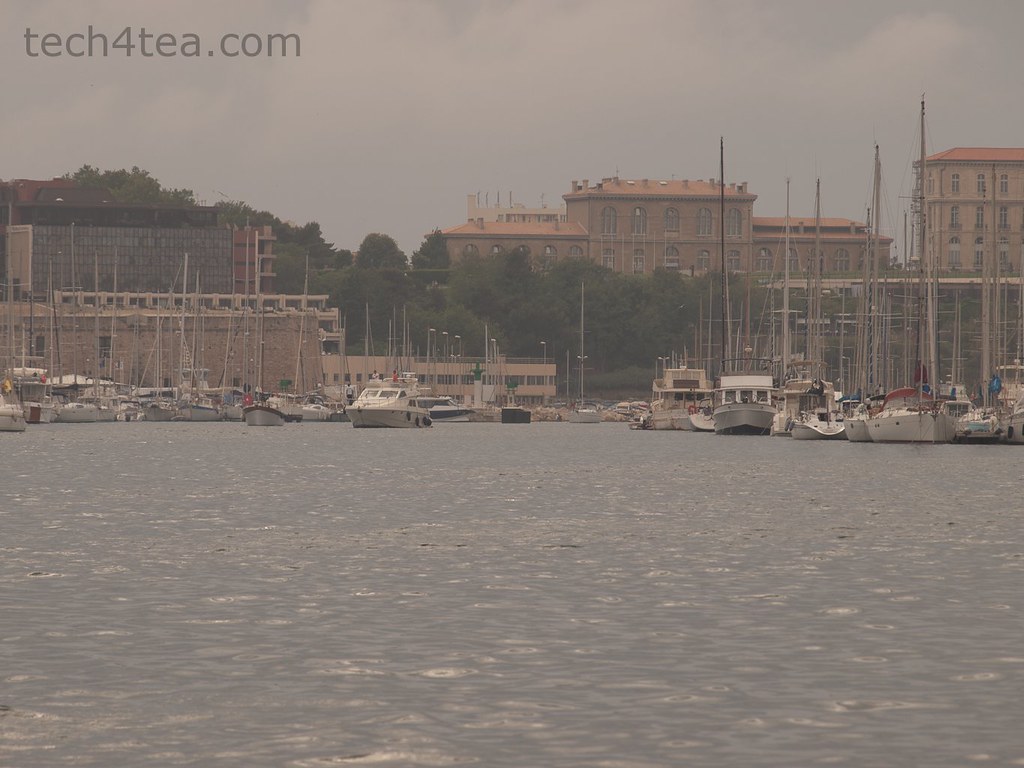
Pict 6: Port of Marseille on a dull and overcast day.
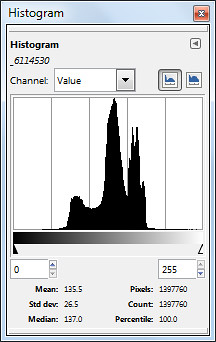
Pict 7: All bunched up in the middle - suggesting a photo with poor contrast.
A well-exposed photo usually has a histogram which looks like a bell-shape and which stretches from one end of the histogram to the other (see Pictures 1 & 2).
A photo that is overexposed (too bright) usually has a histogram that is bunched up on the right, while an underexposed photo will have a histogram that’s bunched up to the left (see Pictures 3 to 5).
A photo with poor contrast will usually have a histogram that is squashed up towards the middle. The photo appears dull and flat. The brightest pixels are not bright enough while the darkest pixels are not dark enough (see Pictures 6 & 7).
Exceptions
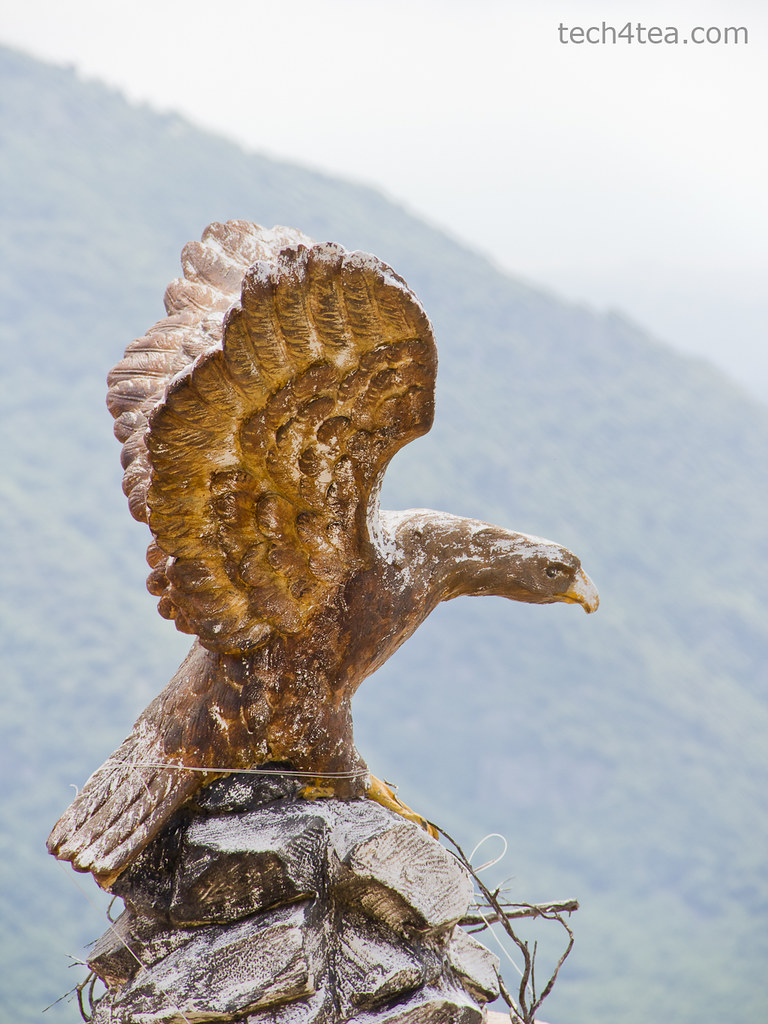
Note that there are exceptions under special photographic situations. For example, a photo that comprises mainly bright tones (such a scene comprising white snow against a light coloured sky) can have a histogram that is bunched up to the right, even though it is properly exposed (see Pictures 8 & 10).

Pict 8: Eagle perched atop Gourdon.

Pict 9: Stained glass window in Provencal church.
Similarly, a photo consisting of predominantly dark tones can have a histogram that is bunched up on the left – even when properly exposed (see Pictures 9 & 11).
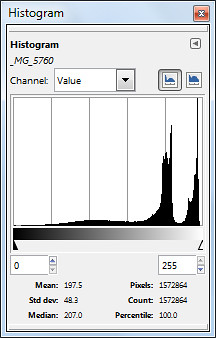
Pict 10: Bunching up to the right caused by bright background behind the eagle despite proper exposure.

Pict 11: Histogram is bunched up because of the predominance of dark tones - despite proper exposure.
In the next installment, we’ll use the Levels command to enhance a photo’s brightness andcontrast based on the characteristics of its histogram.
Tags:GIMP, image editor, Photoshop, tips
Posted in GIMP, GIMP Intermediate Series, Howtos, Software | 1 Comment »
Friday, April 22nd, 2011
First day sales of the newly launched BlackBerry PlayBook from RIM was said to reach 50,000 on April 19. RIM is expected to sell 500,000 of the 7 inch tablets in its first quarter ending in May.
 The first day sales number of 50,000 includes pre-sales and was estimated by an analyst at RBC Capital Markets. This appears to surpass the equivalent first day sales for Motorola’s Xoom and the Samsung Galaxy Tab.
Analyst Mike Abramsky’s staff checked 70 retails stores and found 11% of the locations that stocked the device had sold out, according to Matt Hamblen from Computerworld.
This may come as a surprise to many observers in view of the negative reviews that have bombarded Research In Motion (RIM) over the launch of the tablet computer.
Punters feel the software for the PlayBook was not ready yet because native support for email, contact and calendar apps were not available. Such support may only be provided as an over the air update in summer.
In the meantime, only those who own a BlackBerry smartphone can enable the PlayBook to access these basic apps via a Bluetooth connection. The tablet is only available in WiFi configuration with 3G available only in summer.
It is still too early to tell whether the PlayBook will be able to grab any market share from a tablet market seeing an influx of competitors to Apple’s iPad.
Tags:BlackBerry, Galaxy, Motorola, Playbook, RIM, Samsung, Tab, Xoom
Posted in Figures, iPad, PlayBook, RIM, Tablets | No Comments »