Archive for the ‘Review’ Category

Apple reveals Mac OS X Lion at WWDC 2011

Tuesday, June 7th, 2011

Mac OS X Lion has 250 new features and can be downloaded in July from the Mac App Store for US$29.99.
Mac OS X Lion fromApple
The eighth major release of Apple’s desktop operating system will feature more than 250 new features and 3,000 new developer APIs.

Main new features of the Mac OS X Lion
  • New Multi-Touch gestures
  • System-wide support for full screen apps
  • Mission Control, an innovative view of everything running on your Mac
  • The Mac App Store will now be built right into the OS
  • Launchpad, a new home for all your apps
  • A completely redesigned Mail app

“The Mac has outpaced the PC industry every quarter for five years running and with OS X Lion we plan to keep extending our lead,” said Philip Schiller, Apple’s senior vice president of Worldwide Product Marketing, who briefed WWDC 2011 attendees on Lion. “The best version of OS X yet, Lion is packed with innovative features such as new Multi-Touch gestures, system-wide support for full screen apps, and Mission Control for instantly accessing everything running on your Mac.”

Mac OS X Lion from Apple

Mac OS X Lion from Apple

The details

New Multi-Touch gestures and fluid animations built into Lion let you interact directly with content on the screen for a more intuitive way to use your Mac. New gestures include momentum scrolling, tapping or pinching your fingers to zoom in on a web page or image, and swiping left or right to turn a page or switch between full screen apps. All Mac notebooks ship with Multi-Touch trackpads and desktop Macs can use Apple’s Magic Trackpad.

Full screen apps take advantage of the entire display and are perfect for reading email, surfing the web or browsing photos, especially on a MacBook Air or MacBook Pro. With a single click your app fills the display and you can swipe from one window to another, between full screen apps, or back to your Desktop, Dashboard or Spaces® without ever leaving full screen. iWork and iLife apps, as well as Safari, iTunes, Mail, FaceTime and others, all take advantage of Lion’s system-wide support for full screen apps.

Mission Control combines Exposé, full screen apps, Dashboard and Spaces into one unified experience for a bird’s eye view of every app and window running on your Mac. With a simple swipe, your desktop zooms out to display your open windows grouped by app, thumbnails of your full screen apps and your Dashboard, and allows you to instantly navigate anywhere with a tap.

The Mac App Store is now built into Lion and is the place to browse for new Mac apps, buy them with your iTunes account, download and install them. Apps automatically install directly to Launchpad, and with Lion’s release, the Mac App Store will be able to deliver smaller “delta” app updates and new apps that can take advantage of features like In-App Purchase and Push Notifications.

Launchpad makes it easier than ever to find and launch any app. With a single Multi-Touch gesture, all your Mac apps are displayed in a stunning full screen layout. You can organise apps in any order or into folders and swipe through unlimited pages of apps to find the one you want.

Lion includes a completely redesigned Mail app with an elegant widescreen layout. The new Conversations feature groups related messages into an easily scrollable timeline, intelligently hiding repeated text so the conversation is easy to follow, and retaining graphics and attachments as they were originally sent. An powerful new search feature allows you to refine your search and suggests matches by person, subject and label as you type. Mail includes built-in support for Microsoft Exchange 2010.

Additional new features in Lion

Resume, which conveniently brings your apps back exactly how you left them when you restart your Mac or quit and relaunch an app.

Auto Save, which automatically and continuously saves your documents as you work.

Versions, which automatically records the history of your document as you create it, and gives you an easy way to browse, revert and even copy and paste from previous versions.

AirDrop, which finds nearby Macs and automatically sets up a peer-to-peer wireless connection to make transferring files quick and easy.

Pricing & Availability

Mac OS X Lion will be available in July as an upgrade to Mac OS X version 10.6 Snow Leopard from the Mac App Store for US$29.99. At about 4GB, it is the size of an HD movie from the iTunes Store. Mac OS X Lion Server requires Lion and will be available in July from the Mac App Store for US$49.99.

Lion requires an Intel-based Mac with a Core 2 Duo, i3, i5, i7 or Xeon processor and 2GB of RAM. The Lion upgrade can be installed on all your authorised personal Macs.

The Mac OS X Lion Up-To-Date upgrade is available at no additional charge via the Mac App Store to all customers who purchased a qualifying new Mac system from Apple or an Apple Authorised Reseller on or after June 6, 2011. Users must request their Up-To-Date upgrade within 30 days of purchase of their Mac computer. Customers who purchase a qualifying Mac between June 6, 2011 and the date when Lion is available in the Mac App Store will have 30 days from Lion’s official release date to make a request.

Steve Jobs unveils Apple’s new Mac OS, iOS 5 and iCloud at WWDC 2011

Monday, June 6th, 2011

As planned, Steve Jobs – who is currently on a medical leave of absence from Apple – made an appearance to host the WWDC 2011. He unveiled the personally unveiled iCloud and left the briefing on Mac OS X Lion and iOS 5 to his staff.

The 5-day Worldwide Developers Conference (WWDC) 2011 is being held at San Francisco.

Steve Jobs put in an appearance at WWDC 2011 to unveil iCloudiCloud

Steve Jobs personally unveiled the much anticipated iCloud services from Apple. The set of free cloud services promises to work seamlessly with applications on the iPhone, iPad, iPod touch, Mac or PC to automatically and wirelessly store a user’s content in iCloud and again automatically and wirelessly push it to all of the same user’s devices. When anything changes on any one of the devices, all of the user’s other devices are wirelessly updated almost instantly.

The iCloud beta and Cloud Storage APIs are available immediately to iOS and Mac Developer Program members at developer.apple.com. iCloud will be available this autumn concurrently with iOS 5.

New iCloud services from AppleUsers can sign up for iCloud for free on an iPhone, iPad or iPod touch running iOS 5 or a Mac running Mac OS X Lion with a valid Apple ID. iCloud includes 5GB of free cloud storage for Mail, Document Storage and Backup. Purchased music, apps, books and Photo Stream do not count against the storage limit. iTunes Match will be available for US$24.99 per year (US only).

iOS 5

iOS 5 for Apple iPhone, iPad and iPod touchScott Forstall – Apple’s senior vice president of iOS – paraded 10 of the promised 200 new features for the iPhone, iPad, and iPod Touch.

Main new features include: Notification Center, a new way to easily view and manage notifications in one place without interruption; iMessage, a new messaging service that lets users easily send text messages, photos and videos between all iOS devices; Newsstand, a new way to purchase and organise a user’s newspaper and magazine subscriptions; and PC Free feature, where iOS 5 users can activate and set up their iOS device right out of the box and get software updates over the air with no computer required.

iOS 5 beta software and SDK are available nowThe iOS 5 beta software and SDK are available immediately for iOS Developer Program members at developer.apple.com. iOS 5 will be available as a free software update for iPhone 4, iPhone 3GS, iPad 2, iPad, iPod touch (fourth generation) and iPod touch (third generation) this autumn.

Mac OS X Lion

Mac OS X LionPhilip Schiller, Apple’s senior vice president of Worldwide Product Marketing, briefed WWDC 2011 attendees on the eighth major release of Apple’s desktop operating system, which features more than 250 new features and 3,000 new developer APIs.

Main new features of the Mac OS X Lion includes: new Multi-Touch gestures; system-wide support for full screen apps; Mission Control, an innovative view of everything running on your Mac; Launchpad, a new home for all your apps; and a completely redesigned Mail app. The Mac App Store will now be built right into the OS.

Mac OS X LionMac OS X Lion will be available in July as an upgrade to Mac OS X version 10.6 Snow Leopard from the Mac App Store for US$29.99. At about 4GB, it is the size of an HD movie from the iTunes Store. Mac OS X Lion Server requires Lion and will be available in July from the Mac App Store for US$49.99.
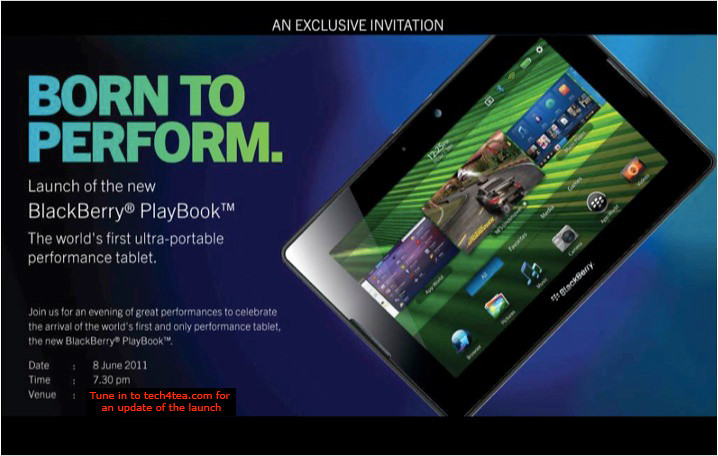
Singapore launch of the BlackBerry PlayBook

Monday, June 6th, 2011

The BlackBerry PlayBook from RIM is finally arriving in Singapore. First launched in the US on April 19 earlier this year, the 7-inch tablet computer will officially be launched in Singapore on Wednesday, Jun 8.

RIM BlackBerry PlayBook launches in Singapore this Wed, June 8, 2011

RIM BlackBerry PlayBook launches in Singapore this Wed, June 8, 2011.

The beta version of the BlackBerry Playbook was first unveiled during the Adobe Max 2010 developer conference in October last year. It was first seen in Singapore when two advanced beta prototypes were specially flown in and displayed as part of the Adobe Refresh Roadshow on March 10.

Four days prior to its official launch in the US on April 19, a special preview was held in a BlackBerry PlayBook Bus in Singapore on April 15. Two days from now – and almost two months after the US launch – the PlayBook will hit the shelves in Singapore.

Prices for the 16, 32 and 64-gigabyte models in the US are $500, $600, and $700 respectively. We’ll see what these will translate to in Singapore.

The PlayBook has received a mixed reaction since its launch in the US. The most common complaint has been its lack of native email, messenger, contacts and calendar apps, relying on Bluetooth tethering to access these functionalities via a BlackBerry handset. Other grouses include the lack of 3G/4G, and the relatively small repository of PlayBook specific apps in BlackBerry App World.

On the other end of the scale, the PlayBook features a lightning fast processor, capable of true multi-tasking, has a fabulous display and user interface, and supports both Flash and HTML5. In fact, some analysts have observed that the first day sales of the PlayBook has beaten that for Motorola Xoom and Galaxy Tab.

It’ll be interesting to hear the latest progress for the PlayBook during the Singapore launch the day after tomorrow.

TomTom Singapore PC Show 2011 Promotions

Sunday, June 5th, 2011

The 20 year old Dutch maker of GPS navigation devices will be at PC Show 2011 from 9 – 12 June 2011, along with partners AAAs, Harvey Norman and NewStead. TomTom has promised sharp price discounts that will be announced during the actual show.

TomTom GO 750 GPS at SGD$349 TomTom XXL 550 GPS at SGD$299 TomTom XL 250 GPS at SGD$229

Freebies

Purchases of any of the three models during the PC Show 2011 comes with a free international map of your choice worth up to S$111.71. Purchases of the top end GO 750 will come with a free Original TomTom GO Carry Case worth $59.00 and a free 2GB Micro SD Memory Card.

The three main GPS models available in Singapore are:

Model Usual Price
SGD
Main features
GO 750 S$349 Bluetooth hands-free calling
4.3″ touch screen
expanded menu options
XXL 550 S$299 5″ touch screen
expanded menu options
XL 250 S$229 4.3″ touch screen
easy two-button menu access

Main features for all three versions

  • All three South East Asia versions include maps of Singapore, Malaysia, Thailand, Indonesia, Brunei, Hong Kong (new) & Macau (new).
  • Advanced Lane Guidance and spoken street names.
  • Help me! Emergency Menu, TomTom’s latest map guarantee, free daily map updates with TomTom Map ShareTM and postcode search.
  • TomTom Latest Map Guarantee ensures you always start driving with the latest map. If a newer version of your map is available within 30 days of first using your device, you can download this map for free using TomTom HOME.
  • TomTom Dashboard Mounting disc and a highspeed multi-charger are sold separately, while stocks last.

The devices can be purchased from the following partners’ booths

  • AAAs: Level 4, Booth A2022
  • Harvey Norman: Level 6, Booth B2008
  • NewStead: Booth 302 (ACCS A)

ACD Systems releases ACDSee Pro 4

Thursday, May 26th, 2011

Seattle based ACD Systems announced the availability of the latest version of its all-in-one photo editing and management product. The US$239.99 ACDSee Pro 4 promises to reduce time, cost and complexity for the professional photographer.

ACDSee Pro 4 allows photographers to manage, edit and distribute/share their photos within one application. Below are the main features of Pro 4 as described by ACDSee:

Manage

Pro 4 gives photographers the freedom to organize photos and their digital workspace according to their individual needs and preferences. They can customize their application toolbars and layout to reflect the way they naturally work with their images—Manage, View, Process and publish Online.

ACDSee Pro 4 photo editing and catalogueing softwarePhotographers can view and manage a wide range of file types. ACDSee’s catalog-based technology stores key identifying metadata for each image, including date, location, and equipment used. This makes it fast and simple to perform tasks such as search according to keywords, dates and other important information, and to drag and drop images to compare characteristics and tags with other images.

Photographers do not have to import or export images into a vendor-controlled database resulting in a virtual view. Unlike other solutions, Pro 4 allows users to edit photographs in real-time, directly from the source – whether it is a camera memory card, hard drive or computer system — and then save those changes to the original equipment.

Edit

The patent-pending LCE (Lighting and Contrast Enhancement) and single exposure HDR (High Dynamic Range) algorithms are built into Pro 4’s RAW technology. The technology was developed to give users a simple and efficient means of dramatically improving lighting and contrast in photos.

ACDSee Pro 4 photo editing and catalogueing softwarePhotos are fine-tuned to more accurately reflect the subject, and if desired, enhance the representation of the original subject. With LCE, photographers can increase the exposure of dark (underexposed) photos, increase the contrast and vibrancy of dull photos, correct uneven lighting, correct backlit photos, selectively brighten dark areas and darken bright areas (automatic dodge and burn), and create an HDR image from a single exposure.

Original RAW images are rendered in full-size and at high speed. Lighting and exposure problems, including high contrast and backlit scenes, insufficient flash, dull images, and under and overexposure are corrected in seconds. The traditional alternative – multi-exposure HDR – is extremely labor intensive and requires additional, specialized software. It can also result in motion blur, as well as process and capture complexity.

ACDSee Pro 4 photo editing and catalogueing softwareEdits can be seen in real-time and previewed in full screen. Batch processing is intuitive and fast. Photographers can experiment freely, knowing that the originals are always safe with Pro 4’s non-destructive editing capabilities.

Photographers can use his own editing tool together with Pro 4. For example, they can use editing products such as Photoshop and then import their images into Pro 4 for management and distribution.

Distribute and share

ACDSee Pro 4 photo editing and catalogueing softwarePhotographers can quickly and easily share photographs using ACDSeeonline.com, a free, cloud-based photo sharing site. Privacy controls are set by the photographer, to ensure control and security.

Pro 4 allows selected contacts to download password protected full resolution images. Photographers can also share images on the most popular social media sites such as Facebook, Twitter, Flickr, SmugMug and Zenfolio, and/or via their own websites.

Release of Free File Opener v7

Wednesday, May 25th, 2011

Minneapolis based Free File Opener LLC announced the release of the latest version of its flagship product, with enhancements in terms of usability, performance and functionality.

Free File Opener is a versatile and feature-rich file viewer and editor capable of working with files of over 200 different formats, from simple text and MP3 files to multi-layer PSD documents, high-definition videos and Microsoft Office documents.

Free File OpenerThe new version of Free File Opener now supports over 80 new file formats and is capable of cross-converting images to 15 different formats. The program core has become considerably faster, thus making it easier to work with large files and “heavy” folders containing hundreds or thousands of files. Images and photos can also be edited using built-in tools with full support of RAW image files.

An optional paid upgrade unlocks additional features, such as an ability to save and print files, edit Word documents and Excel spreadsheets and convert Excel spreadsheets into the PDF format for easy sharing and distribution.

Free File OpenerThe program works on all major Windows versions, requires no third-party components or libraries and takes seconds to download on a typical broadband connection.

The regular version is free to download and allows users to open and view over 200 different types of files. The company also offers a paid upgrade for users who also want the ability to print and save changes to files they have edited.

The full version of Free File Opener costs only $19.

Seagate introduce GoFlexAccess app

Monday, May 23rd, 2011

The free GoFlexAccess app allows the iPhone, iPad and Android smartphones to access media shared on the Seagate’s GoFlex Home network storage system.

Seagate Technology LLCThe free app is now available for download from the iTunes Store and Android Market. The application can be found by searching for “Seagate” or “GoFlex” in either storefront using the computer or the app store on a iPad, iPhone, iPod touch or Android compatible mobile device.

Seagate’s GoFlex Home network storage server is designed as a simple to set up shared storage drive, which provides back up and sharing capabilities within a home network and is also accessible using remote access from a personal computer.

Seagate GoFlexAccess AppSeagate GoFlexAccess App

With the introduction of the GoFlexAccess app, the GoFlex Home network can be accessed from mobile devices as well.
  • The possibilities enabled by the GoFlexAccess  app include:
  • Access photos, movies, music and documents stored in the GoFlex Home network from an iPad, iPhone or Android smart phone.
  • Create slideshows from photos in the network drive and play music at the same time to accompany it.
  • Stream music or video to mobile devices over 3G/4G and WiFi.
  • large number of files and file types.
  • Album art support for music files.
  • Access Excel, PowerPoint, Word documents and PDFs etc.
  • The app features content type filters, to simplify access to content that may contain a large number of files and file types
Capacity SRP
1 TB S$219
2 TB S$319
3 TB S$379

Available in 1TB, 2TB and 3TB capacities, the GoFlex Home storage system allows files to be centrally stored, easily accessed and continuously backed up wirelessly from computers on the home network running either Windows or Mac OS X operating systems.

Storage capactiy of GoFlex Home system can be increased simply by connecting additional drives to the USB port. What’s more, this USB port can be used to wirelessly share a USB printer with all computers on the network.

Professional Edition of Adobe Digital Publishing Suite Now Available

Saturday, May 21st, 2011

Adobe Systems has announced the immediate availability of the Professional Edition of Adobe Digital Publishing Suite, a turnkey solution that includes hosted services and viewer technology that allow a spectrum of publishers to cost-efficiently publish content to Android tablets, BlackBerry PlayBook and Apple iPad.

Aimed at publishing houses, business publishers, and education institutions that require an off-the-shelf tablet publishing solution, the Professional Edition taps the huge interest in digital publishing across a range of industries – including retail, banking, financial services, healthcare and education – where companies and brands want to publish a new genre of engaging publications on tablets, as part of their digital publishing and mobile marketing strategies.

The Enterprise and Professional editions of Digital Publishing Suite is targeted at producing more engaging applications from both media and business publishers.

The Adobe Digital Publishing Suite tightly integrates with Adobe InDesign CS5.5 and Adobe Creative Suite 5.5 software, empowering designers with industry-standard page layout capabilities for creating highly designed, engaging digital content that includes a new class of interactivity.

Used in conjunction with the Folio Producer tools in InDesign CS5.5, Digital Publishing Suite provides a robust end-to-end publishing solution for creation, distribution, commercialization and analysis of high-value content including traditional magazines and newspapers as well as corporate publications including magazines, annual reports, product guides and retail catalogs consumed on desktops and tablets.

The Professional Edition provides media and business publishers as well as educational institutes with an expedient tablet publishing solution that offers creation of rich reading experiences; amplification of brand across mobile channels, distribution and monetization of content across leading mobile marketplaces and tablet devices; as well as availability to deeper reader insights through pre-built analytic reports, based on the Adobe Online Marketing Suite powered by Omniture.

Adobe is targeted at supporting all levels of customers who require a comprehensive tablet publishing solution. In addition to the immediate availability of both the Professional and Enterprise Editions, Adobe expects to allow organizations to purchase Digital Publishing Suite through an expanded set of agency partners.

Pricing and Availability

The Professional Edition of Digital Publishing Suite is available immediately, with pricing consisting of both a platform and service fee.

The estimated platform fee for professional-edition customers is US$495 per month (or US$5,940 per year), which provides access to core Digital Publishing services including hosting of an unlimited number of titles per individual publisher and bundled Gold technical support.

The service fee scales based on the total number of issues downloaded per year. A customer purchases an annual commitment level of issue downloads that range from 25,000 to 500,000 downloads per year:

25,000 issue downloads ($0.22/issue) for US$5,500 per year
250,000 issue downloads ($0.15/issue) for US$37,500 per year
500,000 issue downloads ($0.12/issue) for US$60,000 per year

Adobe Creative Suite 5.5 Now Available Across Southeast Asia

Friday, May 20th, 2011

Adobe Creative Suite 5.5 features advances in HTML5 and Flash authoring for web designers and developers for both content and applications; as well as enhancements in video production and editing.

For digital publishing, content can be delivered to multiple platforms, operating systems, web browsers, smartphones and tablets — including Android, BlackBerry Tablet OS, and Apple iOS devices.

The new Creative Suite product lineup is headlined by Adobe Creative Suite 5.5 Master Collection, which includes, in a single package, all of Adobe’s industry-defining creative tools, such as Photoshop, Illustrator, InDesign, Acrobat, Flash Builder, Flash Catalyst, Flash Professional, Dreamweaver, Adobe Premiere Pro and After Effects.

These products are available separately or as components of one or more of the five Creative Suite editions. The complete Creative Suite 5.5 lineup and their estimated street prices are tabulated below. Upgrade pricing, volume licensing and education pricing are also available.

Creative Suite 5.5 Master Collection: US$3159
Creative Suite 5.5 Design Premium: US$2309
Creative Suite 5.5 Web Premium: US$2185
Creative Suite 5.5 Production Premium: US$2065
Creative Suite 5.5 Design Standard: US$1579

Adobe now plans to have milestone Creative Suite product introductions at 24-month intervals and – starting with Creative Suite 5.5 – major mid-cycle releases between the milestone versions. The major mid-cycle update was announced on April 12 and is available now in Southeast Asia.

Mobile App Development and New HTML5 Capabilities

Focused on the latest wave of mobile devices, this release of Creative Suite gives web designers and developers a complete software solution that allows them to produce stunning HTML5 content in the browser and deliver high-impact mobile applications through sweeping advances in Flash tooling.

Creative Suite 5.5 Web Premium Suite is packed with innovations in HTML5 and Flash authoring tools, empowering customers to create, deliver and monetize rich content and applications for virtually any screen.

Designers and developers can create rich browser-based content across screens using HTML5. Adobe Flash Professional CS5.5, Flash Builder 4.5 Premium and the Flex 4.5 framework allow users to quickly and easily develop, test and deploy high-performance mobile applications for Android, BlackBerry Tablet OS and Apple iOS.

Digital Publishing

Over the last year Adobe and leading publishers, including Condé Nast and Martha Stewart Living Omnimedia, have worked to develop new digital publishing workflows based on Creative Suite and Adobe InDesign.

Creative Suite 5.5 will enable print publishers to create beautiful interactive publications on the latest tablet platforms.

Using Adobe InDesign CS5.5, in combination with the integrated Folio Producer toolset, designers can add new levels of interactivity to their page layouts targeted at tablet devices.

Adobe has also announced the immediate availability of the Professional Edition of Adobe® Digital Publishing Suite, a turnkey solution that includes hosted services and viewer technology that allow publishers to cost-efficiently publish content to Android tablets, BlackBerry PlayBook and Apple iPad.

In addition to advances in mobile authoring and digital publishing, Creative Suite 5.5 Production Premium Suite promises “breakthrough performance, workflow improvements, creative innovations and powerful new audio editing capabilities” to video and audio professionals, broadcasters and filmmakers.

Acer Chromebook with Google Chrome OS

Thursday, May 12th, 2011

Google has unveiled its first two Chrome-based notebooks from Acer and Samsung at the Google I/O conference in San Francisco. They will be available for order online from June 15.

Acer’s Wi-Fi only Chromebook will cost $349, while the Samsung Chromebook will cost $429 for the Wi-Fi only version and $499 for the 3G version.

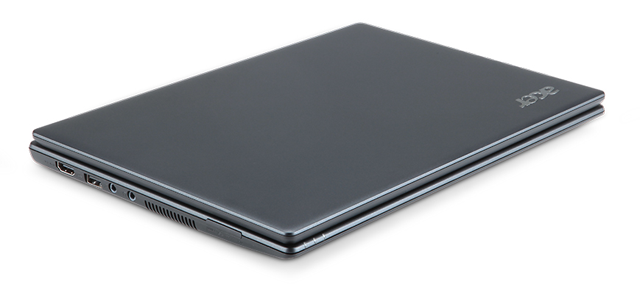
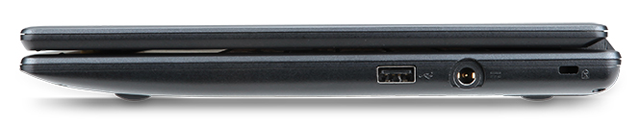
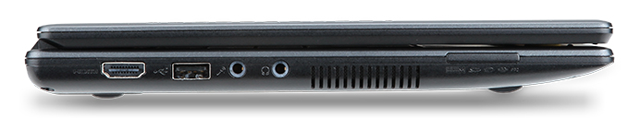
The Acer Chromebook is a netbook running Google’s Chrome OS. It has an 11.6 inch display, 1.66 GHz dual-core Intel Atom N570 processor, 16 GB SSD drive and 2 GB RAM, with 6 hours battery life. It is available in black.

Acer Chromebook running Google's Chrome OS

Acer Chromebook

The price of $349 is for the Wi-Fi only version. 3G will be an additional optional configuration.

Chromebooks will be available online June 15 in the U.S., U.K., France, Germany, Netherlands, Italy and Spain. More countries will follow in the coming months. In the U.S., Chromebooks will be available from Amazon and Best Buy and internationally from leading retailers.

Here are the main specifications:

  • 11.6″ HD (1,366×768) 16:9 Widescreen CineCrystalTM LED-backlit LCD
  • 1.66 GHz dual-core Intel Atom N570 processor
  • Acer Chromebook running Goolge's Chrome OS2GB RAM
  • 16GB SSD drive
  • 6 to 8 hours battery life
  • stereo speakers
  • 2 USB 2.0 ports
  • Acer Chromebook running Google's Chrome OS4-in-1 memory card slot
  • HDMI port
  • 11.6 x 8.6 x 0.8 inches
  • Acer Chromebook running Google Chrome OS2.95 lbs / 1.34 kg
  • A full-size keyboard
  • Multitouch touch pad
  • Built in dual-band 802.11 b/g/n Wi-Fi and World-mode 3G (optional)
  • 1.3 megapixel HD Webcam with noise cancelling microphone
  • Instant-on from standby, and an 8-second boot time