Archive for the ‘Review’ Category

Apple to introduce world’s first Thunderbolt display

Sunday, July 17th, 2011

The 27-inch 16:9 IPS monitor will be available at S$1,348 (incl GST) within the next two months.

Apple announces the world's first Thunderbolt display.

Apple announces the world's first Thunderbolt display.

The display features Thunderbolt I/O technology and serves as a docking station for a Mac notebook. With a single cable, users can connect a Thunderbolt-enabled Mac to the 27-inch Apple Thunderbolt Display and access its FaceTime camera, high quality audio, and Gigabit Ethernet, FireWire 800, USB 2.0 and Thunderbolt ports.

A single cable connects a Mac notebook to the Thunderbolt displayDesigned specifically for Mac notebooks, the new display features a thin aluminium and glass enclosure, and includes a MagSafe connector that charges a connected MacBook Pro or MacBook Air.

The 27-inch 16:9 IPS monitor will be available at S$1,348 (incl GST) within the next two months.With a 16:9 edge-to-edge glass design, the Thunderbolt Display uses IPS technology to provide a brilliant image across a wide 178 degree viewing angle. Any Thunderbolt-enabled Mac notebook can dock with the display to quickly and easily replicate a full-fledged desktop solution.

The Thunderbolt Display includes a built-in FaceTime HD video camera for video conferencing, a 2.1 speaker system for high quality audio, an integrated MagSafe charger to keep Mac notebooks charged, three USB 2.0 ports, one FireWire 800 port, one Gigabit Ethernet port and a Thunderbolt port for daisy chaining up to five additional Thunderbolt devices.

The Thunderbolt IPS display sports a high resolution of 2560 by 1440 and viewing angle of 178 degrees.

The Thunderbolt IPS display sports a high resolution of 2560 by 1440 and viewing angle of 178 degrees.

The Thunderbolt Display aspires to be the world’s first display to include Thunderbolt I/O technology.

The two 10-Gbps channels of data transfer for Thunderbolt is up to 12 times faster than FireWire 800 and up to 20 times faster than USB 2.0.Featuring two bi-directional channels with transfer speeds up to a blistering 10Gbps each, each Thunderbolt port delivers PCI Express directly to external peripherals such as high performance storage and RAID arrays, supports DisplayPort for high resolution displays and works with existing adapters for HDMI, DVI and VGA displays. Data transfer for Thunderbolt is up to 12 times faster than FireWire 800 and up to 20 times faster than USB 2.0.

Thunderbolt-based Macs with discrete graphics can drive two external displays giving professional users over 7 million additional pixels of display real estate and the ability to daisy chain additional Thunderbolt devices, as well as video and audio capture devices.

Two high-resolution Apple Thunderbolt Displays can be connected to the MacBook Pro.

Two high-resolution Apple Thunderbolt Displays can be connected to the MacBook Pro.

The Thunderbolt Display includes an ambient light sensor which automatically adjusts the display brightness based on external lighting conditions and uses only as much energy as necessary to provide an optimum viewing experience.

MacBook Air updated with Next Generation Processors, Thunderbolt I/O, Backlit Keyboard and Mac OS X Lion

Saturday, July 16th, 2011

With up to twice the performance of its predecessor, flash storage for instant-on responsiveness and a compact design, the MacBook Air starts at a suggested retail price of S$1,288 (incl GST) and is available from July 20, 2011.

Apple MacBook Air is available in 11-inch and 13-inch modelsMacBook Air is available in compact 11-inch and 13-inch models that feature a durable aluminium unibody enclosure measuring only 0.3 cm at its thinnest point and 1.7 cm at its thickest. Flash storage allows MacBook Air to turn on instantly and deliver fast data access, improved reliability and energy efficiency.

The 11-inch model weighs 1.08 kilograms and provides up to 5 hours of battery life, while the 13-inch weighs 1.35 kilograms and provides up to 7 hours of battery life.
The MacBook Air line of notebooks are slim and sleek in design
With the latest Intel Core i5 and Core i7 dual-core processors, the new MacBook Air is up to twice as fast as its predecessor. MacBook Air also features Intel HD Graphics 3000 and offers up to 4GB of 1333 MHz memory.

The left side of the MacBook Air houses the plugs for the MagSafe charger, USB, headphone and microphone.

The left side of the MacBook Air houses the plugs for the MagSafe charger, USB, headphone and microphone.

Thunderbolt I/O technology provides additional expansion possibilities to MacBook Air users. Through a single cable, users can connect to high performance peripherals and the new Apple Thunderbolt Display, a docking station for Mac notebooks. Thunderbolt can easily be adapted to support legacy connections such as FireWire and Gigabit Ethernet.

The right side of the MacBook Air houses the USB and Thunderbolt plugs.

The right side of the MacBook Air houses the USB and Thunderbolt plugs.

MacBook Air comes with a full size backlit keyboard and an glass Multi-Touch trackpad. The backlit keyboard uses a sensor to automatically detect a change in ambient lighting and adjusts the keyboard brightness according to the environment.

New Multi-Touch gestures are available as part of Mac OS X LionThe Multi-Touch trackpad supports Lion’s new Multi-Touch gestures such as momentum scrolling, tapping or pinching your fingers to zoom in on a web page or image, and swiping left or right to turn a page or switch between full screen apps.

MacBook Air features 802.11n Wi-Fi and Bluetooth 4.0 technologyMacBook Air also features a thin but brilliant, high resolution LED backlit display. Ultra-fast Wi-Fi, enables wireless download of apps from the Mac App Store, data back-up to Time Capsule and quick and easy file sharing using AirDrop. MacBook Air includes Bluetooth for wireless peripherals and two USB ports for easy connectivity for wired and wireless devices.

Every new MacBook Air comes with Mac OS X Lion, the latest Mac operating system, and iLife apps for creating and sharing photos, movies and music.

Pricing & Availability

The 11-inch and 13-inch MacBook Air are available for order on the Apple Store and Apple Authorised Resellers.

11-inch, 1.6 GHz MacBook Air
S$1,288 2 GB memory, 64 GB flash storage
S$1,588 4 GB memory, 128 GB flash storage
13-inch, 1.7 GHz MacBook Air
S$1,688 4 GB memory, 128 GB flash storage
S$2,088 4 GB memory, 256 GB flash storage

All the prices above include GST. Configure-to-order options and accessories include a 1.8 GHz Core i7 processor, additional flash storage, MacBook Air SuperDrive and a USB Ethernet Adapter.

Specifications for the Olympus PEN E-P3

Monday, July 4th, 2011

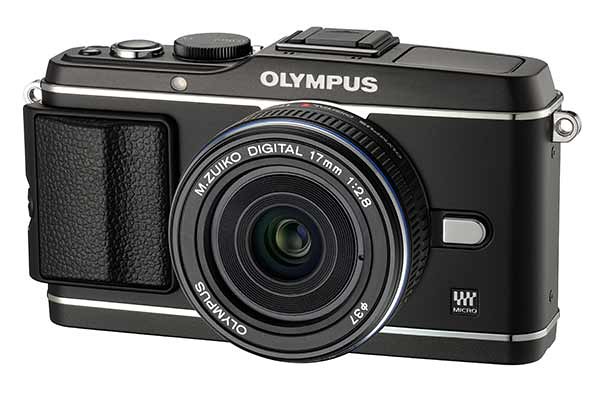
Here are the specifications for the latest flagship digital camera for the PEN series of mirrorless interchangeable lens DSLR from Olympus. Although it looks similar to its predecessor, the PEN E-P3 features near instantaneous autofocus speeds, enhanced image quality and a more ergonomical user interface. The camera comes in black, silver or white.

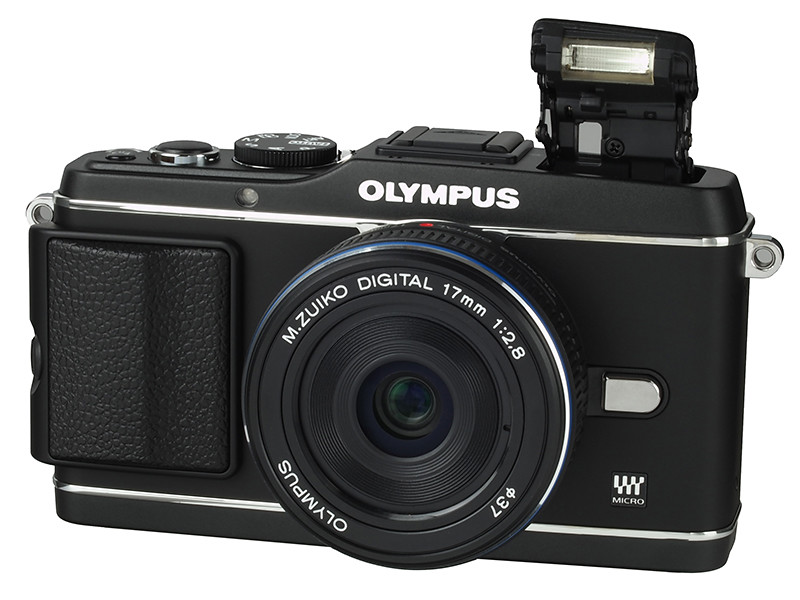
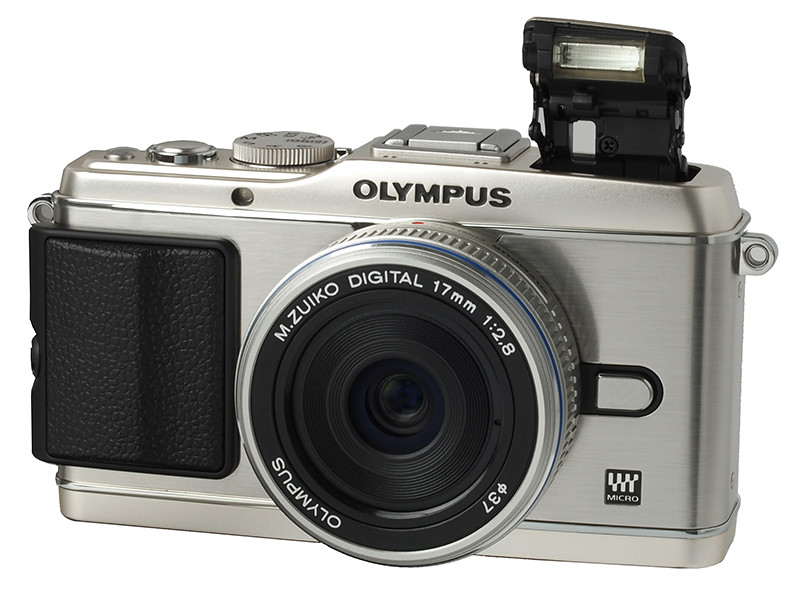
The svelte Olympus PEN E-P3 with a 17mm lens.

The svelte Olympus PEN E-P3 with a 17mm lens.

The Olympus PEN E-P3 is a 12.3-megapixel entry-level DSLR camera which is more compact than traditional DSLRs because the design leaves out the mirror that channels the view through the lens to an optical viewfinder on top of the camera.

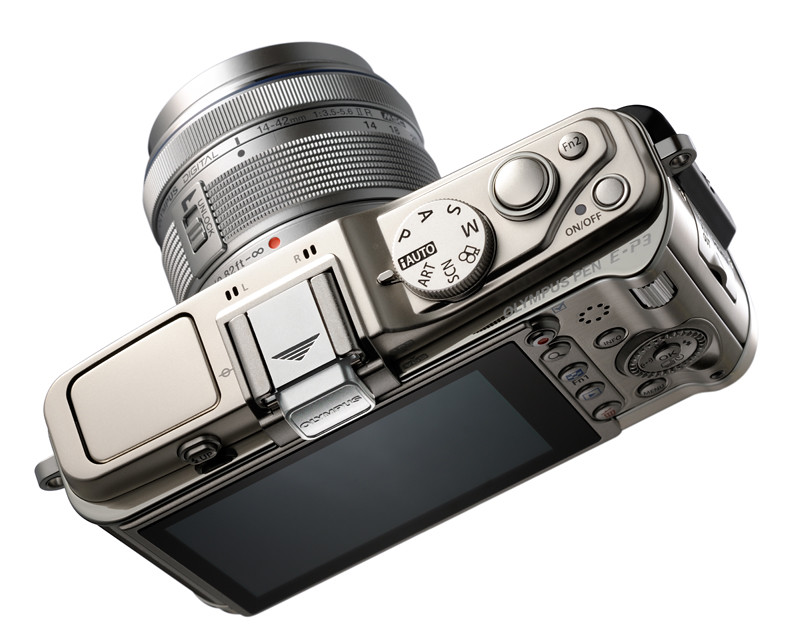
The LCD screen at the back of the camera shows a preview of the shot for framing and composition. An optional add-on electronic viewfinder is available for those who prefer to hold the camera to the face rather than at arms length.

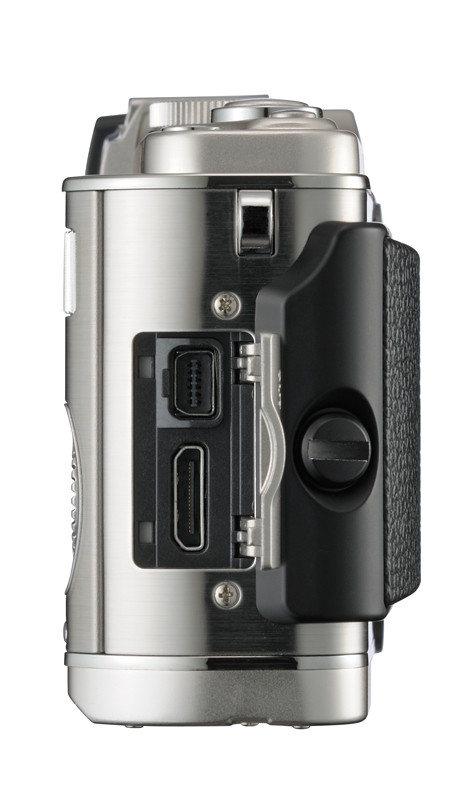
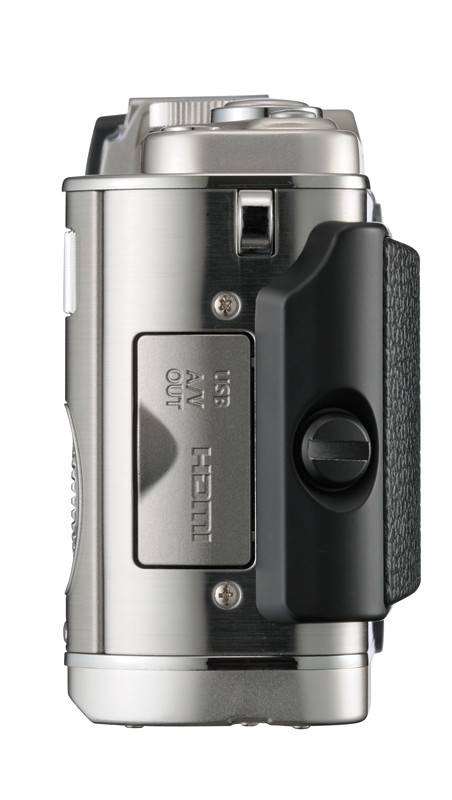
A multi-purpose USB/AV out/remote control socket, and a mini-HDMI connector for connecting to your TV.

A USB/AV out/remote control socket, and a mini-HDMI connector.

The micro four thirds format and size of the image sensor also contributes to the compactness, although some believe the smaller size of the sensor would slightly impact the image quality when compared with other DSLRs using the standard but slightly larger APS-C sized sensor.

The main highlight of the PEN E-P3 is the enhancement of the autofocus system, which has improved the autofocus speed by more than three times when compared to its predecessor.

I’ve tried it during the launch event for the product and the autofocus felt near instantaneous and impressive.

The details are below:

Main Specs
Price (Singapore) to be announced
Effective megapixels 12.3
Monitor 3-inch 3:2 OLED touch screen with 610k dots
Colours Black, Silver or White
Movie – HD 1280 x 720 @ 30fps (16:9)
– SD 640 x 480 @ 30fps (4:3)
The juicy details
Image stabilisation – Photo: “Supersonic Wave Drive” in-body sensor shift (up to 3 EV stops compensation)
– Video: Digital IS
Sensor 4/3 inch hi-speed Live MOS sensor
File format (Photos) JPEG, RAW, MPO (3D)
Largest photo size 4032 x 3024 pixels
Image aspect ratio 4:3, 3:2, 16:9, 1:1
Video recording AVCHD and AVI Motion-JPEG
1920 x 1080, 60i recording, 17 Mbps
Frame rate: 30 fps
Max length: 29 min, 4 GB
Image processor engine TruePic VI
Auto focus FAST AF system with 35-area multiple AF
(Imager contrast detection)
AF assist lamp Yes
Exposure modes iAuto, Program AE (with shift), P, A, S, M, Art Filter, Scene select
Sensitivity – Auto: ISO 200 – 12800
– Manual: ISO 100 – 12800
(adjustable in 1/3 EV step)
Metering modes Digital ESP (324-area multi-pattern metering), Centre-weighted average, Spot (1%)
AE Bracketing 2, 3, 5 or 7 frames
Exposure compensation Up to +/- 3 EV in 1/3, 1/2 or 1.0 steps
Shutter speed 1/4000 sec to 60 sec
WB Auto, Sunny, Shadow, Cloudy, Incandescent, Fluorescent, Flash, Custom
Art filters 10 (Pop Art, Soft Focus, Grainy Film, Pin Hole, Diorama, Dramatic, Pale & Light Color, Light Tone, Cross Process, Gentle Sepia)
Scene modes 23
Continuous shooting – Sequential (3 fps)
– Raw: max 8 frames
– JPEG: Unlimited until memory runs out
Self-timer 2 or 12 sec
Flash – Built-in pop-up (GN10 at ISO 200
– Hotshoe for external flash
Viewfinder Optional EVF
Orientation sensor Yes
Storage SD (SDHC, SDXC)
Dimensions 122 x 69.1 x 34.2 mm
Weight (excl battery and card) 275g / 9.2oz. (incl. Battery and card)
In the box Li-ion battery BLS-5, charger BCS-1, USB/Video multi cable, Shoulder strap, Software CD-ROM, Instruction manual.

First look at the Olympus PEN E-P3

Sunday, July 3rd, 2011
The PEN E-P3 - flagship model for the PEN series of mirrorless interchangeable lens cameras from Olympus.

The PEN E-P3 - flagship model for the PEN series of mirrorless interchangeable lens cameras from Olympus.

Externally similar to its predecessors, the PEN E-P3 has received a new sensor, image processing engine and the autofocus system has been tuned up to become lightning fast.

The PEN E-P3 is scheduled for release in Singapore on July 22, 2011 although the pricing has not been revealed yet. Online retailers such as Adorama is taking preorders for the PEN E-P3 at US$899 with M. Zuiko 14-42mm II R f/3.5-5.6 kit lens. The camera is available in black, white and silver. See the specifications here.

FASTer autofocus

Olympus claims that the new FAST (Frequency Acceleration Sensor Technology) autofocus (AF) system makes the E-P3 the camera to beat when it comes to AF speed. The FAST AF is achieved through the combination of a few innovations.

The PEN E-P3 - flagship model for the PEN series of mirrorless interchangeable lens cameras from Olympus.

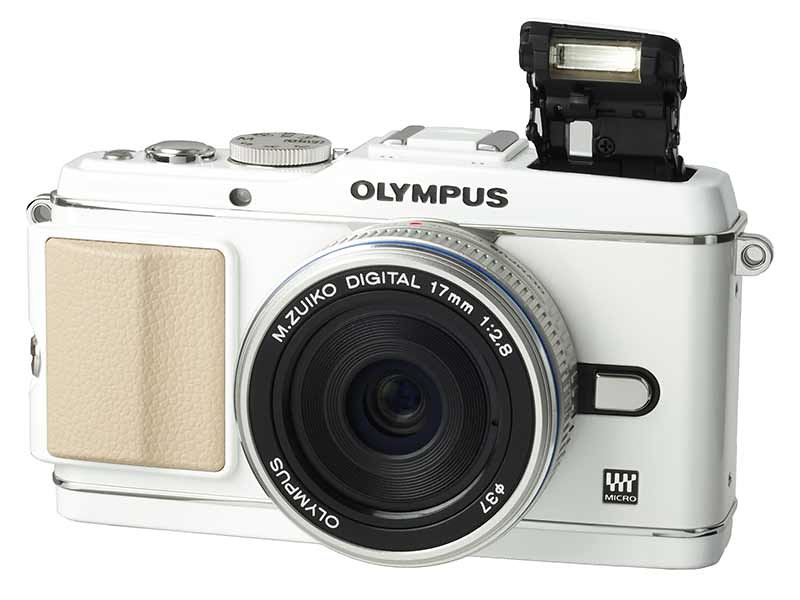
Three colours are available - black, silver and white.

Firstly, the Live MOS Sensor is driven at double the previous speed – 120 fps – so that image data can be obtained more quickly than with previous systems. Secondly, the speed of the AF computations that generate the contrast information from the image data – in order to determine the degree of focusing – has also been doubled. Thirdly, the speed of communication for controlling the lens motion during AF has been increased. Finally, the response time from pressing the shutter release to the start-up of AF system has been shortened.

Overall, the imager AF speed has become almost three times faster than before.

I tried out the camera during its launch on 30 June and found the AF was indeed much faster than its predecessors the E-P2 and E-P1 – even at low light. An AF illuminator light – inexplicably absent in previous models – has a range of 3m for low light situations.

The number of focus selection areas has been increased from 11 to 35, enabling detailed, pinpoint AF across a wider area than before. To capture a moving subject accurately, the group area selection can apply AF to a limited region compose of 3 vertical and 3 horizontal areas.

Design and UI

The PEN E-P3 - flagship model for the PEN series of mirrorless interchangeable lens cameras from Olympus.

The Olympus PEN E-P3 retains the retro design of the PEN series and looks similar to its predecessors.

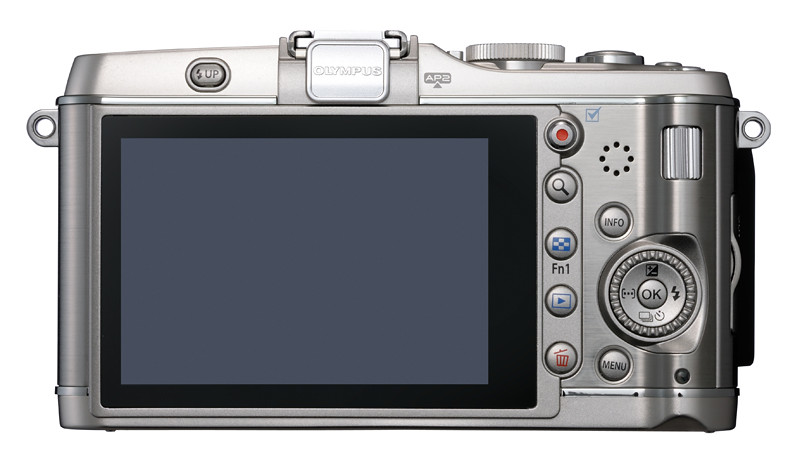
The 3-inch, 610k-dot OLED display is not only bright and sharp but features a touch screen that is easy to use – in fact addictive. Simply tap the main subject on the screen to prefocus, or focus and take the snapshot immediately. The font and graphic design of the user interface and menu system has been improved to become more readable and good-looking.

In terms of external design, its retro look is similar to its predecessors with a few design and functional differences. There are now two Function buttons and a direct movie-recording button – making camera control easier. A built-in GN10 (ISO 200) flash – absent in previous models – is now available. Two designs of detachable camera grips are available in white, black or silver. Alternatively, leave the grip at home for a minimalistic look, showing off the metallic finish on the E-P3 body.

Inside the camera

The PEN E-P3 - flagship model for the PEN series of mirrorless interchangeable lens cameras from Olympus.

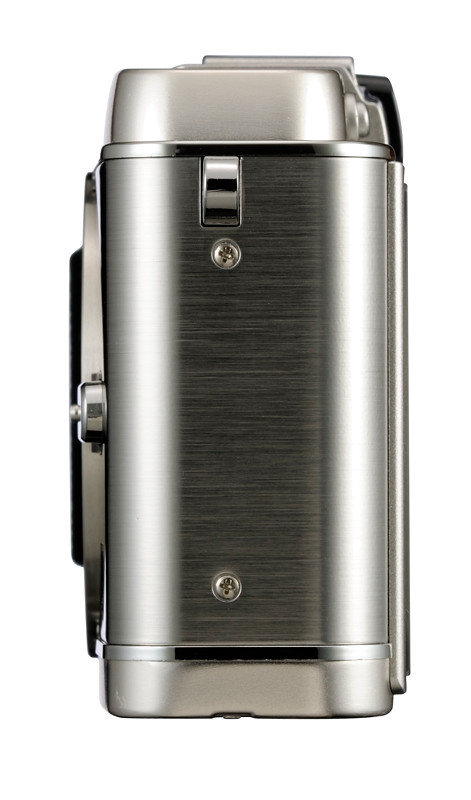
Sideviews of the Olympus PEN E-P3.

A new 12.3 megapixel Live MOS sensor in the micro four thirds interchangeable lens digital camera promises an enhanced image quality. 1080i60 full HD movies in AVCHD format are now possible as is high-sensitivity shooting at ISO12800.

The dual core processor allows live view on the LCD panel and image processing when a shot is taken to be executed in parallel, decreasing the blackout time after snapping each photo. This, together with the aforementioned FASTer AF gives the E-P3 a snappier feel and makes it more responsive – especially when taking multiple shots at a go.

The E-P3 now ships with 10 Art Filters – precanned special effects that are applied to the JPEG image when you snap a photo. This is two more than the E-P2 and four more than the E-PL3. Art Filter bracketing is now possible for recording multiple Art Filtered pictures with a single snapshot.

Two new Art Effects are added – “Starlight” and “White Edge”, as well as a new Art Filter variation called the “Pale & Light Colour II”. The Art Filters can be applied during full HD movie shooting and the 3D Art Filter is compatible with the new 3D Photo Shooting scene mode.

Image processing has been enhanced by incorporating the “Full Detail” processing algorithm used in the E-5, the flagship DSLR from Olympus. New “Real Colour Technology” targets the reproduction of colours that are difficult to accurately reproduce such as emerald green and yellow making the image pop.

The “Advanced Shadow Adjustment Technology” (ASAT) tries to correct backlit photos by brightening the backlit subject independently without blowing out the bright background.

Based on paper specifications and a short physical handling session, the Olympus E-P3 promises to be a much better performer than its predecessor, the E-P2, in terms of AF speed, image quality and camera operation, viz touch screen and enhanced button and menus.

Jay Chou designs notebook for ASUS

Friday, July 1st, 2011

What has Jay Chou, Asus, Intel and Bang & Olufsen have in common? The answer is a new limited edition N-series notebook computer from ASUS.

Jay Chou, renowned artist and songwriter, was appointed by ASUS as the Chief Designer of the N3, which features 2nd generation Intel Core processors and Sandy Bridge architecture that enhance both graphics and multitasking performance.

The notebook also comes with the SonicMaster audio technology which was co-developed last year by a dedicated ASUS team and leading sound experts from Bang & Olufsen ICEpower.

Jay Chou collects his honorary staff pass from ASUS Chairman Jonney Shih

Jay Chou collects his honorary staff pass from ASUS Chairman Jonney Shih.

The notebook was launched in a media conference in Taipei by Jay Chou and ASUS Chairman Jonney Shih. Hoping to blend technology with art, Shih believes that “this strong partnership <with Jay Chou> will continue to bring more exciting products to our customers”.

The notebook is estimated to be available in Singapore by the first half of July 2011 and will retail for S$1298 (GST included).

Unique design inspired by traditional and modern motifs

ASUS Chairman Jonney Shih and celebrity Jay Chou launches the limited edition N series notebook.

ASUS Chairman Jonney Shih and celebrity Jay Chou launches the limited edition N series notebook.

Jay Chou transformed his passion and devotion for music into innovative notebook design by using music notes, sheet music, piano concepts and other musical icons as inspiration for a truly unique notebook. The combination of modern “J-style” text-wrapping with a classical Chinese blue and white porcelain finish infuses the notebook with strong and diverse Asian aesthetics.

“It has been a tremendous pleasure to work with the ASUS Design Center.  They were able to translate and transform my musical inspirations onto the N series notebook product design and functionality.  Every detail on the N series perfectly portrays my personal taste and multimedia lifestyle,” said Jay Chou.

Enhanced sight and sound

The Intel chips in the N3 upgrade graphics and boost flexible multitasking performance while optimizing power consumption. SonicMaster incorporates grand, theater-like acoustics with the constrained physical dimensions of a notebook PC.

The audio technology delivers the clear treble and resonant bass on any portable PC. SonicMaster also enables wide-reaching and powerful surround-sound effects, creating theater-grade and highly lifelike audio.

Below are the main specifications of this collector’s item.

Model: N43SL
Processor: Intel Core i5-2410M (2.3GHz)
Operating system: Genuine Windows 7 Home Premium (64-bit)
Chipset: Mobile Intel HM65 Express chipsets
RAM: 4GB DDR3 RAM
HDD: 640GB SATA HDD (5400rpm)
Display: 14.0” LED-Backlit (1366×768)
VGA: NVIDIA GeForce GT 540M with 2GB dedicated VRAM
ODD: SuperMulti Double Layer
WLAN: Integrated 802.11b/g/n + Bluetooth
Audio: Audio by Bang & Olufsen ICEpower & SonicMaster technology
Weight: 2.4Kg (with 6-cell battery)
Dimension: 35.0(W) x 24.0(D) x 3.30 ~ 3.70 (H) cm
RSP: $1,298 (GST Included)
Availability: Estimated 1st – 2nd week July 2011

Olympus launches PEN E-P3, E-PL3 and E-PM1

Thursday, June 30th, 2011

Olympus has just launched, worldwide, its slew of new cameras, lenses and accessories. The three new camera models include updates to the PEN E-P2 and E-PL2, as well as the new E-PM1 with a similar form factor (for the body) as the Olympus XZ-1. New and repackaged lenses are also being launched.

The new Truepic VI engine and sensor promise enhanced image quality and, together with the new auto-focusing system, deliver much faster auto-focus  on these new cameras.

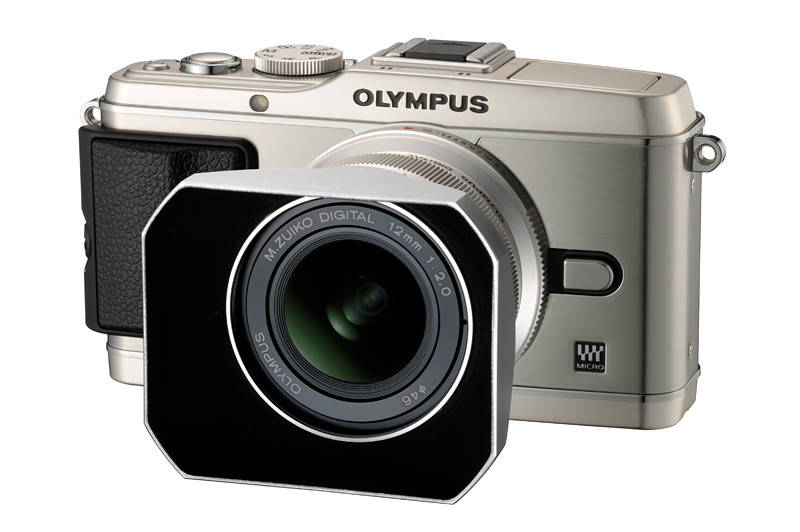
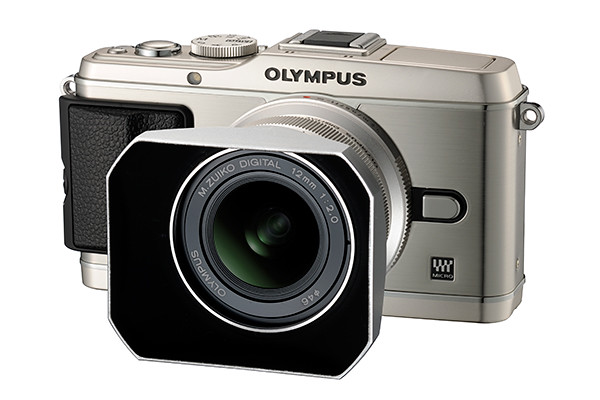
Olympus PEN E-P3, with the 12 mm, f/2.0 lens.

Olympus PEN E-P3, with the 12 mm, f/2.0 lens.

Olympus PEN E-PL3, with the 40-150 mm II R kit lens and retro lens hood.

Olympus PEN E-PL3, with the 40-150 mm II R kit lens and retro lens hood.

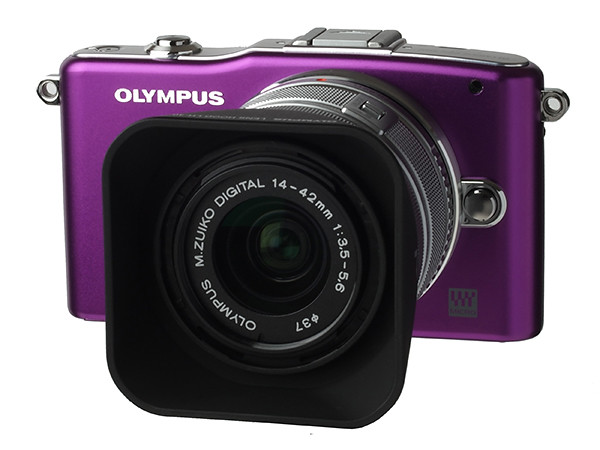
Olympus PEN E-PM1, with the 14-42 mm II R kit lens and retro lens hood.

Olympus PEN E-PM1, with the 14-42 mm II R kit lens and retro lens hood.

The Olympus PEN E-P3 is here. And some of its new powerful features have also been made available to its “Lite” and “Mini” cousins: the E-PL3 and E-PM1 respectively.

Two new lenses – a 12 mm f/2.0 lens and a 45 mm f/1.8 lens – have also been introduced together with the new cameras. At the same time, two existing kit lenses has been repackaged into the 14-42 mm II R and the 40-150 mm II R to match the design of the new cameras, although the functionality remains unchanged. A new external wireless-capable flash – FL300R – was also unveiled.

The PEN E-P3 and the 12 mm f/2.0 lens is scheduled for release in Singapore on July 22, 2011, while the other camera models and lenses will only be available later. As of today’s launch, only the E-P3 was ready for shooting, while the E-PL3 was not ready to be powered on. For the E-PM1, only a mock-up was viewable in a display case.

Prices in Singapore are yet to be determined, although Adorama is taking preorders online for the PEN E-P3 (US$899 with kit lens), the 12 mm f/2.0 lens (US$799) and the 45 mm f/1.8 lens (US$399).

The launch in Singapore at the National Geographic Store in VivoCity is one of 6 venues worldwide holding the event at the same time.

“The much faster autofocus speed is achieved through the combination of four components making up the FAST <Frequency Acceleration Sensor Technology> autofocus system introduced in these new cameras,” Terada Toshiyuki (寺田 利之), Group Leader of the Product and Marketing Planning Group in Olympus told me.

The long awaited worldwide product launch from Olympus.“This includes a new LiveMOS sensor which is driven twice as fast as current sensors, faster calculation of the contrast detection autofocus, faster communications between the camera and the lens, and reduction of the lag in activating autofocus when the shutter release button is pressed,” elaborated the Tokyo-Shinjuku based guest.

Trying out the E-P3 unit myself, I found the auto-focus almost instantaneous – even in low-light. It certainly feels much faster than the previous incarnations of cameras in the PEN series.

I found the touch-screen really addictive and easy to use – simply point at the subject you want to focus on, and the camera focuses quickly on it and takes the snapshot. No more fiddling with buttons and menu systems just to select from a limited number of focus points.

You can also use the touch screen to pre-focus in prefocus mode – simply tap the main screen where the main subject is and the camera focuses but does not release the shutter. Press the regular shutter release button to take the snapshot.

The previous PEN cameras came with auto-tracking of subjects. This works with the touch-screen as well.

Olympus claims that image quality has also been improved with the new sensor and Truepic VI engine. More realistic colour reproduction and selective brightening of back-lit subjects without the addition of noise are some of the advanced features touted.

Olympus set for major product launch tomorrow

Wednesday, June 29th, 2011

Olympus will announce a slew of new products tomorrow (Thursday June 30th) at 6 am London time (1 pm Singapore time). Expect the E-P3, E-PL3, E-PM1 and a slew of new and repackaged lens that leverage a new Truepic VI engine and faster electronic connections to provide faster auto-focus.

Is this what the new Olympus E-P3 looks like?

Is this what the new Olympus E-P3 looks like? Photo from www.43rumors.com

Olympus has been gearing up towards tomorrow’s launch event at multiple venues worldwide. There is much speculation as to what will be launched. Here are some sneak peeks. Check back for the actual specs tomorrow.

Is this what the new Olympus E-PM1 looks like?

Is this what the new Olympus E-PM1 looks like? Photo from www.43rumors.com

The new Truepic VI engine promises to improve the auto-focus speed tremendously, compared to existing Olympus PEN cameras.

New camera models

  • E-P3. New 12 megapixel sensor with dual-processor  Truepic VI engine. ISO 100 to 12,800.
  • E-PL3. Same sensor and af speed as the E-P3.
  • E-PM1. Similar compactness as the Olympus XZ-1 but without any tilt screen nor built-in flash.

New lenses

  • 12 mm f/2.0 lens. Micro Four Thirds High Grade lens made in Japan. Full metal construction with distance scale. Filter size 46 mm with minimum focusing distance at 20 cm.
  • 45 mm f/1.8 lens. No macro.

Reworked lenses

  • 14-42 mm II R. Same price and optical performance as the current 14-42mm lens but with a much faster autofocus performance.
  • 40-150 mm II R. Same price and optical performance as the current 40-150mm lens but with a much faster autofocus performance.

Accessories

  • FL-300R
  • External EVF

BlackBerry PlayBook Tablet available in Singapore from 23rd June

Monday, June 20th, 2011

Three versions of the BlackBerry PlayBook from Research In Motion (RIM) will be available this Thursday, June 23, 2011, from SingTel, M1 and Starhub, as well as a number of nation-wide retail stores.

The recommended retail prices for the three Wi-Fi only versions are as follows (GST of 7% included):

  • 16GB: $668SGD
  • 32GB: $798SGD
  • 64GB: $928SGD

Starting today, customers can place orders for the BlackBerry PlayBook. The full list of retailers offering customers the ability to preorder is available here.

Main BlackBerry PlayBook specifications are as follows:

  • 7″ 1024×600 WSVGA capacitive LCD touch screen
  • 0.9 lbs (425g) and 5.1” x 7.6” x 0.4” (130mm x 194mm x 10mm)
  • 1 GHz dual-core processor
  • BlackBerry® Tablet OS with support for symmetric multiprocessing
  • MP3, AAC and WMA audio playback
  • Support for high resolution video playback (H.264, MPEG4, WMV)
  • 1080p HDMI output
  • Dual 1080p HD cameras for video conferencing and video capture (3MP front and 5MP rear)
  • 1 GB RAM memory
  • Up to 64 GB internal storage (16, 32 and 64 GB models)
  • GPS, Orientation Sensor (Accelerometer), 6-Axis Motion Sensor (Gyroscope), Digital Compass (Magnetometer)
  • Stereo speakers and stereo microphones
  • Wi-Fi (802.11 a/b/g/n) connectivity
  • Bluetooth® 2.1+EDR support

Apple previews iOS 5 at WWDC 2011

Tuesday, June 7th, 2011

The new version of iOS for Apple’s iPhone, iPad and iPod touch includes Notification Center, iMessage, Newsstand, Twitter integration among 200 New Features.

iOS 5 for Apple iPhone, iPad and iPod touchAt the Worldwide Developers Conference (WWDC) 2011 today, Scott Forstall – Apple’s senior vice president of iOS – paraded 10 of the promised 200 new features for the iPhone, iPad, and iPod Touch. Although customers will only be receiving the update in autumn, developers will get their version of iOS 5 today.

Main new iOS 5 features

Notification Center, a new way to easily view and manage notifications in one place without interruption.

iMessage, a new messaging service that lets users easily send text messages, photos and videos between all iOS devices.

Newsstand, a new way to purchase and organise a user’s newspaper and magazine subscriptions.

PC Free feature, iOS 5 users can activate and set up their iOS device right out of the box and get software updates over the air with no computer required.

“iOS 5 has some great new features, such as Notification Center, iMessage and Newsstand and we can’t wait to see what our developers do with its 1,500 new APIs,” said Steve Jobs, Apple’s CEO. “Perhaps iOS 5’s paramount feature is that it’s built to seamlessly work with iCloud in the Post PC revolution that Apple is leading.”

The details

With iOS 5 and iCloud, you just enter your Apple ID and password and iCloud will seamlessly integrate with your apps to automatically and wirelessly keep all of your mail, contacts, calendars, photos, apps, books, music and more, up-to-date across all your devices without ever having to connect to a computer.

Notification Center in Apple iOS 5Notification Center provides iOS 5 users with an innovative way to easily access all notifications―text messages, missed calls, calendar alerts, app alerts and more, all in one place, from anywhere in iOS 5. When they arrive, notifications appear briefly at the top of the screen without interrupting what you’re doing. With one swipe you can see all your notifications, and a simple tap will take you right to its app for more detail. Notifications also appear on the lock screen, with the ability to be taken to the notifying app with just one swipe. This is similar to the consolidated notification alert bar and window on newer BlackBerry devices like the Torch.

Newsstand in Apple iOS 5Newsstand is an easy-to-organise bookshelf displaying the covers of all your newspaper and magazine subscriptions in one place. A new section of the App Store features just subscription titles, and allows users to quickly find the most popular newspapers and magazines in the world. For subscribed titles, new issues appear in the Newsstand and are updated automatically in the background so you always have the latest issue and the most recent cover art.

Safari gets new features in iOS 5Safari sees new features for the browser in iOS 5. Safari Reader will strip down poorly formatted pages into an RSS-like view, and provides a link that allows you to e-mail the entire text of a story from within Safari. Reading List lets you save articles to read later and they automatically show up on all your iOS devices. Tabbed browsing is now available on the iPad making it easy to flip between multiple web pages on the tablet.

Twitter integration in Apple iOS 5iOS 5 includes built-in Twitter integration, so you can sign in once and then tweet directly from all your Twitter-enabled apps, including Photos, Camera, Safari, YouTube and Maps with a single tap. New APIs give third party developers the ability to take advantage of the single sign-on capability for their own iOS 5 apps.

iMessage in Apple iOS 5iMessage in iOS 5 brings the functionality of iPhone messaging to all of your iOS devices―iPhone, iPad and iPod touch. Built right into the Messages app, iMessage allows you to easily send text messages, photos, videos or contact information to a person or a group on other iOS 5 devices over Wi-Fi or 3G. iMessages are automatically pushed to all your iOS 5 devices, making it easy to maintain one conversation across your iPhone, iPad and iPod touch. iMessage also features delivery and read receipts, typing indication and secure end-to-end encryption.

The new Reminders app helps you manage your tasks; create and group related tasks together; and set time or location-based reminder alerts, priorities and due dates, so you can be reminded of a task as its deadline approaches, or when you arrive or depart a given location. Reminders can also be viewed in iCal and Outlook and are updated automatically.

New features in the Camera and Photos apps give you instant access to the camera right from the lock screen, and you can use the volume-up button to quickly snap a photo. Optional grid lines help line up your shot and a simple tap locks focus and exposure on one subject. The new Photos app lets you crop, rotate, enhance and remove red-eye, and organise your photos into albums right on your device to share them on the go.

PC Free feature in Apple iOS 5With the new PC Free feature, iOS 5 users can activate and set up their iOS device right out of the box with no computer required, and iOS software updates are delivered over the air and installed with just a tap. Wi-Fi Sync in iOS 5 transfers and backs up your content securely over SSL and wirelessly syncs purchased content from your device to your iTunes library.

Additional new features in iOS 5

Game Center in Apple iOS 5Game Center, now with the ability to add photos to your profile, purchase new games from within the Game Center app and easier ways to find friends and new games.

Mail enhancements which include the ability to compose messages using draggable addresses, and a new formatting bar with bold, italics, underline and indention controls; and

• a system-wide split keyboard to make it even easier to type on your iPad.

Availability

Beta software and SDK for Apple iOS 5The iOS 5 beta software and SDK are available immediately for iOS Developer Program members at developer.apple.com. iOS 5 will be available as a free software update for iPhone 4, iPhone 3GS, iPad 2, iPad, iPod touch (fourth generation) and iPod touch (third generation) this autumn. Some features may not be available on all products.

Steve Jobs unveils Apple’s new iCloud at WWDC 2011

Tuesday, June 7th, 2011

Steve Jobs personally unveiled the much anticipated iCloud during the keynote address at the annual Worldwide Developers Conference (WWDC) 2011 in San Francisco.

ON 6 June 10 am PST (local time 7 June, 1 am), Steve Jobs revealed the set of free cloud services that promises to work seamlessly with applications on the iPhone, iPad, iPod touch, Mac or PC to automatically and wirelessly store a user’s content in iCloud and again automatically and wirelessly push it to all of the same user’s devices. When anything changes on any one of the devices, all of the user’s other devices are wirelessly updated almost instantly.

New Apple iCloud services unveiled by Steve Jobs at WWDC 2011“Today it is a real hassle and very frustrating to keep all your information and content up-to-date across all your devices,” said Steve Jobs, Apple’s CEO. “iCloud keeps your important information and content up to date across all your devices. All of this happens automatically and wirelessly, and because it’s integrated into our apps you don’t even need to think about it—it all just works.”

iCloud services

• The former MobileMe services — Contacts, Calendar and Mail — are all completely re-architected and rewritten to work seamlessly with iCloud. Users can share calendars with friends and family, and the ad-free push Mail account is hosted at me.com. A user’s inbox and mailboxes are kept up-to-date across all of the user’s iOS devices and computers.

New Apple iCloud services unveiled by Steve Jobs• The App Store and iBookstore can now download purchased iOS apps and books to all a user’s devices, not just to the device they were purchased on. Simply tapping the iCloud icon will download any apps and books to any iOS device (up to 10 devices) at no additional cost. The App Store and iBookstore now let a user see his/her purchase history.

• iCloud Backup automatically and securely backs up a user’s iOS devices to iCloud daily over Wi-Fi when the iPhone, iPad or iPod touch is charged. Backed up content includes purchased music, apps and books, Camera Roll (photos and videos), device settings and app data. If a user replaces an iOS device, simply entering his Apple ID and password during setup will prompt iCloud to restore the new device.

iCloud Storage• iCloud Storage seamlessly stores all documents created using iCloud Storage APIs, and automatically pushes them to all of a user’s devices. When document is altered on any device, iCloud automatically pushes the changes to all the other devices. Apple’s Pages, Numbers and Keynote apps are already using iCloud Storage. Users get up to 5GB of free storage for their mail, documents and backup — and this does not include the storage for music, apps and books purchased from Apple, as well as the storage required by Photo Stream. Users will be able to buy even more storage, with details announced when iCloud ships this fall.



• iCloud’s Photo Stream service automatically uploads the photos taken or imported on any of your devices and wirelessly pushes them to all of the user’s other devices and computers. Imagine taking a bunch of photos with your iPhone at a birthday party and seeing them ready to share on your iPad when you return home. Photo Stream is built into the photo apps on all iOS devices, iPhoto on Macs, and saved to the Pictures folder on a PC. To save space, the last 1,000 photos are stored on each device so they can be viewed or moved to an album to save forever. Macs and PCs will store all photos from the Photo Stream, since they have more storage. iCloud will store each photo in the cloud for 30 days, which gives users ample time to connect devices to iCloud and automatically download the latest photos from Photo Stream via Wi-Fi.

• iTunes in the Cloud lets you download previously purchased iTunes music to all of your iOS devices at no additional cost, and new music purchases can be downloaded automatically to all your devices. In addition, music not purchased from iTunes can get gain an improvement in quality by using iTunes Match, a service that replaces your music with a 256 kbps AAC DRM-free version if the service can match it to the over 18 million songs in the iTunes Store. It makes the matched music available in minutes (instead of weeks to upload your entire music library), and uploads only the small percentage of unmatched music. iTunes Match will be available this autumn (only in the US) for a US$24.99 annual fee. Apple today is releasing a free beta version of iTunes in the Cloud, without iTunes Match, for iPhone, iPad and iPod touch users running iOS 4.3. iTunes in the Cloud will support all iPhones that iOS 5 supports in autumn.

Apple is ready to ramp iCloud in its three data centers, including the third recently completed in Maiden, NC. Apple has invested over $500 million in its Maiden data center to support the expected customer demand for the free iCloud services.

Pricing & Availability

The iCloud beta and Cloud Storage APIs are available immediately to iOS and Mac Developer Program members at developer.apple.com. iCloud will be available this autumn concurrently with iOS 5. Users can sign up for iCloud for free on an iPhone, iPad or iPod touch running iOS 5 or a Mac running Mac OS X Lion with a valid Apple ID. iCloud includes 5GB of free cloud storage for Mail, Document Storage and Backup. Purchased music, apps, books and Photo Stream do not count against the storage limit. iTunes Match will be available for US$24.99 per year (US only).

iTunes in the Cloud is available today in the US and requires iTunes 10.3 and iOS 4.3.3. Automatic download of apps and books is available today. Using iCloud with a PC requires Windows Vista or Windows 7. Outlook 2010 or 2007 is recommended for accessing contacts and calendars.