Posts Tagged ‘scan’

New printer: HP ENVY120 e-All-in-One multifunction inkjet

Monday, April 1st, 2013

HP today unveiled the new HP ENVY120 e-All-in-One – an inkjet printer with a see-through scan preview lid and paper trays that extend only during printing.

RRP: S$399 (incl. GST). Available in Singapore now.

HP ENVY120 e-All-in-One multifunction inkjet printer - S$399 in Singapore.

HP ENVY120 e-All-in-One multifunction inkjet printer – S$399 in Singapore.

The HP ENVY120 e-All-in-One allows home users to scan, copy, access the web and print premium lab-quality photos and everyday documents.

The HP ENVY120 e-All-in-One multifunction inkjet has a see-through scan preview lid and retractable paper tray.

See-through scan preview lid and retractable paper tray.

It features ePrint, helping users to save time and enjoy more flexibility in printing from virtually anywhere with a smartphone, tablet or a PC.

It also has wireless direct printing capability that enables users to print without going through a router.

The front USB port is optimized for charging USB-compatible mobile devices.

The printer also sports quiet acoustics and an auto-retracting paper tray when loading paper and picking up print-outs.

“The HP ENVY120 e-All-in-One printer offers the flexibility of printing from multiple mobile devices while being an attractive showpiece in the living room,” said Serena Yong, General Manager, Printing and Personal Systems, HP Singapore.

Via the large 4.33-inch color touchscreen, users can access and download free apps from HP and partners to create, share, and print puzzles, coloring pages, and more.

Additionally, users can scan documents and photos to their email directly.

Families using the HP ENVY120 e-All-in-One can reduce their environmental impact with this PVC-free printer that also reduces the use of paper with automatic two-sided printing and is ENERGY STAR qualified.

Below are the tech specs for the HP ENVY 120 eAiO printer.

(more…)

Review: HP Photosmart 7520 e-All-in-One inkjet photo printer

Sunday, March 24th, 2013

If you’re a photography enthusiast looking for lab-quality prints at home, as well as copy, scan and fax capabilities for your home office, check out this duplex A4 inkjet printer that comes with wireless connectivity.

RRP: S$339 (incl. GST).

HP Photosmart 7520 e-All-in-One inkjet photo printer.

HP Photosmart 7520 e-All-in-One inkjet photo printer.

The Photosmart 7520 e-All-in-One printer is HP’s top all-in-one home printer for lab-quality photos.

Other models in the Photosmart series of AiO printers are the Photosmart 6520 and 5520.

Photo quality

The Photosmart 6520 and 5520 uses only four ink cartridges (Cyan, Magenta, Yellow and Matt Black).

The Photosmart 7520, however uses an additional ink cartridge – Photo Black – that’s dedicated to printing photos, and which enhances the quality of photo prints.

The print quality on HP’s Photo Paper was superb, with vivid accurate colour and no sign of banding.

What I was particularly impressed with was the print quality on normal paper, be it from a digital file or from a photocopy.

The copy looked identical to the original for both photos and colour illustrations.

Print quality for text documents and powerpoint graphics was also very good, although not as fast and pro-looking as most laser printers.

My Say:
The Photosmart 7520 e-AiO is great for families that print lots of photos, and needs to copy, scan and fax as well. Photo print quality is top-notch, while its wireless connectivity makes it a breeze to share the device between computers, tablets and smartphones in the home office.

(more…)

Tech Trend 2013 – Why laser printers are better than inkjet printers

Tuesday, March 5th, 2013

With the prices of laser printers becoming more affordable, many home and small offices are choosing to buy laser printers to enjoy the more economical print per page costs, faster speed and professional document print quality.

I reviewed an S-LED printer (DocuPrint M255 z) from Fuji Xerox last week and was curious how S-LED technology worked. Both LED and Laser involve Page Printing, utilising similar technology – electrophotography.

I reviewed an S-LED printer (DocuPrint M255 z) from Fuji Xerox last week and was curious how its S-LED technology worked. Both LED and Laser involve Page Printing, utilising similar technology – electrophotography.

Laser printers are the workhorse of the office where large numbers of prints are made. This is because they are fast, produce professional print quality for documents, and most importantly – print per page is much cheaper than the inkjet printer at home.

LED printers are also known as laser-class printers. S-LED print head technology keeps the advantages of conventional LED's mechanical reliability and compact design while improving print quality and reliability.

LED printers are also known as laser-class printers. S-LED print head technology keeps the advantages of conventional LED’s mechanical reliability and compact design while improving print quality and reliability.

Only problem is – they used to be bulky and were much more expensive than inkjets. So home and small offices who are budget conscious tend to use inkjets instead, especially if the quantity of prints is small.

Xerox developed the industry’s first laser printer in 1977, offering a lower cost, reliable, and high print quality printer.

Today, laser technology is a sophisticated printing technology, providing fast printing, quality finishing and easy operation advantages.

Fuji Xerox was voted on HardwareZone as the Best LED Printer Brand 2013 – Readers Choice, and Best SOHO Multi-Function Printer (Editors Choice) DocuPrint M355 df. I asked the company how the laser printer compares with an inkjet printer today.

Pros and cons of a laser printer and inkjet printer.

Pros and cons of a laser printer and inkjet printer. Click to enlarge.

The above is their qualitative comparison against a generic inkjet printer. What everybody already knows, of course, is that the laser printer trounces the inkjet for printing large volumes at very fast speed.

36,000 pages over 3 years. *Warranty period of 4 years – 2-year standard (labour+parts) + 2-year limited (parts only) warranty including replacement of drum cartridge.

36,000 pages over 3 years. *Warranty period of 4 years – 2-year standard (labour+parts) + 2-year limited (parts only) warranty including replacement of drum cartridge. Click to enlarge.

In terms of Total Cost of Ownership (TCO), above is comparison chart for a high usage rate of 1,000 pages per month over 3 years, as well as a relatively low usage rate of 50 pages per month below.

Even for a low throughput of only 50 pages per month over 3 years, a laser could be more economical than an inkjet.

Even for a low throughput of only 50 pages per month over 3 years, a laser could be more economical than an inkjet. Click to enlarge.

In both cases, Fuji Xerox believes laser printers incur a lower TCO than inkjets.

Summing up the charts, there are savings of over 60%, even with low scale of printing of only 50 pages a month over a period of 3 years. The savings increases with the volume of printing as seen in chart 2 of over 36,000 pages in 3 years.

You can enjoy these savings too, by using a laser printer.

Laser versus Inkjet technologyInkjet printing creates a digital image by dropping spots of ink onto paper; laser printers produce digital images by scanning a laser beam across photoreceptors.

Laser printers work in a dramatically different manner. A laser projects the image of a document onto the printing drum, which is electrically charged. This image is then sprayed with dry ink, or toner, which sticks to the charged areas. The drum is then rolled onto paper and the ink is fused to the paper by a heat source.

This printing process differs dramatically from inkjets because the entire document is loaded into the printer, rather than in a continuous stream, as is the case with inkjets. This difference makes the laser printer ideal for entirely different printing needs than the inkjet.

Review: Fuji Xerox DocuPrint M255 z multifunction desktop printer

Thursday, February 21st, 2013

The DocuPrint M255 z is a four-in-one multifunction machine that prints (monochrome laser), copies, scans (with OCR), and faxes.

Targeted towards small businesses or the home office, it is priced at S$399 (incl. GST).

Fuji Xerox DocuPrint M255 z S-LED Multifunction Desktop Printer (RRP:S$399).

Fuji Xerox DocuPrint M255 z S-LED Multifunction Desktop Printer (RRP:S$399).

I used the DocuPrint M255 z for two weeks and found it to be easy to set up, churned out good print quality, and felt faster than its specs suggested.

Although it’s labelled a desktop printer, it does take up the better half of a regular work desk – but that’s no surprise since it’s a multifunction machine that not only prints, but copies, scans and faxes as well.

It’s no bulkier than other office multifunction laser printers that I’ve used from other makes.

The control panel looks busy with plenty of buttons. Once you get the hang of it, the user-interface is actually quite easy to use.

The control panel looks busy with plenty of buttons. Once you get the hang of it, the user-interface is actually quite easy to use.

The DocuPrint M255 z is able to print double-sided, saving much time and paper cost. Most importantly to me, that makes it all the more environmentally friendly.

The printer has a fixed drum feature that means that there is only one consumable to replace, further keeping the cost of ownership down.

Print resolution is 1,200 x 1,200 dpi and I had no complaints with the print quality – be it text documents or black-and-white printouts of graphics, illustrations, and photos in black-and-white.

A toner save mode provides the option of using uses less toner per page. Although the printout was slightly fainter, I found that the printout was still crisp, sharp and readable.

One might not even notice the difference if not told that toner save mode is used.

My say:
Designed for small and home offices (SOHOs), the affordable S$399 DocuPrint M255 z churns out good print quality while keeping the cost of ownership affordable for the budget conscious who don’t want to compromise on print quality.

Print speed is up to 30 pages per minute but it certainly feels much faster – at least compared with what I’m used to. It’s like the machines sucks in paper from the feeder and spits it out almost instantaneously, albeit rather vehemently.

(more…)

Review: HP Officejet Pro 8600 Plus e-All-in-One inkjet printer

Saturday, January 5th, 2013

If you’re looking for a capable workhorse for your home office, this duplex A4 inkjet printer gives you the full range of print, copy, scan and fax capabilities you’ll need.

Print quality is good, operation is simple and fast – but make sure you have enough space for it.

RRP: S$499 (incl. GST).

HP Officejet Pro 8600 Plus e-All-in-One inkjet prints up to 20 ppm in black, and 16 ppm in colour.

HP Officejet Pro 8600 Plus e-All-in-One inkjet prints up to 20 ppm in black, and 16 ppm in colour.

The print quality of the Officejet Pro 8600 Plus  is excellent. Text documents look as if they were printed by a laser printer, while photos (printed on glossy photo paper) were crisp and vibrant.

You’ll be hard put to tell they were not printed on a dedicated photo printer.

I tested the photo-print quality by printing full A4 sized outputs on glossy photo paper.

I was rather impressed as I didn’t expect a multi-function printer meant for office-use to produce photo prints almost as well as a dedicated photo printer.

(more…)

Fuji Xerox DocuCentre S2010 & S1810

Tuesday, May 29th, 2012

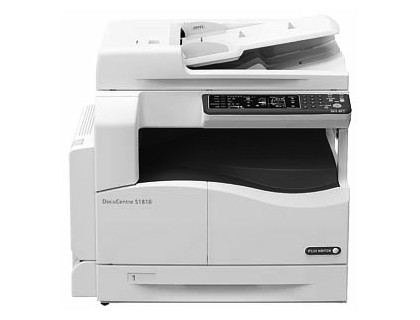
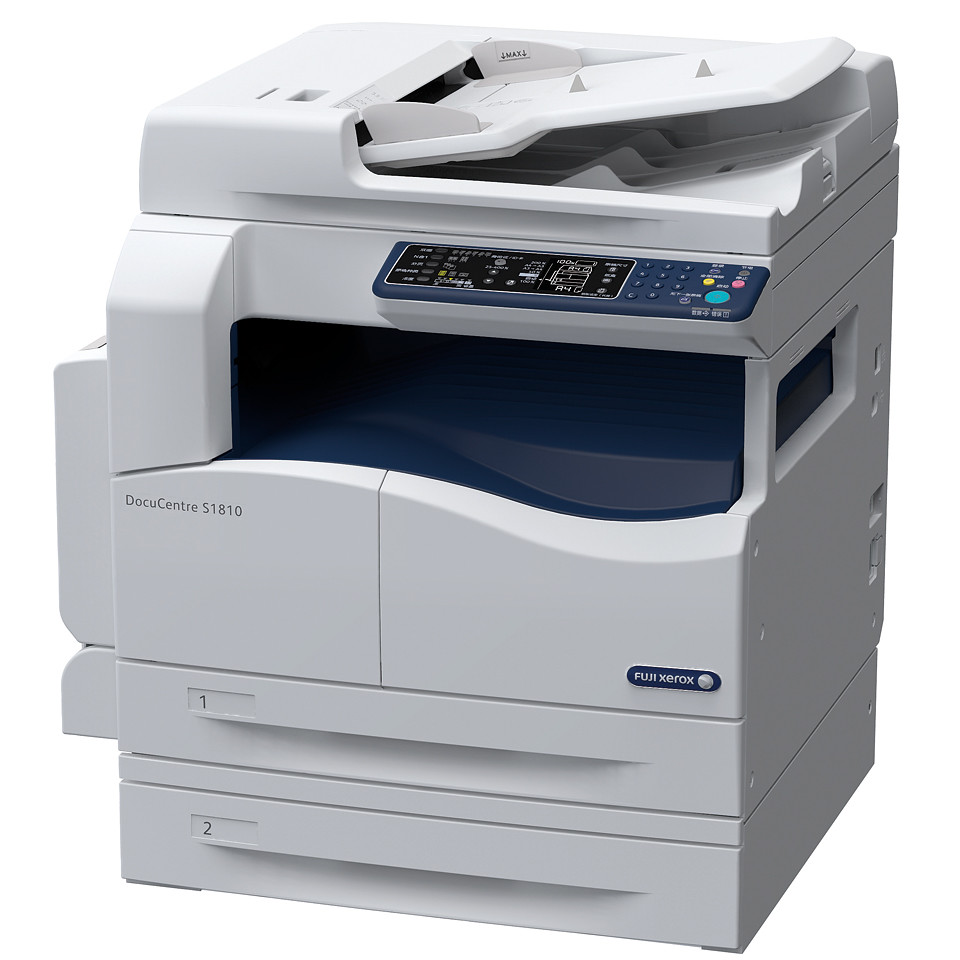
Fuji Xerox has introduced two new digital  monochrome multifunction devices (MFDs). The DocuCentre S2010 and S1810 offers small and home offices (SOHOs) with cost effective and high-performance copy, print and scan jobs of up to A3 size.

Available now. Enquire at Fuji Xerox on price which varies with configuration.

Fuji Xerox DocuCentre S2010 & S1810

Fuji Xerox DocuCentre S2010 & S1810

The DocuCentre S2010 and S1810 print and copy at 20 pages per minute (ppm) and 18 ppm respectively. Both print images at up to 600 dpi resolution.

Fuji Xerox DocuCentre S2010 & S1810The Duplex Automatic Document Feeder loads up to 110 sheets and scans multi-page documents at 18 sheets per minute while the durable platen glass handles small or varied-sized documents and books for printouts.

Users can also electronically set and sort desired page order for fuss-free print collection, minimizing the need to manually collate high-volume printouts for faster turnaround time.

Multiple-Up function prints up to two pages on one sheet, and when in duplex mode – fits up to four pages on one piece of paper.

Fuji Xerox DocuCentre S2010 & S1810Further paper-saving can be achieved by digitizing documents up to a maximum of A3 size and storing scanned data to a personal computer (PC).

Connect a single user directly through USB or configure a network of multiple users through Ethernet support to facilitate document sharing.

The Toner Saver Mode calibrates toner density according to print or copy requirements, which controls ink usage and maximizes replacement schedules.

Equipped with built-in energy-saving Sleep Mode and Low Power Mode, DocuCentre S2010 and S1810 operate on low energy Typical Electricity Consumption (TEC) and follow stringent International Energy Star Program standards.

The MFDs can be configured to fit workflow requirements – a desktop set-up for individuals or small groups, or a stand-alone device for multiple users, with maximum paper tray capacity of up to 850 sheets.