Archive for the ‘iOS’ Category

BlackBerry Mobile Fusion available in Singapore

Friday, July 20th, 2012

BlackBerry Mobile Fusion is RIM’s next-generation mobile device management solution for Government and Business Customers in Singapore.

It promises to be a secure, reliable, and scalable solution to easily manage BlackBerry, iOS and Android devices.

From left, Ian Gardner, Director, Enterprise Sales, RIM; and Charles Dufourcq, Director, Singapore, RIM sharing the advantages of BlackBerry Mobile Fusion

From left, Ian Gardner, Director, Enterprise Sales, RIM; and Charles Dufourcq, Director, Singapore, RIM sharing the advantages of BlackBerry Mobile Fusion

BlackBerry Mobile Fusion consolidates the management of smartphones and tablets running BlackBerry OS (which includes BlackBerry PlayBook and future BlackBerry 10 devices) as well as Android and iOS.

“For businesses and government, managing a mix of mobile devices on any scale is chaotic. Organizations face pressure to allow employees to bring their own devices into the workplace,” said Charles Dufourcq, Director for Singapore at Research In Motion.

BlackBerry Mobile Fusion provides a single, unified, web–based console to manage the wide range of mobile devices that the employees of an organisation may bring and use for work.

BlackBerry Mobile Fusion integrates the market-leading features and security architecture of BlackBerry Enterprise Server (version 5.0.3), providing advanced IT management and controls, a single outbound security connection (256-bit AES encrypted “BlackBerry VPN”), enforceable IT policies, support for BlackBerry Balance technology, and over-the-air app and software installation capabilities for the management of BlackBerry smartphones and PlayBook tablets (as well as future BlackBerry 10 devices).
(more…)

Sneak peek: Belkin home automation and networking gadgets

Sunday, July 15th, 2012

Belkin will be introducing its latest range of Home automation and Networking products in Singapore later this year.

Head down to tech@vogue to get a preview and hands-on of the WeMo, @TV, and the AC1200DB Wi-Fi Dual-Band AC+ Gigabit Router.

Sneak preview of Belkin's upcoming home-automation and networking devices.

Sneak preview of Belkin’s upcoming home-automation and networking devices.

I was at the pre-opening preview of tech@vogue in nex Mall last Friday afternoon.

Control switches at home remotely using a smartphone/tablet.

Control switches at home remotely using a smartphone/tablet.

What caught my eye was this demo booth that Belkin has set up to provide a preview and hands-on experience of some of the home automation and networking products that it will be introducing into Singapore towards the end of this year.

These include WeMo, which was announced at this year’s CES 2012 at Las Vegas, the @TV, which provides a new way to watch, record and experience television content, as well as the AC1200 DB Wi-Fi Dual-Band AC+ Gigabit Router.

These Wi-Fi enabled gadgets allow you to use your iPhone or iPad to remotely switch on/off your wall power outlets from outside your homes.

The @TV can be controlled using both iOS devices and Android devices when viewing or recording television content.

Below are pictures and more information on these gadgets.

Belkin WeMo Home Control Switch and WeMo Home Control Switch with Remote

WeMo Home Control Switch and WeMo Home Control Switch with Remote

WeMo devices allow household electronics plugged into a wall outlet to be remotely switched on /off from a mobile app on a smartphone or tablet.

WeMo works with a home’s existing electrical system and requires only a Wi-Fi network and free smartphone app to set up and control.

Belkin @TV

@TV

@TV works over WiFi or 3G/4G networks, enabling users to access all content from their home theatre on their tablets, smartphones and laptops.

@TV works with the @TV mobile app, which is available for both iOS and Android platforms.

Belkin AC1200 DB Wi-Fi Dual-Band AC+ Gigabit Router

AC1200 DB Wi-Fi Dual-Band AC+ Gigabit Router

Enhanced reliability, greater speeds, and enhanced streaming capabilities.

Featuring Broadcom’s fifth-generation (5G Wi-Fi) 802.11ac chip technology, the Belkin AC1200 DB provides gigabit speeds wirelessly to extend network range and provide more reliable coverage at greater distances.

tech@vogue wants to dress up and style your mobile phone & tablet

Saturday, July 14th, 2012

The one-stop specialty boutique selling covers, accessories and connectivity solutions for your mobile device at nex Mall (#02-22/23) opens today.

The new tech@vogue at nex Mall, #02-22/23

The new tech@vogue at nex Mall, #02-22/23

This store is the first of a new chain of specialty stores and caters for smartphones and tablets across various operating systems including Android, Blackberry, iOS and Windows.

For audiophiles

For audiophiles

The new stores will be managed by the same team that runs Nubox – an arm of Newstead Technologies.

Nubox currently includes 11 Apple stores in Singapore.

The cozy 898 square-feet tech@vogue in nex Mall (#02-22/23) will be open daily from 10:30am to 9:30pm.

For those who are unfamiliar with the area, nex Mall is a large shopping Mall located at 23 Serangoon Central, above the Serangoon MRT station.

tech@vogue Gallery

The new tech@vogue Gallery categorises accessories under eight zones.

These are: Blast It, Dress It, Gotta Have It, Hear It, Juice It, Link It, Perk It and Style It. Check out what each of these zones specialises in at the end of the post.

Personalise your smartphones and tablets.

Personalise your smartphones and tablets.

There will also be an “experience zone” at tech@vogue where shoppers can see, hear, and feel the various solutions first-hand.

Wireless and connectivity solutions

Wireless and connectivity solutions

A number of international brands including Belkin, InCase and Just Mobile will debut their first demo corners in Singapore at the new store.

Be inspired by the Belkin products that enable you to connect to your home electronics anytime anywhere with a smartphone.

Learn how InCase products protect and enhance the technology that is essential to our lives.

Immerse yourself in the suite of stylish and award winning accessories from Just Mobile.

“With over 45 stores in Singapore, we hear the frustrations of our customers in their relentless search for the perfect accessories for their mobile devices. Often, style is compromised by the need for function and that is something which tech@vogue is set to change … we have accessories that consumers may not even know they need before visiting our store,” said Evelyn Chua, Chief Marketing Officer, Newstead Technologies.

Other exciting displays include the Slingbox which allows users to watch and control their home television on their mobile devices; and a dedicated Samsung corner that demonstrates the integration of functions through technology to provide a seamless experience.

The second tech@vogue Gallery will open at Marina Bay Link Mall in August 2012. Evelyn tells me they are looking to add a third in the Orchard area.

(more…)

Norton Mobile Survey 2012: Greater awareness of mobile security needed

Friday, July 13th, 2012

The ownership and use of mobile phones to access the internet and stay connected is fast catching up with the use of computers.

Yet, the awareness of mobile security remains wanting compared to the relative maturity in security awareness for general computer usage.

David Freer, Vice President, Consumer, Asia Pacific and Japan, Symantec

David Freer, Vice President, Consumer, Asia Pacific and Japan, Symantec. Photo taken on a mobile phone.

I was briefed on the results of the Norton Mobile Survey this morning at their offices at Suntec Singapore. A summary of the detailed numbers can be found at the end of this post. Here’s how the survey was conducted.

Ownership and use of mobile phones fast catching up with computers.

Mobile phone Computer
Ownership 91% 92%
Access Internet 88% 69%

This was the same survey which found that “76% of Internet users in Singapore would rather forgo US$1million than give strangers unlimited access to their computers”.

What stood out from the numbers was the disparity between the greater dependence and use of our mobile phones on one hand (see sideboxes), and on the other hand the lagging level of mobile security in their usage.

So we’re doing an awful lot of things on our mobile phones – pretty much the same sort of things we do on our computers – in terms of accessing the Internet and staying connected. (And snapping the cover photo for this article.)

Need for greater awareness of mobile security

Yet almost half of the mobile users in Singapore do not take the simple step of using passwords to protect their phones, even though 61% of Singaporeans acknowledge that mobile threats are real.

What do people actually do on their mobile phones?

Social networking 57%
Read the news 55%
Online messaging 39%
Mobile banking/payments 27%
Location-based tasks, including navigation 25%
Online shopping 19%

In addition, some 30% are not aware that they can remotely track their phone using GPS navigation software.

Is it because we’re still trapped in the age when mobile phones were less capable and we were less dependent on them – and therefore had little to lose if a mobile phone was lost or stolen.

You know, when we had feature phones, the most painful thing about losing the phone was the loss of the contacts on them, and the hassle of having to replace them.

Viruses and malware for feature phones were almost unheard of.

US$1million for complete access to your computer?

US$1million for complete access to your computer?

Now, your smartphone can store a substantial trove of precious PERSONAL photos and videos, work-related documents and apps that access your stockmarket transactions.

The survey found that for the one in three Singaporeans who have had their mobile phone stolen/lost, most of them (78%) mentioned that losing their contact information was the worst part of the experience, with 52% feeling their privacy had been invaded.

To resolve their lost/stolen phone situation, two in three Singaporeans had paid an average of S$424.

The survey found that three in five Singaporeans would rather pay a ransom S$273 to get your phone back.averaging S$273 in order to resolve their lost/stolen phone problem – assuming they were offered the chance.

This is almost double the S$148 “ransom” that half of those surveyed in LAST YEAR’s study were willing to pay.

Dark cloud arising

“Singapore is a very tech savvy nation that is hugely mobile and connected,” said David Freer, Vice President of Norton for Asia Pacific & Japan.

Personally, I believe the concern with lost contact information will diminish rapidly with the convenience of syncing contact and calendar information with cloud-based services, such as iCloud and Google.

These cloud services allow you to reinstate contact lists and calendars in a new smartphone in a matter of minutes.

On the other hand, the tight coupling between the smartphones with cloud services bring with it a much greater problem.

“With greater connectivity to the Internet through mobile devices, cybercriminals are increasingly targeting this platform.

With so much valuable and personal information residing on our mobile devices, mobile users need to have the right security measures in place – both a reliable mobile security solution and personal diligence to back up important information,” added Freer.

By serving as gateways to access huge repositories of information on the cloud, people who lose their mobile phones stand to lose much more than just what’s physically stored on the phone itself.

It’s akin to losing a wallet full of cash viz-a-viz losing a wallet full of cash and a couple of credit cards.

So, if you haven’t enabled remote locking or wiping, anyone losing their phone would also need to change the passwords of all the online services the phone and its apps has been authorised to access.

Emails accounts, Facebook/Twitter accounts, Dropbox are but a few that immediately pop into mind. How many of these can you recall off the top of your head, and in the heat and stress of having realised you’ve just lost your phone?

Norton Mobile Security

Norton Mobile Security for Android devices addresses some of today’s most common mobile issues, including device loss and data protection.

Norton Mobile Survey 2012Norton Mobile Security has anti-theft, anti-malware, locate and remote wipe features.

Norton Mobile Security Lite is available for free in English on the Google Play Store.

For users seeking additional protection, there is the option to upgrade to the full featured Norton Mobile Security for an annual subscription of S$19.90.

Versions for iOS and Windows Phone will be released later this year.

Below is a summary of the main findings of the Norton Mobile Survey 2012.

(more…)

Numbers from Apple’s WWDC 2012

Tuesday, June 12th, 2012

As usual, Apple has revealed a slew of statistics to illustrate how it is leading the field. Here are some of the more interesting numbers from WWDC 2012.

Apple and WWDC 2012 in numbers

Apple and WWDC 2012 in numbers

There are now  650,000 apps in the App Store, out of which 225,000 are specific to the iPad.

In its four years of existence, 30 billion apps have been downloaded from Apple’s App Store, with US$5 billion for all app sales.

There are 400 million iTunes accounts with credit card. 140 million iMessage users send > 1 billion messages a day.

There are 365 million iOS devices out there, with 80% of these on the current latest iOS 5.

Apple contrast this with the Android’s profile, where slightly less than three-quarters of Android devices are still on Android 2.3.

To date, 26 million copies of Lion OS have been sold. Overall, there are 66 million Mac users.

First Apple WWDC 2012 without Steve Jobs

Monday, June 11th, 2012

A year ago, Steve Jobs made his last appearance at an Apple WWDC. This year, Tim Cook helms his first WWDC as Apple’s CEO.

Apple's WWDC 2012 is from 11-15 June in San Francisco.

Apple's WWDC 2012 is from 11-15 June in San Francisco.

The annual Worldwide Developers Conference (WWDC) this year is being held from June 11 – 15 at San Francisco’s Moscone West. Tickets were sold out in a mere two hours when it went on sale in April.

Here’s a quick roundup of some of the revelations from the opening keynote presentation on first of the 5-day conference.

MacBooks / OS X Mountain Lion

Refreshed MacBook Air & Next-generation MacBook Pro ships today.
In comes Ivy Bridge processor and USB 3.0, out goes Ethernet and FireWire 800 ports, MacBook Air becomes thinner and lighter, MacBook Pro gets 60% faster graphics performance.
Retina display in MacBooks: 220ppi with 2880 x 1800 resolution.
Highest-resolution notebook display in the world.
Retina Display support: Final Cut Pro, Aperture and Diablo3 now supports 220ppi display.
AutoCad and Photoshop support in the works.
iPad-style Dictation is introduced to Mountain Lion for Macs.
Speak directly into native Apple software, Microsoft Word and Facebook.
AirPort Express available now.
Pocket WiFi router supports simultaneous dual-band.
New OS X feature: Power Nap.
Mac updates emails, notifications and photos, and backs itself up while charging.
OS X Mountain Lion available on Macs in July.
Free upgrade for new Mac purchases between now and arrival of the new OS.

iOS 6

iOS 6 unveiled Beta today, full release in the fall.
More than 200 improvements: launch apps with enhanced Siri, and it comes to iPads, FaceTime over cellular data.
Supported: iPhone 3GS and up, 2nd gen iPads and up, 4th gen iPod touch.
Enhanced Siri launches apps and comes to new iPads and eventually into cars.
Siri to get into the car with Eyes Free: demo: Toggle Siri on by tapping a button the steering wheel.
iOS 6 to get Do Not Disturb feature from Mountain Lion.
Select which push notifications to mute and which to stay on.
iOS 6 integrates more tightly with Facebook, Twitter and App Store.
Share directly from core apps like Maps, Photos and Safari.
Safari offers unified search across the web, browser history and bookmarks.
Following in Chrome’s footsteps.
iCloud Tabs syncs Safari web-browsing across all devices.
Simultaneously see all the tabs open on any device.“IOS 6 will include Apple’s own mobile mapping software to compete with software from Google. TomTom will supply Apple with map data and related content.” – statement from TomTom.
Enhanced Safari features.
Multitouch to help navigate tabs, upload images directly, Offline Reading List.
Passbook provides one-stop purchase of tickets and boarding passes.
No more paper QR-codes and tickets.
Apple replaces Google Maps with own Maps app.
Maps comes with Yelp integration and turn-by-turn navigation, and 3D.

New TomTom App for iPhone/iPad available in iTunes

Sunday, April 22nd, 2012

TomTom South East Asia V1.10 is now available in the iTunes store. Priced at US$69.99, existing V1.9 users can download the update for free.

TomTom App for iPhone/iPad South East Asia V1.10 available now on iTunes.

TomTom App for iPhone/iPad South East Asia V1.10 available now on iTunes.

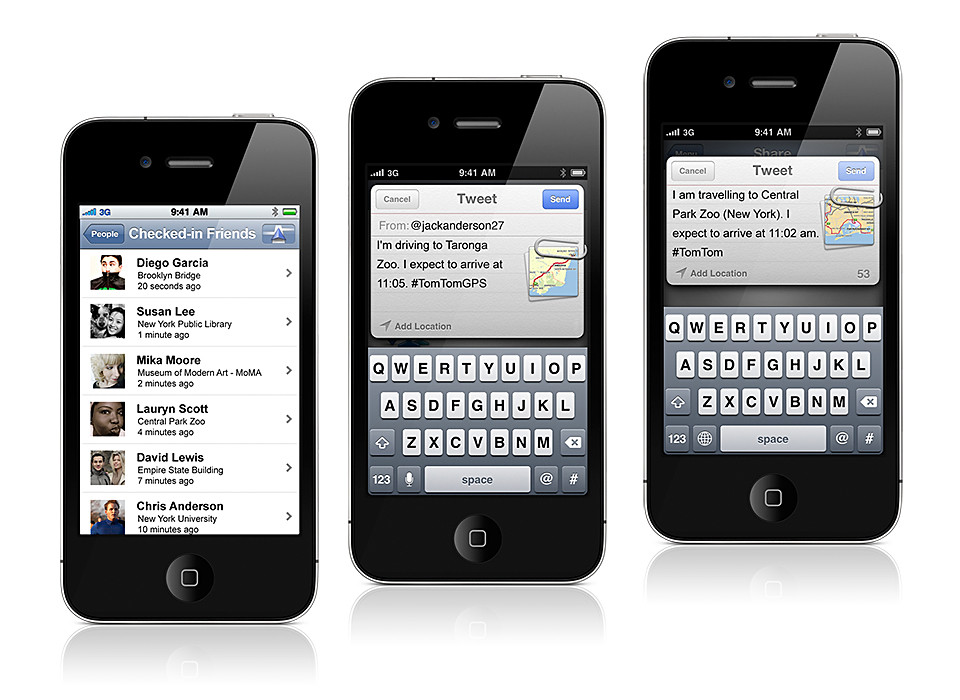
The latest version of the TomTom App integrates TomTom navigation with social media applications such as Facebook and Twitter – allowing users to navigate to friends, places and events more easily.

TomTom App for iPhone/iPad South East Asia V1.10 First previewed during CES 2012 in January, the TomTom navigation app for iPhone and iPad fully supports social networks as a source for turn-by-turn navigation.

The new version automatically plans routes based on information from Facebook events and places.

Additionally, drivers can use the app to share their destination and arrival time on Twitter, Facebook, by email and by SMS text.

The app offers regional coverage and the update includes the latest maps of Singapore, Malaysia, Indonesia, Thailand, and Brunei.

New DSLR: Nikon D3200

Thursday, April 19th, 2012

Nikon has launched, worldwide, the 24.2-megapixel D3200. The new entry-level DSLR will be available in the US in late April (approx. US$700 with 18-55mm kit lens).

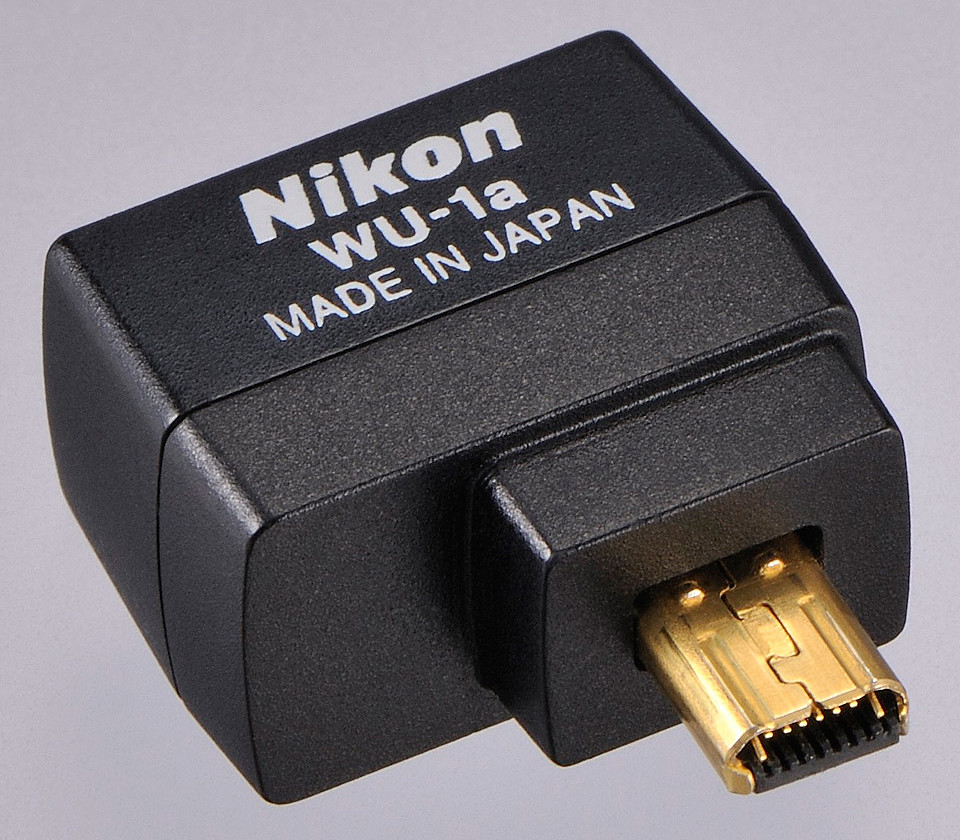
Nikon has also launched a Wireless Mobile Adapter WU-1a (approx. US$60, available in May in the US) for the D3200.

The new Nikon D3200 is available in red or black.

The new Nikon D3200 is available in red or black.

The D3200 records Full HD (1080p) video with full time autofocus (AF) and sports a high-speed continuous shooting mode at 4 frames-per second (fps).

The optional WU-1a gives the Nikon D3200 wireless connectivity to mobile devices.

WU-1a Wireless Mobile Adapter

The new optional WU-1a Wireless Mobile Adapter can wirelessly send images to mobile devices such as smartphones and tablets, to enable preview of an image (but not videos) before shooting and remote control of the camera, from up to 15 m away.

The 24.2-megapixel DX-format CMOS sensor works together with Nikon’s EXPEED 3 image processing engine gives an ISO range of 100 – 6400, expandable to ISO 12,800.

As an entry-level DSLR, the D3200 is designed with user-friendly features for the beginner.

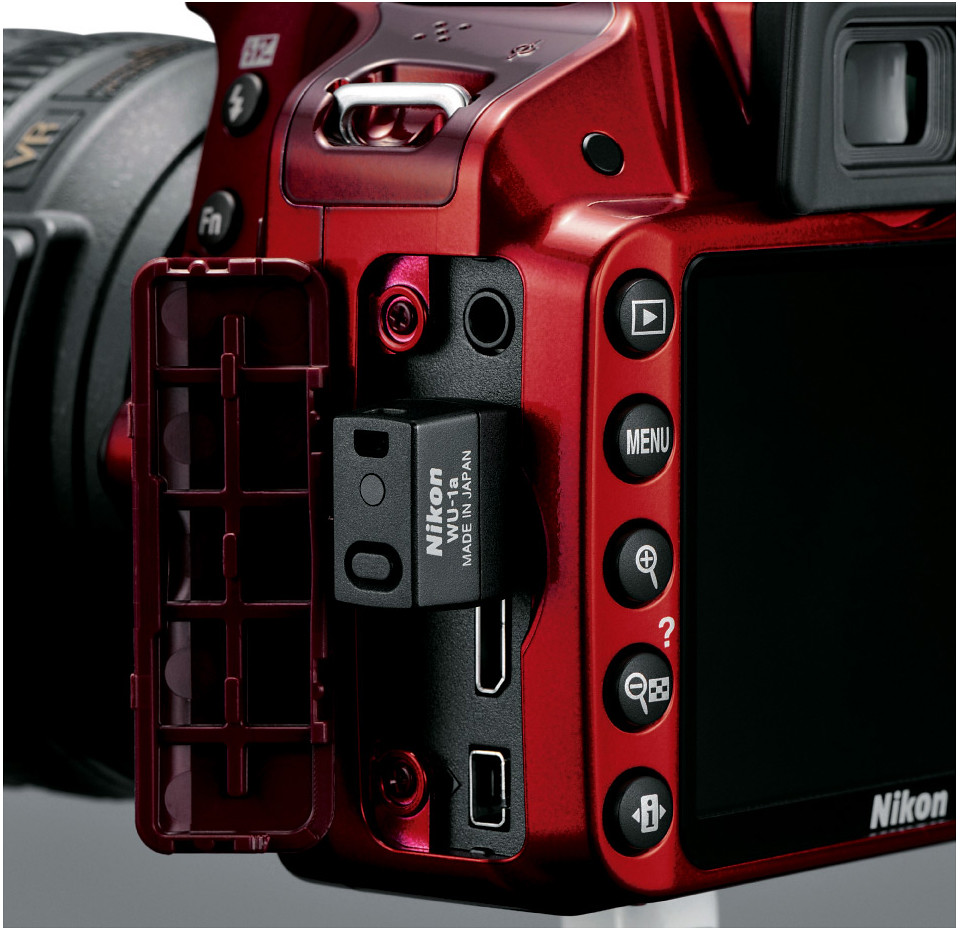
WU-1a plugged into D3200.

WU-1a plugged into D3200.

Accessible on the Mode Dial, the Guide Mode provides step-by-step photo instructions for set-up, shooting, viewing and deleting images and movies.

There are also six Scene Modes – Portrait, Landscape, Child, Sports, Close-Up and Night Portrait.

For video, the camera offers manual or automatic exposure control, and a stereo microphone input to attach an optional external microphone.

The application for Android smartphones (2.3) and tablets (3.x) will be available in May 2012, with the iOS app for iPhone and iPad expected in Fall 2012.

The Guide Mode walks the beginner using the entry-level D3200.

The Guide Mode walks the beginner using the entry-level D3200.

The main differences between the Nikon D3200 and the D3100 are tabulated below.

Nikon D3200 D3100
Resolution 24.2 MP 14.2 MP
Video Full HD (1080p) 30 fps 24 fps
LCD 920 k 230 k
Max ISO (regular) ISO 6,400 ISO 3,200
Continuous shoot 4 fps 3 fps
Release date 19 Apr 2012 19 Aug 2010

The brochure can be downloaded here.

SUBWAY joins Pointpal in Singapore

Wednesday, April 18th, 2012

SUBWAY has become part of Pointpal’s loyalty and rewards community. SUBWAY customers can use their mobile phones (Apple iOS or Google Android based) in place of stamp card for collecting rewards points.

Get a free SUBWAY meal with every 8 stamps collected through Pointpal.

Get a free SUBWAY meal with every 8 stamps collected through Pointpal.

With the addition of SUBWAY, Pointpal claims to be the largest mobile loyalty programme in Singapore.

Pointpal replaces traditional paper and ink stamp collecting booklets/cards.

Pointpal replaces traditional paper and ink stamp collecting booklets/cards.

SUBWAY customers will get a free SUBWAY meal (6-inch sub regular meal) with every 8 stamps collected from SUBWAY.

Customers also enjoy an immediate 2 free stamps when they sign up for this offer from April 15 to May 15.

Customers who want to join the Pointpal community to enjoy the SUBWAY rewards programme need to first download the Pointpal app from either Apple iTunes (AppStore) or Android Market (Google Play).

They then register (which only needs to be done once), and can choose which pre-installed loyalty cards and programmes they wish to participate in, and begin collecting points.

BlackBerry OS vs iOS vs Windows Phone vs Android

Monday, April 16th, 2012

Trend Micro has released the results of its study on the four main mobile operating systems in a report titled “Enterprise Readiness of Consumer Mobile Platforms”.

The security firm found the BlackBerry 7 OS the most secure mobile operating system, followed by iOS 5, Windows Phone 7.5, and Android 2.3.

Summary chart from “Enterprise Readiness of Consumer Mobile Platforms” White Paper by Trend Micro.

Summary chart from “Enterprise Readiness of Consumer Mobile Platforms” White Paper by Trend Micro.

Android 2.3 was used in the study because it was the dominant installed/supplied version of Google’s mobile OS at the time of the research.

Below is an excerpt from the White Paper summarising the findings about the four mobile platforms.

(more…)