Six new apps for Apple iPads and Android tablets have been announced by Adobe at its MAX 2011 technology conference.
At US$9.99 each, the six apps address different areas of the creative process: image editing; ideation; sketching; mood boards; website and mobile app prototyping; and presenting finished work.
Adobe Touch Apps are essential components of Adobe Creative Cloud, a major new company initiative also announced today. Adobe Creative Cloud will allow subscribers to access desktop and tablet applications, find creative services, and share their work.
Files created via Adobe Touch Apps can be shared, viewed across devices or transferred into Adobe Creative Suite software for further refinement. Adobe Touch Apps are designed to work with both finger and stylus input.
Adobe Touch Apps will be available for Android devices in November 2011. iOS availability will likely be announced only in early 2012, although Adobe Ideas is already available for the iPad.
Access to the file viewing, sharing and transfer functionality of Adobe Creative Cloud is included in the price of each Adobe Touch App. Details regarding pricing of the Adobe Creative Cloud and its expanded capabilities around applications, services and community will be announced in November 2011.
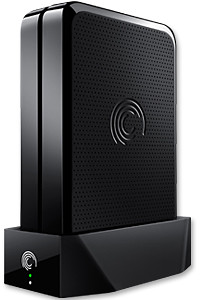
GoFlex Home is a consumer network attached storage (NAS) hard drive for the home. Easy to set up and use, it allows the access, sharing, streaming, and backup of files and media for computers, network TVs, media players and game consoles connected to the home wireless network.
The Seagate GoFlex Home comprises a drive dock and a hard drive.
Secure access can also be opened to computers and iOS/Android tablets and smartphones over the Internet.
Over the weekend, I helped my friend set up an NAS drive for his desktop, netbook, two laptops, iPhone and Android tablet. He had bought the Seagate GoFlex Home 3 TB storage drive during the recent COMEX 2011 but hadn’t had the time to set it up yet.
I helped by using eye-power because he decided to give it a go himself and actually got the thing working in less than 15 minutes. That was the reason why I recommended the drive in the first place, it works with most consumer home Wi-Fi routers with little set-up or configuration needed.
The GoFlex Home comes with two cables and an software installation CD. The following steps were all that was needed to get the personal storage cloud going:
1. Connect the GoFlex Home drive dock to the Wi-Fi router by using the provided Ethernet cable.
2. Pop the GoFlex hard drive into the GoFlex drive dock and plug the power supply into the drive dock and the wall outlet. Switch on the GoFlex Home by pressing the Power button on the drive dock.
3. Pop the CD (or download from Seagate’s website) into the computer (can be a Mac or Windows PC) to install the software needed to access the hard drive. Simply select a language, key in the product information found on the drive, give the drive a name and register it. The name has to be unique globally since it will be used to identify the drive should you access it from the Internet.
4. Install the software on other computers that require access to the shared drive. Up to 5 people/computers on the home network can access the GoFlex Home. By paying to subscribe to the Seagate Share Pro, you get access for an unlimited number of people/computers to the GoFlex Home.
There are three ways to access the drive. One is to use the installed Seagate Dashboard software (on Windows PCs), which allows all features of the drive to be configured and managed. You can add computers and user accounts, backup, access and share files as well.
Use Seagate Dashboard software to configure and manage GoFelx Home
The other way is to use a browser-based Seagate Share either for a computer in the home network or out in the Internet.
Free iOS/Android app
Both are easy to use with a simple interface, using drag-and-drop or standard dialog boxes we’re familar with.
The third method is via the appropriate free app on a iOS/Android smartphone or tablet, also over the Internet.
The GoFlex Home comes with a USB port which is very useful. You can connect an additional external hard drive to expand the capacity of the original GoFlex hard drive. You can also connect a USB hub for connecting more than one USB device.
In my friend’s case, he connected his printer to the USB port and all his computers on the Wi-Fi network got to share that printer. No more plugging/unplugging the old printer from one computer to another.
The included backup software allows up to three connected computers to be automatically backed up to the GoFlex Home. Upgrade to Premium Backup ($49.95) to back up an unlimited number of computers on the GoFlex Home network. You can upgrade at the Application Store that can be accessed through the Seagate Dashboard software.
For each user account set up on the GoFlex Home, three folders are created – a Public, Personal, and Backup folder. The Public folder holds files that can be stored and accessed by everyone on your home network. The Personal and Backup folders can only be accessed by the the user.
What I like about the sharing is the granular control available for the files shared. You can specify who you want to share files with, choose to share just certain files or entire folders, set passwords, and set expiry dates for the shares. Administration is intuitive and easy to pick up. You can send a URL of a shared file via email.
Stream media to other computers and media players on the home wireless network.
Music, photos and video can also be shared and streamed to media players, game consoles or network TVs that support UPnP-AV, DLNA or Windows Media Connect. A wide range of file types are supported.
The GoFlex Home is available in 1TB (S$179), 2TB (S$239) and 3TB (S$339) capacities.
An overseas friend uses the Viber app on her iPhone for free VOIP international voice calls and text messages on her smartphone. I installed the free app on my Android phone and tested it. Setup was swift and quality was superb.
I was at the petrol station and the attendant was filling up an almost empty tank with petrol. While waiting, I whipped out my Android phone, searched the Android Market for Viber and installed it. Before the attendant had finished filling up the tank, I was already chatting with my friend in Kuala Lumpur on her iPhone – for free.
Set up was really simple on the Android phone. Once it was downloaded and installed, it gets your permission to access your contacts and sends you a 4-digit access code to activate your account. After that, you’re set to go!
Viber is free and works on the iPhone and Android phones.
The interface looks similar to the usual numeric dialpad with tabs to access recent calls, contacts, messages and more activities such as inviting friends, sharing on Facebook, tweeting etc.
Basically, Viber emulates the usual phone calling and sms usage – everything is based on your regualr phone number.
Viber dialpad on Android phone
Your account id is your phone number. If the party you’re calling has Viber installed on her Android or iPhone, you just dial her usual number, complete with international dialing code, to get connected. Viber is currently only available on the iPhone and Android phones. A BlackBerry version is in the pipeline.
Quality was good. Voice quality was loud and clear, although there was just a split-second lag, which didn’t affect the flow of the conversation in the slightest bit.
If the other party does not have Viber installed yet, the app gives you the option to place a regular call through your carrier.
Conclusion: Fast and easy to set-up and use, call quality is fantastic. The free app is compatible with iPhone 3GS (and later) and Android phones.
The 3G (16 GB) tablet is priced in Singapore at S$848 (incl GST) without contract.
Samsung Galaxy Tab 10.1
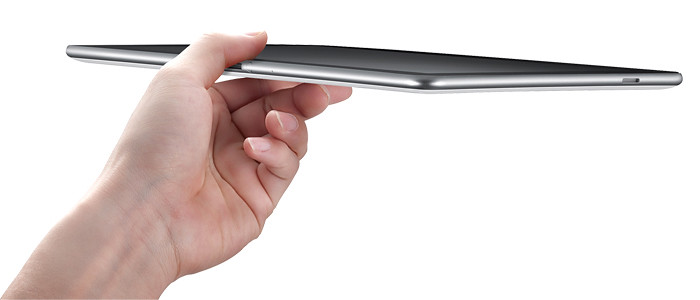
Samsung, the global leader in Android mobile devices, launched the Galaxy Tab 10.1 in Singapore today. The 10-inch tablet is the world’s thinnest tablet at only 8.6 mm thick and weighs only 560 g for the WiFi version and 565 g for the 3G version.
Powered by the Android 3.1 Honeycomb platform, the Galaxy Tab 10.1 features a 1GHz dual core application processor and HSPA+ network speeds of up to 21Mbps. Equipped with surround-sound stereo speakers, 1080p HD video, and support for Adobe® Flash® Player 10.3, the tablet computer has a three-megapixel rear camera and a two-megapixel front camera.
Galaxy Tab 10.1, only 8.6 mm thick.
It also offers multi-tasking and enhanced user interaction and navigation on Samsung’s own TouchWiz user interface. Designed with a Live Panel menu for users to customise and display a variety of content on the home screen including digital pictures, favourite Web sites and social network feeds, the interface also includes an application tray of commonly used features such as task manager, calendar and music player for easy access.
The HTC EVO 3D was launched in Singapore on 10 August 2011. The Android-Gingerbread (2.3) smartphone will be available at S$895 in August 2011. Here are the main features.
SRP: S$895 available in August 2011
Operating System: Android Gingerbread (2.3)
4.3-inch QHD 3D display
1.2 GHz Qualcomm Snapdragon dual-core processor
Dual rear-facing 5 megapixel camera
1.3 megapixel front-facing camera for video chat
3G Mobile Hotspot capability, supporting up to eight Wi-Fi enabled devices simultaneously
Android Market for access to more than 200,000 applications, widgets and games available for download
Google mobile services such as Google Search, Gmail, Google Maps, Google Calendar, Voice Actions, and YouTube
Corporate e-mail (Microsoft Exchange ActiveSync), personal (POP and IMAP) e-mail and instant messaging
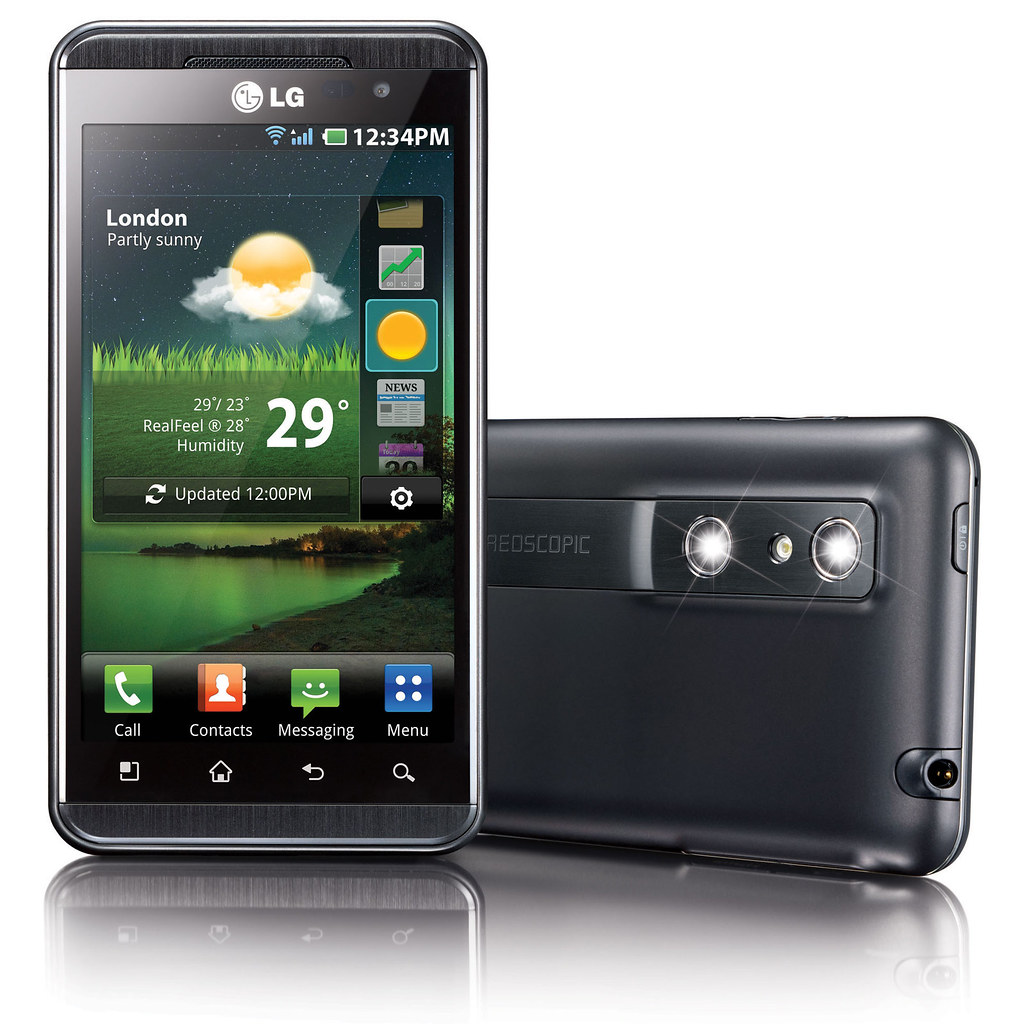
The LG Optimus 3D was launched in Singapore on 11 August 2011. The Android smartphone will be available at S$938 (incl GST without contract) in Singapore in end August. Here are the main specifications.
Available at S$938 (incl GST without contract) in Singapore in end August, the latest Android smartphone from LG allows users to create 3D photos and video using the phone and to view 3D content and play 3D games without wearing any 3D glasses.
LG Electronics today launched the LG Optimus 3D at its LG Live outlet at Marina Bay Sands.
The new Android smartphone boasts a “Tri-Dual” architechure – dual-core, dual-channel and dual-memory – promising improved performance when multi-tasking, viewing graphics-intensive websites, watching a movie or playing graphics-intensive games.
It also brings glasses-free 3D experience into the palms of its users. LG wants to empower its users to immerse themselves in 3D – from creating 3D photos and video, to enjoying them, and beyond that to sharing 3D media with others – all from a smartphone.
Create, enjoy, share
To create 3D photos and video, the user can use the dual 5 megapixel stereoscopic cameras on board to shoot 3D stills and footage. Alternatively, users can use included software on the smartphone to convert existing 2D photos and videos into 3D. Free software for converting 2D games will be available for download (more details to be announced soon)
To enjoy 3D media – and this is where LG is all excited about – the user does not need to wear 3D glasses. By using double-layered screen technology, the two images for the left and right eyes are are interlaced with each other and sent separately to both eyes so that the left eye only sees the image meant for the left eye and the right eye only sees the image meant for the right eye.
LG boasts that the cross-talk between the two images – the extent to which pixels meant for one eye is seen by the other eye – is extremely low. I tried it myself and found the 3D images gave a strong sense of depth and dimensionality – very realistic without any nausea even after more than 10 minutes of use.
The intensity of the 3D effect can be reduced or turned off – based on user’s preference – similar to the Nintendo 3DS game console. The sweet spot for optimal 3D effect seems to be about 30 cm away from the screen.
The 4.3-inch WVGA display offers bright and flicker-free images in HD, up to 1080p in 2D and up to 720p in 3D.
In case the user drops the smartphone after purchase and the dual stereoscopic cameras get misaligned, the Optimus 3D allows re-calibration of the cameras by correcting the images captured via software to account for any mis-alignment.
The Optimus 3D comes preloaded with 10 free 3D games including titles such as Nova, Asphalt 6 and Let’s Golf 2.
Captured 3D content can be shared with 3D TVs via an HDMI 1.4 connection and the phone can also send content to any DLNA Certified device. In addition, users can upload and stream 3D content on YouTube’s dedicated 3D channel (www.youtube.com/3D).
Smartphone and 3D gizmo
Even without its 3D functionality, the Optimus 3D serves as a highly powered smartphone with top-notch graphic performance, web browsing experience, raw computing speed and high video resolution.
The LG Optimus 3D smartphone was launched in Singapore today.
For 3D buffs, it offers a chance to own a 3D camera and glasses-free 3D viewing/playing device and a gadget to share and interact with 3D content on the Web.
The LG Optimus 3D offers the best of both worlds and places both functionalities into a single device. This class of gadgets will surely bring 3D into the lives of the average smartphone user.
The main specifications of the Optimus 3D can be found here.
The EVO 3D is the first smartphone with “glasses-free” 3D display to be launched in Singapore. The Android-Gingerbread (2.3) smartphone will be available at all mobile operators and authorized retailers at a suggested retail price of S$895 in August 2011.
The HTC EVO 3D empowers the user to capture and view photos and video in 3D through a brilliant high-defintion 4.3-inch QHD 3D display, which does not require the wearing of special 3D glasses.
The HTC EVO 3D features a powerful 1.2 GHz Qualcomm Snapdragon dual-core processor, dual 5 megapixel cameras, which can be used to capture both conventional 2D and stunning 3D images and videos.
With integrated 3D HD (720p) video capture and the latest version of HTC Sense, HTC EVO 3D will enable users to easily and seamlessly post 3D media to YouTube or Facebook.
Its integrated DLNA (Digital Living Network Alliance) capability allows fast and easy to sharing of stored music, pictures and user-generated HD video wirelessly with other DLNA-certified home electronics, including HDTVs, monitors, digital cameras, printers and more.
Connection via an HDMI cable (sold separately) enables sharing of user-created 3D video content via a 3D TV.
Access 3D movies and games through the EVO 3D
According to ABI Research (Dec. 20, 2010) mobile 3D devices will be driven by three key applications: creation of user-generated 3D content by integrated video and still cameras, playback of 3D content and 3D gaming.
It also anticipates that mobile devices may turn out to be the most successful form factor towards bringing 3D technology into mainstream markets.
HTC EVO 3D will be pre-loaded with HTC Watch which provides access to a large catalog of movies, including 3D titles optimized for viewing on the HTC EVO 3D’s 4.3-inch screen.
HTC Watch offers the latest new releases on the same day that they become digitally available in the region. Customers can buy or rent digitally and download directly to their smartphone, along with select 3D movies.
Rentals will be available for viewing on one screen within at least 30 days of rental, with a 24-hour or 48-hour viewing period once the title is first played.
The HTC EVO 3D ships with a whole library of multimedia entertainment that includes The Green Hornet 3D Movie (limited stocks available) and games such as Spider-Man: Total Mayhem HD, Need for Speed SHIFT and The Sims 3.
HTC has also teamed up with Chalkboard, a large location-based network in Southeast Asia to offer HTC EVO 3D users access to a catalogue of local offers wherever they go.
Main features of the HTC EVO 3D are summarised here.
We had the chance to bring the freshly launched 10.1-inch Asus tablet with us to Germany and the Czech Republic.
It proved to be the favourite gadget for the kids, and a very useful gadget for the adults.
The kids on the Asus Eee Pad Transformer whilst taking a break from sight-seeing.
The Asus Eee Pad Transformer TF101 was launched in Singapore at the end of April. Here’s the nifty little device in action along the castle route from Frankfurt in Germany to Prague in the Czech Republic and back.
Using an Asus EeePad Transformer tablet instead of paper to do museum sketches
Erin loves visiting museums, and usually she sketches some of the exhibits that interests her on a paper notepad. This time, she was delighted to use the sketching app (Kids Doodle – Movie Kids Paint by Bejoy Mobile) on the Andoid tablet to do her sketches – in colour.
The app was in colour and could even reproduce the neon lighting effect of this exhibit!
How do you keep the kids occupied while waiting for tea to arrive? You guessed it, let them at the tablet. Erin used it to write her journal of what she’d seen while Justin plays the games on it.
Erin dressing up her electronic doll in a girly app (Maidens Avatar Creator by Magicsoft) while waiting for tea to be served.
We don’t allow games and books during meals, so waiting for the meal to arrive is often the time to catch a breather and relax.
Afternoon tea at the Cafe in the cellar of Heidelberg Castle.
They love those quiz apps from the Android Market.
Anyone for maths quiz before pizza and kebab lunch at Weinheim?
As I said mealtimes are reserved for relishing the food, conversation and company.
Pizza and kebab anyone?
At the Frankfurt Zoo, Erin used the camera on the tablet to snap photos and record videos, which she then uploaded to the Internet, back at the hotel, to share with her friends. We also used it to surf the net check maps and to read up on the sights we planned to visit the next day.
The Frankfurt Zoo has a fabulous collection of primates.
Back at the hotel, the kids also used the tablet to read ebooks and worksheets in pdf format. It was a long vacation and we didn’t want the kids to totally lay off homework.
Almost every town we visited in Germany had an H&M. But the clothes just didn't suit us and we fell back on brands like Espirit and Benetton.
And finally shopping. No prizes for guessing how the Justin occupied himself while the rest of the family was busy shopping away.
The 5-day annual trade show in Taipei will see more tablet models based on Google’s Android and a preview of Microsoft’s next Windows platform for tablets – one year after Apple’s game changing iPads grab the lion’s share of the tablet market.
COMPUTEX Taipei, or Taipei International Information Technology Show (台北國際電腦展), will be held from May 31 to June 4, 2011 in Taipei. Taiwan based Acer and Asustek had first showed off their low-cost but trend-setting netbooks at the Computex in 2007 and 2008.
Investors and analysts will be watching to see if new Android based tablets can challenge Apple’s iPad. Non-iPad tablet competitors are expected to halve Apple’s 100 percent dominance of the tablet market to 50 percent next year, iSuppli predicted on April 21. The iPad had cordoned off the entire tablet market when it was first launched in June last year because of the absence of competitors.
Computex Taipei 2011 from May 31 to June 4, 2011.
Both Google and Microsoft will send executives to the event to brief the media on their plans. Intel, the world’s largest chipmaker, and ARM, whose chip designs are licensed by Qualcomm and Nvidia to power tablets, will also be vying for tablet manufacturers to select their chips.
Global shipments of tablets will increase almost twelve times to 215 million units in 2015 from 17 million last year, Toni Sacconaghi, a New York-based analyst at Sanford C. Bernstein & Co., wrote in a May 26 report.
Computer sales growth will be reduced by 2 percent annually between 2010 and 2015, Sacconaghi wrote, because fifteen percent of all tablets will cannibalize the sale of consumer PCs.
Bloomberg reports that Microsoft will “preview its operating system designed for tablets this week, using hardware with ARM-based chips”. The current Windows 7 operating system from Microsoft is not compatible with the ARM chips used in tablets from manufacturers such as Samsung and Motorola.


 No more plugging/unplugging the old printer from one computer to another.
 number of computers on the GoFlex Home network. You can upgrade at the Application Store that can be accessed through the Seagate Dashboard software.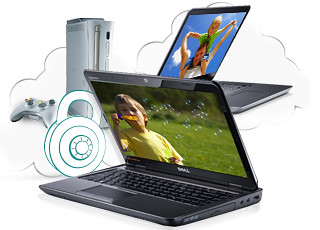



 To create 3D photos and video, the user can use the dual 5 megapixel stereoscopic cameras on board to shoot 3D stills and footage. Alternatively, users can use included software on the smartphone to convert existing 2D photos and videos into 3D. Free software for converting 2D games will be available for download (more details to be announced soon)
 To enjoy 3D media – and this is where LG is all excited about – the user does not need to wear 3D glasses. By using double-layered screen technology, the two images for the left and right eyes are are interlaced with each other and sent separately to both eyes so that the left eye only sees the image meant for the left eye and the right eye only sees the image meant for the right eye.
 LG boasts that the cross-talk between the two images – the extent to which pixels meant for one eye is seen by the other eye – is extremely low. I tried it myself and found the 3D images gave a strong sense of depth and dimensionality – very realistic without any nausea even after more than 10 minutes of use.
 The Optimus 3D comes preloaded with 10 free 3D games including titles such as Nova, Asphalt 6 and Let’s Golf 2.
 Captured 3D content can be shared with 3D TVs via an HDMI 1.4 connection and the phone can also send content to any DLNA Certified device. In addition, users can upload and stream 3D content on YouTube’s dedicated 3D channel (