Archive for the ‘Desktops’ Category
Thursday, March 8th, 2012
HP will be at the IT Show 2012 in Suntec Singapore at Level 4, Halls 401-403, Booths 8150, 8245 & 8428. Check out the promotional discounts, freebies and purchase-with-purchase deals for its desktops and notebooks.

HP is at Level 4 at Suntec Singapore during IT Show 2012.
Check out some of HP’s star products at their booths: HP Folio, Omni, ENVY Spectre, Pavilion dv6, and TouchSmart.

HP ENVY Spectre

Accessories

Consumer desktops & notebooks - HP Folio, Omni, Pavilion, TouchSmart series.

Commercial notebooks - comprising the HP ProBook & EliteBook series.
You can view or download HP’s IT Show 2012 flyers above. Click on each of the thumbnails to get to the flyers (in PDF format).
Tags:accessories, desktop, HP, IT Show, IT Show 2012, laptops, notebooks, promotions, Singapore, Suntec
Posted in Accessories, Brochures, Desktops, Events, Exhibition, Gadgets, HP, Notebooks, Prices, Promotions, Specifications, Windows 7 | 1 Comment »
Thursday, March 8th, 2012
Dell will be at IT Show 2012 in Suntec Singapore at Level 3, Booth 3001; and Level 4, Halls 401, 402 & 403, Booths 8230, 8251, 8108, and 8139. Check out the discounts and freebies for its desktops, laptops and XPS 13 Ultrabook.

A collage of Dell's flyers for IT Show 2012. Click to access and download the PDF containing these flyers.
Check out Dell’s top three products during the show:
- Dell XPS 13 Ultrabook
- Alienware M17x (3D)
- Alienware X51 (desktop, no monitor included)
Download Dell’s IT Show 2012 flyer here, or view it below after the break.
(more…)
Tags:Alienware, computer, DELL, desktop, IT Show, IT Show 2012, laptops, notebooks, promotions, Singapore, Suntec, ultrabook, XPS13
Posted in Brochures, Dell, Desktops, Events, Exhibition, Gadgets, Notebooks, Prices, Promotions, Specifications | 1 Comment »
Monday, January 30th, 2012
Here’s a selection of Apps from the Mac App Store to check out for your Mac as we transit from Lunar New Year to Valentine’s Day.

Angry Birds Seasons in Apple Mac App Store (SGD$4.99, Rovio)
Angry Birds Seasons (S$4.99, Rovio)
With the dragon year, the new update from Rovio brings an all new mystical dragon, as well as tons of unique levels, and exploding fireworks that light up the night sky.

Tropico 3: Gold Edition from the Apple Mac App Store (SGD$34.99, Feral Interactive)
Tropico 3: Gold Edition (S$34.99, Feral Interactive)
Ever wonder what it’s like to own your own island? Tropico 3 has you covered, dropping you into a tropical paradiso where you call the shots. Rule with an iron fist or velvet glove as you expand your economy, and turn your land into a tourist mecca or military empire!

Cake Mania Main Street from Apple Mac App Store (SGD$4.99, Digital Chocolate)
Cake Mania Main Street (S$4.99, Digital Chocolate)
Try your hand at city management in this all-new take on the Cake Mania franchise. Own multiple storefronts, upgrade your inventory, and grow your village into a shoppers paradise.

Fantastical from the Apple Mac App Store (SGD$19.99, Flexibits)
Fantastical (S$19.99, Flexibits)
Our favorite calendar companion for Mac is now additionally fluent in French, Italian, Spanish, & German languages with its latest update. Type out the details of your appointment or event in normal speak and this app will schedule it for you right away.
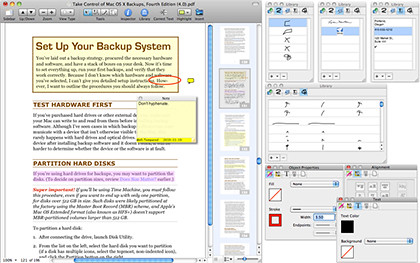
PDFpenPro from Apple Mac App Store (SGD$99.99, Smile Software)
PDFpenPro (S$99.99, Smile Software)
This powerful PDF editor comes with a wealth of functions including custom form creation and makes for a great alternative to the more expensive Adobe Acrobat Pro. It’s newest update enhances the app with iCloud to allow for document sharing with its new PDFpen app for iPad.
Tags:Apple, Apps, Mac
Posted in App, Apple, Desktops, Games, Mac OS, Notebooks, Prices, Software | 1 Comment »
Tuesday, December 13th, 2011
In less than one year, 100 million apps have been downloaded from the Mac App Store.

Apple's Mac App Store tops 100 million downloads.
“With Autodesk products in both the App Store and Mac App Store, we can reach hundreds of millions of Apple users around the world,” said Amar Hanspal, senior vice president of Platform Solutions and Emerging Business at Autodesk. “With our free AutoCAD WS and the more powerful professional drafting tools of AutoCAD LT, we’re using the Mac App Store to deliver new products and reach a growing base of new Mac customers.”With thousands of free and paid apps, the Mac App Store brings the App Store experience to the Mac.
Users can buy apps using their iTunes account, and download and install them in just one step.
Apple’s App Store now has more than 500,000 apps.
Overall, customers have downloaded more than 18 billion apps and continue to download more than 1 billion apps per month.
The Mac App Store offers thousands of apps in Education, Games, Graphics & Design, Lifestyle, Productivity, Utilities and other categories.
“The Mac App Store has unparalleled reach and has completely transformed our distribution and development cycle,” said Saulius Dailide of the Pixelmator Team. “Offering Pixelmator 2.0 exclusively on the Mac App Store allows us to streamline updates to our image editing software and stay ahead of the competition.”Users can browse new and noteworthy apps, find out what’s hot, see staff favourites, search categories and look up top charts for paid and free apps, as well as user ratings and reviews.
The Mac App Store is included with Mac OS X Lion and is available as a software update for any Mac running Mac OS X Snow Leopard.
Mac developers set the prices for their apps, keep 70 percent of the sales revenue, are not charged for free apps and do not have to pay hosting, marketing or credit card fees.
Tags:Apple, Apps, downloads, Mac, Mac OS
Posted in App, Apple, Desktops, Figures, Gadgets, Mac OS, Software, Tech news | No Comments »
Saturday, November 5th, 2011
Seagate is streamlining its flagship family of desktop drives under a single product that focuses on performance and big capacities – to cater to the explosive growth in content creation and consumption by businesses and consumers.
 The new Barracuda family makes it easier for consumers to find the product they need and reduces costs for Seagate’s original equipment manufacturer and distribution channel customers by reducing the number of product qualifications and amount of inventory they need to manage.
The new Barracuda hard drive – to be available first at online retailers – is designed for desktop, tower or all-in-one personal computers; workstations, home and small business servers; “Our OEM and channel customers want to reduce overhead costs by having fewer product lines to qualify and manage in their inventory,” said Scott Horn, vice president of Marketing at Seagate.network-attached storage devices; direct-attached storage expansion; and home and small-business RAID solutions.
Capacities of the family range from 250GB to 3TB.
The simplification of the Barracuda family comes as Seagate begins volume shipments of its 1TB-per-disk Barracuda hard drive. Seagate plans to end production of its Barracuda Green drive in February 2012.
Seagate analysis shows that its new Barracuda drives have a nearly identical power-consumption profile as energy-efficient desktop drives but deliver much higher performance. Barracuda XT, Seagate’s fastest desktop hard drive, will be folded into the new Barracuda family and re-emerge, in name, as the company’s desktop solid state hybrid drive.
Technical specifications
The new Barracuda hard drive features a SATA 6GB/second interface, 7200RPM spin speed and up to 64MB cache to deliver high performance across all capacities.
Seagate’s SmartAlign technology, a feature of Seagate’s Barracuda Green drives, will continue to ship with the flagship Barracuda drives to help the hard drive industry segue from the current 512-byte sector standard for hard drives to the new 4096-byte sector size.
The new 4K standard enables the use of stronger error correction algorithms to maintain data integrity at higher storage densities and capacities.
Tags:Barracuda, HDD, Seagate, storage
Posted in Accessories, Desktops, Gadgets, Launch, Seagate, Specifications, storage drive | No Comments »
Tuesday, November 1st, 2011
More than 300GB of potentially sensitive data was discovered on five second hand storage devices that were advertised as having been wiped of previously stored information.
“Our findings underline that data erasure is critical before any hardware devices are disposed of – personal computers, servers, hard disk drives, USBs and even MP3 players,” said CK Lee, country manager, Kroll Ontrack Singapore.Kroll Ontrack – a leading provider of data recovery and information management products and services, is warning companies to be extra vigilant when disposing of computer equipment in light of recent tests carried out in its labs
It recently conducted a little experiment in Singapore. Specialists from the company purchased five storage devices from a popular international online auction site to see if there was any sensitive data that could be recovered from the supposedly “wiped” devices.
The specialists found more than 300GB of data including personal and corporate proprietary information including Microsoft Office documents, applications, databases, e-mails and photos.
“Simply pressing the ‘delete’ button or using other basic overwriting techniques only removes the pathways to the data and not the data itself and it is essential to remember this when preparing equipment for sale or disposal,” Lee added.The five devices were from different parts of Singapore and included two hard disk drives from a server in RAID configuration, a server, a desktop HDD (Hard Disk Drive) and a laptop HDD.
Recoverable data poses risk of security breaches if it falls into the wrong hands. It is crucial for individuals and businesses to ensure that data is destroyed before disposal. Without the correct data erasure procedures, proprietary information becomes vulnerable.
Kroll Ontrack provides several options for data erasure such as Ontrack Eraser Software and Ontrack Eraser Degausser. Both solutions set out to destroy data in a fast, secure and user-friendly way.
Tags:HDD, security, storage
Posted in Accessories, Desktops, Enterprise IT, Gadgets, Notebooks, Security, Software, storage drive, Tech news, Utility | No Comments »
Thursday, September 29th, 2011
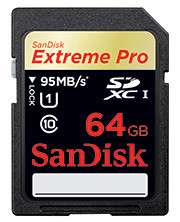
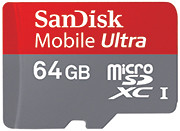
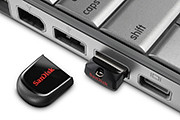
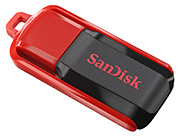
Tags:microSD, SanDisk, SD, SDHC, SDXC, SSD, USB
Posted in Accessories, Cameras, Desktops, Events, Gadgets, Launch, Notebooks, Phones, Prices, SanDisk, Specifications, storage drive, Tablets | 2 Comments »
Monday, September 26th, 2011
GoFlex Home is a consumer network attached storage (NAS) hard drive for the home. Easy to set up and use, it allows the access, sharing, streaming, and backup of files and media for computers, network TVs, media players and game consoles connected to the home wireless network.
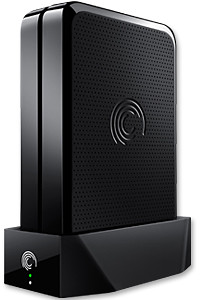
The Seagate GoFlex Home comprises a drive dock and a hard drive.
Secure access can also be opened to computers and iOS/Android tablets and smartphones over the Internet.
Over the weekend, I helped my friend set up an NAS drive for his desktop, netbook, two laptops, iPhone and Android tablet. He had bought the Seagate GoFlex Home 3 TB storage drive during the recent COMEX 2011 but hadn’t had the time to set it up yet.
I helped by using eye-power because he decided to give it a go himself and actually got the thing working in less than 15 minutes. That was the reason why I recommended the drive in the first place, it works with most consumer home Wi-Fi routers with little set-up or configuration needed.
The GoFlex Home comes with two cables and an software installation CD. The following steps were all that was needed to get the personal storage cloud going:
1. Connect the GoFlex Home drive dock to the Wi-Fi router by using the provided Ethernet cable.
2. Pop the GoFlex hard drive into the GoFlex drive dock and plug the power supply into the drive dock and the wall outlet. Switch on the GoFlex Home by pressing the Power button on the drive dock.
3. Pop the CD (or download from Seagate’s website) into the computer (can be a Mac or Windows PC) to install the software needed to access the hard drive. Simply select a language, key in the product information found on the drive, give the drive a name and register it. The name has to be unique globally since it will be used to identify the drive should you access it from the Internet.
4. Install the software on other computers that require access to the shared drive. Up to 5 people/computers on the home network can access the GoFlex Home. By paying to subscribe to the Seagate Share Pro, you get access for an unlimited number of people/computers to the GoFlex Home.
There are three ways to access the drive. One is to use the installed Seagate Dashboard software (on Windows PCs), which allows all features of the drive to be configured and managed. You can add computers and user accounts, backup, access and share files as well.

Use Seagate Dashboard software to configure and manage GoFelx Home
The other way is to use a browser-based Seagate Share either for a computer in the home network or out in the Internet.
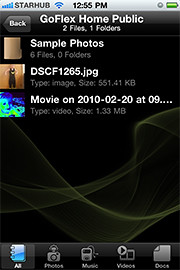
Free iOS/Android app
Both are easy to use with a simple interface, using drag-and-drop or standard dialog boxes we’re familar with.
The third method is via the appropriate free app on a iOS/Android smartphone or tablet, also over the Internet.
The GoFlex Home comes with a USB port which is very useful. You can connect an additional external hard drive to expand the capacity of the original GoFlex hard drive. You can also connect a USB hub for connecting more than one USB device.
In my friend’s case, he connected his printer to the USB port and all his computers on the Wi-Fi network got to share that printer.  No more plugging/unplugging the old printer from one computer to another.
The included backup software allows up to three connected computers to be automatically backed up to the GoFlex Home. Upgrade to Premium Backup ($49.95) to back up an unlimited  number of computers on the GoFlex Home network. You can upgrade at the Application Store that can be accessed through the Seagate Dashboard software.
For each user account set up on the GoFlex Home, three folders are created – a Public, Personal, and Backup folder. The Public folder holds files that can be stored and accessed by everyone on your home network. The Personal and Backup folders can only be accessed by the the user.
What I like about the sharing is the granular control available for the files shared. You can specify who you want to share files with, choose to share just certain files or entire folders, set passwords, and set expiry dates for the shares. Administration is intuitive and easy to pick up. You can send a URL of a shared file via email.
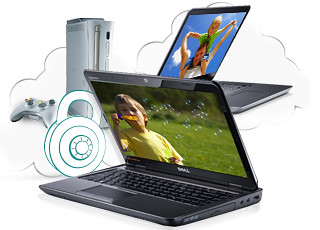
Stream media to other computers and media players on the home wireless network.
Music, photos and video can also be shared and streamed to media players, game consoles or network TVs that support UPnP-AV, DLNA or Windows Media Connect. A wide range of file types are supported.
The GoFlex Home is available in 1TB (S$179), 2TB (S$239) and 3TB (S$339) capacities.
Tags:Android, Apple, Google, iOS, iPad, iPhone, smartphone, tablets
Posted in Accessories, Android, App, Browser, Cloud, Desktops, Gadgets, Howtos, iOS, iPad, iPhone, Notebooks, Phones, Prices, Review, Seagate, Specifications, storage drive, Tablets, TV | 18 Comments »
Friday, September 16th, 2011
Newstead Technologies has opened a new multi-brand IT concept store in Funan DigitaLife Mall today. “Digital Style” is organised into six thematic zones, based on the needs of the modern IT consumer.
This is in keeping with the times – since consumers today have different purchasing habits and approaches.
This is the first of a chain of such stores. Eventually, there will likely be four to five such stores geographically distributed around Singapore, according to Evelyn Chua, Business Development and Marketing Manager of Newstead Technologies.
The 2,647 square feet store is located at #03-32 of the mall and opens from 11 am to 8 pm from Tuesdays to Sundays, and 11 am to 7 pm on Mondays.
The six themes are Entertainment & Media, Gaming, Home Computing, Mobile Communications, Office & Professional, and Ultra Mobile & Business.
The focus is on allowing shoppers to try out, for themselves, different products in the themes they are interested in.
For instance, in the gaming kiosk, the whole spectrum of gaming related gadgets and peripherals – from consoles, laptops, speakers and controllers – are displayed, for shoppers to mix-and-match and plug-and-play the various components together at one-stop.
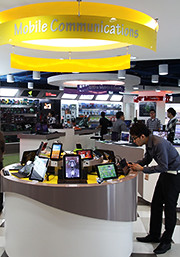 Across the various themes, products are featured from all the major brands, including Acer, Asus, BlackBerry, Dell, Fujitsu, HP, HTC, Lenovo, Logitech, Microsoft, Motorola, Panasonic, Samsung, Toshiba and others.
Apple related products are absent, so you’ll have to visit authorised Apple resellers, such as Nubox, which is also under Newstead Technologies.
I noticed that digital cameras and video cameras are not sold at the shop.
Update (24 February, 2012): Newstead Technologies has opened its second and bigger Digital Style store in Jurong Point. The next will be at The Star Vista towards the end of 2012.
Tags:Funan, Newstead
Posted in Accessories, Acer, Asus, BlackBerry, Dell, Desktops, Events, Fujitsu, Gadgets, Gaming, HP, HTC, Launch, Lenovo, Microsoft, Motorola, Notebooks, Panasonic, Phones, Samsung, Tablets, Toshiba | 2 Comments »
Tuesday, August 30th, 2011
Nübox will be at Level 3, Booth 3105 and Level 4, Booth 8236 during COMEX 2011. Customers purchasing any MacBook Air, MacBook Pro or iPod from these booths will receive a special bundle worth up to S$361.
Consumers can also enjoy up to 70% discount on an extensive range of accessories including latest iPad 2 cases, mobile charger for iPhones and wireless Bluetooth keyboard. Nubox is offering Windows 7 Home Premium and Parallels Desktop 6 at a special price of S$249 (usual price S$318) with free upgrade to Parallels Desktop 7.
“The Wanted” giveaway

Nubox offers for Apple products during COMEX 2011.
In an exclusive tie-up with Universal Music Group, Nubox is giving away UK’s new pop sensation, The Wanted’s self-debut album and passes to the five-piece band showcase on September 17 at Comex 2011.
The first 200 customers to spend S$300 and above at the Nubox booths during Comex 2011, and “Like” the Nubox Facebook page can redeem The Wanted debut album at Nubox@Raffles City from September 10 to September 16.
The first 50 customers who purchase a Mac and “Like” the Nubox Facebook page will be entitled to a pair of showcase passes and The Wanted debut album. They can redeem the passes and debut album at Nubox@Marina Bay Link Mall from September 10 to September 16.
Tags:Apple, COMEX 2011, Lion, Mac OS X, Nubox
Posted in Accessories, Apple, Desktops, Events, Gadgets, Mac OS, Notebooks, Prices | 1 Comment »