Posts Tagged ‘iPhone’

New company byte: Nubox

Friday, August 24th, 2012

With the opening of its 10th Apple Premium Reseller (APR) store in Sim Lim Square today, I have created a new company byte for Nubox.

Nubox is an arm of Newstead Technologies with Apple Premium Reseller (APR) and Apple Authorised Reseller (AAR) stores in Singapore.

Nubox is an arm of Newstead Technologies with Apple Premium Reseller (APR) and Apple Authorised Reseller (AAR) stores in Singapore.

Read a byte-sized profile and background information of Nubox for quick reference here.

You can also read articles related to Nubox on tech4tea.com here.

Nubox upgrades Sim Lim store from AAR to APR status

Friday, August 24th, 2012

Nubox today opened its 10th Apple Premium Reseller (APR) store in Sim Lim Square. Prior to this, it had an Apple Authorised Reseller store at the geek’s paradise.

The new Nubox APR store replaces the previous AAR store in Sim Lim Square.

The new Nubox APR store replaces the previous AAR store in Sim Lim Square.

To be awarded APR status, the store met stringent criteria from Apple: ability to offer impeccable service to customers, store location and size and availability of staff with Apple Certified Support Professional certification.

In addition to the complete range of Apple products, Nubox@Sim Lim Square will offer a quality range of third-party accessories and software as well professional services that include training and service support.

Newstead Technologies now has 11 Nubox stores across Singapore, comprising 10 APRs and one AAR in Funan Digital Life Mall. The Funan AAR will also be replaced with an APR next month.

Evelyn Chua, the Chief marketing Officer of Newstead, tells me that she plans to open a twelfth Nubox APR in Bedok Mall next year.

Store opening promotions for Nubox @ Sim Lim Square from 24-26 August, 2012.

Store opening promotions for Nubox @ Sim Lim Square from 24-26 August, 2012. Click on thumbnail to zoom in.

For the time being, the plan is to stop at twelve. You can read more about Nubox and its stores here.

As part of the store opening, there will be promotional offers from today till Sunday.

TomTom updates its Navigation app for iPhone and iPad

Thursday, August 23rd, 2012

TomTom has launched a new version (v1.11) of its Navigation app for iPhone and iPad. Users will be able to navigate to addresses found on the Internet, search with foursquare, and get the very latest TomTom maps.

Customers with an older version of the app can download it for free. For new customers, the app can be purchased for US$49.99 at the Apple App Store.

TomTom Navigation app for iPhone/iPad v1.11

TomTom Navigation app for iPhone/iPad v1.11

Drivers can now quickly and easily navigate to places they’ve found on websites and other apps by copying an address and pasting it into their TomTom Navigation app.

There’s no need to type as the app will automatically work out the destination and direct them straight there.

While v1.10 integrated Facebook with the app, v1.11 adds foursquare.

After linking foursquare to the TomTom app, users can search and navigate to their favourite foursquare places, checking in to collect points on arrival.

TODAY! Mountain Lion available from Mac App Store

Wednesday, July 25th, 2012

The ninth major release of Apple’s desktop operating system is now available as a download from the Mac App Store. Mountain Lion is available as an upgrade from Lion or Snow Leopard for S$25.98.

Mountain Lion OS X, Apple's new desktop operating system is available for download today.

Mountain Lion OS X, Apple’s new desktop operating system is available for download today.

Mountain Lion features more than 200 new features, including iCloud integration, the all new Messages app, Notification Center, system-wide Sharing, Facebook integration, Dictation, AirPlay Mirroring and Game Center.

Pricing & Availability

OS X Mountain Lion is available from the Mac App Store for S$25.98.

Mountain Lion requires Lion or Snow Leopard (OS X v10.6.8 or later), 2GB of memory and 8GB of available space.

A complete list of system requirements and compatible systems can be found here.

OS X Server requires Mountain Lion and is available from the Mac App Store for S$25.98.

The OS X Mountain Lion Up-to-Date upgrade is available at no additional charge from the Mac App Store to all customers who purchased a qualifying new Mac system from Apple or an Apple Authorised Reseller on or after 11 June, 2012.

Below are some of these key new features.

  • iCloud integration, for easy set up of your Mail, Contacts, Calendar, Messages, Reminders and Notes, and keeping everything, including iWork documents, up to date across all your devices.
  • The new Messages app, which replaces iChat and brings iMessage to the Mac, so you can send messages to anyone with an iPhone, iPad, iPod touch or another Mac.
  • Notification Center, which streamlines the presentation of notifications and provides easy access to alerts from Mail, Calendar, Messages, Reminders, system updates and third party apps.
  • System-wide Sharing, to make it easy to share links, photos, videos and other files quickly without having to switch to another app, and you just need to sign in once to use third-party services like Facebook, Twitter, Flickr and Vimeo.
  • Facebook integration, so you can post photos, links and comments with locations right from your apps, automatically add your Facebook friends to your Contacts, and even update your Facebook status from within Notification Center.
  • Dictation, which allows you to dictate text anywhere you can type, whether you’re using an app from Apple or a third party developer.
  • AirPlay Mirroring, an easy way to wirelessly send an up-to-1080p secure stream of what’s on your Mac to an HDTV using Apple TV, or send audio to a receiver or speakers that use AirPlay.
  • Game Center, which brings the popular social gaming network from iOS to the Mac so you can enjoy live, multiplayer games with friends whether they’re on a Mac, iPhone, iPad or iPod touch.
  • The new Gatekeeper, which makes downloading software from the Internet safer.
  • Power Nap, which automatically updates your apps and system while your Mac is asleep.
  • A faster Safari browser.

New TomTom App for iPhone/iPad available in iTunes

Sunday, April 22nd, 2012

TomTom South East Asia V1.10 is now available in the iTunes store. Priced at US$69.99, existing V1.9 users can download the update for free.

TomTom App for iPhone/iPad South East Asia V1.10 available now on iTunes.

TomTom App for iPhone/iPad South East Asia V1.10 available now on iTunes.

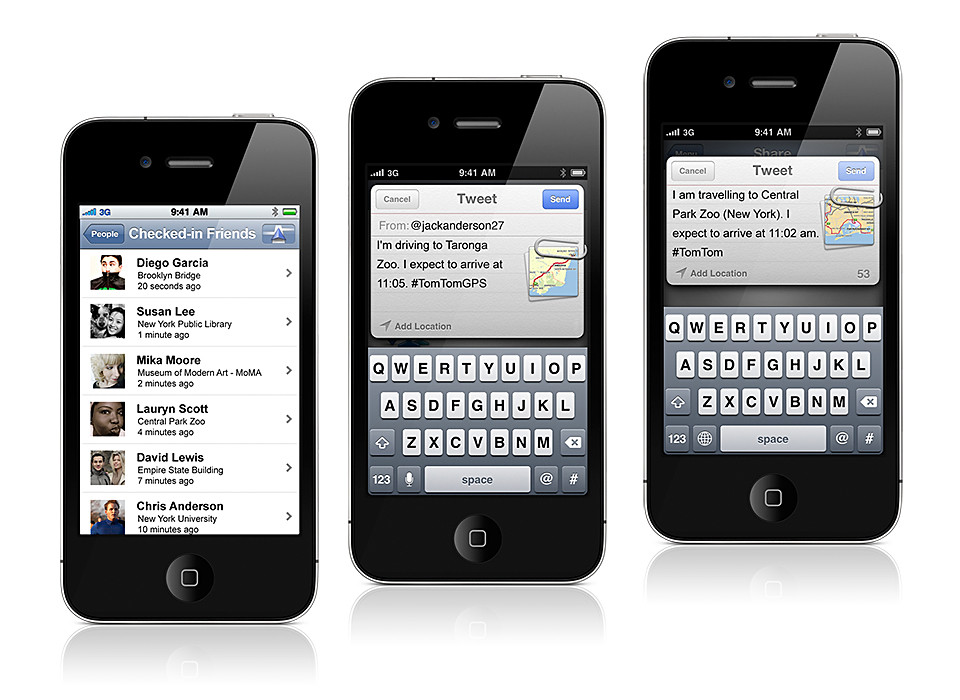
The latest version of the TomTom App integrates TomTom navigation with social media applications such as Facebook and Twitter – allowing users to navigate to friends, places and events more easily.

TomTom App for iPhone/iPad South East Asia V1.10 First previewed during CES 2012 in January, the TomTom navigation app for iPhone and iPad fully supports social networks as a source for turn-by-turn navigation.

The new version automatically plans routes based on information from Facebook events and places.

Additionally, drivers can use the app to share their destination and arrival time on Twitter, Facebook, by email and by SMS text.

The app offers regional coverage and the update includes the latest maps of Singapore, Malaysia, Indonesia, Thailand, and Brunei.

New iOS and Android app: WD TV Remote

Friday, December 30th, 2011

This free WD TV Remote app from Western Digital turns an iPhone, iPod touch, iPad, or Android compatible mobile device into an advanced feature remote control for the WD TV Live or WD TV Live Hub.

WD TV Remote app has all the features of the standard WD TV remote control, plus additional advanced features.

WD TV Remote app has all the features of the standard WD TV remote control, plus additional advanced features.

The WD TV Remote app allows users to more easily navigate the wide variety of digital media WD TV users enjoy on their television.

This includes media from leading entertainment services like Vimeo, Dailymotion, TuneIn Radio, Deezer, Facebook and YouTube, to personal video, photos or music.

The new WD TV Remote app provides all the features of the standard WD TV remote control along with several advanced features.

A gesture pad helps users to navigate menu screens and services with intuitive touch gestures.

QWERTY keyboard support for text entry and search functionality is also included.

Western Digital WD TV Live wireless streaming media player

Western Digital WD TV Live wireless streaming media player

A favorites screen provides quick access to entertainment services on the WD TV.

Travel: When technology fails you

Monday, November 28th, 2011

That’s when old school topo skills come in useful.

View from Base HQ of Mount Kinabalu. Taken with Dramatic Tone Art Effect on the Olympus PEN E-P3.

View from Base HQ of Mount Kinabalu. Taken with Dramatic Tone Art Effect on the Olympus PEN E-P3.

In the interest of packing light and reducing the gadget count, I’d decided to leave behind the TomTom VIA 280 dedicated GPS portable navigation device (PND) at home.

Mt Kinabalu, shrouded in clouds

Mt Kinabalu, shrouded in clouds

We were also undecided whether to rent a car to self-drive from Kota Kinabalu to Mount Kinabalu or to take a local tour.

Furthermore,  I’d just installed the equivalent turn-by-turn navigation app from TomTom on an  iPhone 3GS and found it to work as well as the PND while driving around Singapore.

When we arrived at 8pm last night, we found the rental rates at the airport to be reasonable and decided to go for the self-drive option.

Imagine our dismay when we found the iPhone 3GS could not get a GPS fix.

The other iPhone 3G that we had did not have any problems getting a fix so we realized the problem lay with the GPS unit within the iPhone 3GS.

Fresh Bougainvillea enroute to Mount Kinabalu

Fresh Bougainvillea enroute to Mount Kinabalu

Fortunately, the 15-minute journey from the airport to the hotel was short and simple, and we managed it through good old verbal instructions from the rental guy and maps from the brochure.

Pekan Nabalu enroute to Mt Kinabalu. Taken using Pop Art effect on Olympus PEN E-P3.

Pekan Nabalu enroute to Mt Kinabalu. Taken using Pop Art effect on Olympus PEN E-P3.

By the time we reached “Le Meridin” hotel (the neon light for the second “e” in Meridien must have burnt out), the iPhone 3GS still couldn’t get a fix.

The next morning, it was the same story, the 3GS couldn’t get a fix even though the 3G could.

Who would have thought a relatively simple and basic module like the GPS would fail on a month-old iPhone (Yes – I know – it’s two generations behind the iPhone 4S).

Stores at Pekan Nabalu. Olympus PEN E-P3 with Pop Art effect.

Stores at Pekan Nabalu. Olympus PEN E-P3 with Pop Art effect.

And the iPhone 3G (Yes – that’s THREE generations behind the iPhone 4S – and proud of that) didn’t have that app installed, and I wasn’t prepared to chalk up huge data roaming fees using the Google Maps app on the 3G.

So it was back to paper maps, driving instructions from the concierge, and old school topographical skills.

We’d driven around the complicated and tiny country roads of the Loire Valley in France on nothing more than paper maps, and surely the single highway route to Mt Kinabalu would be a piece of cake.

Prior to starting off, I ran the route through the Google Maps app on my iPhone 3G to download map data into the app’s cache using the hotel’s free WiFi. That should serve as reference later on during the drive.

Wild squirrel on the alert, at the foothills of Mt Kinabalu.

Wild squirrel on the alert, at the foothills of Mt Kinabalu.

We made the 2-hour drive to Mt Kinabalu smoothly. There was only one wrong turn prior to reaching the highway and a quick check on the Google Maps app on the iPhone 3G guided us back to the highway and we were on our way.

As in a marathon, most amateurs complete in more than 4 hours, although most choose to do the climb over 2 days, planning the arrival at the peak at sunrise.

As in a marathon, most amateurs complete in more than 4 hours, although most choose to do the climb over 2 days, planning the arrival at the peak at sunrise.

After a lunch stop at Pekan Nabalu, we reached the base HQ of Mt Kinabalu. Only at this highest mountain in Malaysia and South East Asia did the iPhone 3GS finally pick up a GPS signal, and it promptly told us we were some 300km away in Bandar Seri Begawan, the capital of Brunei.

After a long while it finally placed us at Mt Kinabalu. All along the way back to Kota Kinabalu, the GPS of the iPhone 3GS kept flip-flopping between our true location and Bandar Seri Begawan, forcing the GPS app to recalculate routes.

Half-way home, the 3GS decided it had had enough. It finally ran out of battery – from the constant search for a GPS signal, as well as its exertions to recalculate routes.

By which time, we’d all but given up on depending on the iPhone. I sure hope TomTom comes up with a GPS app on the Android.

New iPhone app: Feecha

Wednesday, November 16th, 2011

A new location based app that allows users to share and be aware of information, photos and video about activities in their vicinity and on the map. Use the app for a chance to win S$8,888 in cash on December 18, 2011.

The free iPhone app "feecha" launches today.

The free iPhone app "feecha" launches today.

I was trundling down Haji Lane last evening and taking in the vibrant atmosphere of the little pubs and shops on both sides of the single-lane back alley.

Have you ever wondered what goes on in the joints that you walk pass while listening to the din emanating from within?

Fun and quirky app that shows only the most vibrant places and activities.A new fun and quirky app called feecha lets you plug into the scene.

People organising, participating or witnessing events can post and share their activities using the app.

The information appears as a map pin – in the form of a cutesy (or hideous, depending on your point of view) creature called a feecha – on a map within the app, indicating where the event is taking place.

Activities can be tagged so that others following those tags are alerted once the event is shared.

If others like the activity and add to it, the feecha turns red and grows bigger.

If the event is largely ignored, the feecha map pin turns blue and eventually disappears from the feecha map.

If you see something interesting, witness an accident or spot a summon aunty, you can also post a photo or video as part of the feecha.

feecha feecha

Now imagine walking down Haji Lane with the app in hand.

You might just discover that ad-hoc photo exhibition on the Japanese earthquake by that budding photographer – that you might be interested in.

Or that talk about the role of Entomology, Botany, and Mineralogy in forensic anthropology, if you’re a fan of the TV series “Bones”.

feecha feecha

On December 18, the poster of the biggest and reddest feecha stands to win S$8,888 in cash.

Feecha is free for download on iTunes and works on the iPhone running iOS 4.2 and higher. The app is only released in the Singapore App Store, so those on the US store will have to switch stores to find feecha in iTunes.

An Android version is also in the works. A Windows Phone 7 version may eventually be in the works. A BlackBerry version is not in the works.

New iPhone app: SG Florist

Sunday, November 13th, 2011

No more excuses not to send your better half that bouquet of flowers. This PayPal-powered mobile app from FarEastFlora makes it easy for Singaporean men to remember and celebrate their loved ones.

SG Florist SG Florist

Sending flowers has now become a breeze with this free mobile app that is available from Apple’s App Store and the Nokia Ovi Store.

SG Florist is a free app available on Apple's App Store and the Nokia Ovi Store.Flowers and gifts are delivered on the day of the order.

An order placed as late as 4pm in the afternoon can be delivered between 7 – 10pm at night on the same day.

Users can set reminders within the app to deliver flowers for special occasions.

Tap and swipe through a wide range of over 1,000 gift options ranging from flower bouquets, plant arrangements, gift hampers, gourmet baskets and even perfumes.

Select your gift, add to your shopping bag, and check-out with PayPal in two simple taps.

Using ‘Pay with PayPal’, simply log-on to your PayPal account and confirm the purchase.

SG Florist SG Florist

PayPal also provides a safer mobile payment method as no financial details are shared with merchants or stored on mobile devices.

Features of the app:

  • Reminders and Wishlist: Pre-select favourite gift items under ‘Wishlist’ and set reminders for special occasions like birthdays, anniversary and Mother’s Day.
  • Sync addresses from phone contacts: Sync recipients’ addresses and details from phone contacts, avoiding the hassle of manually typing in addresses.
  • Surprise: Tap the ‘Surprise’ tab and shake the phone – lucky users might get a discount exclusive to SG Florist app users.

Google withdraws Gmail app from Apple iOS devices

Thursday, November 3rd, 2011

Having just launched the new e-mail app earlier in the day, Google has withdrawn it new Gmail app from iPhone, iPad and iPod Touch devices after users started getting error messages.

“Unfortunately, it contained a bug which broke notifications and caused users to see an error message when first opening the app,” the company said in a blog. “We’ve removed the app while we correct the problem.”The newly-launched app is the first Gmail app for Apple’s iOS devices.

Google is now fixing the software bug and will release a new version. In the meantime, users who have already installed the app can continue using it, despite the bug.

Read the breaking story on Bloomberg.