Archive for the ‘Software’ Category

Adobe Creative Suite 5.5 Production Premium suite

Thursday, April 14th, 2011

Adobe Creative Suite 5.5 Production Premium suite is a major mid-cycle update to the software for video and post-production for delivering content to virtually any screen. Performance and workflow have been imporved while powerful new audio editing capabilities have been added.

New component software receiving major updates include Adobe Premiere Pro CS5.5, Adobe After Effects CS5.5, Adobe Flash Professional CS5.5, Adobe Flash Catalyst CS5.5, Adobe Story, Adobe Media Encoder CS5.5, and Adobe Device Central CS5.5.

New to the suite is Adobe Audition CS5.5, bringing its audio-for-video multitrack editing environment to both Mac OS and Windows for the first time.

Estimated street price for the Creative Suite 5.5 Production Premium suite is US$2065. It is one of five suite editions of the Creative Suite 5.5 line of software.

Greater Productivity

Productivity enhancements promise to enable video and audio professionals to dramatically accelerate their workflows. The powerful Adobe Mercury Playback Engine, introduced in Adobe Premiere Pro CS5, broadens its graphics processing unit (GPU) hardware support to include laptops and more supported cards, and allows users to open projects faster, get real-time feedback for more GPU-accelerated features, and work more smoothly at 4k and higher resolutions.

Adobe Premiere Pro CS5.5 boosts performance by providing a smoother editing workflow, enabled by new trimming and editing tools that provide more precision and control.

Dual-system sound support from the new Merge Clips command in Adobe Premiere Pro CS5.5 lets users quickly sync video with high-quality audio recorded on separate devices like location recorders, ideal for DSLR or RED workflows.

Leveraging an integrated workflow with Adobe Audition, Adobe Premiere Pro users can save time by sending individual clips or sequences, including reference videos, directly to Adobe Audition for audio editing and restoration. File-based workflows see enhanced support for RED and other tapeless cameras, including improved RED Source Settings dialog in Premiere Pro and After Effects CS5.5 and native support for up to 5k media from RED Epic cameras via an extension available on Adobe Labs.

As it is a truly native editing solution, users saves time time and eliminates the need to transcode or rewrap footage.

The new 64-bit Adobe Media Encoder CS5.5 has been completely redesigned to deliver Adobe Premiere Pro video sequences, After Effects compositions, and Adobe Encore projects to multiple screen formats quickly, while doing the encoding in the background.

Adobe Media Encoder CS5.5 also introduces new format support such as AVC-Intra and DPX, and watch folders so users can encode a single clip to multiple destinations with a simple drag and drop.

New features

After Effects CS5.5 introduces new features such as the Warp Stabilizer, Camera Lens Blur and Light Falloff to enable users to enhance footage in post-production.

The Warp Stabilizer eliminates unwanted camera movement by steadying shaky footage, making handheld footage appear as smooth as a camera mounted on a mechanical stabilizer.

The Camera Lens Blur effect mimics the properties of physical lenses offering more realistic depth of field blurs. The Light Falloff effect enables users to simulate natural illumination falloff to mimic how light behaves in a 3D scene and can be used to create other light intensity effects.

Video professionals can use the new Adobe Audition in CS5.5 Production Premium on both Mac and Windows platforms. The completely re-written audio engine in Audition offers a robust toolset to record, edit, mix, master, and sweeten audio. With its professional editing and multitrack mixing tools, powerful noise-reduction and effects options, Adobe Audition CS5.5 will be able to handle a wide range of tasks quickly and efficiently.

Improved Collaboration

Adobe Creative Suite 5.5 Production Premium enables users to collaborate with existing workflows, even if they use a variety of tools. Enhanced project exchange support for Final Cut Pro users provides maximum flexibility for video editors, while new or enhanced OMF support in Adobe Premiere Pro and Adobe Audition makes it possible to export high-quality audio projects to Avid Pro Tools, facilitating more efficient collaboration between audio editors, remixers and sound designers.

Access to the new version of Adobe Story, an Adobe CS Live online service, improves collaboration between users with email notifications of new script edits and a faster method of tracking changes through script elements and filters.

The ability to import Adobe Story script data directly into Adobe Premiere Pro further strengthens XML-based metadata support found throughout the Production Premium suite, which is critical for everything from file-based workflows to media asset management.

The metadata-driven workflows, plus the ease and flexibility of communicating with Adobe applications with critical third party solutions from news management systems to playback servers, is a key selling point for broadcasters and other organizations around the world.


Adobe Creative Suite 5.5 Web Premium suite

Wednesday, April 13th, 2011

Adobe Creative Suite 5.5 Web Premium suite is a major mid-cycle update to the software for Web designers and developers. The new version give Web professionals the ability to bring high-impact content experiences and mobile apps to the latest form factors across Android, BlackBerry Tablet OS and iOS platforms.

New in the suite are updated versions of Adobe Dreamweaver, Adobe Flash Professional, Adobe Flash Catalyst, Adobe Flash Builder, the all-new Flex framework for mobile devices, Adobe Device Central and Adobe Acrobat X Pro.

Key enhancements include substantive HTML5 advancements in Dreamweaver, new tablet and smartphone application development capabilities in Flash Professional CS5.5 and Flash Builder Premium 4.5, and enhanced cross-browser testing as well as mobile emulation and on-device debugging.

Estimated street price for the Creative Suite 5.5 Web Premium suite is US$2185. It is one of five suite editions of the Creative Suite 5.5 line of software.

Advances in HTML5

Web Premium CS5.5 advances HTML5 authoring tools, enabling Web designers and developers to create browser-based content that gives end-users a seamless and immersive experience across virtually any screen.

New HTML5 support in Dreamweaver CS5.5 includes jQuery mobile framework integration for browser-based content and PhoneGap integration for native and mobile application design and development.

Enhancements to the multiscreen preview panel in Dreamweaver have also been made, supporting the latest in media queries, WebKit engine updates, and CSS3 attributes, enabling side-by-side renderings of what a single design looks like on different form factors.

“With Adobe the jQuery project has spent a significant amount of time researching and developing user interfaces for mobile browsers, the final result being the creation of the jQuery Mobile framework,” said John Resig, founder of the jQuery Project.

Enhanced Flash tooling

New additions in Flash Professional CS5.5 include content scaling so users can easily scale their content on stage to adapt to different screen sizes, which is a huge timesaver.

Flash Professional CS5.5 also includes a new shared assets feature for more streamlined publishing, as well as more than 20 new code snippets for creating mobile and Adobe AIR applications for accelerometer, multitouch gestures, and save/load data.

Enhanced Application Development for Mobile Devices

Adobe CS5.5 Web Premium includes new mobile application development support to deliver rich interactive applications to the latest Android, BlackBerry Tablet OS and iOS devices.

In the updated Flash Builder 4.5, users have new mobile support for ActionScript and mobile Flex projects, as well as improved designer-developer collaboration throughout application development with a new bi-directional workflow with Flash Catalyst CS5.5 and Flash Professional CS5.5.

New capabilities in Adobe Flash Builder 4.5, Flash Professional CS5.5 and the introduction of the Flex 4.5 framework for mobile devices, let designers and developers build mobile applications that run on iPhone, iPad, Android devices and BlackBerry PlayBook. The apps can be easily deployed through the application markets such as Apple’s iTunes App Store, Android Market and BlackBerry App World.

Enhanced Browser Compatibility Testing

To keep Web developers and designers ahead of rapidly changing technology, Web Premium CS5.5 includes new HTML5 emulation and support for the latest mobile devices in Adobe Device Central, software that simplifies the production of innovative and compelling content for mobile phones and consumer electronics devices.

Adobe BrowserLab, a key component of Adobe CS Live online services, has also been updated for cross-browser compatibility testing for the newest browsers to help ensure Web projects are accurately previewed across a spectrum of browsers.

Adobe CS Live online services are free until April 12, 2012.

Adobe introduces Creative Suite 5.5

Tuesday, April 12th, 2011

Adobe’s major mid-cycle product release targets enhancements across Flash, HTML5, video, mobile App and digital publishing tools. It also extends workflows to include tablets.

Adobe announced today the new Adobe Creative Suite 5.5 product line, enabling designers and developers to target popular and emerging smartphone and tablet platforms, as the revolution in mobile communications fundamentally changes the way content is distributed and consumed.

Today’s launch marks a significant change to Adobe’s product release strategy for Creative Suite, the design and development software catering for print, video, mobile and online media.

Adobe now plans to have milestone Creative Suite product introductions at 24-month intervals and – starting with Creative Suite 5.5 – major mid-cycle releases between the milestone versions.

Product lineup and pricing

The new Creative Suite product lineup is headlined by Adobe Creative Suite 5.5 Master Collection, which includes, in a single package, all of Adobe’s industry-defining creative tools, such as Photoshop, Illustrator, InDesign, Acrobat, Flash Builder, Flash Catalyst, Flash Professional, Dreamweaver, Adobe Premiere Pro and After Effects.

These products are available separately or as components of one or more of the five Creative Suite editions.

The complete Creative Suite 5.5 lineup and their estimated street prices are tabulated below, and is scheduled to ship within 30 days. Upgrade pricing, volume licensing and education pricing are also available.

Creative Suite 5.5 Master Collection: US$3159
Creative Suite 5.5 Design Premium: US$2309
Creative Suite 5.5 Web Premium: US$2185
Creative Suite 5.5 Production Premium: US$2065
Creative Suite 5.5 Design Standard: US$1579

Key enhancements

The new Creative Suite 5.5 Web Premium suite sees enhancements in HTML5 and Adobe Flash authoring tools, allowing users to create, deliver and monetize rich content and applications for virtually any screen.

This release helps enable designers and developers to deliver mobile applications on Android, BlackBerry Tablet OS, iOS and other platforms; create rich browser-based content across screens using HTML5; and leverage Flash Player to deliver premium video content, casual games and rich Internet applications.

Tablet devices are now included in the creative workflow, going beyond the desktop computer. A new scripting engine in Adobe Photoshop and an enhanced Photoshop Software Development Kit (SDK) enable developers to build tablet applications that interact with Photoshop from Android, BlackBerry and iOS devices.

Adobe also announced three new iPad applications that demonstrate the creative possibilities of using tablets to drive common Photoshop workflows – Adobe Color Lava for Photoshop, Adobe Eazel for Photoshop and Adobe Nav for Photoshop.

With the launch of Adobe Flash Builder 4.5 – available as part of the Creative Suite 5.5 Web Premium suite – and the Flex 4.5 framework, developers can easily develop and deploy mobile applications to the over 200 million Android, BlackBerry Playbook and iOS devices anticipated to be in market by the end of 2011.

With more than 131 million smartphones expected to have Flash Player installed by the end of the year, Adobe Flash makes it possible to bring rich content to desktops and devices inside the browser.

Flash Player is supported on Android, HP webOS and Google TV today. BlackBerry Tablet OS, upcoming versions of Windows Phone, Samsung SmartTVs and others are expected to support Flash Player in the near future.

For video and audio professionals, Adobe Creative Suite 5.5 Production Premium suite promises breakthrough performance, workflow improvements, creative innovations, and powerful new audio editing capabilities.

The powerful Adobe Mercury Playback Engine, introduced in Adobe Premiere Pro CS5, broadens its graphics processing unit (GPU) hardware support to include laptops and more supported cards, allowing users to open projects faster, get real-time feedback and work more smoothly at higher resolutions.

Creative Suite 5.5 Design Premium suite includes Adobe’s recent product innovations in digital publishing to create slick digital editions for tablet devices. Using InDesign CS5.5, in combination with the integrated Folio Producer toolset, designers can add new levels of interactivity to their page layouts targeted to tablet devices.

Documents can include video, audio, panoramic views, 360-degree object rotation, pan and zoom of images, integration of HTML and HTML5 content and other interactive overlays. Leading to a much more robust and engaging reading experience.

Creative Suite 5.5 is tightly integrated with Adobe Digital Publishing Suite to support publication, sale and analysis of content on an array of tablet devices.

Adobe Creative Suite 5.5 products integrate with Adobe CS Live, a set of online services that accelerate key aspects of the creative workflow and enable designers to focus on creating their best work. CS Live online services include: Adobe BrowserLab; Adobe CS Review; Acrobat.com; Adobe Story; and Adobe SiteCatalyst NetAverages powered by Omniture. Adobe CS Live is free until April 12,2012.

Creative Suite 5.5 Design Premium and Design Standard suites

Monday, April 11th, 2011

Creative Suite 5.5 Design Premium comprises new versions of Adobe InDesign, Adobe Dreamweaver, Adobe Flash Professional and Adobe Flash Catalyst, as well as Adobe Acrobat X Pro, Adobe Illustrator CS5, Adobe Photoshop CS5 Extended and Adobe Fireworks CS5.

Estimated street price for the Creative Suite 5.5 Design Premium suite is US$2309 while that of the Design Standard suite is US$1579. Both are part of five suite editions of the Creative Suite 5.5 line of software and will ship within 30 days.

The software in the Adobe Creative Suite 5.5 Design Premium suite enables designers to produce content faster and deliver immersive, visually rich experiences to screens of all shapes and sizes. New features in Creative Suite 5.5 Design Premium bolster the many timesaving features that were introduced in Creative Suite 5 to improve efficiency of everyday tasks.

Design for both Tablets and Smartphones

With Creative Suite 5.5 Design Premium, designers can create immersive digital magazines, e-books with accompanying video and audio, websites based on HTML5 and CSS3 standards, and interactive mobile applications built with familiar Flash tools that display consistently across Android, BlackBerry Playbook and iOS devices.

Updates to Dreamweaver CS5.5 (including the Live View mode, CSS panel and Multiscreen Preview panel) streamline the design of websites that need to be optimized for viewing on multiple devices, and let designers preview desktop, tablet and smartphone browsers side-by-side.

With the new Folio Producer tools in InDesign, which work in conjunction with the Adobe Digital Publishing Suite, creative professionals can design interactive, rich media digital magazines, newspapers, corporate publications and advertising for reading on tablet devices such as Apple iPad, BlackBerry PlayBook and a wide variety of Android tablets.

Using InDesign CS5.5 in combination with the integrated Folio Producer toolset, designers can add new levels of interactivity to their page layouts. Documents targeted to tablet devices can include video, audio, panoramic views, 360-degree rotation of objects, pan and zoom of images, integration of HTML5 content and other interactive overlays.

Designers can also easily test how their content will look and feel on a broad array of tablet devices directly from within InDesign. Once content authoring is completed in InDesign, tight integration with Adobe Digital Publishing Suite allows users with a Digital Publishing Suite account (available separately) to efficiently produce, distribute, optimize and monetize content for tablet devices.

A number of features in InDesign have also been enhanced to improve reading experiences on e-book devices, such as Barnes and Noble Nook, Sony Reader and Apple iPad.

Designers can now add refined typography, images that resize automatically to fit virtually any screen, and video and audio for e-book reader applications that support HTML5 video and audio tags.

New capabilities in Flash Professional CS5.5 let designers and developers build mobile applications that run on iPhone, iPad, Android devices and BlackBerry Playbook. The apps can be easily deployed through the application markets such as Apple’s iTunes App Store, Android Market and BlackBerry AppWorld.

Beyond the Desktop

Adobe is continuing to extend productivity with cloud services and new tablet apps.

Creative Suite 5.5 Design Premium works with new tablet applications for Photoshop (available separately) that enhance the creative workflow and extend the design experience beyond the desktop.

A new scripting engine in Adobe Photoshop and an enhanced Photoshop Software Development Kit (SDK) enable developers to build tablet applications that interact with Photoshop from Android, BlackBerry and iOS devices.

Adobe has used the new SDK to deliver three iPad applications that demonstrate the creative possibilities of using tablets to drive common Photoshop workflows – Adobe Color Lava for Photoshop, Adobe Eazel for Photoshop and Adobe Nav for Photoshop.

Creative Suite 5.5 Design Premium also integrates with CS Live, a set of hosted services that accelerate key project workflows such as shared reviews. CS Live online services are free until April 12, 2012.

New Adobe Software Development Kit for Photoshop CS5

Sunday, April 10th, 2011

The Photoshop Touch SDK and a new scripting engine in Photoshop CS5 open the door for Android, BlackBerry Tablet OS and iOS apps to drive and interact with Photoshop on the desktop.

Adobe has announced the Photoshop Touch Software Development Kit (SDK) inviting developers worldwide to create mobile and tablet applications that interact with Adobe Photoshop CS5 and Photoshop CS5 Extended software, uniting the fun and interactive experience of touch devices with the power and precision of Photoshop.

Using the Touch SDK, Adobe has developed three initial Photoshop CS5 companion apps for Apple iPad: Adobe Color Lava for Photoshop, Adobe Eazel for Photoshop and Adobe Nav for Photoshop. The apps are designed to enable users to create custom color swatches, paint and drive popular Photoshop tools from tablet devices.

Adobe Color Lava will allow creative professionals to use their fingertips to mix colors on the iPad, creating custom color swatches and themes to transfer back into Photoshop.

Adobe Eazel takes advantage of cutting-edge painting technology to let digital artists create rich realistic paintings with their fingertips and introduces a new kind of interaction between “wet” and “dry” paints. These paintings can then be sent directly to Photoshop CS5 for compositing or for taking the artwork further.

Lastly, Adobe Nav increases workflow efficiency by letting users select and control Photoshop tools using the iPad as the input surface, customize the toolbar, browse and zoom in on up to 200 open Photoshop files or easily create new files.

All three applications take advantage of the iPad tablet’s touch screen for a truly immersive, tactile, on-the-go experience.

Although the first applications available are for the Apple iPad and the iOS, the Photoshop Touch SDK makes development possible on other devices, including Android and BlackBerry PlayBook.

Utilizing the Touch SDK, developers will have wide access to Photoshop functionality with the freedom to innovate and create new apps or add capabilities to existing ones. Adobe has already engaged with a number of developers across the industry to incorporate tablets and other devices into creative workflows that empower Photoshop users in new and groundbreaking ways.

For more detailed information about features, OS support, upgrade policies, pricing and international versions, visit: www.adobe.com/go/photoshop.

Compositing your photos in GIMP (Part 10 of 14)

Saturday, April 9th, 2011
Composite various photos into a collage by making them merge seamlessly together – using Layers and Layer Masks in GIMP. Today, we’ll try a simple fading effect and merge two photos int0 each other.
Composite two photos seamlessly together using GIMP.

Composite two photos seamlessly together using GIMP.

Now that you have learnt about Layers and Layer Masks, there are many tasks and effects that you can do using them. I had some questions from readers about how to apply certain effects to their photos so that they can use them in their websites.

Morning dew on flowers at our hotel in Provence, France

Morning dew on flowers outside our hotel in Provence, France

Fading to white allows captions to be added.

Fading to white allows captions to be added.

They’d seen these simple effects being done on other websites and would like to find out how they’re accomplished. In these two parts, we’ll try some that involve compositing a few photos together.

Fading a photo to white (or any other colour)

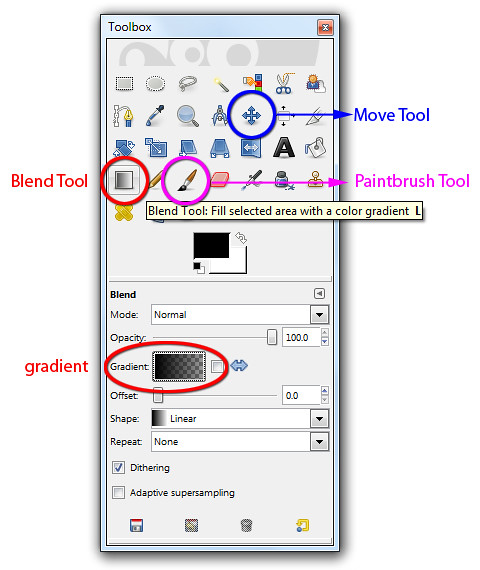
This is easy. After opening the photo in GIMP, activate the BlendTool in the Toolbox.

The Blend, Move and Paintbrush tools are in the Toolbox.

The Blend, Move and Paintbrush tools are in the Toolbox.

In the Tool Options below the Toolbox, click on the rectangle beside the “Gradient” label and from the dropdown list of options, select “FG to Transparent” gradient.

Click on the Foreground Swatch in the Toolbox and select white from the “Change Foreground Color” dialog box that pops up. If you want the photo to fade to black, red or any other colour instead of white, simply select that colour and set that as the Foreground colour.

Now move the cursor to the image window and drag it from the left side of the photo to the right. A gradient going from pure white to nothing is overlaid onto the photo so that it appears as if the photo is fading into white. If you are not satisfied with the fading, press Ctrl-Z to undo and try dragging again. Trial and error is the best way to get your ideal fading effect.

To fade in more gradually, drag further. You can of course drag from right to left or drag vertically or diagonally – depending on how you want the fading effect to appear.

The disadvantage of this quick-and-dirty method is that the gradient is added directly onto the photo. Once you’ve saved and closed the file, you can’t adjust the fading effect to reveal more of the original photo anymore.

Applying the gradient on a separate layer

Here’s a non-destructive approach that allows the fading effect to be tweaked six months down the line.

Instead of applying the gradient directly to the photo in the Background layer, apply it to a new empty layer above the Background layer. This way, none of the pixels in the original photo in the Background layer is changed or “destroyed”. The fading effect can be changed anytime in the future by replacing or modifying the colour and gradient in the upper layer.

Here are the steps.

Apply the gradient to an empty layer above the photo.

Apply the gradient to an empty layer above the photo.

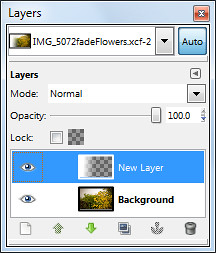
Add a new layer by clicking the icon at the bottom left corner of the Layers dialog. In the “New Layer” dialog box that pops up, select the radio button for “Transparency” option under Layer Fill Type and press the OK button.

A new empty layer is added above the original photo in the Background layer.

Use the Blend Tool to add the gradient to the new empty layer.

The result is that the photo appears to fade into white. You can further finetune the overall effect by using the Move Tool from the Toolbox to move either the photo in the Background layer or the gradient in the upper layer.

Simply activate the Move Tool from the Toolbox, click to select the layer you want to move in the Layers dialog, and drag in the image layer to make the move. You may find it easier to first change the default option of the Move Tool to “Move the active layer” to better control which layer you want to move.

Merging two photos into each other (non-destructively)

Little house on the prairie? More like ruins in a field of lavender.

Little house on the prairie? More like ruins in a field of lavender.

This intelligent Spaniel named Bugis lives on the lavender fields of the Valensole plateau.

This intelligent Spaniel named Bugis lives on the lavender fields of the Valensole plateau.

Pleasant memories from our drive through Valensole in Provence

Pleasant memories from our drive through Valensole in Provence

To merge two photos into each other, simply place one photo as a layer above the other photo. Add a layer mask to the upper layer and use the Blend Tool to apply a gradient to the layer mask. The two photos will appear to blend into each other.

Here are the steps.

Open the first photo in GIMP. The photo resides in the Background layer which is the only layer in the Layers dialog for the moment. Bring in the second photo as a new and separate layer by using the “File > Open as Layers” command from the main menu. The new layer sits above the first photo in the Background layer.

Right-click the image thumbnail for the upper layer in the Layers dialog. In the pop-up menu, select “Add Layer Mask”. In the Add Layer Mask dialog box that pops up, press the Add button – any of the options in the dialog box for initialising the layer mask is fine since we will be modifying the layer mask immediately after creating it.

Press “D” on the keyboard to reset the foreground and background colours to black and white respectively.

Activate the Blend Tool from the Toolbox using any of the three “FG to BG” gradients in the Tool Options. Because the layer mask is active, dragging the Blend Tool in the image window will add the gradient to the layer mask instead of the white layer itself. The layer mask hides part of the photo in the upper layer based on the gradient in the layer mask. The result is that the two photos appear to fade into each other.

Again, none of the pixels in the two photos are altered or “destroyed”. The fading effect can be changed anytime in the future by modifying the gradient in the layer mask of the top layer.

I've modified the layer mask by painting with the Paintbrush Tool.

I've modified the layer mask by painting with the Paintbrush Tool.

You can further modify the blending by using the Paintbrush Tool from the Toolbox to paint either black or white into the layer mask. Remember – white reveals the pixels in the upper layer while black hides. Shades of gray makes the pixels in the upper layer translucent.

As before, you can also use the Move Tool to move either of the photos around.

Digitally apply a graduated ND filter to your landscape photos using GIMP (Part 9 of 14)

Sunday, April 3rd, 2011

Instead of paying to buy a graduated neutral density filter and go through the hassle of carrying it around and fitting and unfitting it everytime you use it, simulate the effect using layers and layer masks in GIMP.

When taking photos of sceneries where the bright sky occupies the upper half and the foreground occupies the lower half, it can be difficult to capture the entire range of brightness levels to show the details clearly.

The park within the grounds of Nijojo Castle in Kyoto.

The park within the grounds of Nijojo Castle in Kyoto in autumn.

The sky has been darkened and the foreground lightened.

The sky has been darkened and the foreground lightened in GIMP.

The clouds and the sky can be too bright; while the mountains, trees and houses in the foreground may be too dark. This is made worse under the harsh sunlight of the midday sun when contrast in the photo will be at the highest.

The traditional way to get around this, is to avoid the midday sun, or to buy a graduated neutral density (ND) filter – if you own an SLR that allows filters to be attached to the lens.

The graduated ND filter darkens the upper portion of a photo so that the sky will not be overexposed while a brighter exposure can be used for the whole photo such that the foreground will not be too dark.

What if you use a compact camera, on which typically you can’t attach any filters? Or you find it a hassle to attach and unattach filters between snapshots? Or you simply don’t want to pay for another camera accessory that you have to carry around?

Using layers and layer masks in GIMP, you can pretty much simulate the effect of a graduated ND filter on the computer.

Simulate a graduated ND filter digitally using GIMP

I snapped the autumn colours of the park within Nijojo Castle in Kyoto from the top of the castle keep. The clear blue sky was rather bright while trees along the moat in the foreground of the photo were too dark.

Darkening the photo to darken the sky would make the foreground too dark. Brightening the photo to brighten up the foreground would overexpose the sky.

Duplicate two copies of the original photo in the Layers dialog.

Duplicate two copies of the original photo in the Layers dialog.

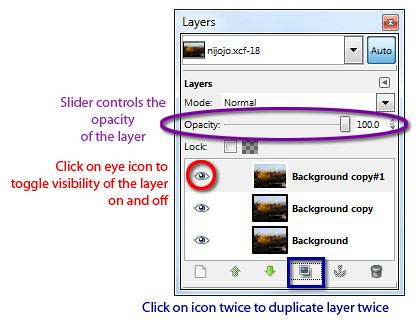
To control which areas to darken and brighten, first duplicate the original background layer twice by clicking twice on the Duplicate icon at the bottom of the Layers dialog.

Two new layers containing copies of the original photo are now created above the background layer. We will darken the upper copy and lighten the lower copy and then use a layer mask to merge the two layers so that only the darkened sky and the brightened foreground is visible.

Brightening the foreground

First hide the upper copy by clicking the eye icon to the left of its thumbnail in the Layers dialog.

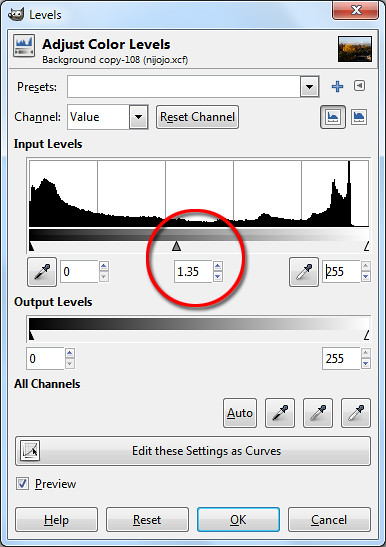
Drag the middle slider directly below the histogram.

Drag the middle slider directly below the histogram.

Now click on the lower copy by clicking on it in the Layers dialog. Brighten the lower copy. You can use Colors > Brightness-Contrast I generally prefer the Colors > Levels command. I will cover this command in more detail later in the series.

In the Levels dialog box that pops up, look below the Input Levels histogram and drag the middle slider to the left until the foreground is suitably lightened. You can see the entire photo lighten as you drag the slider.

Pay attention to the foreground and ignore the sky which will become excessively bright. You can see the numeric value of the middle slider in the centre text box just below the histogram. I used a setting of 1.35

Darkening the sky

Select the upper copy in the Layers dialog by clicking on it. Turn its visibility back on by clicking on the where eye icon previously was.

The lower duplicate copy is lightened with the Levels command.

The lower duplicate copy is lightened with the Levels command.

The upper duplicate copy is darkened to make the sky more dramatic.

The upper duplicate copy is darkened to make the sky more dramatic.

Darken this layer using the Colors > Levels command.

In the Levels dialog box that pops up, drag the middle slider to the right until the sky is suitably darkened. Again, pay attention to the sky and ignore the foreground which will become excessively dark. I used a setting of 0.45.

Blending the two copies using a layer mask

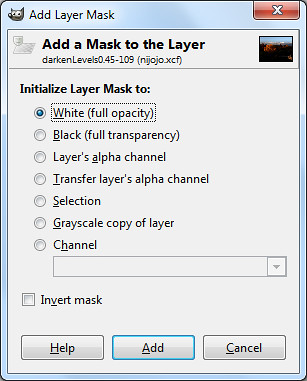
Select the White (full opacity) option.

Select the White (full opacity) option.

Right-click the upper copy and choose Add Layer Mask command from the pop-up menu. Click the radio button for “White (full opacity)” option and click on the Add button.

A layer mask is now added to the upper copy. In the Layers dialog, you can see the thumbnail for the layer mask to the right of the image thumbnail in the layer containing the upper copy.

Activate the Blend Tool from the Toolbox. Reset the colour swatches in the Toolbox by pressing “D” on the keyboard. In the tool options below the Toolbox, make sure the “FG to BG” Gradient is selected.

Activate the Blend Tool from the Toolbox.

Activate the Blend Tool from the Toolbox.

Here’s the magic, click the cursor somewhere near the top of the yellow tree and drag the mouse vertically upwards until the cursor is just above the clouds in the sky before releasing the mouse button.

A black to white gradient is painted into the layer mask for the upper copy. The white parts represents the parts where the upper copy will be visible and the black areas represents the parts where the upper copy will be hidden. Grey areas represents areas where the upper copy is partially visible.

Where the upper copy is hidden or translucent, the lower copy will show through. The result is that the darkened sky of the upper copy will be visible while the lightened foreground of the lower copy will show through.

The layer mask shows the darkened sky and the lightened foreground.

The layer mask shows the darkened sky and the lightened foreground.

By painting in the layer mask with the Paintbrush Tool with black or white, you can further finetune exactly which parts of the darkened upper copy to remain visible and which parts of the lower lightened copy to show through.

You can further tweak the final result by adjusting the opacity of the two copies by dragging the layer opacity sliders for each of the layers. The layer opacity slider is found at the top of the Layers dialog.

You now have a pseudo-HDR (High Dynamic Range) photo which captures both the lightest tones in the sky and the darkest details in the foreground in a single photo.

Android compatibility for the PlayBook

Saturday, April 2nd, 2011
Having had only 25,000 apps in BlackBerry App World, RIM’s PlayBook will tap the 150,000 apps in the Android Market to give it a headstart, while ramping up the number of PlayBook specific apps to stand against the staggering 350,000 apps in Apple’s App Store.

RIM launches the PlayBook on April 19RIM will be opening the PlayBook to Android apps to provide customers a wider choice of apps.

Software tools for making Android apps work on the PlayBook will be available this summer, Tyler Lessard, head of RIM’s developer relations told Bloomberg in an interview.

Android is the world’s fastest-growing smartphone platform and is also gaining market share for tablet computers, based on data on global shipments from Strategy Analytics below.

Percentage of global shipments Android iPad
Oct to Dec 2010 22 % 75%
Jul to Sep 2010 2.3 % 95 %

Although developers can port Android apps for the PlayBook, Lessard states that developers should still create programs specifically for the PlayBook to make the most of its multimedia performance and ensure their apps work as well as possible.

Bloomberg reports that “Dozens” of games for the PlayBook will be released this year through Unity Technologies’s Union game development tool.

RIM readies itself for launch of its PlayBook

Friday, April 1st, 2011
RIM positions PlayBook to capture market share from its Apple and Android tablet rivals from the consumer market, even as it opens up for Android app compatibility and ramps up on building its own ecosystem of PlayBook specific apps.

Research In Motion (RIM) whose BlackBerry smartphone was a hit with corporate customers, is also targeting developers of consumer applications, including games and magazines.

The 7-inch tablet will be preloaded with applications such as Tetris – my favourite game on an Apple Macintosh during my college days, and the Kobo e-book reader.

An online version of Pro Football Weekly magazine will also be available for sports aficionados.

The display was superb and performance lightning fastThe PlayBook goes on sale in the US on April 19 and will feature a new operating system, a dual-core processor, and the capability to play applications for Google’s Android platform.

I had the chance to play with a beta release version of the PlayBook when it was first brought to Singapore three weeks ago and the display not only looked great, the processor was lightning fast, multi-tasking 8-10 CPU/graphics-intensive apps without showing any latency.

Although RIM has not been as successful as Apple or Google in attracting independent developers to write consumer apps for the BlackBerry, it is trying to rectify this with the PlayBook.

Hugo Miller from Bloomberg quoted Travis Boatman, senior vice president at Electronic Arts as being impressed with the PlayBook.

“It’s one of the fastest devices out there … You take a good software environment and great hardware, you’ve got a device that designers and developers can create great content on.”

The Redwood City, California-based company will release “Tetris” and “Need for Speed Undercover,” a car racing game, on the PlayBook.

Research In Motion launches the PlayBook on April 19RIM will be opening the PlayBook to Android apps to provide customers a wider choice of apps. There are more than 150,000 apps in the Android Market, compared with more than 25,000 in BlackBerry App World and more than 350,000 in Apple’s App Store.

“We are absolutely targeting the consumer, personal apps market as much if not more because there is such a vast market out there,” Tyler Lessard, head of RIM’s developer relations told Bloomberg in an interview.

Polar Mobile, a Toronto-based developer of apps for magazines including Time, GQ and Sports Illustrated, is building over 100 PlayBook apps including Pro Football Weekly, that will be ready in July, said Polar CEO Kunal Gupta.

Like other newcomers to the tablet scene, the PlayBook will be hoping to chip away at the market share of Apple, the market leader who has enjoyed little competition since the launch of its iPad in April 2010.

Analysts estimate that Apple has shipped more than 15 million iPads so far, and sold about 500,000 of the newly launched iPad 2, over its March 11 debut weekend.

HTC and Acer switch fortunes as smartphones and tablets outmode netbooks and PCs

Thursday, March 31st, 2011
HTC is now valued at 22.2 times reported earnings, compared with 10.6 for Acer. Only in February last year, HTC had a PE ratio of 11 times, while Acer was at 22.

Taipei-based HTC is the world’s largest maker of handsets using operating systems from Google and Microsoft. Acer is the world’s second-largest manufacturer of personal computers.

HTC makes Android and Windows Mobile smartphonesThe wheel of fortune for the two companies seems to have turned as sales of smartphones and tablet computers grew at the expense of notebooks and personal computers.

Prior to the explosive growth, set off by Apple, of the smartphone and tablet sector, Acer had snatched the lead from Asus for a similarly explosive growth in the netbook sector.

From HTC’s low in February last year, it has rallied some 264 percent, while Acer has fallen by 36 percent. According to Kevin Chang from Citigroup, Acer is the biggest seller of consumer notebooks in the developed world.

Acer won the pole position for the netbook market from AsusIn a report dated March 28, Chang wrote that “Consumers are not buying notebooks because they have already spent money on new tablet PCs or on upgrading their handsets from feature phones to smartphones.” He adds that Acer could become “a much smaller company in the next few years,” if tablet PC sales grow to exceed those for notebooks.



Not surprisingly, Chang has a “sell” rating on Acer’s stock and a “buy” recommendation on HTC.

A March 24 report from the Goldman Sachs Group estimates that HTC’s market worth may reach $100 billion in the next three to five years from $30 billion now, as the company ships a possible 200 million smartphones and 30 million tablet computers a year.

HTC’s value has quadrupled since reaching a low of $7.4 billion in February last year, while Acer’s market capitalization has declined to $5.6 billion from a peak of $9.4 billion reached in January 2010.