Archive for the ‘Software’ Category

Amazon beats Apple and Google to music streaming service

Wednesday, March 30th, 2011
Amazon launches the service ahead of rivals Apple and Google who are both preparing to release similar services.

Amazon unveiled Cloud Player – its music streaming service that allows users to buy tracks, store them on the company’s servers and play them on Android smartphones and browsers on computers.

Amazon targets cloud storage for consumersMusic libraries can be uploaded to Amazon’s new Cloud Drive, which provides 5 gigabytes of free memory space. Users who purchase an album from Amazon.com will have their Cloud Drive space upgraded to 20 gigabytes. This can can be used to store music, photos, videos and other digital files.

The service targets users who find it a hassle to download music to their work computer or phones because they find it hard to move music around to different devices.

It is unlikely that the service will win over existing customers of iTunes since Apple’s own music streaming service will likely be launched soon.

Observers believe Amazon’s sights are well beyond the music arena. It is hoping to capture market share of users storing their data online. They want to get – not just music – but the user’s entire hard drives on its cloud.

Apple WWDC 2011 sold out almost immediately

Tuesday, March 29th, 2011
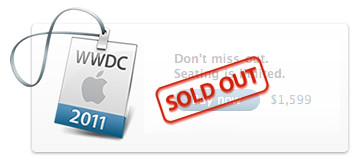
As expected, tickets for the Worldwide Developers Conference (WWDC) this year were sold out even faster than last year’s 8 days. Tickets, priced at US$1,599, were sold out almost immediately when sales commenced.
Apple WWDC 2011 tickets sold out
Slated to be held from June 6 – 10 at San Francisco’s Moscone West, there is much speculation on whether the iPhone 5 will be launched during the conference. There is also chatter on whether the iOS5 and new Mac OS Lion will be released during the conference. 

At any rate, the rapid sell-out of the tickets indicate that the popularity of the Apple ecosystem is showing no signs of losing its momentum, even in the face of competition from Android-based devices and the resurgence of devices based on Windows Phone 7, HP’s webOS and RIM’s BlackBerry Playbook.

Apple WWDC 2011 to kick off June 6 in San Francisco

Monday, March 28th, 2011
Last year’s conference tickets were sold out in a record 8 days. I expect the tickets will sell out even faster given its focus on the iOS and the Mac OS, and how to harness them for churning out sizzling hot apps.

The annual Worldwide Developers Conference (WWDC) will be held this year from June 6 – 10 at San Francisco’s Moscone West.

Apple Worldwide Developers Conference 2011 June 6 - 10Apple announced that during the five-day conference, it “will unveil the future of iOS and Mac OS, including exciting demonstrations of the new kinds of apps that developers can build using Apple’s advanced frameworks.”

“At this year’s conference we are going to unveil the future of iOS and Mac OS,” said Philip Schiller, Apple’s senior vice president of Worldwide Product Marketing. “If you are an iOS or Mac OS X software developer, this is the event that you do not want to miss.”

Mobile developers will be able to explore the latest innovations and capabilities of iOS and learn how to enhance the functionality, performance and design of their apps. Mac developers will see and learn how to develop Mac OS X Lion applications using its latest technologies and capabilities. Developers can bring their code to the labs and work with Apple engineers, applying development techniques and best-practices to enhance their apps.

Activities at Apple’s WWDC 2011 include:

  • more than 100 technical sessions presented by Apple engineers on a wide range of technology-specific topics for developing, deploying and integrating the latest iOS and Mac OS technologies.
  • over 1,000 Apple engineers providing developers with code-level assistance, insight into optimal development techniques, and guidance on how they can make the most of iOS and Mac OS technologies in their apps.
  • the opportunity to connect with thousands of fellow iPad, iPhone and Mac developers from around the world.
  • Apple Design Awards which recognize iPad, iPhone and Mac apps that demonstrate technical excellence, innovation and outstanding design.

Tickets are priced at US$1,599 – same as last year. Go to the Apple Worldwide Developers Conference 2011 website to purchase tickets, as well as for updates and more information.

Hiatus in the Intermediate GIMP Series this weekend

Saturday, March 26th, 2011
I’m dedicating this weekend to a photo tribute to Japan and a remembrance of the March 11 earthquake and tsunami.

The GIMP Intermediate Series takes a break today and tomorrow. The series will resume next weekend.

Firefox 4 breaks its predecessor’s first 24-hr download record

Saturday, March 26th, 2011

The pent-up demand arising from the delay of its launch from November last year has resulted in a whopping 8.75 million downloads in the first 24-hours following its launch earlier this week on March 22.

It easily trounced the 2.35 million downloads that Internet Explorer 9 garnered in the first 24-hours of its launch just a week prior.

Firefox 4 is downloaded 8.75 times within first 24 hours

The number of Firefox 4 downloads in the first 24 hours surpassed the previous record set by Firefox 3 when the predecessor captured a cool 8 million downloads during the first 24 hours after its launch in June 2008.
Firefox 4 is available on Windows, Mac OS and Linux. It supports Windows XP while IE9 doesn’t. Many observers see that as the main reason why it has drawn more than 3 times the number of downloads that IE9 recorded in its first 24 hours.

Windows XP accounts for more than 61 percent of all windows-based machines that went online in February, according to web metrics firm Net Applications.

While Mozilla has chided Microsoft for leaving Windows XP users stuck with the two-and-a-half year old IE8, the latter supports only Windows 7, Vista and Windows Server based PCs because it wants to leverage the more advanced technology available in these newer operating systems and does not want IE9 to be constrained by the older technology in 10-year-old Windows XP.

In the meantime, visit http://glow.mozilla.org/ for a live status of the number of Firefox 4 downloads worldwide.

And for some statistics of the market share of the various browsers, checkout this wikipedia page. Below are some download statistics updated from my earlier posting for the IE9 launch:

Browser/
App/
Plug-in
Claimed downloads Time period Launch Date
Mozilla Firefox 4.0 8.75 1 day Mar 2011
Mozilla Firefox 3.0 8 million 1 day Jun 2008
Opera 11 6.7 million 1 day Dec 2010
IE 9 2.35 million 1 day Mar 2011
Apple Safari 4.0 6 million 3 days Jun 2009
IE9 beta 2 million 2 days Sep 2010
IE8 beta 1.3 million 5 days Aug 2008
Angry Birds 5 million 1 month Dec 2010
Mac App Store 1 million 1 day Jan 2011
Nokia Ovi 3 million Daily Ongoing
Adobe Flash Player 8 million Daily Ongoing

Adobe CS6 in 2012

Wednesday, March 23rd, 2011

The next major version of Adobe Creative Suite will arrive in 2012, Chief Executive Officer Shantanu Narayen revealed. This is in line with the 18 – 24 month product renewal cycle the suite has followed in the past.

Adobe CS6 in 2012In the meantime, Adobe plans to release an HTML5 update to the current version. The update will make it easier for designers and developers to build websites using the HTML5 Internet standard.

Adobe released the current Creative Suite 5, which includes the Photoshop and Illustrator programs, in April 2010. The version before that, Creative Suite 4, was released in October 2008.

The HTML5 standard is supported by both Apple and Google and competes with Adobe’s Flash Internet video and animation software. Apple bans Flash on the iPad tablet computer and iPhone handset.

Adobe believes that selling HTML5 development tools and working with software developers who create applications for smartphones and tablets can help Adobe assert the importance of its tools.

By embracing HTML5, Adobe gives Web developers more options and positions itself to benefit whether programmers decide to use Flash or HTML5. It is a win-win situation for the company whether developers choose to work with Flash or HTML5.

Japan disaster fallout: Adobe tempers forecast

Tuesday, March 22nd, 2011

Lower sales in Japan due to the Mar 11 disasters. Adobe forecasts second-quarter profit that missed analysts’ estimates because of earthquake and tsunami impact on sales.

Adobe forecast affected by Japan disastersAdobe Systems Inc. is the largest maker of graphic design software in the world. It has reduced its sales forecast by $50 million because of the disasters in Japan – its second largest market after the U.S. According to analysts, Japan accounts for 10 – 15 percent of Adobe’s revenue each quarter.

Profit for the current quarter is expected to be 47 – 54 cents. This compares with a 56 cents average based on analysts’ projections compiled by Bloomberg.

“We saw a noticeable drop in our revenue,”Aaron Ricadela from Businessweek quotes  Mark Garrett, Adobe’s Chief Financial Officer.

Launch of Mozilla FireFox 4

Monday, March 21st, 2011

The next major release for the popular browser from Mozilla will be launched tomorrow.

Firefox 4 from MozillaBased on the final beta – Release Candidate 2 – that became available only three days ago on 18 March, Mozilla has announced that this will be the last update where the delta from the previous release is a large one.

Future releases will be more frequent and involve smaller changes. This is in line with other browsers which releases minor updates on a more frequent basis.

The main enhancements involve better standards support, improvements in performance, and a face-lifted user interface.

The current version is at 3.6.

Local adjustments using Layer Masks in GIMP (Part 8 of 14)

Saturday, March 19th, 2011
Use a combination of layers and layer masks to make localised adjustments to specific parts of a photo. This installment shows how to use them to paint with light.

In the photo of the landscape waterfall, the rocks around the artificial waterfall are too dark because they are lying in the shadows of the surrounding trees. I want to lighten the rock features. Download the before photo and follow along.

This tranquil landscaped lake was shot in the Nijojo Castle in Kyoto, Japan.

This tranquil landscaped lake was shot in the Nijojo Castle in Kyoto, Japan.

I want to lighten only the rocks around the waterfall without affecting the trees.

I want to lighten only the rocks around the waterfall without affecting the trees.

Creating a lighter duplicate layer

First duplicate the background layer by clicking on the fourth icon at the bottom of the Layers dialog.

Lightening the rocks has lightened everything else as well, making the photo too harsh.

Lightening the rocks has lightened everything else as well, making the photo too harsh.

Brighten the duplicated copy by using Colors > Brightness-Contrast command from the main menu. You can see that in addition to the rocks, the other parts of the photo are lightened as well. That is the problem with global adjustments – when you lighten the shadows, the highlights get blown out.

For the moment, just concentrate on getting the brightness of the rocks right. Ignore what happens to the rest of the photo. I used a Brightness setting of 75 and Contrast setting of 45.

The duplicated layer has become lighter overall and more contrasty. It’s actually not bad overall but it gives the impression of a hot and harsh sunny day at the park. I prefer to convey the shadiness of the trees in the background and the tranquil ambience of the lake.

Adding a layer mask
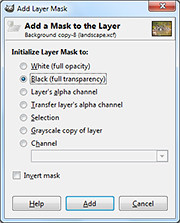
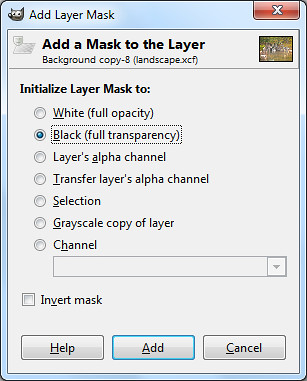
Select the Black (full transparency) radio button.

Select the Black (full transparency) radio button.

Right-click on the name of the duplicated layer in the Layers dialog and select “Add Layer Mask” from the pop-up menu.

An “Add Layer Mask” dialog box pops up. Click the “Black (full transparency)” radio button and press the Add button.

In the image window, the duplicated layer disappears from view and you see the original darker photo in the Background layer.

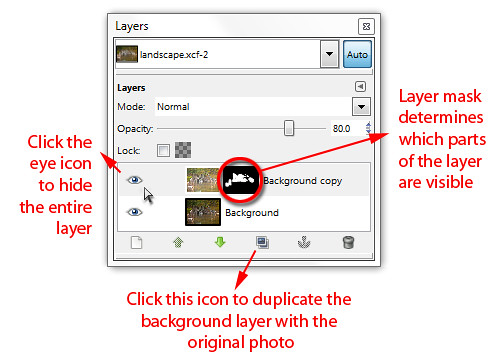
In the Layers dialog, note that in the duplicated layer,  a small rectangle thumbnail has been added to the right of the layers thumbnail. It is a mask that determines which part of the layer is visible.
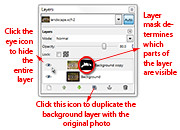
A Layer Mask is added to the duplicated layer in the Layers dialog.

A Layer Mask is added to the duplicated layer in the Layers dialog.

Black areas in the mask make the corresponding areas in the layer transparent/invisible while white areas make the layer opaque/visible. Grey areas make the corresponding areas in the layer translucent or partially visible.

At the moment, the mask is totally black, so the entire layer is hidden from view.

Painting with light
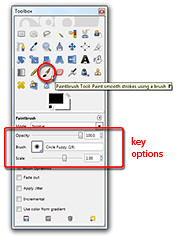
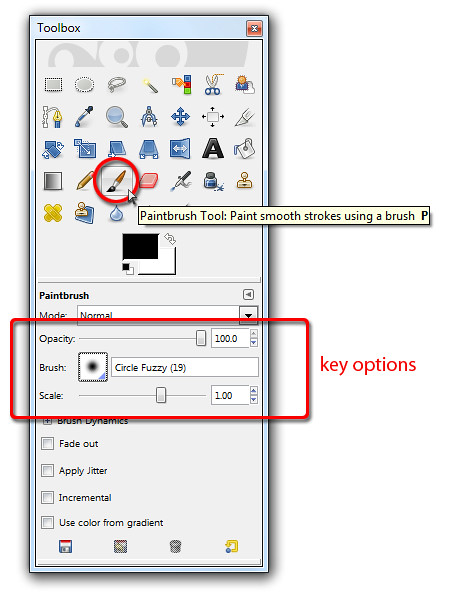
Activate the Paintbrush Tool to paint on the Layer Mask for the duplicate layer.

Activate the Paintbrush Tool to paint on the Layer Mask for the duplicate layer.

Select the Paintbrush Tool from the Toolbox. From the options below the Toolbox, select a Circle Fuzzy brush. Set the Foreground colour swatch to white. You can press “D” followed by “X” on the keyboard as a shortcut.

Now move the cursor over the rocks in the photo to be lightened and start painting. Because the layer mask is active, the painting actually occurs on the layer mask instead of the pixels in the layer.

And because the Foreground colour is white, painting on the layer mask reveals the corresponding pixels in the layer itself so that they become visible.

You can see the rocks lightening as you paint over them because pixels in the lightened layer is revealed as you paint white into the layer mask. You can also see the white areas appear in the layer mask thumbnail in the Layers dialog as you paint.

Adjust the size of the brush by pressing the “]” and “[” keys on the keyboard to increase or decrease respectively.

Painting back the mask

If you paint into the areas where you do not want to be lightened – like the leaves – and want to reverse the lightening, simply press “X” on the keyboard to toggle the Foreground colour to black. Painting on the layer mask now will hide the lighter pixels, so that the areas painted appears darker again.

If you find that painting on an area lightens or darkens it too much, lower the opacity of the Paintbrush Tool by dragging the Opacity slider in the Options below the Toolbox.

Alt-click on the Layer Mask thumbnail in the Layers dialog to show the mask in the image window.

Alt-click on the Layer Mask thumbnail in the Layers dialog to show the mask in the image window.

As you are painting, you can toggle the eye icon of the duplicated layer in the Layers dialog to compare how the photo looks before and after the adjustments. You can also disable the layer mask by Ctrl-clicking on it to see how the layer looks without the layer mask. Alt-clicking on the layer mask will show black-and-white layer mask in the image window itself.

Once you’ve completed the painting and lightened the rocks, you can still fine-tune the results by varying the layer opacity of the duplicated layer. Simply drag the Opacity slider near the top of the Layers dialog. This will reduce the overall intensity of all the lightening that you have done.

Maximum flexibility

This method of doing local adjustment provides plenty of control and flexibility. You don’t have to make a selection before making the adjustments. You can “paint” in the adjustments on the fly and reverse when you overdo an effect. You can tone down the opacity of the Paintbrush Tool to reduce the intensity and when the painting is completed, you can still control the overall intensity of the adjustments by varying the opacity of the duplicated layer.

What’s more, if you save the file in GIMP’s native .xcf file format, you can re-open the .xcf file at a later date and adjust the layer mask if you want change the adjustment.

Naturally, you can use this method for any type of adjustments – darkening, colour saturation, black and white toning etc. Just apply whatever effect you want to the duplicate layer and then use a layer mask to control how much of the effect shows through.

IE9 downloads vs the rest of the world

Friday, March 18th, 2011
Microsoft has claimed that Internet Explorer 9 has been downloaded 2.35 million times in the first 24 hours since its official release on Monday night. This ranks it behind Firefox and Opera but ahead of Safari.

Mozilla Firefox 3 was fastest off the block when it clocked 8 million downloads in the first 24 hours after its launch in June 2008. Next was Opera 11 with 6.7 million downloads in the first day after launch in December 2010.

Both browsers were ahead of Internet Explorer 9 in terms of number of downloads in the first 24 hours.

Following behind was Apple’s Safari which reached 6 million downloads but only after three days. Data for Chrome were unavailable.

The above statistics were compiled by Gavin Clarke of The Register and based on claims by the companies themselves without any means of external verification.

I have summarised the compilation below. Also included are downloads statistics for Angry Birds, the Mac App Store, Nokia Ovi store and the all-time-favourite – Adobe Flash Player.

Browser/
App/
Plug-in
Claimed downloads Time period Launch Date
Mozilla Firefox 3.0 8 million 1 day Jun 2008
Opera 11 6.7 million 1 day Dec 2010
IE 9 2.35 million 1 day 14 Mar 2011
Apple Safari 4.0 6 million 3 days Jun 2009
IE9 beta 2 million 2 days Sep 2010
IE8 beta 1.3 million 5 days Aug 2008
Angry Birds 5 million 1 month Dec 2010
Mac App Store 1 million 1 day Jan 2011
Nokia Ovi 3 million Daily Ongoing
Adobe Flash Player 8 million Daily Ongoing