Archive for the ‘Software’ Category

Turn your photo into a film slide

Sunday, May 22nd, 2011

Tired of simple white borders for your digital photos? GIMP has a simple filter that adds a frame around the photo to make it look like it is a film slide – complete with black frame, sprocket holes, and labels.

Turn your digital photo into a film slide using the Slide filter in GIMP.

Turn your digital photo into a film slide using the Slide filter in GIMP.

Adding a border around a digital photo adds visual interest to make it look more interesting, and can focus the viewer’s attention on the main subject as well. If you’re feeling fanciful, you can easily add a decorative border around your photo to turn it into a film slide. Here’s how.

The original photo in landscape orientation. Photo from morguefile.com.

The original photo in landscape orientation. Photo from morguefile.com.

With your photo open in GIMP, select the Filters > Decor > Slide command from the main menu.

The pop-up dialog box for the Slide filter.

The pop-up dialog box for the Slide filter.

The “Slide” dialog box for the filter pops up with various options to customise the appearance of the slide.

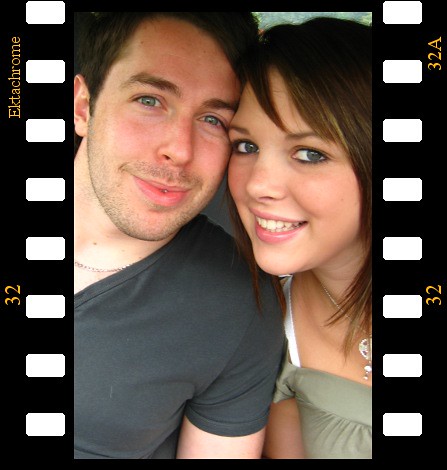
The original photo in portrait orientationTurned into film slide

The Slide filter can also be applied to a photo in portrait orientation.

Filter options

The “Text” option allows you to enter a label for the slide. You can use it to caption your photo. Or you could type in “Kodak” to emulate a real slide. For “Number”, type a number from 1 to 37.

The “Font” and “Font color” options lets you specify the font face and colour of the text and numbers adorning the slides of the slide. Leaving them to the default values produces the most realistic results.

Leave the “Work on copy” option checked so that a duplicate copy of the photo will be used for the slide effect and the original is left unchanged. Press the “OK” button and GIMP churns out your slide as a new image which you can save as a JPEG file under a different name.

Points to note

If the original photo is in landscape orientation, the black frames with sprocket holes and labels will be added to the top and bottom sides of the photo. If the original photo is in portrait orientation, the frames will be added to the left and right sides.

Original photo is too close-cropped

The colour of the sprocket holes will be based on the current background colour in the colour swatches in the Toolbox. So if you want the holes to be white, remember to reset the background colour to white by pressing “D” on the keyboard, before applying the filter.

If the aspect ratio of the photo is anything other than 3:2, it will be cropped into that ratio. If you want to control exactly how the photo is to be cropped, crop it yourself to 3:2 first before applying the filter. This will ensure you don’t end up with half a face being cropped out of the photo.

Letting the filter crop to 3:2 aspect ratio may have a blinding effect

Letting the filter crop to 3:2 aspect ratio may have a blinding effect.

Use the crop tool to do your own cropping to crop it exactly the way you want it.

Use the crop tool to do your own cropping to crop it exactly the way you want it.

Professional Edition of Adobe Digital Publishing Suite Now Available

Saturday, May 21st, 2011

Adobe Systems has announced the immediate availability of the Professional Edition of Adobe Digital Publishing Suite, a turnkey solution that includes hosted services and viewer technology that allow a spectrum of publishers to cost-efficiently publish content to Android tablets, BlackBerry PlayBook and Apple iPad.

Aimed at publishing houses, business publishers, and education institutions that require an off-the-shelf tablet publishing solution, the Professional Edition taps the huge interest in digital publishing across a range of industries – including retail, banking, financial services, healthcare and education – where companies and brands want to publish a new genre of engaging publications on tablets, as part of their digital publishing and mobile marketing strategies.

The Enterprise and Professional editions of Digital Publishing Suite is targeted at producing more engaging applications from both media and business publishers.

The Adobe Digital Publishing Suite tightly integrates with Adobe InDesign CS5.5 and Adobe Creative Suite 5.5 software, empowering designers with industry-standard page layout capabilities for creating highly designed, engaging digital content that includes a new class of interactivity.

Used in conjunction with the Folio Producer tools in InDesign CS5.5, Digital Publishing Suite provides a robust end-to-end publishing solution for creation, distribution, commercialization and analysis of high-value content including traditional magazines and newspapers as well as corporate publications including magazines, annual reports, product guides and retail catalogs consumed on desktops and tablets.

The Professional Edition provides media and business publishers as well as educational institutes with an expedient tablet publishing solution that offers creation of rich reading experiences; amplification of brand across mobile channels, distribution and monetization of content across leading mobile marketplaces and tablet devices; as well as availability to deeper reader insights through pre-built analytic reports, based on the Adobe Online Marketing Suite powered by Omniture.

Adobe is targeted at supporting all levels of customers who require a comprehensive tablet publishing solution. In addition to the immediate availability of both the Professional and Enterprise Editions, Adobe expects to allow organizations to purchase Digital Publishing Suite through an expanded set of agency partners.

Pricing and Availability

The Professional Edition of Digital Publishing Suite is available immediately, with pricing consisting of both a platform and service fee.

The estimated platform fee for professional-edition customers is US$495 per month (or US$5,940 per year), which provides access to core Digital Publishing services including hosting of an unlimited number of titles per individual publisher and bundled Gold technical support.

The service fee scales based on the total number of issues downloaded per year. A customer purchases an annual commitment level of issue downloads that range from 25,000 to 500,000 downloads per year:

25,000 issue downloads ($0.22/issue) for US$5,500 per year
250,000 issue downloads ($0.15/issue) for US$37,500 per year
500,000 issue downloads ($0.12/issue) for US$60,000 per year

Adobe Creative Suite 5.5 Now Available Across Southeast Asia

Friday, May 20th, 2011

Adobe Creative Suite 5.5 features advances in HTML5 and Flash authoring for web designers and developers for both content and applications; as well as enhancements in video production and editing.

For digital publishing, content can be delivered to multiple platforms, operating systems, web browsers, smartphones and tablets — including Android, BlackBerry Tablet OS, and Apple iOS devices.

The new Creative Suite product lineup is headlined by Adobe Creative Suite 5.5 Master Collection, which includes, in a single package, all of Adobe’s industry-defining creative tools, such as Photoshop, Illustrator, InDesign, Acrobat, Flash Builder, Flash Catalyst, Flash Professional, Dreamweaver, Adobe Premiere Pro and After Effects.

These products are available separately or as components of one or more of the five Creative Suite editions. The complete Creative Suite 5.5 lineup and their estimated street prices are tabulated below. Upgrade pricing, volume licensing and education pricing are also available.

Creative Suite 5.5 Master Collection: US$3159
Creative Suite 5.5 Design Premium: US$2309
Creative Suite 5.5 Web Premium: US$2185
Creative Suite 5.5 Production Premium: US$2065
Creative Suite 5.5 Design Standard: US$1579

Adobe now plans to have milestone Creative Suite product introductions at 24-month intervals and – starting with Creative Suite 5.5 – major mid-cycle releases between the milestone versions. The major mid-cycle update was announced on April 12 and is available now in Southeast Asia.

Mobile App Development and New HTML5 Capabilities

Focused on the latest wave of mobile devices, this release of Creative Suite gives web designers and developers a complete software solution that allows them to produce stunning HTML5 content in the browser and deliver high-impact mobile applications through sweeping advances in Flash tooling.

Creative Suite 5.5 Web Premium Suite is packed with innovations in HTML5 and Flash authoring tools, empowering customers to create, deliver and monetize rich content and applications for virtually any screen.

Designers and developers can create rich browser-based content across screens using HTML5. Adobe Flash Professional CS5.5, Flash Builder 4.5 Premium and the Flex 4.5 framework allow users to quickly and easily develop, test and deploy high-performance mobile applications for Android, BlackBerry Tablet OS and Apple iOS.

Digital Publishing

Over the last year Adobe and leading publishers, including Condé Nast and Martha Stewart Living Omnimedia, have worked to develop new digital publishing workflows based on Creative Suite and Adobe InDesign.

Creative Suite 5.5 will enable print publishers to create beautiful interactive publications on the latest tablet platforms.

Using Adobe InDesign CS5.5, in combination with the integrated Folio Producer toolset, designers can add new levels of interactivity to their page layouts targeted at tablet devices.

Adobe has also announced the immediate availability of the Professional Edition of Adobe® Digital Publishing Suite, a turnkey solution that includes hosted services and viewer technology that allow publishers to cost-efficiently publish content to Android tablets, BlackBerry PlayBook and Apple iPad.

In addition to advances in mobile authoring and digital publishing, Creative Suite 5.5 Production Premium Suite promises “breakthrough performance, workflow improvements, creative innovations and powerful new audio editing capabilities” to video and audio professionals, broadcasters and filmmakers.

Going down nostalgia lane

Tuesday, May 17th, 2011
Did you see the front page of The Sunday Times on 15 May? The portraits of MM Lee and SM Lee were splashed across half the front page in sepia – that faded brown tint that adds a sense of nostalgia to photos because of the association of that toning effect with photographic print techniques from a bygone era.

Lee Kuan Yew (photo from BBC) Lee Kuan Yew - in sepia tone

Old Photo filter in GIMP applied with Defocus and Sepia options selected but without Mottle nor faded border effect.

Minister Mentor Lee Kuan Yew and Senior Minister Goh Chok Tong are two former Prime Ministers of Singapore who had tendered their resignations on Saturday, May 14 to quit the Cabinet – in order to make way for a clean slate for the current Prime Minister Lee Hsien Loong to reform the ruling PAP government.

Goh Chok Tong (photo from BBC) Goh Chok Tong - in sepia tone

Old Photo filter in GIMP applied with Defocus, Sepia and Mottle options selected together with faded border effect.

The first and second Prime Ministers of the island nation, both brought Singapore from a fledgling, newly-independent, former-colonial state barely able to survive – to the modern nation it is today. Despite handing over their Prime Ministership to their successors, both had been actively involved in the government.

So it was surprising to see, so soon and suddenly, both their portraits published in sepia – suggesting they have become part of a bygone era.

Sepia toning


Select the Filters > Decor > Old Photo command from the main menu

Select the Filters > Decor > Old Photo command from the main menu

“Beginning in the 1880s, sepia was produced by adding a pigment, called sepia, made from the Sepia officinalis cuttlefish found in the English channel,to the positive print of a photograph,” according to Wikipedia. The specialized treatment gave the photograph a warmer tone and enhanced the archival qualities of the prints.

Simulating a sepia effect in GIMP

It is easy to simulate a sepia effect to a digital photo using photo-editing software.

In GIMP, open the digital photo to be modified and select the Filters > Decor > Old Photo command from the main menu. The “Old Photo” dialog box pops up with options to control how the photo is to be “aged”.

The Old Photo filter comes with options to age the look of a photo.

The Old Photo filter comes with options to age the look of a photo.

You can “Defocus” the photo to make it slightly blur, add a faded white border, apply a “Sepia” tone, or “Mottle” the photo to simulate the blobs of pigment you see in old photos. Checking the “Sepia” checkbox will tell GIMP to desaturate the image, reduce brightness and contrast, and modify the color balance to apply the sepia effect.

Once you click “OK”, GIMP gets to work on the photo.

If you just want to get a black-and-white version of the photo, or tint in a different colour from sepia, or want more control over how the final result looks like, check out the  “Black-and-white and Sepia” tutorial that was part of the 14-part Basic GIMP Series of tutorials.

Using Curves to enhance brightness and contrast in GIMP (Final Part 14 of 14)

Sunday, May 15th, 2011
Both the rudimentary Brightness-Contrast command and the handy Levels command allows you to enhance the tonal balance of a photo and for correcting colour balance. But the Curves command gives you ultimate control over how specific tones are to be tweaked in your digital photo.

The Levels command allows the user to adjust the three main tonal ranges of a photo – the shadows, midtones and highlights. The Curves tool, however, allows you to target any tone or tonal range in the photo to tweak their brightness and contrast.

Using the Curves command

With the photo open in GIMP, choose the Colors > Curves command (or Tools > Color Tools > Curves)  from the main menu. An “Adjust Color Curves” dialog box pops up showing a square grid with a straight diagonal line. The histogram of the photo can be seen in the background of the grid for reference.

As for the Levels command, an understanding and analysis of the histogram of the photo is the basis for using the Curves command.

The horizontal X-axis of the grid represents the initial brightness values – from zero (black) to 255 (white) – of the pixels in the photo before the Curves command is applied. The vertical Y-axis represents the brightness values that each pixel is to be mapped into after the adjustments have been applied. It also ranges from zero to 255.

The lower left corner of the grid represents the black point (for pixels with brightness value zero) while the upper right corner represents the white point (for pixels with the maximum brightness value of 255).

Adjusting brightness

To begin adjusting the photo, click anywhere on the diagonal line in the grid. An anchor point is added to the line. You can drag the anchor point around with the mouse.

Drag the point downwards to make the photo darker. The straight diagonal line turns into a curve passing through the anchor point and the black and white points. A faint straight diagonal line is still visible in the grid – it serves as reference for an unadjusted photo.

When the cursor is inside the grid, you can see the X (input) and Y (output) values of the cursor at the top left hand corner of the grid. Mouse-over the anchor point that you’ve just dragged. In the example, you can see that the brightness of any pixel with original value 128 (X-value) will be reduced to 160 (Y-value). Pixels with brightness close to 128 will also be darkened. You can eyeball the effects of the adjustments by looking at the photo itself in the image window.

To lighten the photo, drag the anchor point down below the faint diagonal guide. Now pixels with brightness 128 will be darkened to 90, while the pixels of similar brightness will be darkened as well.

To remove an anchor point, simply drag it off the side of the grid. You can add as many as 14 anchor points (excluding the original black and white points) to the curve. This allows you to target up to 16 specific brightness values in the photo for brightening or darkening. However, you seldom need more than a handful anchor points to get the job done.

Adjusting contrast

If the histogram is bunched up the towards the middle, drag the black or points inwards horizontally to where the histogram begins and ends respectively. This is similar to dragging the black and white points of the Levels command inwards to maximise the tonal range of the photo.

The steeper gradient of the line indicates that the contrast of the photo is increased.

A typical Curves adjustment that can be applied to most photos is the “S-Curve”. This curve tends to enhance most photos by increasing the overall contrast and making the photo “pop” with vivid shadows and highlights.

To apply an “S-Curve” adjustment, add two points on the Curve – the first to lower the brightness of pixels of brightness 64, the second to increase the brightness of pixels of brightness 192. The above numbers are just guides – drag the adjustment points around with the mouse while eyeballing the photo.

The S-Curve suppresses the shadows and highlights while increasing the contrast of the mid-tones, where the main subject usually is. Add a third point with brightness of roughly 128 to increase or decrease the brightness of the midtones.

In addition to these adjustment points, you can add additional adjustment points to tweak specific tones in the photo – such as skin tones.

With some practice, you will be able to control and enhance any particular tone that appears in your photo.

Acer Chromebook with Google Chrome OS

Thursday, May 12th, 2011

Google has unveiled its first two Chrome-based notebooks from Acer and Samsung at the Google I/O conference in San Francisco. They will be available for order online from June 15.

Acer’s Wi-Fi only Chromebook will cost $349, while the Samsung Chromebook will cost $429 for the Wi-Fi only version and $499 for the 3G version.

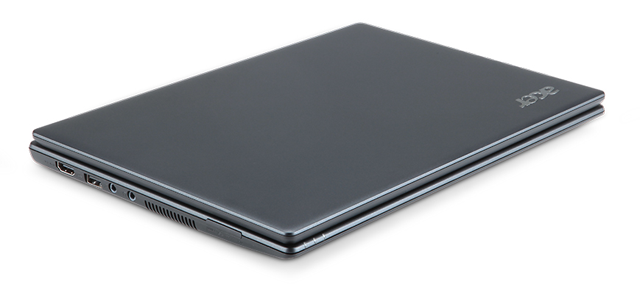
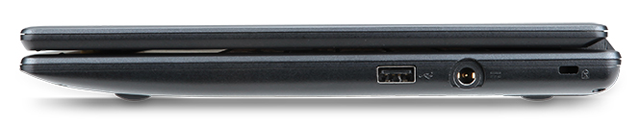
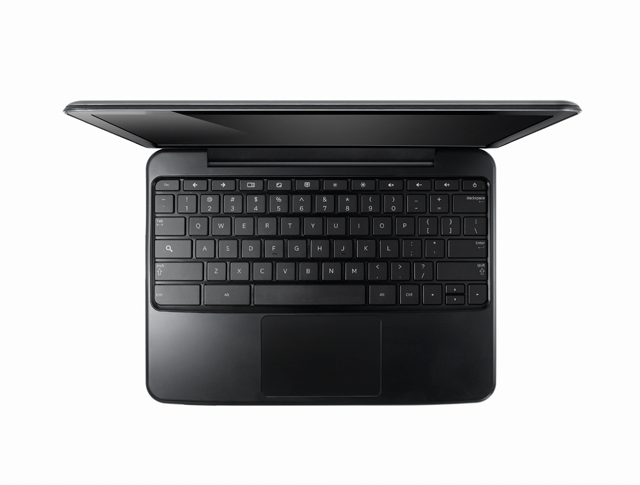
The Acer Chromebook is a netbook running Google’s Chrome OS. It has an 11.6 inch display, 1.66 GHz dual-core Intel Atom N570 processor, 16 GB SSD drive and 2 GB RAM, with 6 hours battery life. It is available in black.

Acer Chromebook running Google's Chrome OS

Acer Chromebook

The price of $349 is for the Wi-Fi only version. 3G will be an additional optional configuration.

Chromebooks will be available online June 15 in the U.S., U.K., France, Germany, Netherlands, Italy and Spain. More countries will follow in the coming months. In the U.S., Chromebooks will be available from Amazon and Best Buy and internationally from leading retailers.

Here are the main specifications:

  • 11.6″ HD (1,366×768) 16:9 Widescreen CineCrystalTM LED-backlit LCD
  • 1.66 GHz dual-core Intel Atom N570 processor
  • Acer Chromebook running Goolge's Chrome OS2GB RAM
  • 16GB SSD drive
  • 6 to 8 hours battery life
  • stereo speakers
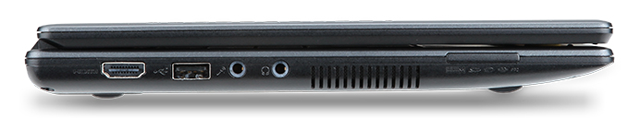
  • 2 USB 2.0 ports
  • Acer Chromebook running Google's Chrome OS4-in-1 memory card slot
  • HDMI port
  • 11.6 x 8.6 x 0.8 inches
  • Acer Chromebook running Google Chrome OS2.95 lbs / 1.34 kg
  • A full-size keyboard
  • Multitouch touch pad
  • Built in dual-band 802.11 b/g/n Wi-Fi and World-mode 3G (optional)
  • 1.3 megapixel HD Webcam with noise cancelling microphone
  • Instant-on from standby, and an 8-second boot time


Samsung Series 5 Chromebook

Wednesday, May 11th, 2011

Google has unveiled today its first Chrome-based notebooks from Acer and Samsung at the Google I/O conference in San Francisco. They will be available for order online from June 15.

The Samsung Chromebook will cost $429 for the Wi-Fi only version and $499 for the 3G version, while Acer’s Wi-Fi only Chromebook will cost $349.

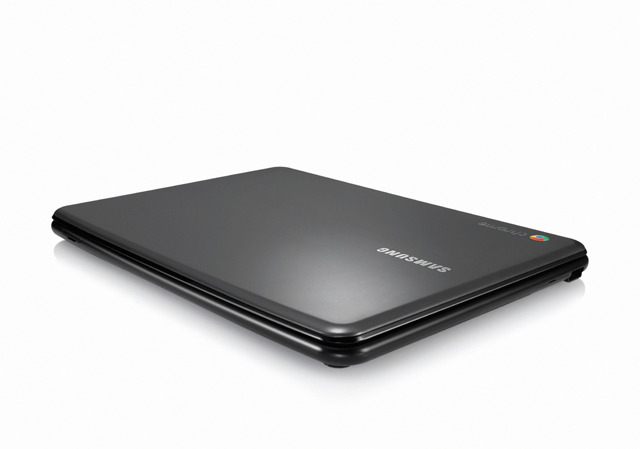
Samsung Series 5 Chromebook, based on Google's Chrome OS

Samsung Series 5 Chromebook

The Samsung Series 5 Chromebook is a netbook running Google’s Chrome OS. It has a 12.1 inch display, 1.66 GHz dual-core Intel Atom N570 processor, 16 GB SSD drive and 2 GB RAM, with 8.5 hours battery life.

Looking similar to the CR-48 prototype, the Series 5 is available either in white or “Titan Silver”.

Chromebooks will be available online June 15 in the U.S., U.K., France, Germany, Netherlands, Italy and Spain. More countries will follow in the coming months. In the U.S., Chromebooks will be available from Amazon and Best Buy and internationally from leading retailers.

Here are the main specifications:

  • A 12.1-inch (1280×800) SuperBright display at 300 nits, with a 16:10 aspect
  • 1.66 GHz dual-core Intel Atom N570 processor
  • Samsung Series 5 Chromebook, based on Google's Chrome OS2GB RAM
  • 16GB SSD drive
  • 8.5 hours battery life
  • Stereo speakers
  • Two USB 2.0 ports
  • SD/SDHC/MMC/SDXC card slot
  • Samsung Series 5 Chromebook, based on Google's Chrome OSMini-VGA port
  • 11.6 x 8.6 x 0.79 inches
  • 3.26 lbs / 1.48 kg
  • A full-size keyboard
  • Multitouch touch pad
  • Built-in dual-band Wi-Fi and World-mode 3G (optional)
  • HD Webcam with noise cancelling microphone
  • Instant-on from standby, and an 8-second boot time


Google to unveil Chromebooks

Tuesday, May 10th, 2011

Google will reveal its first Chrome-based notebooks from Acer and Samsung at the Google I/O conference in San Francisco. They will be available for order online from June 15.

The Samsung Chromebook will cost $429 for the Wi-Fi only version and $499 for the 3G version, while Acer’s Wi-Fi only Chromebook will cost $349.

It’ll be interesting whether consumers will bite, considering that you can buy a decent Netbook or an iPad the $499 price-tag for the 3G Samsung Chromebook.

Acer Chromebook, available from June 15, 2011

Acer Chromebook

Chromebooks will be available online June 15 in the U.S., U.K., France, Germany, Netherlands, Italy and Spain. More countries will follow in the coming months. In the U.S., Chromebooks will be available from Amazon and Best Buy and internationally from leading retailers.

Equipped with dual-core processors from Intel, the Chromebooks boast all-day battery life, and instant-on ability and built-in Net connectivity. Chromebooks will get updates and patches automatically every few weeks, like its browser cousin Chrome.

A special pricing is available for schools – Google will charge $20 a month for each Chromebook. The price will include hardware, administrative support, hardware upgrades, and warranty.

With this long awaited foray, Chromebooks will be taking on the tablet market dominated by Apple’s iPads, and the PC market dominated by both Microsoft and Apple.

Samsung Chromebook, available from June 15, 2011

Samsung Chromebook

The Chromebooks will run a new new bare-bones operating system that is basically a web browser that allows users to access applications like email, wordprocessors and spreadsheets directly on the web, instead of installing software such as Outlook or Office directly on the computer’s harddisks.

Users can also store their music and documents in the cloud for access from other computers as long as there is an Internet connection. Naturally, that means that a lot of the functionality may likely be unavailable or crippled offline.

Google has been touting Chrome as an alternative to Microsoft Windows for some two years now, but it has encountered delays producing computers designed to use the software.

Final installement of Intermediate GIMP series

Sunday, May 8th, 2011

The final installment of the 14-part Intermediate GIMP series will be run next weekend.

After more than a week of following the Singapore General Election 2011 and staying up past 3 am to watch the results, I’m afraid I’ve had to postpone the final installment of the Intermediate GIMP series till next weekend.

It will be on using the advanced Curves command to correct/enhance the brightness and contrast of a photo.

Roundup of RIM releases for BlackBerry World 2011

Wednesday, May 4th, 2011

BlackBerry Bold 9900 and 9930 smartphones on BlackBerry 7 operating system, new Facebook and Video Chat apps for the PlayBook tablet — these are some of the initiatives unveiled by RIM just prior to the BlackBerry World 2011 conference.

A range of enterprise solutions for unified communications, device management and mobile security for smartphones and tablets were also announced.

Research In Motion (RIM) BlackBerry World 2011The annual BlackBerry World is now ongoing at the Orlando World Center Marriott in Florida from 3 – 5 May. Typically, new devices, solutions and initiatives are announced during this period. This year, there is much anticipation on what devices will be unveiled, given the large number of leaks about Research In Motion’s (RIM) lineup of smartphones for 2011.

Here is a roundup of releases just prior to BlackBerry World. Some are for RIM’s consumer devices while others are from their traditional stronghold of mobile IT solutions.

New BlackBerry Bold Smartphones on BlackBerry 7 OS

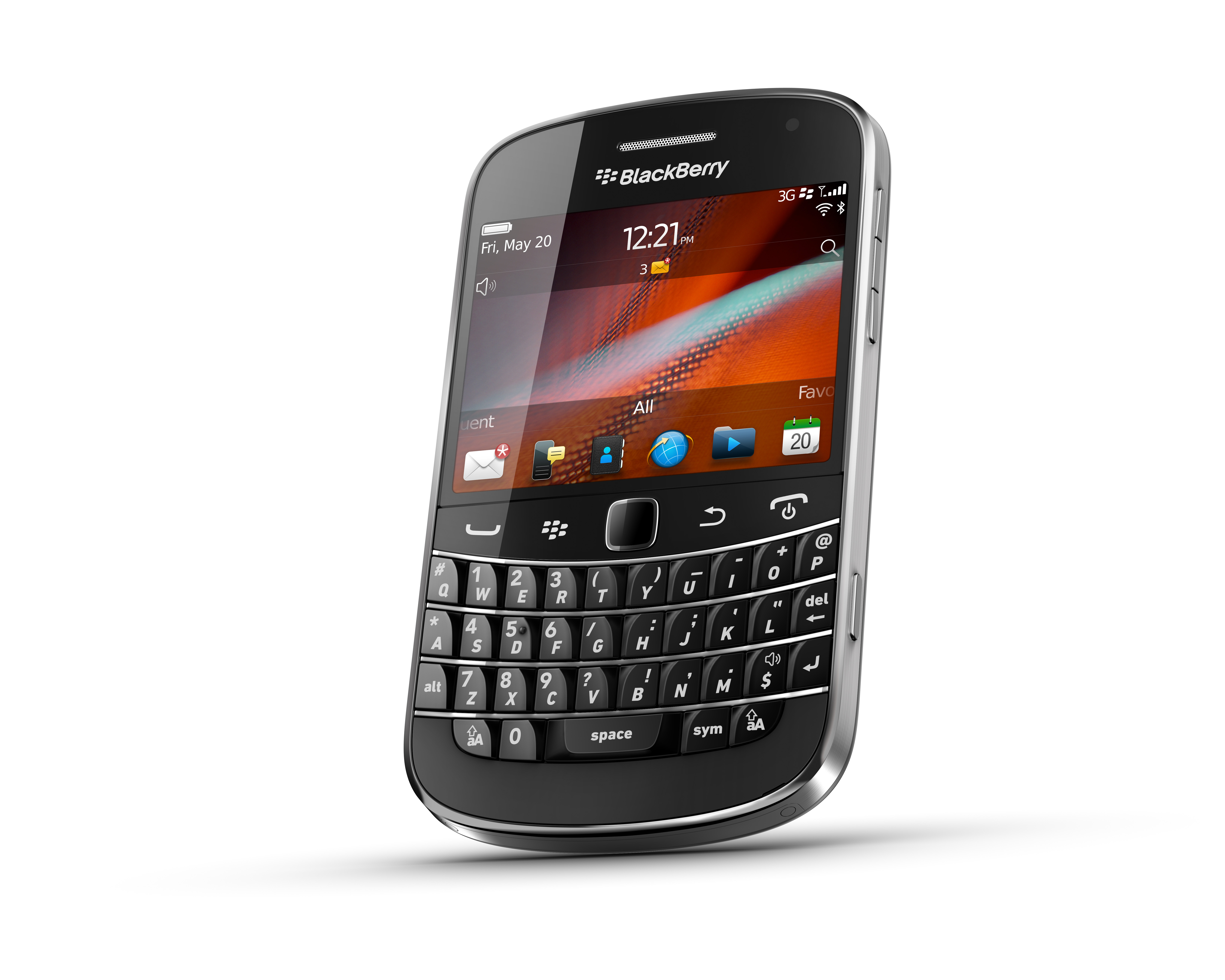
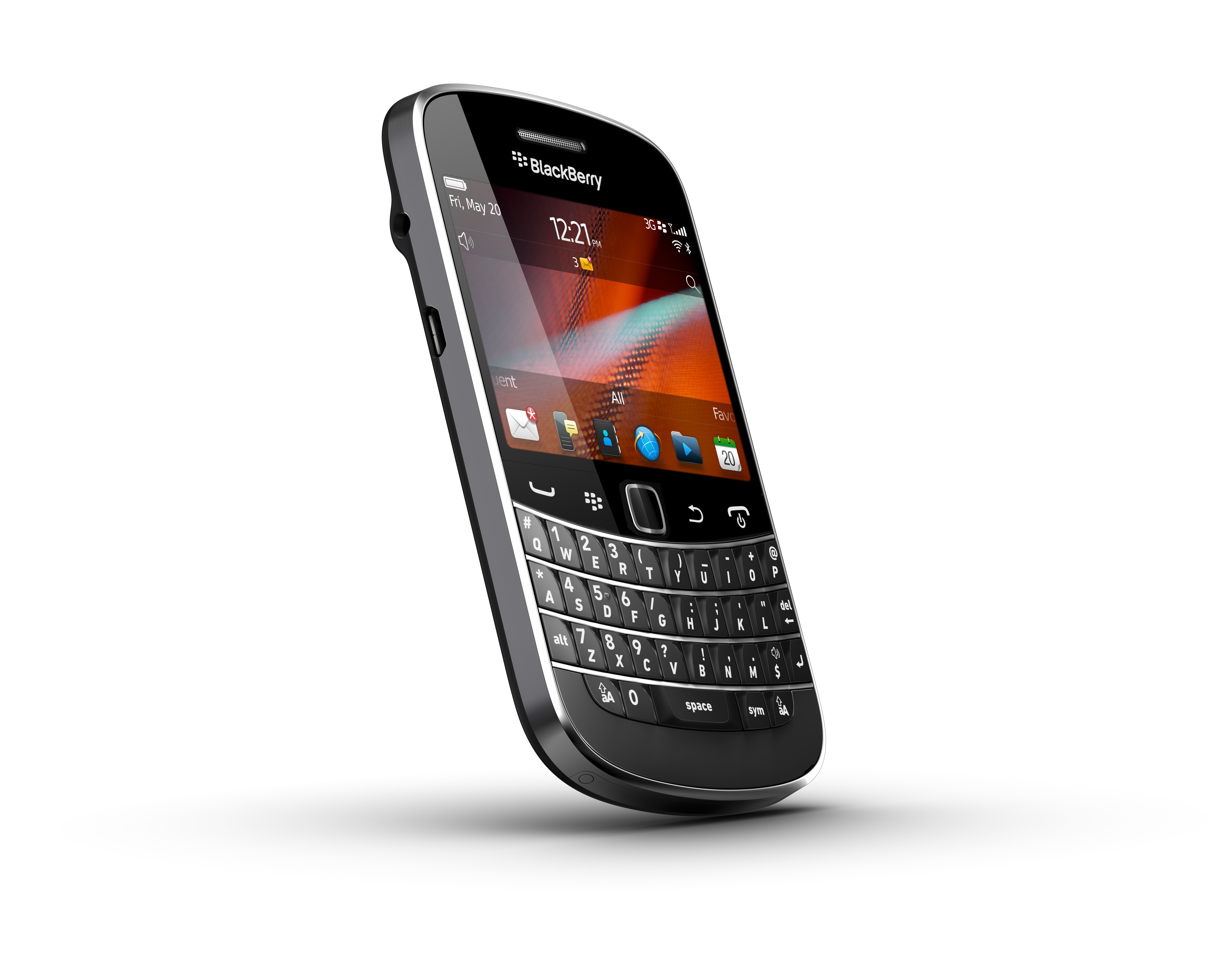
New BlackBerry Bold 9900 from RIMThe BlackBerry Bold 9900 and 9930 smartphones will be the thinnest and most powerful BlackBerry devices yet. The easy-to-use BlackBerry keyboard is integrated with a brilliant, high resolution, capacitive touch screen. These smartphones are built on a new platform powered by the BlackBerry 7 operating system and designed to deliver high performance  in communications, multimedia and productivity for users around the world.

Sporting a 1.2 GHz CPU, a 2.8 inch 640×480 pixels VGA display at 287 dpi resolution, the smartphones support 4G and NFC (Near Field Communications).

The two Bold models are expected to be available from carriers around the world beginning this summer.

New Facebook and Video Chat apps for BlackBerry PlayBook tablet

Facebook for BlackBerry PlayBook appFollowing the release of the Facebook for BlackBerry® smartphones app, RIM has announced the Facebook for BlackBerry PlayBook app. This new app delivers popular features of Facebook, optimized for the 7″ high resolution, multi-touch LCD display of the BlackBerry PlayBook tablet. Facebook for BlackBerry PlayBook offers users a highly engaging experience by integrating popular features such as viewing and adding friends, seamless photo and video viewing, connecting with friends by using Facebook chat, and viewing and interacting with the News Feed.

The app be available on BlackBerry App World later this month.

BlackBerry App WorldRIM has also announced the availability of the BlackBerry PlayBook Video Chat app – an easy and fun way for friends and family to place and receive video calls between BlackBerry PlayBook tablets over an internet connected Wi-Fi network. Key features of the PlayBook Video Chat application include: one-click video and voice over Wi-Fi calls, incoming call notifications, powerful in-call functions and a friends list.
The app will be distributed to existing BlackBerry PlayBook customers through an over-the-air software update and is available on BlackBerry App World.

BlackBerry Balance for Work-Life Balance on BlackBerry

RIM is advancing work-life balance on BlackBerry smartphones with BlackBerry Balance. This new technology allows the convenience of using a single BlackBerry smartphone for both work and personal purposes without compromising company security or personal privacy. RIM is introducing this technology in response to the growing trend by businesses to allow employees to use personal BlackBerry smartphones for work, or company-owned smartphones for personal, and the need for businesses to secure, manage and control confidential company or client information.

Multi-Platform BlackBerry Enterprise Solution for Smartphones and Tablets

RIM has announced plans for a multi-platform BlackBerry Enterprise Solution for managing and securing mobile devices for enterprises and government organizations.

New BlackBerry Bold 9900 from RIM

The solution will make available the market-leading management, security and controls of BlackBerry Enterprise Server and BlackBerry Enterprise Server Express for BlackBerry devices. In addition, through RIM’s pending acquisition of ubitexx (creator of the ubi-Suite device management solution), the solution is expected to incorporate secure device management for Android and iOS based devices and tablets, all managed from a single web-based console.

The multi-platform BlackBerry Enterprise Solution is planned for general availability later this year.

BlackBerry Mobile Voice System 5 with Voice Over Wi-Fi Calling for Avaya and Legacy Nortel Communications Systems

To help more businesses bring together the desk phone and smartphone. RIM announced plans to make BlackBerry Mobile Voice System 5 (BlackBerry MVS 5) available to more corporate phone systems and unified communications applications. BlackBerry MVS 5 with voice over Wi-Fi calling will soon be available for Avaya Aura 6.1, Avaya CS1000 Communication Server, as well as legacy phone systems such as Avaya Communications Manager and Nortel Communication Server. BlackBerry MVS 5 has also been re-architected to be more extensible with third party applications and phone systems.