Archive for April, 2012

SolarWinds Mobile Admin lets IT staff BYOD

Monday, April 16th, 2012

If you can’t beat them, join them! After years of fighting the tide of consumerisation of corporate IT, IT staff can now cross over to the “Dark Side” and  – bring THEIR own device to work.

Pricing for SolarWinds Mobile Admin software starts at US$695 per license and includes the first year of maintenance. Download the free 30-day evaluation trial online to try it out.
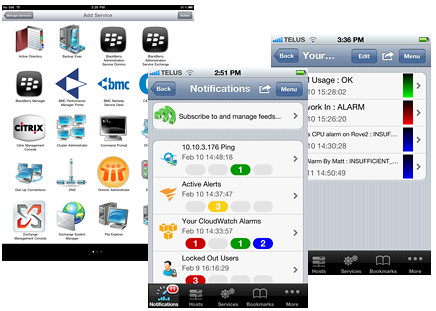
SolarWinds Mobile Admin Version 7

SolarWinds Mobile Admin Version 7

With the consumerisation of IT, employees and (more significantly) CXOs are banging down the doors of the IT departments to be allowed to bring their choice of personal devices to work and to access the Enterprise IT systems with these gadgets.
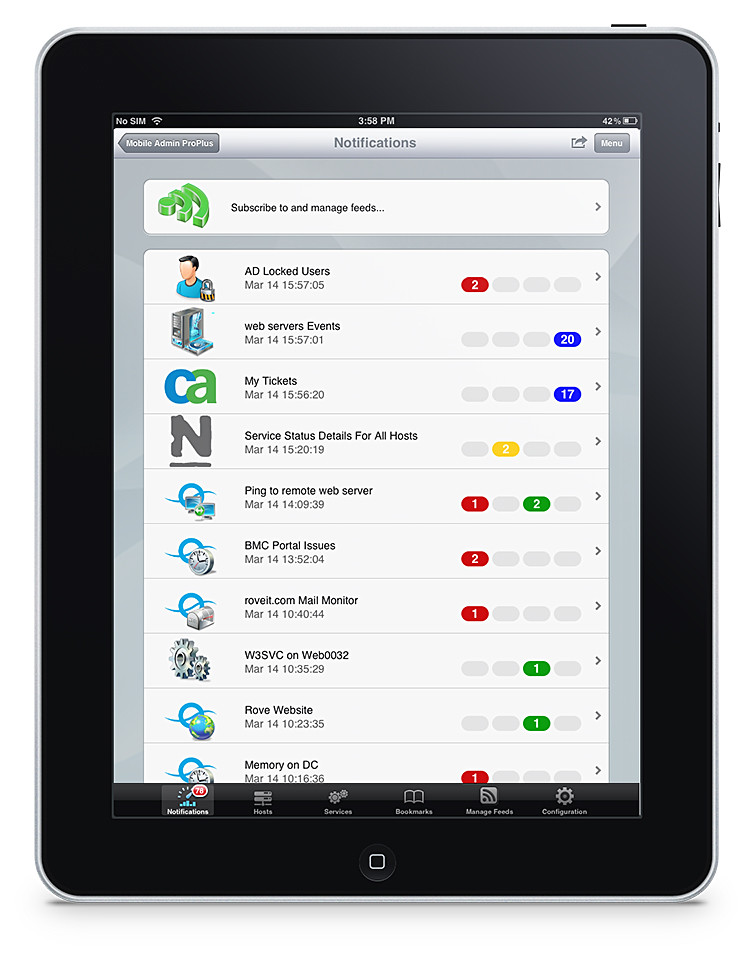
IT staff can now "Bring Your Own Device" too!

IT staff can now "Bring Your Own Device" too!

A strict No-No in the past, mane enterprises and organisations have given in to the pressure and allowed BYOD (Bring Your Own Devices) into their IT policies.

Now, the IT personnel too can jump on the bandwagon too.

SolarWinds, a provider of IT management software, has acquired Rove and released version 7 of the latter’s Mobile Admin software.

SolarWinds Mobile Admin software is designed specifically for mobile devices, with native applications for the most common mobile operating systems, and an extensive list of remote fix capabilities.

Now IT staff can also work with any device, from anywhere, anytime of the day (or night).
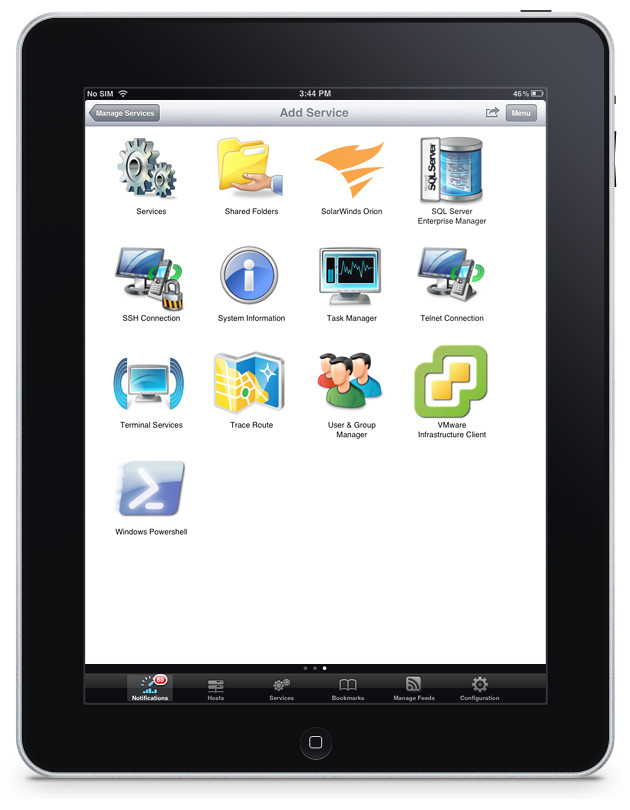
Mobile Admin works on iOS, Android and BlackBerry mobile devices.

Mobile Admin works on iOS, Android and BlackBerry mobile devices.

From the queues of a grocery store, or at the cafe with friends, an IT staff can manage a server on the other side of the world – resetting passwords and rebooting servers.

Mobile Admin is used by thousands of customers to monitor and manage their corporate IT infrastructure from their iPhone, iPad, Android smartphones and tablets, BlackBerry smartphones and PlayBook (OS2), and Kindle Fire.

In addition to dozens of third party systems and services, the latest version of Mobile Admin now adds support for Amazon EC2, Microsoft Active Sync, and SolarWinds network and server management products.

Some of the main features of SolarWinds Mobile Admin 7.0 are listed below.

(more…)

BlackBerry OS vs iOS vs Windows Phone vs Android

Monday, April 16th, 2012

Trend Micro has released the results of its study on the four main mobile operating systems in a report titled “Enterprise Readiness of Consumer Mobile Platforms”.

The security firm found the BlackBerry 7 OS the most secure mobile operating system, followed by iOS 5, Windows Phone 7.5, and Android 2.3.

Summary chart from “Enterprise Readiness of Consumer Mobile Platforms” White Paper by Trend Micro.

Summary chart from “Enterprise Readiness of Consumer Mobile Platforms” White Paper by Trend Micro.

Android 2.3 was used in the study because it was the dominant installed/supplied version of Google’s mobile OS at the time of the research.

Below is an excerpt from the White Paper summarising the findings about the four mobile platforms.

(more…)

Mother’s Day gift ideas from Logitech

Sunday, April 15th, 2012

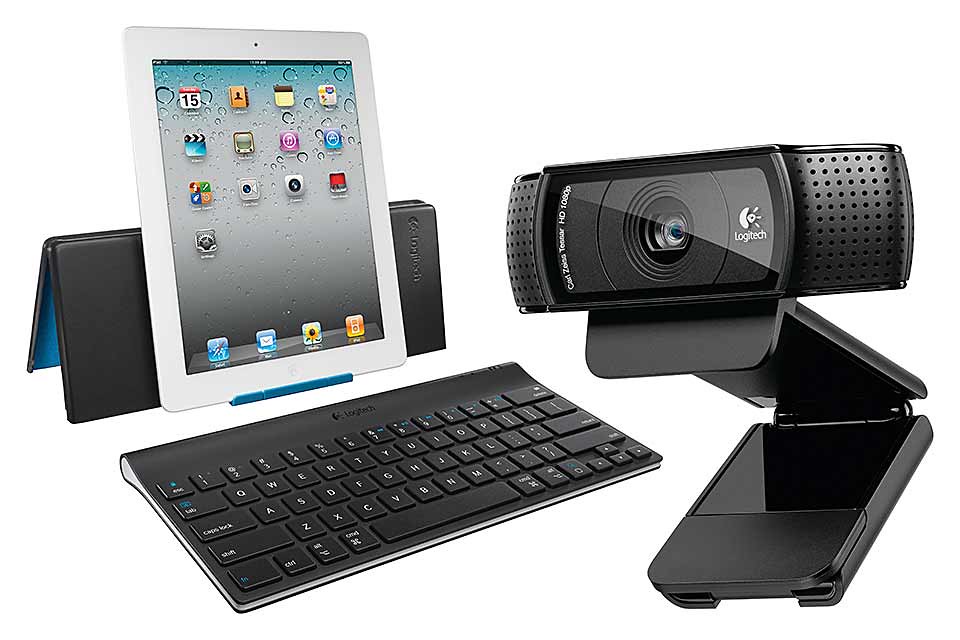
Whether you have a mobile mum, a geeky mum, a travelling mum, or a stay-at-home mum, Logitech has something you can get for her.

Mother's Day gadget gift ideas from Logitech

Mother's Day gadget gift ideas from Logitech

Mother’s Day is on 13 May this year. If you’re looking to buy a gift for a mom – which can also be the mother of your children – check out Logitech’s collection of gadgets and accessories.

(more…)

Nanyang Polytechnic students win Singapore’s Microsoft Imagine Cup Championship 2012

Saturday, April 14th, 2012

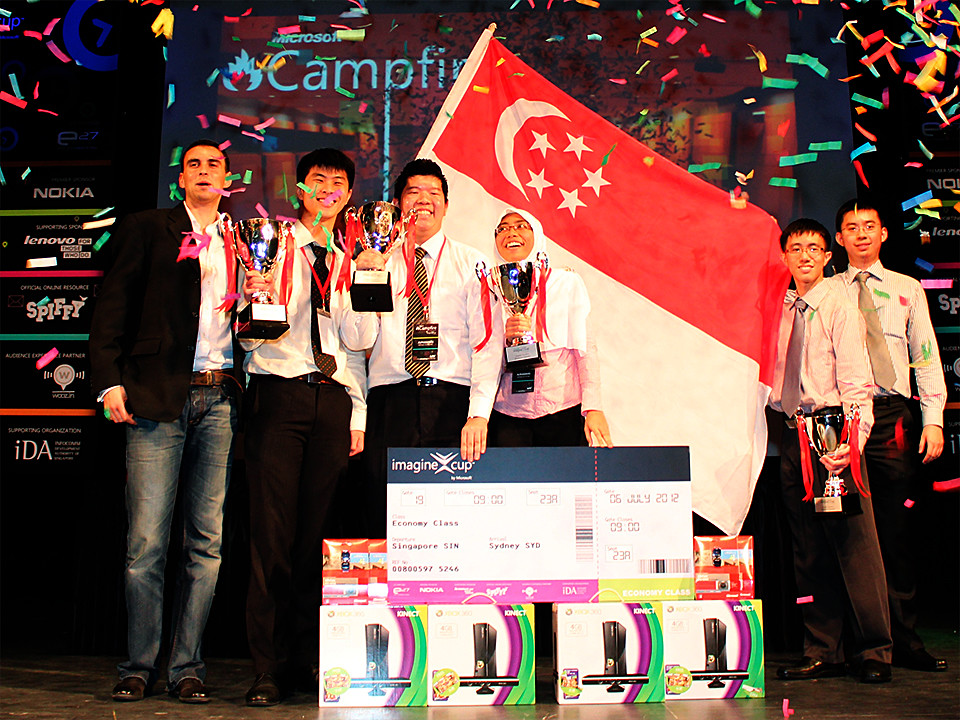
Out of 85 entries, Team AlphaWaves from Nanyang Polytechnic Singapore emerged the national champion of the Singapore Finals.

Their project was “Dementia Assistance and Recall Engine (DARE)” – a web-based digital scrapbook designed to capture and organize the past memories in a personalized digital format.

Team AlphaWaves from Nanyang Polytechnic is the Singapore Imagine Cup 2012 national champion. From left: Ziriad Saibi, Director, Platform and Developer Evangelism Group, Microsoft Singapore, Koh Kai Wei, Eustace Zheng Xiangwen, Nur Nadiah Binte Zailani, Mong Yunheng, Shen Yizhe, Academic Developer Evangelist, Microsoft Singapore.

Team AlphaWaves from Nanyang Polytechnic is the Singapore Imagine Cup 2012 national champion. From left: Ziriad Saibi, Director, Platform and Developer Evangelism Group, Microsoft Singapore, Koh Kai Wei, Eustace Zheng Xiangwen, Nur Nadiah Binte Zailani, Mong Yunheng, Shen Yizhe, Academic Developer Evangelist, Microsoft Singapore. (Photo: Microsoft)

The aim of DARE, as part of reminiscence therapy, is to stimulate recall of past memories through photographs and other media (e.g. sound, video) that can be presented on a PC or tablet to remind the elderly and persons with dementia of their past and who they are.

“Technology empowers the individual to make the world accessible according to their own needs,” said Nur Nadiah Bte Zailani, Team AlphaWaves, champions of Singapore Imagine Cup 2012.The project was based on this year’s theme to “Imagine a world where technology helps solve the toughest problems.”

More than 2700 students registered for this year’s Singapore competition. 16 teams met at the Semi-finals at *SCAPE, Level 4, GRID MMS yesterday to vie for four places in the Finals today.

“Built on Windows 8 and Windows Azure, DARE will have an active link to user’s brainwaves to analyze and make sense of their cognitive and mental abilities to help in stimulating their recall capabilities,” Zailani elaborated.Team AlphaWaves beat the other three finalists which comprised a team from Nanyang Technological University (1st Runners-up), a joint team from Temasek Polytechnic and Singapore Polytechnic (2nd Runners-up), and another team from Nanyang Polytechnic (3rd Runners-up).

All four finalists received prizes comprising Microsoft products which included Kinect Bundles.

Team AlphaWaves, however, won the only coveted slot to represent Singapore in the Imagine Cup 2012 Worldwide Finals in Sydney in July.

Team AlphaWaves from Nanyang Polytechnic is the Singapore Imagine Cup 2012 national champion.

Mother’s Day gift ideas from Dell

Saturday, April 14th, 2012

Thinking of getting the mom a laptop or ultrabook for Mother’s Day this year? Check out Dell’s offerings.

From left: Dell XPS 13 ultrabook, Dell Inspiron 14R, Dell Inspiron One 2320.

From left: Dell XPS 13 ultrabook, Dell Inspiron 14R, Dell Inspiron One 2320.

Here are three laptops/ultrabooks from Dell for Mother’s Day this year (13 May 2012 in Singapore).

(more…)

What’s better than a Canon EOS-1D X? Ans: A Canon EOS-1D C!

Friday, April 13th, 2012

Canon has announced the EOS-1D C, a DSLR capable of recording video at 4K resolution (4,096 x 2,160 pixels) at a frame rate of 24p, or Full HD resolution (1,920×1,080 pixels) at 60p – whilst retaining the still image shooting prowess of the EOS-1D X.

This new flagship DSLR will be available from end October this year (prices TBA).

Canon EOS-1D C, flagship DSLR with 4K video - available in October 2012.

Canon EOS-1D C, flagship DSLR with 4K video - available in October 2012.

The Canon EOS-1D C is designed for use in motion picture, television and other high-resolution digital production industries.

The DSLR provides its users a physically compact yet digitally powerful machine to meet the high demands of today’s production standards.

The Canon EOS-1D C records 4K resolution video (4,096 x 2,160 pixels) at a frame rate of 24p, with 8-bit Motion JPEG compression, cropped to an APS-H-equivalent angle of view.

It can also record Full HD video (1,920 x 1,080 pixels) at a maximum frame rate of 60p, answering the demanding needs of industry professionals.

In addition, the EOS-1D C allows for efficient workflow during production and post-production, with features within the firmware and the accompanying software suite.

Connections panel on one side of the camera.

Connections panel on one side of the camera.

The camera records all video, including 4K, directly to the inserted CF card without having to use peripheral equipment such as external storage devices, bringing increased mobility to its user.

When required, captured video (excluding 4K video) can be output to an external recorder via an HDMI terminal, using an uncompressed YCbCr 4:2:2 signal.

For motion-picture productions, the camera incorporates a Super 35mm crop function, enabling video to be recorded in the industry-standard 35mm angle of view.

The Canon Log Gamma enables the recording of high-quality video with rich gradation expression.

This produces the impressive image quality required in motion-pictures by minimizing both shadow detail loss and highlight detail loss while retaining a high level of color-grading freedom.

Top view of the Canon EOS-1D C

Top view of the Canon EOS-1D C

The EOS-1D C ships with software applications such as EOS Utility and Picture Style Editor.

Canon EOS-1D C body

Canon EOS-1D C body

EOS Utility allows a whole host of camera operations to be controlled via a PC, while the Picture Style Editor allows users to edit and register customized image settings in the camera.

These two applications enable real-time processes such as editing the picture style and confirming results on a monitor during set up or even on the shooting set, increasing production efficiency.

Playback software that ships with the camera allows 4K/Motion JPEG and Full HD video at 60p shot on the EOS-1D C to be output on an external monitor with no loss in image quality.

It also enables video shot with the Canon Log Gamma to be output on a monitor with video gamma applied.

Imagine Cup encourages the use of technology to help the less fortunate

Friday, April 13th, 2012

16 Singaporean teams will meet in the Semi-finals of the Imagine Cup today – out of which four will enter the Finals tomorrow.

The winning team will get to represent Singapore at the global Imagine Cup finals in Sydney in July 2012.

Singapore’s Microsoft Imagine Cup Championship 2012

Singapore’s Microsoft Imagine Cup Championship 2012

Microsoft Singapore is holding Campfire 2012 on today and tomorrow at *SCAPE, Level 4, GRID MMS. The Imagine Cup is the highlight of the two-day event.

Imagine Cup is Microsoft’s student technology and software competition which challenges students aged 16 and above to use their creativity, passion and knowledge of technology to help solve global challenges and make a difference in the world.

Initially branded as the Asia Pacific Student .NET Competition in 2001, the name of the competition was changed to “Imagine Cup” in 2003.

The tournament is held at the national and international levels. The Singapore chapter of the competition was held for the first time in 2003. The winners get to take part in the Worldwide Finals, which is traditionally held in a different country each year.

This year, students have been tasked to use technology to make a difference in the lives of people in their local communities and around the world, addressing issues in education, healthcare and environmental sustainability.

These projects include – eradicate extreme poverty and hunger; achieve universal primary education; promote gender equality and empower women; reduce child mortality; improve maternal health; combat HIV/AIDS, malaria and other diseases; ensure environmental sustainability; and develop a global partnership for development.

More than 2700 students registered for this year’s Singapore competition, resulting in more than 85 entries in the Software Design Category.

RIM to launch more BBM-Connected apps

Thursday, April 12th, 2012

RIM has announced a series of updates to its popular BlackBerry apps that will make it easier for users to to keep their BBM community in the know.

BlackBerry apps for Facebook and Twitter, BlackBerry Travel and BlackBerry App World will be integrated with BBM.

BlackBerry apps for Facebook and Twitter, BlackBerry Travel and BlackBerry App World will be integrated with BBM.

BlackBerry apps for Facebook and Twitter, BlackBerry Travel and BlackBerry App World will be integrated with BBM, thus making it easier for users to share updates with their BBM groups or friends.

By adding BBM (BlackBerry Messenger) connectivity to these apps, Research In Motion (RIM) aims to make it even easier for users to stay in touch with their contacts, share experiences and content, and discover new things from their BBM community.

Facebook for BlackBerry smartphones (version 3.0) and Twitter for BlackBerry smartphones (version 3.0) will allow users to automatically share their Facebook status or latest Tweet with their BBM friends right from within the app.

“Since we provided developers the means to build BBM connectivity into their apps, we have seen more than 800 hundred new BBM-connected apps come to market, which has been followed by a huge uptake by users – about one of every five apps being downloaded on BlackBerry App World is a BBM-connected app,” said Alec Saunders, VP of Developer Relations at RIM. It is now easier than ever to update those who matter most about your travel plans.

The new BlackBerry Travel app (version 2.5) is now BBM-connected, allowing users to share their travel plans and flight changes directly with select BBM contacts or with their entire BBM community.

With BBM (version 6.2) and BlackBerry App World (version 3.1.2), users can easily update their BBM profile to let their friends know about new apps they’ve just downloaded on BlackBerry App World.

With this updated version of BlackBerry App World, users can also instantly share info about their favorite app or a list of their installed apps with friends using BlackBerry Tag**.

“Today we’re excited to announce that RIM has also integrated BBM connectivity into a number of our own popular apps.” – Alec SaundersThe enhanced BBM will also offer a polished, enhanced and more personal experience.

It includes a new selection of animated avatars, a simpler way of updating one’s personal message in their profile, and now allows users to quickly send voice notes.

** BlackBerry Tag requires an NFC-enabled BlackBerry smartphone running BlackBerry 7.1 OS or higher.

NEW! PINK Galaxy Note to hit Singapore on 14 April

Thursday, April 12th, 2012

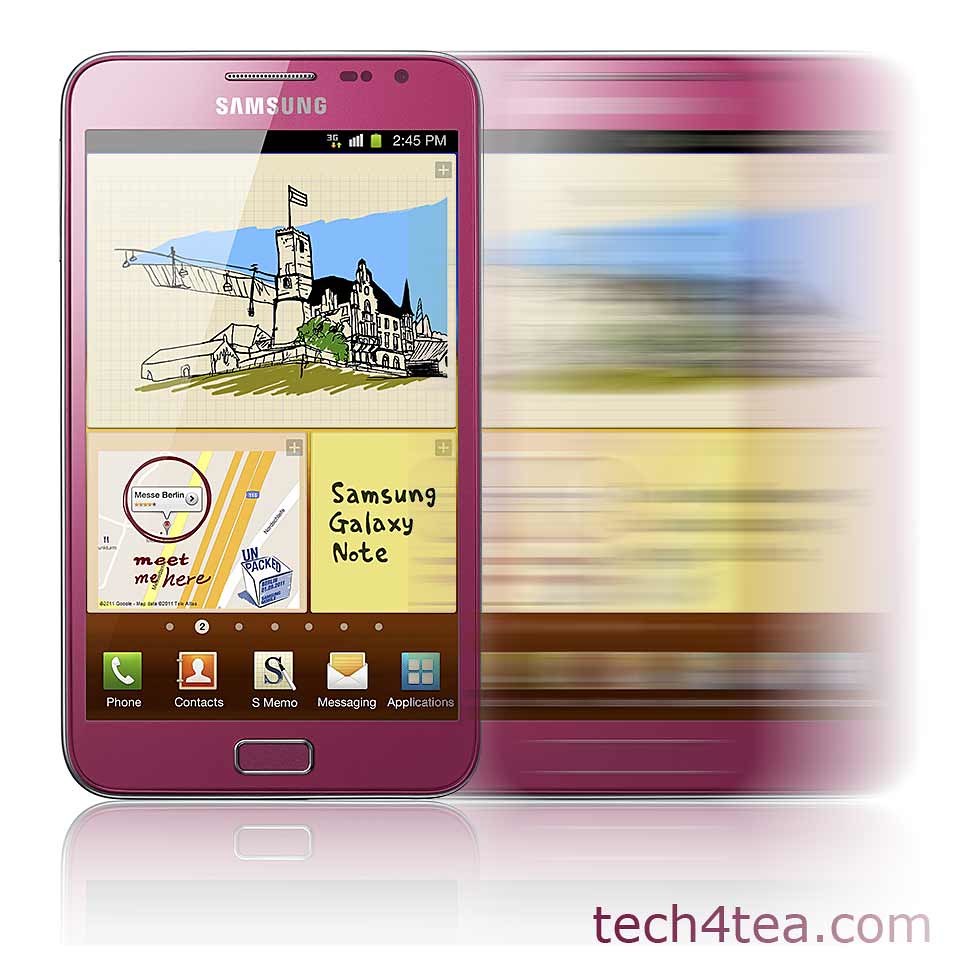
Samsung has just revealed that the pink version of the GALAXY Note will be available in Singapore this Saturday – that’s the day after tomorrow.

Price without contract will be S$948 (incl. GST) without contract.

The PINK Samsung Galaxy Note hits Singapore shelves this Saturday (14 April).

The PINK Samsung Galaxy Note hits Singapore shelves this Saturday (14 April).

The GALAXY Note was first announced back in November last year, together with the GALAXY Nexus.

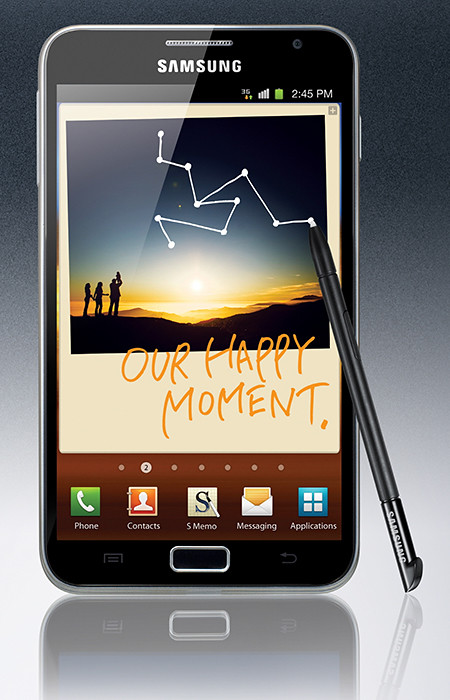
Samsung GALAXY Note (S$998, 16GB) will be available in Singapore in November 2011.The GALAXY Note tries to create a new niche form factor by combining the larger screen size of tablets with the portability of smart phones.

The 9.65mm thick GALAXY Note features the world’s first and largest 5.3” HD Super AMOLED touch screen display at WXGA (1280×800, 285ppi) resolution. It works with pen-input technology using a stylus called the S Pen.

Powered by a 1.4 GHz dual-core processor, the gadget runs on Android 2.3 (Gingerbread) and comes with 16GB onboard storage, with a microSD slot that supports up to 32GB.

GALAXY Note comes with an 8-megapixel rear camera and a 2-megapixel front camera.

The main technical specifications of the Samsung GALAXY Note is tabulated below.

(more…)

New notebooks: Toshiba M800, L800 and C800 Series

Wednesday, April 11th, 2012

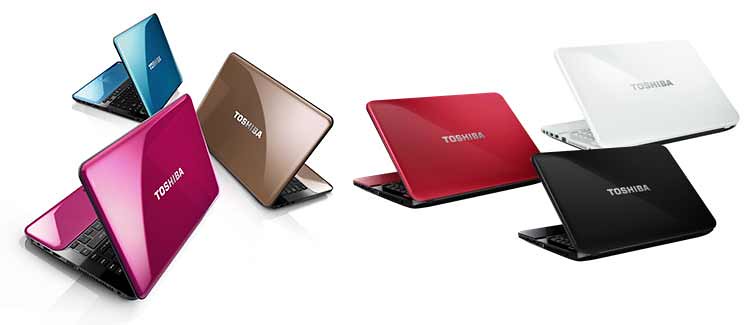
Toshiba has unveiled its latest line of Satellite notebook computers. The M800, L800 and C800 series of notebooks come in a wide range of configurations, screen sizes and colours.

They will be available soon (this quarter) throughout South and South East Asia.

Toshiba's new line of Satellite notebooks - M800, L800 and C800 Series.

Toshiba's new line of Satellite notebooks - M800, L800 and C800 Series.

All the models come standard with at least one USB 3.0 port and Bluetooth 4.0.

Toshiba’s eco Utility, PC Health Monitor, promotes laptop longevity with utilities designed to protect vital components and conserve power.

Toshiba Hi-speed Start Technology offers smarter and quicker bootup and resume that saves precious time.

Toshiba Satellite M800 Series L800 Series C800 Series
Price S$1,199 S$1,099 S$869
Colours available Gold Blaze
Pink Blush
Blue Horizon
Midnight Black
Luscious Red
Icy White
Black Graphite
Red Graphite

And Toshiba’s Resolution+ video upconversion technology breathes new life into standard-def video by seamlessly adjusting color, brightness and contrast to give video a more high-def look and feel.

If you’re wondering about the ultrabook class, Toshiba had just launched the Satellite U840 Series early in February. Here’s the review of the ultrabook.

A brief description and key specifications for each series is tabulated below.

Toshiba Satellite M800 Series

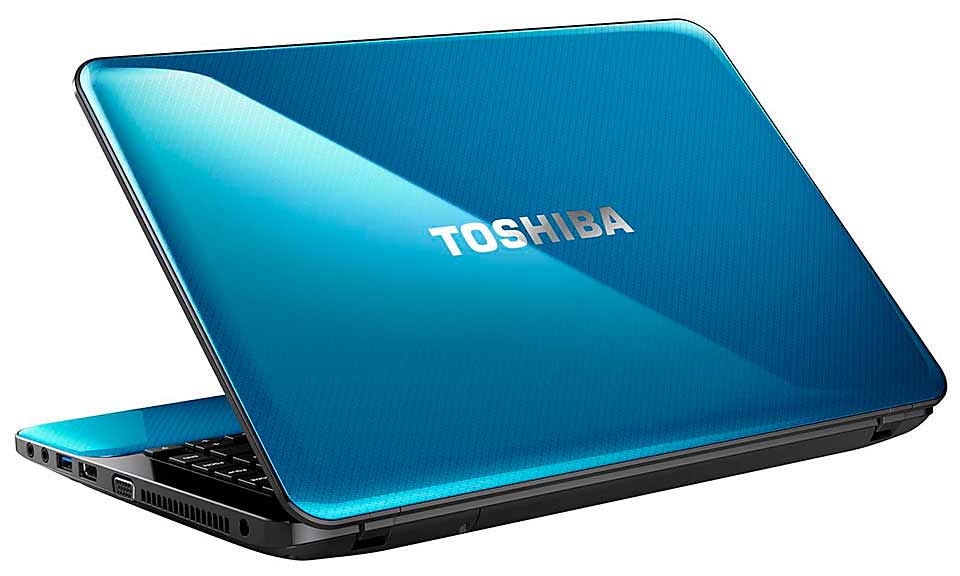
Toshiba Satellite M845 notebook.

Toshiba Satellite M845 notebook

The M800 series promises solid performance, functionality and style.

Its thin and light body weighs only 1.99kg and has a spacious track pad and raised tile keyboard.

Additional multimedia and connectivity features include ATI Radeon HD 7670 graphics card with 2GB dedicated video memory, stereo speakers with SRS Premium Sound HD, HD Webcams, HDMI, two USB 3.0 ports, as well as Toshiba Video Player that supports 2D to 3D conversions.

  • 2nd generation Intel Core i3 and i5 Processors
  • RAM: up to 8GB DDR3
  • 2.5” HDD (5,400 rpm) up to 750 GB
  • 14.0” HD Clear SuperView display with LED backlighting, 1,366 x 768 pixels
  • Intel HD Graphics 3000, or ATI  ATI Radeon HD 7670 graphics card (2GB dedicated VRAM)
  • Ultra-slim DVD SuperMulti Double Layer Drive (DVD±RW/RAM)
  • WLAN, Bluetooth 4.0, 10/100/1000Mbps Ethernet LAN
  • 2x USB 3.0 with USB Sleep-and-Charge, 1x USB 2.0, Multi Card Reader, HDMI
  • A4 tile keyboard, TouchPad with multi-touch
  • HD webcam with Toshiba Face Recognition
  • Stereo speakers with SRS Premium Sound HD Technology
  • Toshiba Hi-Speed Start Technology
  • Toshiba Video Player supporting 2D to 3D conversions and output via a 3D TV
  • Toshiba Resolution+ , Toshiba Eco Utility, Toshiba PC Health Monitor
  • Microsoft Windows 7 Home Basic(English) or Premium (English/简中/繁中)
  • Weight starting from 1.99kg
Toshiba Satellite L800 Series

Toshiba Satellite L840 notebook.

Toshiba Satellite L840 notebook

Value-for-money laptop targeted at families, students and small business owners.

There are three model classes: the highly-mobile Satellite L830 (13.5-inch diagonal widescreen display), the lightweight Satellite L840 (14-inch display), and the versatile Satellite L850 (15.6-inch display) desktop replacement.

The Satellite L800 series also comes with ATI Radeon HD 7670 graphics card with a choice of 1GB or 2GB dedicated video memory, stereo speakers with SRS Premium Sound HD, HD Webcams, a HDMI Port and 2 USB 3.0 ports.

  • Choice of Intel 2nd generation Core i3, i5, or AMD processors
  • Choice of 13.3”, 14.0” or 15.6” HD Clear SuperView display with LED backlighting, 1,366 x 768 pixels
  • RAM: up to 8GB DDR3
  • 2.5“ HDD (5,400 rpm) up to 750 GB
  • Intel HD Graphics 3000, ATI Radeon HD 7670 graphics card (choice of 1GB or 2GB dedicated VRAM), or ATI Radeon HD 7550 graphics card (choice of 1GB) for 13.3” model.
  • DVD-Super Multi drive (Double Layer) rewritable drive
  • WLAN, Bluetooth 4.0, 10/100/1000Mbps Ethernet LAN
  • 2x USB 3.0 with USB Sleep-and-Charge, 1x USB 2.0, Multi Card Reader, HDMI
  • A4 tile keyboard, TouchPad with multi-touch
  • HD webcam with Toshiba Face Recognition
  • Stereo speakers with SRS Premium Sound HD Technology and Toshiba Audio Enhancement
  • Toshiba Hi-Speed Start Technology
  • Toshiba Video Player supporting 2D to 3D conversions and output via a 3D TV
  • Toshiba Resolution+, Toshiba Eco Utility, Toshiba PC Health Monitor
  • Microsoft Windows 7 Home Basic (English) or Premium (English/简中/繁中)
  • Weight: Starting from 1.89kg (13.3” model), 2.12kg (14.0” model), 2.41 kg (15.6” model)
Toshiba Satellite C800 Series

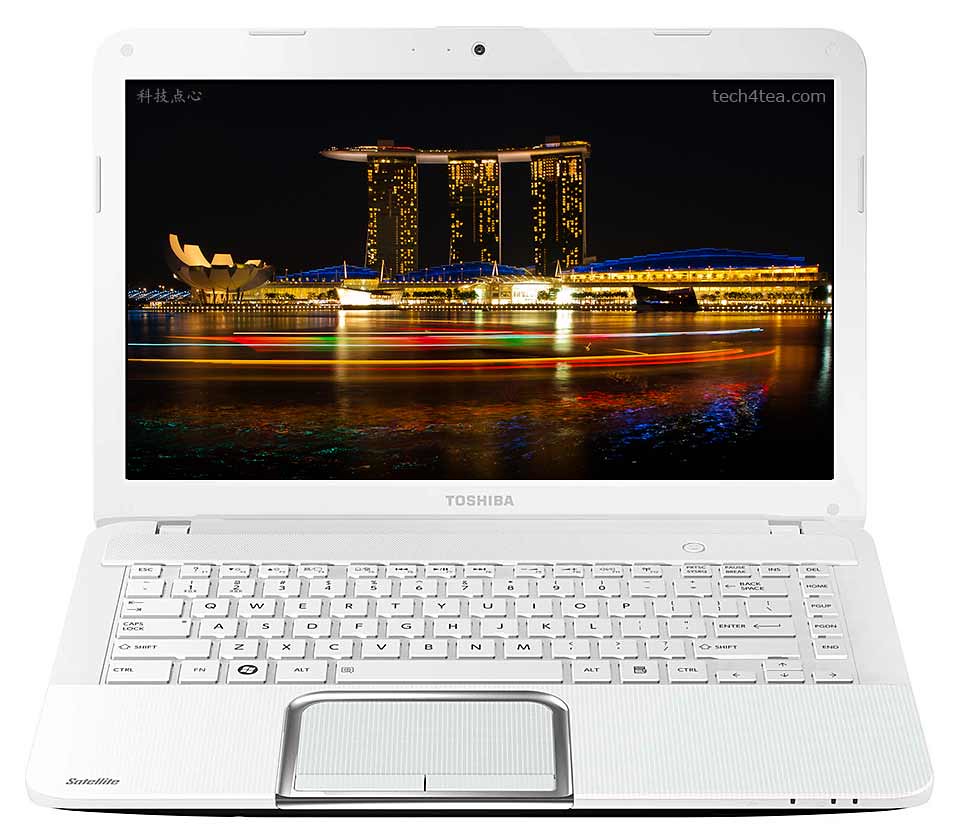
Toshiba Satellite C840 notebook.

Toshiba Satellite C840 notebook

Entry-level affordable notebook computer for price conscious consumers, students and first-time buyers looking for basic productivity at home or in the office.

Available with a 14.0-inch and 15.6 inch diagonal widescreen display, the Satellite C800 Series offers configurations featuring either Intel or AMD processors.

The notebooks include 1x USB 3.0 ports, a Card Reader and an HDMI port. The system also includes a Webcam with Face Recognition technology, a DVD drive for watching movies and a full-sized keyboard.

  • Choice of Intel 2nd generation Core i3, Pentium Dual and Celeron or AMD processors
  • Choice of 14.0” or 15.6” HD Clear SuperView display with LED backlighting, 1,366 x 768 pixels
  • RAM: up to 8GB DDR3
  • 2.5” HDD (5,400 rpm) up to 640GB
  • Intel HD Graphics 3000, or ATI Radeon HD 7610M graphics card (1GB dedicated VRAM)
  • DVD-Super Multi drive (Double Layer) rewritable drive
  • WLAN, Bluetooth 4.0, 10/100Mbps Ethernet LAN
  • 1x USB 3.0, 2x USB 2.0, Multi Card Reader, HDMI
  • A4 tile keyboard , TouchPad with multi-touch
  • Webcam with Toshiba Face Recognition
  • Stereo speakers with Toshiba Audio Enhancement
  • Toshiba Hi-Speed Start Technology
  • Toshiba Resolution+, Toshiba Eco Utility, Toshiba PC Health Monitor
  • Microsoft Windows 7 Home Basic or Premium
  • Weight: 2.12kg (14” model), 2.41 kg (15” model)