Archive for April, 2011

Apple profit almost double after iPhone’s Verizon debut

Thursday, April 21st, 2011
Profit for the second quarter almost doubled due to iPhone sales via Verizon, even though sales for newly launched iPad 2 were below estimates because of supply shortage.

Fears of growth being affected by supply disruptions from Japan’s earthquake and tsunami were also allayed.

2nd Quarter A year earlier Bloomberg survey
Net income
(almost doubled)
$5.99 billion,
$6.40 a share
$3.07 billion,
$3.33 a share
$5.04 billion,
$5.39 a share
Sales
(up 83%)
$24.7 billion $13.5 billion $23.4 billion

Apple began selling the iPhone through Verizon Wireless in February, and launched the iPad 2 on March 11.

Demand for the iPad has been so strong that Apple has not been able to make enough, leading to sales that were lower than what most analysts predicted.

2nd Qtr Analysts predictions
iPhones sold through Verizon 18.7 million 16.3 million
iPads sold 4.69 million 6.1 million
Mac computers 3.76 million 3.6 million
iPod media players 9.02 million 9.8 million

“Apple is ramping up production as it prepares to start selling the tablet computer in 13 additional countries this month”, Chief Operating Officer Tim Cook told Bloomberg.

Still, sales of products in the country may be $200 million lower as consumers coping with the temblor and tsunami buy fewer gadgets, he said.

Innards of the BlackBerry PlayBook

Wednesday, April 20th, 2011
Have you ever wondered what the insides of a tablet computer looks like? Teardown specialists iFixit has opened up the latest RIM BlackBerry PlayBook – launched only yesterday in the US.

Innards of the BlackBerry PlayBook

Innards of the BlackBerry PlayBook

The PlayBook was easier to tear down compared to an iPad, and has a smaller battery which is not straightforward to replace. The motherboard has to be removed in order to get to the battery, which is glued to the mid-plane assembly.

BlackBerry PlayBook from RIMMany of the chips are from Texas Industries. The main chips include:  1GHz TI OMAP 4430 dual core processor, SanDisk 1GB NAND Flash, Elpida B8064B2PB-8D-F 1GB DRAM, Bosch Sensortec BMA150 Digital 3-axis accelerometer, and an Invensense MPU-3050 3-axis gyroscope.

For those into chips, other components include: Texas Instruments TWL6030 Power Management, STMicroelectronics XTV0987 5 MP mobile imaging processor, Wolfson WM8994E audio codec, Texas Instruments WL1283 WLAN/Bluetooth/FM, TriQuint Semiconductor TQP6M9002 802.11a/b/g/n + BT front-end module.

Motherboard of the BlackBerry PlayBook

Motherboard of the BlackBerry PlayBook

Not detailed enough? There’s also the Texas Instruments LMV339 Quad General Purpose Low-Voltage Comparators, Texas Instruments SN74AVCH4T245 4-Bit Dual-Supply Bus Transceiver with Configurable Voltage Translation and 3-State Outputs, and a Texas Instruments PS63020 High Efficiency Single Inductor Buck-Boost Converter with 4A Switch 

For the gory details, visit iFixit’s report.

BlackBerry PlayBook Launch

Tuesday, April 19th, 2011

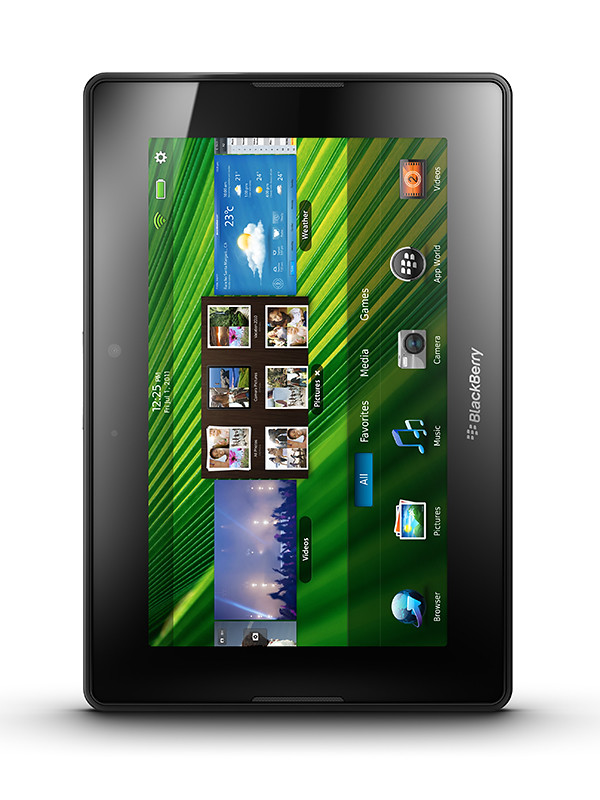
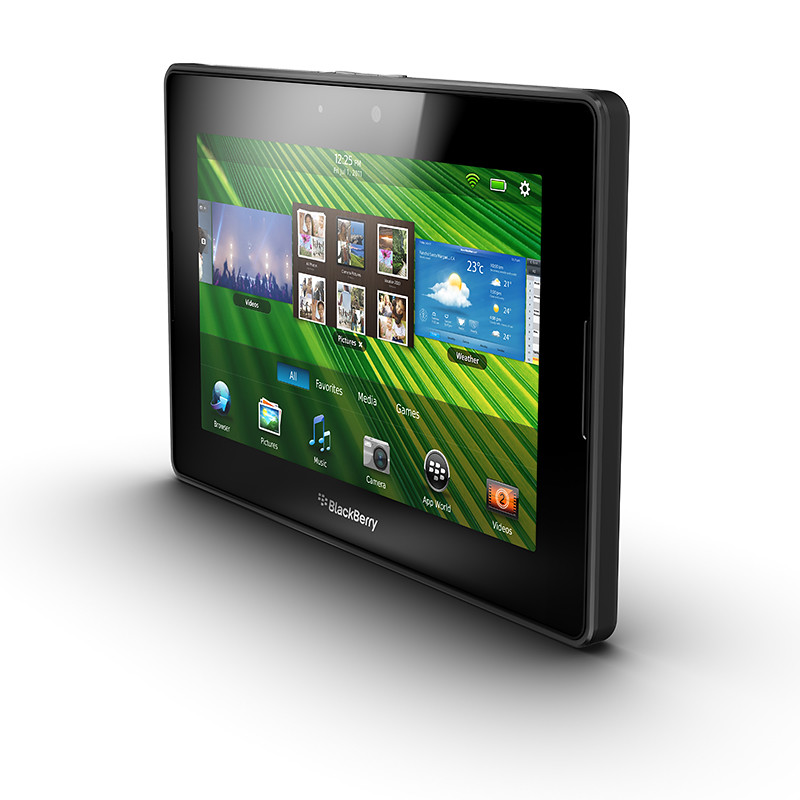
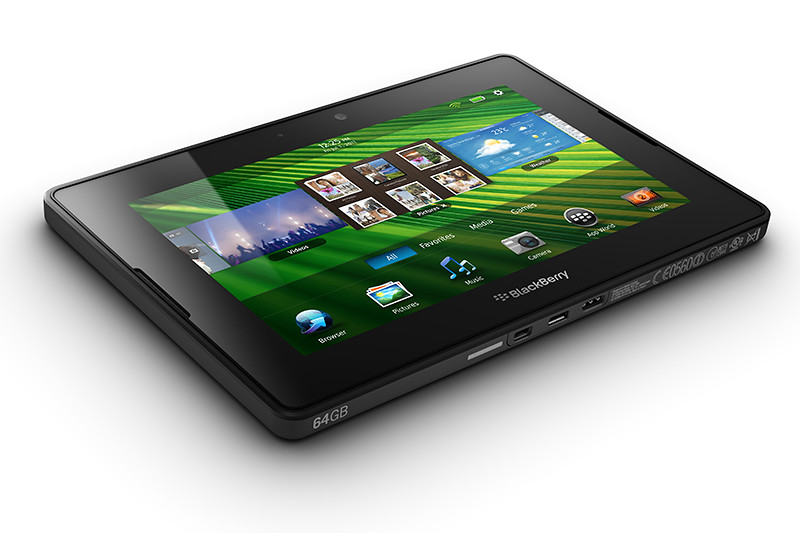
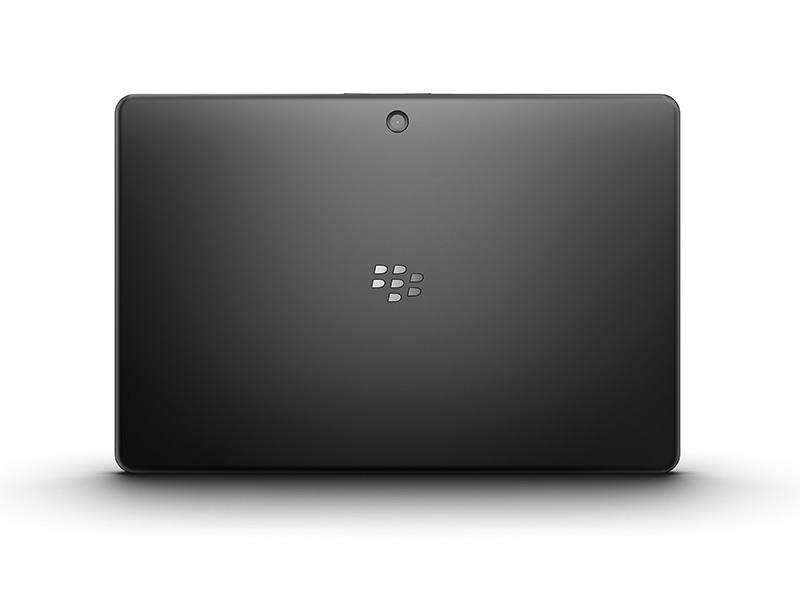
The 7-inch tablet from Research In Motion (RIM) hits the shelves in the US today. Here’s a quick roundup of the likes and dislikes from those who have tried out the shipping version of the BlackBerry PlayBook.

RIM PlayBookThere’s a lot to like about the PlayBook, but there’re also plenty of frustrations out there from those who’ve had the privilege of playing with the PlayBook. The general feel seems to be that the PlayBook has the potential to be something great – just that it’s not quite complete at the moment.

Already behind the iPad 2 and other Android tablets in terms of launch date, my feel is that RIM wants to get the hardware out as soon as possible before the specs get old – even though the software isn’t quite as ready yet.

RIM PlayBookDare I compare that with an evolutionary release of the iPad 2 with bigger steps only to be expected for the upcoming iPad 3?

With such stiff competition in the tablet market, it is no wonder these slate-makers are rolling off their products as soon as possible. In all honesty, I do believe RIM will sort out the grouses that reviewers have complained about, but the question is whether consumers are willing to fork out the dough to buy what’s beginning to be perceived as an unfinished product, that is only going to be made complete after a few more months – if ever.

RIM PlayBookPerhaps, RIM should have launched it at a discounted price – you know, an early bird discount – to entice consumers and grab market share. Given that the hardware is fabulous, the discount may have worked to convince consumers to buy first and wait out for the software to catch up.

At any rate, below is a quick round-up of the likes and dislikes from people who has played with the PlayBook so far. Prices for the 16, 32 and 64-gigabyte models in the US are $500, $600, and $700 respectively.

Likes Dislikes Mitigation
Fabulous display, and user interface Tiny recessed power button difficult to find and press Nothin’ much can be done about this – but do I care?
Sleek:
10mm / 0.4 inch thick 

Light:
0.9 lbs / 425 g

No native email, messenger, contacts and calendar Need to be Bluetooth tethered via a BlackBerry smartphone to access these. 

Native support could be added later on

Lightning fast processor No 3G connection 3G version in summer 

4G version end 2011

Impressive multi-tasking Small repository of Apps (~3,000) Compatibility with selected Android apps to be introduced later, plus build-up of PlayBook specific apps.
Supports Flash and HTML5 No video chat Video chat app to be released later.

BlackBerry Torch 9800 Review

Monday, April 18th, 2011
RIM touts the Torch as the best BlackBerry ever. I’ve been using one over the last two weeks. Indeed, it’s the best BlackBerry smartphone I’ve played with so far and I certainly prefer it over my wife’s BlackBerry Bold.

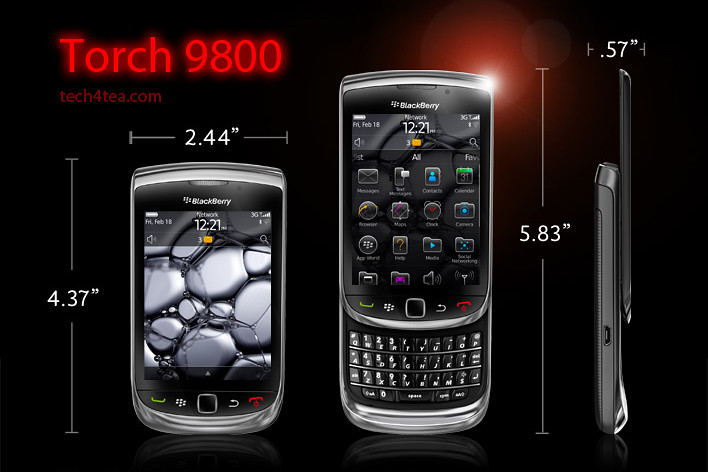
The BlackBerry Torch was the first smartphone from Research In Motion (RIM) that shipped with the new BlackBerry OS 6. It has a completely new keyboard implementation – instead of having the physical keyboard and the screen share the face of the device, the Torch allowed the 3.2 inch screen to hog the entire front.


BlackBerry Torch 9800 with 6.0 Operating System.

BlackBerry Torch 9800 with 6.0 Operating System.

An on-screen keyboard – which I found rather responsive – can be easily called up in case you need to type something. Need the traditional QWERTY keyboard to do some intensive typing? Slide it out from below the screen and you’re good to go.

It’s a trade-off, whether you have the hard keyboard readily available all the time or hide-in below the screen to make for a bigger screen.

For my usage profile, at least, I liked the balance – I do a fair bit of messaging and typing but I don’t mind having to slide out the keyboard when I need it – since I get a bigger screen real estate – 480×360 pixels on a 3.2 inch capacitive touch screen.

I did find the Bold keyboard slightly easier to type than on the Torch, but both are far more tactile and better than typing on a touch screen.

I suppose those who really have a lot of typing to do would rather have the keyboard available at all times – it depends on your usage profile. The Torch tries to give you both the large screen of the Storm and the popular hard keyboard in a compact body.

The hardware

The form factor is almost identical to many other BlackBerry devices like the Bold. The usual five buttons line the bottom of the screen: BlackBerry call, menu, back, and end buttons and optical trackpad.

The Marvell CPU runs at 624MHz (though the company claims this is a newer generation chip), with 512 MB RAM and 4 GB of storage. You can add up to 32 GB though the microSD slot. The device also comes with 802.11b/g/n WiFi, Bluetooth 2.1 and an AGPS chip.

Photos were rather impressive for a phone camera

Photos were rather impressive for a phone camera

The Torch has a 5 megapixel camera, with an LED flash. Photo quality was rather remarkable for a smartphone camera.  I like the preset scene modes – Party mode for lowlight indoor shooting and Sports mode both yielded impressive results. Video wise, you can shoot clips at 640×480 resolution.

New OS and interface

With the new OS 6, web browsing on the Torch is now quite a pleasant experience using the new Webkit-based browser. Unfortunately, neither Flash nor HTML5 video are supported.

I really love the persistent notification alert bar at the top of the home screen: the small row of icons allows you to see social networking, email, SMS, call, and calendar alerts all in one place. The bar drops down a separate window to show the list of notifications, each of which can be clicked on to bring you to the app.

11 scene modes are available for taking photos under different situations

11 scene modes are available for taking photos under different situations

Another new feature I like is the universal search. Ever wanted to look for something you know is on your phone but can’t recall exactly where it is located and how to get at it? Simply begin typing the relevant search term into the search box and the Torch throws the icon for it right at you – almost instantaneously. It really beats having to wade through the menus and interface looking for contacts, messages, calendar, music or pictures.

has included a powerful universal search alongside a social networking tool which allows you to aggregate RSS feeds and services like Twitter or Facebook into a single view. There are a lot of changes, so we’re going to go step-by-step through what we consider the biggest changes for the BlackBerry platform.

Battery life

As with other BlackBerry devices I’ve tested before, battery seems to last forever. Alright, that’s exaggerating. There were days when I ran Youtube videos and videos from the media folder for extended periods of time and the battery held out. Under normal usage, I only had to recharge the battery every few days.

BlackBerry Torch 2

There’s been numerous leaks about what the upcoming BlackBerry smartphones lined up for 2011. One of them is the Torch 2. Expected to be announced during the BlackBerry World in May and released in the US in July, it looks physically like the Torch, but features a 1.2 GHz processor and a 640×480 resolution on a similarly-sized 3.2 inch screen.

Going by previous BlackBerry release schedules, we’ll probably only see the Torch 2 in Singapore towards the end of the year.

In the meantime, if you’re looking at replacing your current BlackBerry phone, do give the Torch a spin and see if it impresses you enough for you to pick one up as replacement.

BlackBerry Torch 2 sneak peek

Sunday, April 17th, 2011
The BlackBerry Torch 2 is rumoured to be announced during the BlackBerry World in May and then go on sale in the US in July later this year. With the release of the PlayBook tablet next Tuesday in the US, RIM has a few more models in line to keep its fanbase riveted for the rest of the year.

Photo of BlackBerry Torch 2There has been plenty of leaks from RIM (Research In Motion) about upcoming BlackBerry models for 2011. These include the BlackBerry Touch (Monaco/Monza), Bold Touch, Storm 3, Bold (Dakota), Curve (Apollo), and the Torch 2.

Having gotten hold of a Torch 2, BGR reports that the new device looks almost identical to its predecessor but features a significantly more powerful 1.2 GHz processor. Coupled with the BlackBerry OS 6.1 and a 3.2 inch 640×480 VGA display, it will be an exciting gadget to own.

Processor power has been doubled from the current 624 MHz, and the 3.2 inch screen runs at a higher pixel resolution than the 480×360 pixels on the current BlackBerry Torch.

Going by previous BlackBerry release schedules, we’ll probably only see the Torch 2 in Singapore towards the end of the year.

The main specifications of the Torch 2 are listed below:

  • CPU – 1.2 GHz processor
  • Display – 3.2″ VGA (480 x 640) capacitive touchscreen display
  • Radio – Quad-band GSM/GPRS/EDGE ; Tri-band HSPA 14.4Mbps
  • Memory – 8GB storage + 512MB RAM + up to 32GB MicroSD
  • Connectivity – WiFi, Bluetooth, NFC
  • Camera – 5 megapixels
  • Battery – 1300MAh battery
  • Thickness – 14.6mm thick
  • Sensors – magnetometer, digital compass

Designing a poster in GIMP (Part 11 of 14)

Saturday, April 16th, 2011
Layers and layer masks are what differentiates a powerful image editor like GIMP from a basic photo editor. Design a poster for your living room from your favourite photo.
Make a poster or postcard from your favourite photo.

Make a poster or postcard from your favourite photo.

Ever wanted to make a postcard or a poster from your favourite photo? Here are some techniques using layers and layer masks in GIMP.

Add a grid of white dots

Open the photo in GIMP. From the Layers dialog, you can see it resides in the Background layer which is the only layer for the moment.

The original photo from morguefile.com.

The original photo from morguefile.com.

A grid of white dots is overlaid onto the photo.

A grid of white dots is overlaid onto the photo.

Add a new layer by clicking the icon at the bottom left corner of the Layers dialog. In the “New Layer” dialog box that pops up, select the radio button for “White” option under Layer Fill Type and press the OK button.

A new empty layer filled with white is added above the original photo in the Background layer.

Right-click on its thumbnail in the Layers dialog and select “Add Layer Mask” command from the pop-up menu. In the “Add Layer Mask” dialog box that pops up, select the “White (full opacity)” option and press the OK button. A layer mask filled with white is added to the layer – you can see its thumbnail beside the original thumbnail in the Layers dialog.

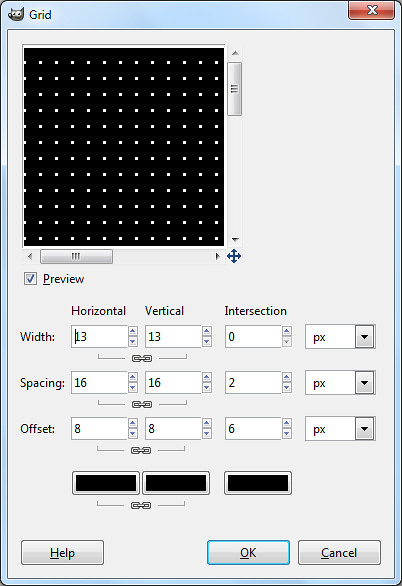
Use the Grid filter to create the grid of white dots.

Use the Grid filter to create the grid of white dots.

From the main menu, select the “Filters > Render > Pattern > Grid” command. In the Grid dialog box that pops up, increase the horizontal width setting until the preview in the dialog box shows a grid of white dots of the desired size. Here I used a setting of 13.

The white layer now appears as a grid of white dots overlaid on the original photo.

Right-click on the upper layer in the Layers dialog and select “Apply Layer Mask” to merge the layer mask into the original solid white layer. The layer mask is removed and the layer becomes a transparent layer with a grid of white dots overlaid on the photo below.

Hiding the white dots from the heads and faces

Use a layer mask to hide the white dots from the heads and faces.

Use a layer mask to hide the white dots from the heads.

Add a new layer mask on this layer, again selecting the “White (full opacity)” option in the  “Add Layer Mask” pop-up dialog box.

Press “D” on the keyboard to reset the Foreground colour to black. Activate the Paintbrush Tool from the Toolbox and paint on the layer mask in the image window. Paint around the heads and faces of the wedding couple to hide the white dots in that area.

From the main menu, select the “Layer > New from Visible” command to create a new layer that combines all the visible layers in one layer.

Adding the green arc

In the Layers dialog, click to select the layer below the new combined layer. This is so that any new layers created will be added BELOW the combined layer.

Zoom out until the photo is smaller than the image window.

Zoom out until the photo is smaller than the image window.

Set the Foreground colour to green (or your preferred colour). Add a new layer by clicking the icon at the bottom left corner of the Layers dialog. In the “New Layer” dialog box that pops up, select the radio button for “Foreground color” option under Layer Fill Type and press the OK button.

A new layer filled with green is added just below the combined layer.

Right-click the combined layer in the Layers dialog to add a layer mask to the layer, using the “White (full opacity)” option. Press the minus key (“-”) on the keyboard to zoom out the view in the image window.

As the photo becomes smaller than the image window, you will see white space between the edges of the photo and the edges of the image window.

Adding a green arc at the bottom of the poster.

Adding a green arc at the bottom of the poster.

Activate the Ellipse Select Tool from the Toolbox and drag an elliptical selection around the couple’s heads. You can begin dragging in the white space between the photo and the edge of the image window so that the elliptical selection covers most of the photo except for a small arc at the bottom of the photo.

Remember you can adjust the size and position of the elliptical selection by dragging the side or corner control handles of the selection outline. Once happy with the selection, use the “Select > Invert” command from the main menu to invert the selection.

Press “D” on the keyboard to reset the Foreground colour to black. Select the “Edit > Fill with FG Color” command to fill the arc with black (in the layer mask).

An arc of green is revealed below the photo.

Adding the white highlight

Click on the green layer in the Layers dialog to select it.

Add a white highlight band in the green arc.

Add a white highlight band in the green arc.

Add another new layer, this time selecting the radio button for “White” option under Layer Fill Type. The new white layer is added above the green layer but below the combined layer.

Add a layer mask to the white layer, selecting the “Black (full transparency)” option in the pop-up dialog box. A layer mask filled with black is added to the layer.

Press “D” to reset the Background colour to white. Using the Rectangle Select Tool from the Toolbox, select a vertical band and use the “Edit > Fill with BG Color” command from the main menu. A white band is added to the layer mask such that a white band runs through the green arc.

Adding the text captions

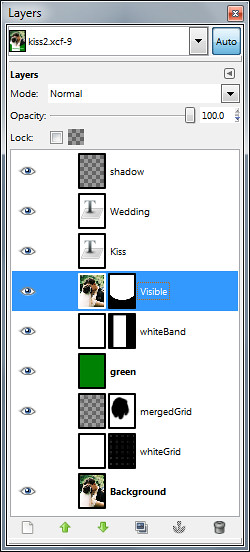
GIMP's Layers dialog.

GIMP's Layers dialog.

Click the combined layer (the topmost layer) in the Layers dialog to select it, so that any text captions added will be added above it.

Activate the Text Tool from the Toolbox. In the Tool Options below the Toolbox, set the font, size and colour settings for the Text Tool. Click in the white band in the arc with the cursor and type the word “Wedding”. Click in the green portion to add the word “Kiss”.

After adding the captions, you can still change the font, size and colour setting for these captions by selecting them first with the Text Tool and then modifying them in the Tool Options.

Add edge shadow

Add a new empty layer right at the top of all other layers. Activate the Blend Tool from the Toolbox. Press “D” to reset the Foreground colour to black and the gradient to “FG to Transparent”.

Again, zoom out the photo (by pressing the minus key on the keyboard) until the photo is smaller than the image window. Drag a black-to-transparent gradient from outside the right edge of the photo (but inside the right edge of the image window) to slightly inside the right edge of the photo.

Save the file in .xcf format so that you can come back to tweak the design in the future. Save as .jpg to send the file for print at the studio.

BlackBerry PlayBook preview in Singapore

Friday, April 15th, 2011
The BlackBerry PlayBook Bus will tour Singapore tonight, showing off a preview of RIM’s 7-inch tablet computer, that is due to be launched in the US on 19 April next Tuesday.
Preview of the BlackBerry PlayBook in Singapore

Preview of the tablet on the BlackBerry PlayBook Bus in Singapore

Keep a lookout for the limo bus driving around town tonight. Sources tell me it will launch from the Tanjong Pagar area. The first time that the BlackBerry PlayBook debuted in Singapore was back in March. But the two devices I played with were still beta release versions.

Tonight, the preview will provide some hands-on for the real McCoy. Perhaps RIM (Research In Motion) will also provide some hints as to when the aspiring challenger to the iPad will be launched in Singapore and at what pricing.

For now, here’re some of the main specs of the BlackBerry PlayBook:

Looks
7″ LCD display, 1024 x 600 WSVGA Multi-touch capacitive screen

Physical feel
0.9 lbs (425g) and 5.1″ x 7.6″ x 0.4″ (130mm x 194mm x 10mm)

Performance
1 GHz dual-core processor
1 GB RAM
Symmetric multi-processing
Full Adobe Flash 10.1 enabled
Built-in support for HTML 5

Configuration
Internal storage of 16, 32 or 64 GB
GPS, Orientation Sensor (Accelerometer), 6-Axis Motion Sensor (Gyroscope), Digital Compass (Magnetometer)
Stereo speakers and stereo microphones
Wi-Fi (802.11 a/b/g/n) connectivity, Wirelessly connect to your BlackBerry smartphone for real time access to: Email, calendar, address book, task list and BBM

Cameras
3 MP high-definition forward-facing camera
5 MP high-definition rear-facing camera
Codec support for superior media playback, creation and video calling
1080p HD video; H.264, MPEG4, WMV HDMI video output
Micro USB and Micro HDMI ports
Video calling with dual video cameras

BlackBerry Tablet OS
Powered by QNX technology, supports POSIX OS, SMP, Open GL, BlackBerry 6, WebKit, Adobe Flash, Java and Adobe Mobile AIR

Adobe Creative Suite 5.5 Production Premium suite

Thursday, April 14th, 2011

Adobe Creative Suite 5.5 Production Premium suite is a major mid-cycle update to the software for video and post-production for delivering content to virtually any screen. Performance and workflow have been imporved while powerful new audio editing capabilities have been added.

New component software receiving major updates include Adobe Premiere Pro CS5.5, Adobe After Effects CS5.5, Adobe Flash Professional CS5.5, Adobe Flash Catalyst CS5.5, Adobe Story, Adobe Media Encoder CS5.5, and Adobe Device Central CS5.5.

New to the suite is Adobe Audition CS5.5, bringing its audio-for-video multitrack editing environment to both Mac OS and Windows for the first time.

Estimated street price for the Creative Suite 5.5 Production Premium suite is US$2065. It is one of five suite editions of the Creative Suite 5.5 line of software.

Greater Productivity

Productivity enhancements promise to enable video and audio professionals to dramatically accelerate their workflows. The powerful Adobe Mercury Playback Engine, introduced in Adobe Premiere Pro CS5, broadens its graphics processing unit (GPU) hardware support to include laptops and more supported cards, and allows users to open projects faster, get real-time feedback for more GPU-accelerated features, and work more smoothly at 4k and higher resolutions.

Adobe Premiere Pro CS5.5 boosts performance by providing a smoother editing workflow, enabled by new trimming and editing tools that provide more precision and control.

Dual-system sound support from the new Merge Clips command in Adobe Premiere Pro CS5.5 lets users quickly sync video with high-quality audio recorded on separate devices like location recorders, ideal for DSLR or RED workflows.

Leveraging an integrated workflow with Adobe Audition, Adobe Premiere Pro users can save time by sending individual clips or sequences, including reference videos, directly to Adobe Audition for audio editing and restoration. File-based workflows see enhanced support for RED and other tapeless cameras, including improved RED Source Settings dialog in Premiere Pro and After Effects CS5.5 and native support for up to 5k media from RED Epic cameras via an extension available on Adobe Labs.

As it is a truly native editing solution, users saves time time and eliminates the need to transcode or rewrap footage.

The new 64-bit Adobe Media Encoder CS5.5 has been completely redesigned to deliver Adobe Premiere Pro video sequences, After Effects compositions, and Adobe Encore projects to multiple screen formats quickly, while doing the encoding in the background.

Adobe Media Encoder CS5.5 also introduces new format support such as AVC-Intra and DPX, and watch folders so users can encode a single clip to multiple destinations with a simple drag and drop.

New features

After Effects CS5.5 introduces new features such as the Warp Stabilizer, Camera Lens Blur and Light Falloff to enable users to enhance footage in post-production.

The Warp Stabilizer eliminates unwanted camera movement by steadying shaky footage, making handheld footage appear as smooth as a camera mounted on a mechanical stabilizer.

The Camera Lens Blur effect mimics the properties of physical lenses offering more realistic depth of field blurs. The Light Falloff effect enables users to simulate natural illumination falloff to mimic how light behaves in a 3D scene and can be used to create other light intensity effects.

Video professionals can use the new Adobe Audition in CS5.5 Production Premium on both Mac and Windows platforms. The completely re-written audio engine in Audition offers a robust toolset to record, edit, mix, master, and sweeten audio. With its professional editing and multitrack mixing tools, powerful noise-reduction and effects options, Adobe Audition CS5.5 will be able to handle a wide range of tasks quickly and efficiently.

Improved Collaboration

Adobe Creative Suite 5.5 Production Premium enables users to collaborate with existing workflows, even if they use a variety of tools. Enhanced project exchange support for Final Cut Pro users provides maximum flexibility for video editors, while new or enhanced OMF support in Adobe Premiere Pro and Adobe Audition makes it possible to export high-quality audio projects to Avid Pro Tools, facilitating more efficient collaboration between audio editors, remixers and sound designers.

Access to the new version of Adobe Story, an Adobe CS Live online service, improves collaboration between users with email notifications of new script edits and a faster method of tracking changes through script elements and filters.

The ability to import Adobe Story script data directly into Adobe Premiere Pro further strengthens XML-based metadata support found throughout the Production Premium suite, which is critical for everything from file-based workflows to media asset management.

The metadata-driven workflows, plus the ease and flexibility of communicating with Adobe applications with critical third party solutions from news management systems to playback servers, is a key selling point for broadcasters and other organizations around the world.

Adobe Creative Suite 5.5 Web Premium suite

Wednesday, April 13th, 2011

Adobe Creative Suite 5.5 Web Premium suite is a major mid-cycle update to the software for Web designers and developers. The new version give Web professionals the ability to bring high-impact content experiences and mobile apps to the latest form factors across Android, BlackBerry Tablet OS and iOS platforms.

New in the suite are updated versions of Adobe Dreamweaver, Adobe Flash Professional, Adobe Flash Catalyst, Adobe Flash Builder, the all-new Flex framework for mobile devices, Adobe Device Central and Adobe Acrobat X Pro.

Key enhancements include substantive HTML5 advancements in Dreamweaver, new tablet and smartphone application development capabilities in Flash Professional CS5.5 and Flash Builder Premium 4.5, and enhanced cross-browser testing as well as mobile emulation and on-device debugging.

Estimated street price for the Creative Suite 5.5 Web Premium suite is US$2185. It is one of five suite editions of the Creative Suite 5.5 line of software.

Advances in HTML5

Web Premium CS5.5 advances HTML5 authoring tools, enabling Web designers and developers to create browser-based content that gives end-users a seamless and immersive experience across virtually any screen.

New HTML5 support in Dreamweaver CS5.5 includes jQuery mobile framework integration for browser-based content and PhoneGap integration for native and mobile application design and development.

Enhancements to the multiscreen preview panel in Dreamweaver have also been made, supporting the latest in media queries, WebKit engine updates, and CSS3 attributes, enabling side-by-side renderings of what a single design looks like on different form factors.

“With Adobe the jQuery project has spent a significant amount of time researching and developing user interfaces for mobile browsers, the final result being the creation of the jQuery Mobile framework,” said John Resig, founder of the jQuery Project.

Enhanced Flash tooling

New additions in Flash Professional CS5.5 include content scaling so users can easily scale their content on stage to adapt to different screen sizes, which is a huge timesaver.

Flash Professional CS5.5 also includes a new shared assets feature for more streamlined publishing, as well as more than 20 new code snippets for creating mobile and Adobe AIR applications for accelerometer, multitouch gestures, and save/load data.

Enhanced Application Development for Mobile Devices

Adobe CS5.5 Web Premium includes new mobile application development support to deliver rich interactive applications to the latest Android, BlackBerry Tablet OS and iOS devices.

In the updated Flash Builder 4.5, users have new mobile support for ActionScript and mobile Flex projects, as well as improved designer-developer collaboration throughout application development with a new bi-directional workflow with Flash Catalyst CS5.5 and Flash Professional CS5.5.

New capabilities in Adobe Flash Builder 4.5, Flash Professional CS5.5 and the introduction of the Flex 4.5 framework for mobile devices, let designers and developers build mobile applications that run on iPhone, iPad, Android devices and BlackBerry PlayBook. The apps can be easily deployed through the application markets such as Apple’s iTunes App Store, Android Market and BlackBerry App World.

Enhanced Browser Compatibility Testing

To keep Web developers and designers ahead of rapidly changing technology, Web Premium CS5.5 includes new HTML5 emulation and support for the latest mobile devices in Adobe Device Central, software that simplifies the production of innovative and compelling content for mobile phones and consumer electronics devices.

Adobe BrowserLab, a key component of Adobe CS Live online services, has also been updated for cross-browser compatibility testing for the newest browsers to help ensure Web projects are accurately previewed across a spectrum of browsers.

Adobe CS Live online services are free until April 12, 2012.

Adobe introduces Creative Suite 5.5

Tuesday, April 12th, 2011

Adobe’s major mid-cycle product release targets enhancements across Flash, HTML5, video, mobile App and digital publishing tools. It also extends workflows to include tablets.

Adobe announced today the new Adobe Creative Suite 5.5 product line, enabling designers and developers to target popular and emerging smartphone and tablet platforms, as the revolution in mobile communications fundamentally changes the way content is distributed and consumed.

Today’s launch marks a significant change to Adobe’s product release strategy for Creative Suite, the design and development software catering for print, video, mobile and online media.

Adobe now plans to have milestone Creative Suite product introductions at 24-month intervals and – starting with Creative Suite 5.5 – major mid-cycle releases between the milestone versions.

Product lineup and pricing

The new Creative Suite product lineup is headlined by Adobe Creative Suite 5.5 Master Collection, which includes, in a single package, all of Adobe’s industry-defining creative tools, such as Photoshop, Illustrator, InDesign, Acrobat, Flash Builder, Flash Catalyst, Flash Professional, Dreamweaver, Adobe Premiere Pro and After Effects.

These products are available separately or as components of one or more of the five Creative Suite editions.

The complete Creative Suite 5.5 lineup and their estimated street prices are tabulated below, and is scheduled to ship within 30 days. Upgrade pricing, volume licensing and education pricing are also available.

Creative Suite 5.5 Master Collection: US$3159
Creative Suite 5.5 Design Premium: US$2309
Creative Suite 5.5 Web Premium: US$2185
Creative Suite 5.5 Production Premium: US$2065
Creative Suite 5.5 Design Standard: US$1579

Key enhancements

The new Creative Suite 5.5 Web Premium suite sees enhancements in HTML5 and Adobe Flash authoring tools, allowing users to create, deliver and monetize rich content and applications for virtually any screen.

This release helps enable designers and developers to deliver mobile applications on Android, BlackBerry Tablet OS, iOS and other platforms; create rich browser-based content across screens using HTML5; and leverage Flash Player to deliver premium video content, casual games and rich Internet applications.

Tablet devices are now included in the creative workflow, going beyond the desktop computer. A new scripting engine in Adobe Photoshop and an enhanced Photoshop Software Development Kit (SDK) enable developers to build tablet applications that interact with Photoshop from Android, BlackBerry and iOS devices.

Adobe also announced three new iPad applications that demonstrate the creative possibilities of using tablets to drive common Photoshop workflows – Adobe Color Lava for Photoshop, Adobe Eazel for Photoshop and Adobe Nav for Photoshop.

With the launch of Adobe Flash Builder 4.5 – available as part of the Creative Suite 5.5 Web Premium suite – and the Flex 4.5 framework, developers can easily develop and deploy mobile applications to the over 200 million Android, BlackBerry Playbook and iOS devices anticipated to be in market by the end of 2011.

With more than 131 million smartphones expected to have Flash Player installed by the end of the year, Adobe Flash makes it possible to bring rich content to desktops and devices inside the browser.

Flash Player is supported on Android, HP webOS and Google TV today. BlackBerry Tablet OS, upcoming versions of Windows Phone, Samsung SmartTVs and others are expected to support Flash Player in the near future.

For video and audio professionals, Adobe Creative Suite 5.5 Production Premium suite promises breakthrough performance, workflow improvements, creative innovations, and powerful new audio editing capabilities.

The powerful Adobe Mercury Playback Engine, introduced in Adobe Premiere Pro CS5, broadens its graphics processing unit (GPU) hardware support to include laptops and more supported cards, allowing users to open projects faster, get real-time feedback and work more smoothly at higher resolutions.

Creative Suite 5.5 Design Premium suite includes Adobe’s recent product innovations in digital publishing to create slick digital editions for tablet devices. Using InDesign CS5.5, in combination with the integrated Folio Producer toolset, designers can add new levels of interactivity to their page layouts targeted to tablet devices.

Documents can include video, audio, panoramic views, 360-degree object rotation, pan and zoom of images, integration of HTML and HTML5 content and other interactive overlays. Leading to a much more robust and engaging reading experience.

Creative Suite 5.5 is tightly integrated with Adobe Digital Publishing Suite to support publication, sale and analysis of content on an array of tablet devices.

Adobe Creative Suite 5.5 products integrate with Adobe CS Live, a set of online services that accelerate key aspects of the creative workflow and enable designers to focus on creating their best work. CS Live online services include: Adobe BrowserLab; Adobe CS Review; Acrobat.com; Adobe Story; and Adobe SiteCatalyst NetAverages powered by Omniture. Adobe CS Live is free until April 12,2012.