Archive for April, 2011

Creative Suite 5.5 Design Premium and Design Standard suites

Monday, April 11th, 2011

Creative Suite 5.5 Design Premium comprises new versions of Adobe InDesign, Adobe Dreamweaver, Adobe Flash Professional and Adobe Flash Catalyst, as well as Adobe Acrobat X Pro, Adobe Illustrator CS5, Adobe Photoshop CS5 Extended and Adobe Fireworks CS5.

Estimated street price for the Creative Suite 5.5 Design Premium suite is US$2309 while that of the Design Standard suite is US$1579. Both are part of five suite editions of the Creative Suite 5.5 line of software and will ship within 30 days.

The software in the Adobe Creative Suite 5.5 Design Premium suite enables designers to produce content faster and deliver immersive, visually rich experiences to screens of all shapes and sizes. New features in Creative Suite 5.5 Design Premium bolster the many timesaving features that were introduced in Creative Suite 5 to improve efficiency of everyday tasks.

Design for both Tablets and Smartphones

With Creative Suite 5.5 Design Premium, designers can create immersive digital magazines, e-books with accompanying video and audio, websites based on HTML5 and CSS3 standards, and interactive mobile applications built with familiar Flash tools that display consistently across Android, BlackBerry Playbook and iOS devices.

Updates to Dreamweaver CS5.5 (including the Live View mode, CSS panel and Multiscreen Preview panel) streamline the design of websites that need to be optimized for viewing on multiple devices, and let designers preview desktop, tablet and smartphone browsers side-by-side.

With the new Folio Producer tools in InDesign, which work in conjunction with the Adobe Digital Publishing Suite, creative professionals can design interactive, rich media digital magazines, newspapers, corporate publications and advertising for reading on tablet devices such as Apple iPad, BlackBerry PlayBook and a wide variety of Android tablets.

Using InDesign CS5.5 in combination with the integrated Folio Producer toolset, designers can add new levels of interactivity to their page layouts. Documents targeted to tablet devices can include video, audio, panoramic views, 360-degree rotation of objects, pan and zoom of images, integration of HTML5 content and other interactive overlays.

Designers can also easily test how their content will look and feel on a broad array of tablet devices directly from within InDesign. Once content authoring is completed in InDesign, tight integration with Adobe Digital Publishing Suite allows users with a Digital Publishing Suite account (available separately) to efficiently produce, distribute, optimize and monetize content for tablet devices.

A number of features in InDesign have also been enhanced to improve reading experiences on e-book devices, such as Barnes and Noble Nook, Sony Reader and Apple iPad.

Designers can now add refined typography, images that resize automatically to fit virtually any screen, and video and audio for e-book reader applications that support HTML5 video and audio tags.

New capabilities in Flash Professional CS5.5 let designers and developers build mobile applications that run on iPhone, iPad, Android devices and BlackBerry Playbook. The apps can be easily deployed through the application markets such as Apple’s iTunes App Store, Android Market and BlackBerry AppWorld.

Beyond the Desktop

Adobe is continuing to extend productivity with cloud services and new tablet apps.

Creative Suite 5.5 Design Premium works with new tablet applications for Photoshop (available separately) that enhance the creative workflow and extend the design experience beyond the desktop.

A new scripting engine in Adobe Photoshop and an enhanced Photoshop Software Development Kit (SDK) enable developers to build tablet applications that interact with Photoshop from Android, BlackBerry and iOS devices.

Adobe has used the new SDK to deliver three iPad applications that demonstrate the creative possibilities of using tablets to drive common Photoshop workflows – Adobe Color Lava for Photoshop, Adobe Eazel for Photoshop and Adobe Nav for Photoshop.

Creative Suite 5.5 Design Premium also integrates with CS Live, a set of hosted services that accelerate key project workflows such as shared reviews. CS Live online services are free until April 12, 2012.

New Adobe Software Development Kit for Photoshop CS5

Sunday, April 10th, 2011

The Photoshop Touch SDK and a new scripting engine in Photoshop CS5 open the door for Android, BlackBerry Tablet OS and iOS apps to drive and interact with Photoshop on the desktop.

Adobe has announced the Photoshop Touch Software Development Kit (SDK) inviting developers worldwide to create mobile and tablet applications that interact with Adobe Photoshop CS5 and Photoshop CS5 Extended software, uniting the fun and interactive experience of touch devices with the power and precision of Photoshop.

Using the Touch SDK, Adobe has developed three initial Photoshop CS5 companion apps for Apple iPad: Adobe Color Lava for Photoshop, Adobe Eazel for Photoshop and Adobe Nav for Photoshop. The apps are designed to enable users to create custom color swatches, paint and drive popular Photoshop tools from tablet devices.

Adobe Color Lava will allow creative professionals to use their fingertips to mix colors on the iPad, creating custom color swatches and themes to transfer back into Photoshop.

Adobe Eazel takes advantage of cutting-edge painting technology to let digital artists create rich realistic paintings with their fingertips and introduces a new kind of interaction between “wet” and “dry” paints. These paintings can then be sent directly to Photoshop CS5 for compositing or for taking the artwork further.

Lastly, Adobe Nav increases workflow efficiency by letting users select and control Photoshop tools using the iPad as the input surface, customize the toolbar, browse and zoom in on up to 200 open Photoshop files or easily create new files.

All three applications take advantage of the iPad tablet’s touch screen for a truly immersive, tactile, on-the-go experience.

Although the first applications available are for the Apple iPad and the iOS, the Photoshop Touch SDK makes development possible on other devices, including Android and BlackBerry PlayBook.

Utilizing the Touch SDK, developers will have wide access to Photoshop functionality with the freedom to innovate and create new apps or add capabilities to existing ones. Adobe has already engaged with a number of developers across the industry to incorporate tablets and other devices into creative workflows that empower Photoshop users in new and groundbreaking ways.

For more detailed information about features, OS support, upgrade policies, pricing and international versions, visit: www.adobe.com/go/photoshop.

Compositing your photos in GIMP (Part 10 of 14)

Saturday, April 9th, 2011
Composite various photos into a collage by making them merge seamlessly together – using Layers and Layer Masks in GIMP. Today, we’ll try a simple fading effect and merge two photos int0 each other.
Composite two photos seamlessly together using GIMP.

Composite two photos seamlessly together using GIMP.

Now that you have learnt about Layers and Layer Masks, there are many tasks and effects that you can do using them. I had some questions from readers about how to apply certain effects to their photos so that they can use them in their websites.

Morning dew on flowers at our hotel in Provence, France

Morning dew on flowers outside our hotel in Provence, France

Fading to white allows captions to be added.

Fading to white allows captions to be added.

They’d seen these simple effects being done on other websites and would like to find out how they’re accomplished. In these two parts, we’ll try some that involve compositing a few photos together.

Fading a photo to white (or any other colour)

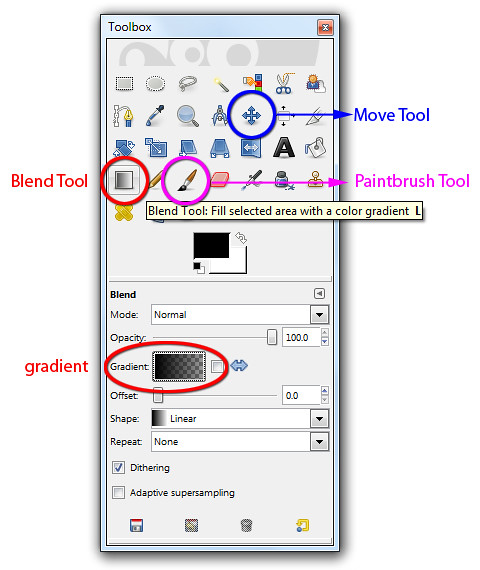
This is easy. After opening the photo in GIMP, activate the BlendTool in the Toolbox.

The Blend, Move and Paintbrush tools are in the Toolbox.

The Blend, Move and Paintbrush tools are in the Toolbox.

In the Tool Options below the Toolbox, click on the rectangle beside the “Gradient” label and from the dropdown list of options, select “FG to Transparent” gradient.

Click on the Foreground Swatch in the Toolbox and select white from the “Change Foreground Color” dialog box that pops up. If you want the photo to fade to black, red or any other colour instead of white, simply select that colour and set that as the Foreground colour.

Now move the cursor to the image window and drag it from the left side of the photo to the right. A gradient going from pure white to nothing is overlaid onto the photo so that it appears as if the photo is fading into white. If you are not satisfied with the fading, press Ctrl-Z to undo and try dragging again. Trial and error is the best way to get your ideal fading effect.

To fade in more gradually, drag further. You can of course drag from right to left or drag vertically or diagonally – depending on how you want the fading effect to appear.

The disadvantage of this quick-and-dirty method is that the gradient is added directly onto the photo. Once you’ve saved and closed the file, you can’t adjust the fading effect to reveal more of the original photo anymore.

Applying the gradient on a separate layer

Here’s a non-destructive approach that allows the fading effect to be tweaked six months down the line.

Instead of applying the gradient directly to the photo in the Background layer, apply it to a new empty layer above the Background layer. This way, none of the pixels in the original photo in the Background layer is changed or “destroyed”. The fading effect can be changed anytime in the future by replacing or modifying the colour and gradient in the upper layer.

Here are the steps.

Apply the gradient to an empty layer above the photo.

Apply the gradient to an empty layer above the photo.

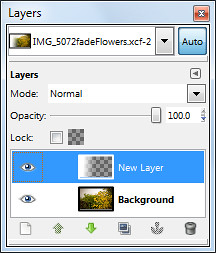
Add a new layer by clicking the icon at the bottom left corner of the Layers dialog. In the “New Layer” dialog box that pops up, select the radio button for “Transparency” option under Layer Fill Type and press the OK button.

A new empty layer is added above the original photo in the Background layer.

Use the Blend Tool to add the gradient to the new empty layer.

The result is that the photo appears to fade into white. You can further finetune the overall effect by using the Move Tool from the Toolbox to move either the photo in the Background layer or the gradient in the upper layer.

Simply activate the Move Tool from the Toolbox, click to select the layer you want to move in the Layers dialog, and drag in the image layer to make the move. You may find it easier to first change the default option of the Move Tool to “Move the active layer” to better control which layer you want to move.

Merging two photos into each other (non-destructively)

Little house on the prairie? More like ruins in a field of lavender.

Little house on the prairie? More like ruins in a field of lavender.

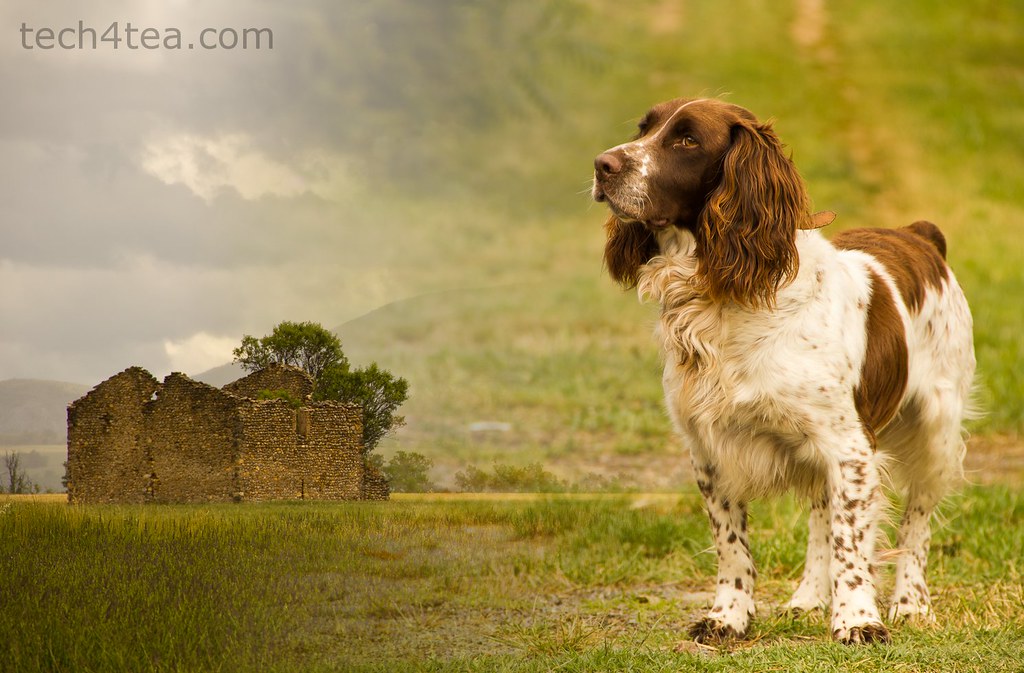
This intelligent Spaniel named Bugis lives on the lavender fields of the Valensole plateau.

This intelligent Spaniel named Bugis lives on the lavender fields of the Valensole plateau.

Pleasant memories from our drive through Valensole in Provence

Pleasant memories from our drive through Valensole in Provence

To merge two photos into each other, simply place one photo as a layer above the other photo. Add a layer mask to the upper layer and use the Blend Tool to apply a gradient to the layer mask. The two photos will appear to blend into each other.

Here are the steps.

Open the first photo in GIMP. The photo resides in the Background layer which is the only layer in the Layers dialog for the moment. Bring in the second photo as a new and separate layer by using the “File > Open as Layers” command from the main menu. The new layer sits above the first photo in the Background layer.

Right-click the image thumbnail for the upper layer in the Layers dialog. In the pop-up menu, select “Add Layer Mask”. In the Add Layer Mask dialog box that pops up, press the Add button – any of the options in the dialog box for initialising the layer mask is fine since we will be modifying the layer mask immediately after creating it.

Press “D” on the keyboard to reset the foreground and background colours to black and white respectively.

Activate the Blend Tool from the Toolbox using any of the three “FG to BG” gradients in the Tool Options. Because the layer mask is active, dragging the Blend Tool in the image window will add the gradient to the layer mask instead of the white layer itself. The layer mask hides part of the photo in the upper layer based on the gradient in the layer mask. The result is that the two photos appear to fade into each other.

Again, none of the pixels in the two photos are altered or “destroyed”. The fading effect can be changed anytime in the future by modifying the gradient in the layer mask of the top layer.

I've modified the layer mask by painting with the Paintbrush Tool.

I've modified the layer mask by painting with the Paintbrush Tool.

You can further modify the blending by using the Paintbrush Tool from the Toolbox to paint either black or white into the layer mask. Remember – white reveals the pixels in the upper layer while black hides. Shades of gray makes the pixels in the upper layer translucent.

As before, you can also use the Move Tool to move either of the photos around.

Company byte: Nokia

Friday, April 8th, 2011

Nokia is a global leader in mobile communications whose products are used by more than 1.3 billion people around the world.

Nokia Corporation, global leader in mobile communicationsNokia Corporation is a Finnish multinational corporation with 132,000 employees in 120 countries and sales in more than 150 countries.

Nokia Corporation, global leader in mobile communications

Nokia Corporation, global leader in mobile communications

First established as a ground wood pulp mill in 1865, Nokia only produced its first electronic device in 1962 – a pulse analyser for nuclear power plants.

Since 1998, it has been the world’s largest manufacturer of mobile phones.

In 2010, it had a global annual revenue of over 42 billion Euros and operating profit of 2 billion Euros.

Information extracted from Wikipedia.

Cisco launches Linksys E4200 Wireless-N Router

Thursday, April 7th, 2011

Cisco Consumer Products launched the Linksys E4200 Maximum Performance Wireless-N Router today. The new model is aesthetically designed, easy to set up and NGNBN ready – with simultaneous dual-band and maximum wireless speeds of up to 300 and 450 Mbps respectively.

It is ideal for those looking to set up a wireless environment in their home for their latest gadgets – gaming consoles, media streaming, file sharing between computers.


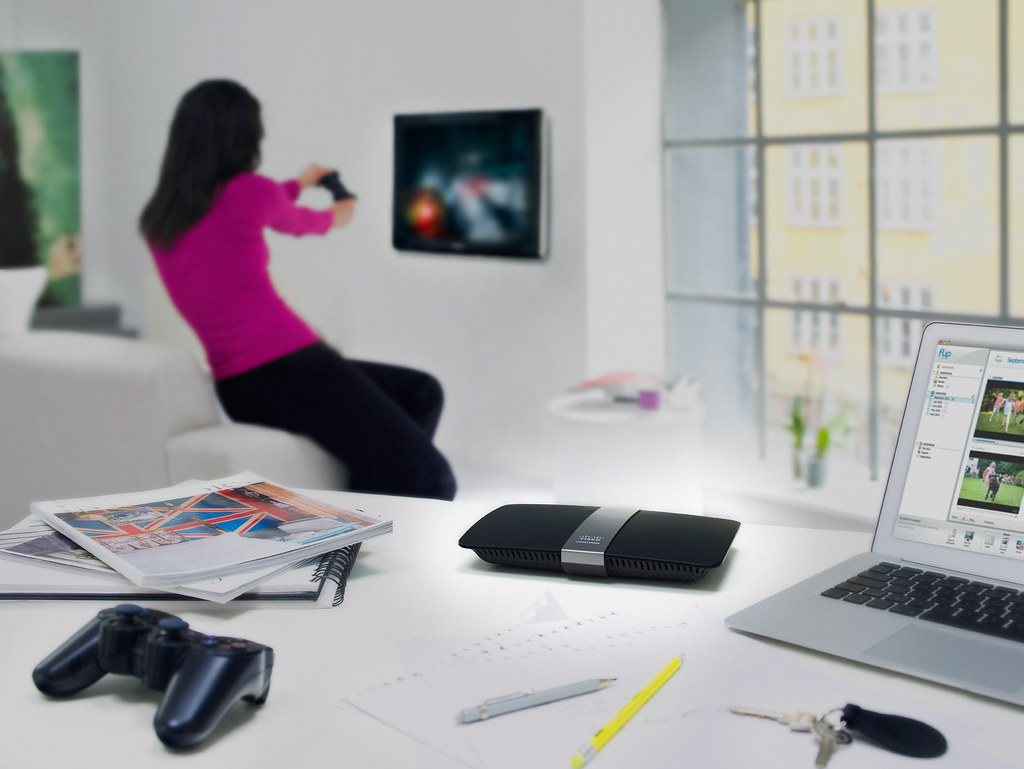
Cisco Linksys E4200 Wireless-N Router

The router will not look out-of-place in a modern sophisticated living room.

The Linksys E4200 home router is the flagship model of the new Linksys E-series family line – designed for optimum home theatre performance, it promises to work seamlessly with the latest entertainment devices, including Internet TVs, iPad mobile devices, game consoles, smart phones, e-readers, and VoIP devices.

Apart from its powerful performance and range to deliver smooth streaming of video, music and uninterrupted gaming in the home, its sleek and stylish design has also been awarded the reddot design award 2011. I like the design – it looks like a slick Hi-Fi console and would not look out of place in any modern living room.

Recommended retail price in Singapore

Linksys E-series family of Wireless-N routers MSRP SGD
Linksys E4200 Maximum Performance Wireless-N Router S$279
Cisco Linksys E3000 High Performance Wireless-N Router S$249
Cisco Linksys E2000 Advanced Wireless-N Router S$159
Cisco Linksys E1000 Wireless-N Router S$99

Available at: Challenger Superstore, Harvey Norman, Best Denki, Courts, South Asia Computer, PK Computer, Inforcom Technologies, Fuwell, A Genuine Technology, Cybermind Computer House, Cyberactive Technology and Bizgram.

The launch event was held at the Inforcomm Experience Centre at the Esplanade Xchange today. The live demo had a NAS streaming three different HD videos simultaneously to an Xbox, a computer and a tablet at the other end of the room more than 30 metres away. All three movies played smoothly – the speed and range were rather impressive.

The device remained cool to the touch throughout the demo, perhaps due to the efficient heat dispersion design, with plenty of ventilation holes in the honeycomb grid at the bottom of the router. I like it that the gadget had its own ON/OFF switch on board so you can easily power it off when not in use.

Worldwide shipments of wireless-N routers are expected to grow 158% from 2010 to 2014, and the number of households with multimedia networks will grow 103% over the same time period – according to a November 2010 report on Worldwide Home Networking by research firm IDC.

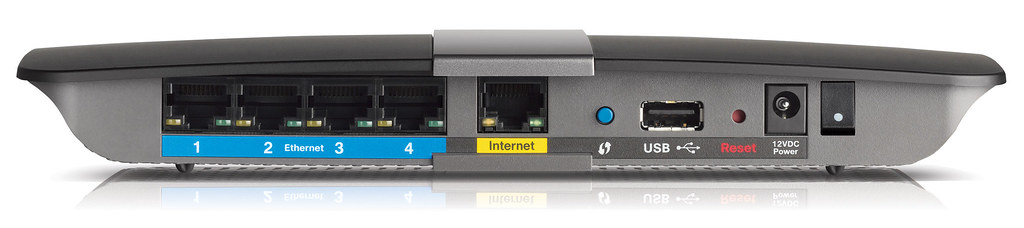
4 x Gigabit ports, 1 x USB port and a dedicated ON/OFF switch

4 x Gigabit ports, 1 x USB port and a dedicated ON/OFF switch

Key features of the Linksys E4200

Next Generation Nationwide Broadband Network (NGNBN) Ready – optimises the speed of the fibre broadband network to deliver the performance demanded by wireless devices today, providing maximum performance of up to 300 Mbps (2.4 GHz) and 450 Mbps (5.0 GHz); with four 10/100/1000 Mbps Gigabit Ethernet ports.

Robust Signal Strength – comes with a combination of internal and external amplifiers coupled with six antennas to help increase the signal strength across greater distances, providing improved home network coverage and reducing dead spots.

Cisco Connect Easy Set-Up – provides a simple three-step set-up guided by a software wizard, taking away the frustration and complexity of setting up a home network. Simply pop-in the installation CD and the device is ready in minutes.

Other features of the E4200

Wireless-N technology – built to the latest 802.11n standard for optimal speed and range.

USB Port – Connect a USB flash or hard drive to add storage to your network. The port can be converted into a virtual USB port to enable printers to easily connect to the network and become available wirelessly to all users in the home.

UPnP AV Media Server – to share and stream your stored photos, music, video and data files.

Security – WEP, WPA and WPA2 personal and enterprise encryption to protect the network. Parental control can be exercised at the router level to control access to undesirable websites. A separate guest network supporting up to 10 guest accounts can be set up for sleep-over guests so they do not have access to your private network. It supports VPN passthrough but not VPN endpoint.

For more details, you can visit www.linksysbycisco.com.

Digitally apply a graduated ND filter to your landscape photos using GIMP (Part 9 of 14)

Sunday, April 3rd, 2011

Instead of paying to buy a graduated neutral density filter and go through the hassle of carrying it around and fitting and unfitting it everytime you use it, simulate the effect using layers and layer masks in GIMP.

When taking photos of sceneries where the bright sky occupies the upper half and the foreground occupies the lower half, it can be difficult to capture the entire range of brightness levels to show the details clearly.

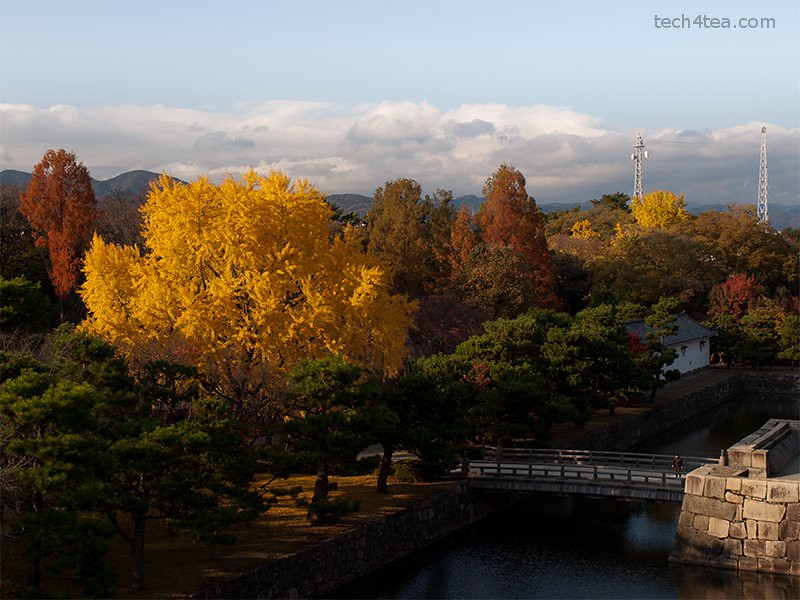
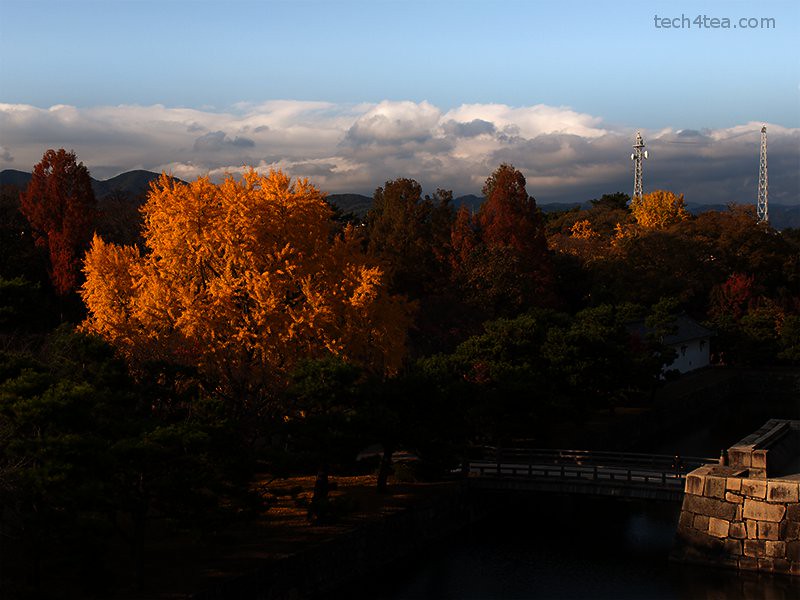
The park within the grounds of Nijojo Castle in Kyoto.

The park within the grounds of Nijojo Castle in Kyoto in autumn.

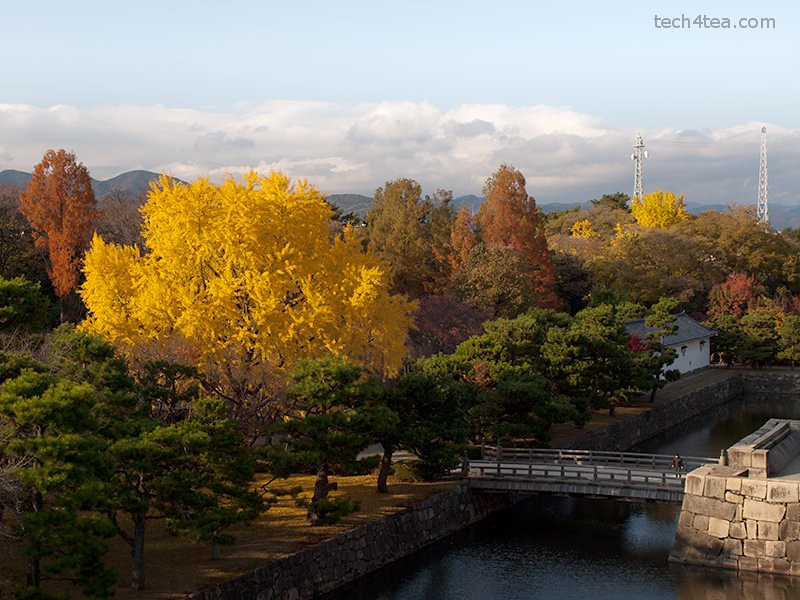
The sky has been darkened and the foreground lightened.

The sky has been darkened and the foreground lightened in GIMP.

The clouds and the sky can be too bright; while the mountains, trees and houses in the foreground may be too dark. This is made worse under the harsh sunlight of the midday sun when contrast in the photo will be at the highest.

The traditional way to get around this, is to avoid the midday sun, or to buy a graduated neutral density (ND) filter – if you own an SLR that allows filters to be attached to the lens.

The graduated ND filter darkens the upper portion of a photo so that the sky will not be overexposed while a brighter exposure can be used for the whole photo such that the foreground will not be too dark.

What if you use a compact camera, on which typically you can’t attach any filters? Or you find it a hassle to attach and unattach filters between snapshots? Or you simply don’t want to pay for another camera accessory that you have to carry around?

Using layers and layer masks in GIMP, you can pretty much simulate the effect of a graduated ND filter on the computer.

Simulate a graduated ND filter digitally using GIMP

I snapped the autumn colours of the park within Nijojo Castle in Kyoto from the top of the castle keep. The clear blue sky was rather bright while trees along the moat in the foreground of the photo were too dark.

Darkening the photo to darken the sky would make the foreground too dark. Brightening the photo to brighten up the foreground would overexpose the sky.

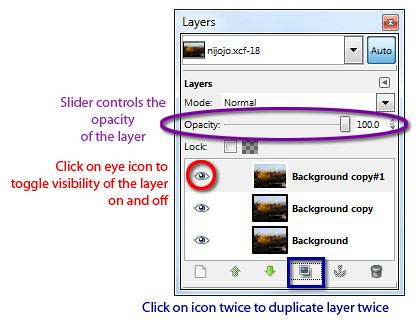
Duplicate two copies of the original photo in the Layers dialog.

Duplicate two copies of the original photo in the Layers dialog.

To control which areas to darken and brighten, first duplicate the original background layer twice by clicking twice on the Duplicate icon at the bottom of the Layers dialog.

Two new layers containing copies of the original photo are now created above the background layer. We will darken the upper copy and lighten the lower copy and then use a layer mask to merge the two layers so that only the darkened sky and the brightened foreground is visible.

Brightening the foreground

First hide the upper copy by clicking the eye icon to the left of its thumbnail in the Layers dialog.

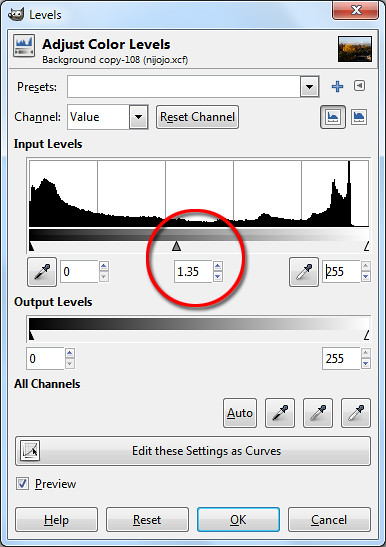
Drag the middle slider directly below the histogram.

Drag the middle slider directly below the histogram.

Now click on the lower copy by clicking on it in the Layers dialog. Brighten the lower copy. You can use Colors > Brightness-Contrast I generally prefer the Colors > Levels command. I will cover this command in more detail later in the series.

In the Levels dialog box that pops up, look below the Input Levels histogram and drag the middle slider to the left until the foreground is suitably lightened. You can see the entire photo lighten as you drag the slider.

Pay attention to the foreground and ignore the sky which will become excessively bright. You can see the numeric value of the middle slider in the centre text box just below the histogram. I used a setting of 1.35

Darkening the sky

Select the upper copy in the Layers dialog by clicking on it. Turn its visibility back on by clicking on the where eye icon previously was.

The lower duplicate copy is lightened with the Levels command.

The lower duplicate copy is lightened with the Levels command.

The upper duplicate copy is darkened to make the sky more dramatic.

The upper duplicate copy is darkened to make the sky more dramatic.

Darken this layer using the Colors > Levels command.

In the Levels dialog box that pops up, drag the middle slider to the right until the sky is suitably darkened. Again, pay attention to the sky and ignore the foreground which will become excessively dark. I used a setting of 0.45.

Blending the two copies using a layer mask

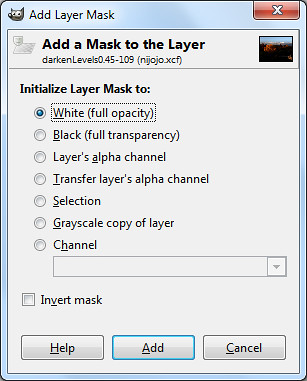
Select the White (full opacity) option.

Select the White (full opacity) option.

Right-click the upper copy and choose Add Layer Mask command from the pop-up menu. Click the radio button for “White (full opacity)” option and click on the Add button.

A layer mask is now added to the upper copy. In the Layers dialog, you can see the thumbnail for the layer mask to the right of the image thumbnail in the layer containing the upper copy.

Activate the Blend Tool from the Toolbox. Reset the colour swatches in the Toolbox by pressing “D” on the keyboard. In the tool options below the Toolbox, make sure the “FG to BG” Gradient is selected.

Activate the Blend Tool from the Toolbox.

Activate the Blend Tool from the Toolbox.

Here’s the magic, click the cursor somewhere near the top of the yellow tree and drag the mouse vertically upwards until the cursor is just above the clouds in the sky before releasing the mouse button.

A black to white gradient is painted into the layer mask for the upper copy. The white parts represents the parts where the upper copy will be visible and the black areas represents the parts where the upper copy will be hidden. Grey areas represents areas where the upper copy is partially visible.

Where the upper copy is hidden or translucent, the lower copy will show through. The result is that the darkened sky of the upper copy will be visible while the lightened foreground of the lower copy will show through.

The layer mask shows the darkened sky and the lightened foreground.

The layer mask shows the darkened sky and the lightened foreground.

By painting in the layer mask with the Paintbrush Tool with black or white, you can further finetune exactly which parts of the darkened upper copy to remain visible and which parts of the lower lightened copy to show through.

You can further tweak the final result by adjusting the opacity of the two copies by dragging the layer opacity sliders for each of the layers. The layer opacity slider is found at the top of the Layers dialog.

You now have a pseudo-HDR (High Dynamic Range) photo which captures both the lightest tones in the sky and the darkest details in the foreground in a single photo.

Android compatibility for the PlayBook

Saturday, April 2nd, 2011
Having had only 25,000 apps in BlackBerry App World, RIM’s PlayBook will tap the 150,000 apps in the Android Market to give it a headstart, while ramping up the number of PlayBook specific apps to stand against the staggering 350,000 apps in Apple’s App Store.

RIM launches the PlayBook on April 19RIM will be opening the PlayBook to Android apps to provide customers a wider choice of apps.

Software tools for making Android apps work on the PlayBook will be available this summer, Tyler Lessard, head of RIM’s developer relations told Bloomberg in an interview.

Android is the world’s fastest-growing smartphone platform and is also gaining market share for tablet computers, based on data on global shipments from Strategy Analytics below.

Percentage of global shipments Android iPad
Oct to Dec 2010 22 % 75%
Jul to Sep 2010 2.3 % 95 %

Although developers can port Android apps for the PlayBook, Lessard states that developers should still create programs specifically for the PlayBook to make the most of its multimedia performance and ensure their apps work as well as possible.

Bloomberg reports that “Dozens” of games for the PlayBook will be released this year through Unity Technologies’s Union game development tool.

RIM readies itself for launch of its PlayBook

Friday, April 1st, 2011
RIM positions PlayBook to capture market share from its Apple and Android tablet rivals from the consumer market, even as it opens up for Android app compatibility and ramps up on building its own ecosystem of PlayBook specific apps.

Research In Motion (RIM) whose BlackBerry smartphone was a hit with corporate customers, is also targeting developers of consumer applications, including games and magazines.

The 7-inch tablet will be preloaded with applications such as Tetris – my favourite game on an Apple Macintosh during my college days, and the Kobo e-book reader.

An online version of Pro Football Weekly magazine will also be available for sports aficionados.

The display was superb and performance lightning fastThe PlayBook goes on sale in the US on April 19 and will feature a new operating system, a dual-core processor, and the capability to play applications for Google’s Android platform.

I had the chance to play with a beta release version of the PlayBook when it was first brought to Singapore three weeks ago and the display not only looked great, the processor was lightning fast, multi-tasking 8-10 CPU/graphics-intensive apps without showing any latency.

Although RIM has not been as successful as Apple or Google in attracting independent developers to write consumer apps for the BlackBerry, it is trying to rectify this with the PlayBook.

Hugo Miller from Bloomberg quoted Travis Boatman, senior vice president at Electronic Arts as being impressed with the PlayBook.

“It’s one of the fastest devices out there … You take a good software environment and great hardware, you’ve got a device that designers and developers can create great content on.”

The Redwood City, California-based company will release “Tetris” and “Need for Speed Undercover,” a car racing game, on the PlayBook.

Research In Motion launches the PlayBook on April 19RIM will be opening the PlayBook to Android apps to provide customers a wider choice of apps. There are more than 150,000 apps in the Android Market, compared with more than 25,000 in BlackBerry App World and more than 350,000 in Apple’s App Store.



“We are absolutely targeting the consumer, personal apps market as much if not more because there is such a vast market out there,” Tyler Lessard, head of RIM’s developer relations told Bloomberg in an interview.

Polar Mobile, a Toronto-based developer of apps for magazines including Time, GQ and Sports Illustrated, is building over 100 PlayBook apps including Pro Football Weekly, that will be ready in July, said Polar CEO Kunal Gupta.

Like other newcomers to the tablet scene, the PlayBook will be hoping to chip away at the market share of Apple, the market leader who has enjoyed little competition since the launch of its iPad in April 2010.

Analysts estimate that Apple has shipped more than 15 million iPads so far, and sold about 500,000 of the newly launched iPad 2, over its March 11 debut weekend.