Firefox 4 breaks its predecessor’s first 24-hr download record

March 26th, 2011

The pent-up demand arising from the delay of its launch from November last year has resulted in a whopping 8.75 million downloads in the first 24-hours following its launch earlier this week on March 22.

It easily trounced the 2.35 million downloads that Internet Explorer 9 garnered in the first 24-hours of its launch just a week prior.

Firefox 4 is downloaded 8.75 times within first 24 hours

The number of Firefox 4 downloads in the first 24 hours surpassed the previous record set by Firefox 3 when the predecessor captured a cool 8 million downloads during the first 24 hours after its launch in June 2008.
Firefox 4 is available on Windows, Mac OS and Linux. It supports Windows XP while IE9 doesn’t. Many observers see that as the main reason why it has drawn more than 3 times the number of downloads that IE9 recorded in its first 24 hours.

Windows XP accounts for more than 61 percent of all windows-based machines that went online in February, according to web metrics firm Net Applications.

While Mozilla has chided Microsoft for leaving Windows XP users stuck with the two-and-a-half year old IE8, the latter supports only Windows 7, Vista and Windows Server based PCs because it wants to leverage the more advanced technology available in these newer operating systems and does not want IE9 to be constrained by the older technology in 10-year-old Windows XP.

In the meantime, visit http://glow.mozilla.org/ for a live status of the number of Firefox 4 downloads worldwide.

And for some statistics of the market share of the various browsers, checkout this wikipedia page. Below are some download statistics updated from my earlier posting for the IE9 launch:

Browser/
App/
Plug-in
Claimed downloads Time period Launch Date
Mozilla Firefox 4.0 8.75 1 day Mar 2011
Mozilla Firefox 3.0 8 million 1 day Jun 2008
Opera 11 6.7 million 1 day Dec 2010
IE 9 2.35 million 1 day Mar 2011
Apple Safari 4.0 6 million 3 days Jun 2009
IE9 beta 2 million 2 days Sep 2010
IE8 beta 1.3 million 5 days Aug 2008
Angry Birds 5 million 1 month Dec 2010
Mac App Store 1 million 1 day Jan 2011
Nokia Ovi 3 million Daily Ongoing
Adobe Flash Player 8 million Daily Ongoing

RIM’s First-Quarter forecasts behind estimates

March 25th, 2011

Research In Motion (RIM), maker of BlackBerry smartphones, has forecast first-quarter revenues and profits that fail to meet analysts’ estimates. Its launch of new models like the Torch has failed to stop a slide in its market share.

The average of analysts’ estimates were compiled by Bloomberg for comparison. Below are the key numbers:

First Quarter Forecast RIM Analysts average estimate
Profit per share $1.47 – $1.55 $1.66
Revenue $5.2 – 5.6 billion $5.65 billion
Gross Margin (% sales after production costs) 41.5% 42.7%
BlackBerrys shipped (4th Qtr) 14.9 million 15 million

In the meantime, Bloomberg quotes Pierre Ferragu from Sanford C. Bernstein & Co as saying that “The company’s sales in the high end have been shrinking for the last 12 months, even if the launch of the Torch has slowed down the trend in the last two quarters.”

Although RIM has traditionally been the darling of large corporations because of its secure messaging, it has seen customers adopting rival devices.

Hugo Miller of Bloomberg reports that JPMorgan Chase, Bank of America and Citigroup are some of the banks that has begun testing iPhones and Android devices late last year, according to at least three people familiar with the trials.

The table below summarises how RIM’s share of worldwide smartphone sales has slipped from a year earlier, compared to its rivals.

Worldwide smartphone marketshare RIM Apple Android
4th Qtr 2010 14% 16% < 11%
4th Qtr 2009 20% 16% 16%

RIM PlayBook debuts in US on April 19

RIM will be launching the PlayBook in the US on April 19, while the company is already taking orders.The company revealed that the tablet would be able to play apps from Google’s Android.

The PlayBook will strive to chip at the huge market share that Apple has enjoyed with its iPad and iPad2.

The iPad has has a full year’s headstart over the PlayBook and has sold over 15 million units so far. Apple also claims that 65 percent of Fortune 100 companies are testing or deploying the iPad, including Procter & Gamble.

This is the same market sector that RIM targets.

Japan disaster recovery: Canon restarts two plants

March 24th, 2011

As the dust settles on the aftermath of the massive 9.0 earthquake, 10 metre tsunami and nuclear accident, more positive news are trickling out for the recovery of supply lines for companies around the world.

Canon restarts two plants after Japan disastersCanon has resumed partial production at two plants last week. It is the biggest camera-maker in the world.

Gota Fumoto, a spokesman for Canon, told Bloomberg by phone that the two plants are at Ami and Toride.  The company has closed a factory at Miyazaki prefecture, that makes compact digital cameras.

Adobe CS6 in 2012

March 23rd, 2011

The next major version of Adobe Creative Suite will arrive in 2012, Chief Executive Officer Shantanu Narayen revealed. This is in line with the 18 – 24 month product renewal cycle the suite has followed in the past.

Adobe CS6 in 2012In the meantime, Adobe plans to release an HTML5 update to the current version. The update will make it easier for designers and developers to build websites using the HTML5 Internet standard.

Adobe released the current Creative Suite 5, which includes the Photoshop and Illustrator programs, in April 2010. The version before that, Creative Suite 4, was released in October 2008.

The HTML5 standard is supported by both Apple and Google and competes with Adobe’s Flash Internet video and animation software. Apple bans Flash on the iPad tablet computer and iPhone handset.

Adobe believes that selling HTML5 development tools and working with software developers who create applications for smartphones and tablets can help Adobe assert the importance of its tools.

By embracing HTML5, Adobe gives Web developers more options and positions itself to benefit whether programmers decide to use Flash or HTML5. It is a win-win situation for the company whether developers choose to work with Flash or HTML5.

Japan disaster fallout: Supply chains affected by factory closures

March 23rd, 2011

Parts shortages has severely disrupted the supply chain in Japan and for major IT manufacturers around the world. The magnitude-9 earthquake, followed by the Tsunami and accident at the nuclear plant, has led to closures of factories around Japan.

Bloomberg reports that Sony has shut five more plants while Toyota Motor has extended production halts, 11 days after the worst earthquake in Japan on record.

Sony shuts five more plantsSony is Japan’s biggest exporter of consumer electronics. The five plants in the central and southern regions will stop work until March 31.It said that the plants produce LCD TVs, broadcasting equipment, headphones, camcorders, cameras, and mobile phones. Sony now has 12 plants where operations have been halted. The factories halted earlier manufacture products like Blu-ray discs and semiconductor lasers.It said that some production may be shifted overseas if the parts and materials shortage continue.
Toyota extends production halts
Toyota is the world’s biggest carmaker. All of its domestic car assembly will halt until March 26. It has lost production of 140,000 thousand vehicles, because of the shortage of electronic parts, plastics and rubber, the spokeswoman for Toyota said.

Honda has also extended the closure of three of its plants until at least March 27.

Canon has closed a factory in Nagasaki, some 680 miles from Fukushima until tomorrow, citing component shortage. It is the largest camera maker in the world.

Toshiba said that a factory makig small LCD panels may remain closed for a month. It has shut two plants so far.

Some Panasonic plants have been halted because of the disastersSome Hitachi factories have been halted because of the disastersOther manufacturers whose plants have been halted include Fujitsu, Panasonic, Hitachi, Hino Motors, Isuzu Motors, Mitsubishi Motors, Japan Tobacco and Kikkoman. None of them have decided when they will resume full production at the factories affected by the disaster.

Reopening of factories

On a brighter note, some factories that have been halted earlier due to the disaster are being reopened.

Nissan Motor, Japan’s second-largest carmaker said that operations at six factories are restarting while some vehicle assembly will also resume.

Canon resumes partial production at three northern Japan factoriesCanon resumed partial production at three factories in northern Japan, while Denso said that all of its plants has partially resumed. It is Japan’s largest auto-parts maker.

Sony has also restarted partial operations at a battery factory in Tochigi prefecture. It is the company’s third to resume production after the disasters.

Japan disaster fallout: Adobe tempers forecast

March 22nd, 2011

Lower sales in Japan due to the Mar 11 disasters. Adobe forecasts second-quarter profit that missed analysts’ estimates because of earthquake and tsunami impact on sales.

Adobe forecast affected by Japan disastersAdobe Systems Inc. is the largest maker of graphic design software in the world. It has reduced its sales forecast by $50 million because of the disasters in Japan – its second largest market after the U.S. According to analysts, Japan accounts for 10 – 15 percent of Adobe’s revenue each quarter.

Profit for the current quarter is expected to be 47 – 54 cents. This compares with a 56 cents average based on analysts’ projections compiled by Bloomberg.

“We saw a noticeable drop in our revenue,”Aaron Ricadela from Businessweek quotes  Mark Garrett, Adobe’s Chief Financial Officer.

Launch of Mozilla FireFox 4

March 21st, 2011

The next major release for the popular browser from Mozilla will be launched tomorrow.

Firefox 4 from MozillaBased on the final beta – Release Candidate 2 – that became available only three days ago on 18 March, Mozilla has announced that this will be the last update where the delta from the previous release is a large one.

Future releases will be more frequent and involve smaller changes. This is in line with other browsers which releases minor updates on a more frequent basis.

The main enhancements involve better standards support, improvements in performance, and a face-lifted user interface.

The current version is at 3.6.

Local adjustments using Layer Masks in GIMP (Part 8 of 14)

March 19th, 2011
Use a combination of layers and layer masks to make localised adjustments to specific parts of a photo. This installment shows how to use them to paint with light.

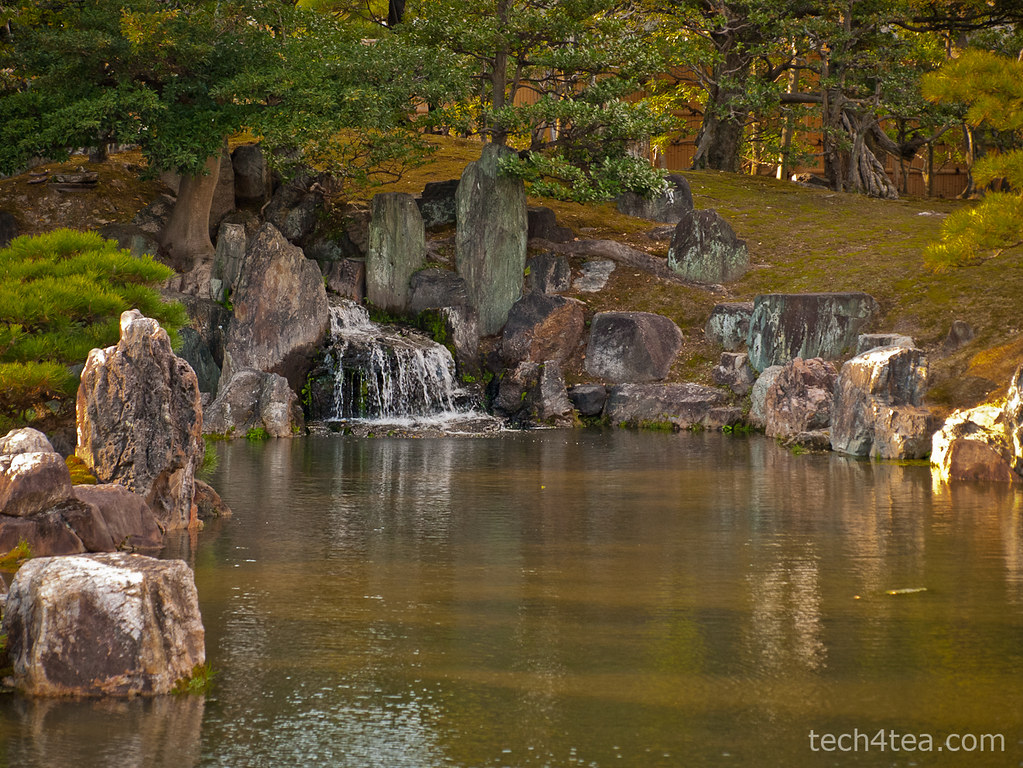
In the photo of the landscape waterfall, the rocks around the artificial waterfall are too dark because they are lying in the shadows of the surrounding trees. I want to lighten the rock features. Download the before photo and follow along.
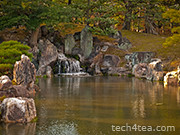
This tranquil landscaped lake was shot in the Nijojo Castle in Kyoto, Japan.
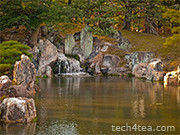
This tranquil landscaped lake was shot in the Nijojo Castle in Kyoto, Japan.

I want to lighten only the rocks around the waterfall without affecting the trees.

I want to lighten only the rocks around the waterfall without affecting the trees.

Creating a lighter duplicate layer

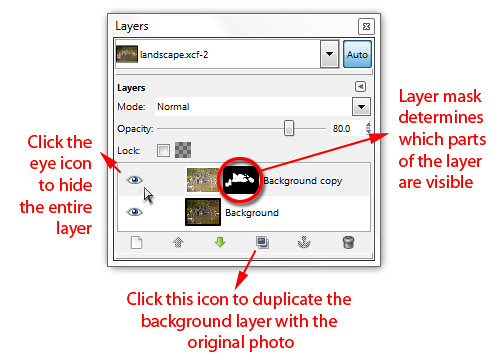
First duplicate the background layer by clicking on the fourth icon at the bottom of the Layers dialog.
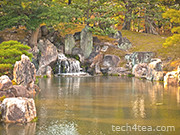
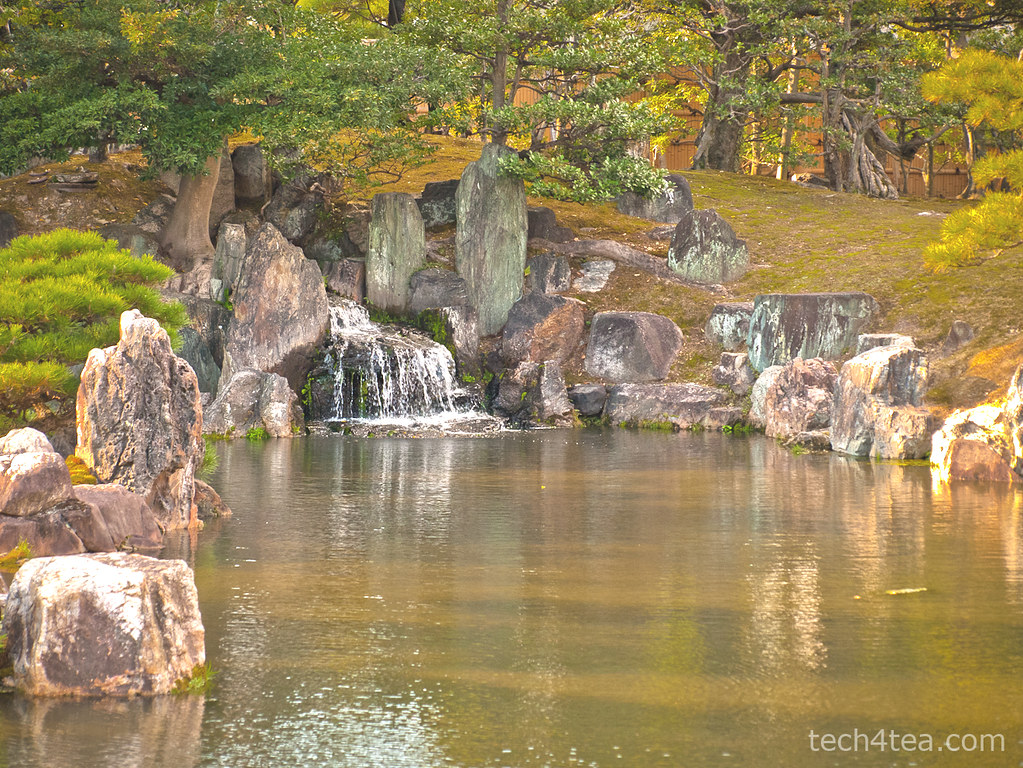
Lightening the rocks has lightened everything else as well, making the photo too harsh.

Lightening the rocks has lightened everything else as well, making the photo too harsh.

Brighten the duplicated copy by using Colors > Brightness-Contrast command from the main menu. You can see that in addition to the rocks, the other parts of the photo are lightened as well. That is the problem with global adjustments – when you lighten the shadows, the highlights get blown out.

For the moment, just concentrate on getting the brightness of the rocks right. Ignore what happens to the rest of the photo. I used a Brightness setting of 75 and Contrast setting of 45.

The duplicated layer has become lighter overall and more contrasty. It’s actually not bad overall but it gives the impression of a hot and harsh sunny day at the park. I prefer to convey the shadiness of the trees in the background and the tranquil ambience of the lake.

Adding a layer mask
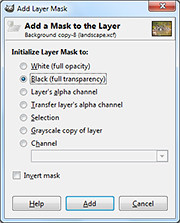
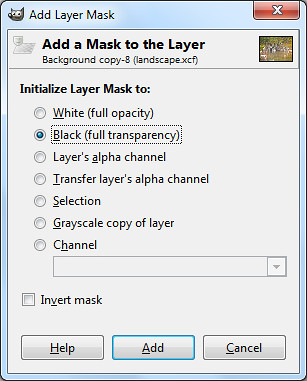
Select the Black (full transparency) radio button.

Select the Black (full transparency) radio button.

Right-click on the name of the duplicated layer in the Layers dialog and select “Add Layer Mask” from the pop-up menu.

An “Add Layer Mask” dialog box pops up. Click the “Black (full transparency)” radio button and press the Add button.

In the image window, the duplicated layer disappears from view and you see the original darker photo in the Background layer.

In the Layers dialog, note that in the duplicated layer,  a small rectangle thumbnail has been added to the right of the layers thumbnail. It is a mask that determines which part of the layer is visible.
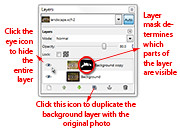
A Layer Mask is added to the duplicated layer in the Layers dialog.

A Layer Mask is added to the duplicated layer in the Layers dialog.

Black areas in the mask make the corresponding areas in the layer transparent/invisible while white areas make the layer opaque/visible. Grey areas make the corresponding areas in the layer translucent or partially visible.

At the moment, the mask is totally black, so the entire layer is hidden from view.

Painting with light
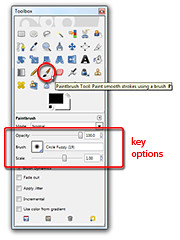
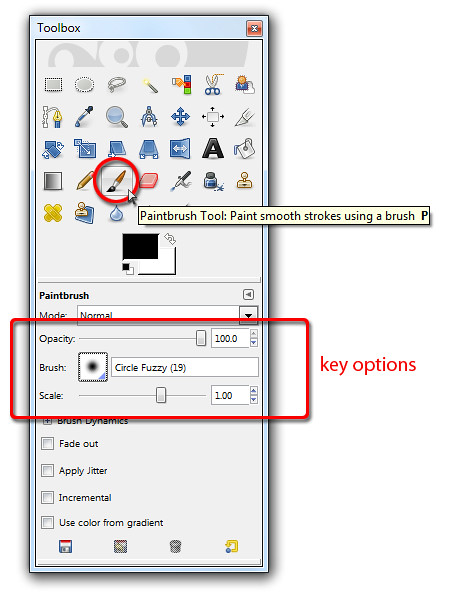
Activate the Paintbrush Tool to paint on the Layer Mask for the duplicate layer.

Activate the Paintbrush Tool to paint on the Layer Mask for the duplicate layer.

Select the Paintbrush Tool from the Toolbox. From the options below the Toolbox, select a Circle Fuzzy brush. Set the Foreground colour swatch to white. You can press “D” followed by “X” on the keyboard as a shortcut.

Now move the cursor over the rocks in the photo to be lightened and start painting. Because the layer mask is active, the painting actually occurs on the layer mask instead of the pixels in the layer.

And because the Foreground colour is white, painting on the layer mask reveals the corresponding pixels in the layer itself so that they become visible.

You can see the rocks lightening as you paint over them because pixels in the lightened layer is revealed as you paint white into the layer mask. You can also see the white areas appear in the layer mask thumbnail in the Layers dialog as you paint.

Adjust the size of the brush by pressing the “]” and “[” keys on the keyboard to increase or decrease respectively.

Painting back the mask

If you paint into the areas where you do not want to be lightened – like the leaves – and want to reverse the lightening, simply press “X” on the keyboard to toggle the Foreground colour to black. Painting on the layer mask now will hide the lighter pixels, so that the areas painted appears darker again.

If you find that painting on an area lightens or darkens it too much, lower the opacity of the Paintbrush Tool by dragging the Opacity slider in the Options below the Toolbox.
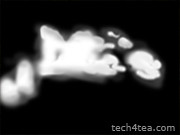
Alt-click on the Layer Mask thumbnail in the Layers dialog to show the mask in the image window.

Alt-click on the Layer Mask thumbnail in the Layers dialog to show the mask in the image window.

As you are painting, you can toggle the eye icon of the duplicated layer in the Layers dialog to compare how the photo looks before and after the adjustments. You can also disable the layer mask by Ctrl-clicking on it to see how the layer looks without the layer mask. Alt-clicking on the layer mask will show black-and-white layer mask in the image window itself.

Once you’ve completed the painting and lightened the rocks, you can still fine-tune the results by varying the layer opacity of the duplicated layer. Simply drag the Opacity slider near the top of the Layers dialog. This will reduce the overall intensity of all the lightening that you have done.

Maximum flexibility

This method of doing local adjustment provides plenty of control and flexibility. You don’t have to make a selection before making the adjustments. You can “paint” in the adjustments on the fly and reverse when you overdo an effect. You can tone down the opacity of the Paintbrush Tool to reduce the intensity and when the painting is completed, you can still control the overall intensity of the adjustments by varying the opacity of the duplicated layer.

What’s more, if you save the file in GIMP’s native .xcf file format, you can re-open the .xcf file at a later date and adjust the layer mask if you want change the adjustment.

Naturally, you can use this method for any type of adjustments – darkening, colour saturation, black and white toning etc. Just apply whatever effect you want to the duplicate layer and then use a layer mask to control how much of the effect shows through.

IE9 downloads vs the rest of the world

March 18th, 2011
Microsoft has claimed that Internet Explorer 9 has been downloaded 2.35 million times in the first 24 hours since its official release on Monday night. This ranks it behind Firefox and Opera but ahead of Safari.

Mozilla Firefox 3 was fastest off the block when it clocked 8 million downloads in the first 24 hours after its launch in June 2008. Next was Opera 11 with 6.7 million downloads in the first day after launch in December 2010.

Both browsers were ahead of Internet Explorer 9 in terms of number of downloads in the first 24 hours.

Following behind was Apple’s Safari which reached 6 million downloads but only after three days. Data for Chrome were unavailable.

The above statistics were compiled by Gavin Clarke of The Register and based on claims by the companies themselves without any means of external verification.

I have summarised the compilation below. Also included are downloads statistics for Angry Birds, the Mac App Store, Nokia Ovi store and the all-time-favourite – Adobe Flash Player.

Browser/
App/
Plug-in
Claimed downloads Time period Launch Date
Mozilla Firefox 3.0 8 million 1 day Jun 2008
Opera 11 6.7 million 1 day Dec 2010
IE 9 2.35 million 1 day 14 Mar 2011
Apple Safari 4.0 6 million 3 days Jun 2009
IE9 beta 2 million 2 days Sep 2010
IE8 beta 1.3 million 5 days Aug 2008
Angry Birds 5 million 1 month Dec 2010
Mac App Store 1 million 1 day Jan 2011
Nokia Ovi 3 million Daily Ongoing
Adobe Flash Player 8 million Daily Ongoing

Adobe launches Photoshop Express 2.0 for iOS

March 17th, 2011

Adobe has announced the release of the free Photoshop Express 2.0 for iOS devices, as well as a new $3.99 Adobe Camera Pack that you can purchase from within Photoshop Express.

Photoshop Express 2.0 (free) and Adobe Camera Pack ($3.99) Adobe Photoshop Express has more than 20 million subscribers on iOS and Android devices. It provides easy-to-use features for capturing, organising, editing and sharing of photos on popular social networks like Facebook, giving users on the road the ability to work on their digital photos on smartphones and tablets.

Adobe Photoshop Express 2.0 for iOS devices can be downloaded free on the Apple iTunes Store. From within the app, you can purchase the new Adobe Camera Pack which includes the following features.

Reduce Noise: Removes and smooths out grain and speckling from photos to improve them.

Self Timer: Set a camera timer to three or 10 seconds to control when a photo is to be recorded.

Auto Review: Provides a quick look at photos taken before saving or deleting it.

Photoshop Express 2.0 requires iOS 4.2 or later. To use the Adobe Camera Pack, customers must have an iPhone 3Gs, iPhone 4, iPod Touch (3rd or 4th generation), or an iPad or iPad 2 (note that Photoshop Express does not include support for the iPad 2 camera at this time).