Release of Free File Opener v7

May 25th, 2011

Minneapolis based Free File Opener LLC announced the release of the latest version of its flagship product, with enhancements in terms of usability, performance and functionality.

Free File Opener is a versatile and feature-rich file viewer and editor capable of working with files of over 200 different formats, from simple text and MP3 files to multi-layer PSD documents, high-definition videos and Microsoft Office documents.

Free File OpenerThe new version of Free File Opener now supports over 80 new file formats and is capable of cross-converting images to 15 different formats. The program core has become considerably faster, thus making it easier to work with large files and “heavy” folders containing hundreds or thousands of files. Images and photos can also be edited using built-in tools with full support of RAW image files.

An optional paid upgrade unlocks additional features, such as an ability to save and print files, edit Word documents and Excel spreadsheets and convert Excel spreadsheets into the PDF format for easy sharing and distribution.

Free File OpenerThe program works on all major Windows versions, requires no third-party components or libraries and takes seconds to download on a typical broadband connection.

The regular version is free to download and allows users to open and view over 200 different types of files. The company also offers a paid upgrade for users who also want the ability to print and save changes to files they have edited.

The full version of Free File Opener costs only $19.

IBM overtakes Microsoft in market capitalisation

May 24th, 2011

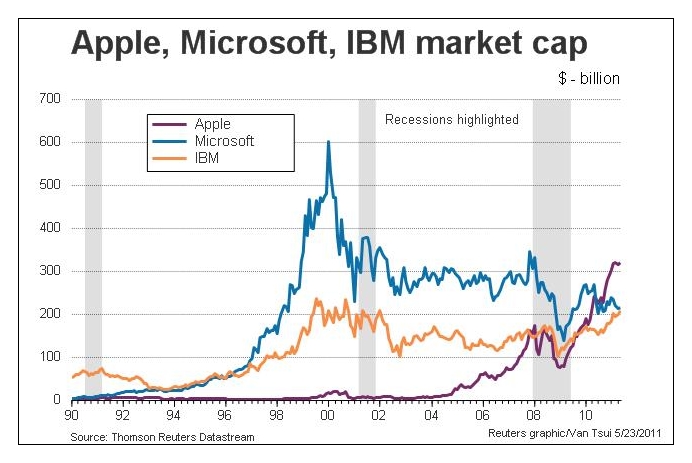
For the first time in 15 years, since 1996, IBM has overtaken Microsoft in market value. It is now the second largest US tech company behind Apple, while Microsoft has dropped to third.

Only a year after Apple had surged past Microsoft in market value, IBM has also powered past Microsoft.

Market capitalisation of Apple, IBM and Microsoft over the past 20 years

Market capitalisation of Apple, IBM and Microsoft over the past 20 years

IBM had been the dominant company in the computer industry for decades until it selected Microsoft to supply the operating system for its personal computers in the eary 80s. Bill Gates managed to turn that opportunity into a dominance of the operating systems market.

Rank Company Market cap 

(billion)

1 Exxon Mobil $397.4
2 Apple $309.2
3 General Electric $205.6
4 IBM $203.8
5 Microsoft $203.7

At its zenith just before the turn of the millennium, Microsoft’s market capitalisation was three times that of IBM’s. It was also the biggest US company then. Now it is the third biggest technology company and fifth biggest US company.

Microsoft is facing challenges in many of its business sectors. Its dominance of the operating systems market, is being challenged by the advent of tablets and Google’s newly introduced Chrome OS, while it has lost its market share in the smartphone market to RIM’s BlackBerry devices, Apple’s iPhones and recently Android based phones.

Microsoft’s decline since 2000 coincides with the burst of the Internet technology bubble and the tenure of Bill Gates’ successor Steve Ballmer as the CEO.

IBM, on the other hand, has reinvented itself from being a predominantly hardware manufacturer into a specialist in enterprise software, servers and consulting. It has even offloaded its PC business to Lenovo in 2002.

Bill Rigby of Reuters observes that “an investor putting $100,000 into both stocks 10 years ago would now have about $143,000 in IBM stock and about $69,000 in Microsoft stock.”

Seagate introduce GoFlexAccess app

May 23rd, 2011

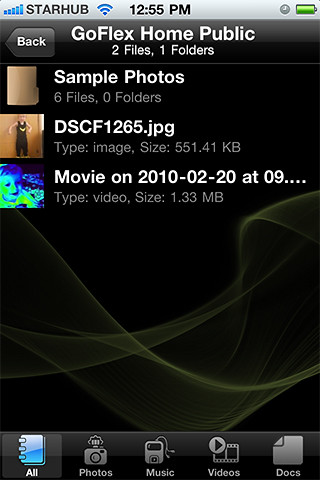
The free GoFlexAccess app allows the iPhone, iPad and Android smartphones to access media shared on the Seagate’s GoFlex Home network storage system.

Seagate Technology LLCThe free app is now available for download from the iTunes Store and Android Market. The application can be found by searching for “Seagate” or “GoFlex” in either storefront using the computer or the app store on a iPad, iPhone, iPod touch or Android compatible mobile device.

Seagate’s GoFlex Home network storage server is designed as a simple to set up shared storage drive, which provides back up and sharing capabilities within a home network and is also accessible using remote access from a personal computer.

Seagate GoFlexAccess AppSeagate GoFlexAccess App

With the introduction of the GoFlexAccess app, the GoFlex Home network can be accessed from mobile devices as well.
  • The possibilities enabled by the GoFlexAccess  app include:
  • Access photos, movies, music and documents stored in the GoFlex Home network from an iPad, iPhone or Android smart phone.
  • Create slideshows from photos in the network drive and play music at the same time to accompany it.
  • Stream music or video to mobile devices over 3G/4G and WiFi.
  • large number of files and file types.
  • Album art support for music files.
  • Access Excel, PowerPoint, Word documents and PDFs etc.
  • The app features content type filters, to simplify access to content that may contain a large number of files and file types
Capacity SRP
1 TB S$219
2 TB S$319
3 TB S$379

Available in 1TB, 2TB and 3TB capacities, the GoFlex Home storage system allows files to be centrally stored, easily accessed and continuously backed up wirelessly from computers on the home network running either Windows or Mac OS X operating systems.

Storage capactiy of GoFlex Home system can be increased simply by connecting additional drives to the USB port. What’s more, this USB port can be used to wirelessly share a USB printer with all computers on the network.

Turn your photo into a film slide

May 22nd, 2011

Tired of simple white borders for your digital photos? GIMP has a simple filter that adds a frame around the photo to make it look like it is a film slide – complete with black frame, sprocket holes, and labels.

Turn your digital photo into a film slide using the Slide filter in GIMP.

Turn your digital photo into a film slide using the Slide filter in GIMP.

Adding a border around a digital photo adds visual interest to make it look more interesting, and can focus the viewer’s attention on the main subject as well. If you’re feeling fanciful, you can easily add a decorative border around your photo to turn it into a film slide. Here’s how.

The original photo in landscape orientation. Photo from morguefile.com.

The original photo in landscape orientation. Photo from morguefile.com.

With your photo open in GIMP, select the Filters > Decor > Slide command from the main menu.

The pop-up dialog box for the Slide filter.

The pop-up dialog box for the Slide filter.

The “Slide” dialog box for the filter pops up with various options to customise the appearance of the slide.

The original photo in portrait orientationTurned into film slide

The Slide filter can also be applied to a photo in portrait orientation.

Filter options

The “Text” option allows you to enter a label for the slide. You can use it to caption your photo. Or you could type in “Kodak” to emulate a real slide. For “Number”, type a number from 1 to 37.

The “Font” and “Font color” options lets you specify the font face and colour of the text and numbers adorning the slides of the slide. Leaving them to the default values produces the most realistic results.

Leave the “Work on copy” option checked so that a duplicate copy of the photo will be used for the slide effect and the original is left unchanged. Press the “OK” button and GIMP churns out your slide as a new image which you can save as a JPEG file under a different name.

Points to note

If the original photo is in landscape orientation, the black frames with sprocket holes and labels will be added to the top and bottom sides of the photo. If the original photo is in portrait orientation, the frames will be added to the left and right sides.

Original photo is too close-cropped

The colour of the sprocket holes will be based on the current background colour in the colour swatches in the Toolbox. So if you want the holes to be white, remember to reset the background colour to white by pressing “D” on the keyboard, before applying the filter.

If the aspect ratio of the photo is anything other than 3:2, it will be cropped into that ratio. If you want to control exactly how the photo is to be cropped, crop it yourself to 3:2 first before applying the filter. This will ensure you don’t end up with half a face being cropped out of the photo.

Letting the filter crop to 3:2 aspect ratio may have a blinding effect

Letting the filter crop to 3:2 aspect ratio may have a blinding effect.

Use the crop tool to do your own cropping to crop it exactly the way you want it.

Use the crop tool to do your own cropping to crop it exactly the way you want it.

Professional Edition of Adobe Digital Publishing Suite Now Available

May 21st, 2011

Adobe Systems has announced the immediate availability of the Professional Edition of Adobe Digital Publishing Suite, a turnkey solution that includes hosted services and viewer technology that allow a spectrum of publishers to cost-efficiently publish content to Android tablets, BlackBerry PlayBook and Apple iPad.

Aimed at publishing houses, business publishers, and education institutions that require an off-the-shelf tablet publishing solution, the Professional Edition taps the huge interest in digital publishing across a range of industries – including retail, banking, financial services, healthcare and education – where companies and brands want to publish a new genre of engaging publications on tablets, as part of their digital publishing and mobile marketing strategies.

The Enterprise and Professional editions of Digital Publishing Suite is targeted at producing more engaging applications from both media and business publishers.

The Adobe Digital Publishing Suite tightly integrates with Adobe InDesign CS5.5 and Adobe Creative Suite 5.5 software, empowering designers with industry-standard page layout capabilities for creating highly designed, engaging digital content that includes a new class of interactivity.

Used in conjunction with the Folio Producer tools in InDesign CS5.5, Digital Publishing Suite provides a robust end-to-end publishing solution for creation, distribution, commercialization and analysis of high-value content including traditional magazines and newspapers as well as corporate publications including magazines, annual reports, product guides and retail catalogs consumed on desktops and tablets.

The Professional Edition provides media and business publishers as well as educational institutes with an expedient tablet publishing solution that offers creation of rich reading experiences; amplification of brand across mobile channels, distribution and monetization of content across leading mobile marketplaces and tablet devices; as well as availability to deeper reader insights through pre-built analytic reports, based on the Adobe Online Marketing Suite powered by Omniture.

Adobe is targeted at supporting all levels of customers who require a comprehensive tablet publishing solution. In addition to the immediate availability of both the Professional and Enterprise Editions, Adobe expects to allow organizations to purchase Digital Publishing Suite through an expanded set of agency partners.

Pricing and Availability

The Professional Edition of Digital Publishing Suite is available immediately, with pricing consisting of both a platform and service fee.

The estimated platform fee for professional-edition customers is US$495 per month (or US$5,940 per year), which provides access to core Digital Publishing services including hosting of an unlimited number of titles per individual publisher and bundled Gold technical support.

The service fee scales based on the total number of issues downloaded per year. A customer purchases an annual commitment level of issue downloads that range from 25,000 to 500,000 downloads per year:

25,000 issue downloads ($0.22/issue) for US$5,500 per year
250,000 issue downloads ($0.15/issue) for US$37,500 per year
500,000 issue downloads ($0.12/issue) for US$60,000 per year

Adobe Creative Suite 5.5 Now Available Across Southeast Asia

May 20th, 2011

Adobe Creative Suite 5.5 features advances in HTML5 and Flash authoring for web designers and developers for both content and applications; as well as enhancements in video production and editing.

For digital publishing, content can be delivered to multiple platforms, operating systems, web browsers, smartphones and tablets — including Android, BlackBerry Tablet OS, and Apple iOS devices.

The new Creative Suite product lineup is headlined by Adobe Creative Suite 5.5 Master Collection, which includes, in a single package, all of Adobe’s industry-defining creative tools, such as Photoshop, Illustrator, InDesign, Acrobat, Flash Builder, Flash Catalyst, Flash Professional, Dreamweaver, Adobe Premiere Pro and After Effects.

These products are available separately or as components of one or more of the five Creative Suite editions. The complete Creative Suite 5.5 lineup and their estimated street prices are tabulated below. Upgrade pricing, volume licensing and education pricing are also available.

Creative Suite 5.5 Master Collection: US$3159
Creative Suite 5.5 Design Premium: US$2309
Creative Suite 5.5 Web Premium: US$2185
Creative Suite 5.5 Production Premium: US$2065
Creative Suite 5.5 Design Standard: US$1579

Adobe now plans to have milestone Creative Suite product introductions at 24-month intervals and – starting with Creative Suite 5.5 – major mid-cycle releases between the milestone versions. The major mid-cycle update was announced on April 12 and is available now in Southeast Asia.

Mobile App Development and New HTML5 Capabilities

Focused on the latest wave of mobile devices, this release of Creative Suite gives web designers and developers a complete software solution that allows them to produce stunning HTML5 content in the browser and deliver high-impact mobile applications through sweeping advances in Flash tooling.

Creative Suite 5.5 Web Premium Suite is packed with innovations in HTML5 and Flash authoring tools, empowering customers to create, deliver and monetize rich content and applications for virtually any screen.

Designers and developers can create rich browser-based content across screens using HTML5. Adobe Flash Professional CS5.5, Flash Builder 4.5 Premium and the Flex 4.5 framework allow users to quickly and easily develop, test and deploy high-performance mobile applications for Android, BlackBerry Tablet OS and Apple iOS.

Digital Publishing

Over the last year Adobe and leading publishers, including Condé Nast and Martha Stewart Living Omnimedia, have worked to develop new digital publishing workflows based on Creative Suite and Adobe InDesign.

Creative Suite 5.5 will enable print publishers to create beautiful interactive publications on the latest tablet platforms.

Using Adobe InDesign CS5.5, in combination with the integrated Folio Producer toolset, designers can add new levels of interactivity to their page layouts targeted at tablet devices.

Adobe has also announced the immediate availability of the Professional Edition of Adobe® Digital Publishing Suite, a turnkey solution that includes hosted services and viewer technology that allow publishers to cost-efficiently publish content to Android tablets, BlackBerry PlayBook and Apple iPad.

In addition to advances in mobile authoring and digital publishing, Creative Suite 5.5 Production Premium Suite promises “breakthrough performance, workflow improvements, creative innovations and powerful new audio editing capabilities” to video and audio professionals, broadcasters and filmmakers.

Radically changed new Cabinet for Singapore announced by PM Lee

May 19th, 2011

Prime Minister Lee Hsien Loong announced the new Cabinet last night. The previous 21-member cabinet has been reduced to 15, with the departure of 9 ministers and introduction of 3 new faces, which includes two freshly elected Members of Parliament.

At the same time, PM Lee has accepted the resignations of SM Goh and MM Lee from the Cabinet.
21 <– ministers in the previous cabinet.

ministers in the new cabinet –>  15

9 <– ministers that are leaving
new faces joining the new cabinet –>  3
2 <– former prime ministers quit
new MPs entering cabinet –> 2

LensPen products to be sold in Singapore

May 18th, 2011
Schmidt Marketing, distributor of camera accessories, has secured the distributorship in Singapore for LensPen products, which includes compact cleaners used for camera lenses, laptop screens and gadgets with sensitive glass components.

Invented in Canada, LensPen uses advanced, proprietary carbon‐based technology to ensure that lenses and optical glass remain in pristine condition when cleaned by its products. The brand gained international recognition when it was selected for use on the International Space Station and on US Space Shuttle missions.

“The unique technology ensures effective and totally safe cleaning of what is often a very expensive piece of equipment and we are delighted to add this brand to our growing range of camera equipment and accessories,” said Mr Chris Lim, Regional Director, Schmidt Marketing (Singapore) Pte Ltd.

The LensPen range of products are tabulate below. They are available at the Schmidt Marketing’s flagship store at Ngee Ann City Tower A, #05‐33.

Lenspen LP1 

Lenspen LP1

• Lens cleaning pen for cleaning camera lenses, binocular lenses, spotting scopes, telescopes, eyepieces and other optical lenses. 

• Patented non‐liquid cleaning tip.

• Retractable brush removes dust.

• SGD $ 14

Vidimax VM1 

Vidimax VM1

• Combines a handy super‐soft dust brush and optical quality chamois pad. 

• Can be used on LCD, Plasma, and other computer and television screens.

• Effectively gets rid of dust and fingerprint marks.

• SGD $ 25

MiniPro II MP2 

MiniPro II MP2

• Retractable brush removes dust. 

• Patented LensPen cleaning tip is flexible and compact.

• Compact design fits easily into digital camera cases.

• SGD $ 14

SensorKlear SK1 

SensorKlear SK1

• Unique shaped cleaning tip for those hard to reach CCD sensors. 

• No sprays, liquids, chemicals or residue.

• Convenient, portable, environmentally safe.

• SGD $ 28

DigiKlear DK1 

DigiKlear DK1

• Digital display cleaning pen for cleaning digital glass and LCD screens on digital cameras, camcorders etc. 

• Special semi‐triangular shaped tip for cleaning into corners.

• Retractable brush removes dust.

• SGD $ 14

Lap Top Pro LTP1 

Lap Top Pro LTP1

• Screen and Keyboard cleaning system. 

• Special LensPen pad cleans screens.

• One brush removes dust from screen, the other cleans between keys.

• SGD $ 25

Going down nostalgia lane

May 17th, 2011
Did you see the front page of The Sunday Times on 15 May? The portraits of MM Lee and SM Lee were splashed across half the front page in sepia – that faded brown tint that adds a sense of nostalgia to photos because of the association of that toning effect with photographic print techniques from a bygone era.

Lee Kuan Yew (photo from BBC) Lee Kuan Yew - in sepia tone

Old Photo filter in GIMP applied with Defocus and Sepia options selected but without Mottle nor faded border effect.

Minister Mentor Lee Kuan Yew and Senior Minister Goh Chok Tong are two former Prime Ministers of Singapore who had tendered their resignations on Saturday, May 14 to quit the Cabinet – in order to make way for a clean slate for the current Prime Minister Lee Hsien Loong to reform the ruling PAP government.

Goh Chok Tong (photo from BBC) Goh Chok Tong - in sepia tone

Old Photo filter in GIMP applied with Defocus, Sepia and Mottle options selected together with faded border effect.

The first and second Prime Ministers of the island nation, both brought Singapore from a fledgling, newly-independent, former-colonial state barely able to survive – to the modern nation it is today. Despite handing over their Prime Ministership to their successors, both had been actively involved in the government.

So it was surprising to see, so soon and suddenly, both their portraits published in sepia – suggesting they have become part of a bygone era.

Sepia toning


Select the Filters > Decor > Old Photo command from the main menu

Select the Filters > Decor > Old Photo command from the main menu

“Beginning in the 1880s, sepia was produced by adding a pigment, called sepia, made from the Sepia officinalis cuttlefish found in the English channel,to the positive print of a photograph,” according to Wikipedia. The specialized treatment gave the photograph a warmer tone and enhanced the archival qualities of the prints.

Simulating a sepia effect in GIMP

It is easy to simulate a sepia effect to a digital photo using photo-editing software.

In GIMP, open the digital photo to be modified and select the Filters > Decor > Old Photo command from the main menu. The “Old Photo” dialog box pops up with options to control how the photo is to be “aged”.

The Old Photo filter comes with options to age the look of a photo.

The Old Photo filter comes with options to age the look of a photo.

You can “Defocus” the photo to make it slightly blur, add a faded white border, apply a “Sepia” tone, or “Mottle” the photo to simulate the blobs of pigment you see in old photos. Checking the “Sepia” checkbox will tell GIMP to desaturate the image, reduce brightness and contrast, and modify the color balance to apply the sepia effect.

Once you click “OK”, GIMP gets to work on the photo.

If you just want to get a black-and-white version of the photo, or tint in a different colour from sepia, or want more control over how the final result looks like, check out the  “Black-and-white and Sepia” tutorial that was part of the 14-part Basic GIMP Series of tutorials.

My chiropractor loves tablets … the electronic kind

May 16th, 2011
Overheard at a chiropractor’s session: the chiropractor was seeing more and more people for pains arising from usage of tablets.

Couldn’t help overhearing the chiropractor talking to a fellow patient in an adjacent cubicle as I was being put through the interferential electrotherapy treatment.

Do chiropractors love tablets?The guy started by commenting that many people going through their mid-life crisis are jumping into marathons without realising what it was going to do to their bodies many years downstream when they grow old – especially if they did not go through the necessary build-up training and if they’ve never gone through a marathon in their younger days before.


Then he went on to observe how he is seeing more and more people for pains and aches arising from the use of tablets. His chiropractic business has seen a pick up from the number of people coming in to see him since tablets started becoming popular.

Something about the weight of the device and having to hold/prop it up in one hand for prolonged periods of time while gesturing with the other hand. Now that more tablets are being introduced by the day and people are buying more and more tablets, this chiropractor must be laughing to the bank, going by his anecdotal correlation between the proliferation of tablets and the health of his business.

Maybe I should reconsider that marathon and think twice about that sleek tablet I’d just read about yesterday …