Archive for the ‘Specifications’ Category

Olympus set for major product launch tomorrow

Wednesday, June 29th, 2011

Olympus will announce a slew of new products tomorrow (Thursday June 30th) at 6 am London time (1 pm Singapore time). Expect the E-P3, E-PL3, E-PM1 and a slew of new and repackaged lens that leverage a new Truepic VI engine and faster electronic connections to provide faster auto-focus.

Is this what the new Olympus E-P3 looks like?

Is this what the new Olympus E-P3 looks like? Photo from www.43rumors.com

Olympus has been gearing up towards tomorrow’s launch event at multiple venues worldwide. There is much speculation as to what will be launched. Here are some sneak peeks. Check back for the actual specs tomorrow.

Is this what the new Olympus E-PM1 looks like?

Is this what the new Olympus E-PM1 looks like? Photo from www.43rumors.com

The new Truepic VI engine promises to improve the auto-focus speed tremendously, compared to existing Olympus PEN cameras.

New camera models

  • E-P3. New 12 megapixel sensor with dual-processor  Truepic VI engine. ISO 100 to 12,800.
  • E-PL3. Same sensor and af speed as the E-P3.
  • E-PM1. Similar compactness as the Olympus XZ-1 but without any tilt screen nor built-in flash.

New lenses

  • 12 mm f/2.0 lens. Micro Four Thirds High Grade lens made in Japan. Full metal construction with distance scale. Filter size 46 mm with minimum focusing distance at 20 cm.
  • 45 mm f/1.8 lens. No macro.

Reworked lenses

  • 14-42 mm II R. Same price and optical performance as the current 14-42mm lens but with a much faster autofocus performance.
  • 40-150 mm II R. Same price and optical performance as the current 40-150mm lens but with a much faster autofocus performance.

Accessories

  • FL-300R
  • External EVF

Apple previews iOS 5 at WWDC 2011

Tuesday, June 7th, 2011

The new version of iOS for Apple’s iPhone, iPad and iPod touch includes Notification Center, iMessage, Newsstand, Twitter integration among 200 New Features.

iOS 5 for Apple iPhone, iPad and iPod touchAt the Worldwide Developers Conference (WWDC) 2011 today, Scott Forstall – Apple’s senior vice president of iOS – paraded 10 of the promised 200 new features for the iPhone, iPad, and iPod Touch. Although customers will only be receiving the update in autumn, developers will get their version of iOS 5 today.

Main new iOS 5 features

Notification Center, a new way to easily view and manage notifications in one place without interruption.

iMessage, a new messaging service that lets users easily send text messages, photos and videos between all iOS devices.

Newsstand, a new way to purchase and organise a user’s newspaper and magazine subscriptions.

PC Free feature, iOS 5 users can activate and set up their iOS device right out of the box and get software updates over the air with no computer required.

“iOS 5 has some great new features, such as Notification Center, iMessage and Newsstand and we can’t wait to see what our developers do with its 1,500 new APIs,” said Steve Jobs, Apple’s CEO. “Perhaps iOS 5’s paramount feature is that it’s built to seamlessly work with iCloud in the Post PC revolution that Apple is leading.”

The details

With iOS 5 and iCloud, you just enter your Apple ID and password and iCloud will seamlessly integrate with your apps to automatically and wirelessly keep all of your mail, contacts, calendars, photos, apps, books, music and more, up-to-date across all your devices without ever having to connect to a computer.

Notification Center in Apple iOS 5Notification Center provides iOS 5 users with an innovative way to easily access all notifications―text messages, missed calls, calendar alerts, app alerts and more, all in one place, from anywhere in iOS 5. When they arrive, notifications appear briefly at the top of the screen without interrupting what you’re doing. With one swipe you can see all your notifications, and a simple tap will take you right to its app for more detail. Notifications also appear on the lock screen, with the ability to be taken to the notifying app with just one swipe. This is similar to the consolidated notification alert bar and window on newer BlackBerry devices like the Torch.

Newsstand in Apple iOS 5Newsstand is an easy-to-organise bookshelf displaying the covers of all your newspaper and magazine subscriptions in one place. A new section of the App Store features just subscription titles, and allows users to quickly find the most popular newspapers and magazines in the world. For subscribed titles, new issues appear in the Newsstand and are updated automatically in the background so you always have the latest issue and the most recent cover art.

Safari gets new features in iOS 5Safari sees new features for the browser in iOS 5. Safari Reader will strip down poorly formatted pages into an RSS-like view, and provides a link that allows you to e-mail the entire text of a story from within Safari. Reading List lets you save articles to read later and they automatically show up on all your iOS devices. Tabbed browsing is now available on the iPad making it easy to flip between multiple web pages on the tablet.

Twitter integration in Apple iOS 5iOS 5 includes built-in Twitter integration, so you can sign in once and then tweet directly from all your Twitter-enabled apps, including Photos, Camera, Safari, YouTube and Maps with a single tap. New APIs give third party developers the ability to take advantage of the single sign-on capability for their own iOS 5 apps.

iMessage in Apple iOS 5iMessage in iOS 5 brings the functionality of iPhone messaging to all of your iOS devices―iPhone, iPad and iPod touch. Built right into the Messages app, iMessage allows you to easily send text messages, photos, videos or contact information to a person or a group on other iOS 5 devices over Wi-Fi or 3G. iMessages are automatically pushed to all your iOS 5 devices, making it easy to maintain one conversation across your iPhone, iPad and iPod touch. iMessage also features delivery and read receipts, typing indication and secure end-to-end encryption.

The new Reminders app helps you manage your tasks; create and group related tasks together; and set time or location-based reminder alerts, priorities and due dates, so you can be reminded of a task as its deadline approaches, or when you arrive or depart a given location. Reminders can also be viewed in iCal and Outlook and are updated automatically.

New features in the Camera and Photos apps give you instant access to the camera right from the lock screen, and you can use the volume-up button to quickly snap a photo. Optional grid lines help line up your shot and a simple tap locks focus and exposure on one subject. The new Photos app lets you crop, rotate, enhance and remove red-eye, and organise your photos into albums right on your device to share them on the go.

PC Free feature in Apple iOS 5With the new PC Free feature, iOS 5 users can activate and set up their iOS device right out of the box with no computer required, and iOS software updates are delivered over the air and installed with just a tap. Wi-Fi Sync in iOS 5 transfers and backs up your content securely over SSL and wirelessly syncs purchased content from your device to your iTunes library.

Additional new features in iOS 5

Game Center in Apple iOS 5Game Center, now with the ability to add photos to your profile, purchase new games from within the Game Center app and easier ways to find friends and new games.

Mail enhancements which include the ability to compose messages using draggable addresses, and a new formatting bar with bold, italics, underline and indention controls; and

• a system-wide split keyboard to make it even easier to type on your iPad.

Availability

Beta software and SDK for Apple iOS 5The iOS 5 beta software and SDK are available immediately for iOS Developer Program members at developer.apple.com. iOS 5 will be available as a free software update for iPhone 4, iPhone 3GS, iPad 2, iPad, iPod touch (fourth generation) and iPod touch (third generation) this autumn. Some features may not be available on all products.

Steve Jobs unveils Apple’s new iCloud at WWDC 2011

Tuesday, June 7th, 2011

Steve Jobs personally unveiled the much anticipated iCloud during the keynote address at the annual Worldwide Developers Conference (WWDC) 2011 in San Francisco.

ON 6 June 10 am PST (local time 7 June, 1 am), Steve Jobs revealed the set of free cloud services that promises to work seamlessly with applications on the iPhone, iPad, iPod touch, Mac or PC to automatically and wirelessly store a user’s content in iCloud and again automatically and wirelessly push it to all of the same user’s devices. When anything changes on any one of the devices, all of the user’s other devices are wirelessly updated almost instantly.

New Apple iCloud services unveiled by Steve Jobs at WWDC 2011“Today it is a real hassle and very frustrating to keep all your information and content up-to-date across all your devices,” said Steve Jobs, Apple’s CEO. “iCloud keeps your important information and content up to date across all your devices. All of this happens automatically and wirelessly, and because it’s integrated into our apps you don’t even need to think about it—it all just works.”

iCloud services

• The former MobileMe services — Contacts, Calendar and Mail — are all completely re-architected and rewritten to work seamlessly with iCloud. Users can share calendars with friends and family, and the ad-free push Mail account is hosted at me.com. A user’s inbox and mailboxes are kept up-to-date across all of the user’s iOS devices and computers.

New Apple iCloud services unveiled by Steve Jobs• The App Store and iBookstore can now download purchased iOS apps and books to all a user’s devices, not just to the device they were purchased on. Simply tapping the iCloud icon will download any apps and books to any iOS device (up to 10 devices) at no additional cost. The App Store and iBookstore now let a user see his/her purchase history.

• iCloud Backup automatically and securely backs up a user’s iOS devices to iCloud daily over Wi-Fi when the iPhone, iPad or iPod touch is charged. Backed up content includes purchased music, apps and books, Camera Roll (photos and videos), device settings and app data. If a user replaces an iOS device, simply entering his Apple ID and password during setup will prompt iCloud to restore the new device.

iCloud Storage• iCloud Storage seamlessly stores all documents created using iCloud Storage APIs, and automatically pushes them to all of a user’s devices. When document is altered on any device, iCloud automatically pushes the changes to all the other devices. Apple’s Pages, Numbers and Keynote apps are already using iCloud Storage. Users get up to 5GB of free storage for their mail, documents and backup — and this does not include the storage for music, apps and books purchased from Apple, as well as the storage required by Photo Stream. Users will be able to buy even more storage, with details announced when iCloud ships this fall.

• iCloud’s Photo Stream service automatically uploads the photos taken or imported on any of your devices and wirelessly pushes them to all of the user’s other devices and computers. Imagine taking a bunch of photos with your iPhone at a birthday party and seeing them ready to share on your iPad when you return home. Photo Stream is built into the photo apps on all iOS devices, iPhoto on Macs, and saved to the Pictures folder on a PC. To save space, the last 1,000 photos are stored on each device so they can be viewed or moved to an album to save forever. Macs and PCs will store all photos from the Photo Stream, since they have more storage. iCloud will store each photo in the cloud for 30 days, which gives users ample time to connect devices to iCloud and automatically download the latest photos from Photo Stream via Wi-Fi.

• iTunes in the Cloud lets you download previously purchased iTunes music to all of your iOS devices at no additional cost, and new music purchases can be downloaded automatically to all your devices. In addition, music not purchased from iTunes can get gain an improvement in quality by using iTunes Match, a service that replaces your music with a 256 kbps AAC DRM-free version if the service can match it to the over 18 million songs in the iTunes Store. It makes the matched music available in minutes (instead of weeks to upload your entire music library), and uploads only the small percentage of unmatched music. iTunes Match will be available this autumn (only in the US) for a US$24.99 annual fee. Apple today is releasing a free beta version of iTunes in the Cloud, without iTunes Match, for iPhone, iPad and iPod touch users running iOS 4.3. iTunes in the Cloud will support all iPhones that iOS 5 supports in autumn.

Apple is ready to ramp iCloud in its three data centers, including the third recently completed in Maiden, NC. Apple has invested over $500 million in its Maiden data center to support the expected customer demand for the free iCloud services.

Pricing & Availability

The iCloud beta and Cloud Storage APIs are available immediately to iOS and Mac Developer Program members at developer.apple.com. iCloud will be available this autumn concurrently with iOS 5. Users can sign up for iCloud for free on an iPhone, iPad or iPod touch running iOS 5 or a Mac running Mac OS X Lion with a valid Apple ID. iCloud includes 5GB of free cloud storage for Mail, Document Storage and Backup. Purchased music, apps, books and Photo Stream do not count against the storage limit. iTunes Match will be available for US$24.99 per year (US only).

iTunes in the Cloud is available today in the US and requires iTunes 10.3 and iOS 4.3.3. Automatic download of apps and books is available today. Using iCloud with a PC requires Windows Vista or Windows 7. Outlook 2010 or 2007 is recommended for accessing contacts and calendars.

Apple reveals Mac OS X Lion at WWDC 2011

Tuesday, June 7th, 2011

Mac OS X Lion has 250 new features and can be downloaded in July from the Mac App Store for US$29.99.
Mac OS X Lion fromApple
The eighth major release of Apple’s desktop operating system will feature more than 250 new features and 3,000 new developer APIs.

Main new features of the Mac OS X Lion
  • New Multi-Touch gestures
  • System-wide support for full screen apps
  • Mission Control, an innovative view of everything running on your Mac
  • The Mac App Store will now be built right into the OS
  • Launchpad, a new home for all your apps
  • A completely redesigned Mail app

“The Mac has outpaced the PC industry every quarter for five years running and with OS X Lion we plan to keep extending our lead,” said Philip Schiller, Apple’s senior vice president of Worldwide Product Marketing, who briefed WWDC 2011 attendees on Lion. “The best version of OS X yet, Lion is packed with innovative features such as new Multi-Touch gestures, system-wide support for full screen apps, and Mission Control for instantly accessing everything running on your Mac.”

Mac OS X Lion from Apple

Mac OS X Lion from Apple

The details

New Multi-Touch gestures and fluid animations built into Lion let you interact directly with content on the screen for a more intuitive way to use your Mac. New gestures include momentum scrolling, tapping or pinching your fingers to zoom in on a web page or image, and swiping left or right to turn a page or switch between full screen apps. All Mac notebooks ship with Multi-Touch trackpads and desktop Macs can use Apple’s Magic Trackpad.

Full screen apps take advantage of the entire display and are perfect for reading email, surfing the web or browsing photos, especially on a MacBook Air or MacBook Pro. With a single click your app fills the display and you can swipe from one window to another, between full screen apps, or back to your Desktop, Dashboard or Spaces® without ever leaving full screen. iWork and iLife apps, as well as Safari, iTunes, Mail, FaceTime and others, all take advantage of Lion’s system-wide support for full screen apps.

Mission Control combines Exposé, full screen apps, Dashboard and Spaces into one unified experience for a bird’s eye view of every app and window running on your Mac. With a simple swipe, your desktop zooms out to display your open windows grouped by app, thumbnails of your full screen apps and your Dashboard, and allows you to instantly navigate anywhere with a tap.

The Mac App Store is now built into Lion and is the place to browse for new Mac apps, buy them with your iTunes account, download and install them. Apps automatically install directly to Launchpad, and with Lion’s release, the Mac App Store will be able to deliver smaller “delta” app updates and new apps that can take advantage of features like In-App Purchase and Push Notifications.

Launchpad makes it easier than ever to find and launch any app. With a single Multi-Touch gesture, all your Mac apps are displayed in a stunning full screen layout. You can organise apps in any order or into folders and swipe through unlimited pages of apps to find the one you want.

Lion includes a completely redesigned Mail app with an elegant widescreen layout. The new Conversations feature groups related messages into an easily scrollable timeline, intelligently hiding repeated text so the conversation is easy to follow, and retaining graphics and attachments as they were originally sent. An powerful new search feature allows you to refine your search and suggests matches by person, subject and label as you type. Mail includes built-in support for Microsoft Exchange 2010.

Additional new features in Lion

Resume, which conveniently brings your apps back exactly how you left them when you restart your Mac or quit and relaunch an app.

Auto Save, which automatically and continuously saves your documents as you work.

Versions, which automatically records the history of your document as you create it, and gives you an easy way to browse, revert and even copy and paste from previous versions.

AirDrop, which finds nearby Macs and automatically sets up a peer-to-peer wireless connection to make transferring files quick and easy.

Pricing & Availability

Mac OS X Lion will be available in July as an upgrade to Mac OS X version 10.6 Snow Leopard from the Mac App Store for US$29.99. At about 4GB, it is the size of an HD movie from the iTunes Store. Mac OS X Lion Server requires Lion and will be available in July from the Mac App Store for US$49.99.

Lion requires an Intel-based Mac with a Core 2 Duo, i3, i5, i7 or Xeon processor and 2GB of RAM. The Lion upgrade can be installed on all your authorised personal Macs.

The Mac OS X Lion Up-To-Date upgrade is available at no additional charge via the Mac App Store to all customers who purchased a qualifying new Mac system from Apple or an Apple Authorised Reseller on or after June 6, 2011. Users must request their Up-To-Date upgrade within 30 days of purchase of their Mac computer. Customers who purchase a qualifying Mac between June 6, 2011 and the date when Lion is available in the Mac App Store will have 30 days from Lion’s official release date to make a request.

Steve Jobs unveils Apple’s new Mac OS, iOS 5 and iCloud at WWDC 2011

Monday, June 6th, 2011

As planned, Steve Jobs – who is currently on a medical leave of absence from Apple – made an appearance to host the WWDC 2011. He unveiled the personally unveiled iCloud and left the briefing on Mac OS X Lion and iOS 5 to his staff.

The 5-day Worldwide Developers Conference (WWDC) 2011 is being held at San Francisco.

Steve Jobs put in an appearance at WWDC 2011 to unveil iCloudiCloud

Steve Jobs personally unveiled the much anticipated iCloud services from Apple. The set of free cloud services promises to work seamlessly with applications on the iPhone, iPad, iPod touch, Mac or PC to automatically and wirelessly store a user’s content in iCloud and again automatically and wirelessly push it to all of the same user’s devices. When anything changes on any one of the devices, all of the user’s other devices are wirelessly updated almost instantly.

The iCloud beta and Cloud Storage APIs are available immediately to iOS and Mac Developer Program members at developer.apple.com. iCloud will be available this autumn concurrently with iOS 5.

New iCloud services from AppleUsers can sign up for iCloud for free on an iPhone, iPad or iPod touch running iOS 5 or a Mac running Mac OS X Lion with a valid Apple ID. iCloud includes 5GB of free cloud storage for Mail, Document Storage and Backup. Purchased music, apps, books and Photo Stream do not count against the storage limit. iTunes Match will be available for US$24.99 per year (US only).

iOS 5

iOS 5 for Apple iPhone, iPad and iPod touchScott Forstall – Apple’s senior vice president of iOS – paraded 10 of the promised 200 new features for the iPhone, iPad, and iPod Touch.

Main new features include: Notification Center, a new way to easily view and manage notifications in one place without interruption; iMessage, a new messaging service that lets users easily send text messages, photos and videos between all iOS devices; Newsstand, a new way to purchase and organise a user’s newspaper and magazine subscriptions; and PC Free feature, where iOS 5 users can activate and set up their iOS device right out of the box and get software updates over the air with no computer required.

iOS 5 beta software and SDK are available nowThe iOS 5 beta software and SDK are available immediately for iOS Developer Program members at developer.apple.com. iOS 5 will be available as a free software update for iPhone 4, iPhone 3GS, iPad 2, iPad, iPod touch (fourth generation) and iPod touch (third generation) this autumn.

Mac OS X Lion

Mac OS X LionPhilip Schiller, Apple’s senior vice president of Worldwide Product Marketing, briefed WWDC 2011 attendees on the eighth major release of Apple’s desktop operating system, which features more than 250 new features and 3,000 new developer APIs.

Main new features of the Mac OS X Lion includes: new Multi-Touch gestures; system-wide support for full screen apps; Mission Control, an innovative view of everything running on your Mac; Launchpad, a new home for all your apps; and a completely redesigned Mail app. The Mac App Store will now be built right into the OS.

Mac OS X LionMac OS X Lion will be available in July as an upgrade to Mac OS X version 10.6 Snow Leopard from the Mac App Store for US$29.99. At about 4GB, it is the size of an HD movie from the iTunes Store. Mac OS X Lion Server requires Lion and will be available in July from the Mac App Store for US$49.99.
Singapore launch of the BlackBerry PlayBook

Monday, June 6th, 2011

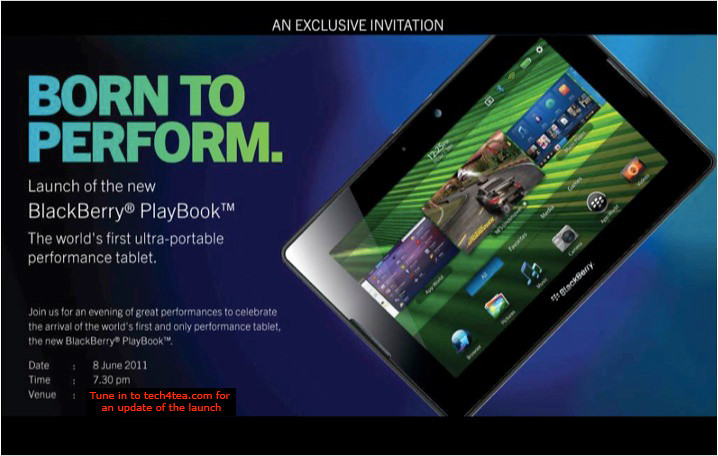
The BlackBerry PlayBook from RIM is finally arriving in Singapore. First launched in the US on April 19 earlier this year, the 7-inch tablet computer will officially be launched in Singapore on Wednesday, Jun 8.

RIM BlackBerry PlayBook launches in Singapore this Wed, June 8, 2011

RIM BlackBerry PlayBook launches in Singapore this Wed, June 8, 2011.

The beta version of the BlackBerry Playbook was first unveiled during the Adobe Max 2010 developer conference in October last year. It was first seen in Singapore when two advanced beta prototypes were specially flown in and displayed as part of the Adobe Refresh Roadshow on March 10.

Four days prior to its official launch in the US on April 19, a special preview was held in a BlackBerry PlayBook Bus in Singapore on April 15. Two days from now – and almost two months after the US launch – the PlayBook will hit the shelves in Singapore.

Prices for the 16, 32 and 64-gigabyte models in the US are $500, $600, and $700 respectively. We’ll see what these will translate to in Singapore.

The PlayBook has received a mixed reaction since its launch in the US. The most common complaint has been its lack of native email, messenger, contacts and calendar apps, relying on Bluetooth tethering to access these functionalities via a BlackBerry handset. Other grouses include the lack of 3G/4G, and the relatively small repository of PlayBook specific apps in BlackBerry App World.

On the other end of the scale, the PlayBook features a lightning fast processor, capable of true multi-tasking, has a fabulous display and user interface, and supports both Flash and HTML5. In fact, some analysts have observed that the first day sales of the PlayBook has beaten that for Motorola Xoom and Galaxy Tab.

It’ll be interesting to hear the latest progress for the PlayBook during the Singapore launch the day after tomorrow.

Acer Chromebook with Google Chrome OS

Thursday, May 12th, 2011

Google has unveiled its first two Chrome-based notebooks from Acer and Samsung at the Google I/O conference in San Francisco. They will be available for order online from June 15.

Acer’s Wi-Fi only Chromebook will cost $349, while the Samsung Chromebook will cost $429 for the Wi-Fi only version and $499 for the 3G version.

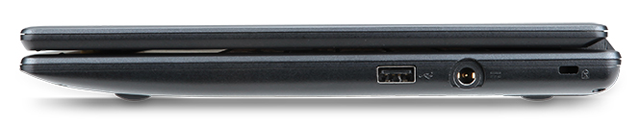
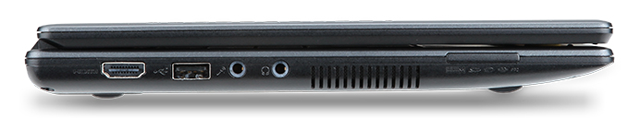
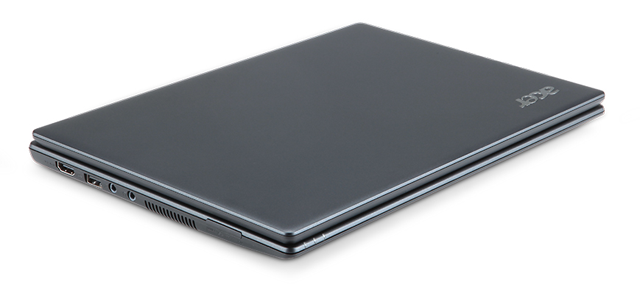
The Acer Chromebook is a netbook running Google’s Chrome OS. It has an 11.6 inch display, 1.66 GHz dual-core Intel Atom N570 processor, 16 GB SSD drive and 2 GB RAM, with 6 hours battery life. It is available in black.

Acer Chromebook running Google's Chrome OS

Acer Chromebook

The price of $349 is for the Wi-Fi only version. 3G will be an additional optional configuration.

Chromebooks will be available online June 15 in the U.S., U.K., France, Germany, Netherlands, Italy and Spain. More countries will follow in the coming months. In the U.S., Chromebooks will be available from Amazon and Best Buy and internationally from leading retailers.

Here are the main specifications:

  • 11.6″ HD (1,366×768) 16:9 Widescreen CineCrystalTM LED-backlit LCD
  • 1.66 GHz dual-core Intel Atom N570 processor
  • Acer Chromebook running Goolge's Chrome OS2GB RAM
  • 16GB SSD drive
  • 6 to 8 hours battery life
  • stereo speakers
  • 2 USB 2.0 ports
  • Acer Chromebook running Google's Chrome OS4-in-1 memory card slot
  • HDMI port
  • 11.6 x 8.6 x 0.8 inches
  • Acer Chromebook running Google Chrome OS2.95 lbs / 1.34 kg
  • A full-size keyboard
  • Multitouch touch pad
  • Built in dual-band 802.11 b/g/n Wi-Fi and World-mode 3G (optional)
  • 1.3 megapixel HD Webcam with noise cancelling microphone
  • Instant-on from standby, and an 8-second boot time


Samsung Series 5 Chromebook

Wednesday, May 11th, 2011

Google has unveiled today its first Chrome-based notebooks from Acer and Samsung at the Google I/O conference in San Francisco. They will be available for order online from June 15.

The Samsung Chromebook will cost $429 for the Wi-Fi only version and $499 for the 3G version, while Acer’s Wi-Fi only Chromebook will cost $349.

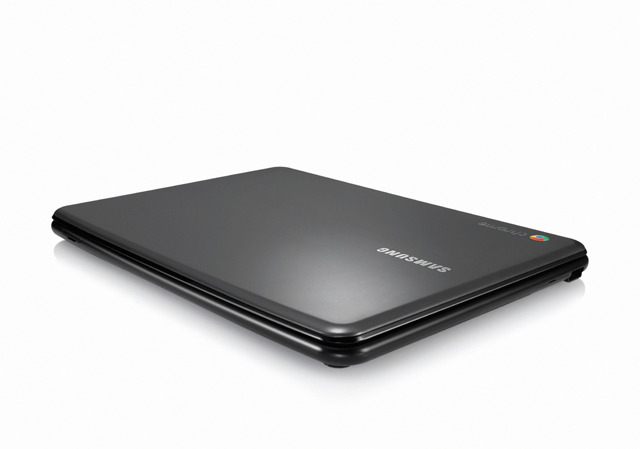
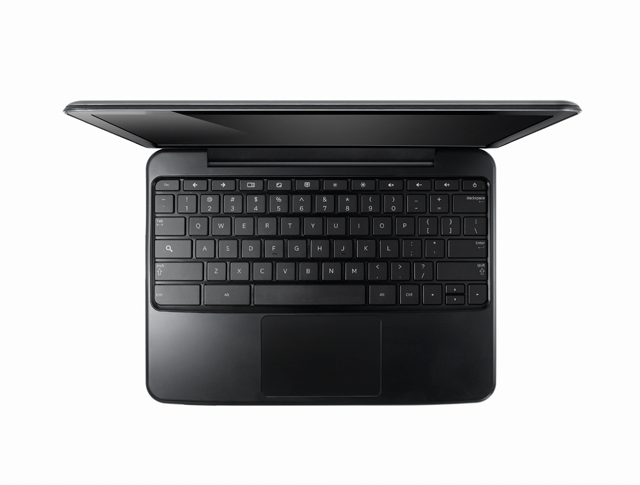
Samsung Series 5 Chromebook, based on Google's Chrome OS

Samsung Series 5 Chromebook

The Samsung Series 5 Chromebook is a netbook running Google’s Chrome OS. It has a 12.1 inch display, 1.66 GHz dual-core Intel Atom N570 processor, 16 GB SSD drive and 2 GB RAM, with 8.5 hours battery life.

Looking similar to the CR-48 prototype, the Series 5 is available either in white or “Titan Silver”.

Chromebooks will be available online June 15 in the U.S., U.K., France, Germany, Netherlands, Italy and Spain. More countries will follow in the coming months. In the U.S., Chromebooks will be available from Amazon and Best Buy and internationally from leading retailers.

Here are the main specifications:

  • A 12.1-inch (1280×800) SuperBright display at 300 nits, with a 16:10 aspect
  • 1.66 GHz dual-core Intel Atom N570 processor
  • Samsung Series 5 Chromebook, based on Google's Chrome OS2GB RAM
  • 16GB SSD drive
  • 8.5 hours battery life
  • Stereo speakers
  • Two USB 2.0 ports
  • SD/SDHC/MMC/SDXC card slot
  • Samsung Series 5 Chromebook, based on Google's Chrome OSMini-VGA port
  • 11.6 x 8.6 x 0.79 inches
  • 3.26 lbs / 1.48 kg
  • A full-size keyboard
  • Multitouch touch pad
  • Built-in dual-band Wi-Fi and World-mode 3G (optional)
  • HD Webcam with noise cancelling microphone
  • Instant-on from standby, and an 8-second boot time


Apple Announces New iMac line of desktop computers

Tuesday, May 3rd, 2011
Starting at S$1,648, the iMac has been updated with next generation quad-core processors, powerful graphics, Thunderbolt I/O Technology and a new FaceTime HD camera.
New iMacs from AppleApple claims that, compared to the previous generation, the new iMac is 70 percent faster and new graphics deliver up to three times the performance of the previous generation.
Apple’s desktop line of computers features quad-core Intel Core i5 processors with an option for customers to choose Core i7 processors up to 3.4 GHz. These next generation processors feature an integrated memory controller for a responsive experience and a powerful new media engine for high-performance video encoding and decoding. The new AMD Radeon HD graphics processors give the new iMac an extremely powerful graphics capability.

Thunderbolt

21.5 or 27 inch brilliant IPS LED-backlit high resolution display

iMac is the first desktop computer on the market to include groundbreaking Thunderbolt I/O technology. Apple had launched its updated MacBook Pro line of notebooks on February 25 earlier this year with the new Thunderbolt I/O technology. It was the  first computer on the market to implement the new technology Apple had developed in collaboration with Intel.

The 21.5-inch iMac has a single Thunderbolt port while the 27-inch model features two ports for even greater expansion. Featuring two bi-directional channels with transfer speeds up to an amazing 10Gbps each, Thunderbolt delivers PCI Express directly to external high performance peripherals such as RAID arrays, and can support FireWire and USB consumer devices, and Gigabit Ethernet networks via adapters.

Thunderbolt also supports DisplayPort for high resolution displays and works with existing adapters for HDMI, DVI and VGA displays. Freely available for implementation on systems, cables and devices, Thunderbolt technology is expected to be widely adopted as a new standard for high performance I/O.

FaceTime

21.5 or 27 inch brilliant IPS LED-backlit high resolution display

The iMac includes a built-in FaceTime HD camera and Apple’s innovative FaceTime software for crisp, widescreen video calling the whole family can enjoy. The new camera supports high definition video calls between all FaceTime HD-enabled Macs and standard resolution calls with iPad 2, iPhone 4, the current generation iPod touch and other Intel-based Macs.

Software

The iMac comes with Mac OS X Snow Leopard and iLife – Apple’s innovative suite of applications for creating and sharing photos, movies and music.

Snow Leopard includes the Mac App Store for finding new apps for the iMac.

iLife ’11 features iPhoto with full screen views for browsing, editing and sharing photos; iMovie with powerful easy-to-use tools to transform home videos into fun theatrical trailers; and GarageBand with new ways to improve your playing and create great sounding songs.

Aluminium enclosure, gorgeous display and all-in-one design.The iMac continues to feature its signature aluminium and glass design, brilliant IPS LED-backlit high resolution display, SD card slot and comes with Apple’s innovative Magic Mouse or Magic Trackpad.
On the Green front, the iMac meets stringent Energy Star 5.2 requirements and achieves EPEAT Gold rating. iMac features LED-backlit displays that are mercury-free and made with arsenic-free glass. iMac uses PVC-free components and cables, contains no brominated flame retardants, uses highly recyclable materials and features material-efficient system and packaging designs.

Pricing & Availability

The new iMac is available through the online Apple Store and Apple Authorised Resellers.

21.5-inch iMac
S$1,648 2.5 GHz quad-core Intel Core i5

AMD Radeon HD 6750M

500GB hard drive

S$2,048 2.7 GHz quad-core Intel Core i5

AMD Radeon HD 6770M

1TB hard drive

27-inch iMac
S$2,348 2.7 GHz quad-core Intel Core i5

AMD Radeon HD 6770M

1TB hard drive

S$2,748 3.1 GHz quad-core Intel Core i5

AMD Radeon HD 6970M

1TB hard drive

Configure-to-order options include faster Intel Core i7 processors up to 3.4 GHz, additional hard drive capacity up to 2TB, a 256GB solid state drive, additional DDR3 memory and AppleCare Protection Plan. Additional technical specifications and configure-to-order options and accessories are available online.

Asus Eee Pad Transformer TF101 arrives in Singapore

Friday, April 29th, 2011
The latest 10.1 inch Android 3.0 tablet from Asus arrived in Singapore today at the launch event at Zirca in Clarke Quay. The 16GB Wi-Fi only version (Eee Pad + Docking keyboard) is priced at S$898.

But as part of its launch promotion, you can get a S$99 discount at S$799. If you choose to purchase only the pad and not the docking station, you can get the 16GB Wi-Fi only version at the launch promotion price of S$699.
The Asus Eee Pad Transformer TF101 arrived in Singapore on April 29, 2011

The Asus Eee Pad Transformer TF101 arrived in Singapore on April 29, 2011

What are the biggest grouses of tablet users today? No Flash, short battery life, no keyboard, no USB ports and card readers. Asus tries to address all these shortcomings in the Asus Eee Pad Transformer TF101.

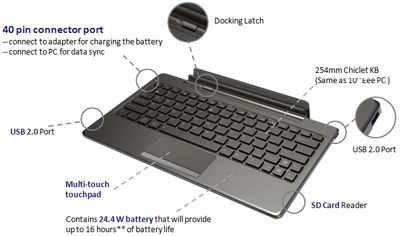
The optional docking station provides a full QWERTY keyboard for work involving intensive typing. It costs S$199 if you purchase it separately, but purchased together with the pad, you need only top up S$100 for it. The docking station makes available an additional 24.4 Wh battery that extends the pad’s 9.5 hours battery life to 16 hours instead.

A card reader (MMC/SD/SDHC) and two USB 2.0 ports are also available on the keyboard. The keyboard also props up the docked pad as a stand.

And finally, Adobe Flash 10.2 is supported, so you can visit all those glitzy sites running Flash animations and video.

The docking station is a full QWERTY keyboard that doubles up as a stand and contains an extra battery to extend the 9.5 hours battery life of the pad to 16 hours. It also contains USB ports and a card reader.

The docking station is a full QWERTY keyboard that doubles up as a stand and contains an extra battery to extend the 9.5 hours battery life of the pad to 16 hours. It also contains USB ports and a card reader.

I played with the Eee Pad on display and found the IPS (In-plane switching) LED backlight screen brilliant and sharp at with 1280×800 pixels packed into the 10.1 inch panel, offering a wide viewing angle of 178 degrees – I could still view the screen display from the side.

The touch screen senses up to 10 fingers for multi-touch - seen here with the Piano app from Android Market.

The touch screen senses up to 10 fingers for multi-touch - seen here with the Piano app from Android Market.

The pad feels slightly heavier than the iPad 2 but comfortable to hold. The book reader app included with the pad was standard fare – offering animated page turning, highlighting and bookmarking etc.

Photos and videos taken with the camera was clear even though the ambient lighting was dark.

Prices and configurations

The 16GB Wi-Fi only tablet is the only configuration available at the moment. Together with the docking station (keyboard), it sells for S$898 at the major retailers in Singapore – Challenger, Best Denki, Harvey Norman etc.

During this launch period, the promotional price for the 16GB Wi-Fi only Transformer sells for S$799 (Eee Pad + Docking station) and S$699 (Eee Pad only). Currently, the docking stations are out of stock and will only be available from the week of May 9 onwards.

The 32GB Wi-Fi only version will also only be available later in May.

“The 3G version is being tested now and will likely be launched in the second or third week of June,” Bernard Wen, Business Operation Manager of Asus Technology told me. “In the meantime, we’ve tested the Pad with USB dongles from SingTel, Starhub and M1 and found that they are all compatible,” he added.