Archive for the ‘Specifications’ Category

Olympus XZ-1 wins TIPA 2011 award for Best Expert Compact Camera

Monday, April 25th, 2011
The flagship compact digital camera from Olympus has won the Best Expert Compact Camera award at the annual XXI TIPA 2011 awards.

Technical Image Press Association - XXI TIPA Awards 2011The 29 member magazines of the Technical Image Press Association (TIPA) awarded the award for the “Best Expert Compact Camera” category to the Olympus XZ-1.

Olympus XZ-1 - Best Expert Compact CameraInto its twenty-first year, the annual awards recognised the best photo and imaging products in 2011 in 40 categories. TIPA has member magazines from nine European countries plus Australia, Canada, China, USA and South Africa.
In its citation, it lauded the XZ-1 for its fast lens, as well its larger sensor area for each pixel – which translates to greater sensitivity, lower noise and better image quality.
“The Olympus XZ-1 has one of the fastest zoom lenses in its class, the iZuiko f1.8-2.5 6.0-24mm (28-112mm equivalent angle of view in 35mm cameras). Rather than succumb to the continuing Megapixel race, the light-reception area of each pixel of the 1/1.63-inch, 10 Megapixel CCD has been doubled. The XZ-1’s AF illuminator, Dual Image Stabilisation, Low-Light mode that automatically adjusts the ISO sensitivity up to ISO 3200 and the compact size all add up to an exciting “candid” camera that also offers advanced manual controls.” – Citation for XXI TIPA Awards for “Best Expert Compact Camera”

In Singapore, the Olympus XZ-1 is available at a suggested retail price of S$748 (incl GST & bundled with a 8GB SD Card).

Listed here are some earlier write-ups on the Olympus XZ-1:
Photo review | Full reviewSpecsSelling pointsDiorama movie

Innards of the BlackBerry PlayBook

Wednesday, April 20th, 2011
Have you ever wondered what the insides of a tablet computer looks like? Teardown specialists iFixit has opened up the latest RIM BlackBerry PlayBook – launched only yesterday in the US.

Innards of the BlackBerry PlayBook

Innards of the BlackBerry PlayBook

The PlayBook was easier to tear down compared to an iPad, and has a smaller battery which is not straightforward to replace. The motherboard has to be removed in order to get to the battery, which is glued to the mid-plane assembly.

BlackBerry PlayBook from RIMMany of the chips are from Texas Industries. The main chips include:  1GHz TI OMAP 4430 dual core processor, SanDisk 1GB NAND Flash, Elpida B8064B2PB-8D-F 1GB DRAM, Bosch Sensortec BMA150 Digital 3-axis accelerometer, and an Invensense MPU-3050 3-axis gyroscope.

For those into chips, other components include: Texas Instruments TWL6030 Power Management, STMicroelectronics XTV0987 5 MP mobile imaging processor, Wolfson WM8994E audio codec, Texas Instruments WL1283 WLAN/Bluetooth/FM, TriQuint Semiconductor TQP6M9002 802.11a/b/g/n + BT front-end module.

Motherboard of the BlackBerry PlayBook

Motherboard of the BlackBerry PlayBook

Not detailed enough? There’s also the Texas Instruments LMV339 Quad General Purpose Low-Voltage Comparators, Texas Instruments SN74AVCH4T245 4-Bit Dual-Supply Bus Transceiver with Configurable Voltage Translation and 3-State Outputs, and a Texas Instruments PS63020 High Efficiency Single Inductor Buck-Boost Converter with 4A Switch 

For the gory details, visit iFixit’s report.

BlackBerry Torch 9800 Review

Monday, April 18th, 2011
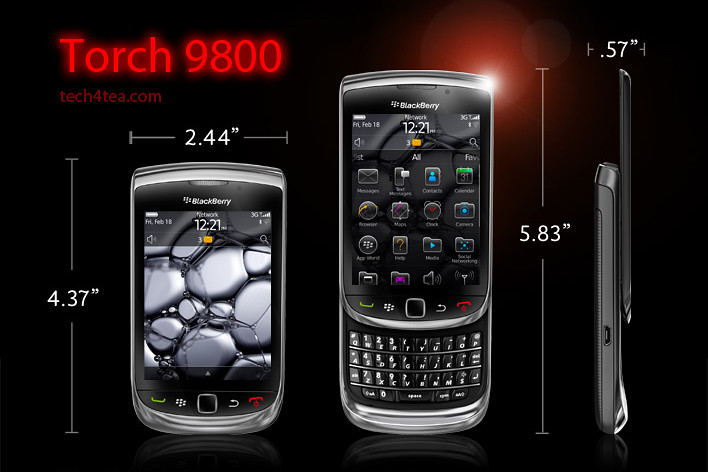
RIM touts the Torch as the best BlackBerry ever. I’ve been using one over the last two weeks. Indeed, it’s the best BlackBerry smartphone I’ve played with so far and I certainly prefer it over my wife’s BlackBerry Bold.

The BlackBerry Torch was the first smartphone from Research In Motion (RIM) that shipped with the new BlackBerry OS 6. It has a completely new keyboard implementation – instead of having the physical keyboard and the screen share the face of the device, the Torch allowed the 3.2 inch screen to hog the entire front.


BlackBerry Torch 9800 with 6.0 Operating System.

BlackBerry Torch 9800 with 6.0 Operating System.

An on-screen keyboard – which I found rather responsive – can be easily called up in case you need to type something. Need the traditional QWERTY keyboard to do some intensive typing? Slide it out from below the screen and you’re good to go.

It’s a trade-off, whether you have the hard keyboard readily available all the time or hide-in below the screen to make for a bigger screen.

For my usage profile, at least, I liked the balance – I do a fair bit of messaging and typing but I don’t mind having to slide out the keyboard when I need it – since I get a bigger screen real estate – 480×360 pixels on a 3.2 inch capacitive touch screen.

I did find the Bold keyboard slightly easier to type than on the Torch, but both are far more tactile and better than typing on a touch screen.

I suppose those who really have a lot of typing to do would rather have the keyboard available at all times – it depends on your usage profile. The Torch tries to give you both the large screen of the Storm and the popular hard keyboard in a compact body.

The hardware

The form factor is almost identical to many other BlackBerry devices like the Bold. The usual five buttons line the bottom of the screen: BlackBerry call, menu, back, and end buttons and optical trackpad.

The Marvell CPU runs at 624MHz (though the company claims this is a newer generation chip), with 512 MB RAM and 4 GB of storage. You can add up to 32 GB though the microSD slot. The device also comes with 802.11b/g/n WiFi, Bluetooth 2.1 and an AGPS chip.

Photos were rather impressive for a phone camera

Photos were rather impressive for a phone camera

The Torch has a 5 megapixel camera, with an LED flash. Photo quality was rather remarkable for a smartphone camera.  I like the preset scene modes – Party mode for lowlight indoor shooting and Sports mode both yielded impressive results. Video wise, you can shoot clips at 640×480 resolution.

New OS and interface

With the new OS 6, web browsing on the Torch is now quite a pleasant experience using the new Webkit-based browser. Unfortunately, neither Flash nor HTML5 video are supported.

I really love the persistent notification alert bar at the top of the home screen: the small row of icons allows you to see social networking, email, SMS, call, and calendar alerts all in one place. The bar drops down a separate window to show the list of notifications, each of which can be clicked on to bring you to the app.

11 scene modes are available for taking photos under different situations

11 scene modes are available for taking photos under different situations

Another new feature I like is the universal search. Ever wanted to look for something you know is on your phone but can’t recall exactly where it is located and how to get at it? Simply begin typing the relevant search term into the search box and the Torch throws the icon for it right at you – almost instantaneously. It really beats having to wade through the menus and interface looking for contacts, messages, calendar, music or pictures.

has included a powerful universal search alongside a social networking tool which allows you to aggregate RSS feeds and services like Twitter or Facebook into a single view. There are a lot of changes, so we’re going to go step-by-step through what we consider the biggest changes for the BlackBerry platform.

Battery life

As with other BlackBerry devices I’ve tested before, battery seems to last forever. Alright, that’s exaggerating. There were days when I ran Youtube videos and videos from the media folder for extended periods of time and the battery held out. Under normal usage, I only had to recharge the battery every few days.

BlackBerry Torch 2

There’s been numerous leaks about what the upcoming BlackBerry smartphones lined up for 2011. One of them is the Torch 2. Expected to be announced during the BlackBerry World in May and released in the US in July, it looks physically like the Torch, but features a 1.2 GHz processor and a 640×480 resolution on a similarly-sized 3.2 inch screen.

Going by previous BlackBerry release schedules, we’ll probably only see the Torch 2 in Singapore towards the end of the year.

In the meantime, if you’re looking at replacing your current BlackBerry phone, do give the Torch a spin and see if it impresses you enough for you to pick one up as replacement.

BlackBerry Torch 2 sneak peek

Sunday, April 17th, 2011
The BlackBerry Torch 2 is rumoured to be announced during the BlackBerry World in May and then go on sale in the US in July later this year. With the release of the PlayBook tablet next Tuesday in the US, RIM has a few more models in line to keep its fanbase riveted for the rest of the year.

Photo of BlackBerry Torch 2There has been plenty of leaks from RIM (Research In Motion) about upcoming BlackBerry models for 2011. These include the BlackBerry Touch (Monaco/Monza), Bold Touch, Storm 3, Bold (Dakota), Curve (Apollo), and the Torch 2.

Having gotten hold of a Torch 2, BGR reports that the new device looks almost identical to its predecessor but features a significantly more powerful 1.2 GHz processor. Coupled with the BlackBerry OS 6.1 and a 3.2 inch 640×480 VGA display, it will be an exciting gadget to own.

Processor power has been doubled from the current 624 MHz, and the 3.2 inch screen runs at a higher pixel resolution than the 480×360 pixels on the current BlackBerry Torch.

Going by previous BlackBerry release schedules, we’ll probably only see the Torch 2 in Singapore towards the end of the year.

The main specifications of the Torch 2 are listed below:

  • CPU – 1.2 GHz processor
  • Display – 3.2″ VGA (480 x 640) capacitive touchscreen display
  • Radio – Quad-band GSM/GPRS/EDGE ; Tri-band HSPA 14.4Mbps
  • Memory – 8GB storage + 512MB RAM + up to 32GB MicroSD
  • Connectivity – WiFi, Bluetooth, NFC
  • Camera – 5 megapixels
  • Battery – 1300MAh battery
  • Thickness – 14.6mm thick
  • Sensors – magnetometer, digital compass

BlackBerry PlayBook preview in Singapore

Friday, April 15th, 2011
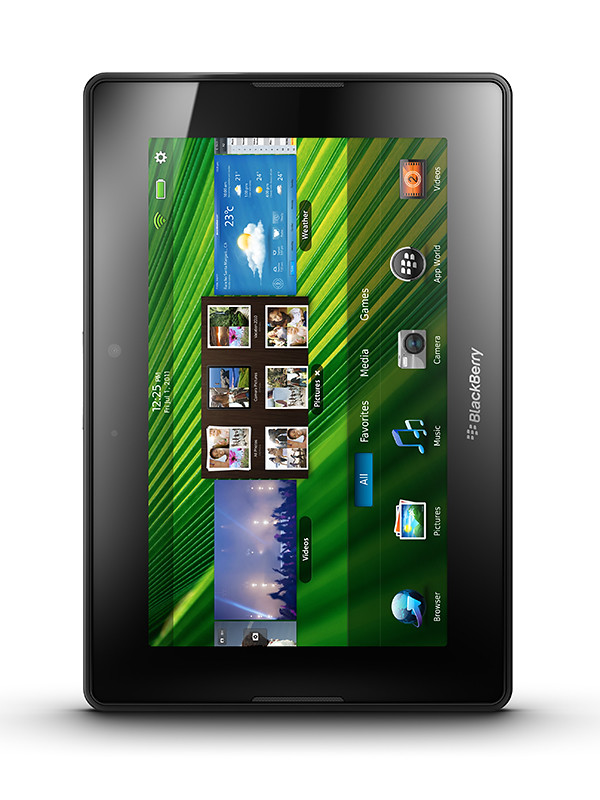
The BlackBerry PlayBook Bus will tour Singapore tonight, showing off a preview of RIM’s 7-inch tablet computer, that is due to be launched in the US on 19 April next Tuesday.
Preview of the BlackBerry PlayBook in Singapore

Preview of the tablet on the BlackBerry PlayBook Bus in Singapore

Keep a lookout for the limo bus driving around town tonight. Sources tell me it will launch from the Tanjong Pagar area. The first time that the BlackBerry PlayBook debuted in Singapore was back in March. But the two devices I played with were still beta release versions.

Tonight, the preview will provide some hands-on for the real McCoy. Perhaps RIM (Research In Motion) will also provide some hints as to when the aspiring challenger to the iPad will be launched in Singapore and at what pricing.

For now, here’re some of the main specs of the BlackBerry PlayBook:

Looks
7″ LCD display, 1024 x 600 WSVGA Multi-touch capacitive screen

Physical feel
0.9 lbs (425g) and 5.1″ x 7.6″ x 0.4″ (130mm x 194mm x 10mm)

Performance
1 GHz dual-core processor
1 GB RAM
Symmetric multi-processing
Full Adobe Flash 10.1 enabled
Built-in support for HTML 5

Configuration
Internal storage of 16, 32 or 64 GB
GPS, Orientation Sensor (Accelerometer), 6-Axis Motion Sensor (Gyroscope), Digital Compass (Magnetometer)
Stereo speakers and stereo microphones
Wi-Fi (802.11 a/b/g/n) connectivity, Wirelessly connect to your BlackBerry smartphone for real time access to: Email, calendar, address book, task list and BBM

Cameras
3 MP high-definition forward-facing camera
5 MP high-definition rear-facing camera
Codec support for superior media playback, creation and video calling
1080p HD video; H.264, MPEG4, WMV HDMI video output
Micro USB and Micro HDMI ports
Video calling with dual video cameras

BlackBerry Tablet OS
Powered by QNX technology, supports POSIX OS, SMP, Open GL, BlackBerry 6, WebKit, Adobe Flash, Java and Adobe Mobile AIR

Adobe Creative Suite 5.5 Production Premium suite

Thursday, April 14th, 2011

Adobe Creative Suite 5.5 Production Premium suite is a major mid-cycle update to the software for video and post-production for delivering content to virtually any screen. Performance and workflow have been imporved while powerful new audio editing capabilities have been added.

New component software receiving major updates include Adobe Premiere Pro CS5.5, Adobe After Effects CS5.5, Adobe Flash Professional CS5.5, Adobe Flash Catalyst CS5.5, Adobe Story, Adobe Media Encoder CS5.5, and Adobe Device Central CS5.5.

New to the suite is Adobe Audition CS5.5, bringing its audio-for-video multitrack editing environment to both Mac OS and Windows for the first time.

Estimated street price for the Creative Suite 5.5 Production Premium suite is US$2065. It is one of five suite editions of the Creative Suite 5.5 line of software.

Greater Productivity

Productivity enhancements promise to enable video and audio professionals to dramatically accelerate their workflows. The powerful Adobe Mercury Playback Engine, introduced in Adobe Premiere Pro CS5, broadens its graphics processing unit (GPU) hardware support to include laptops and more supported cards, and allows users to open projects faster, get real-time feedback for more GPU-accelerated features, and work more smoothly at 4k and higher resolutions.

Adobe Premiere Pro CS5.5 boosts performance by providing a smoother editing workflow, enabled by new trimming and editing tools that provide more precision and control.

Dual-system sound support from the new Merge Clips command in Adobe Premiere Pro CS5.5 lets users quickly sync video with high-quality audio recorded on separate devices like location recorders, ideal for DSLR or RED workflows.

Leveraging an integrated workflow with Adobe Audition, Adobe Premiere Pro users can save time by sending individual clips or sequences, including reference videos, directly to Adobe Audition for audio editing and restoration. File-based workflows see enhanced support for RED and other tapeless cameras, including improved RED Source Settings dialog in Premiere Pro and After Effects CS5.5 and native support for up to 5k media from RED Epic cameras via an extension available on Adobe Labs.

As it is a truly native editing solution, users saves time time and eliminates the need to transcode or rewrap footage.

The new 64-bit Adobe Media Encoder CS5.5 has been completely redesigned to deliver Adobe Premiere Pro video sequences, After Effects compositions, and Adobe Encore projects to multiple screen formats quickly, while doing the encoding in the background.

Adobe Media Encoder CS5.5 also introduces new format support such as AVC-Intra and DPX, and watch folders so users can encode a single clip to multiple destinations with a simple drag and drop.

New features

After Effects CS5.5 introduces new features such as the Warp Stabilizer, Camera Lens Blur and Light Falloff to enable users to enhance footage in post-production.

The Warp Stabilizer eliminates unwanted camera movement by steadying shaky footage, making handheld footage appear as smooth as a camera mounted on a mechanical stabilizer.

The Camera Lens Blur effect mimics the properties of physical lenses offering more realistic depth of field blurs. The Light Falloff effect enables users to simulate natural illumination falloff to mimic how light behaves in a 3D scene and can be used to create other light intensity effects.

Video professionals can use the new Adobe Audition in CS5.5 Production Premium on both Mac and Windows platforms. The completely re-written audio engine in Audition offers a robust toolset to record, edit, mix, master, and sweeten audio. With its professional editing and multitrack mixing tools, powerful noise-reduction and effects options, Adobe Audition CS5.5 will be able to handle a wide range of tasks quickly and efficiently.

Improved Collaboration

Adobe Creative Suite 5.5 Production Premium enables users to collaborate with existing workflows, even if they use a variety of tools. Enhanced project exchange support for Final Cut Pro users provides maximum flexibility for video editors, while new or enhanced OMF support in Adobe Premiere Pro and Adobe Audition makes it possible to export high-quality audio projects to Avid Pro Tools, facilitating more efficient collaboration between audio editors, remixers and sound designers.

Access to the new version of Adobe Story, an Adobe CS Live online service, improves collaboration between users with email notifications of new script edits and a faster method of tracking changes through script elements and filters.

The ability to import Adobe Story script data directly into Adobe Premiere Pro further strengthens XML-based metadata support found throughout the Production Premium suite, which is critical for everything from file-based workflows to media asset management.

The metadata-driven workflows, plus the ease and flexibility of communicating with Adobe applications with critical third party solutions from news management systems to playback servers, is a key selling point for broadcasters and other organizations around the world.

Adobe Creative Suite 5.5 Web Premium suite

Wednesday, April 13th, 2011

Adobe Creative Suite 5.5 Web Premium suite is a major mid-cycle update to the software for Web designers and developers. The new version give Web professionals the ability to bring high-impact content experiences and mobile apps to the latest form factors across Android, BlackBerry Tablet OS and iOS platforms.

New in the suite are updated versions of Adobe Dreamweaver, Adobe Flash Professional, Adobe Flash Catalyst, Adobe Flash Builder, the all-new Flex framework for mobile devices, Adobe Device Central and Adobe Acrobat X Pro.

Key enhancements include substantive HTML5 advancements in Dreamweaver, new tablet and smartphone application development capabilities in Flash Professional CS5.5 and Flash Builder Premium 4.5, and enhanced cross-browser testing as well as mobile emulation and on-device debugging.

Estimated street price for the Creative Suite 5.5 Web Premium suite is US$2185. It is one of five suite editions of the Creative Suite 5.5 line of software.

Advances in HTML5

Web Premium CS5.5 advances HTML5 authoring tools, enabling Web designers and developers to create browser-based content that gives end-users a seamless and immersive experience across virtually any screen.

New HTML5 support in Dreamweaver CS5.5 includes jQuery mobile framework integration for browser-based content and PhoneGap integration for native and mobile application design and development.

Enhancements to the multiscreen preview panel in Dreamweaver have also been made, supporting the latest in media queries, WebKit engine updates, and CSS3 attributes, enabling side-by-side renderings of what a single design looks like on different form factors.

“With Adobe the jQuery project has spent a significant amount of time researching and developing user interfaces for mobile browsers, the final result being the creation of the jQuery Mobile framework,” said John Resig, founder of the jQuery Project.

Enhanced Flash tooling

New additions in Flash Professional CS5.5 include content scaling so users can easily scale their content on stage to adapt to different screen sizes, which is a huge timesaver.

Flash Professional CS5.5 also includes a new shared assets feature for more streamlined publishing, as well as more than 20 new code snippets for creating mobile and Adobe AIR applications for accelerometer, multitouch gestures, and save/load data.

Enhanced Application Development for Mobile Devices

Adobe CS5.5 Web Premium includes new mobile application development support to deliver rich interactive applications to the latest Android, BlackBerry Tablet OS and iOS devices.

In the updated Flash Builder 4.5, users have new mobile support for ActionScript and mobile Flex projects, as well as improved designer-developer collaboration throughout application development with a new bi-directional workflow with Flash Catalyst CS5.5 and Flash Professional CS5.5.

New capabilities in Adobe Flash Builder 4.5, Flash Professional CS5.5 and the introduction of the Flex 4.5 framework for mobile devices, let designers and developers build mobile applications that run on iPhone, iPad, Android devices and BlackBerry PlayBook. The apps can be easily deployed through the application markets such as Apple’s iTunes App Store, Android Market and BlackBerry App World.

Enhanced Browser Compatibility Testing

To keep Web developers and designers ahead of rapidly changing technology, Web Premium CS5.5 includes new HTML5 emulation and support for the latest mobile devices in Adobe Device Central, software that simplifies the production of innovative and compelling content for mobile phones and consumer electronics devices.

Adobe BrowserLab, a key component of Adobe CS Live online services, has also been updated for cross-browser compatibility testing for the newest browsers to help ensure Web projects are accurately previewed across a spectrum of browsers.

Adobe CS Live online services are free until April 12, 2012.

Creative Suite 5.5 Design Premium and Design Standard suites

Monday, April 11th, 2011

Creative Suite 5.5 Design Premium comprises new versions of Adobe InDesign, Adobe Dreamweaver, Adobe Flash Professional and Adobe Flash Catalyst, as well as Adobe Acrobat X Pro, Adobe Illustrator CS5, Adobe Photoshop CS5 Extended and Adobe Fireworks CS5.

Estimated street price for the Creative Suite 5.5 Design Premium suite is US$2309 while that of the Design Standard suite is US$1579. Both are part of five suite editions of the Creative Suite 5.5 line of software and will ship within 30 days.

The software in the Adobe Creative Suite 5.5 Design Premium suite enables designers to produce content faster and deliver immersive, visually rich experiences to screens of all shapes and sizes. New features in Creative Suite 5.5 Design Premium bolster the many timesaving features that were introduced in Creative Suite 5 to improve efficiency of everyday tasks.

Design for both Tablets and Smartphones

With Creative Suite 5.5 Design Premium, designers can create immersive digital magazines, e-books with accompanying video and audio, websites based on HTML5 and CSS3 standards, and interactive mobile applications built with familiar Flash tools that display consistently across Android, BlackBerry Playbook and iOS devices.

Updates to Dreamweaver CS5.5 (including the Live View mode, CSS panel and Multiscreen Preview panel) streamline the design of websites that need to be optimized for viewing on multiple devices, and let designers preview desktop, tablet and smartphone browsers side-by-side.

With the new Folio Producer tools in InDesign, which work in conjunction with the Adobe Digital Publishing Suite, creative professionals can design interactive, rich media digital magazines, newspapers, corporate publications and advertising for reading on tablet devices such as Apple iPad, BlackBerry PlayBook and a wide variety of Android tablets.

Using InDesign CS5.5 in combination with the integrated Folio Producer toolset, designers can add new levels of interactivity to their page layouts. Documents targeted to tablet devices can include video, audio, panoramic views, 360-degree rotation of objects, pan and zoom of images, integration of HTML5 content and other interactive overlays.

Designers can also easily test how their content will look and feel on a broad array of tablet devices directly from within InDesign. Once content authoring is completed in InDesign, tight integration with Adobe Digital Publishing Suite allows users with a Digital Publishing Suite account (available separately) to efficiently produce, distribute, optimize and monetize content for tablet devices.

A number of features in InDesign have also been enhanced to improve reading experiences on e-book devices, such as Barnes and Noble Nook, Sony Reader and Apple iPad.

Designers can now add refined typography, images that resize automatically to fit virtually any screen, and video and audio for e-book reader applications that support HTML5 video and audio tags.

New capabilities in Flash Professional CS5.5 let designers and developers build mobile applications that run on iPhone, iPad, Android devices and BlackBerry Playbook. The apps can be easily deployed through the application markets such as Apple’s iTunes App Store, Android Market and BlackBerry AppWorld.

Beyond the Desktop

Adobe is continuing to extend productivity with cloud services and new tablet apps.

Creative Suite 5.5 Design Premium works with new tablet applications for Photoshop (available separately) that enhance the creative workflow and extend the design experience beyond the desktop.

A new scripting engine in Adobe Photoshop and an enhanced Photoshop Software Development Kit (SDK) enable developers to build tablet applications that interact with Photoshop from Android, BlackBerry and iOS devices.

Adobe has used the new SDK to deliver three iPad applications that demonstrate the creative possibilities of using tablets to drive common Photoshop workflows – Adobe Color Lava for Photoshop, Adobe Eazel for Photoshop and Adobe Nav for Photoshop.

Creative Suite 5.5 Design Premium also integrates with CS Live, a set of hosted services that accelerate key project workflows such as shared reviews. CS Live online services are free until April 12, 2012.

Olympus announces 3 new digital compact cameras.

Monday, March 7th, 2011
Olympus has unveiled 3 new digital compacts. This continues its 2011 trend of releasing new cameras at the beginning of every month.
16M backlit CMOS, 12.5x, 24 - 300 mm

Olympus SZ-20

altText

Olympus SZ-30MR

14M CCD, 5x, 28 - 140 mm

Olympus TG-810


Having launched seven cameras on 6 January and four on 8 February, Olympus has announced another 3 new models on 2 March. The three models are: TG-810, SZ-20, SZ-30MR.

The TG-810 will be available in Singapore in March but availability of the two new SZ series models have yet to be ascertained.

The three models and their main highlights are listed below:

Model
Date available
Estimated price
Colours
Highlights
TG-810
March 2011
S$540 

Colours:
Black
Silver
Blue
Red
– 14 megapixels CCD.
– 5x optical zoom from 28 to 140 mm (35mm equiv).
– 3” 920k dots TFT LCD display.
– HD movie (MPEG-4 AVC/H.264) at 1280 x 720 pixels with dedicated REC button. 

Battle-hardened for the rugged adventurer, this jock is:

– waterproof to a depth of 10m
– shockproof against falls from 2m
– crushproof against loads of up to 100kgf
– dustproof, freezeproof; basically abuse-proof.
– equipped with GPS and electronic compass

SZ-20
Avail: TBD
Price: TBD 

Colours:
Black
Silver

– 16 megapixels backlit CMOS.
– 12.5x optical zoom from 24 to 300 mm (35mm equiv).
– 3” 460k dots LCD display.
– HD movie (MPEG-4 AVC/H.264) at 1920 x 1080 pixels with dedicated REC button. 

For the avid traveller and sports fan, this compact has large zoom, high sensitivity sensor and good for high-speed continuous shooting. Additional features include:

– Hand-held starlight mode combines 4 exposures to eliminate blur and noise in low light.
– Smart Panorama captures up to 360-degrees.
– High-speed continuous shooting of 7 (full-size) or 15 (5 megapixels) photos per second.

SZ-30MR
Avail: TBD
Price: TBD 

Colours:
Black
Silver

– 16 megapixels backlit CMOS.
– 24x optical zoom lens from wide angle of 25 to 600 mm (35mm equiv).
– 3” 460k dots LCD display.
– HD movie (MPEG-4 AVC/H.264) at 1920 x 1080 pixels with dedicated REC button. 

Has everything the SZ-20 has, and more. Zooms twice as far. Multi recording shoots 1080p HD movies and full resolution photos simultaneously.

Common features Features that the 3 new cameras share (and together with many other recent Olympus models) include: 

– 8 Magic Filters for in-camera special effects for stills.
– 6 of them available in movie recording.
– 3D photo shooting.
– Multi Picture format for 3D photos.
– Pet mode for auto-detecting dogs and cats.
– Auto Release when dog/cat faces the camera.
– Eye-Fi card compatible.

Steve Jobs launches the Apple iPad 2

Thursday, March 3rd, 2011
Steve Jobs emerges from medical leave to unveil the iPad 2, an evolutionary upgrade of its predecessor, making it thinner, lighter and faster.

The iPad 2 now comes in white, and its thinner, lighter and faster.The iPad 2 was unveiled as anticipated on 2 Mar at the Yerba Buena Center for the Arts in San Francisco. Specifications were in line with virulent speculations prior to the event. What was more uncertain was whether Steve Jobs would helm the launch.

He did, and Apple’s stock price rose $2.81 to $352.12 on the Nasdaq in a sign of investor confidence. The stock has risen 9.2% this year.

Steve Jobs has been on medical leave since 17 Jan but had stated that he would still “be involved in major strategic decisions for the company.” He is on his third period of medical leave in seven years and there has been rife rumours about how dire his health has become. For some, his attendance at the event was as important as the launch of the new tablet.

The cover is attached using magnets and doubles up as a stand.With 350,000 apps on the Apps Store, with 65,000 dedicated to the iPad 2, the tablet will hit US shelves on 11 March and ship internationally on 25 March. The $499 starting price is the same as the original iPad when it was first launched in Apr 2010.

Competitors already in the market include the Samsung Galaxy and Motorola Xoom – both Android-based tablets. Research In Motion plans to release four versions of its Playbook this year while HP will roll out the WebOS-based Touchpad.

Here are the more noteworthy features of the iPad 2:
The cover comes in 10 colours.

  • It’s available in white.
  • Has 2 cameras for video conferencing: one front (VGA-quality), one back(720p).
  • Faster: New A5 dual-core processor claimed to be twice as fast as the previous iPad.
  • Faster: Graphics performance nine times faster than before.
  • Thinner: by one-third to 8.8mm.
  • Lighter: 1.3 pounds from 1.5 before.

Optional extras:

  • Optional $39 HDMI adaptor that connects the iPad’s 30-pin port to an external display so that iPad’s display is mirrored on the external display.
  • New magnetic protective case that puts the iPad to sleep when it is closed. Bendable and doubles up as an iPan stand. Comes in 10 colours (plastic ones: $39, leather: $69).
  • iMovie and Garageband as Apps at $4.99 each on the Apps store

Pricing (original iPads are now $100 cheaper):

Attached using magnets, the flexible cover puts the iPad 2 to sleep when covered.1. Wi-Fi only versions:
  • 16GB: $499
  • 32GB: $599
  • 64GB: $699

2. Wi-Fi/3G devices:

  • 16GB: $629
  • 32GB: $729
  • 64GB: $829