Archive for the ‘Review’ Category

Adobe Creative Suite 5.5 Production Premium suite

Thursday, April 14th, 2011

Adobe Creative Suite 5.5 Production Premium suite is a major mid-cycle update to the software for video and post-production for delivering content to virtually any screen. Performance and workflow have been imporved while powerful new audio editing capabilities have been added.

New component software receiving major updates include Adobe Premiere Pro CS5.5, Adobe After Effects CS5.5, Adobe Flash Professional CS5.5, Adobe Flash Catalyst CS5.5, Adobe Story, Adobe Media Encoder CS5.5, and Adobe Device Central CS5.5.

New to the suite is Adobe Audition CS5.5, bringing its audio-for-video multitrack editing environment to both Mac OS and Windows for the first time.

Estimated street price for the Creative Suite 5.5 Production Premium suite is US$2065. It is one of five suite editions of the Creative Suite 5.5 line of software.

Greater Productivity

Productivity enhancements promise to enable video and audio professionals to dramatically accelerate their workflows. The powerful Adobe Mercury Playback Engine, introduced in Adobe Premiere Pro CS5, broadens its graphics processing unit (GPU) hardware support to include laptops and more supported cards, and allows users to open projects faster, get real-time feedback for more GPU-accelerated features, and work more smoothly at 4k and higher resolutions.

Adobe Premiere Pro CS5.5 boosts performance by providing a smoother editing workflow, enabled by new trimming and editing tools that provide more precision and control.

Dual-system sound support from the new Merge Clips command in Adobe Premiere Pro CS5.5 lets users quickly sync video with high-quality audio recorded on separate devices like location recorders, ideal for DSLR or RED workflows.

Leveraging an integrated workflow with Adobe Audition, Adobe Premiere Pro users can save time by sending individual clips or sequences, including reference videos, directly to Adobe Audition for audio editing and restoration. File-based workflows see enhanced support for RED and other tapeless cameras, including improved RED Source Settings dialog in Premiere Pro and After Effects CS5.5 and native support for up to 5k media from RED Epic cameras via an extension available on Adobe Labs.

As it is a truly native editing solution, users saves time time and eliminates the need to transcode or rewrap footage.

The new 64-bit Adobe Media Encoder CS5.5 has been completely redesigned to deliver Adobe Premiere Pro video sequences, After Effects compositions, and Adobe Encore projects to multiple screen formats quickly, while doing the encoding in the background.

Adobe Media Encoder CS5.5 also introduces new format support such as AVC-Intra and DPX, and watch folders so users can encode a single clip to multiple destinations with a simple drag and drop.

New features

After Effects CS5.5 introduces new features such as the Warp Stabilizer, Camera Lens Blur and Light Falloff to enable users to enhance footage in post-production.

The Warp Stabilizer eliminates unwanted camera movement by steadying shaky footage, making handheld footage appear as smooth as a camera mounted on a mechanical stabilizer.

The Camera Lens Blur effect mimics the properties of physical lenses offering more realistic depth of field blurs. The Light Falloff effect enables users to simulate natural illumination falloff to mimic how light behaves in a 3D scene and can be used to create other light intensity effects.

Video professionals can use the new Adobe Audition in CS5.5 Production Premium on both Mac and Windows platforms. The completely re-written audio engine in Audition offers a robust toolset to record, edit, mix, master, and sweeten audio. With its professional editing and multitrack mixing tools, powerful noise-reduction and effects options, Adobe Audition CS5.5 will be able to handle a wide range of tasks quickly and efficiently.

Improved Collaboration

Adobe Creative Suite 5.5 Production Premium enables users to collaborate with existing workflows, even if they use a variety of tools. Enhanced project exchange support for Final Cut Pro users provides maximum flexibility for video editors, while new or enhanced OMF support in Adobe Premiere Pro and Adobe Audition makes it possible to export high-quality audio projects to Avid Pro Tools, facilitating more efficient collaboration between audio editors, remixers and sound designers.

Access to the new version of Adobe Story, an Adobe CS Live online service, improves collaboration between users with email notifications of new script edits and a faster method of tracking changes through script elements and filters.

The ability to import Adobe Story script data directly into Adobe Premiere Pro further strengthens XML-based metadata support found throughout the Production Premium suite, which is critical for everything from file-based workflows to media asset management.

The metadata-driven workflows, plus the ease and flexibility of communicating with Adobe applications with critical third party solutions from news management systems to playback servers, is a key selling point for broadcasters and other organizations around the world.

Adobe Creative Suite 5.5 Web Premium suite

Wednesday, April 13th, 2011

Adobe Creative Suite 5.5 Web Premium suite is a major mid-cycle update to the software for Web designers and developers. The new version give Web professionals the ability to bring high-impact content experiences and mobile apps to the latest form factors across Android, BlackBerry Tablet OS and iOS platforms.

New in the suite are updated versions of Adobe Dreamweaver, Adobe Flash Professional, Adobe Flash Catalyst, Adobe Flash Builder, the all-new Flex framework for mobile devices, Adobe Device Central and Adobe Acrobat X Pro.

Key enhancements include substantive HTML5 advancements in Dreamweaver, new tablet and smartphone application development capabilities in Flash Professional CS5.5 and Flash Builder Premium 4.5, and enhanced cross-browser testing as well as mobile emulation and on-device debugging.

Estimated street price for the Creative Suite 5.5 Web Premium suite is US$2185. It is one of five suite editions of the Creative Suite 5.5 line of software.

Advances in HTML5

Web Premium CS5.5 advances HTML5 authoring tools, enabling Web designers and developers to create browser-based content that gives end-users a seamless and immersive experience across virtually any screen.

New HTML5 support in Dreamweaver CS5.5 includes jQuery mobile framework integration for browser-based content and PhoneGap integration for native and mobile application design and development.

Enhancements to the multiscreen preview panel in Dreamweaver have also been made, supporting the latest in media queries, WebKit engine updates, and CSS3 attributes, enabling side-by-side renderings of what a single design looks like on different form factors.

“With Adobe the jQuery project has spent a significant amount of time researching and developing user interfaces for mobile browsers, the final result being the creation of the jQuery Mobile framework,” said John Resig, founder of the jQuery Project.

Enhanced Flash tooling

New additions in Flash Professional CS5.5 include content scaling so users can easily scale their content on stage to adapt to different screen sizes, which is a huge timesaver.

Flash Professional CS5.5 also includes a new shared assets feature for more streamlined publishing, as well as more than 20 new code snippets for creating mobile and Adobe AIR applications for accelerometer, multitouch gestures, and save/load data.

Enhanced Application Development for Mobile Devices

Adobe CS5.5 Web Premium includes new mobile application development support to deliver rich interactive applications to the latest Android, BlackBerry Tablet OS and iOS devices.

In the updated Flash Builder 4.5, users have new mobile support for ActionScript and mobile Flex projects, as well as improved designer-developer collaboration throughout application development with a new bi-directional workflow with Flash Catalyst CS5.5 and Flash Professional CS5.5.

New capabilities in Adobe Flash Builder 4.5, Flash Professional CS5.5 and the introduction of the Flex 4.5 framework for mobile devices, let designers and developers build mobile applications that run on iPhone, iPad, Android devices and BlackBerry PlayBook. The apps can be easily deployed through the application markets such as Apple’s iTunes App Store, Android Market and BlackBerry App World.

Enhanced Browser Compatibility Testing

To keep Web developers and designers ahead of rapidly changing technology, Web Premium CS5.5 includes new HTML5 emulation and support for the latest mobile devices in Adobe Device Central, software that simplifies the production of innovative and compelling content for mobile phones and consumer electronics devices.

Adobe BrowserLab, a key component of Adobe CS Live online services, has also been updated for cross-browser compatibility testing for the newest browsers to help ensure Web projects are accurately previewed across a spectrum of browsers.

Adobe CS Live online services are free until April 12, 2012.

Adobe introduces Creative Suite 5.5

Tuesday, April 12th, 2011

Adobe’s major mid-cycle product release targets enhancements across Flash, HTML5, video, mobile App and digital publishing tools. It also extends workflows to include tablets.

Adobe announced today the new Adobe Creative Suite 5.5 product line, enabling designers and developers to target popular and emerging smartphone and tablet platforms, as the revolution in mobile communications fundamentally changes the way content is distributed and consumed.

Today’s launch marks a significant change to Adobe’s product release strategy for Creative Suite, the design and development software catering for print, video, mobile and online media.

Adobe now plans to have milestone Creative Suite product introductions at 24-month intervals and – starting with Creative Suite 5.5 – major mid-cycle releases between the milestone versions.

Product lineup and pricing

The new Creative Suite product lineup is headlined by Adobe Creative Suite 5.5 Master Collection, which includes, in a single package, all of Adobe’s industry-defining creative tools, such as Photoshop, Illustrator, InDesign, Acrobat, Flash Builder, Flash Catalyst, Flash Professional, Dreamweaver, Adobe Premiere Pro and After Effects.

These products are available separately or as components of one or more of the five Creative Suite editions.

The complete Creative Suite 5.5 lineup and their estimated street prices are tabulated below, and is scheduled to ship within 30 days. Upgrade pricing, volume licensing and education pricing are also available.

Creative Suite 5.5 Master Collection: US$3159
Creative Suite 5.5 Design Premium: US$2309
Creative Suite 5.5 Web Premium: US$2185
Creative Suite 5.5 Production Premium: US$2065
Creative Suite 5.5 Design Standard: US$1579

Key enhancements

The new Creative Suite 5.5 Web Premium suite sees enhancements in HTML5 and Adobe Flash authoring tools, allowing users to create, deliver and monetize rich content and applications for virtually any screen.

This release helps enable designers and developers to deliver mobile applications on Android, BlackBerry Tablet OS, iOS and other platforms; create rich browser-based content across screens using HTML5; and leverage Flash Player to deliver premium video content, casual games and rich Internet applications.

Tablet devices are now included in the creative workflow, going beyond the desktop computer. A new scripting engine in Adobe Photoshop and an enhanced Photoshop Software Development Kit (SDK) enable developers to build tablet applications that interact with Photoshop from Android, BlackBerry and iOS devices.

Adobe also announced three new iPad applications that demonstrate the creative possibilities of using tablets to drive common Photoshop workflows – Adobe Color Lava for Photoshop, Adobe Eazel for Photoshop and Adobe Nav for Photoshop.

With the launch of Adobe Flash Builder 4.5 – available as part of the Creative Suite 5.5 Web Premium suite – and the Flex 4.5 framework, developers can easily develop and deploy mobile applications to the over 200 million Android, BlackBerry Playbook and iOS devices anticipated to be in market by the end of 2011.

With more than 131 million smartphones expected to have Flash Player installed by the end of the year, Adobe Flash makes it possible to bring rich content to desktops and devices inside the browser.

Flash Player is supported on Android, HP webOS and Google TV today. BlackBerry Tablet OS, upcoming versions of Windows Phone, Samsung SmartTVs and others are expected to support Flash Player in the near future.

For video and audio professionals, Adobe Creative Suite 5.5 Production Premium suite promises breakthrough performance, workflow improvements, creative innovations, and powerful new audio editing capabilities.

The powerful Adobe Mercury Playback Engine, introduced in Adobe Premiere Pro CS5, broadens its graphics processing unit (GPU) hardware support to include laptops and more supported cards, allowing users to open projects faster, get real-time feedback and work more smoothly at higher resolutions.

Creative Suite 5.5 Design Premium suite includes Adobe’s recent product innovations in digital publishing to create slick digital editions for tablet devices. Using InDesign CS5.5, in combination with the integrated Folio Producer toolset, designers can add new levels of interactivity to their page layouts targeted to tablet devices.

Documents can include video, audio, panoramic views, 360-degree object rotation, pan and zoom of images, integration of HTML and HTML5 content and other interactive overlays. Leading to a much more robust and engaging reading experience.

Creative Suite 5.5 is tightly integrated with Adobe Digital Publishing Suite to support publication, sale and analysis of content on an array of tablet devices.

Adobe Creative Suite 5.5 products integrate with Adobe CS Live, a set of online services that accelerate key aspects of the creative workflow and enable designers to focus on creating their best work. CS Live online services include: Adobe BrowserLab; Adobe CS Review; Acrobat.com; Adobe Story; and Adobe SiteCatalyst NetAverages powered by Omniture. Adobe CS Live is free until April 12,2012.

Creative Suite 5.5 Design Premium and Design Standard suites

Monday, April 11th, 2011

Creative Suite 5.5 Design Premium comprises new versions of Adobe InDesign, Adobe Dreamweaver, Adobe Flash Professional and Adobe Flash Catalyst, as well as Adobe Acrobat X Pro, Adobe Illustrator CS5, Adobe Photoshop CS5 Extended and Adobe Fireworks CS5.

Estimated street price for the Creative Suite 5.5 Design Premium suite is US$2309 while that of the Design Standard suite is US$1579. Both are part of five suite editions of the Creative Suite 5.5 line of software and will ship within 30 days.

The software in the Adobe Creative Suite 5.5 Design Premium suite enables designers to produce content faster and deliver immersive, visually rich experiences to screens of all shapes and sizes. New features in Creative Suite 5.5 Design Premium bolster the many timesaving features that were introduced in Creative Suite 5 to improve efficiency of everyday tasks.

Design for both Tablets and Smartphones

With Creative Suite 5.5 Design Premium, designers can create immersive digital magazines, e-books with accompanying video and audio, websites based on HTML5 and CSS3 standards, and interactive mobile applications built with familiar Flash tools that display consistently across Android, BlackBerry Playbook and iOS devices.

Updates to Dreamweaver CS5.5 (including the Live View mode, CSS panel and Multiscreen Preview panel) streamline the design of websites that need to be optimized for viewing on multiple devices, and let designers preview desktop, tablet and smartphone browsers side-by-side.

With the new Folio Producer tools in InDesign, which work in conjunction with the Adobe Digital Publishing Suite, creative professionals can design interactive, rich media digital magazines, newspapers, corporate publications and advertising for reading on tablet devices such as Apple iPad, BlackBerry PlayBook and a wide variety of Android tablets.

Using InDesign CS5.5 in combination with the integrated Folio Producer toolset, designers can add new levels of interactivity to their page layouts. Documents targeted to tablet devices can include video, audio, panoramic views, 360-degree rotation of objects, pan and zoom of images, integration of HTML5 content and other interactive overlays.

Designers can also easily test how their content will look and feel on a broad array of tablet devices directly from within InDesign. Once content authoring is completed in InDesign, tight integration with Adobe Digital Publishing Suite allows users with a Digital Publishing Suite account (available separately) to efficiently produce, distribute, optimize and monetize content for tablet devices.

A number of features in InDesign have also been enhanced to improve reading experiences on e-book devices, such as Barnes and Noble Nook, Sony Reader and Apple iPad.

Designers can now add refined typography, images that resize automatically to fit virtually any screen, and video and audio for e-book reader applications that support HTML5 video and audio tags.

New capabilities in Flash Professional CS5.5 let designers and developers build mobile applications that run on iPhone, iPad, Android devices and BlackBerry Playbook. The apps can be easily deployed through the application markets such as Apple’s iTunes App Store, Android Market and BlackBerry AppWorld.

Beyond the Desktop

Adobe is continuing to extend productivity with cloud services and new tablet apps.

Creative Suite 5.5 Design Premium works with new tablet applications for Photoshop (available separately) that enhance the creative workflow and extend the design experience beyond the desktop.

A new scripting engine in Adobe Photoshop and an enhanced Photoshop Software Development Kit (SDK) enable developers to build tablet applications that interact with Photoshop from Android, BlackBerry and iOS devices.

Adobe has used the new SDK to deliver three iPad applications that demonstrate the creative possibilities of using tablets to drive common Photoshop workflows – Adobe Color Lava for Photoshop, Adobe Eazel for Photoshop and Adobe Nav for Photoshop.

Creative Suite 5.5 Design Premium also integrates with CS Live, a set of hosted services that accelerate key project workflows such as shared reviews. CS Live online services are free until April 12, 2012.

Olympus announces 3 new digital compact cameras.

Monday, March 7th, 2011
Olympus has unveiled 3 new digital compacts. This continues its 2011 trend of releasing new cameras at the beginning of every month.
16M backlit CMOS, 12.5x, 24 - 300 mm

Olympus SZ-20

altText

Olympus SZ-30MR

14M CCD, 5x, 28 - 140 mm

Olympus TG-810


Having launched seven cameras on 6 January and four on 8 February, Olympus has announced another 3 new models on 2 March. The three models are: TG-810, SZ-20, SZ-30MR.

The TG-810 will be available in Singapore in March but availability of the two new SZ series models have yet to be ascertained.

The three models and their main highlights are listed below:

Model
Date available
Estimated price
Colours
Highlights
TG-810
March 2011
S$540 

Colours:
Black
Silver
Blue
Red
– 14 megapixels CCD.
– 5x optical zoom from 28 to 140 mm (35mm equiv).
– 3” 920k dots TFT LCD display.
– HD movie (MPEG-4 AVC/H.264) at 1280 x 720 pixels with dedicated REC button. 

Battle-hardened for the rugged adventurer, this jock is:

– waterproof to a depth of 10m
– shockproof against falls from 2m
– crushproof against loads of up to 100kgf
– dustproof, freezeproof; basically abuse-proof.
– equipped with GPS and electronic compass

SZ-20
Avail: TBD
Price: TBD 

Colours:
Black
Silver

– 16 megapixels backlit CMOS.
– 12.5x optical zoom from 24 to 300 mm (35mm equiv).
– 3” 460k dots LCD display.
– HD movie (MPEG-4 AVC/H.264) at 1920 x 1080 pixels with dedicated REC button. 

For the avid traveller and sports fan, this compact has large zoom, high sensitivity sensor and good for high-speed continuous shooting. Additional features include:

– Hand-held starlight mode combines 4 exposures to eliminate blur and noise in low light.
– Smart Panorama captures up to 360-degrees.
– High-speed continuous shooting of 7 (full-size) or 15 (5 megapixels) photos per second.

SZ-30MR
Avail: TBD
Price: TBD 

Colours:
Black
Silver

– 16 megapixels backlit CMOS.
– 24x optical zoom lens from wide angle of 25 to 600 mm (35mm equiv).
– 3” 460k dots LCD display.
– HD movie (MPEG-4 AVC/H.264) at 1920 x 1080 pixels with dedicated REC button. 

Has everything the SZ-20 has, and more. Zooms twice as far. Multi recording shoots 1080p HD movies and full resolution photos simultaneously.

Common features Features that the 3 new cameras share (and together with many other recent Olympus models) include: 

– 8 Magic Filters for in-camera special effects for stills.
– 6 of them available in movie recording.
– 3D photo shooting.
– Multi Picture format for 3D photos.
– Pet mode for auto-detecting dogs and cats.
– Auto Release when dog/cat faces the camera.
– Eye-Fi card compatible.

Steve Jobs launches the Apple iPad 2

Thursday, March 3rd, 2011
Steve Jobs emerges from medical leave to unveil the iPad 2, an evolutionary upgrade of its predecessor, making it thinner, lighter and faster.

The iPad 2 now comes in white, and its thinner, lighter and faster.The iPad 2 was unveiled as anticipated on 2 Mar at the Yerba Buena Center for the Arts in San Francisco. Specifications were in line with virulent speculations prior to the event. What was more uncertain was whether Steve Jobs would helm the launch.

He did, and Apple’s stock price rose $2.81 to $352.12 on the Nasdaq in a sign of investor confidence. The stock has risen 9.2% this year.

Steve Jobs has been on medical leave since 17 Jan but had stated that he would still “be involved in major strategic decisions for the company.” He is on his third period of medical leave in seven years and there has been rife rumours about how dire his health has become. For some, his attendance at the event was as important as the launch of the new tablet.

The cover is attached using magnets and doubles up as a stand.With 350,000 apps on the Apps Store, with 65,000 dedicated to the iPad 2, the tablet will hit US shelves on 11 March and ship internationally on 25 March. The $499 starting price is the same as the original iPad when it was first launched in Apr 2010.

Competitors already in the market include the Samsung Galaxy and Motorola Xoom – both Android-based tablets. Research In Motion plans to release four versions of its Playbook this year while HP will roll out the WebOS-based Touchpad.

Here are the more noteworthy features of the iPad 2:
The cover comes in 10 colours.

  • It’s available in white.
  • Has 2 cameras for video conferencing: one front (VGA-quality), one back(720p).
  • Faster: New A5 dual-core processor claimed to be twice as fast as the previous iPad.
  • Faster: Graphics performance nine times faster than before.
  • Thinner: by one-third to 8.8mm.
  • Lighter: 1.3 pounds from 1.5 before.

Optional extras:

  • Optional $39 HDMI adaptor that connects the iPad’s 30-pin port to an external display so that iPad’s display is mirrored on the external display.
  • New magnetic protective case that puts the iPad to sleep when it is closed. Bendable and doubles up as an iPan stand. Comes in 10 colours (plastic ones: $39, leather: $69).
  • iMovie and Garageband as Apps at $4.99 each on the Apps store

Pricing (original iPads are now $100 cheaper):

Attached using magnets, the flexible cover puts the iPad 2 to sleep when covered.1. Wi-Fi only versions:
  • 16GB: $499
  • 32GB: $599
  • 64GB: $699

2. Wi-Fi/3G devices:

  • 16GB: $629
  • 32GB: $729
  • 64GB: $829

Photo review of the Olympus XZ-1

Wednesday, March 2nd, 2011

The XZ-1 is the flagship compact digital camera from Olympus. It stays compact despite packing in the image quality and manual control of entry level DSLRs, plus a host of other nifty features.

Olympus XZ-1The XZ-1 is a 10-megapixel high-end compact with 4x optical zoom from 28mm to 112mm (35mm equivalent). It records HD movies, has a 610k dots OLED display and features 6 Art Filters that can be applied to movies recorded. The camera comes in black or white and retails at S$748 (incl GST).
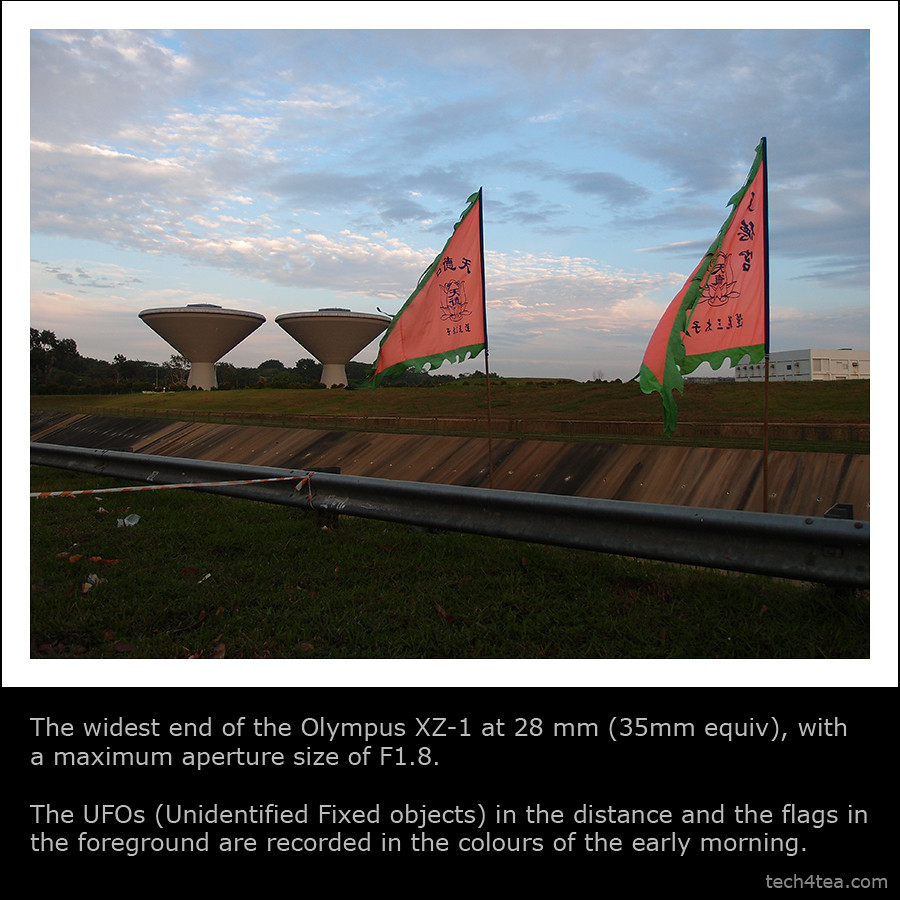
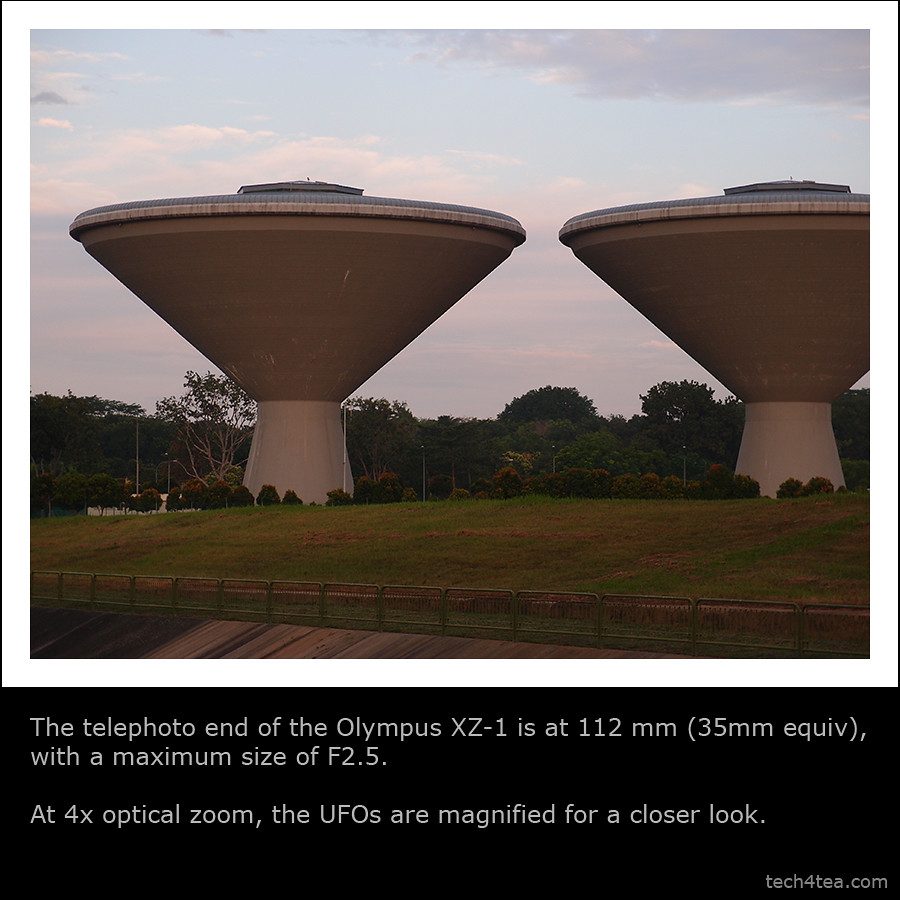
Hopefully these photos will provide a better idea of what the camera can and cannot do.

Listed here are some earlier write-ups on the Olympus XZ-1:
Full review | Detailed specs | Main selling points | Diorama movie

Photo review of the Olympus XZ-1

Wide angle at 28mm

Telephoto end at 112mm (35mm equiv)

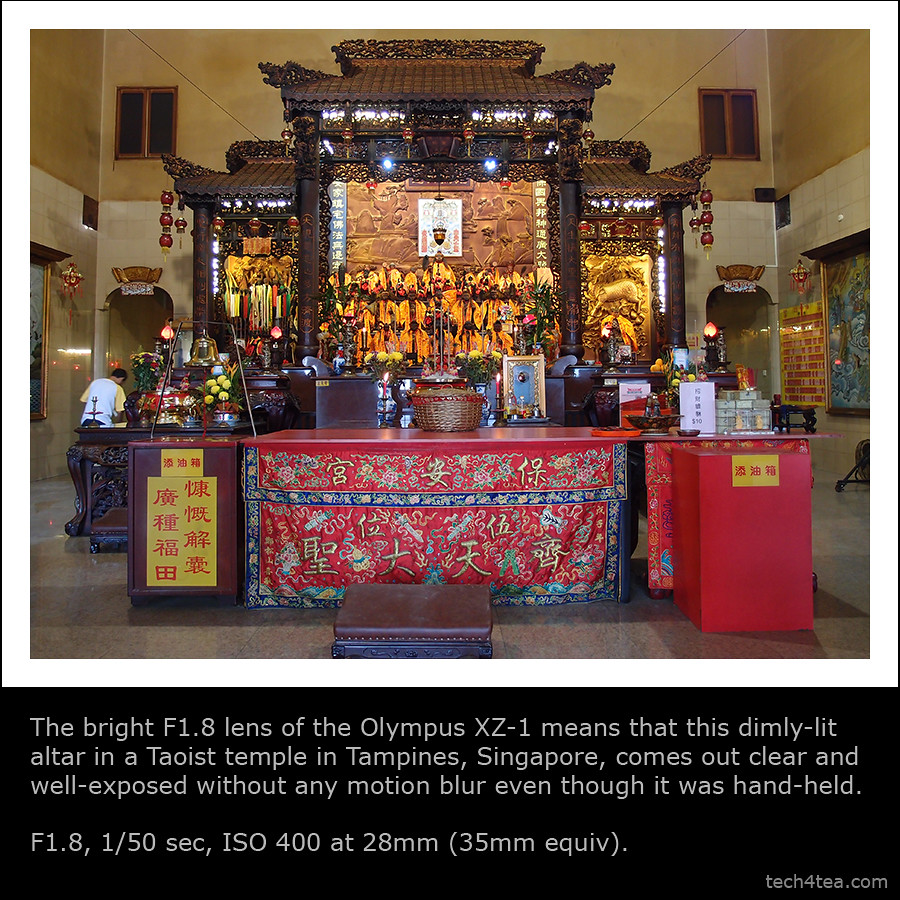
F1.8 for low light

(more…)

Review of Olympus XZ-1

Tuesday, March 1st, 2011

This flagship compact digital camera from Olympus is ideal for those looking for a shooter which is compact yet provides image quality and control that rivals entry-level DSLRs.

I’ve played with the Olympus XZ-1 for the past two weeks. It is an impressive bridge camera that is compact, yet packs in a punch in terms of image quality and a whole range of nifty features.

If you’re using a compact digital now and wants to move on to manual controls and better image quality, without the hassle of changing lens, this camera is for you. It is also suitable as a second camera for those already using DSLRs because of its compactness.

Olympus XZ-1

You can see its detailed specs here and the main selling points here. Check out the photo review of the XZ-1 here.

Basically, it is a 10-megapixel high-end compact with 4x optical zoom from 28mm to 112mm (35mm equivalent). It records HD movies, has a 610k dots OLED display and features 6 Art Filters that can be applied to both stills and recorded movies. The camera comes in black or white and retails for S$748 (incl GST).

In terms of size, it is small enough to slip into a jacket pocket and carried everywhere you go, especially when travelling light on vacation.

Mode dial on the Olympus XZ-1For complete beginners, there is the usual everything-automatic mode (iAuto) that takes care of all shooting settings for you. There are also 18 scene modes with pre-canned settings catered for specific photographic situations from the usual portrait and landscape modes to more unusual modes like e-Portrait, Underwater (Macro or Wide), Multi-Exposure, Cuisine, Pet etc.

Its Live Guide interface in iAuto mode allows even novices to exercise some amount of control to deviate from the camera’s recommendations. The onscreen menu allows users to intuitive control how the photo should be captured by changing the colour, brightness and background blur without knowing anything about specifics like aperture, shutter speed, white balance etc.

The much touted F1.8 maximum aperture at its widest angle of 28mm (35mm equivalent) works as advertised. What is less noticed but nevertheless impressive is that even at the long end at 112mm, the maximum aperture is only 2.5.

The fast lens means that for low-light photography, you can still take pretty good exposures with fast shutter speeds so that photos remain sharp even when the camera is hand-held.

No need for tripods that add bulk to your travel bag, flash that kills the ambience, high ISO that introduces noise and loses detail, or motion blur due camera shake duing long exposure.

Large sensor for a compactTogether with its relatively large 1/1.63” sensor, it provides image quality and depth of field that I found comparable to some entry-level DSLRs that I’ve used in the past. The image processing engine – TruePic V – is the same one used in the Pen series of cameras.

And together with its Auto-tracking feature, I used it to capture moving children and pets rather successfully.

The camera comes with 6 Art Effects, which includes the new Dramatic Tone filter introduced with the E-5, the flagship DSLR from Olympus. I like the special effects applied in-camera. No need to wait till the photos are uploaded to the PC before using a photo-editor to add those effects.

The Soft Focus filter looks much improved from those I’ve seen in earlier cameras from Olympus, with skin textured nicely smoothed out without blurring the eyes excessively.

Dedicated button for one-touch recording of movies.Shooting HD video is a cinch with a dedicated record button. No need to fumble through complicated on-screen menus. Recording movies using Diorama mode is pretty cool, like a video on fast-forward.

I found the panorama mode easy to use and the stitching of the triple exposures seamless.

The 610k dots OLED monitor is bright and can be seen quite clearly even under sunlight and has a wide angle of viewing.

The tactile control ring around the lens.The control ring around the lens is a pleasure to use. It is tactile and responsive and provides immediate adjustments to the main setting for each shooting mode (eg. aperture setting in Aperture Priority mode).

For those who wants to get the most from their photos, the camera records 12-bit RAW and/or JPEG. You should get a lot more data from RAW for creative tweaking, even though the JPEG rendering from the TruePic V engine already does an excellent job.

I also like the built-in ND filter that lets in less light to allow the use of slower shutter speeds and/or wider apertures for creative effect.

The wheel control at the rear panel.Areas to improve? I wished there is a more direct way to access ISO and White Balance settings, rather than using the menu. I also found the wheel controller (around the arrow navigation keys on the rear panel) too slow when making large adjustments, say of the shutter speed. But this is highly subjective and I suspect it’s because I’m spoilt by the more tactile lens ring.

Overall, the Olympus XZ-1 is a compelling all-rounder – compact, yet delivers great image quality and allows manual control.

Olympus VR-330 main specs

Saturday, February 12th, 2011
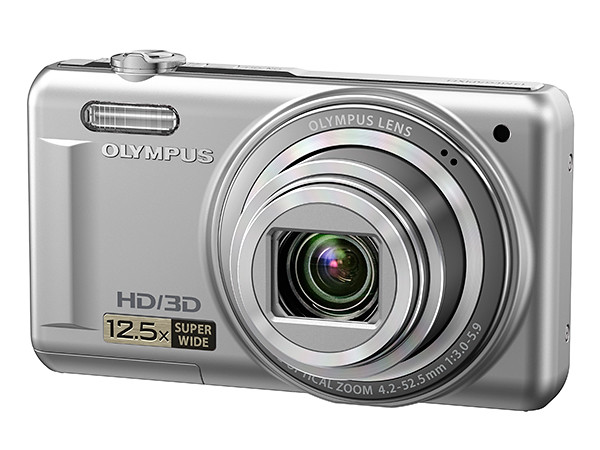
This 14-megapixels compact digital camera packs a 12.5x superzoom and a large 3” 460k dots LCD monitor to watch the 720p HD movies it shoots.

Olympus VG-110 (Blue)
Olympus VG-110 (Red)
Olympus VG-110 (Black)
Olympus VG-110 (Silver)

Olympus VR-330

At an estimated street retail price of S$330, the VR-330 will be available from April in black, silver, red or blue.

The 12.5x zoom lens extends from a wide angle of 24mm to 300mm (35mm equivalent) and uses a 14 megapixels CCD sensor.

A dedicated “Rec” button initiates recording of 1280 x 720 HD movies in MPEG-4 AVC/H.264 format and provides HDMI output for viewing on a high definition TV.

Seven Magic Filters, including the new Sparkle filter, add special effects (Pop, Pin Hole, Fisheye, Sketch, Soft Focus, Punk and Sparkle) to photos.

Lens aperture ranges from 3 to 5.9.

Dual IS (image stabilisation)  allows the use of a fast shutter speed even in low-light conditions to freeze action and to minimise camera shake – so as to reduce blurring. A sensor shift image stabilisation mechanism is used in conjunction with the use of a high ISO sensitivity.

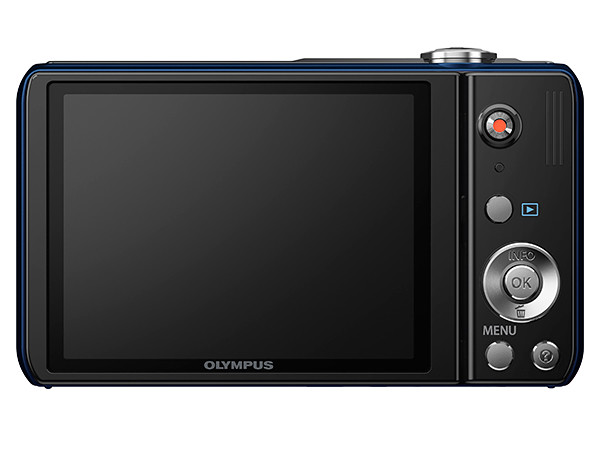
The VR-330 features a 3” 460 thousand dot LCD monitor.

3D capture shoots 3D photos that can be viewed on compatible TVs and computers.

14 scene modes contain pre-programmed camera settings for taking pictures in various photographic situations, including a Pet mode that automatically detects, tracks and focuses on dogs and cats. An Intelligent Auto mode picks the most suitable scene mode to use under the prevalent lighting conditions.

Olympus VR-330

AF tracking locks on to a moving subject and follows it, continuously adjusting focus and brightness. Face detection focuses on the faces in the photo and can work with AF tracking to follow the main subject if it is moving.

Olympus VR-330

The included Olympus [ib] software allows organising, browsing and editing of photos.

The shadow adjustment technology to increase dynamic range of photos taken under high contrast situations by lightening the shadow tones and darkening the highlights.

Olympus VR-310 main specs

Friday, February 11th, 2011
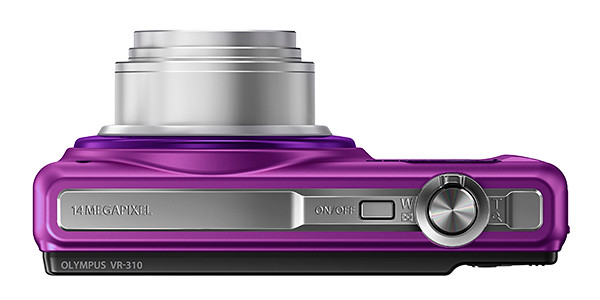
This 14-megapixels compact digital camera has a 10x zoom starting from a wide angle of 24mm and shoots 720p HD movies.

Olympus VG-110 (Purple)
Olympus VG-110 (Red)
Olympus VG-110 (Black)
Olympus VG-110 (Silver)

Olympus VR-310

At an estimated street retail price of S$285, the VR-310 will be available from April in black, silver, red or purple.

The 10x zoom lens extends from a wide angle of 24mm to 240mm (35mm equivalent) and uses a 14 megapixels CCD sensor.

A dedicated “Rec” button initiates recording of 1280 x 720 HD movies in MPEG-4 AVC/H.264 format.

Seven Magic Filters, including the new Sparkle filter, add special effects (Pop, Pin Hole, Fisheye, Sketch, Soft Focus, Punk and Sparkle) to photos.

Lens aperture ranges from 3 to 5.7.

Dual IS (image stabilisation)  allows the use of a fast shutter speed even in low-light conditions to freeze action and to minimise camera shake – so as to reduce blurring. A sensor shift image stabilisation mechanism is used in conjunction with the use of a high ISO sensitivity.

The VR-330 features a 3” 230 thousand dot LCD monitor.

Pre-programmed scene modes contain camera settings for taking pictures in various photographic situations, while an Intelligent Auto mode picks the most suitable camera settings to use under the prevalent lighting conditions.

Olympus VR-310AF tracking locks on to a moving subject and follows it, continuously adjusting focus and brightness. Face detection focuses on the faces in the photo and can work with AF tracking to follow the main subject if it is moving.

Olympus VR-310The included Olympus [ib] software allows organising, browsing and editing of photos.

The shadow adjustment technology to increase dynamic range of photos taken under high contrast situations by lightening the shadow tones and darkening the highlights.