Archive for the ‘Tablets’ Category

Steve Jobs unveils Apple’s new iCloud at WWDC 2011

Tuesday, June 7th, 2011

Steve Jobs personally unveiled the much anticipated iCloud during the keynote address at the annual Worldwide Developers Conference (WWDC) 2011 in San Francisco.

ON 6 June 10 am PST (local time 7 June, 1 am), Steve Jobs revealed the set of free cloud services that promises to work seamlessly with applications on the iPhone, iPad, iPod touch, Mac or PC to automatically and wirelessly store a user’s content in iCloud and again automatically and wirelessly push it to all of the same user’s devices. When anything changes on any one of the devices, all of the user’s other devices are wirelessly updated almost instantly.

New Apple iCloud services unveiled by Steve Jobs at WWDC 2011“Today it is a real hassle and very frustrating to keep all your information and content up-to-date across all your devices,” said Steve Jobs, Apple’s CEO. “iCloud keeps your important information and content up to date across all your devices. All of this happens automatically and wirelessly, and because it’s integrated into our apps you don’t even need to think about it—it all just works.”

iCloud services

• The former MobileMe services — Contacts, Calendar and Mail — are all completely re-architected and rewritten to work seamlessly with iCloud. Users can share calendars with friends and family, and the ad-free push Mail account is hosted at me.com. A user’s inbox and mailboxes are kept up-to-date across all of the user’s iOS devices and computers.

New Apple iCloud services unveiled by Steve Jobs• The App Store and iBookstore can now download purchased iOS apps and books to all a user’s devices, not just to the device they were purchased on. Simply tapping the iCloud icon will download any apps and books to any iOS device (up to 10 devices) at no additional cost. The App Store and iBookstore now let a user see his/her purchase history.

• iCloud Backup automatically and securely backs up a user’s iOS devices to iCloud daily over Wi-Fi when the iPhone, iPad or iPod touch is charged. Backed up content includes purchased music, apps and books, Camera Roll (photos and videos), device settings and app data. If a user replaces an iOS device, simply entering his Apple ID and password during setup will prompt iCloud to restore the new device.

iCloud Storage• iCloud Storage seamlessly stores all documents created using iCloud Storage APIs, and automatically pushes them to all of a user’s devices. When document is altered on any device, iCloud automatically pushes the changes to all the other devices. Apple’s Pages, Numbers and Keynote apps are already using iCloud Storage. Users get up to 5GB of free storage for their mail, documents and backup — and this does not include the storage for music, apps and books purchased from Apple, as well as the storage required by Photo Stream. Users will be able to buy even more storage, with details announced when iCloud ships this fall.

• iCloud’s Photo Stream service automatically uploads the photos taken or imported on any of your devices and wirelessly pushes them to all of the user’s other devices and computers. Imagine taking a bunch of photos with your iPhone at a birthday party and seeing them ready to share on your iPad when you return home. Photo Stream is built into the photo apps on all iOS devices, iPhoto on Macs, and saved to the Pictures folder on a PC. To save space, the last 1,000 photos are stored on each device so they can be viewed or moved to an album to save forever. Macs and PCs will store all photos from the Photo Stream, since they have more storage. iCloud will store each photo in the cloud for 30 days, which gives users ample time to connect devices to iCloud and automatically download the latest photos from Photo Stream via Wi-Fi.

• iTunes in the Cloud lets you download previously purchased iTunes music to all of your iOS devices at no additional cost, and new music purchases can be downloaded automatically to all your devices. In addition, music not purchased from iTunes can get gain an improvement in quality by using iTunes Match, a service that replaces your music with a 256 kbps AAC DRM-free version if the service can match it to the over 18 million songs in the iTunes Store. It makes the matched music available in minutes (instead of weeks to upload your entire music library), and uploads only the small percentage of unmatched music. iTunes Match will be available this autumn (only in the US) for a US$24.99 annual fee. Apple today is releasing a free beta version of iTunes in the Cloud, without iTunes Match, for iPhone, iPad and iPod touch users running iOS 4.3. iTunes in the Cloud will support all iPhones that iOS 5 supports in autumn.

Apple is ready to ramp iCloud in its three data centers, including the third recently completed in Maiden, NC. Apple has invested over $500 million in its Maiden data center to support the expected customer demand for the free iCloud services.

Pricing & Availability

The iCloud beta and Cloud Storage APIs are available immediately to iOS and Mac Developer Program members at developer.apple.com. iCloud will be available this autumn concurrently with iOS 5. Users can sign up for iCloud for free on an iPhone, iPad or iPod touch running iOS 5 or a Mac running Mac OS X Lion with a valid Apple ID. iCloud includes 5GB of free cloud storage for Mail, Document Storage and Backup. Purchased music, apps, books and Photo Stream do not count against the storage limit. iTunes Match will be available for US$24.99 per year (US only).

iTunes in the Cloud is available today in the US and requires iTunes 10.3 and iOS 4.3.3. Automatic download of apps and books is available today. Using iCloud with a PC requires Windows Vista or Windows 7. Outlook 2010 or 2007 is recommended for accessing contacts and calendars.

Steve Jobs unveils Apple’s new Mac OS, iOS 5 and iCloud at WWDC 2011

Monday, June 6th, 2011

As planned, Steve Jobs – who is currently on a medical leave of absence from Apple – made an appearance to host the WWDC 2011. He unveiled the personally unveiled iCloud and left the briefing on Mac OS X Lion and iOS 5 to his staff.

The 5-day Worldwide Developers Conference (WWDC) 2011 is being held at San Francisco.

Steve Jobs put in an appearance at WWDC 2011 to unveil iCloudiCloud

Steve Jobs personally unveiled the much anticipated iCloud services from Apple. The set of free cloud services promises to work seamlessly with applications on the iPhone, iPad, iPod touch, Mac or PC to automatically and wirelessly store a user’s content in iCloud and again automatically and wirelessly push it to all of the same user’s devices. When anything changes on any one of the devices, all of the user’s other devices are wirelessly updated almost instantly.

The iCloud beta and Cloud Storage APIs are available immediately to iOS and Mac Developer Program members at developer.apple.com. iCloud will be available this autumn concurrently with iOS 5.

New iCloud services from AppleUsers can sign up for iCloud for free on an iPhone, iPad or iPod touch running iOS 5 or a Mac running Mac OS X Lion with a valid Apple ID. iCloud includes 5GB of free cloud storage for Mail, Document Storage and Backup. Purchased music, apps, books and Photo Stream do not count against the storage limit. iTunes Match will be available for US$24.99 per year (US only).

iOS 5

iOS 5 for Apple iPhone, iPad and iPod touchScott Forstall – Apple’s senior vice president of iOS – paraded 10 of the promised 200 new features for the iPhone, iPad, and iPod Touch.

Main new features include: Notification Center, a new way to easily view and manage notifications in one place without interruption; iMessage, a new messaging service that lets users easily send text messages, photos and videos between all iOS devices; Newsstand, a new way to purchase and organise a user’s newspaper and magazine subscriptions; and PC Free feature, where iOS 5 users can activate and set up their iOS device right out of the box and get software updates over the air with no computer required.

iOS 5 beta software and SDK are available nowThe iOS 5 beta software and SDK are available immediately for iOS Developer Program members at developer.apple.com. iOS 5 will be available as a free software update for iPhone 4, iPhone 3GS, iPad 2, iPad, iPod touch (fourth generation) and iPod touch (third generation) this autumn.

Mac OS X Lion

Mac OS X LionPhilip Schiller, Apple’s senior vice president of Worldwide Product Marketing, briefed WWDC 2011 attendees on the eighth major release of Apple’s desktop operating system, which features more than 250 new features and 3,000 new developer APIs.

Main new features of the Mac OS X Lion includes: new Multi-Touch gestures; system-wide support for full screen apps; Mission Control, an innovative view of everything running on your Mac; Launchpad, a new home for all your apps; and a completely redesigned Mail app. The Mac App Store will now be built right into the OS.

Mac OS X LionMac OS X Lion will be available in July as an upgrade to Mac OS X version 10.6 Snow Leopard from the Mac App Store for US$29.99. At about 4GB, it is the size of an HD movie from the iTunes Store. Mac OS X Lion Server requires Lion and will be available in July from the Mac App Store for US$49.99.
Singapore launch of the BlackBerry PlayBook

Monday, June 6th, 2011

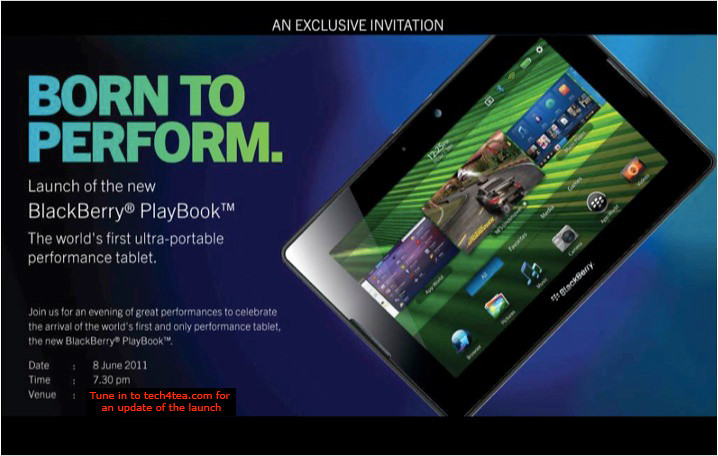
The BlackBerry PlayBook from RIM is finally arriving in Singapore. First launched in the US on April 19 earlier this year, the 7-inch tablet computer will officially be launched in Singapore on Wednesday, Jun 8.

RIM BlackBerry PlayBook launches in Singapore this Wed, June 8, 2011

RIM BlackBerry PlayBook launches in Singapore this Wed, June 8, 2011.

The beta version of the BlackBerry Playbook was first unveiled during the Adobe Max 2010 developer conference in October last year. It was first seen in Singapore when two advanced beta prototypes were specially flown in and displayed as part of the Adobe Refresh Roadshow on March 10.

Four days prior to its official launch in the US on April 19, a special preview was held in a BlackBerry PlayBook Bus in Singapore on April 15. Two days from now – and almost two months after the US launch – the PlayBook will hit the shelves in Singapore.

Prices for the 16, 32 and 64-gigabyte models in the US are $500, $600, and $700 respectively. We’ll see what these will translate to in Singapore.

The PlayBook has received a mixed reaction since its launch in the US. The most common complaint has been its lack of native email, messenger, contacts and calendar apps, relying on Bluetooth tethering to access these functionalities via a BlackBerry handset. Other grouses include the lack of 3G/4G, and the relatively small repository of PlayBook specific apps in BlackBerry App World.

On the other end of the scale, the PlayBook features a lightning fast processor, capable of true multi-tasking, has a fabulous display and user interface, and supports both Flash and HTML5. In fact, some analysts have observed that the first day sales of the PlayBook has beaten that for Motorola Xoom and Galaxy Tab.

It’ll be interesting to hear the latest progress for the PlayBook during the Singapore launch the day after tomorrow.

Steve Jobs to unveil Apple’s new Mac OS, iOS 5 and iCloud at WWDC 2011

Saturday, June 4th, 2011

Steve Jobs will make an appearance at the annual Worldwide Developers Conference (WWDC) to unveil Lion – Apple’s eighth major release of Mac OS X. He will also unveil iOS 5, the next iteration of the mobile operating system for the iPad, iPhone and iPod touch. The much anticipated iCloud – Apple’s upcoming cloud services – will also be revealed.

Apple's Worldwide Developers Conference 2011 (WWDC)The sold-out conference WWDC 2011 will be held from June 6 – 10 at San Francisco’s Moscone West. Apple CEO Steve Jobs and a team of Apple executives will kick off the annual conference with a keynote address on Monday, June 6 at 10 am (PST).

WWDC 2011 will feature more than 100 technical sessions presented by Apple engineers. Mac developers can see and learn how to develop Mac OS X Lion applications using its latest technologies and capabilities. Mobile developers will be able to explore the latest innovations and capabilities of iOS and learn how to enhance the functionality, performance and design of their apps. All developers can bring their code to the labs and work with Apple engineers.

Windows 8 previews by Microsoft

Friday, June 3rd, 2011

Windows President in Microsoft, Steven Sinofsky, previewed the next version of the Windows operating system that will likely premier in March 2012.

The radically revamped OS works on tablets with touch screens; runs on desktop and laptop computers with touchscreen, mouse or keyboards; runs existing Windows software and runs on both Intel and ARM chips.

Windows 8 is set to challenge the dominance of Apple’s iPad iOS and Google’s Android.

Sinofsky gave a preview of Windows 8 on a 10.6-inch touch-screen tablet during the AllThingsD’s D9 Conference in Rancho Palos Verdes, California.

A 30-minute demonstration was subsequently given at the Computex 2011 in Taiwan by Mike Angiulo, Microsoft corporate vice president.

In appearance, it resembles Windows Phone 7 – Microsoft’s operating system for smartphones – using “tiles” instead of icons to represent applications. The tiles on the computer’s start screen can be automatically updated to display the latest information from applications. For instance, a stock ticker app could display stock quotes right on the tile without requiring users to open the app.

Windows 8 will be the first full version of Windows capable of operating on ARM chips which has been the sole supplier of tablet CPUs since Apple launched its iPad in 2010.

Citing Jefferies Group, Bloomberg reports that the number of tablets sold globally will almost quadruple this year to 70 million units from 18 million in 2010. This will more than double to 158 million in 2012. Apple, which will control some 64 percent of the 2011 tablet market, will see its market share fall to 41 percent in 2012.

Apple iWork available for iPhone & iPod Touch today

Wednesday, June 1st, 2011

Apple’s iWork productivity apps – Keynote, Pages and Numbers – are now available for the iPhone, iPod touch,and iPad. iWork apps are available on the App Store for US$9.99 each to new users and as a free update for existing iWork for iPad customers.

Originally created for the Mac and now completely redesigned for Apple’s iOS and Multi-Touch interface, Keynote, Pages and Numbers allow users to create and share presentations, formatted documents and powerful spreadsheets on the go.

Keynote, presentation app in iWork“The incredible Retina display, revolutionary Multi-Touch interface and our powerful software make it easy to create, edit, organise and share all of your documents from iPhone 4 or iPod touch,”said Philip Schiller, Apple’s senior vice president of Worldwide Product Marketing.

Keynote, Pages and Numbers import and export documents from iWork for Mac and Microsoft Office; print wirelessly using AirPrint; and include beautiful Apple-designed themes and templates.

Pages, word processing app in iWorkAll iWork apps now include improved document management with thumbnail images that let users find files quickly, organise them and group them into folders using intuitive gestures.

From the Tools button in the toolbar, presentations, documents or spreadsheets can be shared directly without leaving the app.

Keynote makes it easy to create impressive presentations, complete with animated charts and transitions. Presentations can be played in Full Screen view on the high-resolution Retina display or be connected to a projector or HDTV for a large audience. Available separately, the Keynote Remote app allows an iPhone or iPod touch to control a Keynote presentation on any iOS device or Mac.

Pages is a word processor specially designed for a mobile device and has everything needed to create documents. Pages takes full advantage of the high-resolution Retina display on iPhone 4 and iPod touch so users can see all the detail and richness of their documents. Numbers, spreadsheet app in iWorkTo make working with text easy on iPhone and iPod touch, Smart Zoom automatically zooms in to follow the cursor during editing and zooms back out when done.

Numbers uses Multi-Touch gestures and an intelligent keyboard to help create compelling, good-looking spreadsheets with over 250 easy-to-use functions, flexible tables and eye-catching charts. Similar to Pages, Numbers takes advantage of the high-resolution Retina display and Smart Zoom to make working with text and cells on iPhone 4 or iPod touch easy.

Pricing & Availability

Keynote, Pages and Numbers are universal apps that run on iPad and iPad 2, iPhone 3GS and iPhone 4 and iPod touch (3rd & 4th generation). Keynote, Pages and Numbers are available from the App Store for US$9.99 each for new users, or as a free update for existing iWork for iPad customers. Keynote Remote is sold separately via the App Store for US$0.99.

Computex Taipei 2011 draws tablet watchers and stake holders

Monday, May 30th, 2011

The 5-day annual trade show in Taipei will see more tablet models based on Google’s Android and a preview of Microsoft’s next Windows platform for tablets – one year after Apple’s game changing iPads grab the lion’s share of the tablet market.

COMPUTEX Taipei, or Taipei International Information Technology Show (台北國際電腦展), will be held from May 31 to June 4, 2011 in Taipei. Taiwan based Acer and Asustek had first showed off their low-cost but trend-setting netbooks at the Computex in 2007 and 2008.

Investors and analysts will be watching to see if new Android based tablets can challenge Apple’s iPad. Non-iPad tablet competitors are expected to halve Apple’s 100 percent dominance of the tablet market to 50 percent next year, iSuppli predicted on April 21. The iPad had cordoned off the entire tablet market when it was first launched in June last year because of the absence of competitors.

Computex Taipei 2011 from May 31 to June 4, 2011

Computex Taipei 2011 from May 31 to June 4, 2011.

Both Google and Microsoft will send executives to the event to brief the media on their plans. Intel, the world’s largest chipmaker, and ARM, whose chip designs are licensed by Qualcomm and Nvidia to power tablets, will also be vying for tablet manufacturers to select their chips.

Global shipments of tablets will increase almost twelve times to 215 million units in 2015 from 17 million last year, Toni Sacconaghi, a New York-based analyst at Sanford C. Bernstein & Co., wrote in a May 26 report.

Computer sales growth will be reduced by 2 percent annually between 2010 and 2015, Sacconaghi wrote, because fifteen percent of all tablets will cannibalize the sale of consumer PCs.

Bloomberg reports that Microsoft will “preview its operating system designed for tablets this week, using hardware with ARM-based chips”. The current Windows 7 operating system from Microsoft is not compatible with the ARM chips used in tablets from manufacturers such as Samsung and Motorola.

Seagate introduce GoFlexAccess app

Monday, May 23rd, 2011

The free GoFlexAccess app allows the iPhone, iPad and Android smartphones to access media shared on the Seagate’s GoFlex Home network storage system.

Seagate Technology LLCThe free app is now available for download from the iTunes Store and Android Market. The application can be found by searching for “Seagate” or “GoFlex” in either storefront using the computer or the app store on a iPad, iPhone, iPod touch or Android compatible mobile device.

Seagate’s GoFlex Home network storage server is designed as a simple to set up shared storage drive, which provides back up and sharing capabilities within a home network and is also accessible using remote access from a personal computer.

Seagate GoFlexAccess AppSeagate GoFlexAccess App

With the introduction of the GoFlexAccess app, the GoFlex Home network can be accessed from mobile devices as well.
  • The possibilities enabled by the GoFlexAccess  app include:
  • Access photos, movies, music and documents stored in the GoFlex Home network from an iPad, iPhone or Android smart phone.
  • Create slideshows from photos in the network drive and play music at the same time to accompany it.
  • Stream music or video to mobile devices over 3G/4G and WiFi.
  • large number of files and file types.
  • Album art support for music files.
  • Access Excel, PowerPoint, Word documents and PDFs etc.
  • The app features content type filters, to simplify access to content that may contain a large number of files and file types
Capacity SRP
1 TB S$219
2 TB S$319
3 TB S$379

Available in 1TB, 2TB and 3TB capacities, the GoFlex Home storage system allows files to be centrally stored, easily accessed and continuously backed up wirelessly from computers on the home network running either Windows or Mac OS X operating systems.

Storage capactiy of GoFlex Home system can be increased simply by connecting additional drives to the USB port. What’s more, this USB port can be used to wirelessly share a USB printer with all computers on the network.

Adobe Creative Suite 5.5 Now Available Across Southeast Asia

Friday, May 20th, 2011

Adobe Creative Suite 5.5 features advances in HTML5 and Flash authoring for web designers and developers for both content and applications; as well as enhancements in video production and editing.

For digital publishing, content can be delivered to multiple platforms, operating systems, web browsers, smartphones and tablets — including Android, BlackBerry Tablet OS, and Apple iOS devices.

The new Creative Suite product lineup is headlined by Adobe Creative Suite 5.5 Master Collection, which includes, in a single package, all of Adobe’s industry-defining creative tools, such as Photoshop, Illustrator, InDesign, Acrobat, Flash Builder, Flash Catalyst, Flash Professional, Dreamweaver, Adobe Premiere Pro and After Effects.

These products are available separately or as components of one or more of the five Creative Suite editions. The complete Creative Suite 5.5 lineup and their estimated street prices are tabulated below. Upgrade pricing, volume licensing and education pricing are also available.

Creative Suite 5.5 Master Collection: US$3159
Creative Suite 5.5 Design Premium: US$2309
Creative Suite 5.5 Web Premium: US$2185
Creative Suite 5.5 Production Premium: US$2065
Creative Suite 5.5 Design Standard: US$1579

Adobe now plans to have milestone Creative Suite product introductions at 24-month intervals and – starting with Creative Suite 5.5 – major mid-cycle releases between the milestone versions. The major mid-cycle update was announced on April 12 and is available now in Southeast Asia.

Mobile App Development and New HTML5 Capabilities

Focused on the latest wave of mobile devices, this release of Creative Suite gives web designers and developers a complete software solution that allows them to produce stunning HTML5 content in the browser and deliver high-impact mobile applications through sweeping advances in Flash tooling.

Creative Suite 5.5 Web Premium Suite is packed with innovations in HTML5 and Flash authoring tools, empowering customers to create, deliver and monetize rich content and applications for virtually any screen.

Designers and developers can create rich browser-based content across screens using HTML5. Adobe Flash Professional CS5.5, Flash Builder 4.5 Premium and the Flex 4.5 framework allow users to quickly and easily develop, test and deploy high-performance mobile applications for Android, BlackBerry Tablet OS and Apple iOS.

Digital Publishing

Over the last year Adobe and leading publishers, including Condé Nast and Martha Stewart Living Omnimedia, have worked to develop new digital publishing workflows based on Creative Suite and Adobe InDesign.

Creative Suite 5.5 will enable print publishers to create beautiful interactive publications on the latest tablet platforms.

Using Adobe InDesign CS5.5, in combination with the integrated Folio Producer toolset, designers can add new levels of interactivity to their page layouts targeted at tablet devices.

Adobe has also announced the immediate availability of the Professional Edition of Adobe® Digital Publishing Suite, a turnkey solution that includes hosted services and viewer technology that allow publishers to cost-efficiently publish content to Android tablets, BlackBerry PlayBook and Apple iPad.

In addition to advances in mobile authoring and digital publishing, Creative Suite 5.5 Production Premium Suite promises “breakthrough performance, workflow improvements, creative innovations and powerful new audio editing capabilities” to video and audio professionals, broadcasters and filmmakers.

My chiropractor loves tablets … the electronic kind

Monday, May 16th, 2011
Overheard at a chiropractor’s session: the chiropractor was seeing more and more people for pains arising from usage of tablets.

Couldn’t help overhearing the chiropractor talking to a fellow patient in an adjacent cubicle as I was being put through the interferential electrotherapy treatment.

Do chiropractors love tablets?The guy started by commenting that many people going through their mid-life crisis are jumping into marathons without realising what it was going to do to their bodies many years downstream when they grow old – especially if they did not go through the necessary build-up training and if they’ve never gone through a marathon in their younger days before.



Then he went on to observe how he is seeing more and more people for pains and aches arising from the use of tablets. His chiropractic business has seen a pick up from the number of people coming in to see him since tablets started becoming popular.

Something about the weight of the device and having to hold/prop it up in one hand for prolonged periods of time while gesturing with the other hand. Now that more tablets are being introduced by the day and people are buying more and more tablets, this chiropractor must be laughing to the bank, going by his anecdotal correlation between the proliferation of tablets and the health of his business.

Maybe I should reconsider that marathon and think twice about that sleek tablet I’d just read about yesterday …
