Archive for the ‘Gadgets’ Category

Hands-on with the Wacom Cintiq 24HD

Wednesday, September 28th, 2011

Wacom’s newest flagship Cintiq 24HD tablet-cum-display was launched on 13 September 2011. The only piece available in Southeast Asia was brought in for yesterday’s launch event for the Bamboo graphics tablet.

Priced at S$4269 (incl 7% GST), it will be available in mid-October.

Wacom Cintiq 24 HD in an "hangover" position.

Wacom Cintiq 24 HD in an "hangover" position.

The Cintiq line of graphics tablet is Wacom’s highest end range for creative professionals. Used with a pen stylus, artists work directly on the surface of an LCD screen for an intuitive and direct feel. The tablet-cum-display is plugged into a computer with the necessary graphics software.

The tablet cum display flush with the table top.

The tablet cum display flush with the table top.

The Cintiq 24HD is the newest flagship product for Wacom, featuring a 24-inch HD widescreen display (1920 x 1200 pixels).

The display has a much improved colour gamut compared to its 21-inch and 12-inch siblings, promising 92% of the Adobe RGB colour space – an improvement almost 50%. Users of the Cintiq 21UX and 12 WX frequently set up a separate colour monitor to check for colour accuracy Wiith the 24HD, this is not necessary anymore because of the improved colour accuracy.

Elevated position, with space for keyboard.

Elevated position, with space for keyboard.

I did find the display not as pin-sharp as expected but my guess is that this particular display unit has been toted around more often than it’s been designed for – it’s not meant to be a portable device after all. Yet, physically, the screen was built to withstand the hard with the pen tip – the person giving the brief punched it many times with his knuckles to illustrate this point.

The touch-and-feel of drawing on the tablet was fantastic, as can be expected from a high-end product targeted at the professional market. I did not detect any lag between physical pen movement and the line on the screen below the pen-tip. It painted exactly where I wanted it to, and the 2048 pressure levels made a indelible difference when painting strokes of varying pressure.

Customisable buttons and control ring on both sides.

Customisable buttons and control ring on both sides.

The frame around the screen is deliberately designed to be thick to serve as arm rests. Customisable control rings and buttons can be found on both sides of the frame. They can be set to control brush sizes etc.

The cantilever holder behind the screen is a new design. The tablet can be put in a number of positions: vertical or horizontal, or slanted with one edge resting ON the table, JUST ABOVE a keyboard, or HANGING OVER the table’s edge – whatever position the artist is comfortable with.

For stability, the tablet and the base counterweight weighs some 40 kg. But changing between the positions was simple and fast, and did not require a lot of strength.
Wacom launches new Bamboo graphics pen tablets

Tuesday, September 27th, 2011

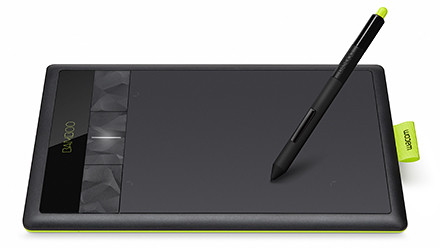
Three re-styled and improved models of the entry-level tablets – Pen, Pen & Touch, and Fun has been launched globally today and is available at S$135, S$185, and S$335 (all incl 7% GST).

Wacom Bamboo graphics tablet

Wacom Bamboo graphics tablet

The 29-year-old Japanese company is the market leader in graphics tablets, enjoying more than 80% of the market share.

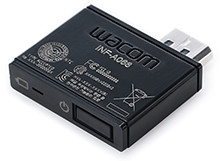
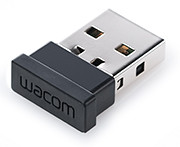
Wireless dongle for Wacom Bamboo

Wireless dongle for Wacom Bamboo

The Bamboo series is the entry level line of tablets for the company, while the Intuos is the mid-tier line, with the Cintiq line the high-end tablet cum LCD display for the heavy-lifting.

This is the third generation of the Bamboo series. The aesthetic design has been restyled to feature a lime green highlight around the edge and a reduced bevel around the tablet’s working area.

All support 1024 pressure levels in the stylus pen tip and a resolution of 2540 pixels. Both the basic Pen and core Touch & Pen models are small sized tablets while the most pricey Fun is medium sized.

The wireless module inserted in the tablet

The wireless module inserted in the tablet

The Touch & Pen and the Fun models both feature four customisable ExpressKeys, supports the use of both pen and finger-touch, supports wireless usage through an optional wireless accessory kit for an extra S$65. The kit may not be available in some countries though.

The Pen model does not have any ExpressKeys nor the wireless ability.

Bundled software for the three models are also slightly different. Both Mac and Windows PCs are supported. The main specifications are tabulated below:

(more…)

Setting up and using the Seagate GoFlex Home storage system

Monday, September 26th, 2011

GoFlex Home is a consumer network attached storage (NAS) hard drive for the home. Easy to set up and use, it allows the access, sharing, streaming, and backup of files and media for computers, network TVs, media players and game consoles connected to the home wireless network.

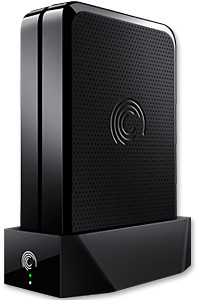
The Seagate GoFlex Home comprises a drive dock and a hard drive.

The Seagate GoFlex Home comprises a drive dock and a hard drive.

Secure access can also be opened to computers and iOS/Android tablets and smartphones over the Internet.

Over the weekend, I helped my friend set up an NAS drive for his desktop, netbook, two laptops, iPhone and Android tablet. He had bought the Seagate GoFlex Home 3 TB storage drive during the recent COMEX 2011 but hadn’t had the time to set it up yet.

I helped by using eye-power because he decided to give it a go himself and actually got the thing working in less than 15 minutes. That was the reason why I recommended the drive in the first place, it works with most consumer home Wi-Fi routers with little set-up or configuration needed.

The GoFlex Home comes with two cables and an software installation CD. The following steps were all that was needed to get the personal storage cloud going:

1. Connect the GoFlex Home drive dock to the Wi-Fi router by using the provided Ethernet cable.

2. Pop the GoFlex hard drive into the GoFlex drive dock and plug the power supply into the drive dock and the wall outlet. Switch on the GoFlex Home by pressing the Power button on the drive dock.

3. Pop the CD (or download from Seagate’s website) into the computer (can be a Mac or Windows PC) to install the software needed to access the hard drive. Simply select a language, key in the product information found on the drive, give the drive a name and register it. The name has to be unique globally since it will be used to identify the drive should you access it from the Internet.

4. Install the software on other computers that require access to the shared drive. Up to 5 people/computers on the home network can access the GoFlex Home. By paying to subscribe to the Seagate Share Pro, you get access for an unlimited number of people/computers to the GoFlex Home.

There are three ways to access the drive. One is to use the installed Seagate Dashboard software (on Windows PCs), which allows all features of the drive to be configured and managed. You can add computers and user accounts, backup, access and share files as well.

Use Seagate Dashboard software to configure and manage GoFelx Home

Use Seagate Dashboard software to configure and manage GoFelx Home

The other way is to use a browser-based Seagate Share either for a computer in the home network or out in the Internet.

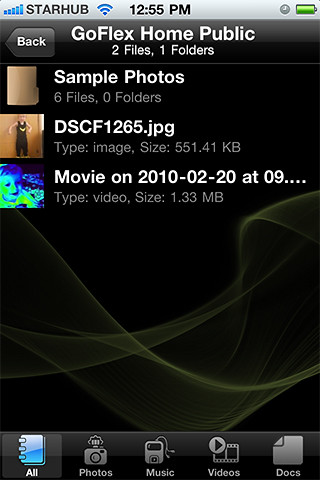
Seagate GoFlexAccess App

Free iOS/Android app

Both are easy to use with a simple interface, using drag-and-drop or standard dialog boxes we’re familar with.

The third method is via the appropriate free app on a iOS/Android smartphone or tablet, also over the Internet.

The GoFlex Home comes with a USB port which is very useful. You can connect an additional external hard drive to expand the capacity of the original GoFlex hard drive. You can also connect a USB hub for connecting more than one USB device.

In my friend’s case, he connected his printer to the USB port and all his computers on the Wi-Fi network got to share that printer. USB port on the drive dock for a HDD, printer or USB hubNo more plugging/unplugging the old printer from one computer to another.

The included backup software allows up to three connected computers to be automatically backed up to the GoFlex Home. Upgrade to Premium Backup ($49.95) to back up an unlimited Seagate GoFlex Home home network attached storagenumber of computers on the GoFlex Home network. You can upgrade at the Application Store that can be accessed through the Seagate Dashboard software.
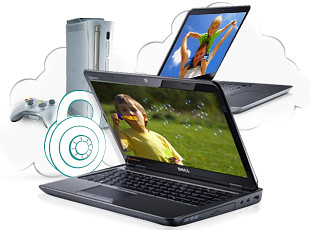
For each user account set up on the GoFlex Home, three folders are created – a Public, Personal, and Backup folder. The Public folder holds files that can be stored and accessed by everyone on your home network. The Personal and Backup folders can only be accessed by the the user.

What I like about the sharing is the granular control available for the files shared. You can specify who you want to share files with, choose to share just certain files or entire folders, set passwords, and set expiry dates for the shares. Administration is intuitive and easy to pick up. You can send a URL of a shared file via email.

Stream media to other computers and media players on the network.

Stream media to other computers and media players on the home wireless network.


Music, photos and video can also be shared and streamed to media players, game consoles or network TVs that support UPnP-AV, DLNA or Windows Media Connect. A wide range of file types are supported.

The GoFlex Home is available in 1TB (S$179), 2TB (S$239) and 3TB (S$339) capacities.

New compact camera: Samsung MultiView MV800

Thursday, September 22nd, 2011

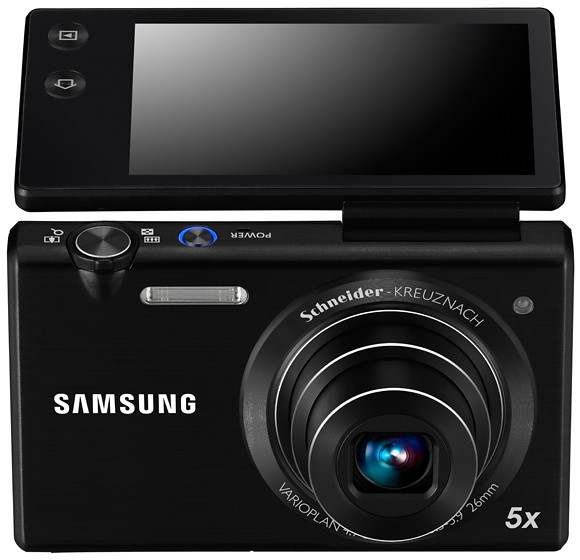
The MV800 features a 3.0-inch wide flip-out touch display and is available in Black, White and Red at S$499.

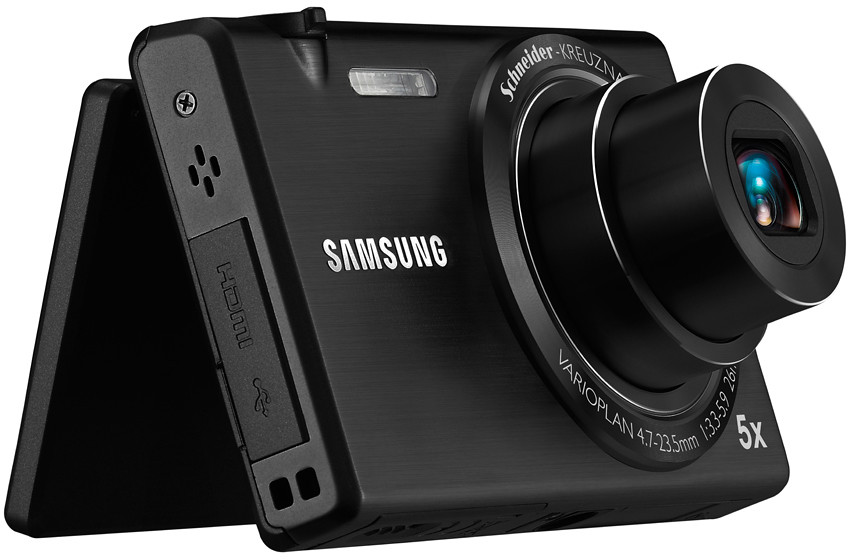
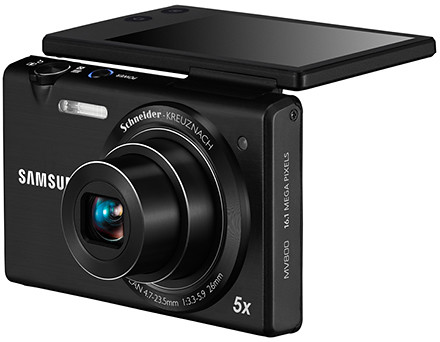
MultiView MV800, the new compact digital camera from Samsung.

MultiView MV800, the new compact digital camera from Samsung.

The flip-out touch screen of Samsung’s new ultra slim compact digital camera enables photographers to snap shots from difficult angles and awkward positions.

Such situations include snapping high-angle shots over the crowd to capture a street performance, and dramatic low-angle shots at ground level. The display can also be folded back to frame the shot when taking self-portraits. Samsung Electronics Co LtdThe screen can be tilted up or down for framing snapshots prior to taking them.

The MV800 pairs a Schneider-Kreuznach lens with a 16.1 megapixel CCD sensor. The 5x zoom Lens ranges goes from a wide angle of 26 mm (35mm equivalent focal length) to a maximum of 130 mm.

Schneider-Kreuznach lens with 5x zoom from 26 to 130 mm (35mm equiv)

Schneider-Kreuznach lens with 5x zoom from 26 to 130 mm (35mm equiv)

The Live Panorama function enables easy photography of large groups by simply holding down the shutter button, and previewing the entire scene that has been captured on the LCD screen. By connecting the MV800 to a 3D HDTV, images and panoramic shots can be viewed in 3D.

The MV800 has a recording time of up to twice as long as the standard MPEG4. The zoom noise reduction technology promises to record only the sound of the subject and not the whirring of the zoom.

The Smart Touch 3.0 with Wallpaper user interface allows users to drag and scroll through menu options to launch features, instead of using traditional clumsy buttons on the camera’s body.

In-camera creative software features

16.1 megapixels and a 3.0-inch wide flip-out touch display.

16.1 megapixels and a 3.0-inch wide flip-out touch display.

The Magic Frame feature includes 12 fun background templates for snapshots, as well as the ability to customise their backgrounds. A Picture-in-Picture function also allows users to insert and combine one image with another.

The Smart Filter function has a selection of 14 artistic effects, including the newly added Water Paint for a stylish watercolour finish or the Cartoon capability that transforms any photo into a fun animated film format. Funny Face allows you to bend, stretch and manipulate portraits by tapping and dragging to radically distort facial characteristics for a good laugh.

TomTom launches redesigned maps

Wednesday, September 21st, 2011

TomTom launches today the new version of all its online maps, after having redesigned them for easier use. The new maps are more detailed than before, with enhanced colouring and shading, as well as clearer labeling of cities, districts and roads.

New online maps from TomTom.

New online maps from TomTom.

The new TomTom online maps offer a number of improvements:

  • Location names are now clearer to view.
  • Country names are depicted in the local language.
  • The format of names and numbers around roads and cities has been optimised and localised.
  • The map now features extra details such as bridges, tunnels and even ferry names.

Map readability has also been improved with the introduction of 2.5D rendering, allowing the user to recognise the environment easily. The colours have been chosen to make the routing as clear and easy to understand as possible.

Check the maps out at www.routes.tomtom.com.

Formula One apps for the BlackBerry PlayBook and smartphones

Wednesday, September 21st, 2011

The Formula 1 comes to Singapore this weekend. Check out the F1 apps for the BlackBerry tablet or smartphones – both free on BlackBerry App World.

Formula One in Singapore from 23 to 25 September 2011.

Formula1.com 2011 app for BlackBerry smartphones.

Formula1.com 2011 app for BlackBerry smartphones.

For BlackBerry smartphone users (device software 4.2.0 or higher), check out the Formula1.com 2011 app from the organisers of Formula 1 itself. Users can access information such as race results, championship standings, timetables, calendars, circuit data etc.

The app streams real-time data directly from Formula One Management’s Technical Centre at the racetrack displaying the same information supplied to the teams from every session, putting you right at the heart of the action. The app also sends you push notifications and keeps you updated even when the app is closed.

Maxis F1 2011 for BlackBerry PlayBook

Maxis F1 2011 for BlackBerry PlayBook

For BlackBerry PlayBook users, check out the Maxis F1 2011 for BlackBerry PlayBook app from Infindo Technology. Users can get detailed information for all the races with exclusive live commentary, top stories, results, schedule, standings, drivers/teams/circuit info etc.

Both apps are free and valid for the entire 2011 F1 season.

Develop educational apps for the Samsung Smart TV

Tuesday, September 20th, 2011

Samsung and MDA has announced a joint call-for-proposal for the development of educational TV apps for the Samsung Smart TV platform and ecosystem.

Develop rich and interactive educational TV apps for the Samsung Smart TV platform.

Develop rich and interactive educational TV apps for the Samsung Smart TV platform.

This comes on the heels of Sony’s renewal of a 5-year MOU with Nanyang Polytechnic to encourage local development of games for the Sony PlayStation.

Samsung Electronics Co LtdDevelopers interested in Samsung’s initiative are invited to attend the Call-for-Proposal briefing at 6pm, 26 September, at Genexis Theatre, Fusionopolis. Starting from 26th September, the call-for-proposal will extend over a period of four weeks and will end on 31st October 2011. Detailed information will be available on the website of the Interactive Digital Media Programme Office (IDMPO) from 26th September.

Shortlisted developers:

  • Will gain 24/7 access to Samsung’s Developer’s Forum (SDF)
  • Will have access to MDA’s testing centre – iJAM@Blk71, located at Block 71, Ayer Rajah Crescent
  • May apply for funding schemes from the IDMPO

Focusing on rich and interactive educational apps for the Singapore audience, this initiative is targeted to promote interest in science, technology, engineering and mathematics, and for self-learning at home at up to tertiary level.

Call-for-Proposal briefing is at 6pm, 26 September, at Genexis Theatre, Fusionopolis.The initiative is also designed to catalyse the development of interactive digital content for TVs in Singapore, and support new interactive digital media (IDM) R&D projects as well as the commercialization efforts of IDM applications and services.
(more…)

Robotic floor cleaner from Samsung

Monday, September 19th, 2011

Samsung has launched the NaviBot-Silencio, an intelligent robotic cleaner that provides hands-free automated and hassle free cleaning on all surfaces. It is available at $1099 at all major retailers.

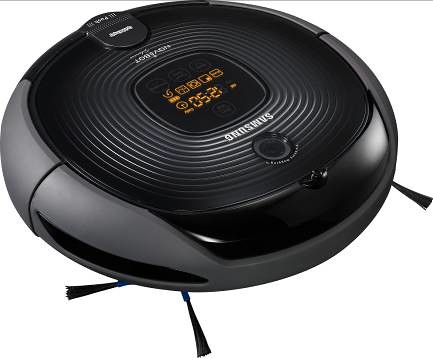
The NaviBot-Silencio robotic cleaner from Samsung, at $1099.

The NaviBot-Silencio robotic cleaner from Samsung, at $1099.

In the recent COMEX 2011, there were two booths selling robotic vacuum cleaners and moppers – the iRobot and the iClebo. I carted home the former and it’s now chugging along in the background while I write this posting.

Samsung Electronics Co LtdNow Samsung has launched its version of the robotic floor cleaner. Based on appearances and technology used, it seems more similar to the Korean iClebo.

Visionary Mapping System for speedy and accurate cleaning

Samsung’s NaviBot-Silencio creates a map of the house with an onboard camera. The Visionary Mapping System captures images at 30 frames per second with the onboard camera, creating a map of the house and plotting the optimum route to achieve total coverage.

The NaviBot-Silencio also has the ability to memorize the best cleaning path, to calculate its exact location in the home, and remembers where it has cleaned, and what is still left to finish.

The NaviBot-Silencio robotic cleaner from Samsung, at $1099.It also uses cognitive mapping technology with two CPU control chips, which serve as the ‘brain’ to think smart with high efficiency. When the battery is low, NaviBot-Silencio automatically takes the shortest route back to the docking station to be recharged. After being fully recharged, it goes back to its last location to begin cleaning.

Micro Fiber Polisher

NaviBot-Silencio picks up dirt, dust, pet hair, crumbs and other debris by specially designed rotating side brushes and power brush while it navigates in the house. The dust cartridge has a capacity of 0.6 litres and filters fine dusts through a washable HEPA filter. It also uses Samsung’s patented technology pet hair care to prevent pet hair from wrapping around the brushes.

The NaviBot-Silencio is designed with Samsung’s Air Path Technology to reduce irritating noise.

Common hand ailments and preventive exercises

Sunday, September 18th, 2011

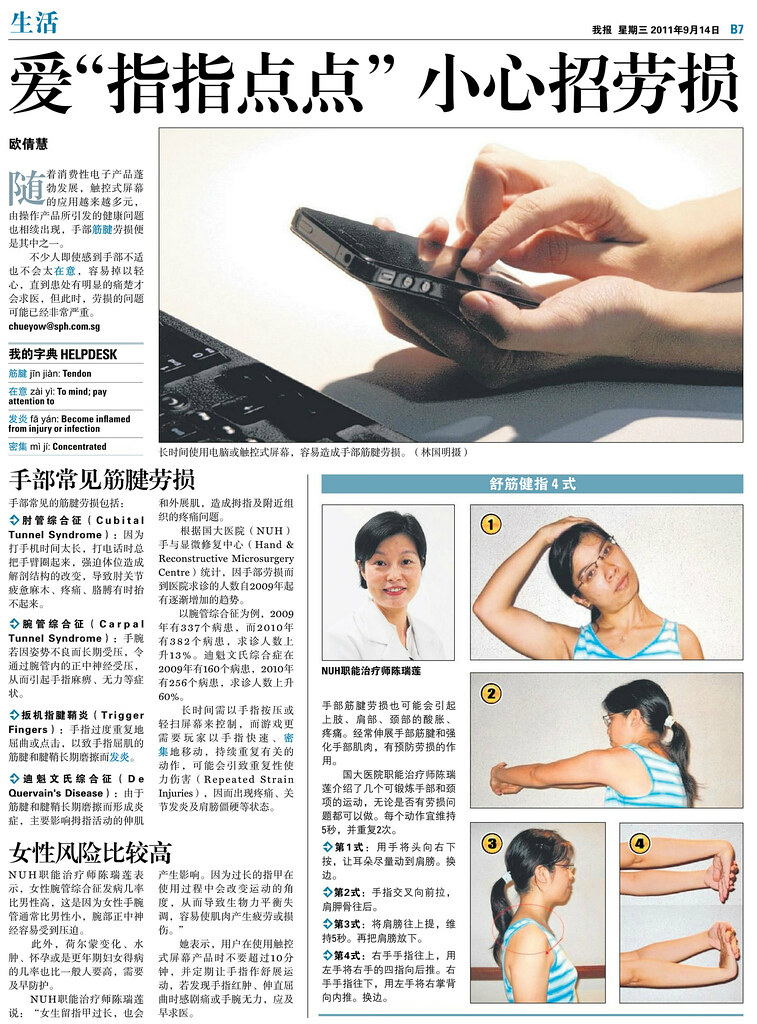
“my paper” listed a number of common hand ailments arising from prolonged usage of touch-screen devices such as tablets and smartphones, as well as a number of preventive exercises.

Some common hand ailments that my paper listed in its 14 Sep story included:

Common RSI and hand ailments and preventive exercises from my paper.

Common RSI and hand ailments and preventive exercises from my paper.

  • Cubital Tunnel Syndrome
  • Carpal Tunnel Syndrome
  • Trigger Fingers
  • DeQuervain’s Disease

According to the Hand & Reconstructive Microsurgery Centre at the National University Hospital (NUH), the number of people seeking treatment from the hospital for hand fatigue/injury has been on the rise since 2009.

For Carpal Tunnel Syndrome, the number of cases has increased 13% from 337 in 2009 to 382 in 2010. For DeQuervain’s Disease, the number has increased 60% from 160 in 2009 to 256 in 2010.

my paper also quoted a therapist from NUH as observing that ladies have a greater tendency to suffer from Repetitive Strain Injuries (RSI) compared to men. This was due to the smaller size of their wrists and other gender-related reasons, such as hormonal changes, pregnancy and menopause.

The article also featured four simple preventive exercises. Each could be done in sets of three repetitions, lasting about 5 seconds for each repetition.

my paper reports on touch screen epidemic

Saturday, September 17th, 2011

Four months ago, I mused about how my chiropractor was laughing to the bank with the increasing number of patients he was seeing because of the proliferation of tablet computers and touch-screen devices. That anecdotal episode has now been substantiated by “my paper”.

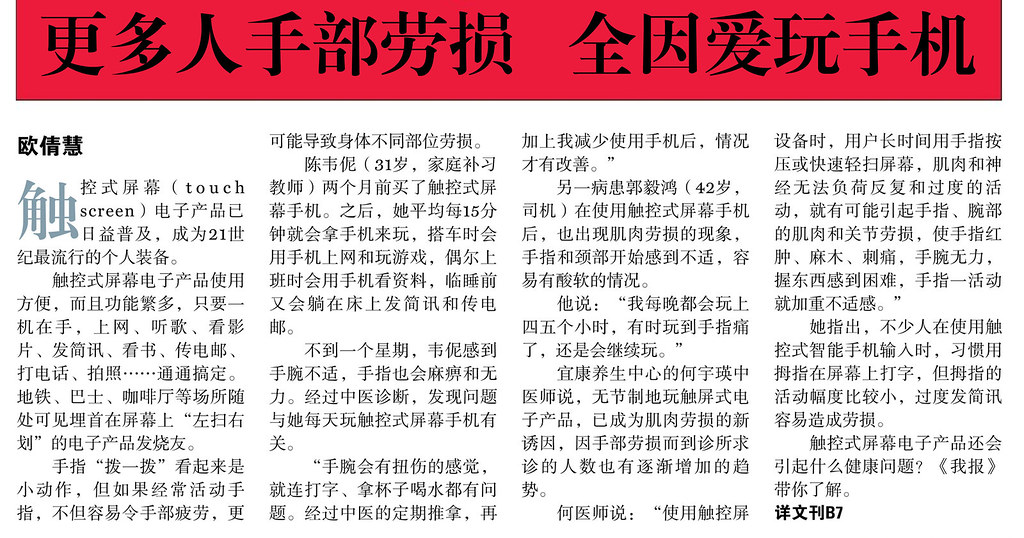
Front page feature in the Chinese section of my paper on 14 September 2011.

Front page feature in the Chinese section of my paper on 14 September 2011.

In the front page feature in the Chinese section of my paper on Wednesday (14 September 2011), my paper reported that the number of people suffering from hand injuries has risen because of the popularity of handheld devices.

It reports that although individual touch screen gestures seem like slight movements on their own, overly frequent use would result in arm fatigue, as well as malaise in different parts of the body.

The feature related how a new touch-screen smartphone owner suffered – within a week – discomfort in her wrists, and numbness cum loss of strength in the fingers. Her Traditional Chinese Medicine (TCM) doctor diagnosed that her affliction was related to the daily usage of her touch-screen device.

What was her usage profile like? She played with the phone every 15 minutes, played games and surfed the net when she rode on the bus, occasionally used it at work to check for information, and sent SMS and email while lying in bed prior to falling asleep.

Does it sound like your usage profile?

The 31-year-old tutor related how her wrists felt bruised, and how she had problems typing and holding drinking cups. Her conditions only improved after regular “Tui Na” (a form of TCM massage) and cutting down on her usage.

Another new touch-screen device user also experienced signs of muscle fatigue and discomfort to the fingers and neck. This 42-year-old chauffeur spends four to five hours every night playing games on the device, sometimes persisting even when his fingers ached.

Use of touch screen devices leads to more hand fatigue and injuries

Use of touch screen devices leads to more hand fatigue and injuries.

A TCM doctor from Income Healthcare observed that the unrestrained usage of touch-screen devices has become the leading cause of muscle fatigue and injury, and the number of patients seeking treatment from clinics for such symptoms has increased gradually.

Because the muscles and nerves cannot withstand the prolonged and repeated typing and gesturing of the fingers necessitated by the use of touch-screen devices, fatigue and injuries to the fingers, wrists, muscles and joints occur, the TCM doctor told my paper.

Perhaps it’s time to examine our own usage of touch-screen devices that are increasingly encroaching into our digital lifestyle.