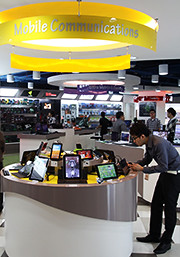
Newstead Technologies has opened a new multi-brand IT concept store in Funan DigitaLife Mall today. “Digital Style” is organised into six thematic zones, based on the needs of the modern IT consumer.
This is in keeping with the times – since consumers today have different purchasing habits and approaches. This is the first of a chain of such stores. Eventually, there will likely be four to five such stores geographically distributed around Singapore, according to Evelyn Chua, Business Development and Marketing Manager of Newstead Technologies.
The 2,647 square feet store is located at #03-32 of the mall and opens from 11 am to 8 pm from Tuesdays to Sundays, and 11 am to 7 pm on Mondays.
The six themes are Entertainment & Media, Gaming, Home Computing, Mobile Communications, Office & Professional, and Ultra Mobile & Business.
The focus is on allowing shoppers to try out, for themselves, different products in the themes they are interested in.
For instance, in the gaming kiosk, the whole spectrum of gaming related gadgets and peripherals – from consoles, laptops, speakers and controllers – are displayed, for shoppers to mix-and-match and plug-and-play the various components together at one-stop.
Across the various themes, products are featured from all the major brands, including Acer, Asus, BlackBerry, Dell, Fujitsu, HP, HTC, Lenovo, Logitech, Microsoft, Motorola, Panasonic, Samsung, Toshiba and others.
Apple related products are absent, so you’ll have to visit authorised Apple resellers, such as Nubox, which is also under Newstead Technologies.
I noticed that digital cameras and video cameras are not sold at the shop.
Update (24 February, 2012): Newstead Technologies has opened its second and bigger Digital Style store in Jurong Point. The next will be at The Star Vista towards the end of 2012.
TomTom has announced the launch of in-car navigation systems with Renault, Fiat and Mazda at the IAA Frankfurt Motor Show (15-25 September 2011).
Apart from the usual navigation features, the Renault system also monitors battery level of the electric car and ensures that the car has enough juice to make it to a charging station.
The new Renault Fluence Z.E. electric car.
Ever wondered who makes those in-car navigation systems that come with the cars on their dashboards? TomTom has launched four such in-car navigation systems based on their LIVE platform for the Renault Fluence Z.E., Fiat Panda, Mazda3 facelift and the Mazda CX-5.
TomTom LIVE in-car navigation system for Mazda CX-5 and Mazda3 facelift.
All four systems feature the regular slew of navigation features in typical in-car navigation systems. These include HD Traffic which combines real time traffic with dynamic routing, speed camera information on both fixed and mobile cameras enroute, live weather updates and local search, and updateability of both map data and system software.
TomTom’s navigation solution for the new compact crossover SUV Mazda CX-5 and the Mazda3 facelift is already available as an option for the recently launched compact van Mazda5. The Blue&Me TomTom LIVE is being featured on a Fiat A-segment car for the first time.
The range of the electric car is displayed against the location of charging stations.
In addition to the usual navigation features, the Carminat TomTom Z.E. LIVE for Renault’s electric car receives information from the car’s battery on its current state of charge, and uses it to determine the remaining range of the vehicle. This information is displayed on the navigation screen, showing the current route against the available range and the routes to the charge stations.
This will help alleviate the “range anxiety” experienced by drivers of electric cars, helping them effectively manage charging into their daily itineraries. At the end of 2011, there will be more than 5000 charging stations in Europe.
All these systems will come standard fitted on the cars in selected European countries.
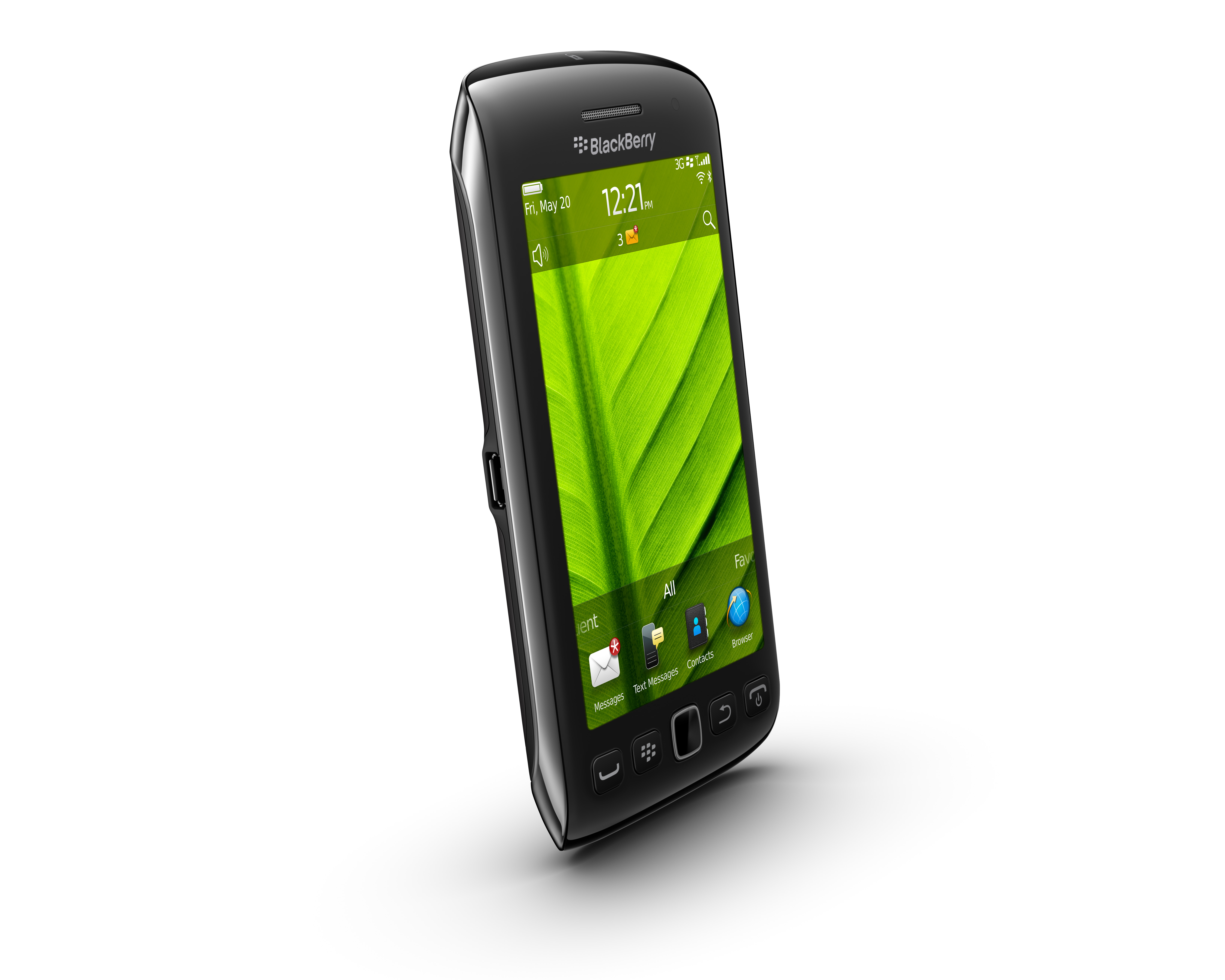
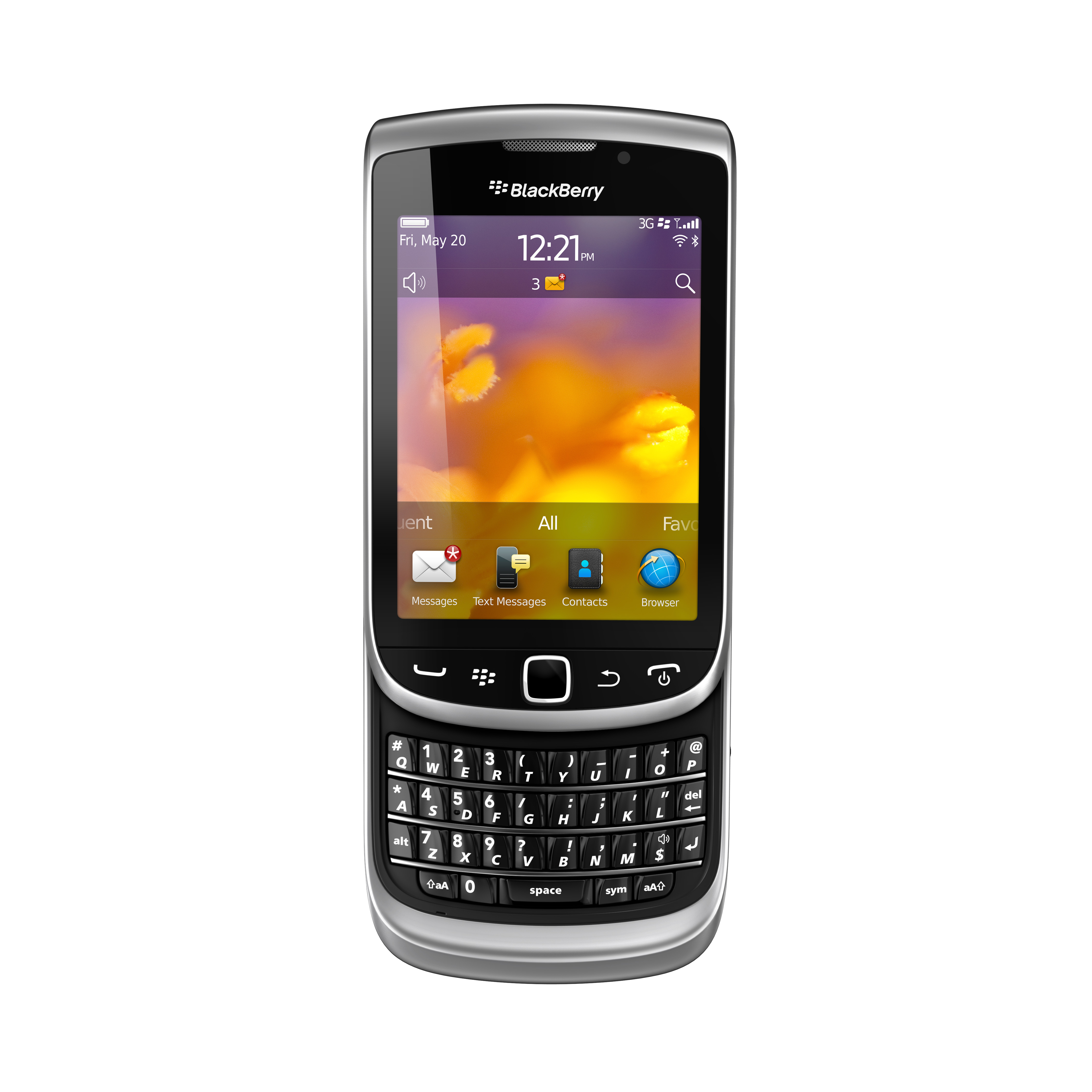
The new BlackBerry Torch 9810 and 9860 will hit the shelves in Singapore next week on 22 September 2011. Pre-orders for both BlackBerry 7 OS based smartphones can be placed with SingTel from today.
Pre-order the BlackBerry Torch 9810 or 9860 online from today.
The two new Torches were first introduced by Research In Motion (RIM) in early-August and unveiled in Singapore in mid-August together with the Bold 9900.
BlackBerry Torch 9860
The BlackBerry Torch 9860 smartphone offers fast and fluid performance in a stylish new all-touch design.
With a new 3.7” display – the largest ever on a BlackBerry smartphone – the new all-touch BlackBerry Torch 9860 smartphone is optimized for high-quality multimedia, web browsing and gaming; whilst offering the real-time communication and collaboration lauded by BlackBerry fans.
BlackBerry Torch 9810
The BlackBerry Torch 9810 is an evolution of the BlackBerry Torch 9800. The new model is faster and more fluid with high performance hardware features while the new BlackBerry 7 OS delivers an enhanced multimedia experience.
Featuring a large 3.2”, high-resolution touch display and a distinctive BlackBerry keyboard that easily slides out to allow fast typing, the BlackBerry Torch 9810 offers the best of both worlds.
Here are some screenshots from the Windows 8 developer preview during the ongoing BUILD conference (13-16 September 2011) in the Anaheim Convention Centre.
Windows 8 will be Microsoft’s attempt to wrest market share in the fast growing tablet market from market leading iPads from Apple and the whole slew of tablets based on Google’s Android.
Click on the images for a larger view. These screenshots have been provided by Microsoft.
The personalized lock screen shows unread emails and other app notifications.
See apps and content at a glance on the start screen.
Pick the files you want to send or share from one place.
Touch browsing seems fast, fluid and intuitive.
Large buttons for typing on the touch keyboard.
The thumb keyboard to avoid having to reach into the centre of the screen.
At the developer-focused BUILD conference, Microsoft has showcased a detailed preview of the next major release of Windows, code-named “Windows 8”, including new tools for developers to write applications for the new operating system.
The ongoing BUILD conference (13-16 September 2011) is being held in the Anaheim Convention Center. Here are some screenshots of the preview. Windows 8 is not expected to be come out of beta until at least the second half of 2012.
Main features
The user interface (UI) is centred around a touch interface, although it works with a mouse and keyboard too. Microsoft calls the UI “Metro” style – displaying important information first, whilst emphasising simplicity and user control. Internet Explorer 10 aims to provide a fast and fluid touch-browsing experience.
On the start screen, apps form the focal point, the Apps “tiles” fill the entire screen. The apps work together and communicate with each other in Windows 8. For example, photos can be selected and shared from different apps via email, Facebook, Flickr or the hard drive.
The ongoing BUILD conference (13-16 September 2011) is being held in the Anaheim Convention Center.
If you use multiple devices, Live roams all the content from the cloud services you use most — photos, email, calendar and contacts — keeping them up-to-date on your devices, be it a desktop, laptop, netbook, tablet or smartphone. With SkyDrive, you can access your files, photos and documents from virtually anywhere with any browser or with Metro style apps in Windows 8.
Windows 8 is an enhanced Windows 7 with lower memory footprint, and runs even on low-end hardware. For PC users, Windows 8 features an enhanced Task Manager and Windows Explorer and new, flexible options for multimonitor setups.
For developers, the Windows Store will allow developers to sell their apps anywhere Windows is sold worldwide, whether they’re creating new games or familiar productivity tools. For games developers, DirectX 11 gaming power underlies Windows 8, allowing the easy creation of full-screen games with smooth, flicker-free action.
Hardware wise, Windows 8 supports ARM-based chipsets, x86 (including x32 and x64) devices, and sensors. It promises instant-on and long battery life for ultrathin PCs and tablets, and is backward compatible with software/devices that run on Windows 7.
The new operating system will run on tablets, desktop and laptop computers via a touch screen, mouse or keyboard. It will also be backward compatible to existing Windows software.
Windows 8 represents Microsoft’s hope of wrestling market share for tablet computers from Apple iPads and Android tablets.
Microsoft will unveil the next iteration of their Windows operating system software today at a developers conference in Anaheim, California. A preview of the design was first released in June this year.
Tough days for PC makers
Windows sales have missed analysts’ estimates for three straight quarters and personal-computer sales have stalled as consumers favor tablets over notebook computers running the software, reported Bloomberg.
Of the 9.3 million iPads sold in the quarter that ended in June, about 20 percent of them went to customers who would have otherwise bought a Windows PC, estimated Colin Gillis, an analyst at BGC Partners LP in New York.
This will be the first time that a Windows operating system is capable of running on chip technology from ARM. Microsoft aims to make Windows 8 capable of running smaller, thinner tablet computers with battery life that can rival that of the market leader – Apple’s iPad.
Out of 60 million media tablets expected to be shipped 2011, 74 percent will be Apple’s iPads, according to an August forecast by IHS. The global market is forecasted to rise to 275.3 million units in 2015, with Apple expected to account for 43.6 percent of the market.
Windows 8 design
The user interface for Windows 8 resembles Microsoft’s Windows Phone 7 smartphone operating system – it uses digital tiles instead of icons to help users navigate between programs. The tiles are on the computer’s home screen can display updated information from inside applications, so that users can see the info at a glance without having to fire up those apps.
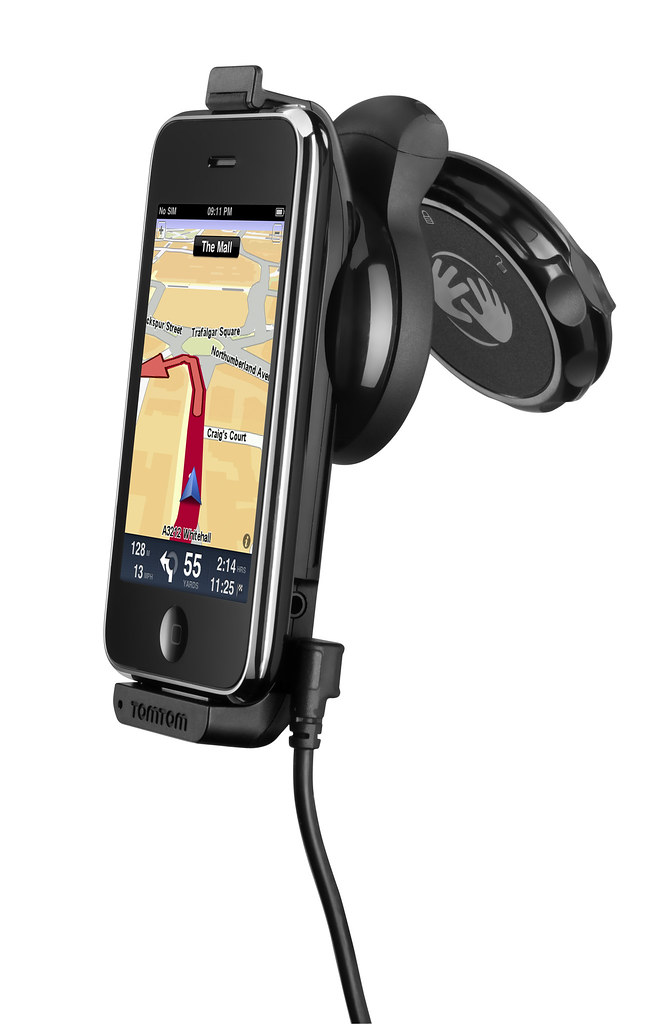
The new iPad App was showcased at the TomTom exhibition stand during IFA 2011 in Berlin and will be available in Q4 2011.
“… we have optimised our TomTom App for the iPad. Now customers have one App for all iOS devices.” said Corinne Vigreux, Managing Director at TomTom.Customers who already have the iPhone version of the navigation app will be able to download the new version to their iPads for free.
This latest version will feature enhanced screen resolution, sharpened graphics and more intuitive controls specifically developed for the iPad.
The latest version of the TomTom App for iPhone (Version 1.8) now includes the latest maps of countries in Southeast Asia, including Singapore, Malaysia, Brunei, Hong Kong, Macau, Thailand and Indonesia. A new multi-stop routes driving feature is also included.
Use the iPhone as a Portable Navigation Device for turn-by-turn navigation.
The South East Asia, TomTom App for iPhone (Version 1.8) can be downloaded from the App Store for USD $69.99. It works with iPhone 4, iPhone 3GS & iPod touch 3rd Gen running iOS4.
The new multi-stop routes feature makes it easier for drivers to make multiple stops on a single route, by letting them add up to five stop-off points when they plan their journey.
Multi-stop routes enable the driver to stop by a bank or petrol station enroute, or a diversion to pick up a friend as part of a longer journey.
This removes the hassle of entering a new journey for each leg of the trip and means that the driver can get an accurate estimated time of arrival for their final destination.
TomTom (AEX:TOM2) is a major supplier of in-car location and navigation products and services.
Founded in 1991 and headquartered in Amsterdam, TomTom has over 3,500 employees and sells its products in over 40 countries. Its products include portable navigation devices, in-dash infotainment systems, fleet management solutions, maps and real-time services, including TomTom HD Traffic.
Here is TomTom’s route planner which includes live traffic information (not available for some areas yet, including Singapore).
An overseas friend uses the Viber app on her iPhone for free VOIP international voice calls and text messages on her smartphone. I installed the free app on my Android phone and tested it. Setup was swift and quality was superb.
I was at the petrol station and the attendant was filling up an almost empty tank with petrol. While waiting, I whipped out my Android phone, searched the Android Market for Viber and installed it. Before the attendant had finished filling up the tank, I was already chatting with my friend in Kuala Lumpur on her iPhone – for free.
Set up was really simple on the Android phone. Once it was downloaded and installed, it gets your permission to access your contacts and sends you a 4-digit access code to activate your account. After that, you’re set to go!
Viber is free and works on the iPhone and Android phones.
The interface looks similar to the usual numeric dialpad with tabs to access recent calls, contacts, messages and more activities such as inviting friends, sharing on Facebook, tweeting etc.
Basically, Viber emulates the usual phone calling and sms usage – everything is based on your regualr phone number.
Viber dialpad on Android phone
Your account id is your phone number. If the party you’re calling has Viber installed on her Android or iPhone, you just dial her usual number, complete with international dialing code, to get connected. Viber is currently only available on the iPhone and Android phones. A BlackBerry version is in the pipeline.
Quality was good. Voice quality was loud and clear, although there was just a split-second lag, which didn’t affect the flow of the conversation in the slightest bit.
If the other party does not have Viber installed yet, the app gives you the option to place a regular call through your carrier.
Conclusion: Fast and easy to set-up and use, call quality is fantastic. The free app is compatible with iPhone 3GS (and later) and Android phones.
 Across the various themes, products are featured from all the major brands, including Acer, Asus, BlackBerry, Dell, Fujitsu, HP, HTC, Lenovo, Logitech, Microsoft, Motorola, Panasonic, Samsung, Toshiba and others.


 This will help alleviate the “range anxiety” experienced by drivers of electric cars, helping them effectively manage charging into their daily itineraries. At the end of 2011, there will be more than 5000 charging stations in Europe.