The Single Edition allows freelance designers and small design firms to publish interactive content created with Adobe InDesign CS5.5 software on the Apple iPad for US$395 per application.
Adobe Publishing Suite, Single Edition at US$395 per iPad application.
Single Edition allows designers to publish a single-issue application for sale or distribution through the Apple App Store, without writing any code, focusing on creative design.
The Professional Edition of the Adobe Digital Publishing Suite was released in May for publishing houses, business publishers, and education institutions that require an off-the-shelf tablet publishing solution.
Single Edition allows users to publish single-issue content such as a brochure, highly-visual book, annual report or personal design portfolio as an application for the iPad.
The Digital Publishing Suite family which now includes Single Edition is used to publish content beyond traditional magazines and newspapers. These include sales tools, brand and customer engagement materials, merchandising deliverables, employee communications and corporate collateral published to tablets.
Pricing and Availability
Single Edition for iPad is expected to be available for purchase online at the end of November 2011. From InDesign CS5.5, users can publish through Single Edition to the iPad for US$395 per application. Single Edition will support additional tablet platforms later in 2012.
Pointpal is a nifty electronic wallet for managing loyalty programmes for consumers who want to enjoy benefits and freebies offered by participating vendors, without the hassle of carrying a multitude of loyalty cards and keeping track of the stamps and tokens associated with the individual cards.
Do you carry a two-inch thick credit card wallet specially to hold all the different loyalty cards and discount cards that you’ve signed up over time with different F&B outlets or boutiques? Some of these offer one free drink for every three drinks purchased or give a free massage for every eight sessions.
Most of the time, the number of purchases are indicated by stamps on the loyalty card. Accumulate the requisite number of stamps and you surrender the card to the bartender for that free cocktail.
Buy X to get Y free.
A new FREE app has been launched for the iPhone that promises to take the hassle out of participating in these loyalty programmes. Apps for Android and BlackBerry smartphones are in the works. Pointpal has already been launched in Australia.
Scan the QR code to join a new loyalty programme
The entire programme is based on the use of QR codes. Participating vendors will display these 2D barcodes on their advertisements and in their compound so that interested customers who have installed the Pointpal app on their iPhones can scan the QR code to sign up for the loyalty programme for that vendor.
This removes the hassle of filling in paper application forms for each loyalty programme you sign up. You only need to enter some basic details once when you first download and install the Pointpal app. After that, simply scan the vendor’s QR code to join.
After every relevant purchase at a participating outlet, you can key in the purchase and let the cashier or bartender verify the purchases by scanning his special QR code. Once you have accumulated enough purchases, show the app to the cashier redeem rewards and freebies. Again, the cashier or bartender will scan his special QR code to acknowledge redemption and then hand over that free drink or merchandise.
Even if the phone is lost, the records of the purchases with the various vendors are available in Pointpal’s cloud storage.
No more lugging around a fat loyalty card wallet, or looking for that elusive card just to get it stamped or to check number of stamps.
Initial participating vendors include Barcode Cocktail Bar, Nail Vibe, and Wine Universe. More can be found here.
Over time, as we get new computers and leave the old still-functional computer as a second or third machine, and we still utilise the different machines, the files we create and work on can get distributed amidst the hard disk drives of the various computers.
A shared network hard drive can bring order back to an increasingly chaotic situation.
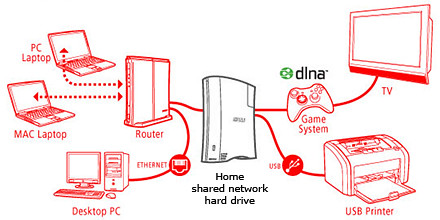
A network attached external hard drive can share files and media (illustration modified from www.buffalotech.com)
The above scenario was what happened to some of my friends and me. Computers and laptops today can last for a long time (if you look after them well) and most often then not, they’re still perfectly functionable when we get a new machine so it seems quite a waste to get rid of the old machine, especially since it can serve as a back up.
And if a member of the family is on the new laptop, others can use the spare computer. So over time, working files, photos, music and video can get distributed over a few computers. At first, it’s easy to remember and keep track of which file is in which computer and do the occasional transfer using an USB thumbdrive.
But over time, as the number of files grow, things can get out of hand – the convenience of being able to work on a few computers turns into a bane.
Now that cloud computing is catching on and we can save files and media on the Internet, this mess can be ameliorated. But those personal and confidential files and humongous video files are still best kept in local storage.
The NAS solution
Schematic of an NAS solution
So over the weekend, I helped my friend rig a similar solution that I use at home – set up a simple external hard drive that can be shared and accessed by a few different computers at home over a local Wi-Fi network.
Those files that are stored on the network attached storage (NAS) drive can then remain accessible no matter which computer you’re working on. It can be used to back up the computers connected.
Some NAS drives allow you to stream media to TVs, media players and game consoles connected to the home network.
In fact, some even enable access to be opened out to the Internet, so that when you’re outstation – in the office, on the road, or overseas – you can still securely access the files stored in the hard drive. This can be done via a browser on a laptop connected to the Internet, or via an app on a smartphone or tablet.
It’s like setting up your personal cloud storage. There are many consumer NAS drives in the market from makers such as Seagate, Western Digital and Buffalo.
They’re all designed to be easily set up by the layman who does not have a PhD in computer science. These NAS drives are connected directly to the router rather than a specific computer acting as a file server.
Any computer connected to the network via the router can access the NAS drive at any time.
Because these NAS drives are more intelligent than the regular dumb external hard drive, they do cost a slight premium over the latter. The NAS drives can manage network access by computers on the network and implement security, access and rights control as well.
Seagate GoFlex Home comes in capacities of 1TB, 2TB and 3TB
Since I’m familiar with the Seagate GoFlex Home, that was what I recommended my friend, who brought home a 3 TB version from the recent COMEX 2011 for S$299.
Tomorrow we’ll see how he managed to tame his growing diaspora of media and files.
Samsung and MDA has announced a joint call-for-proposal for the development of educational TV apps for the Samsung Smart TV platform and ecosystem.
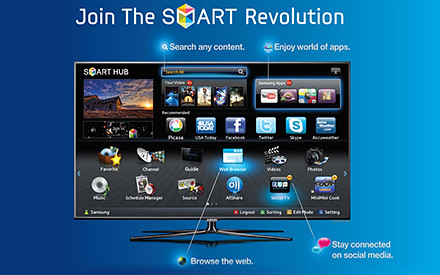
Develop rich and interactive educational TV apps for the Samsung Smart TV platform.
This comes on the heels of Sony’s renewal of a 5-year MOU with Nanyang Polytechnic to encourage local development of games for the Sony PlayStation.
Developers interested in Samsung’s initiative are invited to attend the Call-for-Proposal briefing at 6pm, 26 September, at Genexis Theatre, Fusionopolis. Starting from 26th September, the call-for-proposal will extend over a period of four weeks and will end on 31st October 2011. Detailed information will be available on the website of the Interactive Digital Media Programme Office (IDMPO) from 26th September.
Shortlisted developers:
Will gain 24/7 access to Samsung’s Developer’s Forum (SDF)
Will have access to MDA’s testing centre – iJAM@Blk71, located at Block 71, Ayer Rajah Crescent
May apply for funding schemes from the IDMPO
Focusing on rich and interactive educational apps for the Singapore audience, this initiative is targeted to promote interest in science, technology, engineering and mathematics, and for self-learning at home at up to tertiary level.
The initiative is also designed to catalyse the development of interactive digital content for TVs in Singapore, and support new interactive digital media (IDM) R&D projects as well as the commercialization efforts of IDM applications and services.
The new iPad App was showcased at the TomTom exhibition stand during IFA 2011 in Berlin and will be available in Q4 2011.
“… we have optimised our TomTom App for the iPad. Now customers have one App for all iOS devices.” said Corinne Vigreux, Managing Director at TomTom.Customers who already have the iPhone version of the navigation app will be able to download the new version to their iPads for free.
This latest version will feature enhanced screen resolution, sharpened graphics and more intuitive controls specifically developed for the iPad.
The latest version of the TomTom App for iPhone (Version 1.8) now includes the latest maps of countries in Southeast Asia, including Singapore, Malaysia, Brunei, Hong Kong, Macau, Thailand and Indonesia. A new multi-stop routes driving feature is also included.
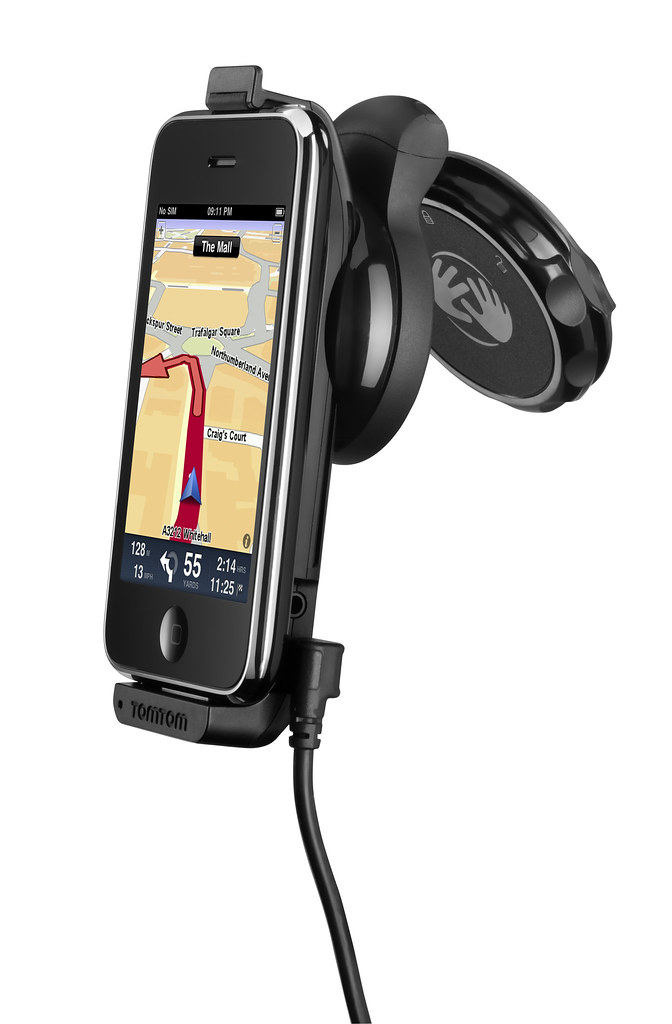
Use the iPhone as a Portable Navigation Device for turn-by-turn navigation.
The South East Asia, TomTom App for iPhone (Version 1.8) can be downloaded from the App Store for USD $69.99. It works with iPhone 4, iPhone 3GS & iPod touch 3rd Gen running iOS4.
The new multi-stop routes feature makes it easier for drivers to make multiple stops on a single route, by letting them add up to five stop-off points when they plan their journey.
Multi-stop routes enable the driver to stop by a bank or petrol station enroute, or a diversion to pick up a friend as part of a longer journey.
This removes the hassle of entering a new journey for each leg of the trip and means that the driver can get an accurate estimated time of arrival for their final destination.
An overseas friend uses the Viber app on her iPhone for free VOIP international voice calls and text messages on her smartphone. I installed the free app on my Android phone and tested it. Setup was swift and quality was superb.
I was at the petrol station and the attendant was filling up an almost empty tank with petrol. While waiting, I whipped out my Android phone, searched the Android Market for Viber and installed it. Before the attendant had finished filling up the tank, I was already chatting with my friend in Kuala Lumpur on her iPhone – for free.
Set up was really simple on the Android phone. Once it was downloaded and installed, it gets your permission to access your contacts and sends you a 4-digit access code to activate your account. After that, you’re set to go!
Viber is free and works on the iPhone and Android phones.
The interface looks similar to the usual numeric dialpad with tabs to access recent calls, contacts, messages and more activities such as inviting friends, sharing on Facebook, tweeting etc.
Basically, Viber emulates the usual phone calling and sms usage – everything is based on your regualr phone number.
Viber dialpad on Android phone
Your account id is your phone number. If the party you’re calling has Viber installed on her Android or iPhone, you just dial her usual number, complete with international dialing code, to get connected. Viber is currently only available on the iPhone and Android phones. A BlackBerry version is in the pipeline.
Quality was good. Voice quality was loud and clear, although there was just a split-second lag, which didn’t affect the flow of the conversation in the slightest bit.
If the other party does not have Viber installed yet, the app gives you the option to place a regular call through your carrier.
Conclusion: Fast and easy to set-up and use, call quality is fantastic. The free app is compatible with iPhone 3GS (and later) and Android phones.
BlackBerry App World 3.0 is now out of beta and available for all BlackBerry smartphone users.
BlackBerry App World is free and works on BlackBerry smartphones running the BlackBerry® 5 OS (Device Software) or higher.
BlackBerry App World is free and works on BlackBerry smartphones running the BlackBerry 5 OS or higher.
The BlackBerry App World 3.0 storefront makes discovering and downloading apps, games, and themes easier than before. Users can personalize their BlackBerry smartphone, find the hottest games and entertainment and get apps to stay connected with the people who matter.
New features include:
Sleek New Design – The BlackBerry App World experience has been enhanced to help users discover the latest and greatest apps and content, starting right on the BlackBerry App World home screen where rotating spotlight banners show off all that’s new and exciting.
New Channels – Apps, Games, and Themes now have their own channels so users can get to what they want even faster.
Introduction of My Account – My Account makes managing BlackBerry ID and payment options easy with direct access to all account information from the home screen.
New My World Features – My World gives users a streamlined view of their apps and status, and now at a glance, in addition to seeing which apps are installed and uninstalled, users can manage subscription content and services. When new updates or subscription renewals are available for apps, users will be notified using push technology.
App Social Sharing – when a user finds an app they can’t live without, they can share it directly from the app details screen through BBM™ (BlackBerry® Messenger), Facebook®, Twitter™, email and SMS
Evolved App Details Screen – At a glance, users can get a quick summary, check out reviews and star ratings, take a look at screen shots, and more
More Search Options – Quickly find apps with a Search Bar now appearing on the storefront home screen and search results are presented across Channels as well as My World. Search Bars are also within each Channel and users have the ability to filter by App Name, Price, Rating, Newest, Best Match, or Popular
EpiCentre will launch an App on August 29 that updates COMEX visitors of promotions from the Premier Apple Reseller during COMEX 2011 from September 1-4, and for two weeks after, at its six stores: Wheelock Place, Ion Orchard, 313 Somerset, Bugis Junction, Marina Bay Sands, and Suntec Singapore.
The App will include a QR code reader that allows only EpiCentre App users to access bargains and giveaways below:
$20 training voucher (for the first 1,000 redemptions at Comex and all EpiCentre stores)
10 Nixon backpacks to be redeemed (first 10 to spend $2000 during the Comex period at the show or all EpiCentre stores will automatically qualify)
Five $599 Geneva S Speakers to be won! Ask for your chance at Geneva’s corner at EpiCentre’s booth (Answer a simple question to qualify. A winner a day!)
Free EpiCentre membership that entitles you discounts on Apple and non-Apple products and accessories (for the first 1,000 redemptions at Comex and all EpiCentre stores)
The new ‘Apps-perience’ adds a new dimension to EpiCentre’s roadshow iPavilion concept, which showcases a large range of Apple accessories.
“We aim to keep the iPavilion concept fresh by adding a new dimension to every show. This time it’s the EpiCentre App which is not only fun, but puts great bargains right in the hands of show-goers,” said Mr Jimmy Fong, EpiCentre’s Chief Executive Officer.
Visitors to the iPavilion will also get expert advice from Apple-certified trainers on the top free and paid-for Apps: how to download the Apps with or without revealing credit card details; and help with installing Apps on-the-spot. Gamers can have the popular Angry Birds or Plans vs Zombie installed by the EpiCentre experts without lifting a finger.
The fun-packed, interactive iPavilion programme also features a noted iPhone photographer, who will have a show-and-tell session on stage on using iPhone apps to capture the perfect picture.
Demo sessions on the new OS X Lion and new MacBook Air will also be conducted.
All EpiCentre customers will enjoy $5 off for every $50 purchase. Applicable on top of Comex deals.
BlackBerry smartphone users can more easily discover and download apps, games, and themes via the BlackBerry App World 3.0 storefront.
Users can personalize their BlackBerry smartphone, find the hottest games and entertainment and get apps to stay connected with the people who matter.
New features in BlackBerry App World 3.0 include:
Sleek New Design
New Channels
Introduction of My Account
New My World Features
App Social Sharing
Evolved App Details Screen
More Search Options
The App will likely come out of beta and be officially released about a month from now.
BlackBerry Beta Zone is the place where Research In Motion (RIM) communicates with and receives feedback from beta participants.
Members of BlackBerry Beta Zone, will have the opportunity to sign up for beta programs and be among the first to try out new BlackBerry software before it’s released to the general public.
Feedback from the beta trial helps future BlackBerry products better meet the needs of customers.


 After every relevant purchase at a participating outlet, you can key in the purchase and let the cashier or bartender verify the purchases by scanning his special QR code. Once you have accumulated enough purchases, show the app to the cashier redeem rewards and freebies. Again, the cashier or bartender will scan his special QR code to acknowledge redemption and then hand over that free drink or merchandise.



 The initiative is also designed to catalyse the development of interactive digital content for TVs in Singapore, and support new interactive digital media (IDM) R&D projects as well as the commercialization efforts of IDM applications and services.