Posts Tagged ‘Apps’
Monday, December 5th, 2011
Are you one of 30,000 heading out to ZoukOut at Siloso Beach this Saturday night? You may find some of these BlackBerry apps handy to survive the 14-hour party.

Check the weather with BeWeather Free in order to know when to start dancing towards the shelter.
 Then, Let There Be Light will turn your BlackBerry smartphone into a multicolored glowstick that you can use to signal your friends or groove to the music.
 Hear a familiar track that you must get your hands on? Shazam Encore will help you identify and buy the track online.

Done with the party and looking for food? ShowNearby will tell you what’s yummy in the vicinity!
All of these apps are free and for BlackBerry smartphones. Shazam Encore is one of those free apps courtesy of RIM.
Tags:Apps, BlackBerry, RIM, smartphone, Zouk, ZoukOut
Posted in App, BlackBerry, BlackBerry OS, Events, Gadgets, Lifestyle, Party, Phones, RIM, Software | No Comments »
Wednesday, November 16th, 2011
A new location based app that allows users to share and be aware of information, photos and video about activities in their vicinity and on the map. Use the app for a chance to win S$8,888 in cash on December 18, 2011.

The free iPhone app "feecha" launches today.
I was trundling down Haji Lane last evening and taking in the vibrant atmosphere of the little pubs and shops on both sides of the single-lane back alley.
Have you ever wondered what goes on in the joints that you walk pass while listening to the din emanating from within?
 A new fun and quirky app called “feecha“ lets you plug into the scene.
People organising, participating or witnessing events can post and share their activities using the app.
The information appears as a map pin – in the form of a cutesy (or hideous, depending on your point of view) creature called a feecha – on a map within the app, indicating where the event is taking place.
Activities can be tagged so that others following those tags are alerted once the event is shared.
If others like the activity and add to it, the feecha turns red and grows bigger.
If the event is largely ignored, the feecha map pin turns blue and eventually disappears from the feecha map.
If you see something interesting, witness an accident or spot a summon aunty, you can also post a photo or video as part of the feecha.
Now imagine walking down Haji Lane with the app in hand.
You might just discover that ad-hoc photo exhibition on the Japanese earthquake by that budding photographer – that you might be interested in.
Or that talk about the role of Entomology, Botany, and Mineralogy in forensic anthropology, if you’re a fan of the TV series “Bones”.
On December 18, the poster of the biggest and reddest feecha stands to win S$8,888 in cash.
Feecha is free for download on iTunes and works on the iPhone running iOS 4.2 and higher. The app is only released in the Singapore App Store, so those on the US store will have to switch stores to find feecha in iTunes.
An Android version is also in the works. A Windows Phone 7 version may eventually be in the works. A BlackBerry version is not in the works.
Tags:Apps, feecha, iPhone, location, social network
Posted in App, Events, iPhone, Launch | No Comments »
Sunday, November 13th, 2011
No more excuses not to send your better half that bouquet of flowers. This PayPal-powered mobile app from FarEastFlora makes it easy for Singaporean men to remember and celebrate their loved ones.
Sending flowers has now become a breeze with this free mobile app that is available from Apple’s App Store and the Nokia Ovi Store.
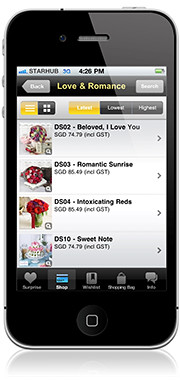 Flowers and gifts are delivered on the day of the order.
An order placed as late as 4pm in the afternoon can be delivered between 7 – 10pm at night on the same day.
Users can set reminders within the app to deliver flowers for special occasions.
Tap and swipe through a wide range of over 1,000 gift options ranging from flower bouquets, plant arrangements, gift hampers, gourmet baskets and even perfumes.
Select your gift, add to your shopping bag, and check-out with PayPal in two simple taps.
Using ‘Pay with PayPal’, simply log-on to your PayPal account and confirm the purchase.
PayPal also provides a safer mobile payment method as no financial details are shared with merchants or stored on mobile devices.
Features of the app:
- Reminders and Wishlist: Pre-select favourite gift items under ‘Wishlist’ and set reminders for special occasions like birthdays, anniversary and Mother’s Day.
- Sync addresses from phone contacts: Sync recipients’ addresses and details from phone contacts, avoiding the hassle of manually typing in addresses.
- Surprise: Tap the ‘Surprise’ tab and shake the phone – lucky users might get a discount exclusive to SG Florist app users.
Tags:Apple, Apps, Far East Flora, flowers, gifts, iPhone, Nokia, Ovi Store
Posted in App, iPhone | No Comments »
Sunday, November 6th, 2011
GarageBand 1.1 for iPad, iPhone and iPod touch is available on the App Store for USD$4.49 to new users, or as a free update for existing GarageBand for iPad customers.

GarageBand 1.1 for iPad, iPhone and iPod touch is available on the App Store
GarageBand is a universal app that runs on iPad, iPad 2, iPhone 3GS, iPhone 4, iPhone 4S and iPod touch (3rd & 4th generation).
 The music creation app from Apple was Introduced earlier this year on the iPad. GarageBand uses Apple’s Multi-Touch interface to make it easy for anyone to create and record their own songs, even if they’ve never played an instrument before.
GarageBand features a collection of fun Touch Instruments that sound great and make it easy for beginners or experienced musicians to play and record keyboards, guitars, drums and basses in a wide variety of styles.
“The innovative Multi-Touch interface combined with Smart Instruments makes it easy to create great sounding music, even if you’ve never studied music or played an instrument before,” said Philip Schiller, Apple’s senior vice president of Worldwide Product Marketing.Smart Instruments now allow you to choose from an extensive new library of custom chords so you can play and strum along with your favourite songs.
You can plug your electric guitar into iPad, iPhone or iPod touch to play and record through classic amps and stompbox effects, or record your voice or any acoustic sound using the built-in microphone.
GarageBand allows you to record and mix up to eight tracks and then share your finished song with friends or send it to your Mac to keep working on it in GarageBand or Logic Pro.
Tags:Apple, Apps, GarageBand, music
Posted in App, Apple, Gadgets, iOS, iPad, iPhone, Launch, Mac OS, Music, Phones, Prices, Software, Tablets | No Comments »
Monday, October 31st, 2011
It’s Halloween today. Here’s a selection of ghouly apps for the occasion.
There are apps for both BlackBerry smartphones and the PlayBook. All the apps can be downloaded from BlackBerry App World. Click on the screenshots to get to the app on BlackBerry App World.
| Apps |
Brief Description |
Count Munchula (Free)
smartphones only

|
The world-famous Screen Muncher just couldn’t resist getting dressed up for Halloween as a blood-sucking vampire named Count Munchula! “Munch” your BlackBerry screen and capture it as an image to post directly to Twitter, share through email, or save for later!
Screen Muncher lets you capture anything you see on your BlackBerry screen just like a desktop “print screen” on a PC. This funny, cute and useful app includes a very special “Count Munchula” sound effect, animation and vibrates every time you Munch a screen! |
Pumpkin Slider (US$0.99)
smartphones only

|
Pumpkin Slider is designed to lock your BlackBerry and prevent any unwanted key press. Even if your BlackBerry is unlocked by accident, Pumpkin Slider still locks your phone and you do not need to worry about the Send key or any unwanted key pressed. Pumpkin Slider automatically locks your BlackBerry when the screen dims.
Pumpkin Slider is fast to setup, easy to use and works with the Lock button on your BlackBerry. |
Jack-O-Lantern (Free)
smartphones only

|
Ever wanted your own Jack-O-Lantern but didn’t know how to carve one? This app is a virtual Jack-O-Lantern for your BlackBerry to help you celebrate the Halloween season. You can change the Jack-O-Lantern’s face by swiping from the left or right on the eyes, nose, or mouth. You can also change the colour by clicking on the screen. Happy Halloween! |
Halloween Photo Editor (US$1.99)
smartphones only

|
Halloween Photo Editor is a powerful image processing app that turns your photos into unique Halloween themed art. Very intuitive and easy to use. even beginners will quickly learn how to create impressive Halloweenish effects! Gear up for your Halloween celebration with this amazing photo app!
The app features 4 awesome Halloween filters, 16 unique Halloween themed photo frames and 11 cute clip art images. |
Ghosty Party (US$1.99)
smartphone/PlayBook

|
Vaporize as many ghosts of the same color as you can to get a high score, with cute halloween theme animations, bonuses, and sound effects. The more ghosts you tap at once, the more scores you will get. The more same color ghosts combo, the more scoresmultiply.
The game features an autosave function on exit or phone call, and the PlayBook version also has global online support to post your scores on Facebook. |
Halloween Haunt (S$1.99)
PlayBook only

|
Zombies, Ghosts, Mummies; oh my! Halloween Haunt is a 5 Reel Slot Machine that features up to 15 credits per line (up to 9 lines) – Changeable credit values ranging from 1¢, 2¢, 5¢, 10¢, and 25¢. Once the ‘High Roller Gauge’ is completely filled, you will gain access to even higher credit values; 50¢, $1, and $5. Slot machine symbols include ‘WILD’ and ‘SPIN & WIN’ symbols, which trigger the FREE SPIN feature. Earn your way to 50 trophies, purchase the 10 items in the gift shop, and work your way up to piles of cash like candy on Halloween! |
Halloween Sounds (US$0.99)
PlayBook only

|
Wanna scare theguy in the next cube out of his wits? Look no further! With Halloween Sounds you can play endless pranks on friends and enemies alike. 15 spooky sounds and Spooky Soundtrack which plays a creepy soundtrack and adds scary sounds on top of it. The perfect soundtrack for handing out treats, or great mood music for a costume party. |
Tags:Apps, BlackBerry, Halloween, Playbook, RIM, smartphone, tablets
Posted in App, BlackBerry, BlackBerry OS, BlackBerry Tablet OS, Bold, Curve, Gadgets, Gaming, Humour, Lifestyle, Operating Systems, Phones, Photography, PlayBook, Prices, RIM, Software, Specifications, Tablets, Torch | No Comments »
Sunday, October 30th, 2011
TomTom App for iPhone 1.9 is now available and optimised for iPad, offering higher resolution and improved user interface for the iPad at no extra cost. The app for South East Asia is available now at US$69.99 but existing app customers download for free.

TomTom App for iPhone/iPad Version 1.9
First announced and show-cased during IFA 2011 in Berlin last month, Existing TomTom App customers can download the new version to their iPads for free.
The user interface has been enhanced to fit the larger screen of the iPad while the resolution has been increased for a sharper display. The new release is also compatible with Apple’s new iOS5.
 The TomTom App for iPhone/iPad 1.9 comes with a new map release, which includes updated roads, more accurate information about fixed speed camera locations and points of interest.
The new release makes use of the extra iPad screen space by showing both driving view and advanced lane guidance at the same time. Drivers can also switch to driving view with one touch from anywhere within the app, and can access guidance options in a tap.
Tags:Apps, GPS, iOS 5, iPad, iPhone, navigation, TomTom
Posted in App, Gadgets, GPS, iOS, Launch, TomTom | No Comments »
Tuesday, October 18th, 2011
Research In Motion (RIM) is making moves to recompense widespread service disruptions last week. Premium apps will be offered free of charge to BlackBerry customers, while enterprise customers will be offered one month of free Technical Support.
 Last week, many BlackBerry users experienced service interruptions and delays over a period of approximately 3 days in Europe, the Middle East, India and Africa, 1.5 days in Latin America and Canada, and 1 day in the United States.
Global teams worked around the clock to contain the issue and minimize the impact to customers as much as possible. Service levels returned to normal on Thursday, October 13.
To make amends for the disruptions, RIM has offered – for free – more than US$100 worth of premium apps from October 19 to December 31, 2011.
RIM’s enterprise customers will also be offered one month of free Technical Support. Current customers will be offered a complimentary one month extension of their existing Technical Support contract.
Customers who do not currently have a Technical Support contract will be offered a one month trial of RIM’s BlackBerry Technical Support Services – Enhanced Support, free of charge.
Additional details about the program and information about how to register will be available here.
Tags:Apps, BlackBerry, RIM, tablets
Posted in App, BlackBerry, BlackBerry OS, BlackBerry Tablet OS, Enterprise IT, Gadgets, Operating Systems, Phones, PlayBook, RIM, Software, Tablets, Tech news | 1 Comment »
Monday, October 17th, 2011
Research In Motion (RIM) announced today that more than US$100 worth of selected premium apps will be offered free of charge to BlackBerry customers, in view of service disruptions last week.
| Game |
Publisher |
| SIMS 3 |
Electronic Arts |
| Bejeweled |
Electronic Arts |
| N.O.V.A. |
Gameloft |
| Texas Hold’em Poker 2 |
Gameloft |
| Bubble Bash 2 |
Gameloft |
| Photo Editor Ultimate |
Ice Cold Apps |
| iSpeech Translator Pro |
iSpeech.org |
| DriveSafe.ly Pro |
iSpeech.org |
| Drive Safe.ly Enterprise |
iSpeech.org |
| Nobex Radio Premium |
Nobex |
| Shazam Encore |
Shazam |
| Vlingo Plus: Virtual Assistant |
Vlingo |
The apps will be available from October 19 to December 31, 2011.
The complete selection of premium apps will become available for download at BlackBerry App World over a period of four weeks beginning Wednesday, October 19th.
The selections over this period will include the following (with more to come):
Tags:Apps, BlackBerry, free, RIM, smartphone, tablets
Posted in App, BlackBerry, BlackBerry OS, BlackBerry Tablet OS, Gadgets, Phones, PlayBook, Promotions, RIM, Software, Tablets, Tech news | 1 Comment »
Wednesday, October 5th, 2011
Adobe announced its slate of six new apps for Apple iPads and Android tablets during the MAX 2011 conference in Los Angeles. Here’s a brief description of what each of the apps does.
Each of the six apps has an introductory price-tag of US$9.99. The Android version is will be available in November 2010 while the iOS version will only be available in 2012.
| Adobe Touch App |
Description of App |
Adobe Photoshop Touch


|
Transform images with core Photoshop features in an app custom-built for tablets. With simple finger gestures, users can combine multiple photos into layered images, make popular edits and apply professional effects. The tablet-exclusive Scribble Selection Tool allows users to easily extract objects in an image by simply scribbling on what to keep and then what to remove.
With Refine Edge technology from Adobe Photoshop, even hard-to-select areas with soft edges, such as hair, are easily captured when making selections. Additionally, the app helps users quickly find images, share creations, and view comments through integration with Facebook and Google Search. Using the syncing capabilities that are a component of Adobe Creative Cloud, files can be opened in Adobe Photoshop. |
Adobe Collage


|
Capture and refine ideas and concepts by combining inspirational images, drawings, text and Creative Suite files into modern, conceptual mood boards.
Features include importing of images, four customizable pen types for drawing, adding text, and applying color themes. A virtually unconstrained canvas grows as needed to accommodate more assets. Files can be shared or transferred for access in Adobe Photoshop. |
Adobe Debut

|
Present designs to clients and stakeholders virtually anywhere. Adobe Debut quickly opens tablet-compatible versions of Creative Suite files for convenient and beautiful viewing on the tablet, including Photoshop layers and Illustrator art boards. Feedback is gathered using a markup pen tool to add notes and drawings on top of the work. |
Adobe Ideas

|
Easy-to-master, vector-based tool for drawing. By using a stylus or finger, strokes appear smooth at any zoom level. Starting with a blank canvas, users can choose color themes, and pull in tablet-compatible image files that can be controlled as separate layers. Finished results are easily accessed in Adobe Illustrator or Photoshop. |
Adobe Kuler

|
Generate color themes easily to inspire design projects. Color can be explored and discovered, with hundreds of thousands of Kuler themes already available via the creative community. Social engagement in the community is enhanced by rating and commenting on themes, which can be exported as color swatches for Adobe Creative Suite projects. |
Adobe Proto


|
Develop interactive wireframes and prototypes for websites and mobile apps on a tablet. Ideas are communicated and shared with teams and clients using a touch-based interface.
Gestures quickly express a design concept, explain website structure or demonstrate interactivity. The wireframe or prototype then can be exported as industry standard HTML, CSS and JavaScript, and shared in popular browsers for immediate review and approval. |
Tags:Adobe, Android, Apple, Apps, iOS, iPad
Posted in Adobe, Android, App, iOS, iPad, Launch, Prices, Software, Specifications, Tablets | 1 Comment »
Tuesday, October 4th, 2011
Six new apps for Apple iPads and Android tablets have been announced by Adobe at its MAX 2011 technology conference.
At US$9.99 each, the six apps address different areas of the creative process: image editing; ideation; sketching; mood boards; website and mobile app prototyping; and presenting finished work.
The six new Adobe Touch Apps are:
- Adobe Photoshop Touch
- Adobe Collage
- Adobe Debut
- Adobe Ideas
- Adobe Kuler
- Adobe Proto
More details of the Touch Apps are tabulated here.
Adobe Touch Apps are essential components of Adobe Creative Cloud, a major new company initiative also announced today. Adobe Creative Cloud will allow subscribers to access desktop and tablet applications, find creative services, and share their work.
Files created via Adobe Touch Apps can be shared, viewed across devices or transferred into Adobe Creative Suite software for further refinement. Adobe Touch Apps are designed to work with both finger and stylus input.
Adobe Touch Apps will be available for Android devices in November 2011. iOS availability will likely be announced only in early 2012, although Adobe Ideas is already available for the iPad.
Access to the file viewing, sharing and transfer functionality of Adobe Creative Cloud is included in the price of each Adobe Touch App. Details regarding pricing of the Adobe Creative Cloud and its expanded capabilities around applications, services and community will be announced in November 2011.
Tags:Adobe, Android, Apple, Apps, iPad, tablets
Posted in Adobe, Android, App, Creative Suite, iOS, iPad, Launch, Software, Tablets | 1 Comment »





