It’s been a busy few days of earnings results from IT bigwigs. Here’s a quick sum-up of the state of the IT industry:
Yahoo! did well with profits beating estimates – could it be because expectations were low?
Conversely, Apple didn’t do so good, missing analysts’ predictions for the first time in at least six years – but that’s probably because expectations were so high!
Google’s doing real well with sales and profit beating estimates – from search advertising growth as usual.
Microsoft is patting itself on its back – for not having bought Yahoo! back in 2008. And taking a swipe at Google’s Android – Steve Balmer says you need to be a computer scientist to use an Android smart phone, unlike Windows Phone 7.
RIM’s still trying to find its way forward by taking a step backward – trying to bridge new QNX with “old” BlackBerry OS 7 – hope that works out.
Amazon is being sued for screwing up the career of an actress by revealing her real age against her will in IMDb.
On the corporate IT front, industry bell weather IBM missed analysts’ estimates on slowing revenue growth at its software, hardware and services businesses.
Steve Jobs has died. The passing of a visionary. I don’t want to degrade his memory by turning his death into news fodder. But I do want to mark it down on my blog.
Apple co-founder Steve Jobs has passed away at age 56 on Oct 5, 2011.
To me, he created. He literally created the market that his products thrived in, and others followed.
Steve Jobs brought Apple from the brink of bankruptcy to become the biggest company in the WORLD.
He created trends and completely new categories of products and market segments, that competitors had no choice but to follow.
There are companies and there are big companies. But with the same amount of resources or more, none has been able to reinvent the technology scene like he did.
This will be the passing of an age, and I don’t think we’ll see another Steve Jobs for a long time.
May he rest in peace.
Here is the statement from Apple’s Board of Directors:
CUPERTINO, Calif. — October 05, 2011
We are deeply saddened to announce that Steve Jobs passed away today.
Steve’s brilliance, passion and energy were the source of countless innovations that enrich and improve all of our lives. The world is immeasurably better because of Steve.
His greatest love was for his wife, Laurene, and his family. Our hearts go out to them and to all who were touched by his extraordinary gifts.
Tim Cook delivered his first major product launch since taking over from Steve Jobs as the CEO. The main anticipation for an iPhone 5 did not come through. Instead an iPhone 4S with changed out innards was offered. By the way, Steve Jobs was absent from the event
"Let's talk iPhone" launches iPhone 4S instead of iPhone 5
The headline for the launch was the iPhone 4S. Identical to the iPhone 4 in terms of external design and appearances, the innards have been completed changed out with much better components. These include a more powerful A5 dual-core CPU promising 2x the previous computing speed and 7x graphics performance, new 8 megapixel camera, full HD video, and iOS 5.
Other highlights inlcude Siri, the voice-activated intelligent assistant and iCloud, a set of cloud services that works and syncs with all the Apple devices a user owns.
New apps and iPod Touch and nano devices were also presented.
Here’s a quick executive summary of the various products launched, their prices (in the US and in Singapore), as well as when they would be available.
Product / Availability
Prices
iPhone 4S
(black & white)
Oct 14:
US, Australia, Canada, France, Germany, Japan & UK Oct 28: 22 countries including Singapore Dec 2011:
Rest of the world
US prices (w 2 yrs contract):
16GB: US$199
32GB: US$299
64GB: US$399
Adobe announced its slate of six new apps for Apple iPads and Android tablets during the MAX 2011 conference in Los Angeles. Here’s a brief description of what each of the apps does.
Each of the six apps has an introductory price-tag of US$9.99. The Android version is will be available in November 2010 while the iOS version will only be available in 2012.
Transform images with core Photoshop features in an app custom-built for tablets. With simple finger gestures, users can combine multiple photos into layered images, make popular edits and apply professional effects. The tablet-exclusive Scribble Selection Tool allows users to easily extract objects in an image by simply scribbling on what to keep and then what to remove.
With Refine Edge technology from Adobe Photoshop, even hard-to-select areas with soft edges, such as hair, are easily captured when making selections. Additionally, the app helps users quickly find images, share creations, and view comments through integration with Facebook and Google Search. Using the syncing capabilities that are a component of Adobe Creative Cloud, files can be opened in Adobe Photoshop.
Capture and refine ideas and concepts by combining inspirational images, drawings, text and Creative Suite files into modern, conceptual mood boards.
Features include importing of images, four customizable pen types for drawing, adding text, and applying color themes. A virtually unconstrained canvas grows as needed to accommodate more assets. Files can be shared or transferred for access in Adobe Photoshop.
Present designs to clients and stakeholders virtually anywhere. Adobe Debut quickly opens tablet-compatible versions of Creative Suite files for convenient and beautiful viewing on the tablet, including Photoshop layers and Illustrator art boards. Feedback is gathered using a markup pen tool to add notes and drawings on top of the work.
Easy-to-master, vector-based tool for drawing. By using a stylus or finger, strokes appear smooth at any zoom level. Starting with a blank canvas, users can choose color themes, and pull in tablet-compatible image files that can be controlled as separate layers. Finished results are easily accessed in Adobe Illustrator or Photoshop.
Generate color themes easily to inspire design projects. Color can be explored and discovered, with hundreds of thousands of Kuler themes already available via the creative community. Social engagement in the community is enhanced by rating and commenting on themes, which can be exported as color swatches for Adobe Creative Suite projects.
Develop interactive wireframes and prototypes for websites and mobile apps on a tablet. Ideas are communicated and shared with teams and clients using a touch-based interface.
Gestures quickly express a design concept, explain website structure or demonstrate interactivity. The wireframe or prototype then can be exported as industry standard HTML, CSS and JavaScript, and shared in popular browsers for immediate review and approval.
Six new apps for Apple iPads and Android tablets have been announced by Adobe at its MAX 2011 technology conference.
At US$9.99 each, the six apps address different areas of the creative process: image editing; ideation; sketching; mood boards; website and mobile app prototyping; and presenting finished work.
Adobe Touch Apps are essential components of Adobe Creative Cloud, a major new company initiative also announced today. Adobe Creative Cloud will allow subscribers to access desktop and tablet applications, find creative services, and share their work.
Files created via Adobe Touch Apps can be shared, viewed across devices or transferred into Adobe Creative Suite software for further refinement. Adobe Touch Apps are designed to work with both finger and stylus input.
Adobe Touch Apps will be available for Android devices in November 2011. iOS availability will likely be announced only in early 2012, although Adobe Ideas is already available for the iPad.
Access to the file viewing, sharing and transfer functionality of Adobe Creative Cloud is included in the price of each Adobe Touch App. Details regarding pricing of the Adobe Creative Cloud and its expanded capabilities around applications, services and community will be announced in November 2011.
The Single Edition allows freelance designers and small design firms to publish interactive content created with Adobe InDesign CS5.5 software on the Apple iPad for US$395 per application.
Adobe Publishing Suite, Single Edition at US$395 per iPad application.
Single Edition allows designers to publish a single-issue application for sale or distribution through the Apple App Store, without writing any code, focusing on creative design.
The Professional Edition of the Adobe Digital Publishing Suite was released in May for publishing houses, business publishers, and education institutions that require an off-the-shelf tablet publishing solution.
Single Edition allows users to publish single-issue content such as a brochure, highly-visual book, annual report or personal design portfolio as an application for the iPad.
The Digital Publishing Suite family which now includes Single Edition is used to publish content beyond traditional magazines and newspapers. These include sales tools, brand and customer engagement materials, merchandising deliverables, employee communications and corporate collateral published to tablets.
Pricing and Availability
Single Edition for iPad is expected to be available for purchase online at the end of November 2011. From InDesign CS5.5, users can publish through Single Edition to the iPad for US$395 per application. Single Edition will support additional tablet platforms later in 2012.
GoFlex Home is a consumer network attached storage (NAS) hard drive for the home. Easy to set up and use, it allows the access, sharing, streaming, and backup of files and media for computers, network TVs, media players and game consoles connected to the home wireless network.
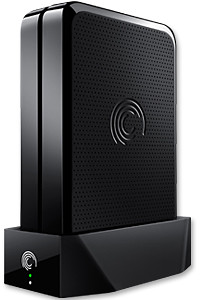
The Seagate GoFlex Home comprises a drive dock and a hard drive.
Secure access can also be opened to computers and iOS/Android tablets and smartphones over the Internet.
Over the weekend, I helped my friend set up an NAS drive for his desktop, netbook, two laptops, iPhone and Android tablet. He had bought the Seagate GoFlex Home 3 TB storage drive during the recent COMEX 2011 but hadn’t had the time to set it up yet.
I helped by using eye-power because he decided to give it a go himself and actually got the thing working in less than 15 minutes. That was the reason why I recommended the drive in the first place, it works with most consumer home Wi-Fi routers with little set-up or configuration needed.
The GoFlex Home comes with two cables and an software installation CD. The following steps were all that was needed to get the personal storage cloud going:
1. Connect the GoFlex Home drive dock to the Wi-Fi router by using the provided Ethernet cable.
2. Pop the GoFlex hard drive into the GoFlex drive dock and plug the power supply into the drive dock and the wall outlet. Switch on the GoFlex Home by pressing the Power button on the drive dock.
3. Pop the CD (or download from Seagate’s website) into the computer (can be a Mac or Windows PC) to install the software needed to access the hard drive. Simply select a language, key in the product information found on the drive, give the drive a name and register it. The name has to be unique globally since it will be used to identify the drive should you access it from the Internet.
4. Install the software on other computers that require access to the shared drive. Up to 5 people/computers on the home network can access the GoFlex Home. By paying to subscribe to the Seagate Share Pro, you get access for an unlimited number of people/computers to the GoFlex Home.
There are three ways to access the drive. One is to use the installed Seagate Dashboard software (on Windows PCs), which allows all features of the drive to be configured and managed. You can add computers and user accounts, backup, access and share files as well.
Use Seagate Dashboard software to configure and manage GoFelx Home
The other way is to use a browser-based Seagate Share either for a computer in the home network or out in the Internet.
Free iOS/Android app
Both are easy to use with a simple interface, using drag-and-drop or standard dialog boxes we’re familar with.
The third method is via the appropriate free app on a iOS/Android smartphone or tablet, also over the Internet.
The GoFlex Home comes with a USB port which is very useful. You can connect an additional external hard drive to expand the capacity of the original GoFlex hard drive. You can also connect a USB hub for connecting more than one USB device.
In my friend’s case, he connected his printer to the USB port and all his computers on the Wi-Fi network got to share that printer. No more plugging/unplugging the old printer from one computer to another.
The included backup software allows up to three connected computers to be automatically backed up to the GoFlex Home. Upgrade to Premium Backup ($49.95) to back up an unlimited number of computers on the GoFlex Home network. You can upgrade at the Application Store that can be accessed through the Seagate Dashboard software.
For each user account set up on the GoFlex Home, three folders are created – a Public, Personal, and Backup folder. The Public folder holds files that can be stored and accessed by everyone on your home network. The Personal and Backup folders can only be accessed by the the user.
What I like about the sharing is the granular control available for the files shared. You can specify who you want to share files with, choose to share just certain files or entire folders, set passwords, and set expiry dates for the shares. Administration is intuitive and easy to pick up. You can send a URL of a shared file via email.
Stream media to other computers and media players on the home wireless network.
Music, photos and video can also be shared and streamed to media players, game consoles or network TVs that support UPnP-AV, DLNA or Windows Media Connect. A wide range of file types are supported.
The GoFlex Home is available in 1TB (S$179), 2TB (S$239) and 3TB (S$339) capacities.
Over time, as we get new computers and leave the old still-functional computer as a second or third machine, and we still utilise the different machines, the files we create and work on can get distributed amidst the hard disk drives of the various computers.
A shared network hard drive can bring order back to an increasingly chaotic situation.
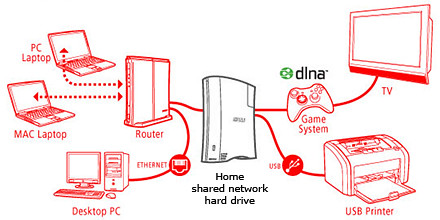
A network attached external hard drive can share files and media (illustration modified from www.buffalotech.com)
The above scenario was what happened to some of my friends and me. Computers and laptops today can last for a long time (if you look after them well) and most often then not, they’re still perfectly functionable when we get a new machine so it seems quite a waste to get rid of the old machine, especially since it can serve as a back up.
And if a member of the family is on the new laptop, others can use the spare computer. So over time, working files, photos, music and video can get distributed over a few computers. At first, it’s easy to remember and keep track of which file is in which computer and do the occasional transfer using an USB thumbdrive.
But over time, as the number of files grow, things can get out of hand – the convenience of being able to work on a few computers turns into a bane.
Now that cloud computing is catching on and we can save files and media on the Internet, this mess can be ameliorated. But those personal and confidential files and humongous video files are still best kept in local storage.
The NAS solution
Schematic of an NAS solution
So over the weekend, I helped my friend rig a similar solution that I use at home – set up a simple external hard drive that can be shared and accessed by a few different computers at home over a local Wi-Fi network.
Those files that are stored on the network attached storage (NAS) drive can then remain accessible no matter which computer you’re working on. It can be used to back up the computers connected.
Some NAS drives allow you to stream media to TVs, media players and game consoles connected to the home network.
In fact, some even enable access to be opened out to the Internet, so that when you’re outstation – in the office, on the road, or overseas – you can still securely access the files stored in the hard drive. This can be done via a browser on a laptop connected to the Internet, or via an app on a smartphone or tablet.
It’s like setting up your personal cloud storage. There are many consumer NAS drives in the market from makers such as Seagate, Western Digital and Buffalo.
They’re all designed to be easily set up by the layman who does not have a PhD in computer science. These NAS drives are connected directly to the router rather than a specific computer acting as a file server.
Any computer connected to the network via the router can access the NAS drive at any time.
Because these NAS drives are more intelligent than the regular dumb external hard drive, they do cost a slight premium over the latter. The NAS drives can manage network access by computers on the network and implement security, access and rights control as well.
Seagate GoFlex Home comes in capacities of 1TB, 2TB and 3TB
Since I’m familiar with the Seagate GoFlex Home, that was what I recommended my friend, who brought home a 3 TB version from the recent COMEX 2011 for S$299.
Tomorrow we’ll see how he managed to tame his growing diaspora of media and files.
The new operating system will run on tablets, desktop and laptop computers via a touch screen, mouse or keyboard. It will also be backward compatible to existing Windows software.
Windows 8 represents Microsoft’s hope of wrestling market share for tablet computers from Apple iPads and Android tablets.
Microsoft will unveil the next iteration of their Windows operating system software today at a developers conference in Anaheim, California. A preview of the design was first released in June this year.
Tough days for PC makers
Windows sales have missed analysts’ estimates for three straight quarters and personal-computer sales have stalled as consumers favor tablets over notebook computers running the software, reported Bloomberg.
Of the 9.3 million iPads sold in the quarter that ended in June, about 20 percent of them went to customers who would have otherwise bought a Windows PC, estimated Colin Gillis, an analyst at BGC Partners LP in New York.
This will be the first time that a Windows operating system is capable of running on chip technology from ARM. Microsoft aims to make Windows 8 capable of running smaller, thinner tablet computers with battery life that can rival that of the market leader – Apple’s iPad.
Out of 60 million media tablets expected to be shipped 2011, 74 percent will be Apple’s iPads, according to an August forecast by IHS. The global market is forecasted to rise to 275.3 million units in 2015, with Apple expected to account for 43.6 percent of the market.
Windows 8 design
The user interface for Windows 8 resembles Microsoft’s Windows Phone 7 smartphone operating system – it uses digital tiles instead of icons to help users navigate between programs. The tiles are on the computer’s home screen can display updated information from inside applications, so that users can see the info at a glance without having to fire up those apps.
The new iPad App was showcased at the TomTom exhibition stand during IFA 2011 in Berlin and will be available in Q4 2011.
“… we have optimised our TomTom App for the iPad. Now customers have one App for all iOS devices.” said Corinne Vigreux, Managing Director at TomTom.Customers who already have the iPhone version of the navigation app will be able to download the new version to their iPads for free.
This latest version will feature enhanced screen resolution, sharpened graphics and more intuitive controls specifically developed for the iPad.
 Yahoo! did well with profits beating estimates – could it be because expectations were low?




 No more plugging/unplugging the old printer from one computer to another.
 number of computers on the GoFlex Home network. You can upgrade at the Application Store that can be accessed through the Seagate Dashboard software.