Archive for the ‘Software’ Category

New portable hard drive: WD My Passport Studio 2TB

Wednesday, April 11th, 2012

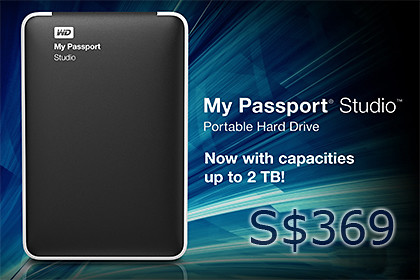
Western Digital has introduced My Passport Studio – its first 2TB portable drive dedicated for Mac users. It is available now at S$369.

Western Digital My Passport Studio 2TB portable hard drive, S$369 for Macs.

Western Digital My Passport Studio 2TB portable hard drive, S$369 for Macs.

The new My Passport Studio portable drive maintains its elegant and protective all-metal casing to complement the MacBook Pro or MacBook Air.

All-metal casing to match MacBooks.

All-metal casing to match MacBooks.

It is compatible with Apple Time Machine for quick and easy automatic backup of Mac hard drives, allowing Mac users to use one drive for the protection and transport of virtually all their digital content, everywhere they go.

In addition to the USB 2.0 interface, My Passport Studio has two high performance FireWire 800 ports.

The dual FireWire ports provide blazing fast upload and transfer speeds while also allowing users to daisy chain additional drives or other peripherals such as HD camcorders.

My Passport Studio also features hardware-based encryption and password protection software, and an all-metal design constructed for scratch resistance and a sturdy feel in your hand.

WD had just launched its My Passport 2TB portable hard drive last week.


Facebook to buy Instagram photo app for US$1 billion

Tuesday, April 10th, 2012

US$100 billion Facebook Inc has agreed to fork out US$1 billion in cash and stock to acquire the photo-sharing application for smartphones. The deal is expected to be completed this quarter.

Is Instagram worth one-hundredth of Facebook?

Is Instagram worth one-hundredth of Facebook?

Facebook is probably looking at attracting the users of mobile devices through its acquisition of Instagram – its biggest acquisition yet.

“Instagram, owned by San Francisco-based Burbn Inc, was valued at $500 million after raising about $60 million last week from investors,” Bloomberg was told.The idea is to attract the advertisers interested in reaching the mobile users.

Instagram started out as the top free photo-sharing app on Apple’s App Store with more than 30 million users.

Only last week, the company introduced the app for Android devices as well.

Instagram has only 13 employees so the offer works out to some US$76 million per employee, according to the Los Angeles Times.

“We need to be mindful about keeping and building on Instagram’s strengths and features rather than just trying to integrate everything into Facebook. That’s why we’re committed to building and growing Instagram independently,” – Zuckerberg wrote on his Facebook fanpage.Instagram was launched in October 2010 by Kevin Systrom and Mike Krieger with a seed funding of about US$500,000.

It subsequently raised US$7 million in 2011, when it had 1.75 million users, according to Bloomberg.

California-based Facebook is the biggest social-networking service today and intends to raise US$5 billion in its initial public offering (IPO) – which is to date the biggest IPO for an Internet company, valuing it at US$100 billion.

Facebook’s CEO, Mark Zuckerberg, said it plans to let Instagram retain its independence, in an effort to reassure Instagram users and potential advertisers.

I tried out Cooklet on the BlackBerry PlayBook

Saturday, April 7th, 2012

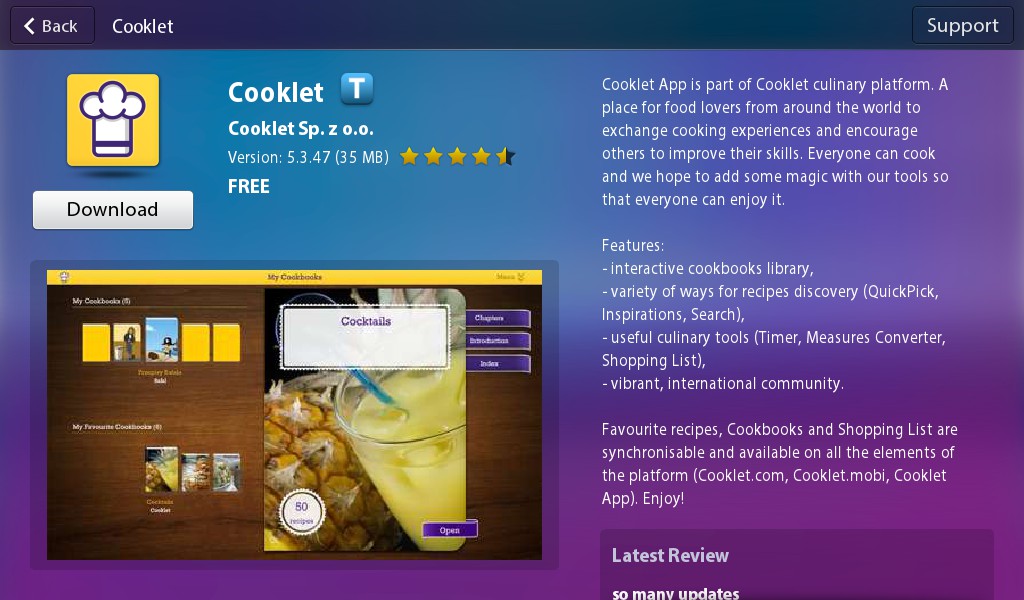
The free Cooklet app was released on BlackBerry App World on Wednesday, 4 April. I downloaded the 35MB app for my wife who has tried it over the long weekend.

The free Cooklet app can be found in App World on the BlackBerry PlayBook.

The free Cooklet app can be found in App World on the BlackBerry PlayBook.

Cooklet App is part of the Cooklet culinary platform, which includes their Facebook page and website which offers recipes, cooking-related utilities.

“I find Multitimer and Converter very useful. I used to use a separate timer, either a mechanical one or my smartphone for timing, and Google for units conversion. Now I can do all that on my PlayBook” – Chef-at-large of the Tan family.Favourite recipes, Cookbooks and Shopping List can be synchronised and are available on all the elements of the platform (Cooklet.com, Cooklet.mobi, Cooklet App).

Cooklet aspires to build a community for food lovers from around the world to exchange cooking experiences and encourage others to improve their skills.

Installation was easy and fast. Go into App World on the PlayBook, do a search for Cooklet, click the Download button.

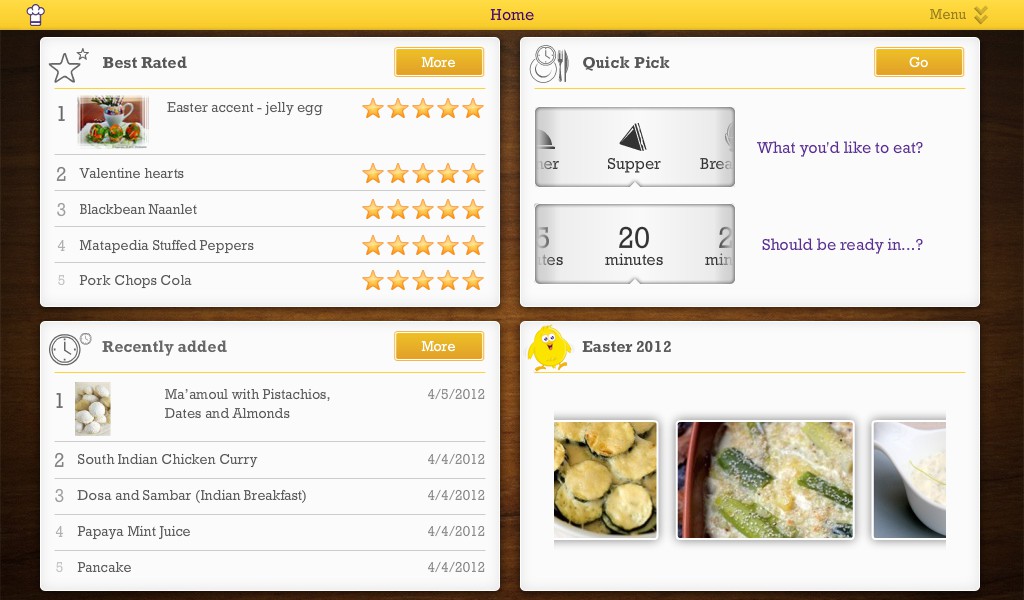
The app's home screen offers various ways of looking up recipes.

The app's home screen offers various ways of looking up recipes.

Once the app is downloaded and installed, you’re good to go.

The home screen of the app comprises four panes, offering different ways to search for recipes: based on ratings, recently added, picture thumbnails based on a them (eg Easter 2012) and Quick Pick search based on which meal you want to prepare for and how much time you have to prepare the meal.

The Converter tool is very useful when perusing the recipes.

The Converter tool is very useful when perusing the recipes.

Swiping downwards from the top edge of the PlayBook reveals the options for the app.

Amongst these are tools such as “Multitimer”, units “Converter”, and “Shopping List”.

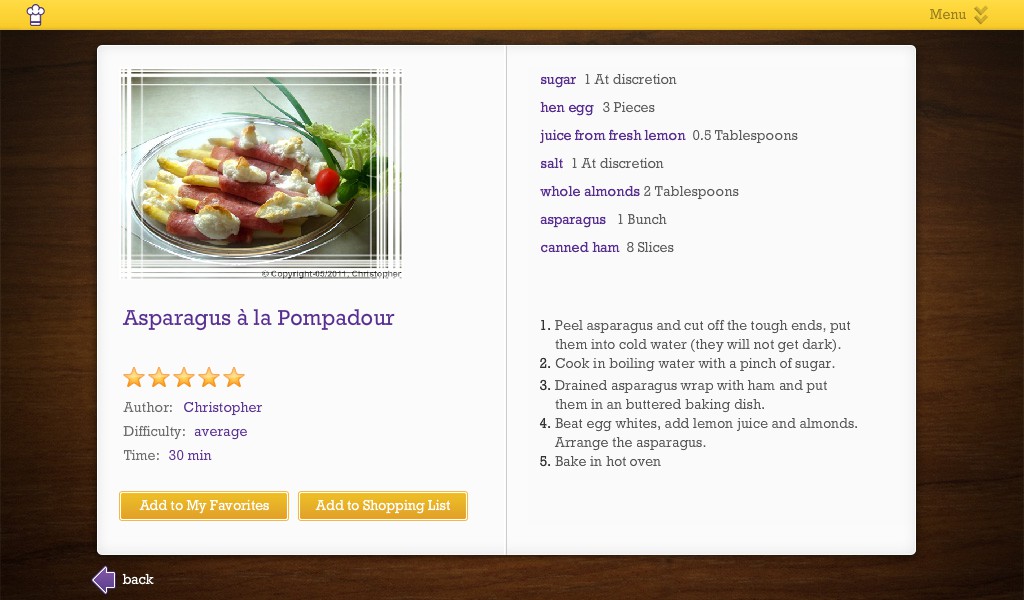
From any recipe, you can send the ingredients to the shopping list with the click of a button.

There is a large repository of recipes available.

There is a large repository of recipes available.

There is also the traditional keyword search for recipes.

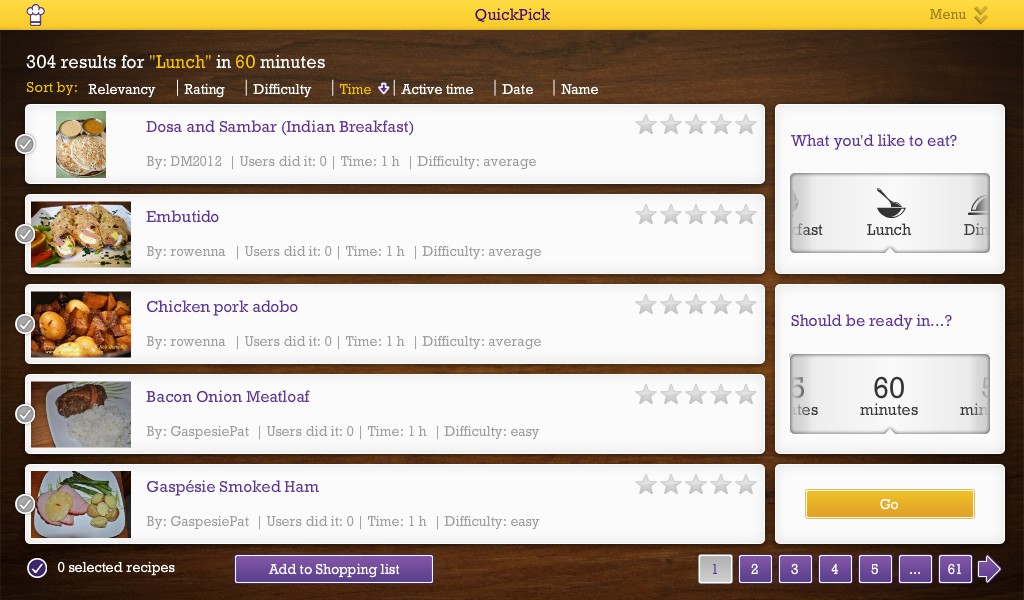
Results can be sorted by Relevancy, Rating, Difficulty, Time needed etc.

For those with a free user account with Cooklet.com, you can access saved recipes from “My Cookbooks” after logging in.

Quick Pick search makes it easy to find the right dish for any meal.

Quick Pick search makes it easy to find the right dish for any meal.

The recipe has a large collection, and the various ways of searching/browsing for recipes makes it easy to look for an appropriate dish for any occasion.

Just a word of caution though, keep the PlayBook well clear of all the flour and raw materials, as well as the oven, unless “PlayBook Cordon Bleu Au Gratin” is part of the menu.

US$1million for complete access to your computer?

Thursday, April 5th, 2012

Norton has unveiled the findings of its latest survey which provides insights into Singaporeans’ Internet dependence, the importance of their personal information and their level of understanding when it comes to Internet security.

Say it with numbers - from Norton's survey of Internet Security.

Say it with numbers – from Norton’s survey of Internet Security.

Last year, Norton did an interesting survey that revealed that phone owners in Singapore were willing to pay an average of S$148 to get their lost/stolen phones back, in order to alleviate the stress and inconvenience losing their mobile phones.

This year, Norton found that 76 percent of Internet users in Singapore would rather forgo US$1million than give strangers unlimited access to their computers.

The key findings are highlighted in the info-graphic above, while the details are at the end of this post.

Protection

So what does Symantec have to protect the multitude of PCs, Macs, smartphones and tablets in the modern household?

Norton will be offering Norton 360 Everywhere in the first half of 2012 (Pricing and systems requirements to be announced at launch).

Norton 360 Everywhere promises to be an easy-to-manage, all-in-one security solution that delivers a multi-platform solution for PCs, Macs, Android-based phones and tablets.

Users can customise their security to meet their specific needs, be it against online threats, data loss, and device loss or theft.

The details of the survey is excerpted below.

(more…)

New mouse: Logitech Touch Mouse M600

Tuesday, April 3rd, 2012

The M600 features a touch surface that lets you swipe and scroll on it with your fingertips to navigate intuitively while surfing the Web. It is now available in Singapore at S$89.

Logitech Touch Mouse M600 - available now for S$89.

Logitech Touch Mouse M600 - available now for S$89.

With the Logitech Touch Mouse M600 you can scroll and swipe wherever the fingertips rest on the mouse.

Logitech Touch Mouse M600Logitech Flow Scroll software makes scrolling fluid, much like scrolling on the touchscreen of a smartphone.

Slide a finger along the touch surface to experience immediate, continuous and free-flowing Web page scrolling.

The mouse’s unique shape is designed to facilitate the tasks we do most – pointing, clicking and scrolling.

It can be used by both right- and left-handers, with click areas that can easily be reassigned with Logitech SetPoint software.

Intuitive control at the fingertipsIn addition, the Logitech Touch Mouse M600 includes the tiny Logitech Unifying receiver, which can connect up to six compatible mice and keyboards through one USB port.

Add a keyboard, switch between mice, mix and match to fit your lifestyle, without having to change receivers or sacrifice another USB port.

The Logitech Touch Mouse M600 was named an International CES Innovations 2012 Design and Engineering Awards Honoree in the Computer Peripherals product category.

The M600 is connected via a USB port and is compatible with Windows 7.

The mouse measures 111.3 x 64.3 x 29.2 mm and weighs 107.7g (with battery).

It comes with 3-year limited hardware warranty.

New tablet: Samsung SLATE PC Series 7

Tuesday, April 3rd, 2012

Powered by an Intel Core i5 processor and featuring an 11.6” screen, the powerful but portable Windows 7 device will be available this month at S$1,688.

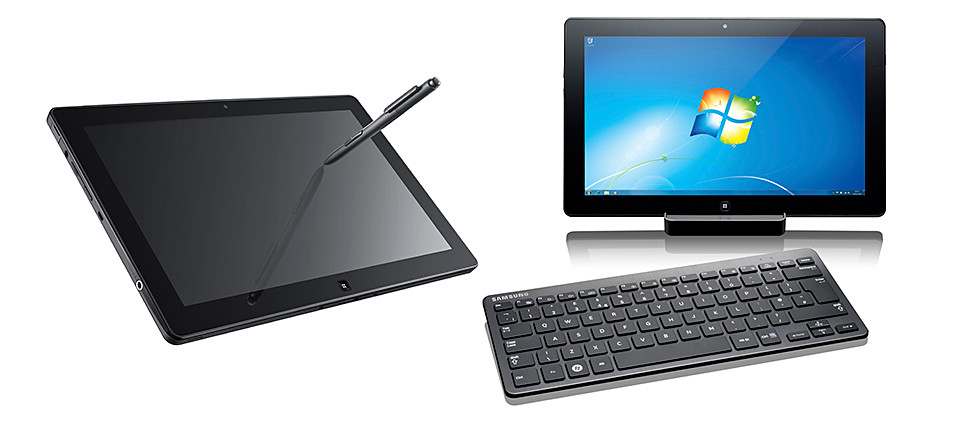
The Samsung SLATE PC Series 7 can be used as a tablet or be used as a desktop.

The Samsung SLATE PC Series 7 can be used as a tablet or be used as a desktop.

The Samsung SLATE PC Series 7 is 12.9mm (0.5”) in thinness and weighs only 860g.

The docking station for the tablet.

The docking station for the tablet.

When connected to the docking station, and the Bluetooth keyboard and mouse (both sold separately), the Slate operates as a desktop PC.

The docking station provides the interface to other devices and enables the flexibility to sync to a larger monitor.

On its own, the SLATE PC Series 7 can used as an ultra-portable device just like a tablet. Battery life is up to 6 hours.

Used as a desktop when docked in and connected to optional Bluetooth keyboard.

Used as a desktop when docked in and connected to optional Bluetooth keyboard.

Multiple input methods from touch screen keyboard to digital pen ensure make it a flexible solution for capturing, creating and presenting content on the go, using Microsoft Office 2010 or via web applications.

Samsung SLATE PC Series 7 (S$1,688)

Samsung SLATE PC Series 7 (S$1,688)

An integrated microphone and dual 2MP (front) / 3MP (rear) cameras record audio/visual files, which can be stored and shared via the full-sized USB port or Wi-Fi, WiMAX and HSPA+ connection.

The SuperBright Plus 11.6” HD display provides outstanding picture quality and text-readability with 400nit brightness – 100% brighter than normal laptop displays, enabling full visual experience even outdoors.

The SLATE PC Series 7 boots up in 15 seconds and wakes from standby in 2 seconds.

Below are the key specifications.

System Configuration
CPU Intel Huron River Core i5 2467M / Core i3
Operating System Genuine Windows 7 Professional
LCD 11.6” HD display, 16:9 aspect ratio, 400nit brightness, PLS(view angle>=170 degree)
GFX Intel HD Graphics 3000
Memory 2GB / 4GB DDR3 1333MHz
Storage 64 / 128 GB SSD
Webcam Front : 2.0M, Rear: 3.0M
WWAN HSPA+ (802.11 bgn)
PAN BT 3.0
Battery 40Wh (up to 6 hours – based on Mobile Mark test)
Dimensions/Wt 12.9mm / 860g (0.5” / 1.89lbs)
Input / Output
Input Capacitive Touch + Digitizer/ AF Coating, Durable Glass
Ports 1x USB2.0 (Type A), m-HDMI, Audio (in/out), micro SD slot
Dock Connector Interface: USB 2.0, Gigabit Ethernet, DC-in, HDMI
Keyboard Bluetooth keyboard (optional)

TODAY! HTC One X and HTC One V hit the shelves

Monday, April 2nd, 2012

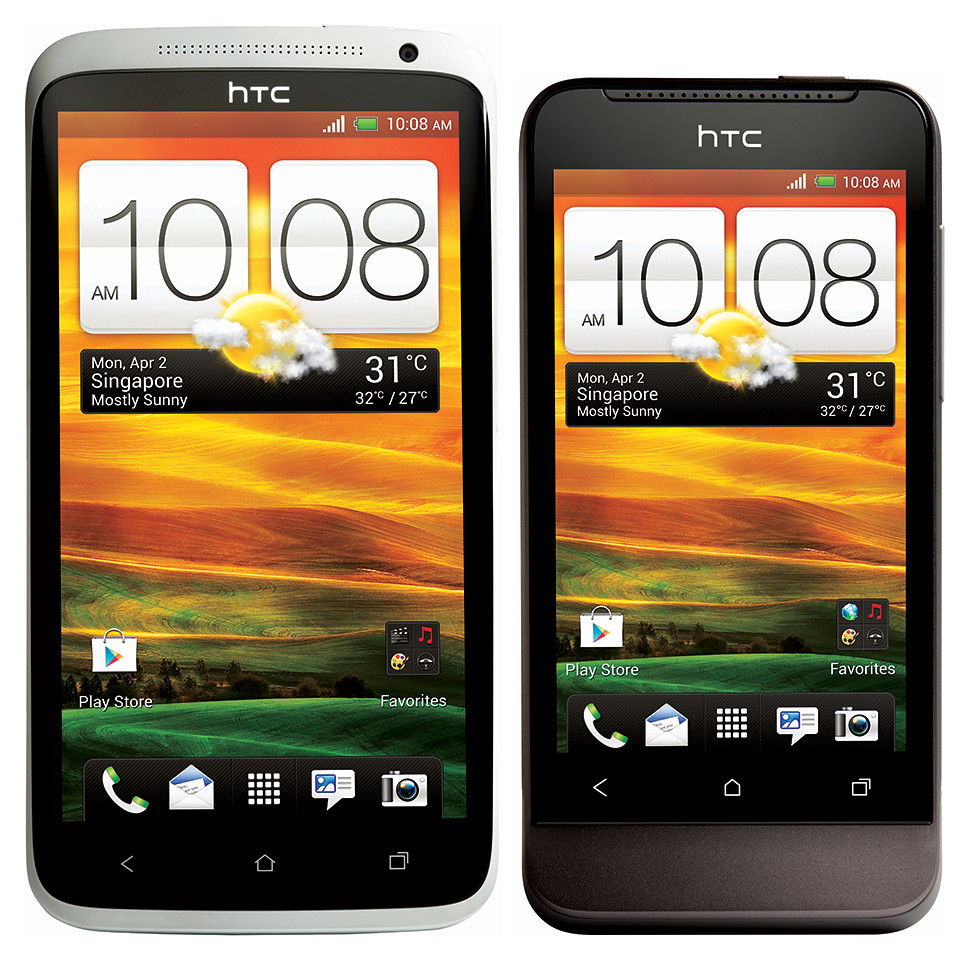
The HTC One X (S$898 without contract) and HTC One V (S$398) are available in Singapore from today, after their launch last Friday.

Lennard Hoornik - President, HTC South Asia - waxes lyrical about the HTC One X.

Lennard Hoornik - President, HTC South Asia - waxes lyrical about the HTC One X.

“One of the key objectives for the HTC One series, was to enable the user to remember their best moments in life easily, whether it be capturing a photo or listening to a song, so it was crucial for us to improve these emotional experiences with an amazing camera and authentic sound experience,” said Lennard Hoornik.I had the chance to speak with Lennard Hoornik during the launch of the HTC One series of smartphones last Friday at Marina Bay Sands.

Lennard Hoornik is the President of HTC South Asia.

On the impending retirement of HTCSense.com’s cloud backup services, Hoornik pointed out that – with the Android’s in-built synching functionalities through Google, coupled with Dropbox integration with the HTC One smartphones – there was no need to replicate the services.

The HTC One X

I was also given a demo by Darren Sng of how the Media Link enabled the content and media of the HTC One X to be “thrown” onto an HDTV in the living room – so that others could view videos on the phone or view web sites accessed by the smartphone.

The Senior Director of Asia Product Marketing at HTC also described how the HTC Car app makes it easy for the driver to control and play music from the HTC One X on the car’s sound system.

A HTC Car Stereo Clip that is plugged into the auxillary socket of the car stereo allows wireless reception of music from the HTC One X, while large icons on the smartphone’s screen make it easier for the driver to take calls and play music.

Both the Media Link and the Car Stereo Clip are sold separately.

Below are the key specifications of the HTC One X and HTC One V.

HTC One X HTC One V
OS Android 4.0(ICS) with HTC Sense 4
Display 4.7″, 1280 x 720 3.7″, 480 x 800
CPU NVIDIA Tegra 3 Quad-core, 1.5GHz 1GHz
Memory 32GB 4GB
Dropbox 25GB – free for 2 years
Size 134.36 x 69.9 x 8.9 mm 120.3 x 59.7 x 9.24 mm
Weight
(with Bty)
130g 115g
Sound Beats Audio
Connectivity
  • Wi-Fi
  • Bluetooth 4.0
  • micro-USB port
  • 3.5MM stereo audio jack
  • DLNA
  • Wi-Fi
  • Bluetooth 4.0
  • micro-USB port
  • 3.5MM stereo audio jack
  • microSD card slot
Camera
  • 8 megapixel
  • f2.0, 28mm lens
  • Autofocus + flash
  • 1080p HD video recording
  • 1.3 MP front camera
  • 5 megapixel
  • f2.0, 28mm lens
  • Autofocus + flash
  • 720p HD video recording
Battery 1800mAh 1500mAh
Talk time
  • Up to 800min (WCDMA)
  • Up to 1020min (GSM)
  • Up to 500min (WCDMA)
  • Up to 540min (GSM)
Standby Time
  • Up to 525hr (WCDMA)
  • Up to 545hr (GSM)
  • Up to 617hr (WCDMA)
  • Up to 533hr (GSM)

New Android smartphones: HTC One X and HTC One V

Friday, March 30th, 2012

HTC has launched its One series of smartphones in Singapore. The HTC One X (S$898 without contract) and HTC One V (S$398) will be available in Singapore and the countries around the world from next Monday, 2 April 2012.

The HTC One X handset is available in Polar White and Glamour Grey, while the HTC One V comes in the colour of Jupiter Rock.

The HTC One X handset is available in Polar White and Glamour Grey, while the HTC One V comes in the colour of Jupiter Rock.

At the media launch in Marina Bay Sands Hall A today, HTC showed off the new Android 4.0 (ICS, with HTC Sense 4) smartphones, which boast a superb camera, Beats Audio and greater connectivity.

The HTC One X has a 4.7-inch, 720p HD screen made of Corning Gorilla Glass, while the One V has a 3.7-inch, 480×800 WVGA screen.

The key tech specs can be found here.

Authentic Sound

Beats By Dr. Dre Audio is integrated into the HTC One smartphones for all sound experiences from listening to music to watching YouTube videos or playing games.

HTC’s included Sync Manager software, available in Windows and Mac versions, makes it a breeze to transfer songs, artists and playlists from your music library, whether it is iTunes or Windows Media Player. The syncing can take place wirelessly as well.

Camera
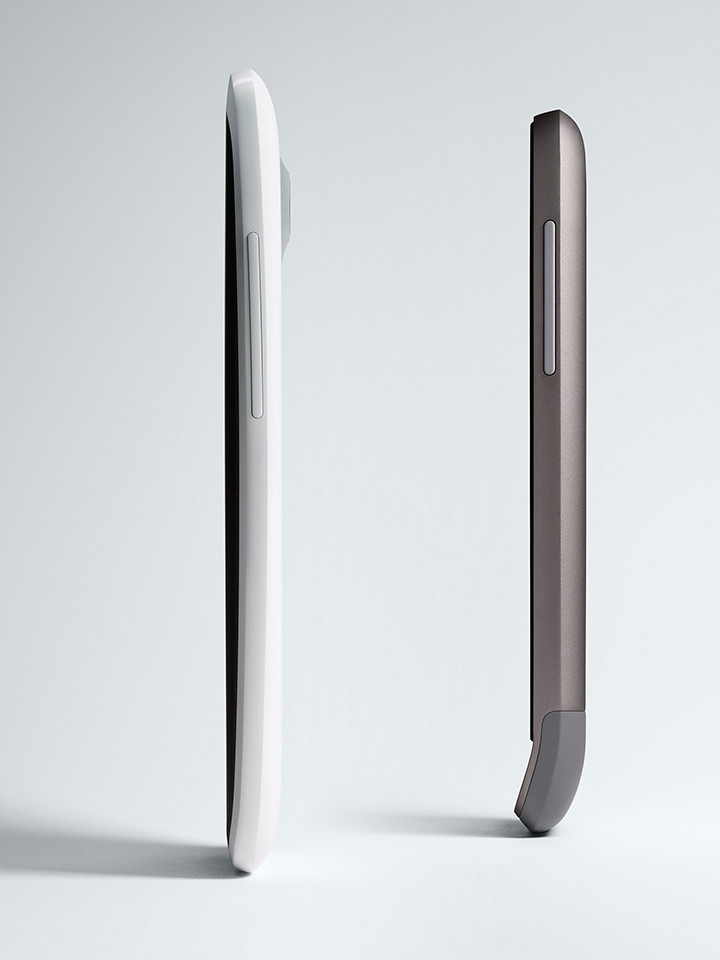
Side views of the HTC One X and V.

HTC One X and HTC One V

With fast autofocus in 0.2 seconds, the camera can take a snapshot in 0.7 seconds.

Simply hold down the shutter button to take up to 99 consecutive shots at 4 frames per second on the HTC One X (HTC One V takes 2 fps to 99 shots).

An f/2.0 lens allows the HTC One X to take pictures in low-light, while HDR technology enables photos in harsh lighting conditions to turn out well.

While shooting HD video, simply press the shutter button to capture a high-resolution still photo without disrupting the video recording. The same can be done while viewing a previously recorded video.

HTC One X will also be available in select 4G LTE markets with a LTE-enabled Qualcomm Snapdragon S4 processor with up to 1.5GHz dual-core CPU’s.

HTC One X will also be available in select 4G LTE markets with a LTE-enabled Qualcomm Snapdragon S4 processor with a 1.5GHz dual-core CPU.

Dropbox integration

To save recorded photos and videos, or any other documents, Dropbox has been integrated with HTC Sense 4 in the HTC One, whose users get 25 gigabytes of free Dropbox space for two years.

Dropbox cloud storage, together with the cloud synchronisation provided by Google via the Android OS has resulted in the recent retirement of HTCsense.com cloud backup services.

Personal entertainment hub

Apart from using the smartphone to make calls, take and view photos or video, enjoy music, surf the web, and play games; HTC is trying to extend the consumption of HTC’s content and media beyond just the smartphone’s screen.

I can see that HTC is positioning the One X as the hub of the modern consumer’s digital lifestyle.

HTC Media Link

If you’re in the living room, you can “throw” the display on your smartphone onto your HDTV with an upward swipe on the smartphone’s screen using three fingers – as long as there is a Wi-Fi network in the vicinity and your TV has an HDMI input which is connected to the HTC Media Link.

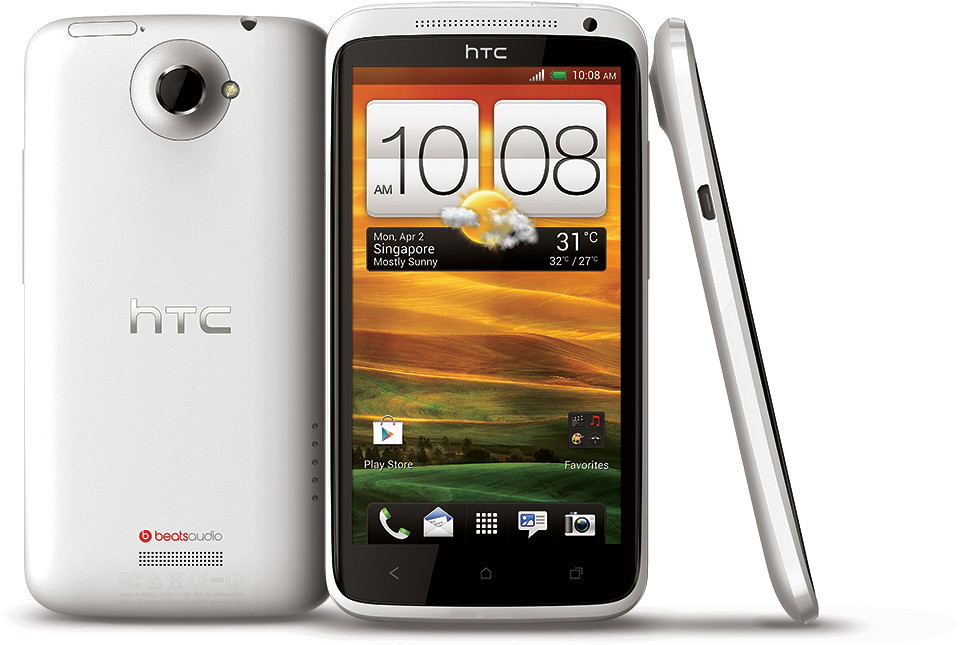
The HTC One X is a highly desirable smartphone in a chic package.

The HTC One X is a highly desirable smartphone in a chic package.

The Media Link is a black box the size of a name card box that has a USB power socket and an HDMI socket.The mirrored display is transmitted over the Wi-Fi network to the Media Link. The TV doesn’t have to be DNLA enabled – all it needs is an HDMI input.

For watching movies, the video can be viewed while the smartphone itself is used for other purposes.

HTC Car Stereo Clip

And if you’re in the car, the music or call audio can be channeled into the car’s speakers. Simply plug the HTC Car Stereo Clip into the car stereo’s auxiliary socket. The Car Stereo Clip receives the sound signals from smartphone and pumps it into the car’s sound system.

With a phone holder that can be attached to the windscreen (via a suction attachment), the smartphone can be put into “car” mode.

Only the essential functionalities typically needed in the car are displayed on the smartphone screen, such as Calls, Music, and navigation – with big icons to make it easier to control while driving.

The Media Link, Car Stereo Clip and the car kit are sold separately.

Nokia ventures into China with Lumia smartphones

Thursday, March 29th, 2012

China Telecom and Nokia have launched the first CDMA Windows phones in China. The Nokia 800C will be available for purchase in April at 3599 RMB (S$718) without contract; while the more affordable Nokia 600C will be available sometime in Q2 2012.

Stephen Elop, CEO of Nokia; and Wang Xiaochu, Chairman of China Telecom at the launch.

Stephen Elop, CEO of Nokia; and Wang Xiaochu, Chairman of China Telecom at the launch.

The Nokia 800C will be Nokia’s first Lumia phone for China – the world’s largest smartphone market. It is the CDMA variant of the Windows Phone-based Lumia 800.

China will see sales of up to 140 million smartphones this year. This is an increase of more than 80%, propelling China past the U.S. as the world’s largest smartphone market, according to researcher Gartner Inc. The Nokia 610C (CDMA variant of Lumia 610, price to be announced) will target more youthful audience and will provide a perfect introduction to Windows Phone with access to the same core signature experiences as the rest of the Lumia range

China Telecom is offering the Nokia 800C in black and cyan.

Nokia is also working on phones for networks operated by China Unicom Hong Kong Ltd. and
China Mobile Ltd, reported Bloomberg.

The smartphone features a 3.7″ AMOLED ClearBlack curved touchscreen display.

With a 1.4 GHz processor, hardware acceleration and a separate graphics processor, it also features an instant-share 8 Mpx camera with Carl Zeiss optics, HD video playback, 16GB of internal user memory and SkyDrive storage for accessing pictures and files from anywhere.

Android enjoys more than half the market share of smartphone platforms in the 4th quarter, while the iPhone accounts for nearly 25 percent, with Windows Phones (from all manufacturers) capturing 1.9 percent. – according to Gartner.Exclusive applications and services for a uniquely local experience

China Telecom and Nokia are targeting young people by integrating music, games, videos, and integrated reading apps right onto the Nokia 800C home screen.

To reach this target market, the Nokia 800C will be featured prominently in Tianyi FlyYoung shops, a distribution arm and new, youth-centered sub-brand of China Telecom.

People purchasing Nokia Lumia  smartphones in China will have access to applications such as magazines from Trends and special offers for free downloads of popular gaming titles such as Fruit Ninja and PVZ.

Trends, a provider of highly interactive fashion magazine applications, will launch Cosmopolitan first for Nokia Lumia smartphones and provide people using a Nokia Lumia phone with free access to For Him Magazine (FHM), Harper’s Bazaar and Esquire magazines in Marketplace, opening today.

Top 3 phone makers in China in the 4th quarter (Gartner)
Samsung 24.3%
Nokia 19.6%
Apple 7.5%

As an added incentive for  people using a Nokia Lumia smartphone in China, Nokia will soon offer 100,000 free downloads of the hit gaming titles Fruit Ninja and PVZ through the Nokia Collection in Marketplace.

Nokia and Microsoft also announced the Be Top program, which is designed to encourage and support developers in creating great new applications on Windows Phone specifically for people in China.

Nokia will offer Lumia users access to all major Internet services in China including Sina, SOHU, Tencent and Renren as well as a choice of nearly 20,000 apps available for download through Marketplace.

The Nokia 800C comes with the Nokia apps that are available only on Lumia smartphones:

The Nokia 800C is the CDMA variant of the Nokia Lumia 800.

The Nokia 800C is the CDMA variant of the Nokia Lumia 800.

Nokia Maps

Quick-access, three-dimensional maps in China and over 190 countries worldwide, as well as the ability to discover the top places nearby with local content support from Fantong, Jiepang, Ctrip, Qunar and Soufun.

People can easily click on the places to see photos, recommendations and information, and quickly dial restaurants to make a reservation.

Nokia Drive

Delivers a full-fledged personal navigation device with free, voice-guided, turn-by-turn navigation for over 100 countries including China.

It has a dedicated in-car user-interface, free offline navigation and speed notifications.

Nokia Music

Offers a single hub experience for discovering the latest music, including unlimited free music for 12 months for consumers in mainland China.

It also includes MixRadio, a free, global, mobile music-streaming application that delivers hundreds of channels of locally-relevant music, including the ability to listen to music offline and build personalized mixes for listening to favourite music from any location.
I tried out Zinio on the BlackBerry PlayBook

Sunday, March 25th, 2012

The free Zinio app was released on BlackBerry App World on Tuesday, 20 March. I’ve tried it out for the past few days to read the two free magazines that came with the “magazine stand” app.

Zinio stocks over 5,000 titles in more than 30 languages.

Zinio stocks over 5,000 titles in more than 30 languages.

Installation was easy and fuss-free. Fire up App World on the PlayBook, search for Zinio, click the Download button.

The 1.8 MB app is downloaded and installed in a jiffy (depending on your bandwidth) and you’re set to go.

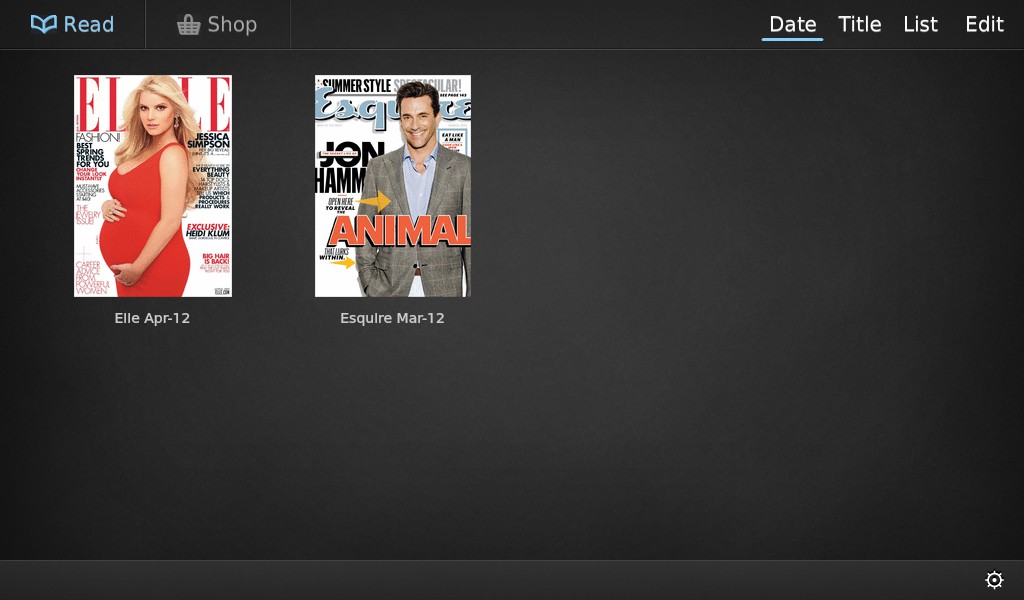
Zinio starts you off with two free magazines when you first install the app.

Zinio starts you off with two free magazines when you first install the app.

Starting up Zinio, you’re prompted to sign in if you have an existing account with Zinio (which is also available through a browser and via apps for iOS and Android tablets), or sign up for a new account.

All you need to sign up is an email and a password. Once logged in, you remain logged in on the PlayBook until you log out.

Once in, you get to the library with two free magazines for installing the app. At this point, you get the March 12 issue of Esquire and April 12 issue of Elle.

Click on the thumbnail to download the magazine. Once downloaded, you can read the magazine even when offline.

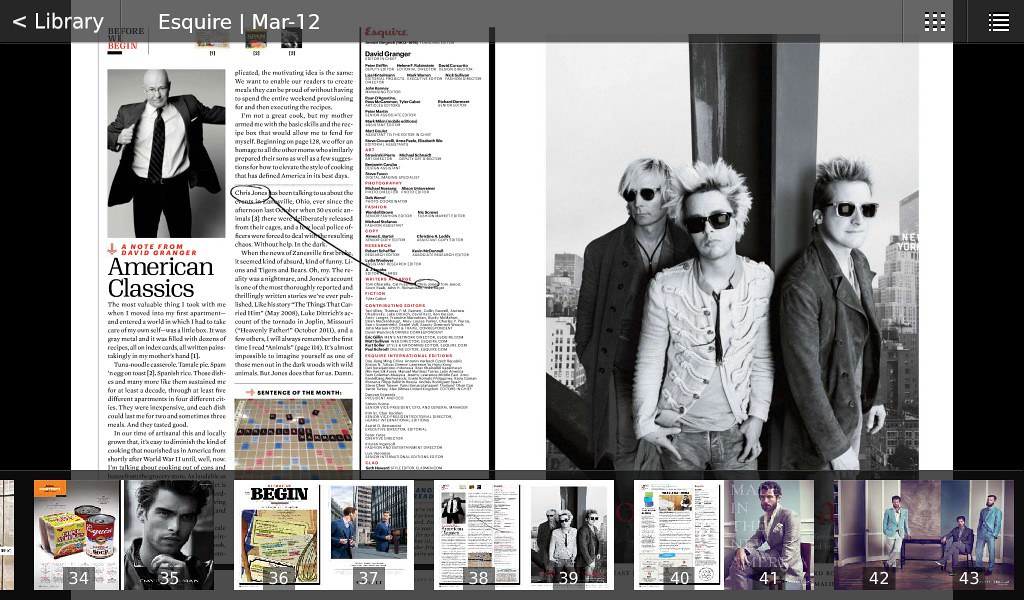
View two pages at a time in landscape mode, with navigation interface when you tap on the screen.

View two pages at a time in landscape mode, with navigation interface when you tap on the screen.

The user interface is simple and intuitive. In portrait mode, you view one page at a time. In landscape mode, you view two pages on the screen.

Pinch to zoom out and spread the fingers to zoom in.

View one page at a time when in portrait mode.

View one page at a time when in portrait mode. Shown with navigation thumbnails below and options above.

Double-tap to zoom-in quickly and single tap to display options, such as a row of scrollable thumbnail pages at the bottom for quick navigation.

Navigation was easy and smooth and the app has been stable in the few days that I’ve played with it.

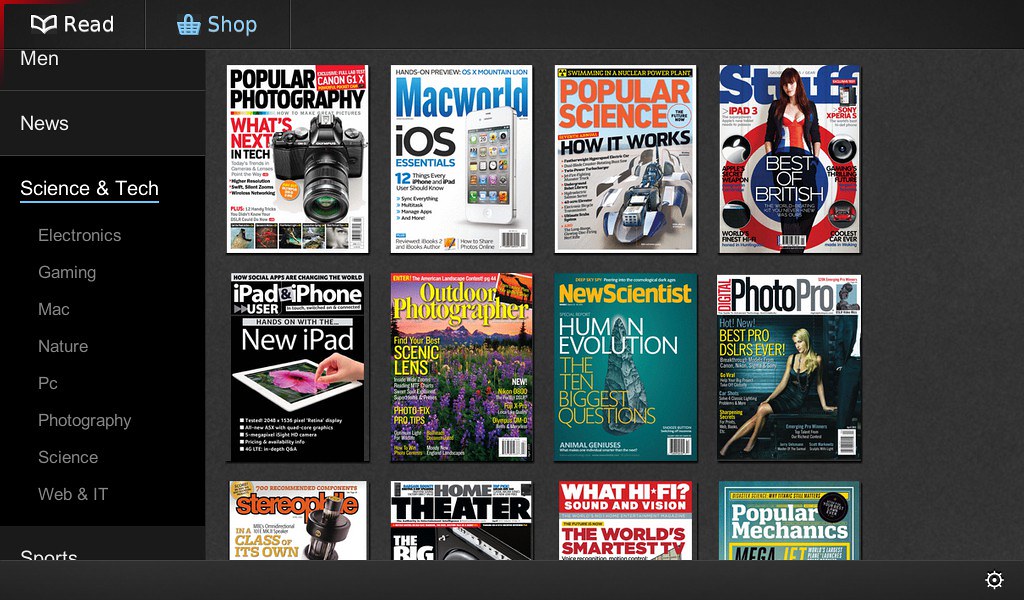
Want more magazines? Hit the online shop. The categories are listed to the left, and the magazine covers in the category listed to the right.

Selecting a magazine will bring you to the details page where you can choose to purchase either a single issue or subscribe for a number of issues.

After that, it’s the typical payment transactions, with entry and verification of credit card details.

Zinio has more than 5,000 titles (magazines and newspapers) in more than 30 languages from around the world.

Publications purchased or subscribed to can be perused on any compatible device as long as the user is logged in with the account used to make the purchase, and a version of the magazine compatible for the OS is available on Zinio.