Posts Tagged ‘laser’
Wednesday, March 6th, 2013
Fuji Xerox will be at Level 1, Booth 1309 at the IT Show 2013 (7-10 March) in Marina Bay Sands.

Click to view/download Fuji Xerox’s 2-page flyer for IT Show 2013.
Three printers worth looking at are the DocuPrint P255 dw (S$169), DocuPrint M255 z (S$349) and DocuPrint M355 df (S$559). There are additional S$50 NTUC vouchers in addition to these discounted prices.
Check out why (laser vs inkjet printers) you may want to consider a laser printer even for a small or home office.

Click to view/download Fuji Xerox’s promotions for IT Show 2013.
Tags:Fuji Xerox, IT Show, IT Show 2013, laser, printers
Posted in Brochures, Exhibition, Fuji Xerox, Gadgets, Prices, Printers, Promotions, Specifications | No Comments »
Tuesday, March 5th, 2013
With the prices of laser printers becoming more affordable, many home and small offices are choosing to buy laser printers to enjoy the more economical print per page costs, faster speed and professional document print quality.

I reviewed an S-LED printer (DocuPrint M255 z) from Fuji Xerox last week and was curious how its S-LED technology worked. Both LED and Laser involve Page Printing, utilising similar technology – electrophotography.
Laser printers are the workhorse of the office where large numbers of prints are made. This is because they are fast, produce professional print quality for documents, and most importantly – print per page is much cheaper than the inkjet printer at home.

LED printers are also known as laser-class printers. S-LED print head technology keeps the advantages of conventional LED’s mechanical reliability and compact design while improving print quality and reliability.
Only problem is – they used to be bulky and were much more expensive than inkjets. So home and small offices who are budget conscious tend to use inkjets instead, especially if the quantity of prints is small.
With laser printers becoming cheaper and more compact, you may want to consider one at the coming IT Show 2013 even if you’re looking for an affordable printer for your home office.
Xerox developed the industry’s first laser printer in 1977, offering a lower cost, reliable, and high print quality printer.
Today, laser technology is a sophisticated printing technology, providing fast printing, quality finishing and easy operation advantages.
Fuji Xerox was voted on HardwareZone as the Best LED Printer Brand 2013 – Readers Choice, and Best SOHO Multi-Function Printer (Editors Choice) DocuPrint M355 df. I asked the company how the laser printer compares with an inkjet printer today.

Pros and cons of a laser printer and inkjet printer. Click to enlarge.
The above is their qualitative comparison against a generic inkjet printer. What everybody already knows, of course, is that the laser printer trounces the inkjet for printing large volumes at very fast speed.

36,000 pages over 3 years. *Warranty period of 4 years – 2-year standard (labour+parts) + 2-year limited (parts only) warranty including replacement of drum cartridge. Click to enlarge.
In terms of Total Cost of Ownership (TCO), above is comparison chart for a high usage rate of 1,000 pages per month over 3 years, as well as a relatively low usage rate of 50 pages per month below.

Even for a low throughput of only 50 pages per month over 3 years, a laser could be more economical than an inkjet. Click to enlarge.
In both cases, Fuji Xerox believes laser printers incur a lower TCO than inkjets.
Summing up the charts, there are savings of over 60%, even with low scale of printing of only 50 pages a month over a period of 3 years. The savings increases with the volume of printing as seen in chart 2 of over 36,000 pages in 3 years.
You can enjoy these savings too, by using a laser printer.
Laser versus Inkjet technologyInkjet printing creates a digital image by dropping spots of ink onto paper; laser printers produce digital images by scanning a laser beam across photoreceptors.
Laser printers work in a dramatically different manner. A laser projects the image of a document onto the printing drum, which is electrically charged. This image is then sprayed with dry ink, or toner, which sticks to the charged areas. The drum is then rolled onto paper and the ink is fused to the paper by a heat source.
This printing process differs dramatically from inkjets because the entire document is loaded into the printer, rather than in a continuous stream, as is the case with inkjets. This difference makes the laser printer ideal for entirely different printing needs than the inkjet.
Tags:copy, DocuPrint, fax, Fuji Xerox, inkjets, laser, multi-function, print, printers, scan
Posted in Figures, Fuji Xerox, Gadgets, Howtos, Inkjet, Laserjet, Multi-function printer, Printers, Study | 2 Comments »
Thursday, February 21st, 2013
The DocuPrint M255 z is a four-in-one multifunction machine that prints (monochrome laser), copies, scans (with OCR), and faxes.
Targeted towards small businesses or the home office, it is priced at S$399 (incl. GST).

Fuji Xerox DocuPrint M255 z S-LED Multifunction Desktop Printer (RRP:S$399).
I used the DocuPrint M255 z for two weeks and found it to be easy to set up, churned out good print quality, and felt faster than its specs suggested.
Physical dimensions
W x D x H:
420 x 398 x 365mm
Although it’s labelled a desktop printer, it does take up the better half of a regular work desk – but that’s no surprise since it’s a multifunction machine that not only prints, but copies, scans and faxes as well.
It’s no bulkier than other office multifunction laser printers that I’ve used from other makes.

The control panel looks busy with plenty of buttons. Once you get the hang of it, the user-interface is actually quite easy to use.
The DocuPrint M255 z is able to print double-sided, saving much time and paper cost. Most importantly to me, that makes it all the more environmentally friendly.
Main specs
- Print speed: 30 ppm
- Print res: 1200 x 1200 dpi
- Copy res: 600 x 600 dpi
- Fax res: 400 x 400 dpi
- Wireless connectivity
- Duplex printing
- Powerful 295 MHz processor
The printer has a fixed drum feature that means that there is only one consumable to replace, further keeping the cost of ownership down.
Print resolution is 1,200 x 1,200 dpi and I had no complaints with the print quality – be it text documents or black-and-white printouts of graphics, illustrations, and photos in black-and-white.
A toner save mode provides the option of using uses less toner per page. Although the printout was slightly fainter, I found that the printout was still crisp, sharp and readable.
One might not even notice the difference if not told that toner save mode is used.
My say:
Designed for small and home offices (SOHOs), the affordable S$399 DocuPrint M255 z churns out good print quality while keeping the cost of ownership affordable for the budget conscious who don’t want to compromise on print quality.
Print speed is up to 30 pages per minute but it certainly feels much faster – at least compared with what I’m used to. It’s like the machines sucks in paper from the feeder and spits it out almost instantaneously, albeit rather vehemently.
(more…)
Tags:copy, DocuPrint, fax, Fuji Xerox, inkjets, laser, multi-function, print, printers, reviews, scan
Posted in Desktops, Fuji Xerox, Gadgets, Laserjet, Multi-function printer, Prices, Printers, Review, Specifications | 3 Comments »
Thursday, November 22nd, 2012
Canon will be at SITEX 2012 at Hall 4B, Booth 4B01 in the Singapore EXPO.

Click to view or download Canon promotions for SITEX 2012. (Caution: 7MB PDF file with 5 flyers)

imageCLASS MF4420W (S$229), home-office multi-function laser printer. Print, scan, copy, wired/wireless LAN.
Check out Canon’s SITEX 2012 promotions and discounts for its range of DSLRs, EOS M mirrorless interchangeable lens camera, as well as Ixus and PowerShot range of compact cameras.
Not forgetting its Legria range of camcorders.
For printers, it has the PIXMA inkjets, as well as imageCLASS series of laser printers and multifunction devices.
Scanners, Inks and toners are also available.
Tags:cameras, Canon, compact, DSLR, EXPO, imageCLASS, inkjet, IT exhibition, IXUS, laser, LaserShot, MIL, PIXMA, Powershot, printers, promotions, Singapore, SITEX, SITEX 2012, SITEX 2012 cameras, SITEX 2012 printers
Posted in Accessories, Brochures, Cameras, Canon, Compact camera, DSLR, EOS, Exhibition, Gadgets, Inkjet, IXUS, Laserjet, MFC, PIXMA, PowerShot, Prices, Printers, Promotions, Scanners, Specifications | 1 Comment »
Wednesday, November 21st, 2012
Fuji Xerox will be at SITEX 2012 at Hall 6 Booths 6D30 and 6C30 in the Singapore EXPO.

Click to view or download SITEX 2012 promotions for Fuji Xerox printers. (Caution: Large 1.6MB jpeg file)
Check out colour and monochrome printers and multifunction laser and S-LED printers from Fuji Xerox during SITEX 2012.
Printers worth checking out include the Fuji Xerox DocuPrint P255dw, DocuPrint M255z, and the DocuPrint CM205fw.
Tags:EXPO, Fuji Xerox, IT exhibition, laser, monochrome, Multifunction, promotions, Singapore, SITEX, SITEX 2012, SITEX 2012 printers
Posted in Brochures, Exhibition, Fuji Xerox, Gadgets, Laserjet, Multi-function printer, Prices, Printers, Promotions, Specifications | 1 Comment »
Wednesday, November 21st, 2012
Brother will be at SITEX 2012 at Hall 6 Booths 6B10 (Newstead) and 6C30 (Harvey Norman) in the Singapore EXPO.

Click to view or download SITEX 2012 promotions for Brother printers, scanners, labellers & sewing machine. (Caution: Large 1.9MB jpeg file)
Check out SITEX 2012 promotions for monochrome and colour laser printers and multifunction devices from Brother, as well as scanners, labellers and – of course – sewing machines.
Printers worth checking out include the Brother MFC-7860DW, Inkjet MFC-7360, and the MFC-J6710DW.
Tags:Brother, EXPO, IT exhibition, labellers, laser, monochrome, Multifunction, promotions, scanners, sewing machines, Singapore, SITEX, SITEX 2012, SITEX 2012 printers
Posted in Brochures, Brother, Exhibition, Gadgets, Laserjet, Multi-function printer, Prices, Printers, Promotions, Scanners, Specifications | 1 Comment »
Thursday, August 30th, 2012
Fuji Xerox will be at COMEX 2012 at Suntec Singapore at Hall 401, Booth 8468; as well as Halls 402/403, Booth 8111.

Click to view or download Fuji Xerox promotions during COMEX 2012.
Check out discounts for laser printers, multifunction printers and toners from Fuji Xerox.
Tags:COMEX, COMEX 2012, COMEX 2012 printers, Fuji Xerox, IT exhibition, laser, Multifunction, promotions, Singapore, Suntec, toners
Posted in Brochures, Events, Exhibition, Fuji Xerox, Gadgets, Laserjet, Prices, Printers, Promotions, Specifications | 1 Comment »
Wednesday, August 15th, 2012
Fuji Xerox launched in Singapore today 5 new monochrome laser printers from the DocuPrint 255 and DocuPrint 355 series. Prices range from S$199 to S$659. All will be available from 30 August, 2012.

Clockwise from top left: Fuji Xerox DocuPrint P355 db, M355 df, P355 d, P255 dw, M255 z monochrome laser printers & multifunction devices.
It was only two weeks ago that Brother launched its slew of monochrome laser printers and multifunction machines in Singapore.
Today, Fuji Xerox has launched its own collection 5 monochrome laser printers, which are compatible with Windows, Mac and Linux platforms.
| Fuji Xerox DocuPrint |
Prices |
| P255 dw |
S$199 |
| M255 z |
S$399 |
| P355 db |
S$359 |
| P355 d |
S$479 |
| M355 df |
S$659 |
All five printers launched today feature duplex double-sided printing, print speeds of up to 30 pages per minute, and print resolutions of 1,200 x 1,200 dpi.
DocuPrint 255 family
The compact DocuPrint 255 family combines exceptional print quality with low cost of ownership. They are ideal for small businesses or the home office.
The DocuPrint M255z is a multifunction printer that prints, scans (with OCR), copies and faxes. It is able to store scanned data easily and quickly without the need for a PC.
DocuPrint 355 family

Fuji Xerox DocuPrint M355 df prints and scans duplex.
The three printers in the DocuPrint 355 family are targeted more at small-to-medium businesses, with the multifunction model providing enterprise level functionalities at an affordable price.
These printers are able to print the first page in six seconds from ready mode. Both the DocuPrint P355 d and DocuPrint M355 df can have wireless networking by plugging in an optional wireless module (S$105).
The DocuPrint M355 df is able to automatically scan double-sided documents.
The DocuPrint P355 db is a basic model that only has a USB port and does not have any networking capability.
Notes:
- The prefix P or M indicates whether the device is a single-function printer or a multifunction printer.
- The suffix d, b, f or w indicates whether the machine has duplex, basic, fax, wireless network capability. A suffix of z means the printer can do everything above.
- All prices include GST. Pictures of the printers are not shown to scale with each other.
Tags:copy, fax, Fuji Xerox, laser, launch, monochrome, Multifunction, printers, scanners, Singapore
Posted in Events, Fuji Xerox, Gadgets, Laserjet, Launch, Prices, Printers, Specifications | No Comments »
Thursday, August 2nd, 2012
Brother launched in Singapore 11 new products today – 3 MFCs, 4 printers, 1 laser fax, and 3 scanners. Prices within.

Brother launched its slew of products at Stellar, 1-Altitude in Singapore.
Founded in 1908 in Japan, the 104-year-old Japanese manufacturer introduced its slew of new office appliances in Singapore today.
The MFCs, printers and laser fax come with 3-years on-site warranty while the scanners come with 1-year carry-in warranty.
4 new mono-laser printers

The Brother HL-5440D & the HL-5450DN looks identical (left) while the HL-5470DW & HL-6180DW looks identical (right).
The four mono-laser printers are targeted towards SMBs and large corporations, offering double-sided printing as well as print speeds of up to 40ppm.
| Mono-laser printers |
Prices |
| HL-5440D |
S$288 |
| HL-5450DN |
S$588 |
| HL-5470DW |
S$688 |
| HL-6180DW |
S$788 |
With Mobile Print (available in all the new models except HL-5440D), users can print anytime, anywhere from their desktops or mobile internet devices such as their Apple or Android smartphones.
The driverless printing supports various platforms, such as the Google Cloud Print, Apple Air-Print and Wi-Fi Direct (applicable for wireless models only).
3 new MFCs and 1 laser fax

Brother MFC-8910DW and MFC-8510DN
The MFCs (Multi-Function Centres) can print, copy, scan and fax.
| Multi-Function Centres |
Prices |
| MFC-8510DN |
S$888 |
| MFC-8910DW |
S$1,088 |
| MFC-7290 |
S$378 |
| FAX-2840 |
S$268 |
Two new models with double-side printing and networking cater to SMBs and large corporations while one is a budget machine for the home or small office.
The FAX-2840 has a fast transmission speed of 33.6kbps and 500-page fax in memory. It can print up to 20ppm at resolutions of up to 2,400 x 600 dpi.
3 scanners

Brother scanners DS-700D, ADS-2100 and DS-600.
The ADS-2100 Desktop Document Scanner helps SMBs digitise hardcopy documents through single-pass high-speed duplex scanning.
| Scanners |
Prices |
| ADS-2100 Desktop |
S$588 |
| DS-600 Mobile |
S$218 |
| DS-700D Mobile |
S$328 |
The DS-600 (single-sided) and DS-700D (double-sided) Mobile Document Scanners allow mobile workers to scan documents on the move, powered by a USB cable.
All three scanners are able to scan name cards as well as A4 size pages.
You can fold an A3 size poster into two so that the scanner can scan both sides and then stitch both halves together with the included software.

Brother FAX=2840. The MFC-7290 looks almost identical in size and form factor.
The scanning software can do OCR (Optical Character Recognition) to scan to editable text files (with no formatting); or scan to PDFs as images (layout preserved).
Alternatively you can also scan your documents into searchable PDFs (OCRed text layer superimposed on scanned image).
As these scanners are sheet-fed, they can only scan loose-leaf pages. For bound books, you’ll need to use a flat-bed scanner instead.
Notes:
“日本悠久制造商Brother在新加坡推出了一系列新产品。包括四部镭射打印机,三部多用途打印机,一部镭射传真机,以及三部文件扫描机。”科技点心(微薄)
- All prices in this post include GST.
- All photos are from Brother but have not been shown to scale.
- Legend for Brother’s nomenclature:
- D – double-side printing
- N – network
- W – WiFi
Tags:1-Altitude, Brother, fax, laser, launch, MFC, printers, scanners, Singapore, Stellar
Posted in Brother, Events, Fax, Gadgets, Laserjet, Launch, MFC, Prices, Printers, Scanners, Specifications | No Comments »
Monday, June 11th, 2012
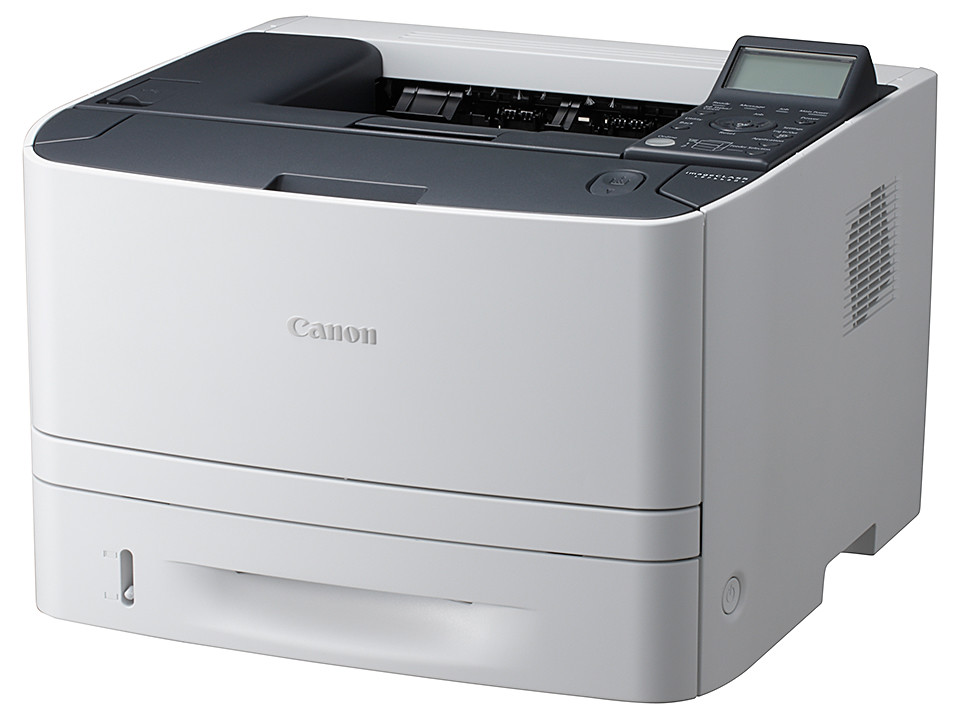
Canon has launched the imageCLASS LBP6680x, a compact monochrome laser printer for Small Office/Home Offices (SOHOs) and Small and Medium-Sized businesses (SMBs).
Available in July for S$799.

Canon imageCLASS LBP6680x - available in July for S$799.
The Canon imageCLASS LBP6680x offers the following advanced printing capabilities.
- Cost-accounting and server-based secure printing via Canon uniFLOW
- Server-less solutions for Home Offices and SMBs
- Reliable, Productive and High-Quality Printing
- Cost- and Energy-Efficiency
- Ease of Use and Maintenance
(more…)
Tags:Canon, imageCLASS, laser, launch, LBP6680x, printer, SMB, SOHO
Posted in Announce, Canon, Enterprise IT, Gadgets, Laserjet, Launch, Prices, Printers, Specifications | No Comments »