Archive for the ‘Utility’ Category

New TomTom app for the iPhone

Monday, September 12th, 2011

The latest version of the TomTom App for iPhone (Version 1.8) now includes the latest maps of countries in Southeast Asia, including Singapore, Malaysia, Brunei, Hong Kong, Macau, Thailand and Indonesia. A new multi-stop routes driving feature is also included.

Use the iPhone as a Portable Navigation Device for turn-by-turn navigation.
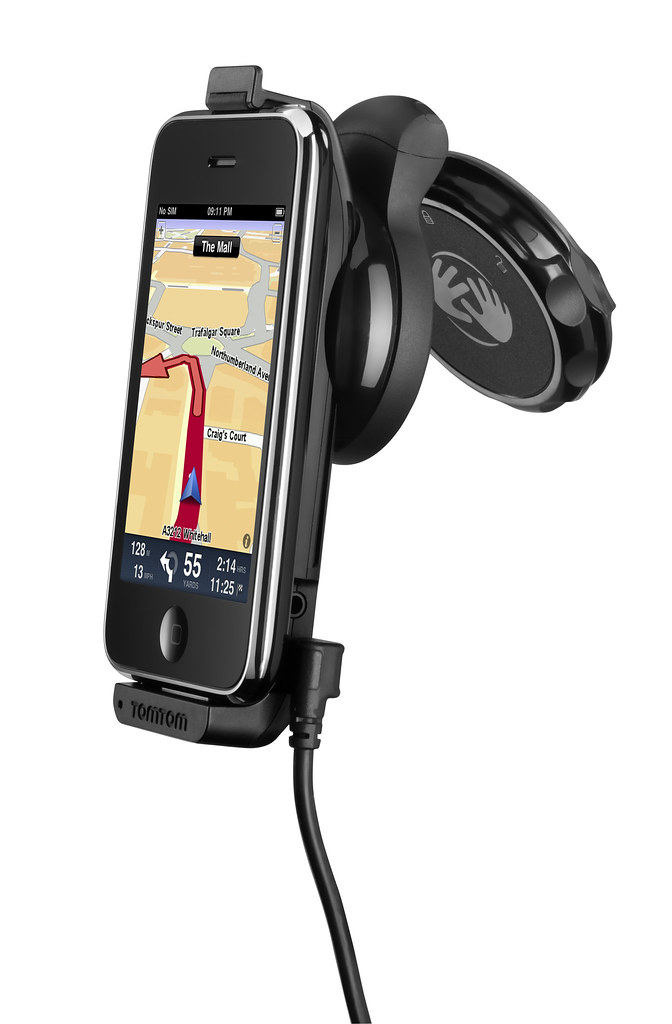
Use the iPhone as a Portable Navigation Device for turn-by-turn navigation.

Mount your iPhone on the dashboard or windscreen to use it like a traditional PND.The South East Asia, TomTom App for iPhone (Version 1.8) can be downloaded from the App Store for USD $69.99. It works with iPhone 4, iPhone 3GS & iPod touch 3rd Gen running iOS4.

The new multi-stop routes feature makes it easier for drivers to make multiple stops on a single route, by letting them add up to five stop-off points when they plan their journey.

Multi-stop routes enable the driver to stop by a bank or petrol station enroute, or a diversion to pick up a friend as part of a longer journey.

This removes the hassle of entering a new journey for each leg of the trip and means that the driver can get an accurate estimated time of arrival for their final destination.

Company byte: TomTom

Sunday, September 11th, 2011

TomTom (AEX:TOM2) is a major supplier of in-car location and navigation products and services.

TomTom, Europe's largest maker of portable navigation devicesFounded in 1991 and headquartered in Amsterdam, TomTom has over 3,500 employees and sells its products in over 40 countries. Its products include portable navigation devices, in-dash infotainment systems, fleet management solutions, maps and real-time services, including TomTom HD Traffic.

Here is TomTom’s route planner which includes live traffic information (not available for some areas yet, including Singapore).

Read more about TomTom on tech4tea.com.

Viber app for free international phone calls

Saturday, September 10th, 2011

An overseas friend uses the Viber app on her iPhone for free VOIP international voice calls and text messages on her smartphone. I installed the free app on my Android phone and tested it. Setup was swift and quality was superb.
Viber for iPhone and Android phones

I was at the petrol station and the attendant was filling up an almost empty tank with petrol. While waiting, I whipped out my Android phone, searched the Android Market for Viber and installed it. Before the attendant had finished filling up the tank, I was already chatting with my friend in Kuala Lumpur on her iPhone – for free.

Set up was really simple on the Android phone. Once it was downloaded and installed, it gets your permission to access your contacts and sends you a 4-digit access code to activate your account. After that, you’re set to go!

Viber is free and works on the iPhone and Android phones.

Viber is free and works on the iPhone and Android phones.

The interface looks similar to the usual numeric dialpad with tabs to access recent calls, contacts, messages and more activities such as inviting friends, sharing on Facebook, tweeting etc.

Basically, Viber emulates the usual phone calling and sms usage – everything is based on your regualr phone number.

Viber dialpad on Android phone

Viber dialpad on Android phone

Your account id is your phone number. If the party you’re calling has Viber installed on her Android or iPhone, you just dial her usual number, complete with international dialing code, to get connected. Viber is currently only available on the iPhone and Android phones. A BlackBerry version is in the pipeline.

Quality was good. Voice quality was loud and clear, although there was just a split-second lag, which didn’t affect the flow of the conversation in the slightest bit.

If the other party does not have Viber installed yet, the app gives you the option to place a regular call through your carrier.

Conclusion: Fast and easy to set-up and use, call quality is fantastic. The free app is compatible with iPhone 3GS (and later) and Android phones.

Company byte: Kroll Ontrack

Wednesday, July 13th, 2011

Kroll Ontrack provides technology-driven services and software to help legal, corporate and government entities as well as consumers manage, recover, search, analyze, produce and present data efficiently and cost-effectively.

“Kroll Ontrack has become a leading provider of legal technologies, with operations in North America, Europe, and Asia Pacific. It has patented technologies and capabilities in recovering seemingly deleted files, including internet-based information cleared from the cache.” – WikipediaIn addition to its suite of software, Kroll Ontrack provides data recovery, data destruction, paper and electronic discovery, document review, computer forensics and ESI consulting.

Kroll Ontrack is the technology services division of Kroll Inc., the global risk consulting company. Kroll is a subsidiary of Altegrity, an industry-leading provider of information solutions.

Companies or individuals can contact Kroll Ontrack for free consultation on the best way to erase data from all types of media. Those in Singapore can call (+65) 6296 5131 or visit their website here. Kroll Ontrack provides several options for data erasure such as Ontrack Eraser Software and Ontrack Eraser Degausser. Both solutions set out to data in a fast, secure and user-friendly way.

Release of Free File Opener v7

Wednesday, May 25th, 2011

Minneapolis based Free File Opener LLC announced the release of the latest version of its flagship product, with enhancements in terms of usability, performance and functionality.

Free File Opener is a versatile and feature-rich file viewer and editor capable of working with files of over 200 different formats, from simple text and MP3 files to multi-layer PSD documents, high-definition videos and Microsoft Office documents.

Free File OpenerThe new version of Free File Opener now supports over 80 new file formats and is capable of cross-converting images to 15 different formats. The program core has become considerably faster, thus making it easier to work with large files and “heavy” folders containing hundreds or thousands of files. Images and photos can also be edited using built-in tools with full support of RAW image files.

An optional paid upgrade unlocks additional features, such as an ability to save and print files, edit Word documents and Excel spreadsheets and convert Excel spreadsheets into the PDF format for easy sharing and distribution.

Free File OpenerThe program works on all major Windows versions, requires no third-party components or libraries and takes seconds to download on a typical broadband connection.

The regular version is free to download and allows users to open and view over 200 different types of files. The company also offers a paid upgrade for users who also want the ability to print and save changes to files they have edited.

The full version of Free File Opener costs only $19.



