Archive for the ‘Mac OS’ Category

New Mac portable hard drives: My Passport Studio and My Passport for Mac

Sunday, October 16th, 2011

Western Digital has launched two new portable hard drives designed for use with Mac computers and Apple Time Machine, with capacities of 500GB, 750GB and 1 TB.

Western Digital My Passport for Mac

Western Digital My Passport for Mac

The Mac-inspired designs of the compact portable hard drives feature matches the external designs of Mac computers.

Powered through the USB 2.0 or Firewire connection, these portable drives allow convenient quick connect external storage without the hassle of lugging additional power adaptors and cables.

My Passport for Mac features a USB 2.0 interface and is an easy way to increase the minimal local storage on MacBook and MacBook Air notebooks.

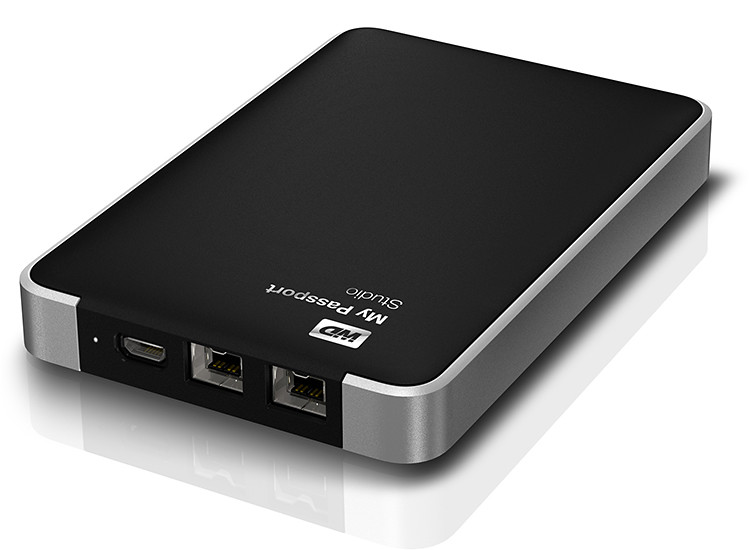
Western Digital My Passport Studio

Western Digital My Passport Studio

My Passport Studio sports an all-metal design, with two FireWire 800 ports and a USB 2.0 interface. The FireWire ports provide fast upload and transfer speeds and can be used to daisy chain up to five additional drives or peripherals such as HD camcorders.

“The speed of the fifth device at the end of the daisy chain is only slower by less than 10% of the first device on the chain,” according to Sheraine Chua, Regional Sales Manager of Branded Products at Western Digital.

Capacity My Passport Studio My Passport for MAC
500 GB S$169 S$119
750 GB S$189 S$129
1 TB S$219 S$159

My Passport Studio also features encryption and password protection software.

COMEX 2011 promotions: Apple products from nübox

Tuesday, August 30th, 2011

Nübox will be at Level 3, Booth 3105 and Level 4, Booth 8236 during COMEX 2011. Customers purchasing any MacBook Air, MacBook Pro or iPod from these booths will receive a special bundle worth up to S$361.

Consumers can also enjoy up to 70% discount on an extensive range of accessories including latest iPad 2 cases, mobile charger for iPhones and wireless Bluetooth keyboard. Nubox is offering Windows 7 Home Premium and Parallels Desktop 6 at a special price of S$249 (usual price S$318) with free upgrade to Parallels Desktop 7.

“The Wanted” giveaway

Nubox offers for Apple products during COMEX 2011.

Nubox offers for Apple products during COMEX 2011.

In an exclusive tie-up with Universal Music Group, Nubox is giving away UK’s new pop sensation, The Wanted’s self-debut album and passes to the five-piece band showcase on September 17 at Comex 2011.

The first 200 customers to spend S$300 and above at the Nubox booths during Comex 2011, and “Like” the Nubox Facebook page can redeem The Wanted debut album at Nubox@Raffles City from September 10 to September 16.

The first 50 customers who purchase a Mac and “Like” the Nubox Facebook page will be entitled to a pair of showcase passes and The Wanted debut album. They can redeem the passes and debut album at Nubox@Marina Bay Link Mall from September 10 to September 16.

Apple updates Mac mini

Monday, July 18th, 2011

The Mac mini will be updated with next generation Intel core processors, new discrete graphics, high-speed Thunderbolt I/O technology and Lion, the Mac’s newly released operating system.

Starting at a suggested retail price of S$788 (inc GST), the new Mac mini will be available from July 20, 2011.

The new Mac mini delivers up to twice the processor and graphics performance of its predecessor, while maintaining its compact form factor of just 19.7 cm2 and 3.6 cm thin.The new Mac mini delivers up to twice the processor and graphics performance of its predecessor, while maintaining its compact form factor of just 19.7 cm2 and 3.6 cm thin.

Available in three different configurations, customers can choose a Mac mini with the latest dual-core Intel Core i5 or Intel Core i7 processors, AMD Radeon HD 6630M discrete graphics, or a quad-core Intel Core i7 powered server configuration.

Suggested retail price of the new Mac mini starts at S$788 (incl GST).

Suggested retail price of the new Mac mini starts at S$788 (incl GST).

Designed without an optical disc drive, Mac mini can access the optical drives on other PCs and Macs, and works with the MacBook Air SuperDrive. Configure-to-order options include up to 8GBs of memory, a faster 7200 RPM hard drive and a 256GB solid state drive.

Plenty of expansion possibilities for the Mac mini.

Plenty of expansion possibilities for the Mac mini.

Mac mini now comes with Thunderbolt I/O technology for greater expansion possibilities. With a Thunderbolt port, Mac mini can connect to peripherals such as high-performance storage devices, RAID arrays and the new Apple Thunderbolt Display.

The new Mac mini is up to twice as fast in terms of processor and graphics performanceThe Thunderbolt display is a 27-inch IPS widescreen display that will enhance the experience for making FaceTime HD video calls, surfing the Web and viewing movies and photos.

Ultra-fast Wi-Fi, enables wireless download of apps from the Mac App Store, data back-up to Time Capsule and quick and easy file sharing using AirDrop. Mac mini includes Bluetooth for wireless peripherals and four USB ports for easy connectivity for wired and wireless devices.

Every new Mac mini comes with Mac OS X Lion, the latest major release of the Mac’s operating system, and iLife apps for creating and sharing photos, movies and music.

Pricing & Availability

The new Mac mini will be available through the Apple Store and Apple Authorised Resellers.

SRP in SGD
(incl GST)
Mac mini Configuration Optional upgrades
S$788 2.3 GHz
Dual-core Intel Core i5
2 GB memory
500 GB hard drive
8 GB memory
750 GB hard drive
S$1,088 2.5 GHz
Dual-core Intel Core i5
4 GB memory
500 GB hard drive
2.7 GHz
Dual-core Intel Core i7
8 GB memory
750 GB hard drive
256 GB solid state drive
S$1,348 2.0 GHz
Dual-core Intel Core i7
Lion Server
4 GB memory
dual 500 GB hard drive
8 GB memory
2 x 750 GB hard drives
2 x 256 GB solid state drives

MacBook Air updated with Next Generation Processors, Thunderbolt I/O, Backlit Keyboard and Mac OS X Lion

Saturday, July 16th, 2011

With up to twice the performance of its predecessor, flash storage for instant-on responsiveness and a compact design, the MacBook Air starts at a suggested retail price of S$1,288 (incl GST) and is available from July 20, 2011.

Apple MacBook Air is available in 11-inch and 13-inch modelsMacBook Air is available in compact 11-inch and 13-inch models that feature a durable aluminium unibody enclosure measuring only 0.3 cm at its thinnest point and 1.7 cm at its thickest. Flash storage allows MacBook Air to turn on instantly and deliver fast data access, improved reliability and energy efficiency.

The 11-inch model weighs 1.08 kilograms and provides up to 5 hours of battery life, while the 13-inch weighs 1.35 kilograms and provides up to 7 hours of battery life.
The MacBook Air line of notebooks are slim and sleek in design
With the latest Intel Core i5 and Core i7 dual-core processors, the new MacBook Air is up to twice as fast as its predecessor. MacBook Air also features Intel HD Graphics 3000 and offers up to 4GB of 1333 MHz memory.

The left side of the MacBook Air houses the plugs for the MagSafe charger, USB, headphone and microphone.

The left side of the MacBook Air houses the plugs for the MagSafe charger, USB, headphone and microphone.

Thunderbolt I/O technology provides additional expansion possibilities to MacBook Air users. Through a single cable, users can connect to high performance peripherals and the new Apple Thunderbolt Display, a docking station for Mac notebooks. Thunderbolt can easily be adapted to support legacy connections such as FireWire and Gigabit Ethernet.

The right side of the MacBook Air houses the USB and Thunderbolt plugs.

The right side of the MacBook Air houses the USB and Thunderbolt plugs.

MacBook Air comes with a full size backlit keyboard and an glass Multi-Touch trackpad. The backlit keyboard uses a sensor to automatically detect a change in ambient lighting and adjusts the keyboard brightness according to the environment.

New Multi-Touch gestures are available as part of Mac OS X LionThe Multi-Touch trackpad supports Lion’s new Multi-Touch gestures such as momentum scrolling, tapping or pinching your fingers to zoom in on a web page or image, and swiping left or right to turn a page or switch between full screen apps.

MacBook Air features 802.11n Wi-Fi and Bluetooth 4.0 technologyMacBook Air also features a thin but brilliant, high resolution LED backlit display. Ultra-fast Wi-Fi, enables wireless download of apps from the Mac App Store, data back-up to Time Capsule and quick and easy file sharing using AirDrop. MacBook Air includes Bluetooth for wireless peripherals and two USB ports for easy connectivity for wired and wireless devices.

Every new MacBook Air comes with Mac OS X Lion, the latest Mac operating system, and iLife apps for creating and sharing photos, movies and music.

Pricing & Availability

The 11-inch and 13-inch MacBook Air are available for order on the Apple Store and Apple Authorised Resellers.

11-inch, 1.6 GHz MacBook Air
S$1,288 2 GB memory, 64 GB flash storage
S$1,588 4 GB memory, 128 GB flash storage
13-inch, 1.7 GHz MacBook Air
S$1,688 4 GB memory, 128 GB flash storage
S$2,088 4 GB memory, 256 GB flash storage

All the prices above include GST. Configure-to-order options and accessories include a 1.8 GHz Core i7 processor, additional flash storage, MacBook Air SuperDrive and a USB Ethernet Adapter.

Apple to release Mac OS X Lion on the Mac App Store

Friday, July 15th, 2011

The eighth major release of the Mac’s operating system will be available as a $29.99 download from the Mac App Store from July 20, 2011.

Mac OS X Lion - the latest operating system for Apple Macs

Mac OS X Lion - the latest operating system for Apple Macs

Some of the 250 new features include: new Multi-Touch gestures; system-wide support for full screen apps; Mission Control, an overview of everything running on your Mac; the Mac App Store that’s built right into the OS; Launchpad, a new home for all your apps; and a completely redesigned Mail app.
New Multi-Touch gestures in Mac OS X Lion
Additional new features in Lion include:

  • Resume, which conveniently brings your apps back exactly how you left them when you restart your Mac or quit and relaunch an app;
  • Auto Save, which automatically and continuously saves your documents as you work;
  • Versions, which automatically records the history of your document as you create it, and gives you an easy way to browse, revert and even copy and paste from previous versions; and
  • AirDrop, which finds nearby Macs and automatically sets up a peer-to-peer wireless connection to make transferring files quick and easy.
“Lion makes upgrading a Mac easier than ever before; just launch the Mac App Store, buy Lion with your iTunes account, and the download and install process will begin automatically,” said Philip Schiller, Apple’s senior vice president of Worldwide Product Marketing.

Mac OS X Lion is available as an upgrade to Mac OS X version 10.6.6 Snow Leopard from the Mac App Store for $29.99. At around 4GB, Lion is about the size of an HD movie from the iTunes Store. Users who do not have broadband access at home, work or school can download Lion at Apple retail stores and later this August, Lion will be made available on a USB thumb drive through the Apple Store for S$88 (incl GST). Mac OS X Lion Server requires Lion and is available from the Mac App Store for $49.99 (US).

Lion requires an Intel-based Mac with a Core 2 Duo, i3, i5, i7 or Xeon processor and 2GB of RAM. Lion is an upgrade and can be installed on all authorized personal Macs. Details regarding Business and Education licensing can be found at apple.com/macosx.

Mac OS X Lion, latest operating system for Apple MacsThe OS X Lion Up-to-Date upgrade will be available through the Mac App Store at no additional charge to all customers who purchased a qualifying new Mac system from Apple or an Apple Authorized Reseller on or after June 6, 2011. Users must request their Up-to-Date upgrade within 30 days of purchase of their Mac computer. Customers who purchased a qualifying Mac between June 6, 2011 and July 20, 2011 will have until August 19, 2011 to make a request.

Steve Jobs unveils Apple’s new iCloud at WWDC 2011

Tuesday, June 7th, 2011

Steve Jobs personally unveiled the much anticipated iCloud during the keynote address at the annual Worldwide Developers Conference (WWDC) 2011 in San Francisco.

ON 6 June 10 am PST (local time 7 June, 1 am), Steve Jobs revealed the set of free cloud services that promises to work seamlessly with applications on the iPhone, iPad, iPod touch, Mac or PC to automatically and wirelessly store a user’s content in iCloud and again automatically and wirelessly push it to all of the same user’s devices. When anything changes on any one of the devices, all of the user’s other devices are wirelessly updated almost instantly.

New Apple iCloud services unveiled by Steve Jobs at WWDC 2011“Today it is a real hassle and very frustrating to keep all your information and content up-to-date across all your devices,” said Steve Jobs, Apple’s CEO. “iCloud keeps your important information and content up to date across all your devices. All of this happens automatically and wirelessly, and because it’s integrated into our apps you don’t even need to think about it—it all just works.”

iCloud services

• The former MobileMe services — Contacts, Calendar and Mail — are all completely re-architected and rewritten to work seamlessly with iCloud. Users can share calendars with friends and family, and the ad-free push Mail account is hosted at me.com. A user’s inbox and mailboxes are kept up-to-date across all of the user’s iOS devices and computers.

New Apple iCloud services unveiled by Steve Jobs• The App Store and iBookstore can now download purchased iOS apps and books to all a user’s devices, not just to the device they were purchased on. Simply tapping the iCloud icon will download any apps and books to any iOS device (up to 10 devices) at no additional cost. The App Store and iBookstore now let a user see his/her purchase history.

• iCloud Backup automatically and securely backs up a user’s iOS devices to iCloud daily over Wi-Fi when the iPhone, iPad or iPod touch is charged. Backed up content includes purchased music, apps and books, Camera Roll (photos and videos), device settings and app data. If a user replaces an iOS device, simply entering his Apple ID and password during setup will prompt iCloud to restore the new device.

iCloud Storage• iCloud Storage seamlessly stores all documents created using iCloud Storage APIs, and automatically pushes them to all of a user’s devices. When document is altered on any device, iCloud automatically pushes the changes to all the other devices. Apple’s Pages, Numbers and Keynote apps are already using iCloud Storage. Users get up to 5GB of free storage for their mail, documents and backup — and this does not include the storage for music, apps and books purchased from Apple, as well as the storage required by Photo Stream. Users will be able to buy even more storage, with details announced when iCloud ships this fall.

• iCloud’s Photo Stream service automatically uploads the photos taken or imported on any of your devices and wirelessly pushes them to all of the user’s other devices and computers. Imagine taking a bunch of photos with your iPhone at a birthday party and seeing them ready to share on your iPad when you return home. Photo Stream is built into the photo apps on all iOS devices, iPhoto on Macs, and saved to the Pictures folder on a PC. To save space, the last 1,000 photos are stored on each device so they can be viewed or moved to an album to save forever. Macs and PCs will store all photos from the Photo Stream, since they have more storage. iCloud will store each photo in the cloud for 30 days, which gives users ample time to connect devices to iCloud and automatically download the latest photos from Photo Stream via Wi-Fi.

• iTunes in the Cloud lets you download previously purchased iTunes music to all of your iOS devices at no additional cost, and new music purchases can be downloaded automatically to all your devices. In addition, music not purchased from iTunes can get gain an improvement in quality by using iTunes Match, a service that replaces your music with a 256 kbps AAC DRM-free version if the service can match it to the over 18 million songs in the iTunes Store. It makes the matched music available in minutes (instead of weeks to upload your entire music library), and uploads only the small percentage of unmatched music. iTunes Match will be available this autumn (only in the US) for a US$24.99 annual fee. Apple today is releasing a free beta version of iTunes in the Cloud, without iTunes Match, for iPhone, iPad and iPod touch users running iOS 4.3. iTunes in the Cloud will support all iPhones that iOS 5 supports in autumn.

Apple is ready to ramp iCloud in its three data centers, including the third recently completed in Maiden, NC. Apple has invested over $500 million in its Maiden data center to support the expected customer demand for the free iCloud services.

Pricing & Availability

The iCloud beta and Cloud Storage APIs are available immediately to iOS and Mac Developer Program members at developer.apple.com. iCloud will be available this autumn concurrently with iOS 5. Users can sign up for iCloud for free on an iPhone, iPad or iPod touch running iOS 5 or a Mac running Mac OS X Lion with a valid Apple ID. iCloud includes 5GB of free cloud storage for Mail, Document Storage and Backup. Purchased music, apps, books and Photo Stream do not count against the storage limit. iTunes Match will be available for US$24.99 per year (US only).

iTunes in the Cloud is available today in the US and requires iTunes 10.3 and iOS 4.3.3. Automatic download of apps and books is available today. Using iCloud with a PC requires Windows Vista or Windows 7. Outlook 2010 or 2007 is recommended for accessing contacts and calendars.

Apple reveals Mac OS X Lion at WWDC 2011

Tuesday, June 7th, 2011

Mac OS X Lion has 250 new features and can be downloaded in July from the Mac App Store for US$29.99.
Mac OS X Lion fromApple
The eighth major release of Apple’s desktop operating system will feature more than 250 new features and 3,000 new developer APIs.

Main new features of the Mac OS X Lion
  • New Multi-Touch gestures
  • System-wide support for full screen apps
  • Mission Control, an innovative view of everything running on your Mac
  • The Mac App Store will now be built right into the OS
  • Launchpad, a new home for all your apps
  • A completely redesigned Mail app

“The Mac has outpaced the PC industry every quarter for five years running and with OS X Lion we plan to keep extending our lead,” said Philip Schiller, Apple’s senior vice president of Worldwide Product Marketing, who briefed WWDC 2011 attendees on Lion. “The best version of OS X yet, Lion is packed with innovative features such as new Multi-Touch gestures, system-wide support for full screen apps, and Mission Control for instantly accessing everything running on your Mac.”

Mac OS X Lion from Apple

Mac OS X Lion from Apple

The details

New Multi-Touch gestures and fluid animations built into Lion let you interact directly with content on the screen for a more intuitive way to use your Mac. New gestures include momentum scrolling, tapping or pinching your fingers to zoom in on a web page or image, and swiping left or right to turn a page or switch between full screen apps. All Mac notebooks ship with Multi-Touch trackpads and desktop Macs can use Apple’s Magic Trackpad.

Full screen apps take advantage of the entire display and are perfect for reading email, surfing the web or browsing photos, especially on a MacBook Air or MacBook Pro. With a single click your app fills the display and you can swipe from one window to another, between full screen apps, or back to your Desktop, Dashboard or Spaces® without ever leaving full screen. iWork and iLife apps, as well as Safari, iTunes, Mail, FaceTime and others, all take advantage of Lion’s system-wide support for full screen apps.

Mission Control combines Exposé, full screen apps, Dashboard and Spaces into one unified experience for a bird’s eye view of every app and window running on your Mac. With a simple swipe, your desktop zooms out to display your open windows grouped by app, thumbnails of your full screen apps and your Dashboard, and allows you to instantly navigate anywhere with a tap.

The Mac App Store is now built into Lion and is the place to browse for new Mac apps, buy them with your iTunes account, download and install them. Apps automatically install directly to Launchpad, and with Lion’s release, the Mac App Store will be able to deliver smaller “delta” app updates and new apps that can take advantage of features like In-App Purchase and Push Notifications.

Launchpad makes it easier than ever to find and launch any app. With a single Multi-Touch gesture, all your Mac apps are displayed in a stunning full screen layout. You can organise apps in any order or into folders and swipe through unlimited pages of apps to find the one you want.

Lion includes a completely redesigned Mail app with an elegant widescreen layout. The new Conversations feature groups related messages into an easily scrollable timeline, intelligently hiding repeated text so the conversation is easy to follow, and retaining graphics and attachments as they were originally sent. An powerful new search feature allows you to refine your search and suggests matches by person, subject and label as you type. Mail includes built-in support for Microsoft Exchange 2010.

Additional new features in Lion

Resume, which conveniently brings your apps back exactly how you left them when you restart your Mac or quit and relaunch an app.

Auto Save, which automatically and continuously saves your documents as you work.

Versions, which automatically records the history of your document as you create it, and gives you an easy way to browse, revert and even copy and paste from previous versions.

AirDrop, which finds nearby Macs and automatically sets up a peer-to-peer wireless connection to make transferring files quick and easy.

Pricing & Availability

Mac OS X Lion will be available in July as an upgrade to Mac OS X version 10.6 Snow Leopard from the Mac App Store for US$29.99. At about 4GB, it is the size of an HD movie from the iTunes Store. Mac OS X Lion Server requires Lion and will be available in July from the Mac App Store for US$49.99.

Lion requires an Intel-based Mac with a Core 2 Duo, i3, i5, i7 or Xeon processor and 2GB of RAM. The Lion upgrade can be installed on all your authorised personal Macs.

The Mac OS X Lion Up-To-Date upgrade is available at no additional charge via the Mac App Store to all customers who purchased a qualifying new Mac system from Apple or an Apple Authorised Reseller on or after June 6, 2011. Users must request their Up-To-Date upgrade within 30 days of purchase of their Mac computer. Customers who purchase a qualifying Mac between June 6, 2011 and the date when Lion is available in the Mac App Store will have 30 days from Lion’s official release date to make a request.

Steve Jobs to unveil Apple’s new Mac OS, iOS 5 and iCloud at WWDC 2011

Saturday, June 4th, 2011

Steve Jobs will make an appearance at the annual Worldwide Developers Conference (WWDC) to unveil Lion – Apple’s eighth major release of Mac OS X. He will also unveil iOS 5, the next iteration of the mobile operating system for the iPad, iPhone and iPod touch. The much anticipated iCloud – Apple’s upcoming cloud services – will also be revealed.

Apple's Worldwide Developers Conference 2011 (WWDC)The sold-out conference WWDC 2011 will be held from June 6 – 10 at San Francisco’s Moscone West. Apple CEO Steve Jobs and a team of Apple executives will kick off the annual conference with a keynote address on Monday, June 6 at 10 am (PST).

WWDC 2011 will feature more than 100 technical sessions presented by Apple engineers. Mac developers can see and learn how to develop Mac OS X Lion applications using its latest technologies and capabilities. Mobile developers will be able to explore the latest innovations and capabilities of iOS and learn how to enhance the functionality, performance and design of their apps. All developers can bring their code to the labs and work with Apple engineers.

Apple Announces New iMac line of desktop computers

Tuesday, May 3rd, 2011
Starting at S$1,648, the iMac has been updated with next generation quad-core processors, powerful graphics, Thunderbolt I/O Technology and a new FaceTime HD camera.
New iMacs from AppleApple claims that, compared to the previous generation, the new iMac is 70 percent faster and new graphics deliver up to three times the performance of the previous generation.
Apple’s desktop line of computers features quad-core Intel Core i5 processors with an option for customers to choose Core i7 processors up to 3.4 GHz. These next generation processors feature an integrated memory controller for a responsive experience and a powerful new media engine for high-performance video encoding and decoding. The new AMD Radeon HD graphics processors give the new iMac an extremely powerful graphics capability.

Thunderbolt

21.5 or 27 inch brilliant IPS LED-backlit high resolution display

iMac is the first desktop computer on the market to include groundbreaking Thunderbolt I/O technology. Apple had launched its updated MacBook Pro line of notebooks on February 25 earlier this year with the new Thunderbolt I/O technology. It was the  first computer on the market to implement the new technology Apple had developed in collaboration with Intel.

The 21.5-inch iMac has a single Thunderbolt port while the 27-inch model features two ports for even greater expansion. Featuring two bi-directional channels with transfer speeds up to an amazing 10Gbps each, Thunderbolt delivers PCI Express directly to external high performance peripherals such as RAID arrays, and can support FireWire and USB consumer devices, and Gigabit Ethernet networks via adapters.

Thunderbolt also supports DisplayPort for high resolution displays and works with existing adapters for HDMI, DVI and VGA displays. Freely available for implementation on systems, cables and devices, Thunderbolt technology is expected to be widely adopted as a new standard for high performance I/O.

FaceTime

21.5 or 27 inch brilliant IPS LED-backlit high resolution display

The iMac includes a built-in FaceTime HD camera and Apple’s innovative FaceTime software for crisp, widescreen video calling the whole family can enjoy. The new camera supports high definition video calls between all FaceTime HD-enabled Macs and standard resolution calls with iPad 2, iPhone 4, the current generation iPod touch and other Intel-based Macs.

Software

The iMac comes with Mac OS X Snow Leopard and iLife – Apple’s innovative suite of applications for creating and sharing photos, movies and music.

Snow Leopard includes the Mac App Store for finding new apps for the iMac.

iLife ’11 features iPhoto with full screen views for browsing, editing and sharing photos; iMovie with powerful easy-to-use tools to transform home videos into fun theatrical trailers; and GarageBand with new ways to improve your playing and create great sounding songs.

Aluminium enclosure, gorgeous display and all-in-one design.The iMac continues to feature its signature aluminium and glass design, brilliant IPS LED-backlit high resolution display, SD card slot and comes with Apple’s innovative Magic Mouse or Magic Trackpad.



On the Green front, the iMac meets stringent Energy Star 5.2 requirements and achieves EPEAT Gold rating. iMac features LED-backlit displays that are mercury-free and made with arsenic-free glass. iMac uses PVC-free components and cables, contains no brominated flame retardants, uses highly recyclable materials and features material-efficient system and packaging designs.

Pricing & Availability

The new iMac is available through the online Apple Store and Apple Authorised Resellers.

21.5-inch iMac
S$1,648 2.5 GHz quad-core Intel Core i5

AMD Radeon HD 6750M

500GB hard drive

S$2,048 2.7 GHz quad-core Intel Core i5

AMD Radeon HD 6770M

1TB hard drive

27-inch iMac
S$2,348 2.7 GHz quad-core Intel Core i5

AMD Radeon HD 6770M

1TB hard drive

S$2,748 3.1 GHz quad-core Intel Core i5

AMD Radeon HD 6970M

1TB hard drive

Configure-to-order options include faster Intel Core i7 processors up to 3.4 GHz, additional hard drive capacity up to 2TB, a 256GB solid state drive, additional DDR3 memory and AppleCare Protection Plan. Additional technical specifications and configure-to-order options and accessories are available online.

Apple WWDC 2011 sold out almost immediately

Tuesday, March 29th, 2011
As expected, tickets for the Worldwide Developers Conference (WWDC) this year were sold out even faster than last year’s 8 days. Tickets, priced at US$1,599, were sold out almost immediately when sales commenced.
Apple WWDC 2011 tickets sold out
Slated to be held from June 6 – 10 at San Francisco’s Moscone West, there is much speculation on whether the iPhone 5 will be launched during the conference. There is also chatter on whether the iOS5 and new Mac OS Lion will be released during the conference. 

At any rate, the rapid sell-out of the tickets indicate that the popularity of the Apple ecosystem is showing no signs of losing its momentum, even in the face of competition from Android-based devices and the resurgence of devices based on Windows Phone 7, HP’s webOS and RIM’s BlackBerry Playbook.

