Archive for the ‘Specifications’ Category

Hands-on with the Wacom Cintiq 24HD

Wednesday, September 28th, 2011

Wacom’s newest flagship Cintiq 24HD tablet-cum-display was launched on 13 September 2011. The only piece available in Southeast Asia was brought in for yesterday’s launch event for the Bamboo graphics tablet.

Priced at S$4269 (incl 7% GST), it will be available in mid-October.

Wacom Cintiq 24 HD in an "hangover" position.

Wacom Cintiq 24 HD in an "hangover" position.

The Cintiq line of graphics tablet is Wacom’s highest end range for creative professionals. Used with a pen stylus, artists work directly on the surface of an LCD screen for an intuitive and direct feel. The tablet-cum-display is plugged into a computer with the necessary graphics software.

The tablet cum display flush with the table top.

The tablet cum display flush with the table top.

The Cintiq 24HD is the newest flagship product for Wacom, featuring a 24-inch HD widescreen display (1920 x 1200 pixels).

The display has a much improved colour gamut compared to its 21-inch and 12-inch siblings, promising 92% of the Adobe RGB colour space – an improvement almost 50%. Users of the Cintiq 21UX and 12 WX frequently set up a separate colour monitor to check for colour accuracy Wiith the 24HD, this is not necessary anymore because of the improved colour accuracy.

Elevated position, with space for keyboard.

Elevated position, with space for keyboard.

I did find the display not as pin-sharp as expected but my guess is that this particular display unit has been toted around more often than it’s been designed for – it’s not meant to be a portable device after all. Yet, physically, the screen was built to withstand the hard with the pen tip – the person giving the brief punched it many times with his knuckles to illustrate this point.

The touch-and-feel of drawing on the tablet was fantastic, as can be expected from a high-end product targeted at the professional market. I did not detect any lag between physical pen movement and the line on the screen below the pen-tip. It painted exactly where I wanted it to, and the 2048 pressure levels made a indelible difference when painting strokes of varying pressure.

Customisable buttons and control ring on both sides.

Customisable buttons and control ring on both sides.

The frame around the screen is deliberately designed to be thick to serve as arm rests. Customisable control rings and buttons can be found on both sides of the frame. They can be set to control brush sizes etc.

The cantilever holder behind the screen is a new design. The tablet can be put in a number of positions: vertical or horizontal, or slanted with one edge resting ON the table, JUST ABOVE a keyboard, or HANGING OVER the table’s edge – whatever position the artist is comfortable with.

For stability, the tablet and the base counterweight weighs some 40 kg. But changing between the positions was simple and fast, and did not require a lot of strength.
Wacom launches new Bamboo graphics pen tablets

Tuesday, September 27th, 2011

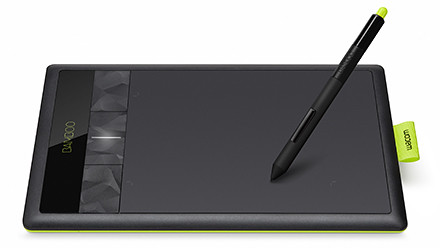
Three re-styled and improved models of the entry-level tablets – Pen, Pen & Touch, and Fun has been launched globally today and is available at S$135, S$185, and S$335 (all incl 7% GST).

Wacom Bamboo graphics tablet

Wacom Bamboo graphics tablet

The 29-year-old Japanese company is the market leader in graphics tablets, enjoying more than 80% of the market share.

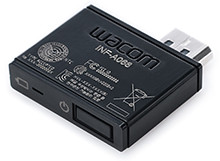
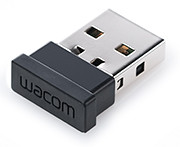
Wireless dongle for Wacom Bamboo

Wireless dongle for Wacom Bamboo

The Bamboo series is the entry level line of tablets for the company, while the Intuos is the mid-tier line, with the Cintiq line the high-end tablet cum LCD display for the heavy-lifting.

This is the third generation of the Bamboo series. The aesthetic design has been restyled to feature a lime green highlight around the edge and a reduced bevel around the tablet’s working area.

All support 1024 pressure levels in the stylus pen tip and a resolution of 2540 pixels. Both the basic Pen and core Touch & Pen models are small sized tablets while the most pricey Fun is medium sized.

The wireless module inserted in the tablet

The wireless module inserted in the tablet

The Touch & Pen and the Fun models both feature four customisable ExpressKeys, supports the use of both pen and finger-touch, supports wireless usage through an optional wireless accessory kit for an extra S$65. The kit may not be available in some countries though.

The Pen model does not have any ExpressKeys nor the wireless ability.

Bundled software for the three models are also slightly different. Both Mac and Windows PCs are supported. The main specifications are tabulated below:

(more…)

Setting up and using the Seagate GoFlex Home storage system

Monday, September 26th, 2011

GoFlex Home is a consumer network attached storage (NAS) hard drive for the home. Easy to set up and use, it allows the access, sharing, streaming, and backup of files and media for computers, network TVs, media players and game consoles connected to the home wireless network.

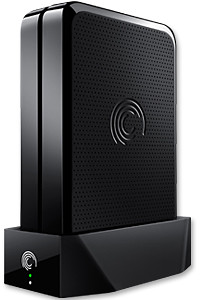
The Seagate GoFlex Home comprises a drive dock and a hard drive.

The Seagate GoFlex Home comprises a drive dock and a hard drive.

Secure access can also be opened to computers and iOS/Android tablets and smartphones over the Internet.

Over the weekend, I helped my friend set up an NAS drive for his desktop, netbook, two laptops, iPhone and Android tablet. He had bought the Seagate GoFlex Home 3 TB storage drive during the recent COMEX 2011 but hadn’t had the time to set it up yet.

I helped by using eye-power because he decided to give it a go himself and actually got the thing working in less than 15 minutes. That was the reason why I recommended the drive in the first place, it works with most consumer home Wi-Fi routers with little set-up or configuration needed.

The GoFlex Home comes with two cables and an software installation CD. The following steps were all that was needed to get the personal storage cloud going:

1. Connect the GoFlex Home drive dock to the Wi-Fi router by using the provided Ethernet cable.

2. Pop the GoFlex hard drive into the GoFlex drive dock and plug the power supply into the drive dock and the wall outlet. Switch on the GoFlex Home by pressing the Power button on the drive dock.

3. Pop the CD (or download from Seagate’s website) into the computer (can be a Mac or Windows PC) to install the software needed to access the hard drive. Simply select a language, key in the product information found on the drive, give the drive a name and register it. The name has to be unique globally since it will be used to identify the drive should you access it from the Internet.

4. Install the software on other computers that require access to the shared drive. Up to 5 people/computers on the home network can access the GoFlex Home. By paying to subscribe to the Seagate Share Pro, you get access for an unlimited number of people/computers to the GoFlex Home.

There are three ways to access the drive. One is to use the installed Seagate Dashboard software (on Windows PCs), which allows all features of the drive to be configured and managed. You can add computers and user accounts, backup, access and share files as well.

Use Seagate Dashboard software to configure and manage GoFelx Home

Use Seagate Dashboard software to configure and manage GoFelx Home

The other way is to use a browser-based Seagate Share either for a computer in the home network or out in the Internet.

Seagate GoFlexAccess App

Free iOS/Android app

Both are easy to use with a simple interface, using drag-and-drop or standard dialog boxes we’re familar with.

The third method is via the appropriate free app on a iOS/Android smartphone or tablet, also over the Internet.

The GoFlex Home comes with a USB port which is very useful. You can connect an additional external hard drive to expand the capacity of the original GoFlex hard drive. You can also connect a USB hub for connecting more than one USB device.

In my friend’s case, he connected his printer to the USB port and all his computers on the Wi-Fi network got to share that printer. USB port on the drive dock for a HDD, printer or USB hubNo more plugging/unplugging the old printer from one computer to another.

The included backup software allows up to three connected computers to be automatically backed up to the GoFlex Home. Upgrade to Premium Backup ($49.95) to back up an unlimited Seagate GoFlex Home home network attached storagenumber of computers on the GoFlex Home network. You can upgrade at the Application Store that can be accessed through the Seagate Dashboard software.
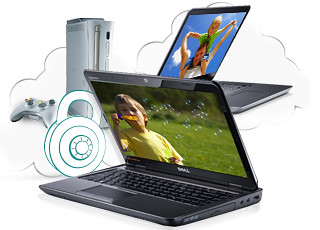

For each user account set up on the GoFlex Home, three folders are created – a Public, Personal, and Backup folder. The Public folder holds files that can be stored and accessed by everyone on your home network. The Personal and Backup folders can only be accessed by the the user.

What I like about the sharing is the granular control available for the files shared. You can specify who you want to share files with, choose to share just certain files or entire folders, set passwords, and set expiry dates for the shares. Administration is intuitive and easy to pick up. You can send a URL of a shared file via email.

Stream media to other computers and media players on the network.

Stream media to other computers and media players on the home wireless network.


Music, photos and video can also be shared and streamed to media players, game consoles or network TVs that support UPnP-AV, DLNA or Windows Media Connect. A wide range of file types are supported.

The GoFlex Home is available in 1TB (S$179), 2TB (S$239) and 3TB (S$339) capacities.

New compact camera: Samsung MultiView MV800

Thursday, September 22nd, 2011

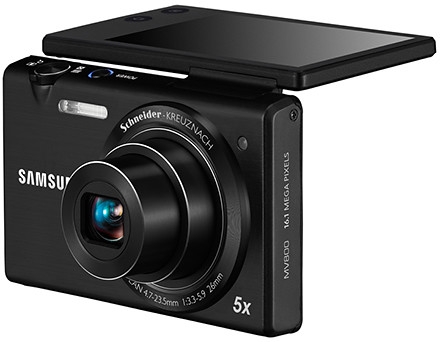
The MV800 features a 3.0-inch wide flip-out touch display and is available in Black, White and Red at S$499.

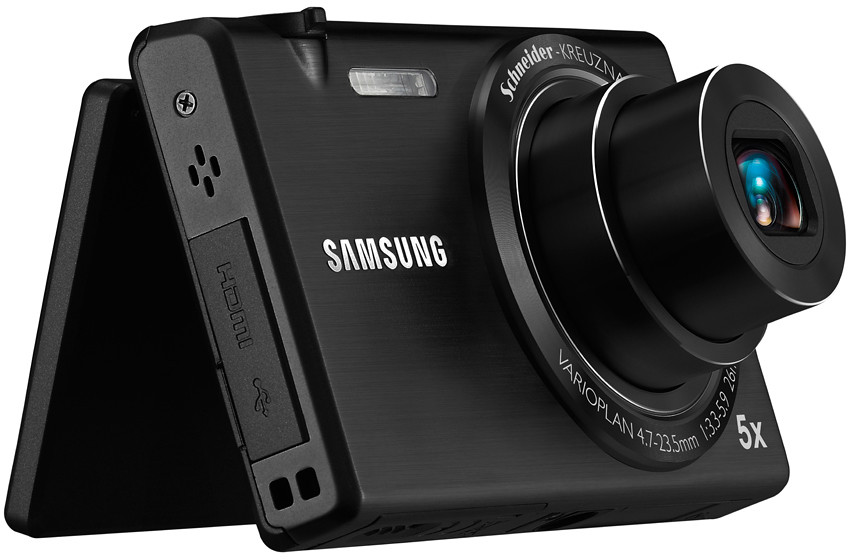
MultiView MV800, the new compact digital camera from Samsung.

MultiView MV800, the new compact digital camera from Samsung.

The flip-out touch screen of Samsung’s new ultra slim compact digital camera enables photographers to snap shots from difficult angles and awkward positions.

Such situations include snapping high-angle shots over the crowd to capture a street performance, and dramatic low-angle shots at ground level. The display can also be folded back to frame the shot when taking self-portraits. Samsung Electronics Co LtdThe screen can be tilted up or down for framing snapshots prior to taking them.

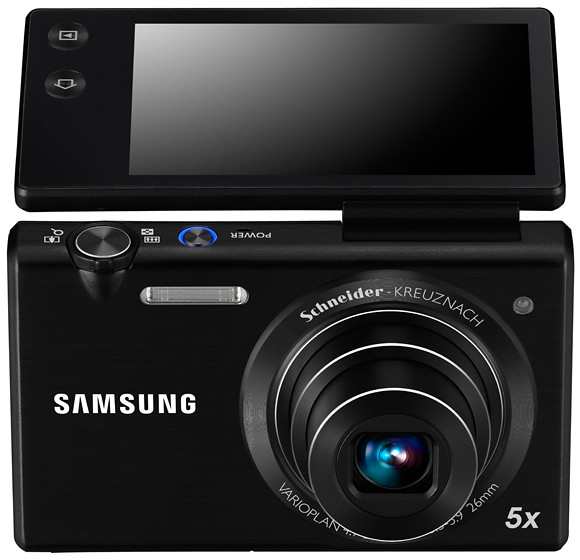
The MV800 pairs a Schneider-Kreuznach lens with a 16.1 megapixel CCD sensor. The 5x zoom Lens ranges goes from a wide angle of 26 mm (35mm equivalent focal length) to a maximum of 130 mm.

Schneider-Kreuznach lens with 5x zoom from 26 to 130 mm (35mm equiv)

Schneider-Kreuznach lens with 5x zoom from 26 to 130 mm (35mm equiv)

The Live Panorama function enables easy photography of large groups by simply holding down the shutter button, and previewing the entire scene that has been captured on the LCD screen. By connecting the MV800 to a 3D HDTV, images and panoramic shots can be viewed in 3D.

The MV800 has a recording time of up to twice as long as the standard MPEG4. The zoom noise reduction technology promises to record only the sound of the subject and not the whirring of the zoom.

The Smart Touch 3.0 with Wallpaper user interface allows users to drag and scroll through menu options to launch features, instead of using traditional clumsy buttons on the camera’s body.

In-camera creative software features

16.1 megapixels and a 3.0-inch wide flip-out touch display.

16.1 megapixels and a 3.0-inch wide flip-out touch display.

The Magic Frame feature includes 12 fun background templates for snapshots, as well as the ability to customise their backgrounds. A Picture-in-Picture function also allows users to insert and combine one image with another.

The Smart Filter function has a selection of 14 artistic effects, including the newly added Water Paint for a stylish watercolour finish or the Cartoon capability that transforms any photo into a fun animated film format. Funny Face allows you to bend, stretch and manipulate portraits by tapping and dragging to radically distort facial characteristics for a good laugh.

Robotic floor cleaner from Samsung

Monday, September 19th, 2011

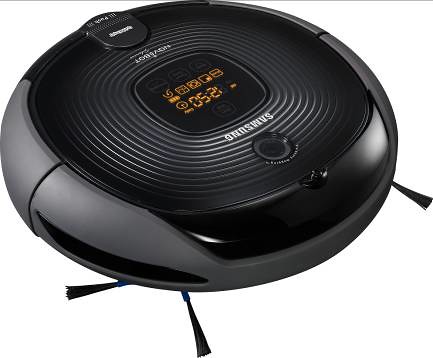
Samsung has launched the NaviBot-Silencio, an intelligent robotic cleaner that provides hands-free automated and hassle free cleaning on all surfaces. It is available at $1099 at all major retailers.

The NaviBot-Silencio robotic cleaner from Samsung, at $1099.

The NaviBot-Silencio robotic cleaner from Samsung, at $1099.

In the recent COMEX 2011, there were two booths selling robotic vacuum cleaners and moppers – the iRobot and the iClebo. I carted home the former and it’s now chugging along in the background while I write this posting.

Samsung Electronics Co LtdNow Samsung has launched its version of the robotic floor cleaner. Based on appearances and technology used, it seems more similar to the Korean iClebo.

Visionary Mapping System for speedy and accurate cleaning

Samsung’s NaviBot-Silencio creates a map of the house with an onboard camera. The Visionary Mapping System captures images at 30 frames per second with the onboard camera, creating a map of the house and plotting the optimum route to achieve total coverage.

The NaviBot-Silencio also has the ability to memorize the best cleaning path, to calculate its exact location in the home, and remembers where it has cleaned, and what is still left to finish.

The NaviBot-Silencio robotic cleaner from Samsung, at $1099.It also uses cognitive mapping technology with two CPU control chips, which serve as the ‘brain’ to think smart with high efficiency. When the battery is low, NaviBot-Silencio automatically takes the shortest route back to the docking station to be recharged. After being fully recharged, it goes back to its last location to begin cleaning.

Micro Fiber Polisher

NaviBot-Silencio picks up dirt, dust, pet hair, crumbs and other debris by specially designed rotating side brushes and power brush while it navigates in the house. The dust cartridge has a capacity of 0.6 litres and filters fine dusts through a washable HEPA filter. It also uses Samsung’s patented technology pet hair care to prevent pet hair from wrapping around the brushes.

The NaviBot-Silencio is designed with Samsung’s Air Path Technology to reduce irritating noise.

New TomTom app for the iPhone

Monday, September 12th, 2011

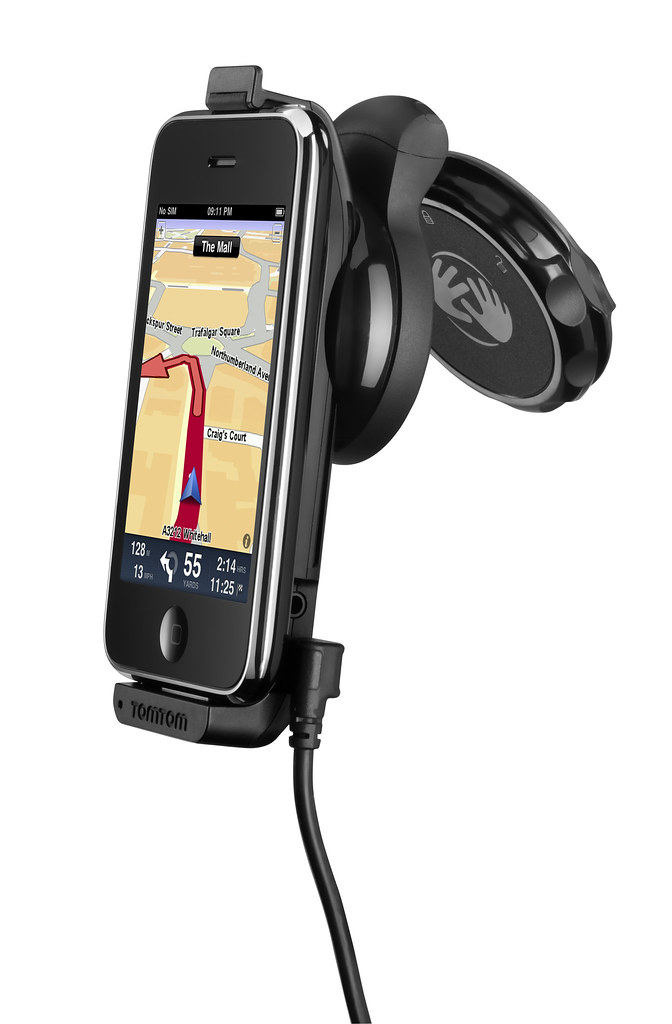
The latest version of the TomTom App for iPhone (Version 1.8) now includes the latest maps of countries in Southeast Asia, including Singapore, Malaysia, Brunei, Hong Kong, Macau, Thailand and Indonesia. A new multi-stop routes driving feature is also included.

Use the iPhone as a Portable Navigation Device for turn-by-turn navigation.

Use the iPhone as a Portable Navigation Device for turn-by-turn navigation.

Mount your iPhone on the dashboard or windscreen to use it like a traditional PND.The South East Asia, TomTom App for iPhone (Version 1.8) can be downloaded from the App Store for USD $69.99. It works with iPhone 4, iPhone 3GS & iPod touch 3rd Gen running iOS4.

The new multi-stop routes feature makes it easier for drivers to make multiple stops on a single route, by letting them add up to five stop-off points when they plan their journey.

Multi-stop routes enable the driver to stop by a bank or petrol station enroute, or a diversion to pick up a friend as part of a longer journey.

This removes the hassle of entering a new journey for each leg of the trip and means that the driver can get an accurate estimated time of arrival for their final destination.

My little haul from COMEX 2011

Sunday, September 4th, 2011

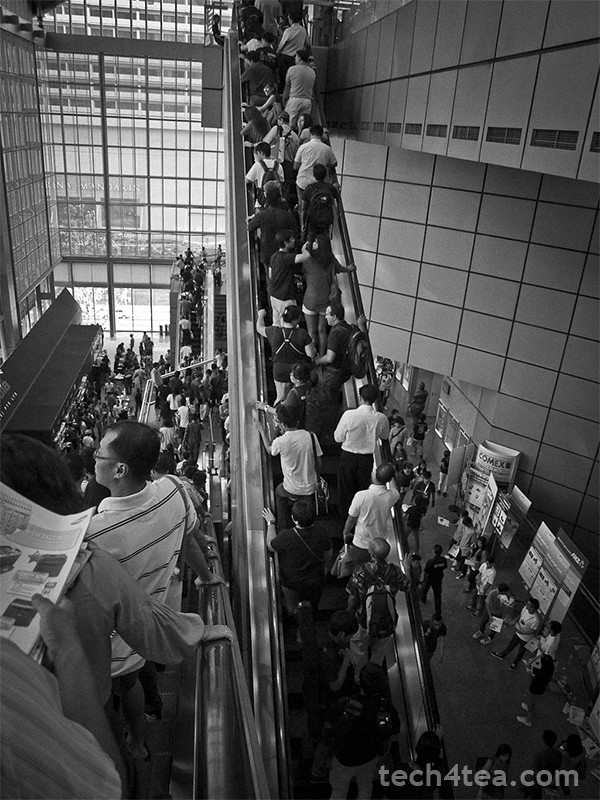
Once a quarter, half of Singapore converges on Suntec City or Singapore Expo to “shop till you drop”. I visited COMEX 2011 on its second of four days to take advantage of promotional prices and to stock up on IT gadgets and peripherals.

Visiting COMEX 2011 on Friday afternoon, the hope was to go in after the initial opening day rush crowd had petered out and before the working folks – who knock off work for the week at five – set in.

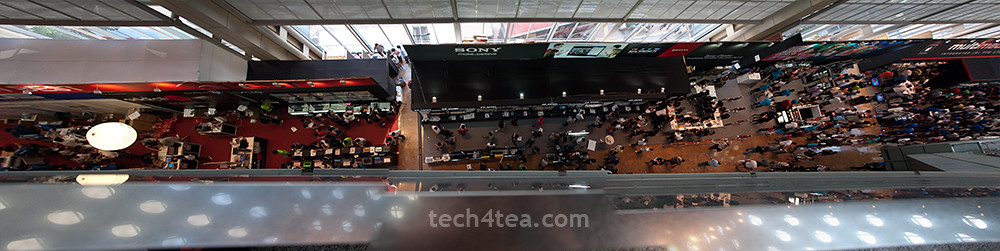
View from Level 6 of COMEX 2011. Combined panorama from 3 photos.

View from Level 6 of COMEX 2011. Combined panorama from 3 photos.

I like to think the ploy worked, though the marketplace was still plenty crowded.

I managed to park the car at Basement 2 of Suntec City itself and dived into the crowd on Level 6 at around half-past-three – shopping list in hand. By 5 pm, people knocking off early from work were streaming into COMEX 2011.I’d listed down beforehand the booth numbers of the vendors selling the stuff I wanted and studied the floor plans to work out an optimal route through the madhouse.

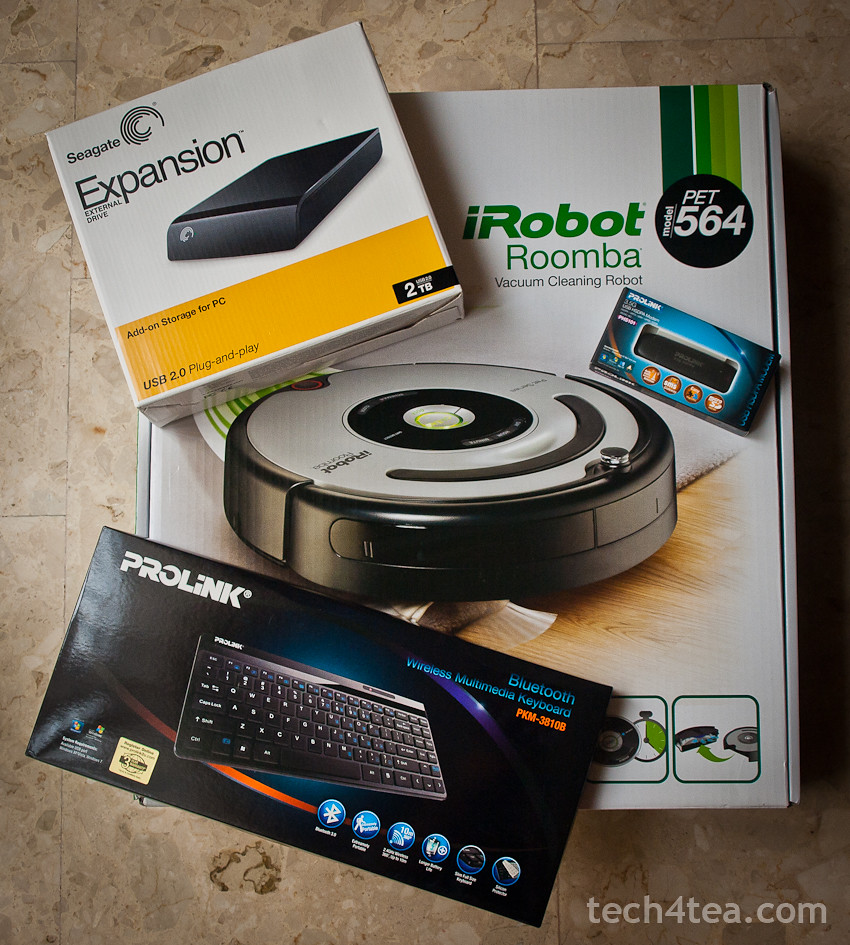
First stop was the Prolink booth where I bought the Prolink PKM-3810B bluetooth keyboard for my BlackBerry PlayBook. The guys at the booth wasn’t sure if it would be compatible with the PlayBook’s OS since it was built for Windows and they’d tested earlier that the keyboard did not play with Android. (Update: I’ve since tested the keyboard with an Android Tab and both worked together without a hitch!)

So I fished out the tablet and tested the display keyboard set. Amazingly both got connected without a hitch, so I became S$48 dollars poorer. And thanks to a cut-out coupon from the Straits Times, I saved S$8 from the original COMEX price of S$56.

Seagate 2TB 3.5-inch external hard disk, iRobot Roomba, Prolink Bluetooth keyboard and 3.5 G USB modem.

My little haul from COMEX 2011

Since I was at Prolink, I bought a 3.5G USB HSDPA Modem for S$69. I was going to renew my home broadband subscription with SingTel. They’d offered a “free” modem for the mobile 1.5 Mbps on condition that I pay S$4 extra per month (if you use your own modem, you get the 1.5 Mbps and data SIM card for free).

Since that worked out to S$96 over the course of two years for the “free” modem, I figured I might as well purchase my own modem for less. Not a lot of savings, but I didn’t like the idea of being suckered into swallowing SingTel’s “free” modem offer.

Next stop was for an external 3.5” hard disk drive. The sweet spot for such storage disks is at 2 TB, and the cheapest 2 TB disk advertised was the Buffalo Drivestation.

“It’s sold out but we have other models that you may want to consider” – sounds all too familiar?

But it’s no darn good if it’s sold out – the “it’s sold out but we have other models that you may want to consider” sounded all too familiar.

So I headed for Seagate and got myself a 2 TB expansion external 3.5” hard disk for S$120. Basic USB 2.0 with no frills.

Last stop was for a robotic maid. The golden retriever at home was driving us nuts with its beautiful golden fur – strewn all over the floor – and the cleaners only come in once a week.

So I checked out the two booths at COMEX selling robotic vacuum cleaners – iClebo and iRobot. I ended up carting home the latter after parting with S$898 for the Pet series iRobot.

“If looks could kill, we’d both have been dead a million times through”.

On the way out of the lift lobby at the B2 carpark, I got waylaid by this guy who saw me lugging the iRobot box and wanted to know where I’d bought it from – while keeping the people in the lift waiting for him.

If looks could kill, we’d both have been dead a million times through.

TomTom introduces in-car fast charger for up to three devices

Saturday, September 3rd, 2011

Available today at S$45 (with GST), the TomTom High Speed Multi-Charger can charge up to three devices at once – and at a rate up to four times faster than a normal USB charger.

TomTom High Speed Multi-Charger at S$45

TomTom High Speed Multi-Charger at S$45 (w GST)

The compact charger ensures that the GPS unit receives the right amount of power and that all devices receive full power charging simultaneously as there are two dedicated USB ports to provide full-power at all times. Most comparable products charge up to 2.1 amps, split between ports.

“It’s the first TomTom accessory that enables users to charge their TomTom device and other mobile devices like a smart phone, tablet or power-hungry DVD player at the same time,” says Nick Saisanas, Marketing Communications Manager, TomTom Asia Pacific.

As well as a 1.2 amp USB charging port suitable for mobile phones or MP3 players, there is a 2.1 amp port to speed-charge high power USB devices such as tablets or smart phones. The TomTom High Speed Multi-Charger will re-charge up to four times faster than a normal USB charger without impacting the other port’s charging capability.

There’s also a dedicated port for powering 12V in-car devices. This multi-port full power functionality means that drivers who are always on the road can charge and use all their electronic devices during their trip.

Those planning an upcoming weekend get-away with the family will also be able to keep children happy with on-the-go charging of items such as tablets and mobile phones – all while navigating.

COMEX 2011 promotions: Olympus cameras and accessories

Thursday, September 1st, 2011

Olympus will be at Booth 8205 on Level 4 in Hall 404  during COMEX 2011. Head for promotional discounts and bundles especially limited sets of the Pen E-PL1, which has been reduced from S$998 to S$498 plus free gifts worth S$320.

The star promotion from Olympus for COMEX 2011 is the PEN E-PL1. Launched in February 2010, OLYMPUS E-PL1 is an entry-level model, equipped with a new Live Guide interface which makes it easy for users to get the results they want even if they have little previous experience with photography.

Olympus promotional price list for cameras and accessories during COMEX 2011 Olympus promotional price list for cameras and accessories during COMEX 2011

Key features include the Live Guide user interface for easy, intuitive adjustment of brightness, hue, background defocusing, and other image parameters; dedicated Movie mode button for seamless access to movie shooting at any time; go-anywhere portability in a light, compact body with built-in flash and image stabilization; offered in white, champagne gold, and black; and six Art Filters, including new Gentle Sepia, for enhanced photographic creativity.

Olympus promotional price list for cameras and accessories during COMEX 2011 Olympus promotional price list for cameras and accessories during COMEX 2011

The normal pricing for the E-PL1 14-42mm Lens Kit is at S$998 (with GST), which includes the body (in White, Champagne Gold, and Black), an M.ZUIKO DIGITAL ED 14–42mm F3.5–5.6 lens (Silver) and an 8 GB SD card.

Olympus promotional price list for cameras and accessories during COMEX 2011 Olympus promotional price list for cameras and accessories during COMEX 2011

The COMEX 2011 offer at S$498 includes an additional 8 GB SD Card, an E-PL1 Skin, a camera bag, a screen protector, a card reader, 3 months local extended warranty and free E-Workshop.

COMEX 2011 debut: Seagate GoFlex Satellite mobile wireless storage

Monday, August 29th, 2011

Seagate today announced the first battery-powered external hard drive to wirelessly extend the storage capacity of any Wi-Fi enabled mobile device. The 500 GB GoFlex Satellite will be widely available from mid-September at S$299. Pre-orders can be made during COMEX 2011.

Bring the GoFlex Satellite everywhere you go to wirelessly expand the storage of up to three tablets and devices.With 500GB and Wi-Fi access over 802.11 b/g/n and a rechargeable battery, this latest member of the GoFlex family connects wirelessly to devices via the use of the free GoFlex Media app—available now on iTunes, the Apple App Store and Android Market—or a web browser.

Many tablets are hampered by the limited on-board storage capacity and lack of connection ports to connect to external storage devices – even though they are popularly used for media consumption.

“No longer will a consumer feel as though it is a compromise to purchase a lower capacity tablet or iPad. With GoFlex Satellite, people will be able to carry their entire media library with them without the need for wires or the web at a fraction of the cost of adding 3G or purchasing or a higher capacity tablet,” said BanSeng Teh, senior vice president and managing director of Asia Pacific and Japan, Seagate Technology.

As a companion for mobile devices, the GoFlex Satellite is capable of providing hours of entertainment for up to three connections. With a stand-by battery life of up to 25 hours, the powerful lithium polymer battery delivers up to five hours of continuously streaming video.

To help with extending battery life, the freeGoFlex Media App provides a progressive download feature, which temporarily loads the video on to the Android device it is being streamed to, allowing the drive to go into stand-by mode.

Streaming over the Internet has enabled video access for tablet owners, but the quality is at the mercy of the Internet connection, be it over Wi-Fi or 3G/4G. With more connected devices per hotspot, it’s often difficult to watch video without choppiness or pixilation. Rather than rely on a buffered stream from a distant provider, GoFlex Satellite mobile storage wirelessly serves up media content as a local attached storage for up to three devices at the same time.

GoFlex Media App

Seagate GoFlex Satellite 500 GB wireless mobile storageAvailable for Apple iOS devices such as iPad, iPhone and iPod touch and any Android devices; the GoFlex Media app provides a seamless way to connect the mobile wireless storage to your mobile devices. Those that currently use an Android smartphone or tablet can access content on a GoFlex Satellite device through its web browser.

Media Sync software

Seagate GoFlex Satellite 500 GB wireless mobile storageThe easy-to-use Media Sync software, also included free with purchase, makes grabbing media from a Windows PC or Mac OS X computer a breeze. Wherever the files are stored, whether that is a file structure of your own creation or in an iTunes library, the Media Sync software will load all of your desired music, videos, photos and documents on to the GoFlex Satellite drive.

Media Sync is easily configured to only place files on the drive that are compatible with your iOS or Android device. Even music and videos purchased through iTunes can be loaded to theGoFlex Satellite drive and will play on all authorized devices.

Loading Media

Seagate GoFlex Satellite 500 GB wireless mobile storageFor rapid loading of media content, the wireless mobile storage comes equipped with the superfast USB 3.0 cable to get files from the computer to the GoFlex Satellite drive. The USB 3.0 cable will also continue to work with USB 2.0 ports and is easily removed for portability. In addition to the USB 3.0 cable, the GoFlex Satellite drive comes complete with a car charger and a compact wall charger.