Archive for the ‘Tablets’ Category
Tuesday, April 3rd, 2012
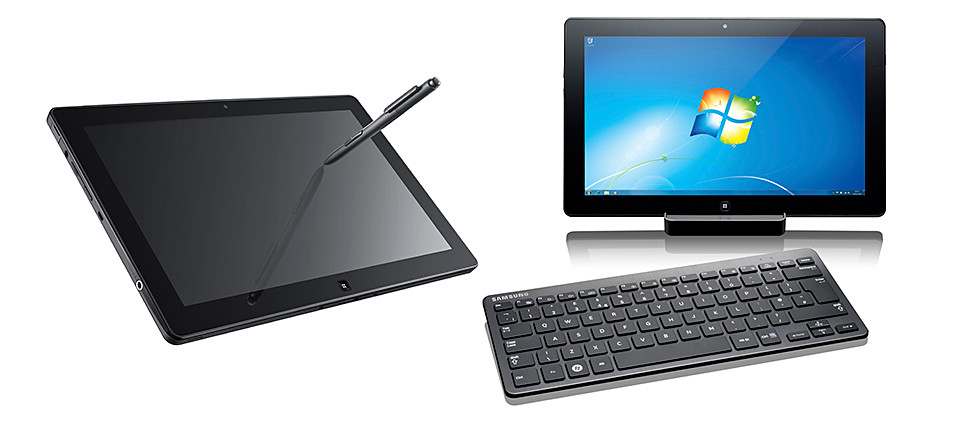
Powered by an Intel Core i5 processor and featuring an 11.6” screen, the powerful but portable Windows 7 device will be available this month at S$1,688.

The Samsung SLATE PC Series 7 can be used as a tablet or be used as a desktop.
The Samsung SLATE PC Series 7 is 12.9mm (0.5”) in thinness and weighs only 860g.

The docking station for the tablet.
When connected to the docking station, and the Bluetooth keyboard and mouse (both sold separately), the Slate operates as a desktop PC.
The docking station provides the interface to other devices and enables the flexibility to sync to a larger monitor.
On its own, the SLATE PC Series 7 can used as an ultra-portable device just like a tablet. Battery life is up to 6 hours.

Used as a desktop when docked in and connected to optional Bluetooth keyboard.
Multiple input methods from touch screen keyboard to digital pen ensure make it a flexible solution for capturing, creating and presenting content on the go, using Microsoft Office 2010 or via web applications.

Samsung SLATE PC Series 7 (S$1,688)
An integrated microphone and dual 2MP (front) / 3MP (rear) cameras record audio/visual files, which can be stored and shared via the full-sized USB port or Wi-Fi, WiMAX and HSPA+ connection.
The SuperBright Plus 11.6” HD display provides outstanding picture quality and text-readability with 400nit brightness – 100% brighter than normal laptop displays, enabling full visual experience even outdoors.
The SLATE PC Series 7 boots up in 15 seconds and wakes from standby in 2 seconds.
Below are the key specifications.
| System Configuration |
| CPU |
Intel Huron River Core i5 2467M / Core i3 |
| Operating System |
Genuine Windows 7 Professional |
| LCD |
11.6” HD display, 16:9 aspect ratio, 400nit brightness, PLS(view angle>=170 degree) |
| GFX |
Intel HD Graphics 3000 |
| Memory |
2GB / 4GB DDR3 1333MHz |
| Storage |
64 / 128 GB SSD |
| Webcam |
Front : 2.0M, Rear: 3.0M |
| WWAN |
HSPA+ (802.11 bgn) |
| PAN |
BT 3.0 |
| Battery |
40Wh (up to 6 hours – based on Mobile Mark test) |
| Dimensions/Wt |
12.9mm / 860g (0.5” / 1.89lbs) |
| Input / Output |
| Input |
Capacitive Touch + Digitizer/ AF Coating, Durable Glass |
| Ports |
1x USB2.0 (Type A), m-HDMI, Audio (in/out), micro SD slot |
| Dock Connector |
Interface: USB 2.0, Gigabit Ethernet, DC-in, HDMI |
| Keyboard |
Bluetooth keyboard (optional) |
Tags:Bluetooth, desktop, dock, keyboard, launch, PC, Samsung, Singapore, slate, tablet, Windows
Posted in Desktops, Gadgets, Launch, Prices, Samsung, Software, Specifications, Tablets, Windows 7 | No Comments »
Sunday, March 25th, 2012
The free Zinio app was released on BlackBerry App World on Tuesday, 20 March. I’ve tried it out for the past few days to read the two free magazines that came with the “magazine stand” app.

Zinio stocks over 5,000 titles in more than 30 languages.
Installation was easy and fuss-free. Fire up App World on the PlayBook, search for Zinio, click the Download button.
The 1.8 MB app is downloaded and installed in a jiffy (depending on your bandwidth) and you’re set to go.

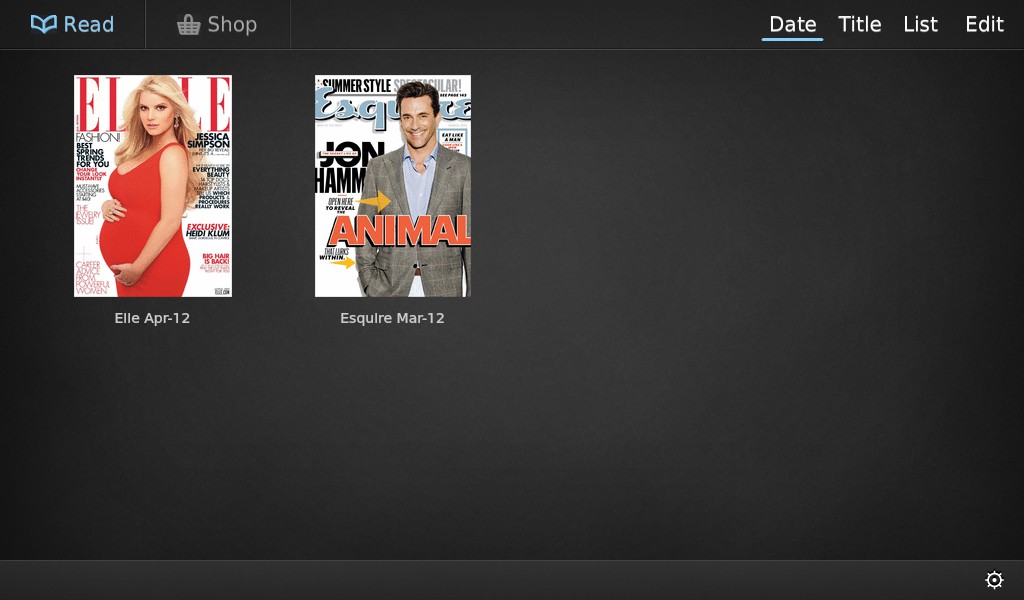
Zinio starts you off with two free magazines when you first install the app.
Starting up Zinio, you’re prompted to sign in if you have an existing account with Zinio (which is also available through a browser and via apps for iOS and Android tablets), or sign up for a new account.
All you need to sign up is an email and a password. Once logged in, you remain logged in on the PlayBook until you log out.
Once in, you get to the library with two free magazines for installing the app. At this point, you get the March 12 issue of Esquire and April 12 issue of Elle.
Click on the thumbnail to download the magazine. Once downloaded, you can read the magazine even when offline.

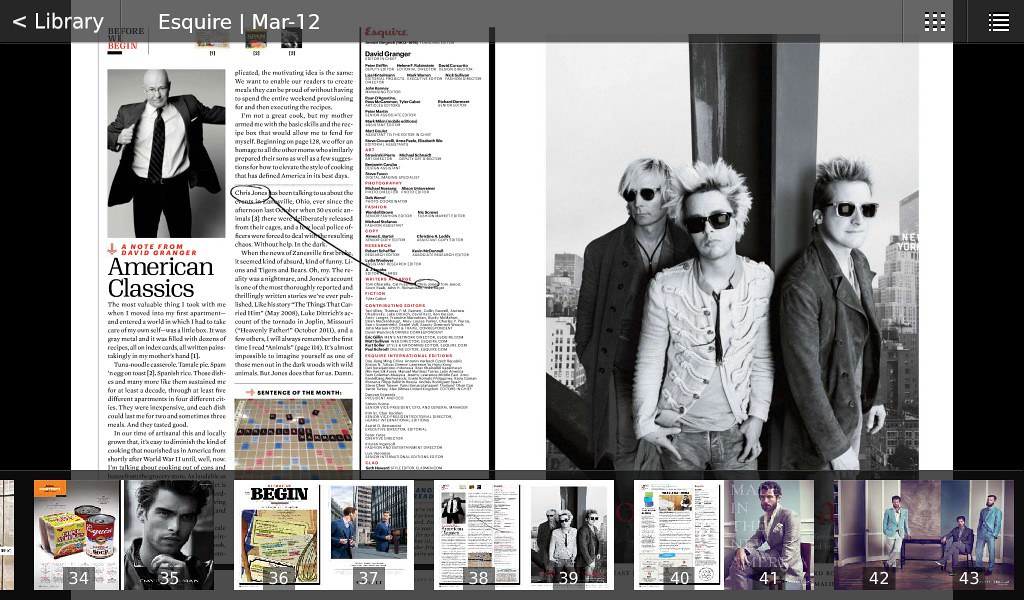
View two pages at a time in landscape mode, with navigation interface when you tap on the screen.
The user interface is simple and intuitive. In portrait mode, you view one page at a time. In landscape mode, you view two pages on the screen.
Pinch to zoom out and spread the fingers to zoom in.

View one page at a time when in portrait mode. Shown with navigation thumbnails below and options above.
Double-tap to zoom-in quickly and single tap to display options, such as a row of scrollable thumbnail pages at the bottom for quick navigation.
Navigation was easy and smooth and the app has been stable in the few days that I’ve played with it.
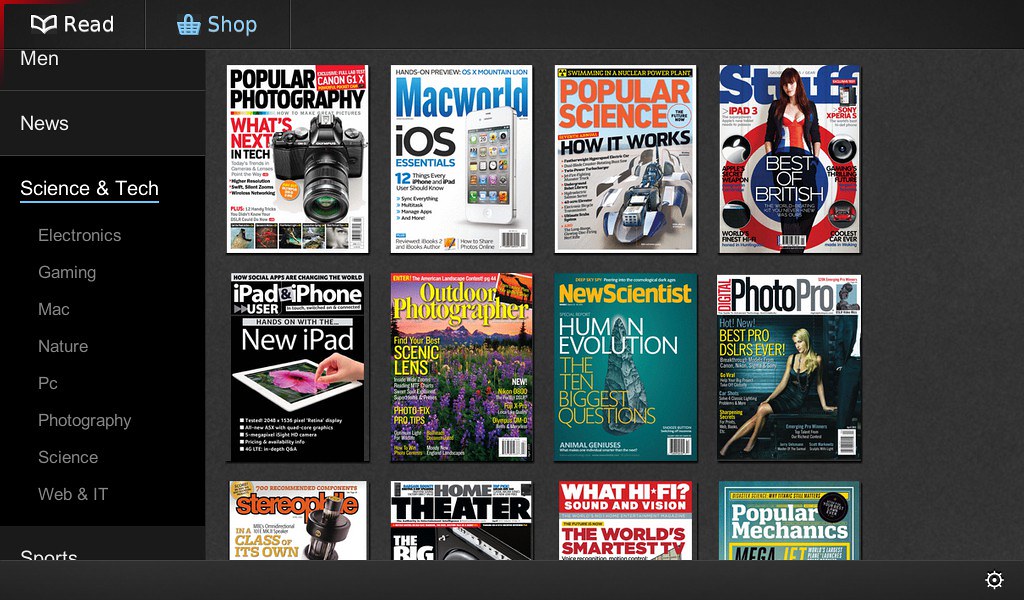
Want more magazines? Hit the online shop. The categories are listed to the left, and the magazine covers in the category listed to the right.
Selecting a magazine will bring you to the details page where you can choose to purchase either a single issue or subscribe for a number of issues.
After that, it’s the typical payment transactions, with entry and verification of credit card details.
Zinio has more than 5,000 titles (magazines and newspapers) in more than 30 languages from around the world.
Publications purchased or subscribed to can be perused on any compatible device as long as the user is logged in with the account used to make the purchase, and a version of the magazine compatible for the OS is available on Zinio.
Tags:Apps, magazines, newstand, Playbook, RIM, tablets, Zinio
Posted in App, BlackBerry, Gadgets, Launch, Opinion, PlayBook, Prices, Review, RIM, Software, Specifications, Tablets | No Comments »
Tuesday, March 20th, 2012
Sony hosted a concept demonstration of how their slew of electronic products can connect easily and seamlessly together to cater to the digital lifestyle needs of the modern consumer.
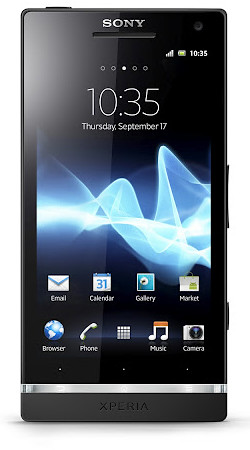
New Bravia TVs and Xperia smartphones were also launched at the event.

Sony connectivity demo at ONE°15 Marina Club in Sentosa.
At ONE°15 Marina Club in Sentosa, tablets, VAIO notebooks, Xperia smartphones and Bravia TVs were interconnected with each other to  demonstrate how media and content can be seamlessly networked and shared between the various devices.
The event is also an apt welcome of Sony Mobile Communications back to the fold of Sony Electronics.
Sony had recently acquired the other 50% of Sony Ericsson and the connectivity event serves to remind consumers of the connectivity and ecosystem that Xperia customers can expect to enjoy with other Sony devices.
The showcased Xperia smartphones are the first range of devices under Sony Mobile Communications.

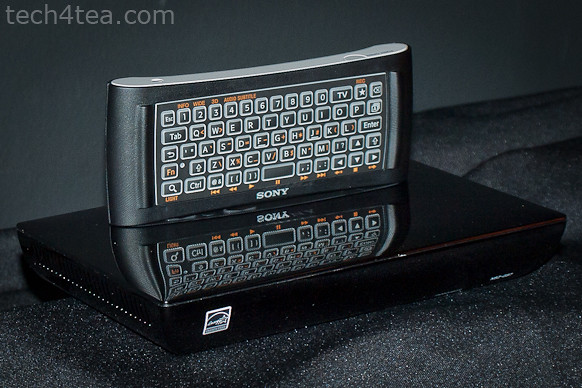
Sony's pre-release Google TV set-top box with remote control.
The new range of Bravia TVs that were first unveiled during CES 2012 in January, as well as a whole range of Xperia smartphones were also showcased.
The three new series of Bravia TVs include the flagship HX, high-end NX and the entry-to-mid-level EX.
Xperia smartphones that were exhibited included the Xperia S, P, U, and sola.
Sony media box

The 2-sided remote control reminds one of in-flight entertainment controllers.
There was a sneak preview of an upcoming set-top box for the second generation Sony Google TV, that was also unveiled during CES 2012.
Sony did not dwell on this set-top box though, which was connected to the Google Play store.
The remote control for the media box comprised a keyboard on one side, with additional controls (D-pad, Menu, Home, Back buttons and a trackpad) on the other side.
Tags:laptops, notebooks, Smart TV, smartphones, Sony, tablets, Vaio
Posted in Events, Exhibition, Gadgets, Launch, Notebooks, Sony, Tablets, TV | 2 Comments »
Monday, March 12th, 2012
Samsung Galaxy users worldwide will get a full-featured Norton Mobile Security free for 90 days. Usually, a one-year license costs S$19.90.

Complimentary 90-day subscription of Norton Mobile Security for Samsung GALAXY smartphones.
Norton Mobile Security, an application for Android OS, is available in multiple languages.
“With smartphone sales now outpacing PC sales, cybercriminals are devising new threats everyday to steal from mobile users. Consumers need to be protected more than ever,” said Janice Chaffin, group president, Consumer Business Unit, Symantec.Samsung Galaxy users will be able to download it from Samsung Apps.
Norton Mobile Security can be downloaded from the ‘Utility’ category in Samsung Apps or by entering ‘Norton Mobile Security’ into the search query at the Samsung Apps.
Norton Mobile Security supports all Samsung Galaxy Android smartphones, including Galaxy S2.
Norton Mobile Security combines anti-theft features with powerful anti-malware to protect user’s important data from loss, theft, viruses and other threats.
The following are the main features.
- Remote Locate — Shows you the location of your smartphone so you can find if it’s lost or stolen.
- Remote Lock — Lets you remotely lock your lost or stolen phone via the Internet or SMS to keep critical data safe and block unauthorized access.
- Remote Wipe — Lets you remotely erase the data on your phone via SMS, blocking access to your private information. In addition, your phone is instantly locked if its SIM card is removed or replaced, so it can’t be used with another SIM card.
- Anti-malware — Scans all files and application updates downloaded to your mobile phone and automatically detects and removes threats without slowing you down.
- SD Card Scanning — Gives you the option of automatically scanning SD (Secure Digital) memory cards for threats when you plug them into mobile phone.
- Automatic LiveUpdate — Automatically downloads and installs security updates keeping you a step ahead of cybercriminals.
Tags:Android, Apps, Galaxy, mobile, Norton, Samsung, security, smartphone
Posted in Announce, App, Gadgets, Galaxy, Norton, Phones, Samsung, Security, Software, Tech news | 2 Comments »
Saturday, March 10th, 2012
Lenovo will be at the IT Show 2012 in Suntec Singapore at Level 4, Hall 401, Booth 8358.

Click to view or download Lenovo's IT Show 2012 flyer for tablet computers.
Check out the promotional discounts and freebies for Lenovo’s tablets, notebooks and desktop computers.
You can view or download Lenovo’s IT Show 2012 flyers below.
(more…)
Tags:desktops, discount, IT Show, IT Show 2012, laptops, Lenovo, notebooks, promotion, Singapore, Suntec, tablets
Posted in Brochures, Desktops, Events, Exhibition, Gadgets, Lenovo, Notebooks, Prices, Promotions, Specifications, Tablets | 1 Comment »
Friday, March 9th, 2012
Toshiba will be at the IT Show 2012 in Suntec Singapore at Hall 401 (Booth 8143 & 8361), Hall 403 (Booth 8418 & 8438) and Hall 601 (Booth 6137). Check out the promotional discounts and freebies for Toshiba’s notebooks and tablets.
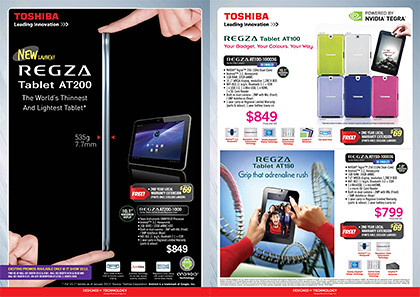
Click the image to view or download Toshiba's promotion flyers for IT Show 2012.
Toshiba’s new REGZA Tablet AT200 is supposedly the world’s thinnest and lightest tablet. Check it out, together with Toshiba’s other tablets and notebook computers.
You can view or download Toshiba’s IT Show 2012 flyers below.
(more…)
Tags:discount, IT Show, IT Show 2012, laptops, notebooks, promotion, Regza, Singapore, Suntec, tablets, Toshiba, ultrabooks
Posted in Brochures, Events, Exhibition, Gadgets, Notebooks, Prices, Promotions, Regza, Specifications, Tablets, Toshiba | 1 Comment »
Friday, March 9th, 2012
Samsung will be at the IT Show 2012 in Suntec Singapore at Levels 3 & 4. Check out the promotional discounts and freebies for Samsung’s notebooks, tablets and mobile phones, cameras, printers, monitors and smart TVs.

Check out Samsung's Ultrabooks and its 3, 7, 9 series of notebooks at IT Show 2012..
Check out the new colour for the Multiview MV800 compact camera that features a 3” flip-out Touch display. The stunning pink gives the 16.1 megapixel shooter a fresh look. The camera also comes with 5x optical zoom at 26mm at its widest angle.
You can view or download Samsung’s other IT Show 2012 flyers below.
(more…)
Tags:cameras, IT Show, IT Show 2012, laptops, monitors, notebooks, printers, promotions, Samsung, Singapore, Smart TV, smartphones, Suntec, tablets, ultrabook
Posted in Brochures, Cameras, Events, Exhibition, Gadgets, Monitors, Notebooks, Phones, Prices, Printers, Promotions, Samsung, Specifications, Tablets, TV | 3 Comments »
Thursday, March 8th, 2012
Huawei will be at the IT Show 2012 in Suntec Singapore at the Newstead, ECS and AAAs Com booths. Check out the discounts and freebies for Huawei’s tablets, smartphones and modems.

Check out Huawei's tablets, smartphones and modems at IT Show 2012.
You can purchase Huawei devices at the following booths during IT Show 2012.
- Booth 3018 – Newstead
- Booth 8019 – ECS
- Booth 6731 – AAAs Com
(more…)
Tags:discount, Huawei, IT Show, IT Show 2012, modems, promotion, Singapore, smartphones, Suntec, tablets
Posted in Brochures, Events, Exhibition, Gadgets, Huawei, Phones, Prices, Promotions, Specifications, Tablets | 1 Comment »
Thursday, March 8th, 2012
Motorola will be at the IT Show 2012 in Suntec Singapore at Level 3, Booth 3008 and Level 6, Booth 6018. Check out the sleek Motorola RAZR (black and glacier versions) and the cool XOOM 2 tablet at the show.

Win a 4D3N stay for 2 at the W Retreat Koh Samui.
Customers can also stand a chance at winning a 4D3N stay at the W Retreat Koh Samui with every purchase! Ten hotel vouchers, each worth $2,000, will be given away.

Check out the sleek Motorola RAZR smartphone at the IT Show 2012.
Motorola will be giving away $100 Takashimaya vouchers and free limited edition Android thumbdrives (worth $38) to the first 100 customers who purchase the Motorola RAZR or Motorola XOOM 2.
Motorola devices will also be available at M1, Starhub & Singtel booths during the show.
Tags:discount, IT Show, IT Show 2012, Motorola, RAZR promotion, Singapore, smartphones, Suntec, tablets, Xoom
Posted in Events, Exhibition, Gadgets, Motorola, Phones, Promotions, RAZR, Tablets, Xoom | No Comments »
Saturday, February 11th, 2012
As scheduled during their launch in January, the GALAXY Nexus (S$948, Black and White) and GALAXY Tab 7.7 (S$898) are available in Singapore from today. All prices include GST but exclude line contract.

Samsung GALAXY Nexus smartphone,S$948, available from today.

Samsung GALAXY Tab 7.7 tablet, S$898, available from today.
Also the
Samsung GALAXY S II (Coral Pink) will be available in Singapore from 18 February at
S$888, inclusive of GST, without line contract.
Tags:Android, Galaxy, Nexus, Samsung, smartphone, Tab 7.7, tablets
Posted in Gadgets, Galaxy, Phones, Prices, Samsung, Tablets | 2 Comments »