Archive for the ‘Notebooks’ Category

New company byte: Nubox

Friday, August 24th, 2012

With the opening of its 10th Apple Premium Reseller (APR) store in Sim Lim Square today, I have created a new company byte for Nubox.

Nubox is an arm of Newstead Technologies with Apple Premium Reseller (APR) and Apple Authorised Reseller (AAR) stores in Singapore.

Nubox is an arm of Newstead Technologies with Apple Premium Reseller (APR) and Apple Authorised Reseller (AAR) stores in Singapore.

Read a byte-sized profile and background information of Nubox for quick reference here.

You can also read articles related to Nubox on tech4tea.com here.

Nubox upgrades Sim Lim store from AAR to APR status

Friday, August 24th, 2012

Nubox today opened its 10th Apple Premium Reseller (APR) store in Sim Lim Square. Prior to this, it had an Apple Authorised Reseller store at the geek’s paradise.

The new Nubox APR store replaces the previous AAR store in Sim Lim Square.

The new Nubox APR store replaces the previous AAR store in Sim Lim Square.

To be awarded APR status, the store met stringent criteria from Apple: ability to offer impeccable service to customers, store location and size and availability of staff with Apple Certified Support Professional certification.

In addition to the complete range of Apple products, Nubox@Sim Lim Square will offer a quality range of third-party accessories and software as well professional services that include training and service support.

Newstead Technologies now has 11 Nubox stores across Singapore, comprising 10 APRs and one AAR in Funan Digital Life Mall. The Funan AAR will also be replaced with an APR next month.

Evelyn Chua, the Chief marketing Officer of Newstead, tells me that she plans to open a twelfth Nubox APR in Bedok Mall next year.

Store opening promotions for Nubox @ Sim Lim Square from 24-26 August, 2012.

Store opening promotions for Nubox @ Sim Lim Square from 24-26 August, 2012. Click on thumbnail to zoom in.

For the time being, the plan is to stop at twelve. You can read more about Nubox and its stores here.

As part of the store opening, there will be promotional offers from today till Sunday.

TODAY! Mountain Lion available from Mac App Store

Wednesday, July 25th, 2012

The ninth major release of Apple’s desktop operating system is now available as a download from the Mac App Store. Mountain Lion is available as an upgrade from Lion or Snow Leopard for S$25.98.

Mountain Lion OS X, Apple's new desktop operating system is available for download today.

Mountain Lion OS X, Apple’s new desktop operating system is available for download today.

Mountain Lion features more than 200 new features, including iCloud integration, the all new Messages app, Notification Center, system-wide Sharing, Facebook integration, Dictation, AirPlay Mirroring and Game Center.

Pricing & Availability

OS X Mountain Lion is available from the Mac App Store for S$25.98.

Mountain Lion requires Lion or Snow Leopard (OS X v10.6.8 or later), 2GB of memory and 8GB of available space.

A complete list of system requirements and compatible systems can be found here.

OS X Server requires Mountain Lion and is available from the Mac App Store for S$25.98.

The OS X Mountain Lion Up-to-Date upgrade is available at no additional charge from the Mac App Store to all customers who purchased a qualifying new Mac system from Apple or an Apple Authorised Reseller on or after 11 June, 2012.

Below are some of these key new features.

  • iCloud integration, for easy set up of your Mail, Contacts, Calendar, Messages, Reminders and Notes, and keeping everything, including iWork documents, up to date across all your devices.
  • The new Messages app, which replaces iChat and brings iMessage to the Mac, so you can send messages to anyone with an iPhone, iPad, iPod touch or another Mac.
  • Notification Center, which streamlines the presentation of notifications and provides easy access to alerts from Mail, Calendar, Messages, Reminders, system updates and third party apps.
  • System-wide Sharing, to make it easy to share links, photos, videos and other files quickly without having to switch to another app, and you just need to sign in once to use third-party services like Facebook, Twitter, Flickr and Vimeo.
  • Facebook integration, so you can post photos, links and comments with locations right from your apps, automatically add your Facebook friends to your Contacts, and even update your Facebook status from within Notification Center.
  • Dictation, which allows you to dictate text anywhere you can type, whether you’re using an app from Apple or a third party developer.
  • AirPlay Mirroring, an easy way to wirelessly send an up-to-1080p secure stream of what’s on your Mac to an HDTV using Apple TV, or send audio to a receiver or speakers that use AirPlay.
  • Game Center, which brings the popular social gaming network from iOS to the Mac so you can enjoy live, multiplayer games with friends whether they’re on a Mac, iPhone, iPad or iPod touch.
  • The new Gatekeeper, which makes downloading software from the Internet safer.
  • Power Nap, which automatically updates your apps and system while your Mac is asleep.
  • A faster Safari browser.

Computer line-up: Dell XPS, Vostro, Precision, Latitude & OptiPlex

Monday, July 16th, 2012

I had the chance to be briefed on the line-up of computers from Dell and how they empower end-user computing for corporate users. Here’s a quick round-up.

Starting prices of new additions incl.GST: XPS 14 (S$1,399), Vostro laptops (TBA), Precision T1650 (S$1,799), Latitude laptops (S$1,348), OptiPlex desktops (S$1,069).

Dell's updated line-up of laptop and desktop computers.

Dell’s updated line-up of laptop and desktop computers.

Here are some of the latest refreshes in Dell’s line-up. All of them are Windows 8 ready but none of them have touch screens.

Dell XPS laptop family

Dell's latest flagship Ultrabook: XPS 14 (starts from S$1,399).

Dell’s latest flagship Ultrabook: XPS 14 (starts from S$1,399).

The latest addition to Dell’s line-up is the XPS 14 Ultrabook. The 14-inch laptop joins the existing 13-inch XPS 13 Ultrabook.

The XPS 14 looks sleek and elegant, but felt rather heavy at 2.1kg. But it has a super-long battery life of 11 hours, so if you need that durability while on the move, and weight is not a problem, this is the Ultrabook for you.

As part of Dell’s flagship XPS brand, the compact XPS 13 offers portability while the XPS 14 is only 20.7 mm thin and offers long battery life and connectivity on the go.

Both laptops have enterprise-friendly features, such as security and services, to enable them to cross-over for enterprise use.

In a shrewd move by Dell to ride on the BYOD (Bring Your Own Device) phenomenon, users can use their XPS Ultrabooks for personal use at home and bring it to work and connect to their corporate IT information systems.

Dell Vostro laptops

Dell Vostro 3460 laptop (price TBA).

Dell Vostro 3460 laptop (price TBA).

The Vostro 3360, 3460 and 3560 will be available this month.

My personal favourite is the Latitude E6430s which fits a 14-inch display into a 13-inch body – the same form-factor as its 13-inch cousin. The laptop felt robust and rugged but rather light. I wouldn’t mind using it as my main workhorse.

These laptops are designed to deliver strong performance and security for growing businesses.

The Vostro series come in three sizes (13”, 14” and 15”) and three colours (Aberdeen Silver, Brisbane Bronze, and Lucerne Red).

The 13-inch Vostro 3360 is only 0.76-inch in thinness.

Dell Latitude, OptiPlex, Precision
Dell Precision T1650 tower workstation (starts from S$1,799).

Dell Precision T1650 tower workstation (starts from S$1,799).

The Latitude and OptiPlex portfolio of business laptops and desktops were refreshed in June and features durable, consumer-inspired designs that appeals to today’s professionals.

Dell Latitude 6430s (starts from S$1,348).

Dell Latitude 6430s (starts from S$1,348).

They are coupled with advanced manageability and data protection and ships with at least 2GB of memory, integrated graphics, Third Generation Intel Core processors, USB 3.0 ports, and optional 128GB SSD.

The Dell Latitude E-Family and Dell OptiPlex feature physical ruggedness and sports long battery-lives of up to 32.7 hours with an optional 9-cell battery.

The E6230, E6330, E6430 and E6530 laptops comes with 12.5”, 13.3”, 14” and 15.6” displays.

The new design of the Latitude E6430s fits a 14-inch display in a 13.3-inch chassis.

Dell OptiPlex 9019 All-in-One desktop (starts from S$1,069).

Dell OptiPlex 9019 All-in-One desktop (starts from S$1,069).

The Latitude 5430 and E5530 laptops are targeted towards budget-conscious professionals and come with 14” and 15.6” displays.

The refreshed Dell OptiPlex family includes the new OptiPlex 3010, 7010, 9010 desktops; and the OptiPlex 9010 All-in-One desktop.

For powerful performance on a budget, there is the new entry-level Dell Precision T1650 tower workstation.

The T1650 offers a broad range of Intel Core and Xeon CPU options, increased memory speed of 1,600MHz, and four USB 3.0 ports.

Game-changing technology: wearable unified displays with scalable imagery

Sunday, July 8th, 2012

In a time when new technology and gadgets are launched everyday, and every one of their makers proclaim them to be game-changers, it is truly heartening to see products showcasing technology that has genuine potential to become a game changer in the near future.

Wearable video displays are an example. The Epson Moverio and Google Glass are examples of such gadgets.

Wearable unified displays can be used everywhere and for any purpose in the future, here an aircraft engineer has his hands free while referencing his technical manual through an Epson Moverio.

Wearable unified displays can be used everywhere and for any purpose in the future. Here an aircraft engineer can have his hands free (if he clips the controller to his overalls) while referencing his technical manual through an Epson Moverio.

In my humble opinion, there are two main constraints in consumer devices that represent frontiers in product developments for gadget makers.

Google Glass was showed off by co-founder Sergey Brin (not in this picture) at the Google I/O conference in June.

Google Glass was showed off by co-founder Sergey Brin (not in this picture) at the Google I/O conference in June.

These are display technology and device input.

What defines a smartphone and a tablet, laptop and a laptop, or even a television and even the cinema?

It is the size and form factor of the device.

Apart from the backend processor and performance, a large determinant of their category is simply their screen size.

If it’s a 3-5 inch device (with 3G connectivity), it’s a smartphone. 7-10 inch flat screen (with or without 3G), it’s a tablet (used to be netbook not too long ago).

Beyond that, you have the 13-17 inch notebook computer, and still beyond that – the desktops with even bigger screens.

Sony HMZ T1 Personal 3D Viewer

Sony HMZ T1 Personal 3D Viewer

Need we go into the numerous sizes for TVs, projectors and erm – cinemas?

A large determinant of device portability and usability – which often run counter to each other – is the size of the display.

Greater portability results in more squinting, whereas nice expansive viewing pleasure means bigger heavier screens.

A viewer/display device that allows the user to divorce display size from processing hardware will free the user from having to own multiple devices with different form factors.

Imagine the ability to make calls, read ebooks, play games, work on documents or edit images/video, watch the equivalent of large-screen movies on a single viewer/display.

Wanna look like an X-men? Try the Cyclops look.

Wanna look like an X-men? Try the Cyclops look.

No need to purchase separate bulky devices with their own different-sized displays.

You’d still need to have the little black-boxes containing the different processing hardware and device input.

But imagine sharing the same viewer/display amongst all these devices.

All of them “plug” into the same viewer/display.

There’s no more difference between a smartphone and a 3G-capable tablet computer.

Cameras and camcorders could also pair up wirelessly.

Although the device closest to bringing this to reality is the mounted-visor display/viewer, I’m sure there’ll be other physical means and ways to achieve this “unified display”.

Olympus has just announced its wearable display prototype - MEG4.0.

Olympus has just announced its wearable display prototype – MEG4.0.

Eventually, I can envisage (pun intended) displays embedded in contact lenses or even implanted into the cornea of the eyes.

In fact, patents have already been filed for such designs.

I haven’t seen any patents that bypass the eyes and inject vision signals directly into the brain though.

In a way, nature already unifies human vision through our eyes. We do not put on a different set of eyes to see different things.

The Olympus MEG 4.0 promises to connect to devices via Bluetooth.

The Olympus MEG 4.0 promises to connect to devices via Bluetooth.

Everything we see are through the same pair of eyes.

Why should we require a different screen to view the contents of different devices?

Now this single unified display may not be good news to device makers, although it surely should be the dream of consumers – even if we may not realise it yet.

Surely it’s better to be able to sell a single user multiple devices with different screen sizes if his/her needs forces him/her to do so.

Many users today own separate tablets and smartphones.

Sony HMZ T1 Personal 3D Viewer

Sony HMZ T1 Personal 3D Viewer

Apple, for instance, would rather sell you an iPhone AND an iPad, than only a single mobile device that “throws” its display into a single viewer with a “scalable” image size.

Google Glass with augmented reality.

Google Glass with augmented reality.

I’m sure it isn’t even news to the makers.

It’s a bit akin to traditional airlines offering budget flights.

Why introduce new budget services – even though it would benefit customers – that will change the game and threaten their erstwhile profitable business?

Fortunately, we have entrepreneurs who have broken the ranks to offer such choice to budget travellers.

A closer analogy would be the way netbooks had cannibalised the mainstream laptop market.

Sony HMZ T1 Personal 3D Viewer

Sony HMZ T1 Personal 3D Viewer

We have Asus to thank for “creating” the netbook niche to bring affordable and no-frills portable computing to the masses.

The Epson Moverio and Google Glass are not the first such device on the market, and in their current form are not mature enough for mass adoption by consumers yet – in terms of usability and feature-set, as well as content and consumer readiness.

But hopefully it precipitates more momentum to force makers to get on the bandwagon.

The other frontier

The other “physical constraint” to device form-factor is input interaction, a large part of which is text-input.

The size of screen again comes into the picture again if an on-screen keyboard is used.

And if a physical keyboard is used – be it a BlackBerry style keypad or a bigger portable keyboard – it translates into the overall form factor of the device.

Voice-input represents a means to free a device from a physical or on-screen keyboard, and even provide interactivity – through voice commands and voice search.

It’s also still early days and much development is needed before we can enjoy keyboardless devices

But as consumers and end-users, we can always dream on.

* Photos and illustrations used in this article belong to Epson, Google, Sony, and Olympus.

窥探一下未来的显示浏览器。如今已有一些头目。譬如:Epson Moverio BT-100, Google Glass, Sony HMZ T1 Personal 3D Viewer, Olympus MEG4.0。希望有朝一日,能够只凭一个显示机利用多种电子设备器材。

Dell offers end-users power to do more

Wednesday, July 4th, 2012

Dell tackles current trends of workforce mobility and consumerisation of IT by offering a complete end-to-end ecosystem of end-point devices, solutions and services – to bestow maximum productivity to end-users in our fast-paced environment.

Chue Chee Wei, Marketing Director, South Asia and Korea Marketing for Dell.

Chue Chee Wei, Marketing Director, South Asia and Korea Marketing for Dell.

I was invited by Dell to listen to how the computer maker envisages the technology landscape and how it plans to cater to different end-users with very different needs.

Slide 1: Changing technology landscape and end-user profile.

Slide 1: Changing technology landscape and end-user profile.

Chue Chee Wei, Marketing Director, South Asia and Korea Marketing for Dell, gave a quick rundown of how the technology landscape and user profile are trending (see Slide 1).

Slide 2: Transformation of computing

Slide 2: Transformation of computing.

As a result of the changing landscape, work computing is undergoing transformation from the traditional highly-controlled and rigid framework – to one in which employees are given much more flexibility in terms of the devices they can use, the level of access, and the ability to access corporate IT anytime, anywhere (see Slide 2).

The organisational challenges to change and adapt current entrenched enterprise IT frameworks and practices are giving many a CIOs sleepless nights, worrying about potential security compromises on the road to recent phenomenons such as BYOD (Bring Your Own Devices).

Organisational challenges facing the CIO.

Slide 3: Organisational challenges facing the CIO.

Chue sees two main tracks in tackling these organisational challenges – managing technology and managing people (see Slide 3).

Chue’s vision for Dell end-user computing

“End-user computing is about delivering open, capable and affordable solutions for an evolving workforce,” says Chue Chee Wei, Marketing Director, South Asia and Korea Marketing for Dell.

To help enterprises and end-uses surmount these challenges, Dell is also placing much emphasis in enabling this transformation.

The company has taken on a customer-inspired design approach across a complete portfolio of systems, services and solutions.

It strives to ensure a seamless experience across multiple devices, operating systems and applications.

And it aims to provide tailored solutions optimised for management, security and productivity.

Simplify technology & people management, improve productivity.

Slide 4: Simplify technology & people management, improve productivity.

As a result, technology and people management are simplified while productivity is improved (see Slide 4).

Chue emphasised that Dell does a lot more than making computers.

Dell’s solution continuum.

Slide 5: Dell’s solution continuum.

It delivers a solution continuum that spans desktop virtualisation, mobility & collaboration, management, security and cloud, service and support (see Slide 5).

Some of these are provided by companies that were – leaders in their areas of expertise – that Dell has acquired over the years.

Dell’s updated line-up.

Slide 6: Dell’s updated line-up.

Dell’s updated computing line-up

Dell also set up and briefed on its updated line-up of computers (see Slide 6). These comprises a whole range of notebooks and desktops that cater to the computing needs of different end-users.

Of note is that Dell is positioning its high-end XPS ultrabooks – which has traditionally been targeted towards consumers – to attract corporate users looking to use their personal high-spec’ed notebooks for work as well.

This is indeed a shrewd cross-over move by Dell to exploit the BYOD phenomenon.

(Slides provided by Dell. Click to enlarge.)

Numbers from Apple’s WWDC 2012

Tuesday, June 12th, 2012

As usual, Apple has revealed a slew of statistics to illustrate how it is leading the field. Here are some of the more interesting numbers from WWDC 2012.

Apple and WWDC 2012 in numbers

Apple and WWDC 2012 in numbers

There are now  650,000 apps in the App Store, out of which 225,000 are specific to the iPad.

In its four years of existence, 30 billion apps have been downloaded from Apple’s App Store, with US$5 billion for all app sales.

There are 400 million iTunes accounts with credit card. 140 million iMessage users send > 1 billion messages a day.

There are 365 million iOS devices out there, with 80% of these on the current latest iOS 5.

Apple contrast this with the Android’s profile, where slightly less than three-quarters of Android devices are still on Android 2.3.

To date, 26 million copies of Lion OS have been sold. Overall, there are 66 million Mac users.

First Apple WWDC 2012 without Steve Jobs

Monday, June 11th, 2012

A year ago, Steve Jobs made his last appearance at an Apple WWDC. This year, Tim Cook helms his first WWDC as Apple’s CEO.

Apple's WWDC 2012 is from 11-15 June in San Francisco.

Apple's WWDC 2012 is from 11-15 June in San Francisco.

The annual Worldwide Developers Conference (WWDC) this year is being held from June 11 – 15 at San Francisco’s Moscone West. Tickets were sold out in a mere two hours when it went on sale in April.

Here’s a quick roundup of some of the revelations from the opening keynote presentation on first of the 5-day conference.

MacBooks / OS X Mountain Lion

Refreshed MacBook Air & Next-generation MacBook Pro ships today.
In comes Ivy Bridge processor and USB 3.0, out goes Ethernet and FireWire 800 ports, MacBook Air becomes thinner and lighter, MacBook Pro gets 60% faster graphics performance.
Retina display in MacBooks: 220ppi with 2880 x 1800 resolution.
Highest-resolution notebook display in the world.
Retina Display support: Final Cut Pro, Aperture and Diablo3 now supports 220ppi display.
AutoCad and Photoshop support in the works.
iPad-style Dictation is introduced to Mountain Lion for Macs.
Speak directly into native Apple software, Microsoft Word and Facebook.
AirPort Express available now.
Pocket WiFi router supports simultaneous dual-band.
New OS X feature: Power Nap.
Mac updates emails, notifications and photos, and backs itself up while charging.
OS X Mountain Lion available on Macs in July.
Free upgrade for new Mac purchases between now and arrival of the new OS.

iOS 6

iOS 6 unveiled Beta today, full release in the fall.
More than 200 improvements: launch apps with enhanced Siri, and it comes to iPads, FaceTime over cellular data.
Supported: iPhone 3GS and up, 2nd gen iPads and up, 4th gen iPod touch.
Enhanced Siri launches apps and comes to new iPads and eventually into cars.
Siri to get into the car with Eyes Free: demo: Toggle Siri on by tapping a button the steering wheel.
iOS 6 to get Do Not Disturb feature from Mountain Lion.
Select which push notifications to mute and which to stay on.
iOS 6 integrates more tightly with Facebook, Twitter and App Store.
Share directly from core apps like Maps, Photos and Safari.
Safari offers unified search across the web, browser history and bookmarks.
Following in Chrome’s footsteps.
iCloud Tabs syncs Safari web-browsing across all devices.
Simultaneously see all the tabs open on any device.“IOS 6 will include Apple’s own mobile mapping software to compete with software from Google. TomTom will supply Apple with map data and related content.” – statement from TomTom.
Enhanced Safari features.
Multitouch to help navigate tabs, upload images directly, Offline Reading List.
Passbook provides one-stop purchase of tickets and boarding passes.
No more paper QR-codes and tickets.
Apple replaces Google Maps with own Maps app.
Maps comes with Yelp integration and turn-by-turn navigation, and 3D.

PC Show 2012 promotions: Newstead/Nubox

Saturday, June 9th, 2012

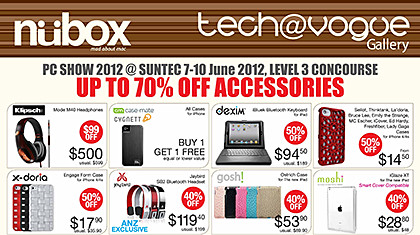
Newstead and Nubox will be at the PC Show 2012 at Suntec Singapore at the Level 3 Concourse.

Click on picture to view/download PC Show 2012 brochures from Newstead.

Click on picture to view/download PC Show 2012 brochures from Newstead.

Here are seven brochures for Newstead’s PC Show 2012 promotions from Nubox, and bargains/deals offered by Newstead for computers from major computer makers Acer, Asus, Dell, HP, Samsung and Toshiba.

PC Show 2012 promotions: Toshiba

Friday, June 8th, 2012

Toshiba will be at the PC Show 2012 at Suntec Singapore at Level 4, Hall 402, Booth A2006.

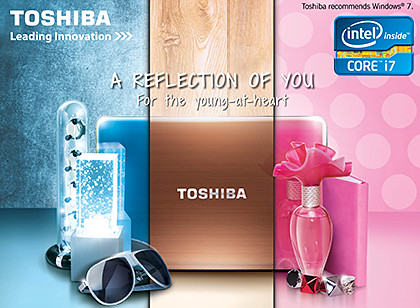
Toshiba's PC Show 2012 promotions for computers in all form factors.

Toshiba's PC Show 2012 promotions for computers in all form factors.

Here are four brochures for Toshiba’s PC Show 2012 promotions for notebooks, ultrabooks, tablets, all-in-one desktop computers and tablets.