Archive for the ‘Accessories’ Category

Game-changing technology: wearable unified displays with scalable imagery

Sunday, July 8th, 2012

In a time when new technology and gadgets are launched everyday, and every one of their makers proclaim them to be game-changers, it is truly heartening to see products showcasing technology that has genuine potential to become a game changer in the near future.

Wearable video displays are an example. The Epson Moverio and Google Glass are examples of such gadgets.

Wearable unified displays can be used everywhere and for any purpose in the future, here an aircraft engineer has his hands free while referencing his technical manual through an Epson Moverio.

Wearable unified displays can be used everywhere and for any purpose in the future. Here an aircraft engineer can have his hands free (if he clips the controller to his overalls) while referencing his technical manual through an Epson Moverio.

In my humble opinion, there are two main constraints in consumer devices that represent frontiers in product developments for gadget makers.

Google Glass was showed off by co-founder Sergey Brin (not in this picture) at the Google I/O conference in June.

Google Glass was showed off by co-founder Sergey Brin (not in this picture) at the Google I/O conference in June.

These are display technology and device input.

What defines a smartphone and a tablet, laptop and a laptop, or even a television and even the cinema?

It is the size and form factor of the device.

Apart from the backend processor and performance, a large determinant of their category is simply their screen size.

If it’s a 3-5 inch device (with 3G connectivity), it’s a smartphone. 7-10 inch flat screen (with or without 3G), it’s a tablet (used to be netbook not too long ago).

Beyond that, you have the 13-17 inch notebook computer, and still beyond that – the desktops with even bigger screens.

Sony HMZ T1 Personal 3D Viewer

Sony HMZ T1 Personal 3D Viewer

Need we go into the numerous sizes for TVs, projectors and erm – cinemas?

A large determinant of device portability and usability – which often run counter to each other – is the size of the display.

Greater portability results in more squinting, whereas nice expansive viewing pleasure means bigger heavier screens.

A viewer/display device that allows the user to divorce display size from processing hardware will free the user from having to own multiple devices with different form factors.

Imagine the ability to make calls, read ebooks, play games, work on documents or edit images/video, watch the equivalent of large-screen movies on a single viewer/display.

Wanna look like an X-men? Try the Cyclops look.

Wanna look like an X-men? Try the Cyclops look.

No need to purchase separate bulky devices with their own different-sized displays.

You’d still need to have the little black-boxes containing the different processing hardware and device input.

But imagine sharing the same viewer/display amongst all these devices.

All of them “plug” into the same viewer/display.

There’s no more difference between a smartphone and a 3G-capable tablet computer.

Cameras and camcorders could also pair up wirelessly.

Although the device closest to bringing this to reality is the mounted-visor display/viewer, I’m sure there’ll be other physical means and ways to achieve this “unified display”.

Olympus has just announced its wearable display prototype - MEG4.0.

Olympus has just announced its wearable display prototype – MEG4.0.

Eventually, I can envisage (pun intended) displays embedded in contact lenses or even implanted into the cornea of the eyes.

In fact, patents have already been filed for such designs.

I haven’t seen any patents that bypass the eyes and inject vision signals directly into the brain though.

In a way, nature already unifies human vision through our eyes. We do not put on a different set of eyes to see different things.

The Olympus MEG 4.0 promises to connect to devices via Bluetooth.

The Olympus MEG 4.0 promises to connect to devices via Bluetooth.

Everything we see are through the same pair of eyes.

Why should we require a different screen to view the contents of different devices?

Now this single unified display may not be good news to device makers, although it surely should be the dream of consumers – even if we may not realise it yet.

Surely it’s better to be able to sell a single user multiple devices with different screen sizes if his/her needs forces him/her to do so.

Many users today own separate tablets and smartphones.

Sony HMZ T1 Personal 3D Viewer

Sony HMZ T1 Personal 3D Viewer

Apple, for instance, would rather sell you an iPhone AND an iPad, than only a single mobile device that “throws” its display into a single viewer with a “scalable” image size.

Google Glass with augmented reality.

Google Glass with augmented reality.

I’m sure it isn’t even news to the makers.

It’s a bit akin to traditional airlines offering budget flights.

Why introduce new budget services – even though it would benefit customers – that will change the game and threaten their erstwhile profitable business?

Fortunately, we have entrepreneurs who have broken the ranks to offer such choice to budget travellers.

A closer analogy would be the way netbooks had cannibalised the mainstream laptop market.

Sony HMZ T1 Personal 3D Viewer

Sony HMZ T1 Personal 3D Viewer

We have Asus to thank for “creating” the netbook niche to bring affordable and no-frills portable computing to the masses.

The Epson Moverio and Google Glass are not the first such device on the market, and in their current form are not mature enough for mass adoption by consumers yet – in terms of usability and feature-set, as well as content and consumer readiness.

But hopefully it precipitates more momentum to force makers to get on the bandwagon.

The other frontier

The other “physical constraint” to device form-factor is input interaction, a large part of which is text-input.

The size of screen again comes into the picture again if an on-screen keyboard is used.

And if a physical keyboard is used – be it a BlackBerry style keypad or a bigger portable keyboard – it translates into the overall form factor of the device.

Voice-input represents a means to free a device from a physical or on-screen keyboard, and even provide interactivity – through voice commands and voice search.

It’s also still early days and much development is needed before we can enjoy keyboardless devices

But as consumers and end-users, we can always dream on.

* Photos and illustrations used in this article belong to Epson, Google, Sony, and Olympus.

窥探一下未来的显示浏览器。如今已有一些头目。譬如:Epson Moverio BT-100, Google Glass, Sony HMZ T1 Personal 3D Viewer, Olympus MEG4.0。希望有朝一日,能够只凭一个显示机利用多种电子设备器材。

New wearable video display: Epson Moverio BT-100

Friday, July 6th, 2012

Epson offers a peek into the future by launching its innovative personal display device – the Epson Moverio BT-100 see-through mobile viewer.

Available in Singapore from 23 July 2012 at S$999. Pre-orders from 9-22 July.

The Epson Moverio BT-100 is available from 23 July 2012 at S$999.

The Epson Moverio BT-100 is available from 23 July 2012 at S$999.

The Epson Moverio BT-100 comprises a headset and an Android-powered media player cum controller.

Bring your personal entertainment on the move.

Bring your personal entertainment on the move.

The device allows users to view streaming video, experience 3D content (in side-by-side format) and enjoy downloaded digital content on a large virtual 320-inch perceived screen projected from 20 meters away.

If you harbour ambitions to be part of the X-men, the headset makes you look like Cyclops.

It uses micro-projection technology to project the imagery onto the visor.

The media player cum controller operates on Google Android 2.2.

Built-in 802.11n wireless connectivity allows the user to browse the Web for content.

Alternatively, pre-downloaded content can be accessed via the device’s microSDHC card slot (4GB card included) and built-in 1GB of internal storage, especially when wireless network access is unavailable.

microSDHC card slot and built-in 1GB internal storage.

microSDHC card slot and built-in 1GB internal storage.

The viewer boasts nearly six hours of rechargeable battery life, supports Adobe Flash 11, and features Dolby Mobile surround sound.

If you have your own kick-a** Dr. Dre headphones or Monster headsets, there’s an audio out socket available.

There’s no video out though, since that defeats the raison d’etre of the Moverio.

If you wear glasses, you can wear the Moverio over them.

In fact, you need to, since there’s no diopter adjustment on the Moverio.

While wearing the Moverio, you can still see through them at the surroundings.

Available for pre-order from 9-22 July.

Available for pre-order from 9-22 July – the Moverio, that is.

You can choose to remove the shades to see the external world better but that makes it more difficult to watch the imagery inside the Moverio unless you’re facing a blank wall with a dark surface.

Although the Moverio runs on Android Froyo, it is not Google Play certified.

Epson said that when they approached Google, the latter felt the Moverio could neither be categorised as a smartphone or tablet.

So you’ll have to head to 3rd-party app-sites for Moverio apps.

And, for the moment, there’s no augmented reality.

Hands-on the Moverio BT-100

I tried out the Moverio for about 20 minutes during the launch event at ION Sky in Singapore.

Epson Moverio BT-100 see-through mobile viewer.

Epson Moverio BT-100 see-through mobile viewer.

Apart from image quality, I was curious whether the headset would be excessively heavy and whether prolonged viewing would cause dizziness and discomfort.

I found image quality to be excellent.

It did feel like watching a big screen.

The weight was okay for me although that seems to a major concern for many people, and something Epson is cognizant of.

I didn’t experience any dizziness although I’d tried it for a short 20 minutes. You’ll have to use it for a longer period of time to really tell.

Although the media player cum controller is an additional box to carry, it’s better than having to plug the headset to a living room set top player.

What I found terribly irritating was that the perceived screen moved every time you moved your head.

But since the display is in the headset itself, that seems pretty unavoidable.

I wonder if there’s any way to “stabilise” the display in the future.

Epson quotes studies in the US that advises against children below 12-years perusing such devices – because their eyesight has not fully developed yet.

Epson Moverio BT-100: Available exclusively at selected Best Denki stores in Singapore.

Epson Moverio BT-100 in a box

So this may not be an appropriate gift for a young child – despite its obvious drool factor.

At the moment, it’s targeted more at the early adopter.

I can see the Moverio coming in very handy for watching movies while riding in the MRT.

You can enjoy absolute privacy without the irritation of fellow passengers peering at your smartphone or tablet.

Just make sure you’re not sitting on a privileged seat with a feisty old woman staring down at your oblivious cyclops facade.

(more…)

Event: Launch of TomTom Via 620 and Map Share

Thursday, July 5th, 2012

TomTom has launched its latest GPS PND (portable navigation device) today and has enabled all of its 60 million PNDs to receive free daily map changes.

TomTom launched the Via 620 at Ku De Ta atop Marina Bay Sands in Singapore.

TomTom launched the Via 620 at Ku De Ta atop Marina Bay Sands in Singapore.

The Via 620 (S$299) has the largest screen and resolution amongst the PNDs made by TomTom (Read about the details of the Via 620 here).

“The roads in Singapore change all the time, sometimes with roadworks springing up overnight. Driving to a destination may take longer than usual as the familiar routes could be closed overnight. Knowing about these changes before setting off can save drivers a lot of time and help reduce overall congestion,” says Valerie Cross, TomTom Public Relations Manager Asia Pacific.At the same time, free daily map changes via the TomTom Map Share community allows drivers to personalise the TomTom map on their own device and also share and receive map changes with the Map Share community around the world.

Map Share was previously only available on a limited number of TomTom devices.

Map Share technology enables drivers to keep the TomTom map on their device up to date with immediate changes in their area.

Drivers then have the choice to share those road changes with TomTom and the broader Map Share community.

Map Share enables people to quickly and easily report and share the most frequent road changes.

TomTom Via 620

TomTom Via 620

More structural, long-term changes such as the addition of roads or roundabouts are validated and updated within TomTom’s maps and made available on a quarterly basis.

TomTom applies a hybrid approach to map-making that includes the combination of authoritative sources, such as field collection, government data or satellite imagery, with community input to ensure its maps accurately reflect reality.

From today, all TomTom Via and GO customers will be able to receive free daily map changes from the TomTom Map Share Community via a simple, free software update.

Daily map changes include the more dynamic, frequent changes that drivers are likely to encounter such as:

  • Changed speed limits
  • New street names
  • Blocked roads
  • New traffic directions
  • Altered turn restrictions

Drivers have control over which daily map changes they load onto their device.

They can choose to accept changes submitted by some or many other Map Share users, or only those verified by TomTom.

View TomTom’s video on Map Share and free daily updates below.

(more…)

New Android smartphones: Samsung Ace 2 and beam

Tuesday, July 3rd, 2012

Samsung has launched two new Android 2.3 (Gingerbread) smartphones. Both the GALAXY Ace 2 (S$438) and GALAXY beam (S$648) will be available in July. Prices include GST but excludes line contract.

GALAXY Ace 2 (left, S$438) and the GALAXY beam (right, S$648).

GALAXY Ace 2 (left, S$438) and the GALAXY beam (right, S$648).

You’ve seen the Nikon compact camera that comes with a built in projector. Now there is a smartphone that comes with a built-in projector – the GALAXY beam.

GALAXY beam

The built-in projector of the GALAXY beam lets users spontaneously share photos, videos or other digital media with family or friends by beaming content stored on the device directly onto walls, ceilings or improvised flat surfaces.

The GALAXY beam comes with a built in 15 lumens projector.

The GALAXY beam comes with a built in 15 lumens projector.

No need to huddle around a tiny smartphone or tablet screens. Project full-screen video clips at up to 50 inches wide with the GALAXY beam’s bright 15 lumens projector.

Both smartphones run on Android 2.3 (Gingerbread) and will ship in July.

Both smartphones run on Android 2.3 (Gingerbread) and will ship in July.

Other than that, the GALAXY beam has a 4-inch (480×800 WVGA) TFT display, 5-megapixel AF rear camera with flash, and a 1.3-megapixel front camera.

A large 2,000mAH battery feeds the projector. Despite having a built-in projector, the GALAXY Beam is only 12.5mm thick, and comes with a USB 2.0 port and 8GB of internal memory, as well as a microSD slot for up to 32GB of external memory.

The GALAXY beam will be available from 7 July at S$648.

GALAXY Ace 2

The GALAXY Ace 2 is the affordable successor to the GALAXY Ace from last year.

With a 3.8-inch (480×800 WVGA) PLS TFT display, it has a 5-megapixel AF rear camera with flash, and a VGA front camera.

The GALAXY Ace 2 has a 1,500mAH battery and comes with a USB 2.0 port and 4GB of internal memory, as well as a microSD slot for up to 32GB of external memory.

The GALAXY Ace 2 will be available in July at S$438.

Adventurer Khoo Swee Chiow to climb K2

Monday, June 25th, 2012

Singaporean adventurer and motivational speaker Khoo Swee Chiow will attempt to scale the summit of K2, the world’s second highest mountain, with the support of title sponsor Seagate Technology.

Khoo Swee Chiow will climb K2, one of the most notorious mountains in the world. Photo by Kevin Mayea.

Khoo Swee Chiow will climb K2, one of the most notorious mountains in the world. Photo by Kevin Mayea.

The Seagate K2 2012 expedition, from 20 June to 20 August, will see Khoo Swee Chiow join an international team of 13 climbers from China, South Korea, USA, Turkey, Macedonia, Serbia, Spain, Nepal and Singapore.

“Swee Chiow has shown incredible tenacity and determination in realizing his dreams. His expeditions have made it possible for him to instill confidence, leadership and excellence in thousands of people through motivational talks,” said BanSeng Teh, senior vice president and managing director for Asia Pacific & Japan, Seagate Technology.Khoo Swee Chiow and his team will be climbing the mountain along the Abruzzi Ridge, otherwise known as the Southeast Ridge, from the Pakistani border.

On this climb, Khoo Swee Chiow is taking Seagate Backup Plus hard drives to store and backup his photos, videos and journal files for him to share his story when he returns.

Seagate’s newly designed external storage – Backup Plus hard drives – deliver easy setup, one-click backup and the ability to save and share content on Facebook and Flickr.

In addition to Seagate Technology, they will be supported by other sponsors including Microsoft, Canon, Millet, Adventure21, Iridium, Energizer, Oakley, Touch&Print, Banana Boat, Powertraveller, GoPro and Meteorological Service Singapore.

“K2 will be the hardest climb of my life, much harder than Everest. After more than 20 years of climbing, I feel the time has come for me to give it a go,” said Khoo Swee Chiow, who first climbed Everest in 1998.Standing at an elevation of 8,611 metres above sea level, K2 is known for its high level of difficulty and notoriously high casualty rate.

It has a daunting death rate of 26 percent per ascent, six times higher than that of the world’s tallest mountain, Mount Everest.

To date, only 302 climbers have successfully reached K2’s peak, a number that pales in comparison to Everest’s 3,500.

New tablets: Microsoft unveils two Surface tablets

Tuesday, June 19th, 2012

Microsoft has unveiled two 10.6-inch Windows tablets and accessories.

One model will run on Windows RT and will be released with the general availability of Windows 8. The other tablet will be available about 90 days after and feature Windows 8 Pro.

Update 2 (1 March, 2013):

Microsoft has announced that beginning late March the rollout of Surface will continue over the next few months.

Surface RT with Windows RT will reach Japan, Mexico, New Zealand, Russia, Singapore and Taiwan.

Surface Pro with Windows 8 Pro will hit Australia, China, France, Germany, Hong Kong, New Zealand and the United Kingdom.

Update 1 (18 July, 2012):

Microsoft’s Steven Sinofsky has just announced at its annual sales meeting that customers will be able to get Windows 8 on 26 October, 2012. This will be available both as an upgrade or on a new PC.

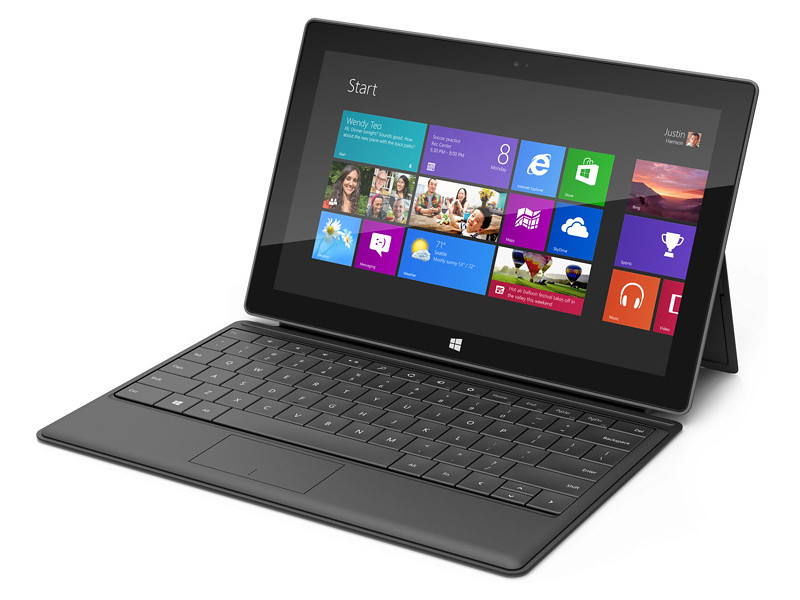
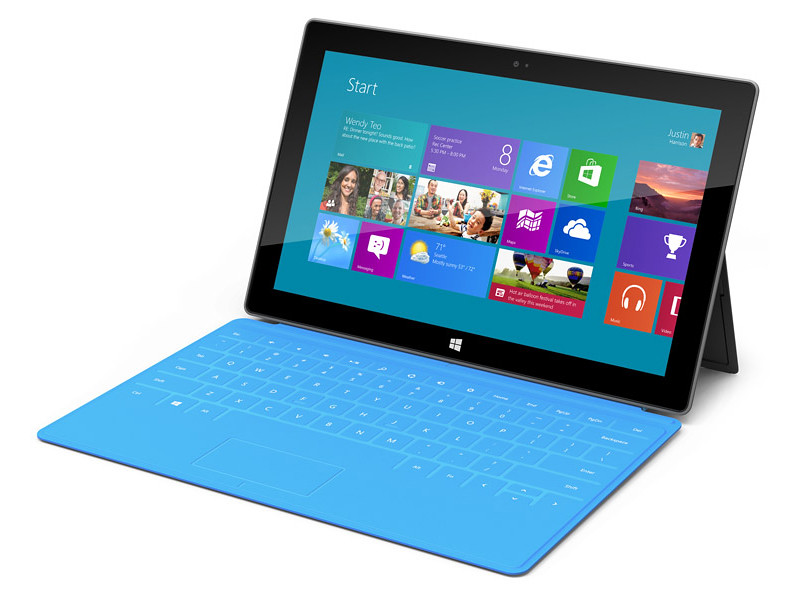
Microsoft finally joins the fray by unveiling its 10.6-inch Surface tablets.

Microsoft finally joins the fray by unveiling its 10.6-inch Surface tablets.

The Windows RT Surface tablet will run on an ARM processor, while the Windows 8 Pro version will have a third-generation Intel Core processor.

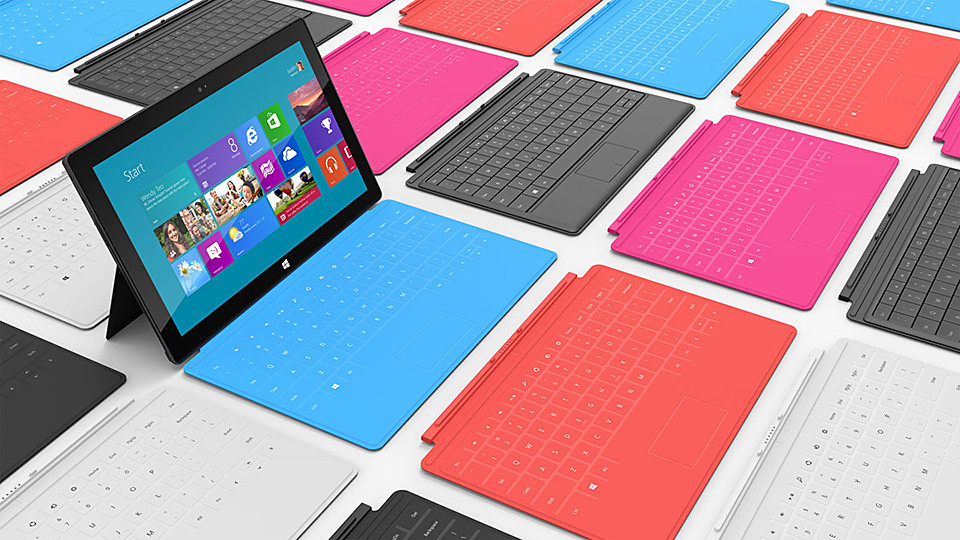
The Touch Cover and Type Cover double up as keyboards.

The Touch Cover and Type Cover double up as keyboards.

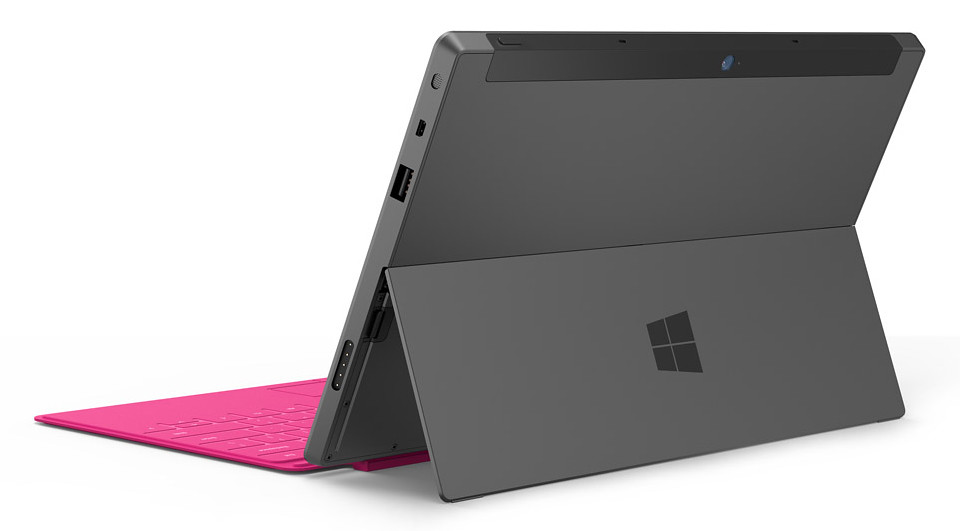
Each Surface tablet will have a full-sized USB port, a microSD slot, and a 16:9 aspect ratio; with edges angled at 22 degrees.

The casing of Surface is created using VaporMg (pronounced Vapor-Mag), where metal and deposit particles are molded to create a finish akin to luxury watches.

Starting with magnesium, parts can be molded as thin as .65 mm, thinner than the typical credit card, to create a product that is thin, light and rigid/strong.

The VaporMg materials and processes has enabled the thin and sleek design of the Surface tablets.

The VaporMg materials and processes has enabled the thin and sleek design of the Surface tablets.

This also enables an extremely thin built-in kickstand to prop the tablet up when watching movies or video conferencing with the HD front- or rear-facing video cameras.

The integrated, built-in kickstand removes the need for a separate accessory.

The integrated, built-in kickstand removes the need for a separate accessory.

I like the idea and design of this integrated kickstand.

To transform the tablet into a “notebook”, a 3 mm Touch Cover uses pressure-sensitive technology to sense keystrokes as gestures, allowing users to touch type significantly faster than on an on-screen keyboard.

The Touch Cover will be available in a selection of vibrant colors. It clicks into the Surface tablet via a built-in magnetic connector, forming a natural spine like you find on a book, and doubles up as a protective cover.

The Touch Cover and Type Cover comes in many vibrant colours.

The Touch Cover and Type Cover comes in many vibrant colours.

Alternatively, users can click in a 5 mm-thin Type Cover that adds moving keys for a more traditional typing feel.

Retail pricing will be announced closer to availability but is expected to be competitive with a comparable ARM tablet or Intel Ultrabook-class PC.

OEMs will have cost and feature parity on Windows 8 and Windows RT.

Oh and if you’re interested in a 40-inch tablet, check out the Samsung SUR40 for Microsoft Surface. (I haven’t heard anyone else calling THAT a tablet yet).

The main technical specifications of the two Surface tablets are tabulated below.

(more…)

New laser printer: Canon imageCLASS LBP6680x

Monday, June 11th, 2012

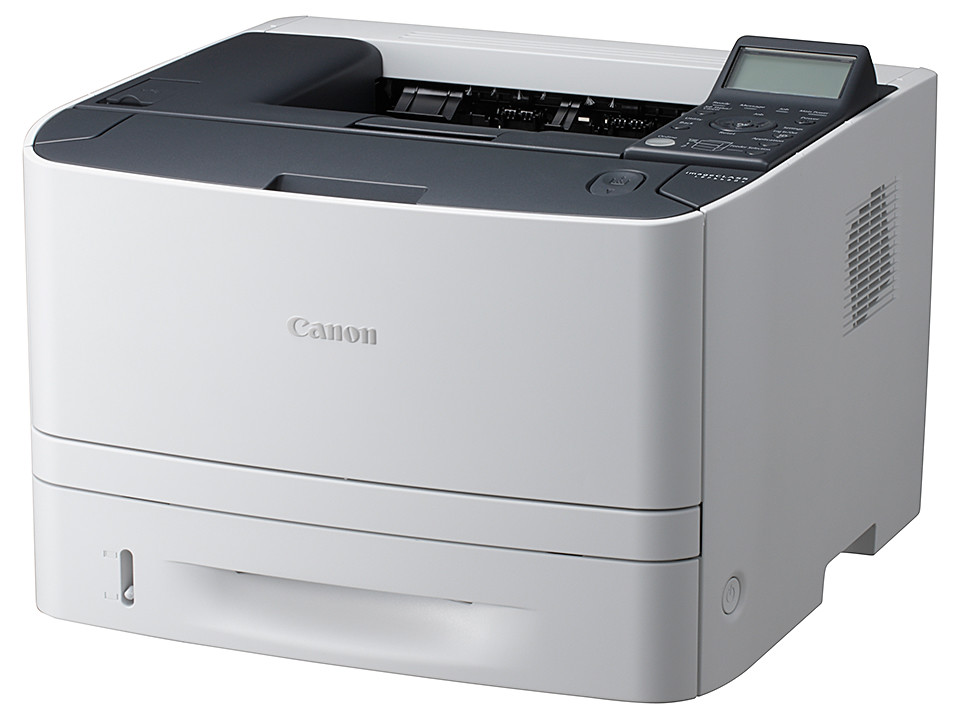
Canon has launched the imageCLASS LBP6680x, a compact monochrome laser printer for Small Office/Home Offices (SOHOs) and Small and Medium-Sized businesses (SMBs).

Available in July for S$799.

Canon imageCLASS LBP6680x - available in July for S$799.

Canon imageCLASS LBP6680x - available in July for S$799.

The Canon  imageCLASS LBP6680x offers the following advanced printing capabilities.

  • Cost-accounting and server-based secure printing via Canon uniFLOW
  • Server-less solutions for Home Offices and SMBs
  • Reliable, Productive and High-Quality Printing
  • Cost- and Energy-Efficiency
  • Ease of Use and Maintenance

(more…)

PC Show 2012 promotions: Newstead/Nubox

Saturday, June 9th, 2012

Newstead and Nubox will be at the PC Show 2012 at Suntec Singapore at the Level 3 Concourse.

Click on picture to view/download PC Show 2012 brochures from Newstead.

Click on picture to view/download PC Show 2012 brochures from Newstead.

Here are seven brochures for Newstead’s PC Show 2012 promotions from Nubox, and bargains/deals offered by Newstead for computers from major computer makers Acer, Asus, Dell, HP, Samsung and Toshiba.

PC Show 2012 promotions: Brother

Saturday, June 9th, 2012

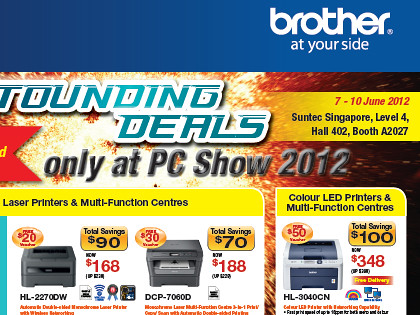
Brother will be at the PC Show 2012 at Suntec Singapore at Level 4, Hall 402, Booth A2027.

Click on picture to view/download PC Show 2012 brochures from Brother.

Click on picture to view/download PC Show 2012 brochures from Brother.

Here’s the brochure for Borther’s PC Show 2012 promotions for printers adn labellers.

PC Show 2012 promotions: Epson

Saturday, June 9th, 2012

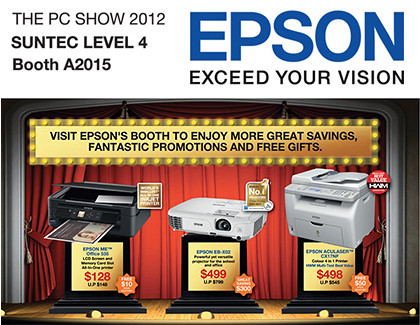
Epson will be at the PC Show 2012 at Suntec Singapore at Level 4, Booth A2015.

Click on picture to view/download PC Show 2012 brochures from Epson.

Click on picture to view/download PC Show 2012 brochures from Epson.

Here are six brochures for Epson’s PC Show 2012 promotions for printers, scanners and projectors.