Archive for the ‘iOS’ Category

Microsoft to demonstrate Windows 8 operating system

Tuesday, September 13th, 2011

The new operating system will run on tablets, desktop and laptop computers via a touch screen, mouse or keyboard. It will also be backward compatible to existing Windows software.

Windows 8 represents Microsoft’s hope of wrestling market share for tablet computers from Apple iPads and Android tablets.

Microsoft will unveil the next iteration of their Windows operating system software today at a developers conference in Anaheim, California. A preview of the design was first released in June this year.

This will be the first time that a Windows operating system is capable of running on chip technology from ARM. Microsoft aims to make Windows 8 capable of running smaller, thinner tablet computers with battery life that can rival that of the market leader – Apple’s iPad.

Out of 60 million media tablets expected to be shipped 2011, 74 percent will be Apple’s iPads, according to an August forecast by IHS. The global market is forecasted to rise to 275.3 million units in 2015, with Apple expected to account for 43.6 percent of the market.

Windows 8 design

The user interface for Windows 8 resembles Microsoft’s Windows Phone 7 smartphone operating system – it uses digital tiles instead of icons to help users navigate between programs. The tiles are on the computer’s home screen can display updated information from inside applications, so that users can see the info at a glance without having to fire up those apps.

TomTom navigation app for iPhone optimised for iPad

Tuesday, September 13th, 2011

The new iPad App was showcased at the TomTom exhibition stand during IFA 2011 in Berlin and will be available in Q4 2011.

“… we have optimised our TomTom App for the iPad. Now customers have one App for all iOS devices.” said Corinne Vigreux, Managing Director at TomTom.Customers who already have the iPhone version of the navigation app will be able to download the new version to their iPads for free.

This latest version will feature enhanced screen resolution, sharpened graphics and more intuitive controls specifically developed for the iPad.

New TomTom app for the iPhone

Monday, September 12th, 2011

The latest version of the TomTom App for iPhone (Version 1.8) now includes the latest maps of countries in Southeast Asia, including Singapore, Malaysia, Brunei, Hong Kong, Macau, Thailand and Indonesia. A new multi-stop routes driving feature is also included.

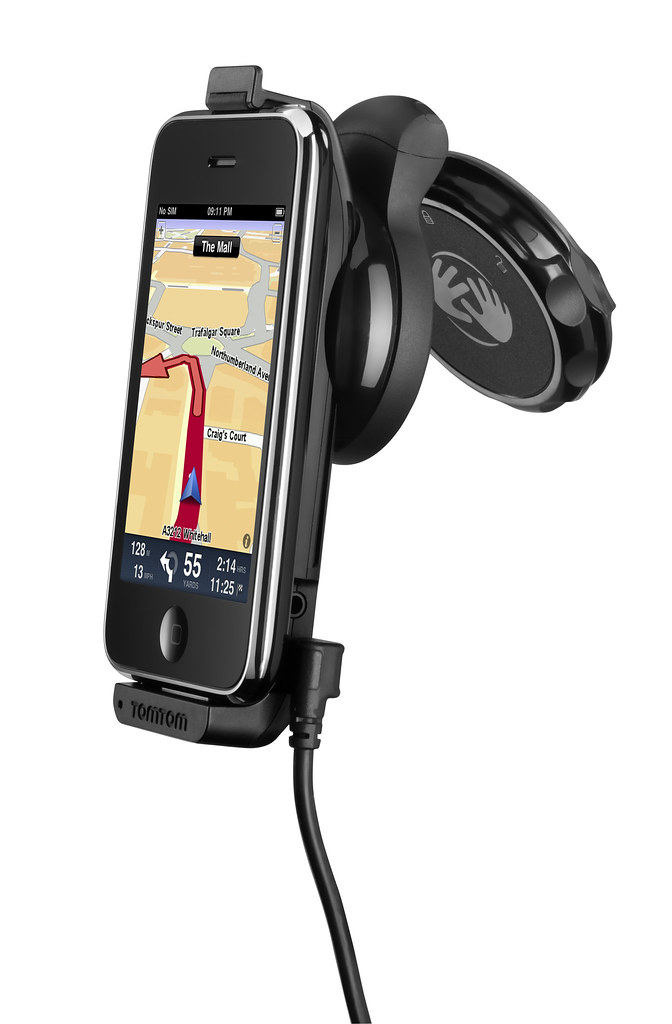
Use the iPhone as a Portable Navigation Device for turn-by-turn navigation.

Use the iPhone as a Portable Navigation Device for turn-by-turn navigation.

Mount your iPhone on the dashboard or windscreen to use it like a traditional PND.The South East Asia, TomTom App for iPhone (Version 1.8) can be downloaded from the App Store for USD $69.99. It works with iPhone 4, iPhone 3GS & iPod touch 3rd Gen running iOS4.

The new multi-stop routes feature makes it easier for drivers to make multiple stops on a single route, by letting them add up to five stop-off points when they plan their journey.

Multi-stop routes enable the driver to stop by a bank or petrol station enroute, or a diversion to pick up a friend as part of a longer journey.

This removes the hassle of entering a new journey for each leg of the trip and means that the driver can get an accurate estimated time of arrival for their final destination.

Viber app for free international phone calls

Saturday, September 10th, 2011

An overseas friend uses the Viber app on her iPhone for free VOIP international voice calls and text messages on her smartphone. I installed the free app on my Android phone and tested it. Setup was swift and quality was superb.
Viber for iPhone and Android phones

I was at the petrol station and the attendant was filling up an almost empty tank with petrol. While waiting, I whipped out my Android phone, searched the Android Market for Viber and installed it. Before the attendant had finished filling up the tank, I was already chatting with my friend in Kuala Lumpur on her iPhone – for free.

Set up was really simple on the Android phone. Once it was downloaded and installed, it gets your permission to access your contacts and sends you a 4-digit access code to activate your account. After that, you’re set to go!

Viber is free and works on the iPhone and Android phones.

Viber is free and works on the iPhone and Android phones.

The interface looks similar to the usual numeric dialpad with tabs to access recent calls, contacts, messages and more activities such as inviting friends, sharing on Facebook, tweeting etc.

Basically, Viber emulates the usual phone calling and sms usage – everything is based on your regualr phone number.

Viber dialpad on Android phone

Viber dialpad on Android phone

Your account id is your phone number. If the party you’re calling has Viber installed on her Android or iPhone, you just dial her usual number, complete with international dialing code, to get connected. Viber is currently only available on the iPhone and Android phones. A BlackBerry version is in the pipeline.

Quality was good. Voice quality was loud and clear, although there was just a split-second lag, which didn’t affect the flow of the conversation in the slightest bit.

If the other party does not have Viber installed yet, the app gives you the option to place a regular call through your carrier.

Conclusion: Fast and easy to set-up and use, call quality is fantastic. The free app is compatible with iPhone 3GS (and later) and Android phones.

Apple previews iOS 5 at WWDC 2011

Tuesday, June 7th, 2011

The new version of iOS for Apple’s iPhone, iPad and iPod touch includes Notification Center, iMessage, Newsstand, Twitter integration among 200 New Features.

iOS 5 for Apple iPhone, iPad and iPod touchAt the Worldwide Developers Conference (WWDC) 2011 today, Scott Forstall – Apple’s senior vice president of iOS – paraded 10 of the promised 200 new features for the iPhone, iPad, and iPod Touch. Although customers will only be receiving the update in autumn, developers will get their version of iOS 5 today.

Main new iOS 5 features

Notification Center, a new way to easily view and manage notifications in one place without interruption.

iMessage, a new messaging service that lets users easily send text messages, photos and videos between all iOS devices.

Newsstand, a new way to purchase and organise a user’s newspaper and magazine subscriptions.

PC Free feature, iOS 5 users can activate and set up their iOS device right out of the box and get software updates over the air with no computer required.

“iOS 5 has some great new features, such as Notification Center, iMessage and Newsstand and we can’t wait to see what our developers do with its 1,500 new APIs,” said Steve Jobs, Apple’s CEO. “Perhaps iOS 5’s paramount feature is that it’s built to seamlessly work with iCloud in the Post PC revolution that Apple is leading.”

The details

With iOS 5 and iCloud, you just enter your Apple ID and password and iCloud will seamlessly integrate with your apps to automatically and wirelessly keep all of your mail, contacts, calendars, photos, apps, books, music and more, up-to-date across all your devices without ever having to connect to a computer.

Notification Center in Apple iOS 5Notification Center provides iOS 5 users with an innovative way to easily access all notifications―text messages, missed calls, calendar alerts, app alerts and more, all in one place, from anywhere in iOS 5. When they arrive, notifications appear briefly at the top of the screen without interrupting what you’re doing. With one swipe you can see all your notifications, and a simple tap will take you right to its app for more detail. Notifications also appear on the lock screen, with the ability to be taken to the notifying app with just one swipe. This is similar to the consolidated notification alert bar and window on newer BlackBerry devices like the Torch.

Newsstand in Apple iOS 5Newsstand is an easy-to-organise bookshelf displaying the covers of all your newspaper and magazine subscriptions in one place. A new section of the App Store features just subscription titles, and allows users to quickly find the most popular newspapers and magazines in the world. For subscribed titles, new issues appear in the Newsstand and are updated automatically in the background so you always have the latest issue and the most recent cover art.

Safari gets new features in iOS 5Safari sees new features for the browser in iOS 5. Safari Reader will strip down poorly formatted pages into an RSS-like view, and provides a link that allows you to e-mail the entire text of a story from within Safari. Reading List lets you save articles to read later and they automatically show up on all your iOS devices. Tabbed browsing is now available on the iPad making it easy to flip between multiple web pages on the tablet.

Twitter integration in Apple iOS 5iOS 5 includes built-in Twitter integration, so you can sign in once and then tweet directly from all your Twitter-enabled apps, including Photos, Camera, Safari, YouTube and Maps with a single tap. New APIs give third party developers the ability to take advantage of the single sign-on capability for their own iOS 5 apps.

iMessage in Apple iOS 5iMessage in iOS 5 brings the functionality of iPhone messaging to all of your iOS devices―iPhone, iPad and iPod touch. Built right into the Messages app, iMessage allows you to easily send text messages, photos, videos or contact information to a person or a group on other iOS 5 devices over Wi-Fi or 3G. iMessages are automatically pushed to all your iOS 5 devices, making it easy to maintain one conversation across your iPhone, iPad and iPod touch. iMessage also features delivery and read receipts, typing indication and secure end-to-end encryption.

The new Reminders app helps you manage your tasks; create and group related tasks together; and set time or location-based reminder alerts, priorities and due dates, so you can be reminded of a task as its deadline approaches, or when you arrive or depart a given location. Reminders can also be viewed in iCal and Outlook and are updated automatically.

New features in the Camera and Photos apps give you instant access to the camera right from the lock screen, and you can use the volume-up button to quickly snap a photo. Optional grid lines help line up your shot and a simple tap locks focus and exposure on one subject. The new Photos app lets you crop, rotate, enhance and remove red-eye, and organise your photos into albums right on your device to share them on the go.

PC Free feature in Apple iOS 5With the new PC Free feature, iOS 5 users can activate and set up their iOS device right out of the box with no computer required, and iOS software updates are delivered over the air and installed with just a tap. Wi-Fi Sync in iOS 5 transfers and backs up your content securely over SSL and wirelessly syncs purchased content from your device to your iTunes library.

Additional new features in iOS 5

Game Center in Apple iOS 5Game Center, now with the ability to add photos to your profile, purchase new games from within the Game Center app and easier ways to find friends and new games.

Mail enhancements which include the ability to compose messages using draggable addresses, and a new formatting bar with bold, italics, underline and indention controls; and

• a system-wide split keyboard to make it even easier to type on your iPad.

Availability

Beta software and SDK for Apple iOS 5The iOS 5 beta software and SDK are available immediately for iOS Developer Program members at developer.apple.com. iOS 5 will be available as a free software update for iPhone 4, iPhone 3GS, iPad 2, iPad, iPod touch (fourth generation) and iPod touch (third generation) this autumn. Some features may not be available on all products.

Steve Jobs unveils Apple’s new iCloud at WWDC 2011

Tuesday, June 7th, 2011

Steve Jobs personally unveiled the much anticipated iCloud during the keynote address at the annual Worldwide Developers Conference (WWDC) 2011 in San Francisco.

ON 6 June 10 am PST (local time 7 June, 1 am), Steve Jobs revealed the set of free cloud services that promises to work seamlessly with applications on the iPhone, iPad, iPod touch, Mac or PC to automatically and wirelessly store a user’s content in iCloud and again automatically and wirelessly push it to all of the same user’s devices. When anything changes on any one of the devices, all of the user’s other devices are wirelessly updated almost instantly.

New Apple iCloud services unveiled by Steve Jobs at WWDC 2011“Today it is a real hassle and very frustrating to keep all your information and content up-to-date across all your devices,” said Steve Jobs, Apple’s CEO. “iCloud keeps your important information and content up to date across all your devices. All of this happens automatically and wirelessly, and because it’s integrated into our apps you don’t even need to think about it—it all just works.”

iCloud services

• The former MobileMe services — Contacts, Calendar and Mail — are all completely re-architected and rewritten to work seamlessly with iCloud. Users can share calendars with friends and family, and the ad-free push Mail account is hosted at me.com. A user’s inbox and mailboxes are kept up-to-date across all of the user’s iOS devices and computers.

New Apple iCloud services unveiled by Steve Jobs• The App Store and iBookstore can now download purchased iOS apps and books to all a user’s devices, not just to the device they were purchased on. Simply tapping the iCloud icon will download any apps and books to any iOS device (up to 10 devices) at no additional cost. The App Store and iBookstore now let a user see his/her purchase history.

• iCloud Backup automatically and securely backs up a user’s iOS devices to iCloud daily over Wi-Fi when the iPhone, iPad or iPod touch is charged. Backed up content includes purchased music, apps and books, Camera Roll (photos and videos), device settings and app data. If a user replaces an iOS device, simply entering his Apple ID and password during setup will prompt iCloud to restore the new device.

iCloud Storage• iCloud Storage seamlessly stores all documents created using iCloud Storage APIs, and automatically pushes them to all of a user’s devices. When document is altered on any device, iCloud automatically pushes the changes to all the other devices. Apple’s Pages, Numbers and Keynote apps are already using iCloud Storage. Users get up to 5GB of free storage for their mail, documents and backup — and this does not include the storage for music, apps and books purchased from Apple, as well as the storage required by Photo Stream. Users will be able to buy even more storage, with details announced when iCloud ships this fall.

• iCloud’s Photo Stream service automatically uploads the photos taken or imported on any of your devices and wirelessly pushes them to all of the user’s other devices and computers. Imagine taking a bunch of photos with your iPhone at a birthday party and seeing them ready to share on your iPad when you return home. Photo Stream is built into the photo apps on all iOS devices, iPhoto on Macs, and saved to the Pictures folder on a PC. To save space, the last 1,000 photos are stored on each device so they can be viewed or moved to an album to save forever. Macs and PCs will store all photos from the Photo Stream, since they have more storage. iCloud will store each photo in the cloud for 30 days, which gives users ample time to connect devices to iCloud and automatically download the latest photos from Photo Stream via Wi-Fi.

• iTunes in the Cloud lets you download previously purchased iTunes music to all of your iOS devices at no additional cost, and new music purchases can be downloaded automatically to all your devices. In addition, music not purchased from iTunes can get gain an improvement in quality by using iTunes Match, a service that replaces your music with a 256 kbps AAC DRM-free version if the service can match it to the over 18 million songs in the iTunes Store. It makes the matched music available in minutes (instead of weeks to upload your entire music library), and uploads only the small percentage of unmatched music. iTunes Match will be available this autumn (only in the US) for a US$24.99 annual fee. Apple today is releasing a free beta version of iTunes in the Cloud, without iTunes Match, for iPhone, iPad and iPod touch users running iOS 4.3. iTunes in the Cloud will support all iPhones that iOS 5 supports in autumn.

Apple is ready to ramp iCloud in its three data centers, including the third recently completed in Maiden, NC. Apple has invested over $500 million in its Maiden data center to support the expected customer demand for the free iCloud services.

Pricing & Availability

The iCloud beta and Cloud Storage APIs are available immediately to iOS and Mac Developer Program members at developer.apple.com. iCloud will be available this autumn concurrently with iOS 5. Users can sign up for iCloud for free on an iPhone, iPad or iPod touch running iOS 5 or a Mac running Mac OS X Lion with a valid Apple ID. iCloud includes 5GB of free cloud storage for Mail, Document Storage and Backup. Purchased music, apps, books and Photo Stream do not count against the storage limit. iTunes Match will be available for US$24.99 per year (US only).

iTunes in the Cloud is available today in the US and requires iTunes 10.3 and iOS 4.3.3. Automatic download of apps and books is available today. Using iCloud with a PC requires Windows Vista or Windows 7. Outlook 2010 or 2007 is recommended for accessing contacts and calendars.

Steve Jobs unveils Apple’s new Mac OS, iOS 5 and iCloud at WWDC 2011

Monday, June 6th, 2011

As planned, Steve Jobs – who is currently on a medical leave of absence from Apple – made an appearance to host the WWDC 2011. He unveiled the personally unveiled iCloud and left the briefing on Mac OS X Lion and iOS 5 to his staff.

The 5-day Worldwide Developers Conference (WWDC) 2011 is being held at San Francisco.

Steve Jobs put in an appearance at WWDC 2011 to unveil iCloudiCloud

Steve Jobs personally unveiled the much anticipated iCloud services from Apple. The set of free cloud services promises to work seamlessly with applications on the iPhone, iPad, iPod touch, Mac or PC to automatically and wirelessly store a user’s content in iCloud and again automatically and wirelessly push it to all of the same user’s devices. When anything changes on any one of the devices, all of the user’s other devices are wirelessly updated almost instantly.

The iCloud beta and Cloud Storage APIs are available immediately to iOS and Mac Developer Program members at developer.apple.com. iCloud will be available this autumn concurrently with iOS 5.

New iCloud services from AppleUsers can sign up for iCloud for free on an iPhone, iPad or iPod touch running iOS 5 or a Mac running Mac OS X Lion with a valid Apple ID. iCloud includes 5GB of free cloud storage for Mail, Document Storage and Backup. Purchased music, apps, books and Photo Stream do not count against the storage limit. iTunes Match will be available for US$24.99 per year (US only).

iOS 5

iOS 5 for Apple iPhone, iPad and iPod touchScott Forstall – Apple’s senior vice president of iOS – paraded 10 of the promised 200 new features for the iPhone, iPad, and iPod Touch.

Main new features include: Notification Center, a new way to easily view and manage notifications in one place without interruption; iMessage, a new messaging service that lets users easily send text messages, photos and videos between all iOS devices; Newsstand, a new way to purchase and organise a user’s newspaper and magazine subscriptions; and PC Free feature, where iOS 5 users can activate and set up their iOS device right out of the box and get software updates over the air with no computer required.

iOS 5 beta software and SDK are available nowThe iOS 5 beta software and SDK are available immediately for iOS Developer Program members at developer.apple.com. iOS 5 will be available as a free software update for iPhone 4, iPhone 3GS, iPad 2, iPad, iPod touch (fourth generation) and iPod touch (third generation) this autumn.

Mac OS X Lion

Mac OS X LionPhilip Schiller, Apple’s senior vice president of Worldwide Product Marketing, briefed WWDC 2011 attendees on the eighth major release of Apple’s desktop operating system, which features more than 250 new features and 3,000 new developer APIs.

Main new features of the Mac OS X Lion includes: new Multi-Touch gestures; system-wide support for full screen apps; Mission Control, an innovative view of everything running on your Mac; Launchpad, a new home for all your apps; and a completely redesigned Mail app. The Mac App Store will now be built right into the OS.

Mac OS X LionMac OS X Lion will be available in July as an upgrade to Mac OS X version 10.6 Snow Leopard from the Mac App Store for US$29.99. At about 4GB, it is the size of an HD movie from the iTunes Store. Mac OS X Lion Server requires Lion and will be available in July from the Mac App Store for US$49.99.

Steve Jobs to unveil Apple’s new Mac OS, iOS 5 and iCloud at WWDC 2011

Saturday, June 4th, 2011

Steve Jobs will make an appearance at the annual Worldwide Developers Conference (WWDC) to unveil Lion – Apple’s eighth major release of Mac OS X. He will also unveil iOS 5, the next iteration of the mobile operating system for the iPad, iPhone and iPod touch. The much anticipated iCloud – Apple’s upcoming cloud services – will also be revealed.

Apple's Worldwide Developers Conference 2011 (WWDC)The sold-out conference WWDC 2011 will be held from June 6 – 10 at San Francisco’s Moscone West. Apple CEO Steve Jobs and a team of Apple executives will kick off the annual conference with a keynote address on Monday, June 6 at 10 am (PST).

WWDC 2011 will feature more than 100 technical sessions presented by Apple engineers. Mac developers can see and learn how to develop Mac OS X Lion applications using its latest technologies and capabilities. Mobile developers will be able to explore the latest innovations and capabilities of iOS and learn how to enhance the functionality, performance and design of their apps. All developers can bring their code to the labs and work with Apple engineers.

Apple iWork available for iPhone & iPod Touch today

Wednesday, June 1st, 2011

Apple’s iWork productivity apps – Keynote, Pages and Numbers – are now available for the iPhone, iPod touch,and iPad. iWork apps are available on the App Store for US$9.99 each to new users and as a free update for existing iWork for iPad customers.

Originally created for the Mac and now completely redesigned for Apple’s iOS and Multi-Touch interface, Keynote, Pages and Numbers allow users to create and share presentations, formatted documents and powerful spreadsheets on the go.

Keynote, presentation app in iWork“The incredible Retina display, revolutionary Multi-Touch interface and our powerful software make it easy to create, edit, organise and share all of your documents from iPhone 4 or iPod touch,”said Philip Schiller, Apple’s senior vice president of Worldwide Product Marketing.

Keynote, Pages and Numbers import and export documents from iWork for Mac and Microsoft Office; print wirelessly using AirPrint; and include beautiful Apple-designed themes and templates.

Pages, word processing app in iWorkAll iWork apps now include improved document management with thumbnail images that let users find files quickly, organise them and group them into folders using intuitive gestures.

From the Tools button in the toolbar, presentations, documents or spreadsheets can be shared directly without leaving the app.

Keynote makes it easy to create impressive presentations, complete with animated charts and transitions. Presentations can be played in Full Screen view on the high-resolution Retina display or be connected to a projector or HDTV for a large audience. Available separately, the Keynote Remote app allows an iPhone or iPod touch to control a Keynote presentation on any iOS device or Mac.

Pages is a word processor specially designed for a mobile device and has everything needed to create documents. Pages takes full advantage of the high-resolution Retina display on iPhone 4 and iPod touch so users can see all the detail and richness of their documents. Numbers, spreadsheet app in iWorkTo make working with text easy on iPhone and iPod touch, Smart Zoom automatically zooms in to follow the cursor during editing and zooms back out when done.

Numbers uses Multi-Touch gestures and an intelligent keyboard to help create compelling, good-looking spreadsheets with over 250 easy-to-use functions, flexible tables and eye-catching charts. Similar to Pages, Numbers takes advantage of the high-resolution Retina display and Smart Zoom to make working with text and cells on iPhone 4 or iPod touch easy.

Pricing & Availability

Keynote, Pages and Numbers are universal apps that run on iPad and iPad 2, iPhone 3GS and iPhone 4 and iPod touch (3rd & 4th generation). Keynote, Pages and Numbers are available from the App Store for US$9.99 each for new users, or as a free update for existing iWork for iPad customers. Keynote Remote is sold separately via the App Store for US$0.99.

Computex Taipei 2011 draws tablet watchers and stake holders

Monday, May 30th, 2011

The 5-day annual trade show in Taipei will see more tablet models based on Google’s Android and a preview of Microsoft’s next Windows platform for tablets – one year after Apple’s game changing iPads grab the lion’s share of the tablet market.

COMPUTEX Taipei, or Taipei International Information Technology Show (台北國際電腦展), will be held from May 31 to June 4, 2011 in Taipei. Taiwan based Acer and Asustek had first showed off their low-cost but trend-setting netbooks at the Computex in 2007 and 2008.

Investors and analysts will be watching to see if new Android based tablets can challenge Apple’s iPad. Non-iPad tablet competitors are expected to halve Apple’s 100 percent dominance of the tablet market to 50 percent next year, iSuppli predicted on April 21. The iPad had cordoned off the entire tablet market when it was first launched in June last year because of the absence of competitors.

Computex Taipei 2011 from May 31 to June 4, 2011

Computex Taipei 2011 from May 31 to June 4, 2011.

Both Google and Microsoft will send executives to the event to brief the media on their plans. Intel, the world’s largest chipmaker, and ARM, whose chip designs are licensed by Qualcomm and Nvidia to power tablets, will also be vying for tablet manufacturers to select their chips.

Global shipments of tablets will increase almost twelve times to 215 million units in 2015 from 17 million last year, Toni Sacconaghi, a New York-based analyst at Sanford C. Bernstein & Co., wrote in a May 26 report.

Computer sales growth will be reduced by 2 percent annually between 2010 and 2015, Sacconaghi wrote, because fifteen percent of all tablets will cannibalize the sale of consumer PCs.

Bloomberg reports that Microsoft will “preview its operating system designed for tablets this week, using hardware with ARM-based chips”. The current Windows 7 operating system from Microsoft is not compatible with the ARM chips used in tablets from manufacturers such as Samsung and Motorola.