Archive for 2011

Apple Announces New iMac line of desktop computers

Tuesday, May 3rd, 2011
Starting at S$1,648, the iMac has been updated with next generation quad-core processors, powerful graphics, Thunderbolt I/O Technology and a new FaceTime HD camera.
New iMacs from AppleApple claims that, compared to the previous generation, the new iMac is 70 percent faster and new graphics deliver up to three times the performance of the previous generation.
Apple’s desktop line of computers features quad-core Intel Core i5 processors with an option for customers to choose Core i7 processors up to 3.4 GHz. These next generation processors feature an integrated memory controller for a responsive experience and a powerful new media engine for high-performance video encoding and decoding. The new AMD Radeon HD graphics processors give the new iMac an extremely powerful graphics capability.

Thunderbolt

21.5 or 27 inch brilliant IPS LED-backlit high resolution display

iMac is the first desktop computer on the market to include groundbreaking Thunderbolt I/O technology. Apple had launched its updated MacBook Pro line of notebooks on February 25 earlier this year with the new Thunderbolt I/O technology. It was the  first computer on the market to implement the new technology Apple had developed in collaboration with Intel.

The 21.5-inch iMac has a single Thunderbolt port while the 27-inch model features two ports for even greater expansion. Featuring two bi-directional channels with transfer speeds up to an amazing 10Gbps each, Thunderbolt delivers PCI Express directly to external high performance peripherals such as RAID arrays, and can support FireWire and USB consumer devices, and Gigabit Ethernet networks via adapters.

Thunderbolt also supports DisplayPort for high resolution displays and works with existing adapters for HDMI, DVI and VGA displays. Freely available for implementation on systems, cables and devices, Thunderbolt technology is expected to be widely adopted as a new standard for high performance I/O.

FaceTime

21.5 or 27 inch brilliant IPS LED-backlit high resolution display

The iMac includes a built-in FaceTime HD camera and Apple’s innovative FaceTime software for crisp, widescreen video calling the whole family can enjoy. The new camera supports high definition video calls between all FaceTime HD-enabled Macs and standard resolution calls with iPad 2, iPhone 4, the current generation iPod touch and other Intel-based Macs.

Software

The iMac comes with Mac OS X Snow Leopard and iLife – Apple’s innovative suite of applications for creating and sharing photos, movies and music.

Snow Leopard includes the Mac App Store for finding new apps for the iMac.

iLife ’11 features iPhoto with full screen views for browsing, editing and sharing photos; iMovie with powerful easy-to-use tools to transform home videos into fun theatrical trailers; and GarageBand with new ways to improve your playing and create great sounding songs.

Aluminium enclosure, gorgeous display and all-in-one design.The iMac continues to feature its signature aluminium and glass design, brilliant IPS LED-backlit high resolution display, SD card slot and comes with Apple’s innovative Magic Mouse or Magic Trackpad.

On the Green front, the iMac meets stringent Energy Star 5.2 requirements and achieves EPEAT Gold rating. iMac features LED-backlit displays that are mercury-free and made with arsenic-free glass. iMac uses PVC-free components and cables, contains no brominated flame retardants, uses highly recyclable materials and features material-efficient system and packaging designs.

Pricing & Availability

The new iMac is available through the online Apple Store and Apple Authorised Resellers.

21.5-inch iMac
S$1,648 2.5 GHz quad-core Intel Core i5

AMD Radeon HD 6750M

500GB hard drive

S$2,048 2.7 GHz quad-core Intel Core i5

AMD Radeon HD 6770M

1TB hard drive

27-inch iMac
S$2,348 2.7 GHz quad-core Intel Core i5

AMD Radeon HD 6770M

1TB hard drive

S$2,748 3.1 GHz quad-core Intel Core i5

AMD Radeon HD 6970M

1TB hard drive

Configure-to-order options include faster Intel Core i7 processors up to 3.4 GHz, additional hard drive capacity up to 2TB, a 256GB solid state drive, additional DDR3 memory and AppleCare Protection Plan. Additional technical specifications and configure-to-order options and accessories are available online.

HIVOX Penny Pad pain relief

Monday, May 2nd, 2011

I am normally sceptical about these health gizmos that promise immediate results to ailments such as chronic aches and pains. But this nifty electronic device has won me over simply by being effective the two times that I’ve tried it.

My wife had bought it from Isetan Singapore after searching on the Web for other users’ reviews on other products using the same technology. I have used it twice – once on my upper back and another time on the neck just when they started aching. Usually these develop into aches that last for about a week.

HIVOX Penny Pad using TENS technology

HIVOX Penny Pad using TENS technology

Both times, the pain was relieved and the usual stiff neck and back ache seemed to be headed off as well.

The Penny Pad is a small self-adhesive device that uses electrical currents to stimulate muscle groups for the purpose of pain relief or muscle relaxation.

About the size of an elongated palm, you stick it onto the aching area, switch it on, and small electrical currents are applied to the afflicted area for about 20 minutes. The intensity of the electrical currents can be controlled, and the rhythm of application is varied throughout the session.

The technology used is the Transcutaneous Electrical Nerve Stimulation (TENS). TENS technology works by stimulating nerves through the skin. HIVOX claims that the technology is recognized as a clinically proven, effective, non-medication method of treating pain from certain causes.

It manages pain through stopping the pain gate to prevent pain signals from being transmitted to the brain, and helps to release endorphin to soothe the nerves by stimulating them. It is supposed to be free from side-effects when used properly, and can also be used as a simple means of self-treatment.

Applications of TENS includes the following

  • Back Pain
  • Joint Pain (e.g Knee joint, hip joint, shoulder)
  • Neuralgia
  • Headache
  • Menstrual Pain
  • Pain after injuries to muculoskeletal system
  • Pain with circulatory problems
  • Chronic Pain through various causes

Naturally, the gadget comes with warnings about when it should not be used, such as near the heart and during the first 12 weeks of pregnancy.

Disclaimer:
I am not related to the company in any way, and we purchased the gizmo like any other customers, without any discounts. Just wanted to share something that seemed to work for me. I do not guarantee in any way that it’ll work for you nor the safety of this device.

Using Levels to enhance brightness and contrast in GIMP (Part 13 of 14)

Sunday, May 1st, 2011
The Levels command is the tool of choice for more advanced users of photo editors for enhancing the tonal balance of a photo and for correcting colour balance.

That’s because it offers better control than the rudimentary Brightness-Contrast command and produces much better results.
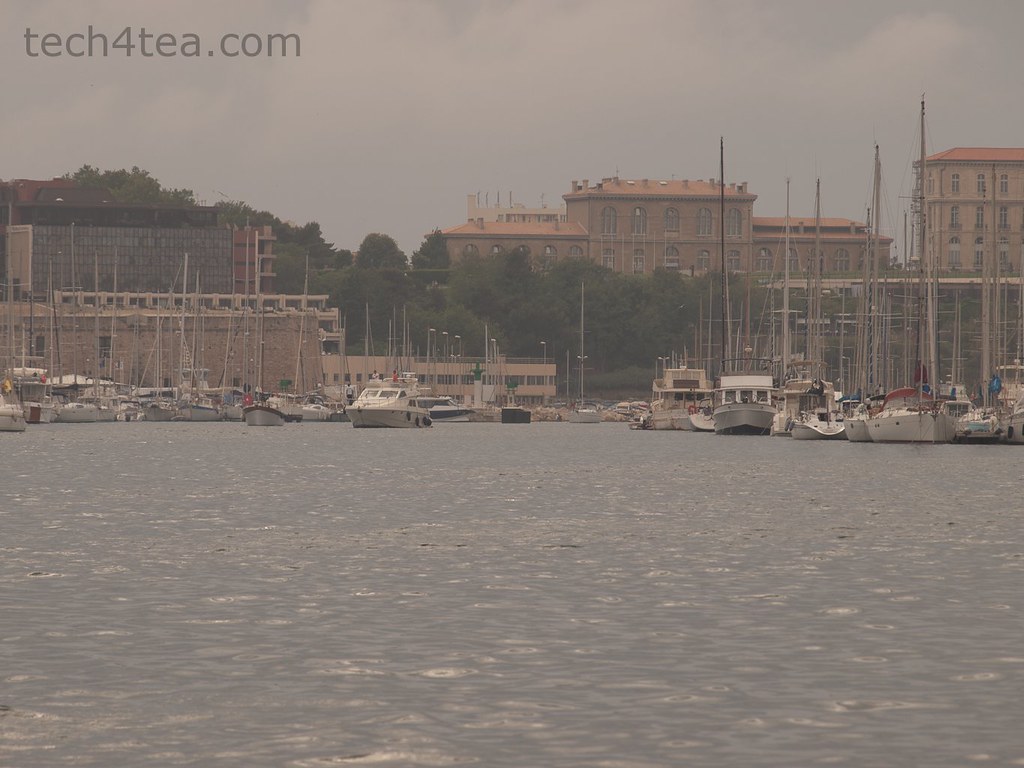
The port of Marseilles in Southern France on an overcast evening.

Pict 1: The port of Marseilles in Southern France on an overcast evening.

The overall contrast and brightness has been increased with the Levels command.

Pict 2: The overall contrast and brightness has been increased with the Levels command.

Most free and basic photo editors offer a basic Brightness/Contrast command that allows the user to easily adjust the brightness and contrast of a photo. GIMP tool also has the equivalent in the Colors > Brightness-Contrast command from the main menu.

This basic adjustment command uses a rudimentary algorithm that treats all pixels equally and adjusts them to the same extent. It’s useful if all you need is a quick and dirty adjustment to the photo.

For almost the same effort, the Levels command provides better control and the algorithm yields better results adjusting pixels to different extents depending on the settings you make.

That is why for many free photo editors, more advanced tools like the Levels and Curves command are not available or are only available when you upgrade to a paid version. In GIMP, these tools available for free.

Using the Levels command

This photo of a hanging potted plant is slightly underexposed because the camera has been fooled by the bright background.

Pict 3: This photo of a hanging potted plant is slightly underexposed because the camera has been fooled by the bright background.

The red petals are now more vibrant and discernible after the photo has been enhanced with the Levels command in GIMP.

Pict 4: The red petals are now more vibrant and discernible after the photo has been enhanced with the Levels command in GIMP.

Last week, we looked at how to analyse a photo’s characteristics and problems by examining its histogram in GIMP.

Using the histogram as a basis, we’ll learn to use the Levels command to improve the tonal distribution of a photo such that the overall brightness and contrast of the photo is just right and the entire range of brightness values (from 0 to 255) available is fully utilised.

With the photo open in GIMP, choose the Colors > Levels command from the main menu. A complicated looking Levels dialog box pops up showing a histogram of the photo as well as many controls and input fields to control the histogram is to be adjusted.

The reason why many beginners hesitate to use the Levels command is the seeming complexity of the dialog box. But in most cases, all you need is to drag one to three of the triangular sliders directly below the histogram. Here’s how.

Darkening a photo

Busy bee working on Lavender flowers in Provence, France.

Pict 5: Busy bee working on Lavender flowers in Provence, south of France.

Photo darkened using the Levels command in GIMP.

Pict 6: The photo after darkening using the Levels command in GIMP.

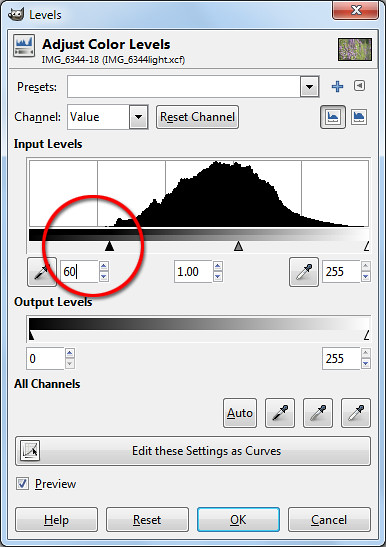
For the slightly overexposed photo of the lavender flowers, the histogram shows that none of the brightness values below 60 is utilised. Drag the blackpoint triangular slider from the left edge inwards towards the right until it is at the point where the main bulk of the histogram starts to form (see Pictures 5 to 7).
Drag the triangular blackpoint slider from the left edge inwards towards the right.

Pict 7: Drag the triangular slider from the left edge inwards towards the right.

The three boxes below the histogram shows the numeric brightness values of where the sliders are. It serves as a reference or when you need to key in specific numeric values to use. Most of the time, you should simply drag the slider inwards based on where the bulk of the histogram begins.

Dragging the blackpoint slider to 60 tells GIMP to darken pixels of brightness 60 and below down to zero. The other pixels in the histogram are correspondingly darkened as well. This also increases the overall contrast of the photo because a wider range of brightness value is now used in the photo.

To further finetune the brightness of the photo, drag the centre slider to the left or right to lighten or darken the mid-tones.

Lightening a photo

Drag the triangular blackpoint slider from the right edge inwards towards the left.

Pict 8: Drag the triangular slider from the right edge inwards towards the left.

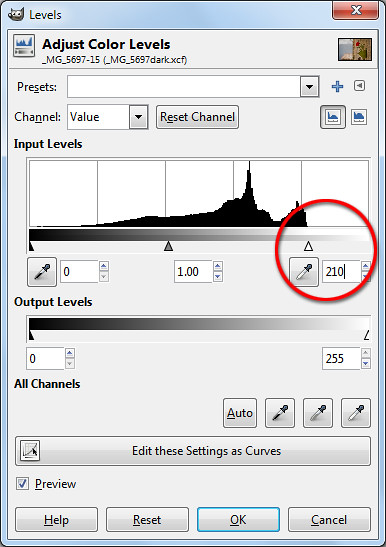
For the slightly underexposed photo of the potted flower on the wall, the histogram stops short at around the brightness level 210. Drag the whitepoint triangular slider from the right edge inwards towards the left until it is at the point where the main bulk of the histogram ends (see Pictures 3, 4 and 8 ).

Dragging the whitepoint slider to 210 tells GIMP to set 210 as the white point – all pixels that are of brightness 210 and greater are increased to the maximum of 255. The other pixels are correspondingly lightened as well.

As before, the overall contrast of the photo is increased because the entire range of brightness values is now used in the photo.

Again, drag the centre slider to the left or right to lighten or darken the mid-tones further.

Adjusting all three sliders

The snapshot of the port of Marseilles was taken on an overcast evening and is not only too dark but sorely lacking in contrast, resulting in a dull and flat photo (See Pictures 1 & 2).

The histogram is now spread across the entire range of brightness.

Pict 10: The histogram is now spread across the entire range of brightness.

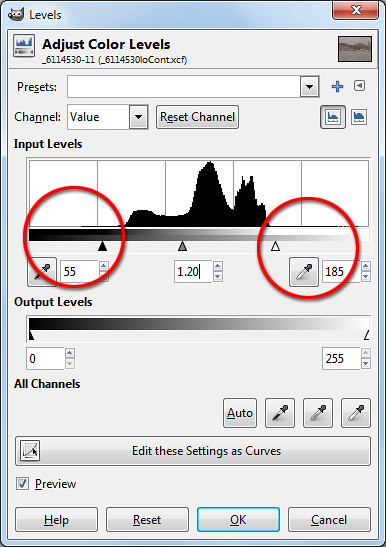
The histogram in the Levels dialog box shows that all the pixels are bunched up in the mid-tones – there are now extreme white or black pixels – so the highlights are not bright enough while the shadows are not dark enough.

Drag the blackpoint and whitepoint triangular sliders from both edges inwards.

Pict 9: Drag the blackpoint and whitepoint triangular sliders from both edges inwards.

In this case, drag the blackpoint and whitepoint sliders inwards to where the bulk of the histogram begins and ends (see Picture 9). This darkens the shadows and lightens the highlights forcing the bunched up histogram to spread out across the entire range of brightness – thereby increasing the overall contrast of the photo.

As the photo is still too dark, drag the centre slider to the left to further brighten the photo.

The resulting histogram after the adjustment is now spread out across the entire brightness range (see Picture 10).

Compact camera winners at the XXI TIPA 2011 awards

Saturday, April 30th, 2011
Compact digital cameras took up seven out of 40 categories evaluated by the 29-member magazines of the Technical Image Press Association (TIPA) this year. Winners include Nikon, Canon, Olympus, Samsung, Fujifilm and Panasonic.

Compared to the four categories for DSLR cameras, there were seven categories for compact digital cameras.

Founded in 1991, the Technical Image Press Association (TIPA) comprises 29 independent photo & imaging magazines from nine European countries plus Australia, Canada, China, USA and South Africa.

This is the 21st installment of the annual awards.

The winners for the seven compact digital camera categories are tabulated below.

Category / Winner TIPA citation
Best General Compact Camera 

Best DSLR Entry: Canon EOS 600D / Rebel T3i / Kiss X5

Nikon
COOLPIX P300

The Nikon COOLPIX P300 is a stylish compact camera with a remarkably powerful f/1.8 lens, starting at 24mm (35mm equivalent) with 4.2x optical zoom. High Refraction Index glass further ensures sharp images with high contrast. Combined with its powerful 12.2 Megapixel back-illuminated CMOS sensor, this camera gives excellent image quality even in dim lighting conditions. The P300 can film in Full HD (1080p), but also in slow motion with a recording speed of up to 120fps.
Best Expert Compact Camera 

Best DSLR Advanced: Nikon D7000

Olympus
XZ-1

The Olympus XZ-1 has one of the fastest zoom lenses in its class, the iZuiko f1.8-2.5 6.0-24mm (28-112mm equivalent angle of view in 35mm cameras.) Rather than succumb to the continuing Megapixel race, the light-reception area of each pixel of the 1/1.63-inch, 10 Megapixel CCD has been doubled. The XZ-1’s AF illuminator, Dual Image Stabilisation, Low-Light mode that automatically adjusts the ISO sensitivity up to ISO 3200 and the compact size all add up to an exciting “candid” camera that also offers advanced manual controls.
Best Premium Camera 

Best DSLR Expert: Olympus E-5

Fujifilm
FinePix X100

Fujifilm’s FinePix X100 offers unrivalled image quality for a compact camera, thanks to its APS-C format CMOS sensor and Fujinon 23mm f/2.0 lens. The Hybrid Viewfinder uniquely combines the ‘bright frame’ window-type optical viewfinder found in high-end film cameras, and the electronic viewfinder system of fixed single lens or digital compact system cameras, offering the user ‘the best of both worlds’. Added to the package is a newly-developed EXR Processor, which combines all the latest Fujifilm image processing technology.
Best Compact System Camera
Entry Level 

Best DSLR Professional: Pentax 645D

Samsung
NX100

The Samsung NX100’s new body design drastically revises the ‘DSLR look-alike’ concept found in other compact interchangeable lens cameras, and is a bold step from the company’s previous NX10/11 designs. This brings it into direct competition with other Compact System Cameras. Impressive features include a vivid 3-inch AMOLED screen, an APS-C size sensor and a line of high-tech iFunction lenses. This promising new series of optics blazes new viewing and camera control paths by allowing the user to program numerous functions right from the lens.
Best Compact System Camera
Expert 

Best DSLR Professional: Pentax 645D

Panasonic
Lumix DMC-GH2

The Panasonic Lumix DMC-GH2 is a true ‘hybrid’ photo and video camera, where video is no longer just an additional function. The DMC-GH2 features full HD 1920×1080, 60i (NTSC) / 50i (PAL) smooth, high quality video recording with 60p (NTSC) / 50p (PAL) output in addition to the high quality photo, a world’s first for cameras in this category. The DMC-GH2 can be operated through an intuitive touch control screen. For example, just tapping a subject on the screen will make the camera focus with a speed that rivals the best DSLR’s on the market.
Best Superzoom Camera 

Best DSLR Professional: Pentax 645D

Canon
PowerShot
SX230 HS

The Canon PowerShot SX230 HS features a 12.1-Megapixel HS System with high-sensitivity CMOS sensor, and a 14x optical zoom (28-392mm equivalent) with optical image stabilisation. A 3-inch LCD screen, with 100% frame coverage, makes for easy viewing and menu control. TIPA members were impressed with features such as Full HD 1080p video with Dynamic Image Stabilizer, a new GPS function (including supplied Map Utility software) and a high-sensitivity CMOS sensor coupled with Canon’s DIGIC 4 processor that reduces noise levels even at the higher ranges (up to ISO 3200).
Best Rugged Compact Camera 

Best DSLR Professional: Pentax 645D

Panasonic
Lumix DMC-FT3 / DMC-TS3

The Panasonic Lumix DMC-TS3/FT3 is waterproof to a depth of 12m and dust-proof equivalent to the IPX8 and IP6X standard. It has an integrated GPS function, ideal for photographers who want to shoot in the great outdoors and record their exact position during that shoot. The camera has a built-in compass, altimeter and barometer to show and record altitude, barometric pressure and orientation data. The barometer also works as indicator for depth underwater. Thanks to its location awareness, the internal clock of the camera is automatically adjusted to the local time.

Asus Eee Pad Transformer TF101 arrives in Singapore

Friday, April 29th, 2011
The latest 10.1 inch Android 3.0 tablet from Asus arrived in Singapore today at the launch event at Zirca in Clarke Quay. The 16GB Wi-Fi only version (Eee Pad + Docking keyboard) is priced at S$898.

But as part of its launch promotion, you can get a S$99 discount at S$799. If you choose to purchase only the pad and not the docking station, you can get the 16GB Wi-Fi only version at the launch promotion price of S$699.
The Asus Eee Pad Transformer TF101 arrived in Singapore on April 29, 2011

The Asus Eee Pad Transformer TF101 arrived in Singapore on April 29, 2011

What are the biggest grouses of tablet users today? No Flash, short battery life, no keyboard, no USB ports and card readers. Asus tries to address all these shortcomings in the Asus Eee Pad Transformer TF101.

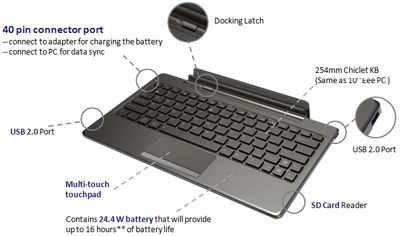
The optional docking station provides a full QWERTY keyboard for work involving intensive typing. It costs S$199 if you purchase it separately, but purchased together with the pad, you need only top up S$100 for it. The docking station makes available an additional 24.4 Wh battery that extends the pad’s 9.5 hours battery life to 16 hours instead.

A card reader (MMC/SD/SDHC) and two USB 2.0 ports are also available on the keyboard. The keyboard also props up the docked pad as a stand.

And finally, Adobe Flash 10.2 is supported, so you can visit all those glitzy sites running Flash animations and video.

The docking station is a full QWERTY keyboard that doubles up as a stand and contains an extra battery to extend the 9.5 hours battery life of the pad to 16 hours. It also contains USB ports and a card reader.

The docking station is a full QWERTY keyboard that doubles up as a stand and contains an extra battery to extend the 9.5 hours battery life of the pad to 16 hours. It also contains USB ports and a card reader.

I played with the Eee Pad on display and found the IPS (In-plane switching) LED backlight screen brilliant and sharp at with 1280×800 pixels packed into the 10.1 inch panel, offering a wide viewing angle of 178 degrees – I could still view the screen display from the side.

The touch screen senses up to 10 fingers for multi-touch - seen here with the Piano app from Android Market.

The touch screen senses up to 10 fingers for multi-touch - seen here with the Piano app from Android Market.

The pad feels slightly heavier than the iPad 2 but comfortable to hold. The book reader app included with the pad was standard fare – offering animated page turning, highlighting and bookmarking etc.

Photos and videos taken with the camera was clear even though the ambient lighting was dark.

Prices and configurations

The 16GB Wi-Fi only tablet is the only configuration available at the moment. Together with the docking station (keyboard), it sells for S$898 at the major retailers in Singapore – Challenger, Best Denki, Harvey Norman etc.

During this launch period, the promotional price for the 16GB Wi-Fi only Transformer sells for S$799 (Eee Pad + Docking station) and S$699 (Eee Pad only). Currently, the docking stations are out of stock and will only be available from the week of May 9 onwards.

The 32GB Wi-Fi only version will also only be available later in May.

“The 3G version is being tested now and will likely be launched in the second or third week of June,” Bernard Wen, Business Operation Manager of Asus Technology told me. “In the meantime, we’ve tested the Pad with USB dongles from SingTel, Starhub and M1 and found that they are all compatible,” he added.

New update to the TomTom App for iPhone

Friday, April 29th, 2011

The update to the TomTom App for iPhone offers TomTom’s latest release of the maps of Malaysia and Singapore. Current owners of the TomTom App can update to the new version for no additional charge.

TomTom App (Version 1.7) for iPhone and iOS devices available nowFor new users, the updated TomTom App (Version 1.7)  for iPhone is now available in the App Store for USD $59.99. The app is available on iPhone 4, iPhone 3GS & iPod touch 3rd Gen running iOS4.
Asus Eee Pad Transformer TF101 launch in Singapore tomorrow

Thursday, April 28th, 2011
Another tablet arrives in Singapore tomorrow – this time from Asus, the Taiwanese company that created the netbook niche. This Android-based tablet tries to redefine the tablet experience by packaging it with a docking keyboard cum extra battery.

Will update on the actual use and feel after the launch event tomorrow.

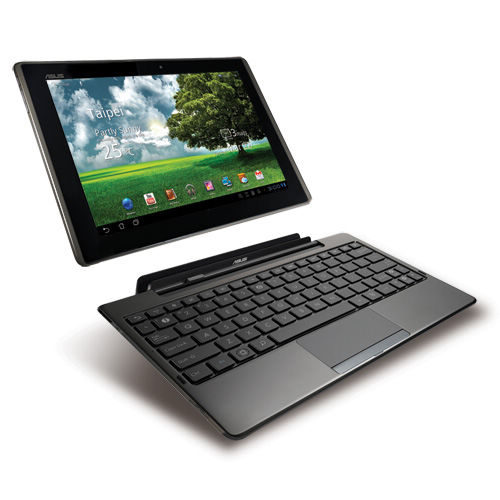
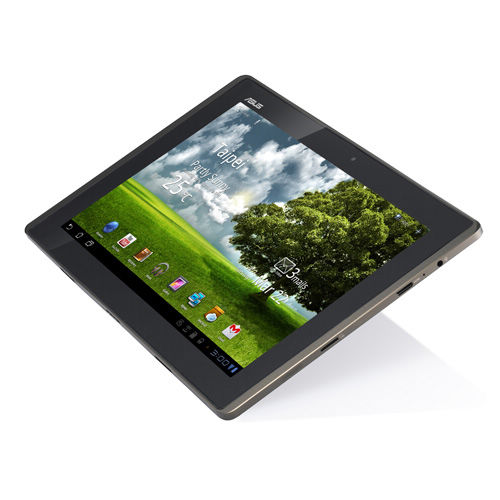
The Asus Eee Pad Transformer has a 10.1″ LED backlight WXGA (1280×800) screen and a docking QWERTY keyboard which also serves as a tablet stand, provides USB ports  and contains an extra 24.4 Wh battery that extends the 9.5 hours battery life of the tablet to 16 hours.

Asus Eee Pad Transformer TF101 launch in Singapore

The screen is IPS (In-plane switching) Panel which typically has a wider view angle than a traditional LCD screen – Asus boast a wide view angle of 178° for this screen. Apple’s iPad also uses an IPS panel.

The 10.1 inch screen screen is an IPS that provides a wide viewing angle of of 178 degreesThere is a 1.2M pixel front Camera and a 5M pixel rear Camera. The standard range of sensors are included: G-Sensor, Light Sensor, Gyroscope, E-Compass, GPS.
The Transformer is based on the Android 3.0 Honeycomb OS and supports Adobe Flash 10.2. It has an NVIDIA Tegra 2 1.0GHz dual-core CPU which provides multitasking and 1080p video playback.

Memory-wise, it has 1 GB RAM and comes in either 16 or 32 GB versions for permanent storage. Unlimited ASUS Webstorage is included free for a year.

Network-wise, it is fairly standard with WLAN 802.11 b/g/n at 2.4GHz and Bluetooth V2.1+EDR. What is conspicuously missing is a 3G version so you’ll probably need a mobile broadband USB dongle or a Wi-Fi network to access the Internet.

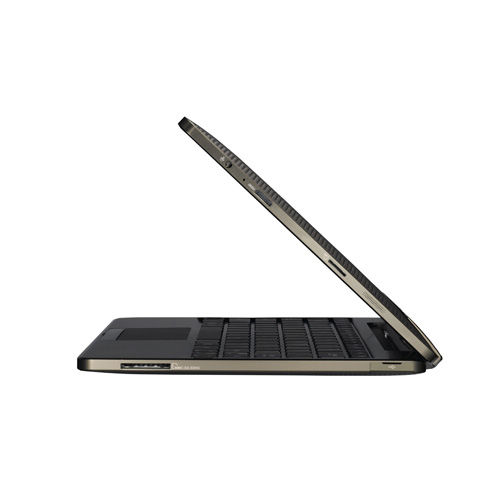
The docking QWERTY keyboard extends battery life to 16 hoursThe docking keyboard comes with two USB 2.0 ports, one card reader (MMC/SD/SDHC) and a touch pad. It can be purchased in the UK for an additional £50 and in the US for an additional US$149 over the base price of the tablet alone.

The tablet itself contains one 2-in-1 Audio Jack (Headphone/Mic-in), one Micro SD Card Reader, and one mini HDMI 1.3a for outputting the display onto an external HD screen. Stereo speakers are built in.

Physically, the tablet measures 271 x 171 x 12.98 mm and weighs 680 g.

The Transformer was first launched in Taiwan on March 25, then in the UK on March 30, and two days ago in the US on April 26. Prices in the US are $100 less than the “equivalent” iPad model.

US Prices

  • 16 GB: US$399
  • 32 GB: US$499
  • Keyboard: US$149

iPad 2 debuts in Asia and arrives in Singapore

Wednesday, April 27th, 2011
The iPad 2 debuts in Asia tomorrow in Japan and will arrive in 11 other countries including Singapore on Friday. China will only see the iPad 2 on May 6 one week later.

The iPad 2 with its Smart Cover arrives in Singapore on Friday - April 29, 2011The iPad 2 was first launched in the US on March 2 and released in 25 more largely European countries on March 25. Tomorrow, it will debut in Japan – the first Asian country to launch it. On Friday, it will arrive in Singapore together with 10 other largely Asian countries. China will only see the iPad 2 with only Wi-Fi on May 6.

Compared to the original iPad, the iPad 2 is 33 percent thinner and up to 15 percent lighter, while sporting the same 9.7-inch LED-backlit LCD screen. iPad 2 features Apple’s new dual-core A5 processor for faster performance and stunning graphics and now includes two cameras, a front-facing VGA camera for FaceTime and Photo Booth, and a rear-facing camera that captures 720p HD video, bringing the FaceTime feature to iPad users for the first time. The iPad 2 promises the same 10 hours of battery life as its predecessor.

Prices and configurations in Singapore

The Smart Cover doubles up as a stand.1. Wi-Fi only versions:

  • 16GB: S$668
  • 32GB: S$798
  • 64GB: S$928

2. Wi-Fi/3G devices:

  • 16GB: S$848
  • 32GB: S$978
  • 64GB: S$1108

iMovie and GarageBand for iPad apps are available for US$4.99 each from the App Store on iPad or www.itunes.com/appstore. The Smart Cover is available in a range of colors in vibrant polyurethane for S$54 or rich leather for S$98.

The iPad 2 will be available in Singapore at select Apple Authorised Resellers, and online through the online Apple Store beginning at 1am local time.

The iPad 2 debuts in Asia in Japan tomorrow - April 28, 2011The 10 other countries getting the iPad 2 together with Singapore on Friday are: Hong Kong, India, Israel, Korea, Macau, Malaysia, Philippines, South Africa, Turkey and UAE.

For those interested, the earlier 25 countries who got their iPad 2 on March 25 are: Australia, Austria, Belgium, Canada, Czech Republic, Denmark, Finland, France, Germany, Greece, Hungary, Iceland, Ireland, Italy, Luxembourg, Mexico, Netherlands, New Zealand, Norway, Poland, Portugal, Spain, Sweden, Switzerland and the UK.

White iPhone selling in 28 countries including Singapore from Thursday 28 April, 2011

Tuesday, April 26th, 2011
The much anticipated white iPhone will become available on Thursday. Originally planned to be launched together with the black version during the iPhone 4 launch in June 2010, the availability of the white version has been delayed until now by production complexities.

The white iPhone debuts on Thursday April 28, 2011The Cupertino company had stated earlier that “white models of Apple’s new iPhone 4 have proven more challenging to manufacture than expected.”

In addition to Singapore, the white model of the iPhone 4 will debut on Thursday in 27 other countries: Austria, Australia, Belgium, Canada, China, Czech Republic, Denmark, Finland, France, Germany, Hong Kong, Ireland, Italy, Japan, Luxembourg, Macau, Netherlands, New Zealand, Norway, South Korea, Spain, Switzerland, Sweden, Taiwan, Thailand, UK and the US.

In Singapore, the recommended retail price tag (without contract) for the 16GB model is S$888, while the price for the 32GB model is S$1048.

Purchases can be made through the online Apple Store, and select Apple Authorised Resellers in Singapore, such as EpiCentre, Nubox, istudio, Juzzl and Multimedia Integrated.

Olympus XZ-1 wins TIPA 2011 award for Best Expert Compact Camera

Monday, April 25th, 2011
The flagship compact digital camera from Olympus has won the Best Expert Compact Camera award at the annual XXI TIPA 2011 awards.

Technical Image Press Association - XXI TIPA Awards 2011The 29 member magazines of the Technical Image Press Association (TIPA) awarded the award for the “Best Expert Compact Camera” category to the Olympus XZ-1.



Olympus XZ-1 - Best Expert Compact CameraInto its twenty-first year, the annual awards recognised the best photo and imaging products in 2011 in 40 categories. TIPA has member magazines from nine European countries plus Australia, Canada, China, USA and South Africa.
In its citation, it lauded the XZ-1 for its fast lens, as well its larger sensor area for each pixel – which translates to greater sensitivity, lower noise and better image quality.
“The Olympus XZ-1 has one of the fastest zoom lenses in its class, the iZuiko f1.8-2.5 6.0-24mm (28-112mm equivalent angle of view in 35mm cameras). Rather than succumb to the continuing Megapixel race, the light-reception area of each pixel of the 1/1.63-inch, 10 Megapixel CCD has been doubled. The XZ-1’s AF illuminator, Dual Image Stabilisation, Low-Light mode that automatically adjusts the ISO sensitivity up to ISO 3200 and the compact size all add up to an exciting “candid” camera that also offers advanced manual controls.” – Citation for XXI TIPA Awards for “Best Expert Compact Camera”

In Singapore, the Olympus XZ-1 is available at a suggested retail price of S$748 (incl GST & bundled with a 8GB SD Card).

Listed here are some earlier write-ups on the Olympus XZ-1:
Photo review | Full reviewSpecsSelling pointsDiorama movie