Archive for the ‘Tablets’ Category

tech@vogue wants to dress up and style your mobile phone & tablet

Saturday, July 14th, 2012

The one-stop specialty boutique selling covers, accessories and connectivity solutions for your mobile device at nex Mall (#02-22/23) opens today.

The new tech@vogue at nex Mall, #02-22/23

The new tech@vogue at nex Mall, #02-22/23

This store is the first of a new chain of specialty stores and caters for smartphones and tablets across various operating systems including Android, Blackberry, iOS and Windows.

For audiophiles

For audiophiles

The new stores will be managed by the same team that runs Nubox – an arm of Newstead Technologies.

Nubox currently includes 11 Apple stores in Singapore.

The cozy 898 square-feet tech@vogue in nex Mall (#02-22/23) will be open daily from 10:30am to 9:30pm.

For those who are unfamiliar with the area, nex Mall is a large shopping Mall located at 23 Serangoon Central, above the Serangoon MRT station.

tech@vogue Gallery

The new tech@vogue Gallery categorises accessories under eight zones.

These are: Blast It, Dress It, Gotta Have It, Hear It, Juice It, Link It, Perk It and Style It. Check out what each of these zones specialises in at the end of the post.

Personalise your smartphones and tablets.

Personalise your smartphones and tablets.

There will also be an “experience zone” at tech@vogue where shoppers can see, hear, and feel the various solutions first-hand.

Wireless and connectivity solutions

Wireless and connectivity solutions

A number of international brands including Belkin, InCase and Just Mobile will debut their first demo corners in Singapore at the new store.

Be inspired by the Belkin products that enable you to connect to your home electronics anytime anywhere with a smartphone.

Learn how InCase products protect and enhance the technology that is essential to our lives.

Immerse yourself in the suite of stylish and award winning accessories from Just Mobile.

“With over 45 stores in Singapore, we hear the frustrations of our customers in their relentless search for the perfect accessories for their mobile devices. Often, style is compromised by the need for function and that is something which tech@vogue is set to change … we have accessories that consumers may not even know they need before visiting our store,” said Evelyn Chua, Chief Marketing Officer, Newstead Technologies.

Other exciting displays include the Slingbox which allows users to watch and control their home television on their mobile devices; and a dedicated Samsung corner that demonstrates the integration of functions through technology to provide a seamless experience.

The second tech@vogue Gallery will open at Marina Bay Link Mall in August 2012. Evelyn tells me they are looking to add a third in the Orchard area.

(more…)

Boosting developer confidence through BlackBerry 10 Jam

Monday, July 9th, 2012

The BlackBerry 10 Jam World Tour rolled into town today as more than 300 developers from Singapore and surrounding countries packed the Grand Ballroom at Hilton Hotel to be briefed on why they should develop apps on BlackBerry 10.

Wvygen Wong (right), local developer, talk about the BlackBerry 10 experience. To his right is Justin Lee, Application Development Consultant, Developer Relations, APAC, RIM.

Wvygen Wong (right), local developer, talk about the BlackBerry 10 experience. To his right is Justin Lee, Application Development Consultant, Developer Relations, APAC, RIM.

“We are fully committed to BlackBerry 10,” says Charles Dufourcq, Director for Singapore at Research In Motion (RIM).

And that is the message that RIM wants to get through to developers.

The rollout of BlackBerry 10 has been further pushed back to the first quarter of next year.

Developers need to be convinced that BlackBerry 10 will come into being if they are to be persuaded to invest time and effort into developing on the new platform.

I believe Dufourcq when he says RIM is committed to BlackBerry 10.

But it is not a secret that RIM may not even be in its current form after it considers the findings of an evaluation study of its strategic options by JP Morgan and RBC, which includes – as a least favoured option – a sale of the company.

It is anybody’s guess how a re-structured/acquired RIM positions BlackBerry 10.

But let’s not speculate too much.

The full-day BlackBerry 10 Jam today aims to provide the developer community with insights on the BlackBerry 10 platform.

“We are fully committed to BlackBerry 10,” says Charles Dufourcq, Director for Singapore at RIM.To help developers get started on the BlackBerry 10 platform, attendees were provided with a BlackBerry 10 Dev Alpha device in order to test their apps and to help ensure their apps are ready and available for customers.

Applications created with any of the BlackBerry 10 tools will run on BlackBerry 10 smartphones as well as BlackBerry PlayBook tablets when the new platform becomes available for the PlayBook.

Game-changing technology: wearable unified displays with scalable imagery

Sunday, July 8th, 2012

In a time when new technology and gadgets are launched everyday, and every one of their makers proclaim them to be game-changers, it is truly heartening to see products showcasing technology that has genuine potential to become a game changer in the near future.

Wearable video displays are an example. The Epson Moverio and Google Glass are examples of such gadgets.

Wearable unified displays can be used everywhere and for any purpose in the future, here an aircraft engineer has his hands free while referencing his technical manual through an Epson Moverio.

Wearable unified displays can be used everywhere and for any purpose in the future. Here an aircraft engineer can have his hands free (if he clips the controller to his overalls) while referencing his technical manual through an Epson Moverio.

In my humble opinion, there are two main constraints in consumer devices that represent frontiers in product developments for gadget makers.

Google Glass was showed off by co-founder Sergey Brin (not in this picture) at the Google I/O conference in June.

Google Glass was showed off by co-founder Sergey Brin (not in this picture) at the Google I/O conference in June.

These are display technology and device input.

What defines a smartphone and a tablet, laptop and a laptop, or even a television and even the cinema?

It is the size and form factor of the device.

Apart from the backend processor and performance, a large determinant of their category is simply their screen size.

If it’s a 3-5 inch device (with 3G connectivity), it’s a smartphone. 7-10 inch flat screen (with or without 3G), it’s a tablet (used to be netbook not too long ago).

Beyond that, you have the 13-17 inch notebook computer, and still beyond that – the desktops with even bigger screens.

Sony HMZ T1 Personal 3D Viewer

Sony HMZ T1 Personal 3D Viewer

Need we go into the numerous sizes for TVs, projectors and erm – cinemas?

A large determinant of device portability and usability – which often run counter to each other – is the size of the display.

Greater portability results in more squinting, whereas nice expansive viewing pleasure means bigger heavier screens.

A viewer/display device that allows the user to divorce display size from processing hardware will free the user from having to own multiple devices with different form factors.

Imagine the ability to make calls, read ebooks, play games, work on documents or edit images/video, watch the equivalent of large-screen movies on a single viewer/display.

Wanna look like an X-men? Try the Cyclops look.

Wanna look like an X-men? Try the Cyclops look.

No need to purchase separate bulky devices with their own different-sized displays.

You’d still need to have the little black-boxes containing the different processing hardware and device input.

But imagine sharing the same viewer/display amongst all these devices.

All of them “plug” into the same viewer/display.

There’s no more difference between a smartphone and a 3G-capable tablet computer.

Cameras and camcorders could also pair up wirelessly.

Although the device closest to bringing this to reality is the mounted-visor display/viewer, I’m sure there’ll be other physical means and ways to achieve this “unified display”.

Olympus has just announced its wearable display prototype - MEG4.0.

Olympus has just announced its wearable display prototype – MEG4.0.

Eventually, I can envisage (pun intended) displays embedded in contact lenses or even implanted into the cornea of the eyes.

In fact, patents have already been filed for such designs.

I haven’t seen any patents that bypass the eyes and inject vision signals directly into the brain though.

In a way, nature already unifies human vision through our eyes. We do not put on a different set of eyes to see different things.

The Olympus MEG 4.0 promises to connect to devices via Bluetooth.

The Olympus MEG 4.0 promises to connect to devices via Bluetooth.

Everything we see are through the same pair of eyes.

Why should we require a different screen to view the contents of different devices?

Now this single unified display may not be good news to device makers, although it surely should be the dream of consumers – even if we may not realise it yet.

Surely it’s better to be able to sell a single user multiple devices with different screen sizes if his/her needs forces him/her to do so.

Many users today own separate tablets and smartphones.

Sony HMZ T1 Personal 3D Viewer

Sony HMZ T1 Personal 3D Viewer

Apple, for instance, would rather sell you an iPhone AND an iPad, than only a single mobile device that “throws” its display into a single viewer with a “scalable” image size.

Google Glass with augmented reality.

Google Glass with augmented reality.

I’m sure it isn’t even news to the makers.

It’s a bit akin to traditional airlines offering budget flights.

Why introduce new budget services – even though it would benefit customers – that will change the game and threaten their erstwhile profitable business?

Fortunately, we have entrepreneurs who have broken the ranks to offer such choice to budget travellers.

A closer analogy would be the way netbooks had cannibalised the mainstream laptop market.

Sony HMZ T1 Personal 3D Viewer

Sony HMZ T1 Personal 3D Viewer

We have Asus to thank for “creating” the netbook niche to bring affordable and no-frills portable computing to the masses.

The Epson Moverio and Google Glass are not the first such device on the market, and in their current form are not mature enough for mass adoption by consumers yet – in terms of usability and feature-set, as well as content and consumer readiness.

But hopefully it precipitates more momentum to force makers to get on the bandwagon.

The other frontier

The other “physical constraint” to device form-factor is input interaction, a large part of which is text-input.

The size of screen again comes into the picture again if an on-screen keyboard is used.

And if a physical keyboard is used – be it a BlackBerry style keypad or a bigger portable keyboard – it translates into the overall form factor of the device.

Voice-input represents a means to free a device from a physical or on-screen keyboard, and even provide interactivity – through voice commands and voice search.

It’s also still early days and much development is needed before we can enjoy keyboardless devices

But as consumers and end-users, we can always dream on.

* Photos and illustrations used in this article belong to Epson, Google, Sony, and Olympus.

窥探一下未来的显示浏览器。如今已有一些头目。譬如:Epson Moverio BT-100, Google Glass, Sony HMZ T1 Personal 3D Viewer, Olympus MEG4.0。希望有朝一日,能够只凭一个显示机利用多种电子设备器材。

New Android smartphones: Samsung Ace 2 and beam

Tuesday, July 3rd, 2012

Samsung has launched two new Android 2.3 (Gingerbread) smartphones. Both the GALAXY Ace 2 (S$438) and GALAXY beam (S$648) will be available in July. Prices include GST but excludes line contract.

GALAXY Ace 2 (left, S$438) and the GALAXY beam (right, S$648).

GALAXY Ace 2 (left, S$438) and the GALAXY beam (right, S$648).

You’ve seen the Nikon compact camera that comes with a built in projector. Now there is a smartphone that comes with a built-in projector – the GALAXY beam.

GALAXY beam

The built-in projector of the GALAXY beam lets users spontaneously share photos, videos or other digital media with family or friends by beaming content stored on the device directly onto walls, ceilings or improvised flat surfaces.

The GALAXY beam comes with a built in 15 lumens projector.

The GALAXY beam comes with a built in 15 lumens projector.

No need to huddle around a tiny smartphone or tablet screens. Project full-screen video clips at up to 50 inches wide with the GALAXY beam’s bright 15 lumens projector.

Both smartphones run on Android 2.3 (Gingerbread) and will ship in July.

Both smartphones run on Android 2.3 (Gingerbread) and will ship in July.

Other than that, the GALAXY beam has a 4-inch (480×800 WVGA) TFT display, 5-megapixel AF rear camera with flash, and a 1.3-megapixel front camera.

A large 2,000mAH battery feeds the projector. Despite having a built-in projector, the GALAXY Beam is only 12.5mm thick, and comes with a USB 2.0 port and 8GB of internal memory, as well as a microSD slot for up to 32GB of external memory.

The GALAXY beam will be available from 7 July at S$648.

GALAXY Ace 2

The GALAXY Ace 2 is the affordable successor to the GALAXY Ace from last year.

With a 3.8-inch (480×800 WVGA) PLS TFT display, it has a 5-megapixel AF rear camera with flash, and a VGA front camera.

The GALAXY Ace 2 has a 1,500mAH battery and comes with a USB 2.0 port and 4GB of internal memory, as well as a microSD slot for up to 32GB of external memory.

The GALAXY Ace 2 will be available in July at S$438.

Samsung rolls out locally developed edutainment apps

Tuesday, July 3rd, 2012

Samsung has rolled out more than 40 new interactive edutainment apps in partnership with Singapore developers. These apps will be available on Samsung smart mobile devices.

Overview of content strategy and edutainment apps by Winston Goh, Senior Product Marketing Manager, Mobile Communications, Samsung Asia

Overview of content strategy and edutainment apps by Winston Goh, Senior Product Marketing Manager, Mobile Communications, Samsung Asia

The 40 new apps are entertaining, intuitive, social and visual in nature and allows users to engage in self-learning experiences, whether at home or on-the-go.

The suite of edutainment apps includes:

  • Mandarin Speaking Skills for Kids: comprises speech interactive exercises to build Mandarin speaking skills for kids from Primary 1 to 6.
  • Zalairos Adventures: comprises 25 e-books for kids aged between 5-10 years old to improve vocabulary, reading and comprehension skills.
  • Skoolbo Core Skills: comprises more than 50,000 questions designed for kids aged between 4-10 years old to improve mathematics and language skills.
  • PREPTEST: standardized self-assessment modules and admission guidelines for GMAT (Graduate Management Admission Test), SAT (Scholastic Aptitude Test) and more.

Samsung is working with the developer community to promote the creation of interesting educational content.

The company commits the tools, resources, technical content and support that app developers require, to create rich applications optimised for its GALAXY range of tablets and smartphones, as well as the GALAXY Note.

The local app developers that Samsung is working with for this range of edutainment apps are B-Secure Technologies, Prep Zone, iQ-hub and Skoolbo.

Some of these apps, such as those developed by B-Secure Technologies and Prep Zone will be made exclusively available on Samsung mobile devices.

The launch was held at Samsung’s store at Vivocity.

I tried out some of the apps during the launch and it’s quite impressive what our local developers are capable of.

Also launched at the event were Samsung’s two new GALAXY smartphones.

These are the GALAXY beam (S$648) and the GALAXY Ace 2 (S$438).

Both are based on Android 2.3 (Gingerbread) and will be available this month.

The list of Edutainment Applications and their availability date are listed below.

(more…)

Microsoft showcases a New World of Work

Monday, July 2nd, 2012

I call it N Wow! Microsoft Singapore demonstrated how it has transited from a traditional fixed-room-and-desk office layout, to a Starbucks-style working environment where employees can work at ANY available desk in its six floors of office space at One Marina Boulevard in Singapore.

No more assigned desks. Click to enlarge to see more of the new way of work.

No more assigned desks. Click to enlarge to see more of the new way of work.

What happens to the personal paraphernalia that adorn the typical office cubicle or room?

Well each employee, including Managing Director Jessica Tan, gets a locker to store their personal effects.

Plenty of collaboration spaces.

Plenty of collaboration spaces.

Each desk comes with power-sockets, a wireless mouse and keyboard, and a Samsung monitor that comes with a privacy screen.

Nothing else – not even a phone.

A single cable from the monitor plugs into the employee’s laptop.

In addition to connecting the display to the monitor, the same cable also provides Internet connection to the laptop, as well as control over the wireless mouse and keyboard.

Every floor has a "landing area" at the entrance - a convenient rendezvous point.

Every floor has a “landing area” at the entrance – a convenient rendezvous point.

Why isn’t there a phone?

Employees rely on Microsoft’s Lync telephony and collaboration solution which allows them to communicate using the Internet.

It is now as easy to work from home as it is to work in the office.

Yet more employees prefer to come physically to the office than to work from home – because of the more open and spontaneous collaborative environment the revamp has facilitated.

For a start, there’re no walls and cubicles between employees.

Workers can choose a private booth to dock-in if they really need to work on or discuss about something really confidential.

But by-and-large, most work in the open, at one of the docking desks.

Overview of rooms and workstations. Reminiscent of Metro UI?

Overview of rooms and workstations. Reminiscent of Metro UI?

Microsoft Singapore invited the regional media to walk around their operational offices to see this concept live.

I suppose this is Microsoft’s way of demonstrating how their technology can help enterprises and businesses adapt to the latest trends of work, where people tend to collaborate more in the course of work.

Instead of a concept demo, Microsoft is showing how they walk the talk – in fact, they’ve been working this concept in Amsterdam for the past five years..

And it was an impressive walkabout – to see what many organisations have only talked or dreamed about.

Samsung SUR40Pixelsense. Seen at Microsoft Technology Centre at One Marina Boulevard in Singapore.

New tablets: Microsoft unveils two Surface tablets

Tuesday, June 19th, 2012

Microsoft has unveiled two 10.6-inch Windows tablets and accessories.

One model will run on Windows RT and will be released with the general availability of Windows 8. The other tablet will be available about 90 days after and feature Windows 8 Pro.

Update 2 (1 March, 2013):

Microsoft has announced that beginning late March the rollout of Surface will continue over the next few months.

Surface RT with Windows RT will reach Japan, Mexico, New Zealand, Russia, Singapore and Taiwan.

Surface Pro with Windows 8 Pro will hit Australia, China, France, Germany, Hong Kong, New Zealand and the United Kingdom.

Update 1 (18 July, 2012):

Microsoft’s Steven Sinofsky has just announced at its annual sales meeting that customers will be able to get Windows 8 on 26 October, 2012. This will be available both as an upgrade or on a new PC.

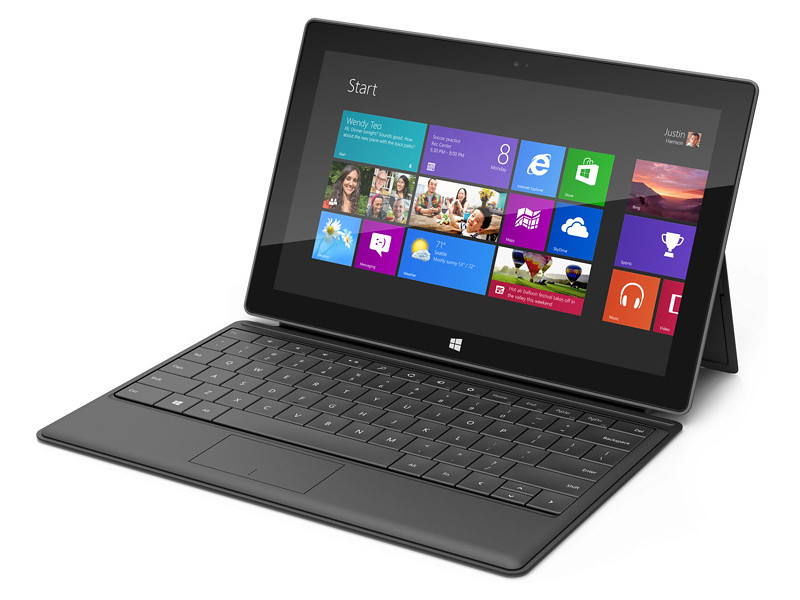
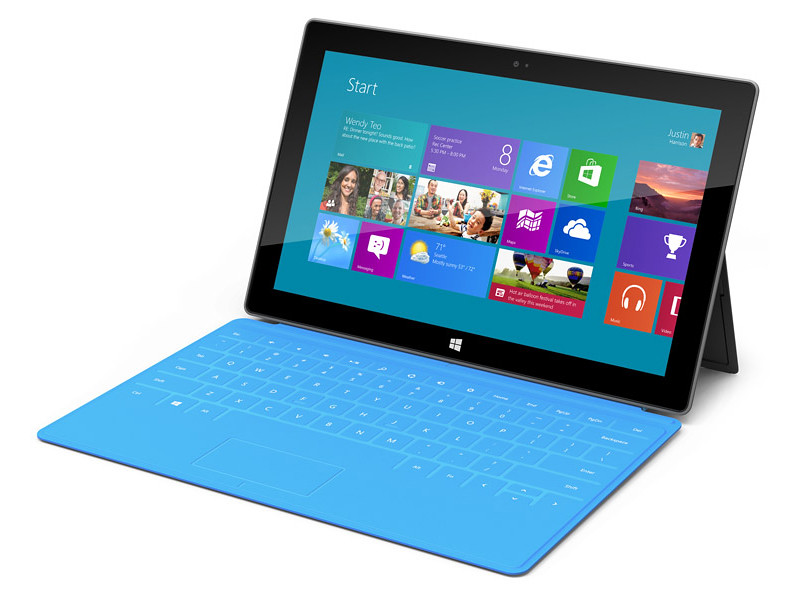
Microsoft finally joins the fray by unveiling its 10.6-inch Surface tablets.

Microsoft finally joins the fray by unveiling its 10.6-inch Surface tablets.

The Windows RT Surface tablet will run on an ARM processor, while the Windows 8 Pro version will have a third-generation Intel Core processor.

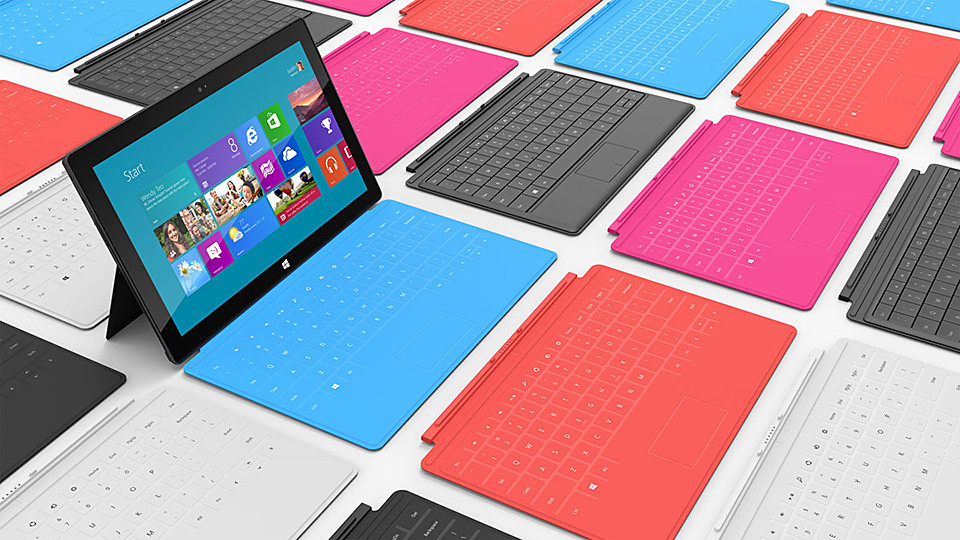
The Touch Cover and Type Cover double up as keyboards.

The Touch Cover and Type Cover double up as keyboards.

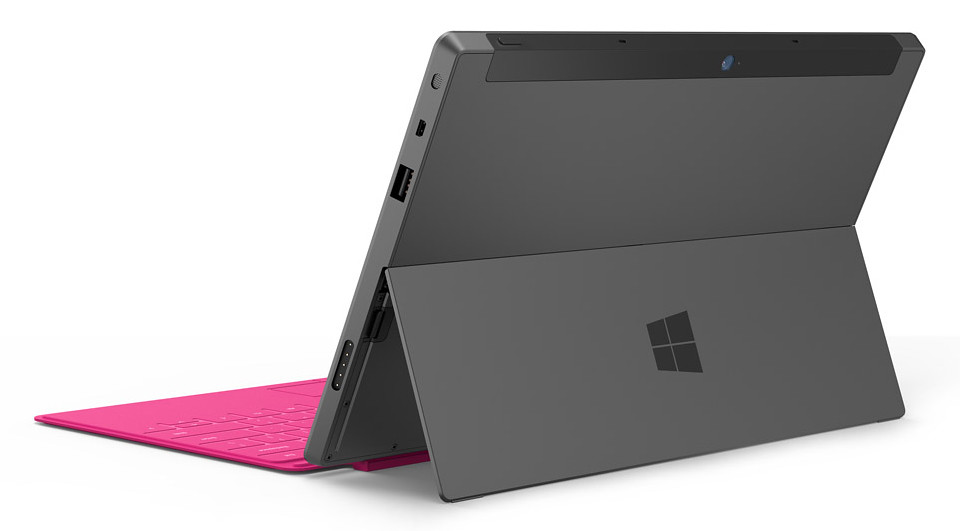
Each Surface tablet will have a full-sized USB port, a microSD slot, and a 16:9 aspect ratio; with edges angled at 22 degrees.

The casing of Surface is created using VaporMg (pronounced Vapor-Mag), where metal and deposit particles are molded to create a finish akin to luxury watches.

Starting with magnesium, parts can be molded as thin as .65 mm, thinner than the typical credit card, to create a product that is thin, light and rigid/strong.

The VaporMg materials and processes has enabled the thin and sleek design of the Surface tablets.

The VaporMg materials and processes has enabled the thin and sleek design of the Surface tablets.

This also enables an extremely thin built-in kickstand to prop the tablet up when watching movies or video conferencing with the HD front- or rear-facing video cameras.

The integrated, built-in kickstand removes the need for a separate accessory.

The integrated, built-in kickstand removes the need for a separate accessory.

I like the idea and design of this integrated kickstand.

To transform the tablet into a “notebook”, a 3 mm Touch Cover uses pressure-sensitive technology to sense keystrokes as gestures, allowing users to touch type significantly faster than on an on-screen keyboard.

The Touch Cover will be available in a selection of vibrant colors. It clicks into the Surface tablet via a built-in magnetic connector, forming a natural spine like you find on a book, and doubles up as a protective cover.

The Touch Cover and Type Cover comes in many vibrant colours.

The Touch Cover and Type Cover comes in many vibrant colours.

Alternatively, users can click in a 5 mm-thin Type Cover that adds moving keys for a more traditional typing feel.

Retail pricing will be announced closer to availability but is expected to be competitive with a comparable ARM tablet or Intel Ultrabook-class PC.

OEMs will have cost and feature parity on Windows 8 and Windows RT.

Oh and if you’re interested in a 40-inch tablet, check out the Samsung SUR40 for Microsoft Surface. (I haven’t heard anyone else calling THAT a tablet yet).

The main technical specifications of the two Surface tablets are tabulated below.

(more…)

GALAXY Tab 2 tablets arriving in Singapore

Thursday, June 14th, 2012

Samsung is bringing in to Singapore the GALAXY Tab 2 (10.1) 3G tablet (S$798) on 16 June, and the GALAXY Tab 2 (7.0) tablet (S$598) on 23 June. Prices include GST but excludes line contract.

Update (22 June, 2012):

Samsung has just announced that the GALAXY Tab 2 (7.0) will only be available in Singapore on 30 June 2012. Price remains unchanged at S$598 (inclusive of GST) without contract.

Pricing and availability of the Wi-Fi versions for the GALAXY Tab 2 series will be announced closer to the launch date.

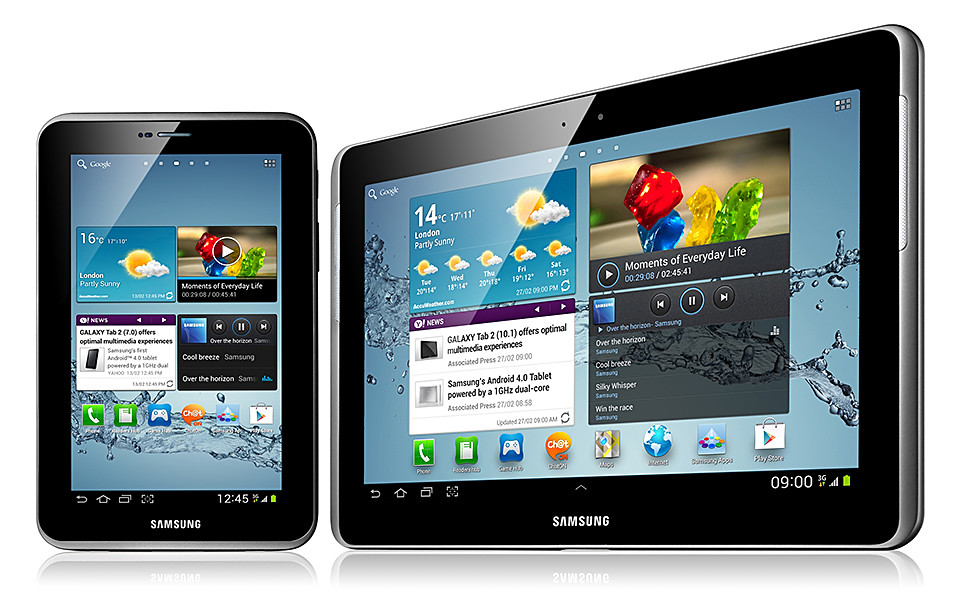
Samsung GALAXY Tab 2 in 7-inch and 10.1 inches.

Samsung GALAXY Tab 2 in 7-inch and 10.1 inches

The GALAXY Tab 2 series of tablets are Samsung’s first Android 4.0 Ice Cream Sandwich tablets. There are now some 400,000 apps for Android phones and tablets.

The GALAXY Tab 2 tablets are available in 3G and WiFi versions.

Samsung GALAXY Tab 2 (7) and GALAXY Tab 2 (10.1)

Samsung GALAXY Tab 2 (7) and GALAXY Tab 2 (10.1)

GALAXY Tab 2 Series offer users easy multimedia access, playback and sharing experiences with Samsung Hub services.

Samsung’s Music Hub provides a full music store solution with access to over 17 million tracks.

GALAXY Tab 2

GALAXY Tab 2

The Readers Hub provides access to over 2.3 million e-books, 3,500 magazines and over 2,000 newspapers in 51 languages, while Game Hub instantly connects users to the latest game titles.

Samsung’s upgraded Touchwiz user interface features Hub widgets for one-step access to users’ content in Hubs.

The device also presents S Suggest, a new service offering recommendations of apps suited to users’ tastes directly on a home screen.

Samsung’s AllShare is a content-sharing service that allows users to search for and play video, photo, and music files freely across their GALAXY Tab 2 Series from PCs and other Samsung smart devices – such as PC, TV, mobile phone, and digital camera – by using the local network for streaming playback.

With the voice call capability, the GALAXY Tab 2 Series can be used as a phone, serving as a second device in case they misplace their primary phone.

It also lets users spontaneously arrange multi-party video calls via Google+ hangouts, as well as engage in group chats or micro-communities to collectively chat or share content.

In addition, ChatON, Samsung’s cross-platform communication service, connects all phone users of any platform into a single community.

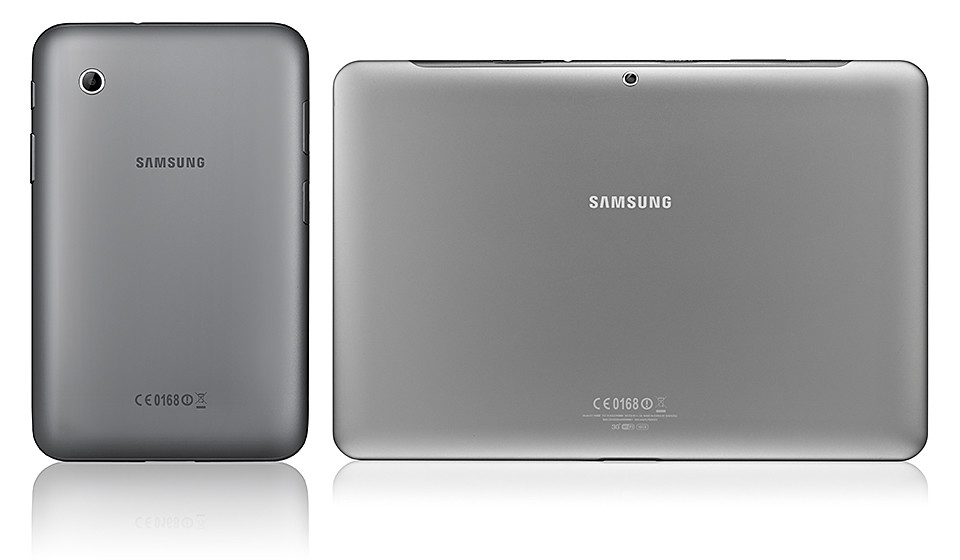
Rear of the Samsung GALAXY Tab 2 tablets

Rear of the Samsung GALAXY Tab 2 tablets

ChatON uses phone numbers instead of ID and passwords, and provides easy instant messaging and group chatting in various formats — images, video, voice, contacts — to make messaging simple and intuitive.

Below are the main technical specifications of the two Samsung GALAXY Tab 2 tablets.

(more…)

First Apple WWDC 2012 without Steve Jobs

Monday, June 11th, 2012

A year ago, Steve Jobs made his last appearance at an Apple WWDC. This year, Tim Cook helms his first WWDC as Apple’s CEO.

Apple's WWDC 2012 is from 11-15 June in San Francisco.

Apple's WWDC 2012 is from 11-15 June in San Francisco.

The annual Worldwide Developers Conference (WWDC) this year is being held from June 11 – 15 at San Francisco’s Moscone West. Tickets were sold out in a mere two hours when it went on sale in April.

Here’s a quick roundup of some of the revelations from the opening keynote presentation on first of the 5-day conference.

MacBooks / OS X Mountain Lion

Refreshed MacBook Air & Next-generation MacBook Pro ships today.
In comes Ivy Bridge processor and USB 3.0, out goes Ethernet and FireWire 800 ports, MacBook Air becomes thinner and lighter, MacBook Pro gets 60% faster graphics performance.
Retina display in MacBooks: 220ppi with 2880 x 1800 resolution.
Highest-resolution notebook display in the world.
Retina Display support: Final Cut Pro, Aperture and Diablo3 now supports 220ppi display.
AutoCad and Photoshop support in the works.
iPad-style Dictation is introduced to Mountain Lion for Macs.
Speak directly into native Apple software, Microsoft Word and Facebook.
AirPort Express available now.
Pocket WiFi router supports simultaneous dual-band.
New OS X feature: Power Nap.
Mac updates emails, notifications and photos, and backs itself up while charging.
OS X Mountain Lion available on Macs in July.
Free upgrade for new Mac purchases between now and arrival of the new OS.

iOS 6

iOS 6 unveiled Beta today, full release in the fall.
More than 200 improvements: launch apps with enhanced Siri, and it comes to iPads, FaceTime over cellular data.
Supported: iPhone 3GS and up, 2nd gen iPads and up, 4th gen iPod touch.
Enhanced Siri launches apps and comes to new iPads and eventually into cars.
Siri to get into the car with Eyes Free: demo: Toggle Siri on by tapping a button the steering wheel.
iOS 6 to get Do Not Disturb feature from Mountain Lion.
Select which push notifications to mute and which to stay on.
iOS 6 integrates more tightly with Facebook, Twitter and App Store.
Share directly from core apps like Maps, Photos and Safari.
Safari offers unified search across the web, browser history and bookmarks.
Following in Chrome’s footsteps.
iCloud Tabs syncs Safari web-browsing across all devices.
Simultaneously see all the tabs open on any device.“IOS 6 will include Apple’s own mobile mapping software to compete with software from Google. TomTom will supply Apple with map data and related content.” – statement from TomTom.
Enhanced Safari features.
Multitouch to help navigate tabs, upload images directly, Offline Reading List.
Passbook provides one-stop purchase of tickets and boarding passes.
No more paper QR-codes and tickets.
Apple replaces Google Maps with own Maps app.
Maps comes with Yelp integration and turn-by-turn navigation, and 3D.

PC Show 2012 promotions: Newstead/Nubox

Saturday, June 9th, 2012

Newstead and Nubox will be at the PC Show 2012 at Suntec Singapore at the Level 3 Concourse.

Click on picture to view/download PC Show 2012 brochures from Newstead.

Click on picture to view/download PC Show 2012 brochures from Newstead.

Here are seven brochures for Newstead’s PC Show 2012 promotions from Nubox, and bargains/deals offered by Newstead for computers from major computer makers Acer, Asus, Dell, HP, Samsung and Toshiba.