Archive for the ‘iPad’ Category

Western Digital envisages a connected lifestyle

Thursday, October 13th, 2011

Western Digital launches a slew of media storage, networking and playback products for the connected lifestyle.

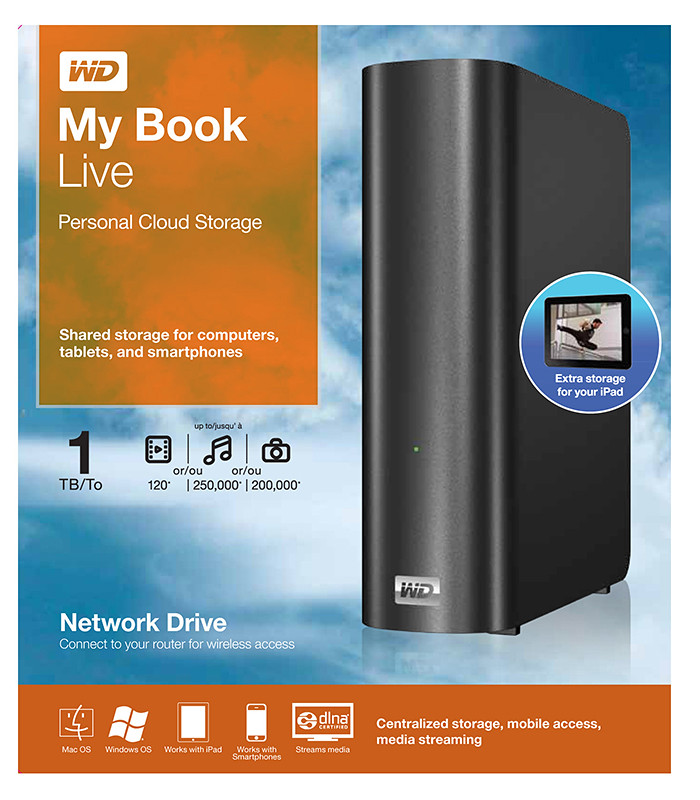
Western Digital My Book Live personal cloud storage

Western Digital My Book Live personal cloud storage

The premise of the Connected Life solution from Western Digital is the simple set-up of a private personal cloud where media can be accessed and shared from any computer at home.

This personal cloud can also be extended into the Internet so that mobile devices such as smart phones and tablet computers can also access data and media in the cloud using apps, while computers can use a browser interface.

The centrepiece of the Connected Life solution from Western Digital is the My Book Live network attached storage. With capacities ranging from 1TB to 3TB, these network capable external hard drives are connected directly to the wireless router at home so that any computer – be it a Mac or a PC – can store and access the media in the drive.

Western Digital WD TV Live streaming media player

Western Digital WD TV Live streaming media player

The WD TV Live media player that is connected to the wireless network can then stream media from My Book Live and play photos, music and videos on a large TV screen. It can also stream media directly from Internet services such as YouTube.

Outside home, data and media on My Book Live can be accessed on mobile devices using WD apps WD 2go (free), WD 2go Pro (US$2.99), and WD Photos (free).

Adobe Touch Apps

Wednesday, October 5th, 2011

Adobe announced its slate of six new apps for Apple iPads and Android tablets during the MAX 2011 conference in Los Angeles. Here’s a brief description of what each of the apps does.

Each of the six apps has an introductory price-tag of US$9.99. The Android version is will be available in November 2010 while the iOS version will only be available in 2012.

Adobe Touch App Description of App

Adobe Photoshop Touch
 

Adobe Photoshop Touch

Adobe Photoshop Touch

Adobe Photoshop Touch

Transform images with core Photoshop features in an app custom-built for tablets. With simple finger gestures, users can combine multiple photos into layered images, make popular edits and apply professional effects. The tablet-exclusive Scribble Selection Tool allows users to easily extract objects in an image by simply scribbling on what to keep and then what to remove.

With Refine Edge technology from Adobe Photoshop, even hard-to-select areas with soft edges, such as hair, are easily captured when making selections. Additionally, the app helps users quickly find images, share creations, and view comments through integration with Facebook and Google Search. Using the syncing capabilities that are a component of Adobe Creative Cloud, files can be opened in Adobe Photoshop.


Adobe Collage
 

Adobe Collage

Adobe Collage

Capture and refine ideas and concepts by combining inspirational images, drawings, text and Creative Suite files into modern, conceptual mood boards.

Features include importing of images, four customizable pen types for drawing, adding text, and applying color themes. A virtually unconstrained canvas grows as needed to accommodate more assets. Files can be shared or transferred for access in Adobe Photoshop.


Adobe Debut
 

Adobe Debut

Present designs to clients and stakeholders virtually anywhere. Adobe Debut quickly opens tablet-compatible versions of Creative Suite files for convenient and beautiful viewing on the tablet, including Photoshop layers and Illustrator art boards. Feedback is gathered using a markup pen tool to add notes and drawings on top of the work.

Adobe Ideas
 

Adobe Debut

Easy-to-master, vector-based tool for drawing. By using a stylus or finger, strokes appear smooth at any zoom level. Starting with a blank canvas, users can choose color themes, and pull in tablet-compatible image files that can be controlled as separate layers. Finished results are easily accessed in Adobe Illustrator or Photoshop.

Adobe Kuler
 

Adobe Kuler

Generate color themes easily to inspire design projects. Color can be explored and discovered, with hundreds of thousands of Kuler themes already available via the creative community. Social engagement in the community is enhanced by rating and commenting on themes, which can be exported as color swatches for Adobe Creative Suite projects.

Adobe Proto
 

Adobe Proto

Adobe Proto

Develop interactive wireframes and prototypes for websites and mobile apps on a tablet. Ideas are communicated and shared with teams and clients using a touch-based interface.

Gestures quickly express a design concept, explain website structure or demonstrate interactivity. The wireframe or prototype then can be exported as industry standard HTML, CSS and JavaScript, and shared in popular browsers for immediate review and approval.

New creative design tablet apps: Adobe Touch Apps

Tuesday, October 4th, 2011

Six new apps for Apple iPads and Android tablets have been announced by Adobe at its MAX 2011 technology conference.

At US$9.99 each, the six apps address different areas of the creative process: image editing; ideation; sketching; mood boards; website and mobile app prototyping; and presenting finished work.

Adobe Touch Apps are essential components of Adobe Creative Cloud, a major new company initiative also announced today. Adobe Creative Cloud will allow subscribers to access desktop and tablet applications, find creative services, and share their work.

Files created via Adobe Touch Apps can be shared, viewed across devices or transferred into Adobe Creative Suite software for further refinement. Adobe Touch Apps are designed to work with both finger and stylus input.

Adobe Touch Apps will be available for Android devices in November 2011. iOS availability will likely be announced only in early 2012, although Adobe Ideas is already available for the iPad.

Access to the file viewing, sharing and transfer functionality of Adobe Creative Cloud is included in the price of each Adobe Touch App. Details regarding pricing of the Adobe Creative Cloud and its expanded capabilities around applications, services and community will be announced in November 2011.

Single Edition of Adobe Digital Publishing Suite for tablets

Monday, October 3rd, 2011

The Single Edition allows freelance designers and small design firms to publish interactive content created with Adobe InDesign CS5.5 software on the Apple iPad for US$395 per application.

Adobe Publishing Suite, Single Edition at US$395 per iPad application.

Adobe Publishing Suite, Single Edition at US$395 per iPad application.

Single Edition allows designers to publish a single-issue application for sale or distribution through the Apple App Store, without writing any code, focusing on creative design.

The Professional Edition of the Adobe Digital Publishing Suite was released in May for publishing houses, business publishers, and education institutions that require an off-the-shelf tablet publishing solution.

Single Edition allows users to publish single-issue content such as a brochure, highly-visual book, annual report or personal design portfolio as an application for the iPad.

The Digital Publishing Suite family which now includes Single Edition is used to publish content beyond traditional magazines and newspapers. These include sales tools, brand and customer engagement materials, merchandising deliverables, employee communications and corporate collateral published to tablets.

Pricing and Availability

Single Edition for iPad is expected to be available for purchase online at the end of November 2011. From InDesign CS5.5, users can publish through Single Edition to the iPad for US$395 per application. Single Edition will support additional tablet platforms later in 2012.

Setting up and using the Seagate GoFlex Home storage system

Monday, September 26th, 2011

GoFlex Home is a consumer network attached storage (NAS) hard drive for the home. Easy to set up and use, it allows the access, sharing, streaming, and backup of files and media for computers, network TVs, media players and game consoles connected to the home wireless network.

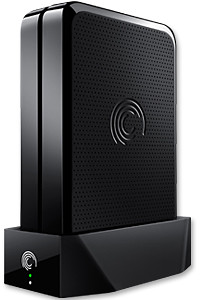
The Seagate GoFlex Home comprises a drive dock and a hard drive.

The Seagate GoFlex Home comprises a drive dock and a hard drive.

Secure access can also be opened to computers and iOS/Android tablets and smartphones over the Internet.

Over the weekend, I helped my friend set up an NAS drive for his desktop, netbook, two laptops, iPhone and Android tablet. He had bought the Seagate GoFlex Home 3 TB storage drive during the recent COMEX 2011 but hadn’t had the time to set it up yet.

I helped by using eye-power because he decided to give it a go himself and actually got the thing working in less than 15 minutes. That was the reason why I recommended the drive in the first place, it works with most consumer home Wi-Fi routers with little set-up or configuration needed.

The GoFlex Home comes with two cables and an software installation CD. The following steps were all that was needed to get the personal storage cloud going:

1. Connect the GoFlex Home drive dock to the Wi-Fi router by using the provided Ethernet cable.

2. Pop the GoFlex hard drive into the GoFlex drive dock and plug the power supply into the drive dock and the wall outlet. Switch on the GoFlex Home by pressing the Power button on the drive dock.

3. Pop the CD (or download from Seagate’s website) into the computer (can be a Mac or Windows PC) to install the software needed to access the hard drive. Simply select a language, key in the product information found on the drive, give the drive a name and register it. The name has to be unique globally since it will be used to identify the drive should you access it from the Internet.

4. Install the software on other computers that require access to the shared drive. Up to 5 people/computers on the home network can access the GoFlex Home. By paying to subscribe to the Seagate Share Pro, you get access for an unlimited number of people/computers to the GoFlex Home.

There are three ways to access the drive. One is to use the installed Seagate Dashboard software (on Windows PCs), which allows all features of the drive to be configured and managed. You can add computers and user accounts, backup, access and share files as well.

Use Seagate Dashboard software to configure and manage GoFelx Home

Use Seagate Dashboard software to configure and manage GoFelx Home

The other way is to use a browser-based Seagate Share either for a computer in the home network or out in the Internet.

Seagate GoFlexAccess App

Free iOS/Android app

Both are easy to use with a simple interface, using drag-and-drop or standard dialog boxes we’re familar with.

The third method is via the appropriate free app on a iOS/Android smartphone or tablet, also over the Internet.

The GoFlex Home comes with a USB port which is very useful. You can connect an additional external hard drive to expand the capacity of the original GoFlex hard drive. You can also connect a USB hub for connecting more than one USB device.

In my friend’s case, he connected his printer to the USB port and all his computers on the Wi-Fi network got to share that printer. USB port on the drive dock for a HDD, printer or USB hubNo more plugging/unplugging the old printer from one computer to another.

The included backup software allows up to three connected computers to be automatically backed up to the GoFlex Home. Upgrade to Premium Backup ($49.95) to back up an unlimited Seagate GoFlex Home home network attached storagenumber of computers on the GoFlex Home network. You can upgrade at the Application Store that can be accessed through the Seagate Dashboard software.

For each user account set up on the GoFlex Home, three folders are created – a Public, Personal, and Backup folder. The Public folder holds files that can be stored and accessed by everyone on your home network. The Personal and Backup folders can only be accessed by the the user.

What I like about the sharing is the granular control available for the files shared. You can specify who you want to share files with, choose to share just certain files or entire folders, set passwords, and set expiry dates for the shares. Administration is intuitive and easy to pick up. You can send a URL of a shared file via email.

Stream media to other computers and media players on the network.

Stream media to other computers and media players on the home wireless network.


Music, photos and video can also be shared and streamed to media players, game consoles or network TVs that support UPnP-AV, DLNA or Windows Media Connect. A wide range of file types are supported.

The GoFlex Home is available in 1TB (S$179), 2TB (S$239) and 3TB (S$339) capacities.

TomTom navigation app for iPhone optimised for iPad

Tuesday, September 13th, 2011

The new iPad App was showcased at the TomTom exhibition stand during IFA 2011 in Berlin and will be available in Q4 2011.

“… we have optimised our TomTom App for the iPad. Now customers have one App for all iOS devices.” said Corinne Vigreux, Managing Director at TomTom.Customers who already have the iPhone version of the navigation app will be able to download the new version to their iPads for free.

This latest version will feature enhanced screen resolution, sharpened graphics and more intuitive controls specifically developed for the iPad.

Apple suit delays Samsung launch of tablet in Australia

Monday, August 1st, 2011

Samsung has agreed not to sell its latest Galaxy Tab 10.1 tablet computer in Australia until Apple’s patent lawsuit against it in Australia  is resolved.

Apple told the Federal Court in Sydney yesterday that the Samsung Galaxy Tab 10.1 infringes ten Apple patents, including the “look and feel,” and touchscreen technology of the iPad.

Galaxy Tab 10.1 from SamsungThe Cupertino, California-based company sought an Australian injunction to stop Samsung from selling the tablet in Australia because Samsung has had “announcements of an imminent launch of the Galaxy Tab 10.1 device ongoing since July 20,” Bloomberg quoted Apple’s lawyer, Steven Burley, as saying. It also wants to prevent Samsung from selling the tablet in other countries, although Burley did not name the countries.

Samsung Electronics Co LtdSamsung has agreed to stop advertising the Galaxy Tab 10.1 in Australia and will not sell the device until it wins court approval or the lawsuit is resolved. The accord between lawyers from both companies were reached during a break in the hearing.

If Apple eventually loses its patent infringement lawsuit, it has agreed to pay Samsung unspecified damages.

Apple first sued Samsung in the U.S. claiming that the Galaxy tablets “slavishly” imitated the designs and technologies used for its iPad and iPhone. Samsung retaliated with lawsuits in South Korea, Japan, Germany and the U.S.  The Suwon, South Korea based company  supplies memory chips to Apple.

As part of the agreement submitted in court, Samsung will provide Apple three samples of the Australian version of the tablet computer at least seven days before any plans to launch it in Australia so Apple could review it, according to the agreement submitted in court. This was because Apple’s claim in Australia was based on a U.S. version of the Galaxy tablet, which is different, Neil Murray, the lawyer representing Samsung disclosed.

The Federal Court Justice Annabelle Bennett has scheduled a hearing for August 29 to review the status of the case and set a trial date if necessary.

New Android tablets from Lenovo to debut in the U.S.

Thursday, July 21st, 2011

Two new tablets based on Android 3.1 will hit the shelves in the U.S. Lenovo, China’s largest maker of personal computers, will be launching the IdeaPad Tablet K1 (from $499) and the Thinkpad Tablet (from $479).

Lenovo IdeaPad Tablet K1, from $499. Orders from July 20, 2011. Lenovo ThinkPad Tablet, from $479. Available from August 2.
Lenovo IdeaPad Tablet K1 (from $499), orders from July 20, 2011; and the Lenovo ThinkPad Tablet (from $479), available from August 2.

Lenovo began sales of its LePad tablet in China in March. Its two new tablet devices will be competing in a tightly fought market dominated by Apple’s iPad.

IdeaPad Tablet P1 from Lenovo, based on Windows 7, coming this fall.

Lenovo's IdeaPad Tablet P1, based on Windows 7, is coming this fall.

Hewlett-Packard, Dell and Lenovo, the world’s three biggest makers of PCs, are introducing new tablets as the popularity of Apple’s iPad eats into demand for desktop and notebook computers.

Gartner reports that global PC shipments rose 2.3 percent in the three months ended June – much less than the 6.7 percent increase predicted by the research house.

Although the two tablets uses the Android operating system from Google, Lenovo plans to launch a new tablet- the IdeaPad Tablet K1 – in the fourth quarter based on the Windows 7 operating system from Microsoft.

China sales of iPhone and iPad helps Apple profits beat estimates

Wednesday, July 20th, 2011

Apple’s stock price surged past $400 for the first time, after record sales of iPhones and iPads pushed third-quarter profit beyond estimates. Net income during the period was $7.31 billion ($7.79 per share), which is more than double of last year’s $3.25 billion ($3.51 per share). This was helped by iPhone sales in China, where total revenue jumped sixfold to $3.8 billion.

Apple's Q3 2011 Unaudited Summary DataOverall sales jumped 82 percent to $28.6 billion. Analysts had predicted a profit of $5.87 per share and a revenue of $25 billion. Apple sold 20.3 million iPhones and 9.3 million iPads in the third quarter, which ended June 25. Mac computer sales were 3.95 million

Having overcome supply shortages for the iPad 2 after its March debut, saw sales of the iPad soar, reported Adam Satariano of Bloomberg. The tablet is now Apple’s second-largest source of revenue – behind the iPhone – less than two years after its initial launch.

After the results were released, Apple shares shot up 7.5 percent to $405 in extended trading. The stock is up 17 percent this year.

The report eased investors’ concerns that sales would suffer from the lack of a new iPhone, which isn’t expected until September. The Cupertino, California-based company also has been operating without the day-to-day attention of Chief Executive Officer Steve Jobs, who has been on medical leave since January.

“China was very key to our results,” said Chief Operating Officer Tim Cook, who has been handling day-to-day leadership at Apple’s headquarters in Cupertino, California, since Chief Executive Officer Steve Jobs’s medical leave in January.

Apple’s results assuaged worries by investors that sales would suffer because a new iPhone will only be available in September. Its foray into China and other fast-growing economies helped compensate slower growth in the U.S. Sales in China, Taiwan and Hong Kong accounted for $8.8 billion in the first three quarters of the fiscal year, Apple revealed.

The Wall Street Journal has cited unmamed sources familiar with the issue that since Jobs went on leave, some members of Apple’s board have discussed CEO succession with executive recruiters. The talks included at least one head of a high-profile technology company, the Journal added.

The results also substantiated the belief that tablets are cannibalizing sales from traditional personal computers. Apple claims that 86 percent of Fortune 500 companies are testing or deploying the iPad, and disclosed that sales of the tablet beat those of the Mac computer among primary and secondary schools.

Apple previews iOS 5 at WWDC 2011

Tuesday, June 7th, 2011

The new version of iOS for Apple’s iPhone, iPad and iPod touch includes Notification Center, iMessage, Newsstand, Twitter integration among 200 New Features.

iOS 5 for Apple iPhone, iPad and iPod touchAt the Worldwide Developers Conference (WWDC) 2011 today, Scott Forstall – Apple’s senior vice president of iOS – paraded 10 of the promised 200 new features for the iPhone, iPad, and iPod Touch. Although customers will only be receiving the update in autumn, developers will get their version of iOS 5 today.

Main new iOS 5 features

Notification Center, a new way to easily view and manage notifications in one place without interruption.

iMessage, a new messaging service that lets users easily send text messages, photos and videos between all iOS devices.

Newsstand, a new way to purchase and organise a user’s newspaper and magazine subscriptions.

PC Free feature, iOS 5 users can activate and set up their iOS device right out of the box and get software updates over the air with no computer required.

“iOS 5 has some great new features, such as Notification Center, iMessage and Newsstand and we can’t wait to see what our developers do with its 1,500 new APIs,” said Steve Jobs, Apple’s CEO. “Perhaps iOS 5’s paramount feature is that it’s built to seamlessly work with iCloud in the Post PC revolution that Apple is leading.”

The details

With iOS 5 and iCloud, you just enter your Apple ID and password and iCloud will seamlessly integrate with your apps to automatically and wirelessly keep all of your mail, contacts, calendars, photos, apps, books, music and more, up-to-date across all your devices without ever having to connect to a computer.

Notification Center in Apple iOS 5Notification Center provides iOS 5 users with an innovative way to easily access all notifications―text messages, missed calls, calendar alerts, app alerts and more, all in one place, from anywhere in iOS 5. When they arrive, notifications appear briefly at the top of the screen without interrupting what you’re doing. With one swipe you can see all your notifications, and a simple tap will take you right to its app for more detail. Notifications also appear on the lock screen, with the ability to be taken to the notifying app with just one swipe. This is similar to the consolidated notification alert bar and window on newer BlackBerry devices like the Torch.

Newsstand in Apple iOS 5Newsstand is an easy-to-organise bookshelf displaying the covers of all your newspaper and magazine subscriptions in one place. A new section of the App Store features just subscription titles, and allows users to quickly find the most popular newspapers and magazines in the world. For subscribed titles, new issues appear in the Newsstand and are updated automatically in the background so you always have the latest issue and the most recent cover art.

Safari gets new features in iOS 5Safari sees new features for the browser in iOS 5. Safari Reader will strip down poorly formatted pages into an RSS-like view, and provides a link that allows you to e-mail the entire text of a story from within Safari. Reading List lets you save articles to read later and they automatically show up on all your iOS devices. Tabbed browsing is now available on the iPad making it easy to flip between multiple web pages on the tablet.

Twitter integration in Apple iOS 5iOS 5 includes built-in Twitter integration, so you can sign in once and then tweet directly from all your Twitter-enabled apps, including Photos, Camera, Safari, YouTube and Maps with a single tap. New APIs give third party developers the ability to take advantage of the single sign-on capability for their own iOS 5 apps.

iMessage in Apple iOS 5iMessage in iOS 5 brings the functionality of iPhone messaging to all of your iOS devices―iPhone, iPad and iPod touch. Built right into the Messages app, iMessage allows you to easily send text messages, photos, videos or contact information to a person or a group on other iOS 5 devices over Wi-Fi or 3G. iMessages are automatically pushed to all your iOS 5 devices, making it easy to maintain one conversation across your iPhone, iPad and iPod touch. iMessage also features delivery and read receipts, typing indication and secure end-to-end encryption.

The new Reminders app helps you manage your tasks; create and group related tasks together; and set time or location-based reminder alerts, priorities and due dates, so you can be reminded of a task as its deadline approaches, or when you arrive or depart a given location. Reminders can also be viewed in iCal and Outlook and are updated automatically.

New features in the Camera and Photos apps give you instant access to the camera right from the lock screen, and you can use the volume-up button to quickly snap a photo. Optional grid lines help line up your shot and a simple tap locks focus and exposure on one subject. The new Photos app lets you crop, rotate, enhance and remove red-eye, and organise your photos into albums right on your device to share them on the go.

PC Free feature in Apple iOS 5With the new PC Free feature, iOS 5 users can activate and set up their iOS device right out of the box with no computer required, and iOS software updates are delivered over the air and installed with just a tap. Wi-Fi Sync in iOS 5 transfers and backs up your content securely over SSL and wirelessly syncs purchased content from your device to your iTunes library.

Additional new features in iOS 5

Game Center in Apple iOS 5Game Center, now with the ability to add photos to your profile, purchase new games from within the Game Center app and easier ways to find friends and new games.

Mail enhancements which include the ability to compose messages using draggable addresses, and a new formatting bar with bold, italics, underline and indention controls; and

• a system-wide split keyboard to make it even easier to type on your iPad.

Availability

Beta software and SDK for Apple iOS 5The iOS 5 beta software and SDK are available immediately for iOS Developer Program members at developer.apple.com. iOS 5 will be available as a free software update for iPhone 4, iPhone 3GS, iPad 2, iPad, iPod touch (fourth generation) and iPod touch (third generation) this autumn. Some features may not be available on all products.