Archive for the ‘Gadgets’ Category

Apple profit almost double after iPhone’s Verizon debut

Thursday, April 21st, 2011
Profit for the second quarter almost doubled due to iPhone sales via Verizon, even though sales for newly launched iPad 2 were below estimates because of supply shortage.

Fears of growth being affected by supply disruptions from Japan’s earthquake and tsunami were also allayed.

2nd Quarter A year earlier Bloomberg survey
Net income
(almost doubled)
$5.99 billion,
$6.40 a share
$3.07 billion,
$3.33 a share
$5.04 billion,
$5.39 a share
Sales
(up 83%)
$24.7 billion $13.5 billion $23.4 billion

Apple began selling the iPhone through Verizon Wireless in February, and launched the iPad 2 on March 11.

Demand for the iPad has been so strong that Apple has not been able to make enough, leading to sales that were lower than what most analysts predicted.

2nd Qtr Analysts predictions
iPhones sold through Verizon 18.7 million 16.3 million
iPads sold 4.69 million 6.1 million
Mac computers 3.76 million 3.6 million
iPod media players 9.02 million 9.8 million

“Apple is ramping up production as it prepares to start selling the tablet computer in 13 additional countries this month”, Chief Operating Officer Tim Cook told Bloomberg.

Still, sales of products in the country may be $200 million lower as consumers coping with the temblor and tsunami buy fewer gadgets, he said.

Innards of the BlackBerry PlayBook

Wednesday, April 20th, 2011
Have you ever wondered what the insides of a tablet computer looks like? Teardown specialists iFixit has opened up the latest RIM BlackBerry PlayBook – launched only yesterday in the US.

Innards of the BlackBerry PlayBook

Innards of the BlackBerry PlayBook

The PlayBook was easier to tear down compared to an iPad, and has a smaller battery which is not straightforward to replace. The motherboard has to be removed in order to get to the battery, which is glued to the mid-plane assembly.

BlackBerry PlayBook from RIMMany of the chips are from Texas Industries. The main chips include:  1GHz TI OMAP 4430 dual core processor, SanDisk 1GB NAND Flash, Elpida B8064B2PB-8D-F 1GB DRAM, Bosch Sensortec BMA150 Digital 3-axis accelerometer, and an Invensense MPU-3050 3-axis gyroscope.

For those into chips, other components include: Texas Instruments TWL6030 Power Management, STMicroelectronics XTV0987 5 MP mobile imaging processor, Wolfson WM8994E audio codec, Texas Instruments WL1283 WLAN/Bluetooth/FM, TriQuint Semiconductor TQP6M9002 802.11a/b/g/n + BT front-end module.

Motherboard of the BlackBerry PlayBook

Motherboard of the BlackBerry PlayBook

Not detailed enough? There’s also the Texas Instruments LMV339 Quad General Purpose Low-Voltage Comparators, Texas Instruments SN74AVCH4T245 4-Bit Dual-Supply Bus Transceiver with Configurable Voltage Translation and 3-State Outputs, and a Texas Instruments PS63020 High Efficiency Single Inductor Buck-Boost Converter with 4A Switch 

For the gory details, visit iFixit’s report.

BlackBerry PlayBook Launch

Tuesday, April 19th, 2011

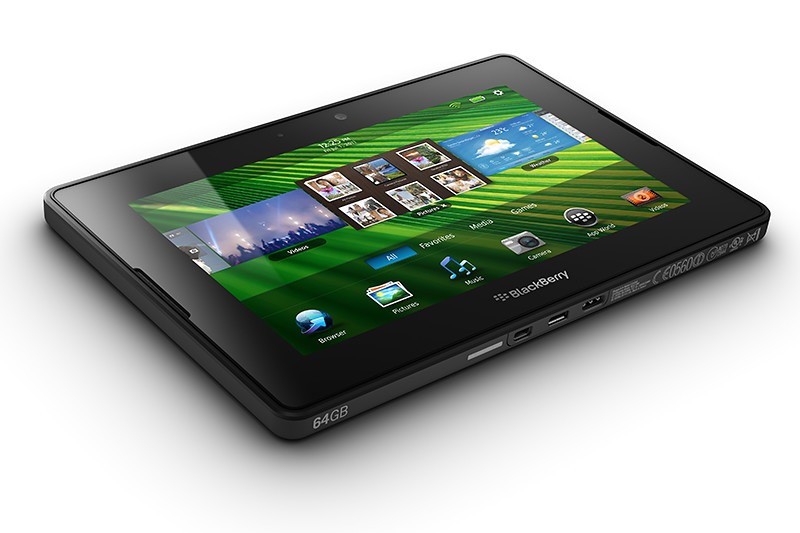
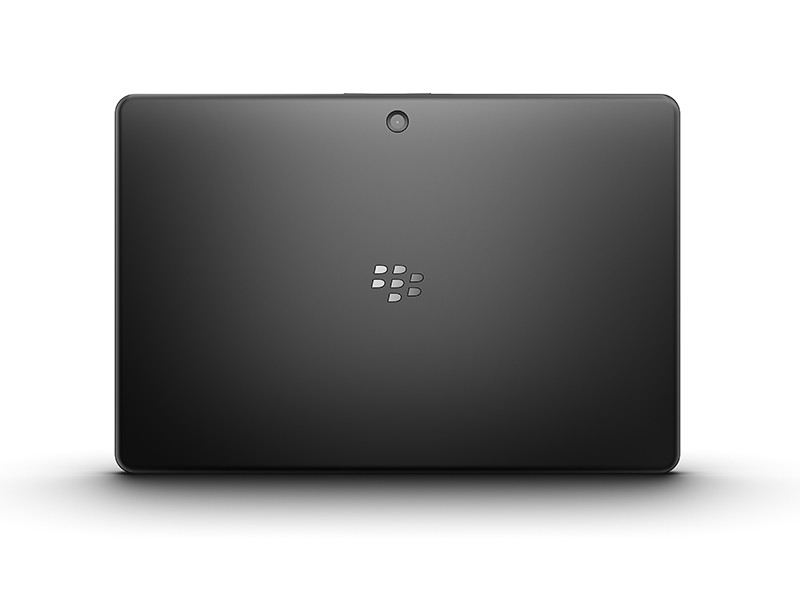
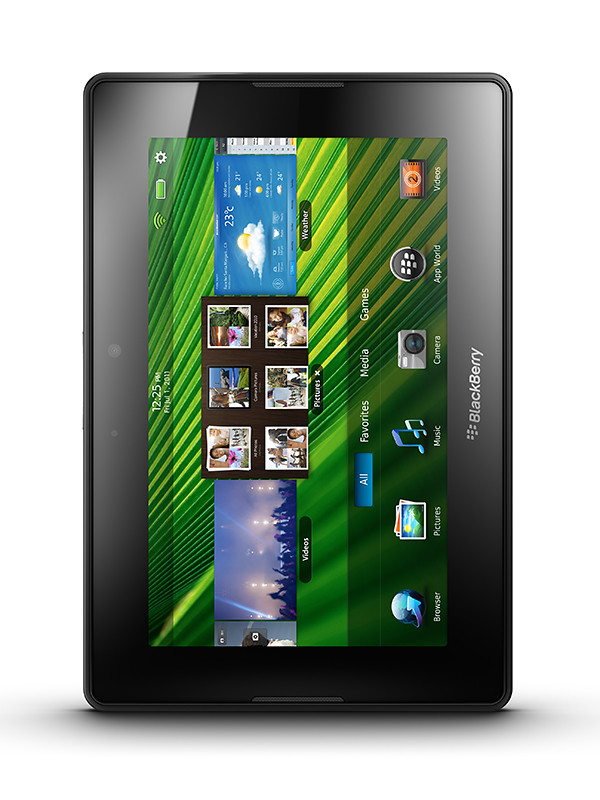
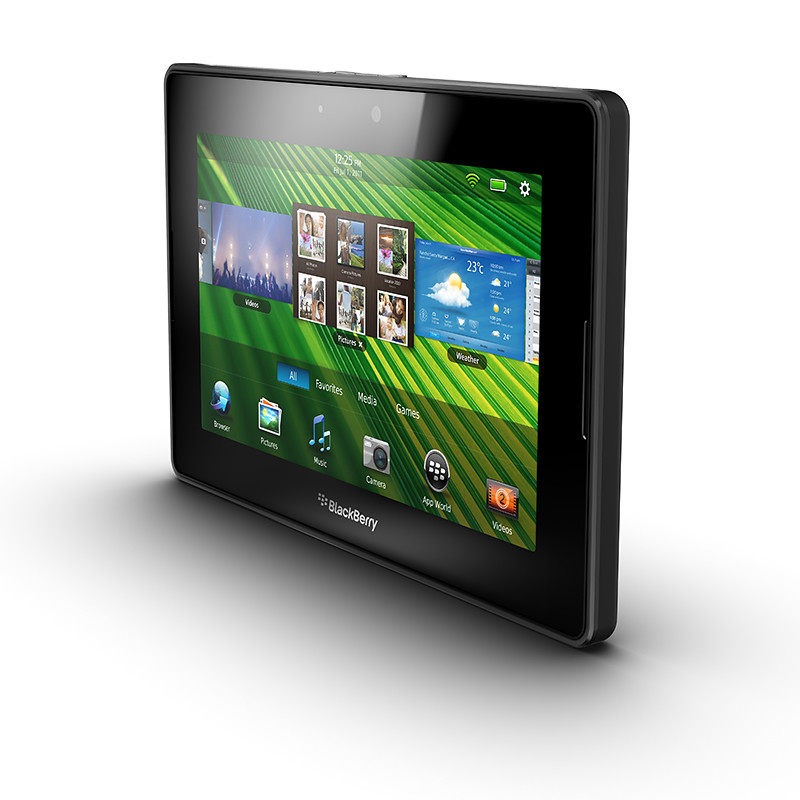
The 7-inch tablet from Research In Motion (RIM) hits the shelves in the US today. Here’s a quick roundup of the likes and dislikes from those who have tried out the shipping version of the BlackBerry PlayBook.

RIM PlayBookThere’s a lot to like about the PlayBook, but there’re also plenty of frustrations out there from those who’ve had the privilege of playing with the PlayBook. The general feel seems to be that the PlayBook has the potential to be something great – just that it’s not quite complete at the moment.

Already behind the iPad 2 and other Android tablets in terms of launch date, my feel is that RIM wants to get the hardware out as soon as possible before the specs get old – even though the software isn’t quite as ready yet.

RIM PlayBookDare I compare that with an evolutionary release of the iPad 2 with bigger steps only to be expected for the upcoming iPad 3?

With such stiff competition in the tablet market, it is no wonder these slate-makers are rolling off their products as soon as possible. In all honesty, I do believe RIM will sort out the grouses that reviewers have complained about, but the question is whether consumers are willing to fork out the dough to buy what’s beginning to be perceived as an unfinished product, that is only going to be made complete after a few more months – if ever.

RIM PlayBookPerhaps, RIM should have launched it at a discounted price – you know, an early bird discount – to entice consumers and grab market share. Given that the hardware is fabulous, the discount may have worked to convince consumers to buy first and wait out for the software to catch up.

At any rate, below is a quick round-up of the likes and dislikes from people who has played with the PlayBook so far. Prices for the 16, 32 and 64-gigabyte models in the US are $500, $600, and $700 respectively.

Likes Dislikes Mitigation
Fabulous display, and user interface Tiny recessed power button difficult to find and press Nothin’ much can be done about this – but do I care?
Sleek:
10mm / 0.4 inch thick 

Light:
0.9 lbs / 425 g

No native email, messenger, contacts and calendar Need to be Bluetooth tethered via a BlackBerry smartphone to access these. 

Native support could be added later on

Lightning fast processor No 3G connection 3G version in summer 

4G version end 2011

Impressive multi-tasking Small repository of Apps (~3,000) Compatibility with selected Android apps to be introduced later, plus build-up of PlayBook specific apps.
Supports Flash and HTML5 No video chat Video chat app to be released later.

BlackBerry Torch 9800 Review

Monday, April 18th, 2011
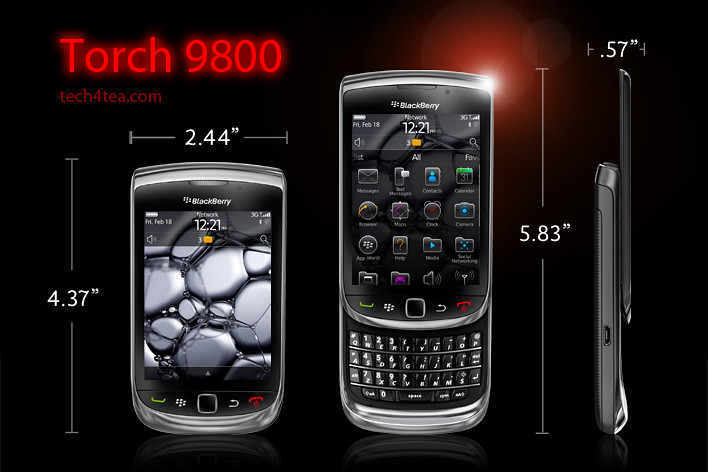
RIM touts the Torch as the best BlackBerry ever. I’ve been using one over the last two weeks. Indeed, it’s the best BlackBerry smartphone I’ve played with so far and I certainly prefer it over my wife’s BlackBerry Bold.

The BlackBerry Torch was the first smartphone from Research In Motion (RIM) that shipped with the new BlackBerry OS 6. It has a completely new keyboard implementation – instead of having the physical keyboard and the screen share the face of the device, the Torch allowed the 3.2 inch screen to hog the entire front.


BlackBerry Torch 9800 with 6.0 Operating System.

BlackBerry Torch 9800 with 6.0 Operating System.

An on-screen keyboard – which I found rather responsive – can be easily called up in case you need to type something. Need the traditional QWERTY keyboard to do some intensive typing? Slide it out from below the screen and you’re good to go.

It’s a trade-off, whether you have the hard keyboard readily available all the time or hide-in below the screen to make for a bigger screen.

For my usage profile, at least, I liked the balance – I do a fair bit of messaging and typing but I don’t mind having to slide out the keyboard when I need it – since I get a bigger screen real estate – 480×360 pixels on a 3.2 inch capacitive touch screen.

I did find the Bold keyboard slightly easier to type than on the Torch, but both are far more tactile and better than typing on a touch screen.

I suppose those who really have a lot of typing to do would rather have the keyboard available at all times – it depends on your usage profile. The Torch tries to give you both the large screen of the Storm and the popular hard keyboard in a compact body.

The hardware

The form factor is almost identical to many other BlackBerry devices like the Bold. The usual five buttons line the bottom of the screen: BlackBerry call, menu, back, and end buttons and optical trackpad.

The Marvell CPU runs at 624MHz (though the company claims this is a newer generation chip), with 512 MB RAM and 4 GB of storage. You can add up to 32 GB though the microSD slot. The device also comes with 802.11b/g/n WiFi, Bluetooth 2.1 and an AGPS chip.

Photos were rather impressive for a phone camera

Photos were rather impressive for a phone camera

The Torch has a 5 megapixel camera, with an LED flash. Photo quality was rather remarkable for a smartphone camera.  I like the preset scene modes – Party mode for lowlight indoor shooting and Sports mode both yielded impressive results. Video wise, you can shoot clips at 640×480 resolution.

New OS and interface

With the new OS 6, web browsing on the Torch is now quite a pleasant experience using the new Webkit-based browser. Unfortunately, neither Flash nor HTML5 video are supported.

I really love the persistent notification alert bar at the top of the home screen: the small row of icons allows you to see social networking, email, SMS, call, and calendar alerts all in one place. The bar drops down a separate window to show the list of notifications, each of which can be clicked on to bring you to the app.

11 scene modes are available for taking photos under different situations

11 scene modes are available for taking photos under different situations

Another new feature I like is the universal search. Ever wanted to look for something you know is on your phone but can’t recall exactly where it is located and how to get at it? Simply begin typing the relevant search term into the search box and the Torch throws the icon for it right at you – almost instantaneously. It really beats having to wade through the menus and interface looking for contacts, messages, calendar, music or pictures.

has included a powerful universal search alongside a social networking tool which allows you to aggregate RSS feeds and services like Twitter or Facebook into a single view. There are a lot of changes, so we’re going to go step-by-step through what we consider the biggest changes for the BlackBerry platform.

Battery life

As with other BlackBerry devices I’ve tested before, battery seems to last forever. Alright, that’s exaggerating. There were days when I ran Youtube videos and videos from the media folder for extended periods of time and the battery held out. Under normal usage, I only had to recharge the battery every few days.

BlackBerry Torch 2

There’s been numerous leaks about what the upcoming BlackBerry smartphones lined up for 2011. One of them is the Torch 2. Expected to be announced during the BlackBerry World in May and released in the US in July, it looks physically like the Torch, but features a 1.2 GHz processor and a 640×480 resolution on a similarly-sized 3.2 inch screen.

Going by previous BlackBerry release schedules, we’ll probably only see the Torch 2 in Singapore towards the end of the year.

In the meantime, if you’re looking at replacing your current BlackBerry phone, do give the Torch a spin and see if it impresses you enough for you to pick one up as replacement.

BlackBerry Torch 2 sneak peek

Sunday, April 17th, 2011
The BlackBerry Torch 2 is rumoured to be announced during the BlackBerry World in May and then go on sale in the US in July later this year. With the release of the PlayBook tablet next Tuesday in the US, RIM has a few more models in line to keep its fanbase riveted for the rest of the year.

Photo of BlackBerry Torch 2There has been plenty of leaks from RIM (Research In Motion) about upcoming BlackBerry models for 2011. These include the BlackBerry Touch (Monaco/Monza), Bold Touch, Storm 3, Bold (Dakota), Curve (Apollo), and the Torch 2.

Having gotten hold of a Torch 2, BGR reports that the new device looks almost identical to its predecessor but features a significantly more powerful 1.2 GHz processor. Coupled with the BlackBerry OS 6.1 and a 3.2 inch 640×480 VGA display, it will be an exciting gadget to own.

Processor power has been doubled from the current 624 MHz, and the 3.2 inch screen runs at a higher pixel resolution than the 480×360 pixels on the current BlackBerry Torch.

Going by previous BlackBerry release schedules, we’ll probably only see the Torch 2 in Singapore towards the end of the year.

The main specifications of the Torch 2 are listed below:

  • CPU – 1.2 GHz processor
  • Display – 3.2″ VGA (480 x 640) capacitive touchscreen display
  • Radio – Quad-band GSM/GPRS/EDGE ; Tri-band HSPA 14.4Mbps
  • Memory – 8GB storage + 512MB RAM + up to 32GB MicroSD
  • Connectivity – WiFi, Bluetooth, NFC
  • Camera – 5 megapixels
  • Battery – 1300MAh battery
  • Thickness – 14.6mm thick
  • Sensors – magnetometer, digital compass

BlackBerry PlayBook preview in Singapore

Friday, April 15th, 2011
The BlackBerry PlayBook Bus will tour Singapore tonight, showing off a preview of RIM’s 7-inch tablet computer, that is due to be launched in the US on 19 April next Tuesday.
Preview of the BlackBerry PlayBook in Singapore

Preview of the tablet on the BlackBerry PlayBook Bus in Singapore

Keep a lookout for the limo bus driving around town tonight. Sources tell me it will launch from the Tanjong Pagar area. The first time that the BlackBerry PlayBook debuted in Singapore was back in March. But the two devices I played with were still beta release versions.

Tonight, the preview will provide some hands-on for the real McCoy. Perhaps RIM (Research In Motion) will also provide some hints as to when the aspiring challenger to the iPad will be launched in Singapore and at what pricing.

For now, here’re some of the main specs of the BlackBerry PlayBook:

Looks
7″ LCD display, 1024 x 600 WSVGA Multi-touch capacitive screen

Physical feel
0.9 lbs (425g) and 5.1″ x 7.6″ x 0.4″ (130mm x 194mm x 10mm)

Performance
1 GHz dual-core processor
1 GB RAM
Symmetric multi-processing
Full Adobe Flash 10.1 enabled
Built-in support for HTML 5

Configuration
Internal storage of 16, 32 or 64 GB
GPS, Orientation Sensor (Accelerometer), 6-Axis Motion Sensor (Gyroscope), Digital Compass (Magnetometer)
Stereo speakers and stereo microphones
Wi-Fi (802.11 a/b/g/n) connectivity, Wirelessly connect to your BlackBerry smartphone for real time access to: Email, calendar, address book, task list and BBM

Cameras
3 MP high-definition forward-facing camera
5 MP high-definition rear-facing camera
Codec support for superior media playback, creation and video calling
1080p HD video; H.264, MPEG4, WMV HDMI video output
Micro USB and Micro HDMI ports
Video calling with dual video cameras

BlackBerry Tablet OS
Powered by QNX technology, supports POSIX OS, SMP, Open GL, BlackBerry 6, WebKit, Adobe Flash, Java and Adobe Mobile AIR

Adobe Creative Suite 5.5 Web Premium suite

Wednesday, April 13th, 2011

Adobe Creative Suite 5.5 Web Premium suite is a major mid-cycle update to the software for Web designers and developers. The new version give Web professionals the ability to bring high-impact content experiences and mobile apps to the latest form factors across Android, BlackBerry Tablet OS and iOS platforms.

New in the suite are updated versions of Adobe Dreamweaver, Adobe Flash Professional, Adobe Flash Catalyst, Adobe Flash Builder, the all-new Flex framework for mobile devices, Adobe Device Central and Adobe Acrobat X Pro.

Key enhancements include substantive HTML5 advancements in Dreamweaver, new tablet and smartphone application development capabilities in Flash Professional CS5.5 and Flash Builder Premium 4.5, and enhanced cross-browser testing as well as mobile emulation and on-device debugging.

Estimated street price for the Creative Suite 5.5 Web Premium suite is US$2185. It is one of five suite editions of the Creative Suite 5.5 line of software.

Advances in HTML5

Web Premium CS5.5 advances HTML5 authoring tools, enabling Web designers and developers to create browser-based content that gives end-users a seamless and immersive experience across virtually any screen.

New HTML5 support in Dreamweaver CS5.5 includes jQuery mobile framework integration for browser-based content and PhoneGap integration for native and mobile application design and development.

Enhancements to the multiscreen preview panel in Dreamweaver have also been made, supporting the latest in media queries, WebKit engine updates, and CSS3 attributes, enabling side-by-side renderings of what a single design looks like on different form factors.

“With Adobe the jQuery project has spent a significant amount of time researching and developing user interfaces for mobile browsers, the final result being the creation of the jQuery Mobile framework,” said John Resig, founder of the jQuery Project.

Enhanced Flash tooling

New additions in Flash Professional CS5.5 include content scaling so users can easily scale their content on stage to adapt to different screen sizes, which is a huge timesaver.

Flash Professional CS5.5 also includes a new shared assets feature for more streamlined publishing, as well as more than 20 new code snippets for creating mobile and Adobe AIR applications for accelerometer, multitouch gestures, and save/load data.

Enhanced Application Development for Mobile Devices

Adobe CS5.5 Web Premium includes new mobile application development support to deliver rich interactive applications to the latest Android, BlackBerry Tablet OS and iOS devices.

In the updated Flash Builder 4.5, users have new mobile support for ActionScript and mobile Flex projects, as well as improved designer-developer collaboration throughout application development with a new bi-directional workflow with Flash Catalyst CS5.5 and Flash Professional CS5.5.

New capabilities in Adobe Flash Builder 4.5, Flash Professional CS5.5 and the introduction of the Flex 4.5 framework for mobile devices, let designers and developers build mobile applications that run on iPhone, iPad, Android devices and BlackBerry PlayBook. The apps can be easily deployed through the application markets such as Apple’s iTunes App Store, Android Market and BlackBerry App World.

Enhanced Browser Compatibility Testing

To keep Web developers and designers ahead of rapidly changing technology, Web Premium CS5.5 includes new HTML5 emulation and support for the latest mobile devices in Adobe Device Central, software that simplifies the production of innovative and compelling content for mobile phones and consumer electronics devices.

Adobe BrowserLab, a key component of Adobe CS Live online services, has also been updated for cross-browser compatibility testing for the newest browsers to help ensure Web projects are accurately previewed across a spectrum of browsers.

Adobe CS Live online services are free until April 12, 2012.

Adobe introduces Creative Suite 5.5

Tuesday, April 12th, 2011

Adobe’s major mid-cycle product release targets enhancements across Flash, HTML5, video, mobile App and digital publishing tools. It also extends workflows to include tablets.

Adobe announced today the new Adobe Creative Suite 5.5 product line, enabling designers and developers to target popular and emerging smartphone and tablet platforms, as the revolution in mobile communications fundamentally changes the way content is distributed and consumed.

Today’s launch marks a significant change to Adobe’s product release strategy for Creative Suite, the design and development software catering for print, video, mobile and online media.

Adobe now plans to have milestone Creative Suite product introductions at 24-month intervals and – starting with Creative Suite 5.5 – major mid-cycle releases between the milestone versions.

Product lineup and pricing

The new Creative Suite product lineup is headlined by Adobe Creative Suite 5.5 Master Collection, which includes, in a single package, all of Adobe’s industry-defining creative tools, such as Photoshop, Illustrator, InDesign, Acrobat, Flash Builder, Flash Catalyst, Flash Professional, Dreamweaver, Adobe Premiere Pro and After Effects.

These products are available separately or as components of one or more of the five Creative Suite editions.

The complete Creative Suite 5.5 lineup and their estimated street prices are tabulated below, and is scheduled to ship within 30 days. Upgrade pricing, volume licensing and education pricing are also available.

Creative Suite 5.5 Master Collection: US$3159
Creative Suite 5.5 Design Premium: US$2309
Creative Suite 5.5 Web Premium: US$2185
Creative Suite 5.5 Production Premium: US$2065
Creative Suite 5.5 Design Standard: US$1579

Key enhancements

The new Creative Suite 5.5 Web Premium suite sees enhancements in HTML5 and Adobe Flash authoring tools, allowing users to create, deliver and monetize rich content and applications for virtually any screen.

This release helps enable designers and developers to deliver mobile applications on Android, BlackBerry Tablet OS, iOS and other platforms; create rich browser-based content across screens using HTML5; and leverage Flash Player to deliver premium video content, casual games and rich Internet applications.

Tablet devices are now included in the creative workflow, going beyond the desktop computer. A new scripting engine in Adobe Photoshop and an enhanced Photoshop Software Development Kit (SDK) enable developers to build tablet applications that interact with Photoshop from Android, BlackBerry and iOS devices.

Adobe also announced three new iPad applications that demonstrate the creative possibilities of using tablets to drive common Photoshop workflows – Adobe Color Lava for Photoshop, Adobe Eazel for Photoshop and Adobe Nav for Photoshop.

With the launch of Adobe Flash Builder 4.5 – available as part of the Creative Suite 5.5 Web Premium suite – and the Flex 4.5 framework, developers can easily develop and deploy mobile applications to the over 200 million Android, BlackBerry Playbook and iOS devices anticipated to be in market by the end of 2011.

With more than 131 million smartphones expected to have Flash Player installed by the end of the year, Adobe Flash makes it possible to bring rich content to desktops and devices inside the browser.

Flash Player is supported on Android, HP webOS and Google TV today. BlackBerry Tablet OS, upcoming versions of Windows Phone, Samsung SmartTVs and others are expected to support Flash Player in the near future.

For video and audio professionals, Adobe Creative Suite 5.5 Production Premium suite promises breakthrough performance, workflow improvements, creative innovations, and powerful new audio editing capabilities.

The powerful Adobe Mercury Playback Engine, introduced in Adobe Premiere Pro CS5, broadens its graphics processing unit (GPU) hardware support to include laptops and more supported cards, allowing users to open projects faster, get real-time feedback and work more smoothly at higher resolutions.

Creative Suite 5.5 Design Premium suite includes Adobe’s recent product innovations in digital publishing to create slick digital editions for tablet devices. Using InDesign CS5.5, in combination with the integrated Folio Producer toolset, designers can add new levels of interactivity to their page layouts targeted to tablet devices.

Documents can include video, audio, panoramic views, 360-degree object rotation, pan and zoom of images, integration of HTML and HTML5 content and other interactive overlays. Leading to a much more robust and engaging reading experience.

Creative Suite 5.5 is tightly integrated with Adobe Digital Publishing Suite to support publication, sale and analysis of content on an array of tablet devices.

Adobe Creative Suite 5.5 products integrate with Adobe CS Live, a set of online services that accelerate key aspects of the creative workflow and enable designers to focus on creating their best work. CS Live online services include: Adobe BrowserLab; Adobe CS Review; Acrobat.com; Adobe Story; and Adobe SiteCatalyst NetAverages powered by Omniture. Adobe CS Live is free until April 12,2012.
Creative Suite 5.5 Design Premium and Design Standard suites

Monday, April 11th, 2011

Creative Suite 5.5 Design Premium comprises new versions of Adobe InDesign, Adobe Dreamweaver, Adobe Flash Professional and Adobe Flash Catalyst, as well as Adobe Acrobat X Pro, Adobe Illustrator CS5, Adobe Photoshop CS5 Extended and Adobe Fireworks CS5.

Estimated street price for the Creative Suite 5.5 Design Premium suite is US$2309 while that of the Design Standard suite is US$1579. Both are part of five suite editions of the Creative Suite 5.5 line of software and will ship within 30 days.

The software in the Adobe Creative Suite 5.5 Design Premium suite enables designers to produce content faster and deliver immersive, visually rich experiences to screens of all shapes and sizes. New features in Creative Suite 5.5 Design Premium bolster the many timesaving features that were introduced in Creative Suite 5 to improve efficiency of everyday tasks.

Design for both Tablets and Smartphones

With Creative Suite 5.5 Design Premium, designers can create immersive digital magazines, e-books with accompanying video and audio, websites based on HTML5 and CSS3 standards, and interactive mobile applications built with familiar Flash tools that display consistently across Android, BlackBerry Playbook and iOS devices.

Updates to Dreamweaver CS5.5 (including the Live View mode, CSS panel and Multiscreen Preview panel) streamline the design of websites that need to be optimized for viewing on multiple devices, and let designers preview desktop, tablet and smartphone browsers side-by-side.

With the new Folio Producer tools in InDesign, which work in conjunction with the Adobe Digital Publishing Suite, creative professionals can design interactive, rich media digital magazines, newspapers, corporate publications and advertising for reading on tablet devices such as Apple iPad, BlackBerry PlayBook and a wide variety of Android tablets.

Using InDesign CS5.5 in combination with the integrated Folio Producer toolset, designers can add new levels of interactivity to their page layouts. Documents targeted to tablet devices can include video, audio, panoramic views, 360-degree rotation of objects, pan and zoom of images, integration of HTML5 content and other interactive overlays.

Designers can also easily test how their content will look and feel on a broad array of tablet devices directly from within InDesign. Once content authoring is completed in InDesign, tight integration with Adobe Digital Publishing Suite allows users with a Digital Publishing Suite account (available separately) to efficiently produce, distribute, optimize and monetize content for tablet devices.

A number of features in InDesign have also been enhanced to improve reading experiences on e-book devices, such as Barnes and Noble Nook, Sony Reader and Apple iPad.

Designers can now add refined typography, images that resize automatically to fit virtually any screen, and video and audio for e-book reader applications that support HTML5 video and audio tags.

New capabilities in Flash Professional CS5.5 let designers and developers build mobile applications that run on iPhone, iPad, Android devices and BlackBerry Playbook. The apps can be easily deployed through the application markets such as Apple’s iTunes App Store, Android Market and BlackBerry AppWorld.

Beyond the Desktop

Adobe is continuing to extend productivity with cloud services and new tablet apps.

Creative Suite 5.5 Design Premium works with new tablet applications for Photoshop (available separately) that enhance the creative workflow and extend the design experience beyond the desktop.

A new scripting engine in Adobe Photoshop and an enhanced Photoshop Software Development Kit (SDK) enable developers to build tablet applications that interact with Photoshop from Android, BlackBerry and iOS devices.

Adobe has used the new SDK to deliver three iPad applications that demonstrate the creative possibilities of using tablets to drive common Photoshop workflows – Adobe Color Lava for Photoshop, Adobe Eazel for Photoshop and Adobe Nav for Photoshop.

Creative Suite 5.5 Design Premium also integrates with CS Live, a set of hosted services that accelerate key project workflows such as shared reviews. CS Live online services are free until April 12, 2012.

New Adobe Software Development Kit for Photoshop CS5

Sunday, April 10th, 2011

The Photoshop Touch SDK and a new scripting engine in Photoshop CS5 open the door for Android, BlackBerry Tablet OS and iOS apps to drive and interact with Photoshop on the desktop.

Adobe has announced the Photoshop Touch Software Development Kit (SDK) inviting developers worldwide to create mobile and tablet applications that interact with Adobe Photoshop CS5 and Photoshop CS5 Extended software, uniting the fun and interactive experience of touch devices with the power and precision of Photoshop.

Using the Touch SDK, Adobe has developed three initial Photoshop CS5 companion apps for Apple iPad: Adobe Color Lava for Photoshop, Adobe Eazel for Photoshop and Adobe Nav for Photoshop. The apps are designed to enable users to create custom color swatches, paint and drive popular Photoshop tools from tablet devices.

Adobe Color Lava will allow creative professionals to use their fingertips to mix colors on the iPad, creating custom color swatches and themes to transfer back into Photoshop.

Adobe Eazel takes advantage of cutting-edge painting technology to let digital artists create rich realistic paintings with their fingertips and introduces a new kind of interaction between “wet” and “dry” paints. These paintings can then be sent directly to Photoshop CS5 for compositing or for taking the artwork further.

Lastly, Adobe Nav increases workflow efficiency by letting users select and control Photoshop tools using the iPad as the input surface, customize the toolbar, browse and zoom in on up to 200 open Photoshop files or easily create new files.

All three applications take advantage of the iPad tablet’s touch screen for a truly immersive, tactile, on-the-go experience.

Although the first applications available are for the Apple iPad and the iOS, the Photoshop Touch SDK makes development possible on other devices, including Android and BlackBerry PlayBook.

Utilizing the Touch SDK, developers will have wide access to Photoshop functionality with the freedom to innovate and create new apps or add capabilities to existing ones. Adobe has already engaged with a number of developers across the industry to incorporate tablets and other devices into creative workflows that empower Photoshop users in new and groundbreaking ways.

For more detailed information about features, OS support, upgrade policies, pricing and international versions, visit: www.adobe.com/go/photoshop.