The punches that Apple Inc. is throwing in its fight against Adobe Systems Inc. are beginning to land, prompting some companies to shift away from Adobe’s video and animation technology and forcing Web designers to work with competing standards.
For the moment, the immediate tactical fight is over Flash on iPhones/iPads. For the longer term, the strategic posturing sees Apple defending its sealed garden, while Flash fears the migration away from Flash will spill over outside of Apple’s ecosystem into the general world wide web.
Flash - Some believe it was one big reason why Adobe acquired Macromedia in 2005
We are beginning to see a repeat of the tedium facing web developers and visitors that arose from the browser wars. Different browsers had varying compliance to web standards. Web developers had to develop different versions of their websites optimised for different browsers. For websites that don’t, users will have to use the appropriate browser to enjoy the full intended experience.
Now you’d need one version of your website for Apple iPads/iPhones, and another for the rest of the world who still uses Flash.
Who will prevail?
Olympus PEN E-P1: CJPC 2010 "Camera of the Year" & "Readers Award"
The Olympus PEN E-P1 was selected from a shortlist of 199 cameras introduced in Japan between 1 April, 2009 and 31 March, 2010. This is the first Olympus camera to receive the Japan Camera Journal Press Club’s highest honor since the inception of the Japan Camera Grand Prix awards in 1984. Previous “Camera of the Year” winners include the Canon EOS 5D Mark II in 2009 and the Nikon D3 in 2008.
We’ve been reading so much about the intense competition between the behemoths in the IT industry. Apple vs Adobe over Flash on iPhone/iPad. Apple vs Gizmodo over lost 4G iPhone. Apple vs Google over mobile search and smartphone OS. Apple vs Google vs Microsoft over everything.
How big are these companies relative to each other? I checked out the Market Capitalisation (share value x number of shares) of these companies on the Nasdaq from Yahoo Finance and put them on a chart for comparison. As at end of 19 May 2010:
Market Capitalisation of the IT behemoths
Everybody knows Microsoft (US$247.1b) is the biggest IT company in the world, while Steve Jobs would love to think of Apple as a small and nimble outfit. In reality, Apple (US$226b) is fast catching up on Microsoft in terms of market cap. No wonder its new found confidence has found expression in so many arenas. Adobe (US$17.31b) is not even one-tenth of Apple. Maybe Apple should just buy over Adobe. I haven’t even bothered to check how much Gizmodo is worth.
By the way, Google (US$157.5b) is still some way off compared to Microsoft and Apple.
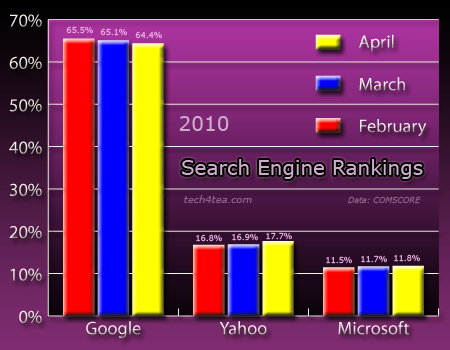
What are the market shares for the three main search engine giants on the internet for the 3 months from February to April of 2010? Here are some data from COMSCORE:
Search engine rankings from February to April 2010
Google continues to enjoy the lion’s share of the search market at around 65% for each of the three months from February to April 2010. Yahoo comes in second with about 17% while Microsoft’s Bing brings up the rear at 12% (percentages averaged and rounded).
This was the original sneak peek video that Adobe uploaded onto YouTube just 3weeks before the official launch. It gave a good idea of what the feature would be capable of.
Before: Two Spanish boys frolicking on a beach in Altea
After: The two boys removed using Content-Aware Fill
Yesterday, I showed how Photoshop CS5’s new Content-Aware Fill can be applied using the Spot Healing brush. The second way of using the powerful feature is to use the Content-Aware option when applying the Fill command.
I took the photo of two local boys at the Spanish beach at Altea, just 10 km to the north of the famous beach haven of Benidorm on the Costa Blanca. I like the way these two boys added life to the beach scene. But just to test out the Content-Aware Fill, I decided to “remove” them from the photo.
Before: Ugly clothes-line in front of charming traditional Japanese shophouse
After: Clothes-line removed with Spot Healing brush using Content-Aware
The most hyped feature in Photoshop CS5 is the Content-Aware Fill. The feature enables you to remove an object in your photo and see it automatically replaced with pixels that match the lighting, tone, and noise of the surrounding area so that it looks like the removed object never existed. Previously, you would have to painstakingly use the Clone Stamp tool to manually copy pixels from surrounding areas to replace the unwanted object.
There are two ways to use Content-Aware Fill. The first is to paint with the Spot Healing Brush (which I will demo today) while the other is as an option of the Fill command to replace content in an active selection.
More than 40 senior IT heads and managers in the industry gathered in Raffles Hotel on 6 Apr 2010 to get an idea of the actual IT implementation and planned future investment planning among enterprises in Asia. The results of IT Nation survey conducted by MIS-Asia was presented to attendees, who also heard from a slew of presenters from Novell, Quest, Sophos and NUS. Topics covered included Cloud Computing, Desktop Virtualisation, Information Security and a study of different mentalities of technopreneurs.
Before: Nice sunset over Siloso beach marred by the flying fox cables overhead.
After: Cables removed with Spot Healing Brush and straightened
Use the Spot Healing brush to remove overhead cables and wires from your snapshots. I took the sunset photo at Siloso Beach, on the resort island of Sentosa – to the south of Singapore. Overhead are some flying fox cables on which people slide down from a high tower further inland.
I chose a brush size slightly wider than each of the flying fox cables. Dragging over the cables got Photoshop to replace them seamlessly with pixels from the sky around. To straighten the photo, just select the Ruler Tool (nested below the Eyedropper Tool), drag along the horizon and click the Straighten button (new in CS5) on the options bar at the top of the screen.
Photoshop provides many ways of removing unwanted people or objects from your photos. In this article that I wrote for Digital Life on 12 May 2010, I illustrate the use of some of the tools in Photoshop CS5 in different situations. The article is the first of a new 12-part series that will run in Digital Life every Wednesday.