Posts Tagged ‘video’

New software: Adobe Photoshop Elements 11 & Premiere Elements 11

Tuesday, September 25th, 2012

Adobe introduces the latest versions of the photo and video editing software with revamped user interfaces that makes editing, organising and sharing easier.

Available as stand-alone products (S$131 each), Photoshop Elements 11 and Premiere Elements 11 can also be purchased together as a bundle (S$197).

Check the buying guide for Adobe Photoshop Elements 11, Premiere Elements 11 or the bundle.

Check the buying guide for Adobe Photoshop Elements 11, Premiere Elements 11 or the bundle.

Photoshop Elements 11 offers a complete solution for editing, organizing and sharing photo creations while Premiere Elements 11 offers easy creation of engaging home movies with professional flair.

Adobe Photoshop Elements 11 and Adobe Premiere Elements 11 software for Windows and Mac are now available here.

Both solutions are available for Windows and Mac.

Powerful, intuitive tools in Photoshop Elements 11

Make photos look their best with editing options that offer virtually everything from quick fixes to a number of creative possibilities.

  • A completely refreshed, user-friendly interface featuring the same engine as Adobe Photoshop – includes easily-navigated Quick, Guided and Expert editing modes; one-click options; a helpful Action bar; and big, bold icons to help users get the most from their shots.
  • Adobe Photoshop Elements 11 (S$131)Organise photos based on people, places (via Google maps geo-tagging) or events easily and intuitively.
  • New Guided Edits make pro-level effects like tilt-shift, vignettes and high and low-key easy to create.
  • New filters – Comic, Graphic Novel and Pen & Ink – inspire creativity by turning photos into stunning illustrations.
  • Intelligent Photoshop technology makes it easy to extract objects from different photos.
  • Easily share photos via email, Facebook, YouTube, Vimeo and more.

Easy pro-quality videos with Premiere Elements 11

Create attractive, pro-level videos with automated moviemaking options to take the work out of editing.

  • An entirely new and improved user interface including many of the same updates found in Photoshop Elements 11.
  • Adobe Premiere Elements 11 (S$131)Add polish with a wide range of great-looking effects, transitions, themes, titles, disc menus, and professional-level effects and sound.
  • Give videos Hollywood movie styles with FilmLooks; easily apply slow and fast motion effects; dial-in colors with slider controls; effortlessly integrate blends for seamless transitions; and make adjustments with Quick Presets.
  • Show off finished creations with integrated video sharing on Vimeo.

New DSLR: Nikon D600

Thursday, September 13th, 2012

Nikon has launched its latest DSLR: a full-frame shooter that fills the gap between the recently-released D800 and the DX-format D7000.

The FX-format D600 has a 24.3-megapixels sensor and will be available from 18 September for S$3,249 (body only).

Nikon D600 was launched in Singapore. Full-frame 24.3 MP. S$3,249 from 18 September.

Nikon D600 was launched in Singapore. Full-frame 24.3 MP. S$3,249 from 18 September.

The Nikon D600 is targeted at the serious photography enthusiast upgrading to an entry-level full-frame camera.

Full-frame digital SLR cameras excel over other digital cameras equipped with smaller sensors, especially under challenging low-light conditions and where the wider angle of view is critical for shooting scenarios such as landscape and architectural photography.

Equipped with the heart and technology of its higher-end siblings (the D4, D800 and D800E), the D600 is more affordable and has a similar ergonomics and layout of controls as the D7000 to make the transition easier for the photographer making the cross-over.

The D600 has the same EXPEED 3 image-processing engine as the D4 (S$9,799) and D800 (S$4,488), and sports the following features:

  • an optical viewfinder with 100% frame coverage
  • Full-frame mode: 24.3 megapixels
  • DX-format crop mode: 10.5 megapixels
  • a magnesium-alloy weather-sealed body for dust and water-resistance
  • 3-D axis tracking with 39 focus points
  • built-in automatic HDR capturing/processing
  • time-lapse video function
  • dual SD memory card slots
  • ISO range from 100-6,400, expandable to 50 (Lo-1) and 25,600 (Hi-2)

The Multi-CAM 4800FX AF-sensor module of the Nikon D600 utilises 39 focus points.

The system also places an emphasis on the human face, working in conjunction with the Advanced Scene Recognition System to provide accurate face detection even through the optical viewfinder.

The camera also offers seven cross-type sensors that are fully functional when using super-telephoto NIKKOR lenses and teleconverters (2.0x) with an aperture value up to f/8.

This is useful for those who need extreme telephoto focal lengths for sports or wildlife.

Nikon D600, entry-level full-frame DSLR.

Nikon D600, entry-level full-frame DSLR.

The Nikon D600 also features a precise Scene Recognition System that analyses detailed scene brightness and colour information acquired from the 2,016-pixel RGB sensor.

The information is then applied to autofocus, automatic exposure, i-TTL balanced fill-flash, and white balance control, all to achieve detailed and balanced images.

For storage, the Nikon D600 has dual card slots for SD cards, and offers users the ability to record backup, overflow, RAW/JPEG separation, and the additional option of shooting stills to one and video to the other.

The new Nikon D600 (left) sitting side-by-side with its higher-end sibling, the D800 (different lenses).

The new Nikon D600 (left) sitting side-by-side with its higher-end sibling, the D800 (different lenses).

Cinematic HD Video

When it comes to recording HD video, users have the choice of various resolutions and frame rates, including full HD 1080 at 30/24p utilising the Nikon D600‘s entire full-frame sensor, and HD 720 at 60/30p.

Nikon D600
Megapixels 24.3 megapixels
Sensor FX-format CMOS (full-frame)
Image processing engine EXPEED 3
ISO 100-6,400 (Expanded: 50-25,600)
Burst mode 5.5 fps
LCD 3.2″, 920k dots, TFT colour
Movie Full HD (1080/30p)
Size /mm 141 x 113 x 82
Weight 760 g
Price S$3,249

By utilising the B-Frame data compression method, users can record H.264/MPEG-4 AVC format video with optimal size and quality for up to 29:59 minutes per clip (normal quality).

The Nikon D600 also enables users to use both compatible FX and DX lenses to shoot HD movies.

The FX-based movie format makes full use of the large image sensor and offers a shallow depth-of-field with an emphasis on background-blur characteristics while the DX- based movie format is optimal for recording movies and bringing subjects closer (1.5X) when lenses with short focal lengths are used.

For professional and broadcast applications that call for outboard digital recorders or external monitors, users can stream an uncompressed full HD signal directly out of the camera via the HDMI port.

The Nikon D600 is also equipped with an audio monitor port for headphones to be used.

Polycom gains significant market share 1H 2012

Tuesday, September 11th, 2012

Polycom gains significant market share in the global video collaboration market in both Q1 and Q2 to gain an additional 8 percent of the total market in 1H 2012, controlling roughly one-third of the market.

Polycom has taken an additional 8% of the global video collaboration market over the past half a year to control roughly one-third of the market.

Polycom has taken an additional 8% of the global video collaboration market over the past half a year to control roughly one-third of the market.

Polycom has announced significant, sequential quarter-over-quarter market share gains in the video collaboration industry for the first half of 2012, at the cost of some of its biggest competitors.

According to new quarterly market share research reports from IDC, Synergy Research Group and Wainhouse Research, Polycom gained between 4.4 and 5.7 percentage points in revenue market share quarter-over-quarter in Q2 2012.

Based on reports from all three firms, Polycom’s Q2 gains build on the company’s market share gains of up to 2.2 percent in the first quarter of the year.

Polycom has gained an additional 8 percent of the total market in 1H 2012, controlling roughly one-third of the market.

On the whole, Polycom now holds more than 32 percent global market share at the end of the second quarter of 2012, and gained nearly 8 percent global video collaboration market share in the first half of 2012, reports Wainhouse Research.

What’s better than a Canon EOS-1D X? Ans: A Canon EOS-1D C!

Friday, April 13th, 2012

Canon has announced the EOS-1D C, a DSLR capable of recording video at 4K resolution (4,096 x 2,160 pixels) at a frame rate of 24p, or Full HD resolution (1,920×1,080 pixels) at 60p – whilst retaining the still image shooting prowess of the EOS-1D X.

This new flagship DSLR will be available from end October this year (prices TBA).

Canon EOS-1D C, flagship DSLR with 4K video - available in October 2012.

Canon EOS-1D C, flagship DSLR with 4K video - available in October 2012.

The Canon EOS-1D C is designed for use in motion picture, television and other high-resolution digital production industries.

The DSLR provides its users a physically compact yet digitally powerful machine to meet the high demands of today’s production standards.

The Canon EOS-1D C records 4K resolution video (4,096 x 2,160 pixels) at a frame rate of 24p, with 8-bit Motion JPEG compression, cropped to an APS-H-equivalent angle of view.

It can also record Full HD video (1,920 x 1,080 pixels) at a maximum frame rate of 60p, answering the demanding needs of industry professionals.

In addition, the EOS-1D C allows for efficient workflow during production and post-production, with features within the firmware and the accompanying software suite.

Connections panel on one side of the camera.

Connections panel on one side of the camera.

The camera records all video, including 4K, directly to the inserted CF card without having to use peripheral equipment such as external storage devices, bringing increased mobility to its user.

When required, captured video (excluding 4K video) can be output to an external recorder via an HDMI terminal, using an uncompressed YCbCr 4:2:2 signal.

For motion-picture productions, the camera incorporates a Super 35mm crop function, enabling video to be recorded in the industry-standard 35mm angle of view.

The Canon Log Gamma enables the recording of high-quality video with rich gradation expression.

This produces the impressive image quality required in motion-pictures by minimizing both shadow detail loss and highlight detail loss while retaining a high level of color-grading freedom.

Top view of the Canon EOS-1D C

Top view of the Canon EOS-1D C

The EOS-1D C ships with software applications such as EOS Utility and Picture Style Editor.

Canon EOS-1D C body

Canon EOS-1D C body

EOS Utility allows a whole host of camera operations to be controlled via a PC, while the Picture Style Editor allows users to edit and register customized image settings in the camera.

These two applications enable real-time processes such as editing the picture style and confirming results on a monitor during set up or even on the shooting set, increasing production efficiency.

Playback software that ships with the camera allows 4K/Motion JPEG and Full HD video at 60p shot on the EOS-1D C to be output on an external monitor with no loss in image quality.

It also enables video shot with the Canon Log Gamma to be output on a monitor with video gamma applied.

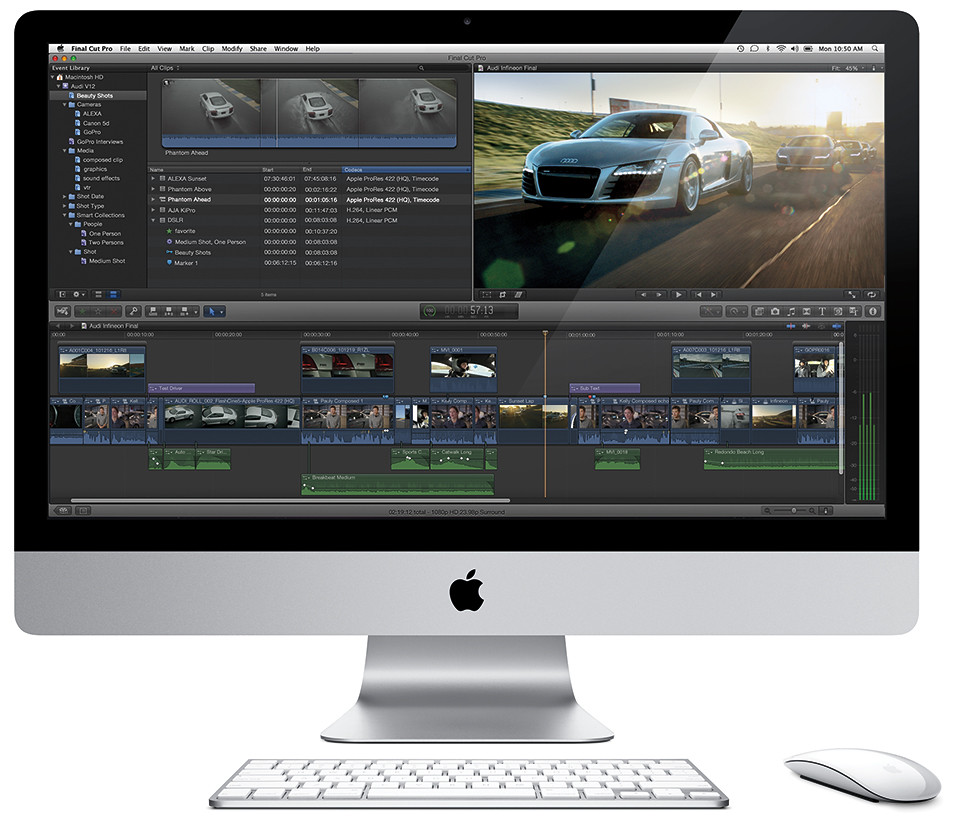
Apple updates Final Cut Pro X

Tuesday, January 31st, 2012

Apple today released Final Cut Pro X v10.0.3, a significant update to its professional video editing application. The free update is available from the Mac App Store.

Apple updates Final Cut Pro X to v10.0.3

Apple updates Final Cut Pro X to v10.0.3

Final Cut Pro X v10.0.3 is available from the Mac App Store for SGD$299.99 (incl. GST) to new users, or as a free update for existing Final Cut Pro X customers.

The update introduces the following main features:

  • Multicam editing that automatically syncs up to 64 angles of video and photos.
  • Advanced chroma keying for handling complex adjustments right in the app.
  • Enhanced XML for a richer interchange with third party apps and plug-ins that support the fast growing Final Cut Pro X ecosystem.
  • Beta of broadcast monitoring that supports Thunderbolt devices as well as PCIe cards.

(more…)

Interesting movie effect using Diorama mode

Friday, March 4th, 2011

The Diorama Art Filter mode in Olympus cameras gives an interesting fast-forward effect, like those you see in documentaries where a flower blooms from bud to full-bloom in seconds, or of clouds racing across the sky.

I shot the video below using the Olympus XZ-1 compact digital camera, shooting it as an HD movie while in Diorama mode.

The Diorama mode is one of six Art Filters included in the camera to add special effects in-camera to photos taken. The Diorama mode imposes an extremely shallow depth of field to simulate photos taken of miniature models.

In newer Olympus cameras, these Art Filters can also be used when shooting videos, although the frame rate or size might be different from the basic normal movie shooting mode.

In the video below, you can see only part of the track is in focus while the rest are blurred. Also, although the snippet is only 12 sec long, the actual sequence lasted more than half a minute.

Using FlipYourProfile to show a video clip as your Facebook profile

Monday, February 14th, 2011

Feeling bored with your Facebook profile photo? A new Facebook app cum browser plugin – FlipYourProfile – lets you replace your profile photo with a looping video clip.

Follow the steps below to replace your Facebook profile photo with a video:

  1. Go to facebook.com/FlipSG – download and install the browser plugin for Chrome, Safari, Firefox or IE.
  2. Restart the browser.
  3. Still at facebook.com/FlipSG, connect your profile with the app.
  4. Shoot and send video by e-mailing a video from a Flip Video cam to me@flipyourprofile.com.

If you don’t own a Flip, click on the Profile Maker tab to shoot a video using the webcam. You can also upload an existing video that is less than 10MB. Only videos in .flv, .mp4, or h.264 formats are accepted. If your video is not in any of these formats, use a free video converter like Miro Video Converter to convert your video file to one of the required formats.

Remember to shoot your video in landscape mode or it will appear sideways on your profile.

Initial reactions to this new Facebook app is mixed. Many are excited while others are dampened by the need to download a browser plugin to upload the video profile. Your friends will have to install the plugin as well in order to view the video profile.

Note that a message saying “Amazing! You can post videos on your Facebook profile. Get the app to view my profile vid,” will be posted to your wall when you upload a video.

Adobe Flash CS5 Professional

Monday, July 5th, 2010

Flash CS5 Professional was launched on 12 April 2010 as part of the Adobe CS5 Suite. It is the industry standard for adding animation, interactive content, videos and games to webpages.

New text engine in Flash CS5 Professional

New text engine in Flash CS5 Professional

Its top feature would have been its Packager for iPhone, which enables developers to write applications within Flash and then convert them into iPhone apps.

However, four days before its launch, and as part of Apple’s beta release of iPhone OS 4 Software Development Kit (SDK), Apple amended its developer licence agreement for iPhone developers to prohibit the use of third-party cross-platform development tools, like Flash, to produce iPhone apps.

Adobe has since announced that while it will ship the Packager as part of Flash CS5, it has stopped all new investments in this area.

Even without the Packager for iPhone, there are enough goodies within Flash CS5 Professional to entice code writers and designers. I will be delving into some of the main features below in more detail over the next few weeks. I also did a review of Adobe Flash CS5 Professional  in Digital Life on 2 Jun 2010.

For the Designer:

  • New text engine – Print-quality typographic control like in desktop publication software, Global language support, Advanced inline text editing, Advanced rendering support.
  • Spring for Bones – The Inverse kinematics feature is enhanced with a dynamic physics engine that simulates realistically the springy vibrational oscillations of a spring.
  • New Deco drawing tools – Dynamic Deco brush tools are extended with new brushes with additional shapes and animation effects.

For the Coder:

  • Code Snippets panel – Prebuilt codes that can be injected into projects for things like timeline navigation, actions, animation, audio and video, and event handlers. The snippets contain helpful comments and clear instructions for easy customisation for the inexperienced programmer.
  • Enhanced ActionScript editor – Custom class code hinting and code completion, and reference your own code or external code libraries more efficiently.
  • Flash Builder – Formerly Adobe Flex Builder, this coding tool is bundled with Flash CS5 Professional and both are tightly integrated with each other.

For all users:

  • Distribute content virtually anywhere – Deliver consistently across screens of virtually any size and use Adobe Device Central for enhanced device testing.
  • XML-based FLA source files – XFL offers improved cross-product integration and workflow productivity.
  • Improved Creative Suite integration – Tight integration with Photoshop, Illustrator, Flash Catalyst, Flash Builder, InDesign, Fireworks, and After Effects.
  • Video improvements – Streamline embedding and encoding processes with on-stage video scrubbing and the ability to define cue points directly in the Properties panel. Playback FLV video directly on the stage instead of testing the movie.