Posts Tagged ‘Apple’

MacBook Air updated with Next Generation Processors, Thunderbolt I/O, Backlit Keyboard and Mac OS X Lion

Saturday, July 16th, 2011

With up to twice the performance of its predecessor, flash storage for instant-on responsiveness and a compact design, the MacBook Air starts at a suggested retail price of S$1,288 (incl GST) and is available from July 20, 2011.

Apple MacBook Air is available in 11-inch and 13-inch modelsMacBook Air is available in compact 11-inch and 13-inch models that feature a durable aluminium unibody enclosure measuring only 0.3 cm at its thinnest point and 1.7 cm at its thickest. Flash storage allows MacBook Air to turn on instantly and deliver fast data access, improved reliability and energy efficiency.

The 11-inch model weighs 1.08 kilograms and provides up to 5 hours of battery life, while the 13-inch weighs 1.35 kilograms and provides up to 7 hours of battery life.
The MacBook Air line of notebooks are slim and sleek in design
With the latest Intel Core i5 and Core i7 dual-core processors, the new MacBook Air is up to twice as fast as its predecessor. MacBook Air also features Intel HD Graphics 3000 and offers up to 4GB of 1333 MHz memory.

The left side of the MacBook Air houses the plugs for the MagSafe charger, USB, headphone and microphone.

The left side of the MacBook Air houses the plugs for the MagSafe charger, USB, headphone and microphone.

Thunderbolt I/O technology provides additional expansion possibilities to MacBook Air users. Through a single cable, users can connect to high performance peripherals and the new Apple Thunderbolt Display, a docking station for Mac notebooks. Thunderbolt can easily be adapted to support legacy connections such as FireWire and Gigabit Ethernet.

The right side of the MacBook Air houses the USB and Thunderbolt plugs.

The right side of the MacBook Air houses the USB and Thunderbolt plugs.

MacBook Air comes with a full size backlit keyboard and an glass Multi-Touch trackpad. The backlit keyboard uses a sensor to automatically detect a change in ambient lighting and adjusts the keyboard brightness according to the environment.

New Multi-Touch gestures are available as part of Mac OS X LionThe Multi-Touch trackpad supports Lion’s new Multi-Touch gestures such as momentum scrolling, tapping or pinching your fingers to zoom in on a web page or image, and swiping left or right to turn a page or switch between full screen apps.

MacBook Air features 802.11n Wi-Fi and Bluetooth 4.0 technologyMacBook Air also features a thin but brilliant, high resolution LED backlit display. Ultra-fast Wi-Fi, enables wireless download of apps from the Mac App Store, data back-up to Time Capsule and quick and easy file sharing using AirDrop. MacBook Air includes Bluetooth for wireless peripherals and two USB ports for easy connectivity for wired and wireless devices.

Every new MacBook Air comes with Mac OS X Lion, the latest Mac operating system, and iLife apps for creating and sharing photos, movies and music.

Pricing & Availability

The 11-inch and 13-inch MacBook Air are available for order on the Apple Store and Apple Authorised Resellers.

11-inch, 1.6 GHz MacBook Air
S$1,288 2 GB memory, 64 GB flash storage
S$1,588 4 GB memory, 128 GB flash storage
13-inch, 1.7 GHz MacBook Air
S$1,688 4 GB memory, 128 GB flash storage
S$2,088 4 GB memory, 256 GB flash storage

All the prices above include GST. Configure-to-order options and accessories include a 1.8 GHz Core i7 processor, additional flash storage, MacBook Air SuperDrive and a USB Ethernet Adapter.

Apple to release Mac OS X Lion on the Mac App Store

Friday, July 15th, 2011

The eighth major release of the Mac’s operating system will be available as a $29.99 download from the Mac App Store from July 20, 2011.

Mac OS X Lion - the latest operating system for Apple Macs

Mac OS X Lion - the latest operating system for Apple Macs

Some of the 250 new features include: new Multi-Touch gestures; system-wide support for full screen apps; Mission Control, an overview of everything running on your Mac; the Mac App Store that’s built right into the OS; Launchpad, a new home for all your apps; and a completely redesigned Mail app.
New Multi-Touch gestures in Mac OS X Lion
Additional new features in Lion include:

  • Resume, which conveniently brings your apps back exactly how you left them when you restart your Mac or quit and relaunch an app;
  • Auto Save, which automatically and continuously saves your documents as you work;
  • Versions, which automatically records the history of your document as you create it, and gives you an easy way to browse, revert and even copy and paste from previous versions; and
  • AirDrop, which finds nearby Macs and automatically sets up a peer-to-peer wireless connection to make transferring files quick and easy.
“Lion makes upgrading a Mac easier than ever before; just launch the Mac App Store, buy Lion with your iTunes account, and the download and install process will begin automatically,” said Philip Schiller, Apple’s senior vice president of Worldwide Product Marketing.

Mac OS X Lion is available as an upgrade to Mac OS X version 10.6.6 Snow Leopard from the Mac App Store for $29.99. At around 4GB, Lion is about the size of an HD movie from the iTunes Store. Users who do not have broadband access at home, work or school can download Lion at Apple retail stores and later this August, Lion will be made available on a USB thumb drive through the Apple Store for S$88 (incl GST). Mac OS X Lion Server requires Lion and is available from the Mac App Store for $49.99 (US).

Lion requires an Intel-based Mac with a Core 2 Duo, i3, i5, i7 or Xeon processor and 2GB of RAM. Lion is an upgrade and can be installed on all authorized personal Macs. Details regarding Business and Education licensing can be found at apple.com/macosx.

Mac OS X Lion, latest operating system for Apple MacsThe OS X Lion Up-to-Date upgrade will be available through the Mac App Store at no additional charge to all customers who purchased a qualifying new Mac system from Apple or an Apple Authorized Reseller on or after June 6, 2011. Users must request their Up-to-Date upgrade within 30 days of purchase of their Mac computer. Customers who purchased a qualifying Mac between June 6, 2011 and July 20, 2011 will have until August 19, 2011 to make a request.

Apple previews iOS 5 at WWDC 2011

Tuesday, June 7th, 2011

The new version of iOS for Apple’s iPhone, iPad and iPod touch includes Notification Center, iMessage, Newsstand, Twitter integration among 200 New Features.

iOS 5 for Apple iPhone, iPad and iPod touchAt the Worldwide Developers Conference (WWDC) 2011 today, Scott Forstall – Apple’s senior vice president of iOS – paraded 10 of the promised 200 new features for the iPhone, iPad, and iPod Touch. Although customers will only be receiving the update in autumn, developers will get their version of iOS 5 today.

Main new iOS 5 features

Notification Center, a new way to easily view and manage notifications in one place without interruption.

iMessage, a new messaging service that lets users easily send text messages, photos and videos between all iOS devices.

Newsstand, a new way to purchase and organise a user’s newspaper and magazine subscriptions.

PC Free feature, iOS 5 users can activate and set up their iOS device right out of the box and get software updates over the air with no computer required.

“iOS 5 has some great new features, such as Notification Center, iMessage and Newsstand and we can’t wait to see what our developers do with its 1,500 new APIs,” said Steve Jobs, Apple’s CEO. “Perhaps iOS 5’s paramount feature is that it’s built to seamlessly work with iCloud in the Post PC revolution that Apple is leading.”

The details

With iOS 5 and iCloud, you just enter your Apple ID and password and iCloud will seamlessly integrate with your apps to automatically and wirelessly keep all of your mail, contacts, calendars, photos, apps, books, music and more, up-to-date across all your devices without ever having to connect to a computer.

Notification Center in Apple iOS 5Notification Center provides iOS 5 users with an innovative way to easily access all notifications―text messages, missed calls, calendar alerts, app alerts and more, all in one place, from anywhere in iOS 5. When they arrive, notifications appear briefly at the top of the screen without interrupting what you’re doing. With one swipe you can see all your notifications, and a simple tap will take you right to its app for more detail. Notifications also appear on the lock screen, with the ability to be taken to the notifying app with just one swipe. This is similar to the consolidated notification alert bar and window on newer BlackBerry devices like the Torch.

Newsstand in Apple iOS 5Newsstand is an easy-to-organise bookshelf displaying the covers of all your newspaper and magazine subscriptions in one place. A new section of the App Store features just subscription titles, and allows users to quickly find the most popular newspapers and magazines in the world. For subscribed titles, new issues appear in the Newsstand and are updated automatically in the background so you always have the latest issue and the most recent cover art.

Safari gets new features in iOS 5Safari sees new features for the browser in iOS 5. Safari Reader will strip down poorly formatted pages into an RSS-like view, and provides a link that allows you to e-mail the entire text of a story from within Safari. Reading List lets you save articles to read later and they automatically show up on all your iOS devices. Tabbed browsing is now available on the iPad making it easy to flip between multiple web pages on the tablet.

Twitter integration in Apple iOS 5iOS 5 includes built-in Twitter integration, so you can sign in once and then tweet directly from all your Twitter-enabled apps, including Photos, Camera, Safari, YouTube and Maps with a single tap. New APIs give third party developers the ability to take advantage of the single sign-on capability for their own iOS 5 apps.

iMessage in Apple iOS 5iMessage in iOS 5 brings the functionality of iPhone messaging to all of your iOS devices―iPhone, iPad and iPod touch. Built right into the Messages app, iMessage allows you to easily send text messages, photos, videos or contact information to a person or a group on other iOS 5 devices over Wi-Fi or 3G. iMessages are automatically pushed to all your iOS 5 devices, making it easy to maintain one conversation across your iPhone, iPad and iPod touch. iMessage also features delivery and read receipts, typing indication and secure end-to-end encryption.

The new Reminders app helps you manage your tasks; create and group related tasks together; and set time or location-based reminder alerts, priorities and due dates, so you can be reminded of a task as its deadline approaches, or when you arrive or depart a given location. Reminders can also be viewed in iCal and Outlook and are updated automatically.

New features in the Camera and Photos apps give you instant access to the camera right from the lock screen, and you can use the volume-up button to quickly snap a photo. Optional grid lines help line up your shot and a simple tap locks focus and exposure on one subject. The new Photos app lets you crop, rotate, enhance and remove red-eye, and organise your photos into albums right on your device to share them on the go.

PC Free feature in Apple iOS 5With the new PC Free feature, iOS 5 users can activate and set up their iOS device right out of the box with no computer required, and iOS software updates are delivered over the air and installed with just a tap. Wi-Fi Sync in iOS 5 transfers and backs up your content securely over SSL and wirelessly syncs purchased content from your device to your iTunes library.

Additional new features in iOS 5

Game Center in Apple iOS 5Game Center, now with the ability to add photos to your profile, purchase new games from within the Game Center app and easier ways to find friends and new games.

Mail enhancements which include the ability to compose messages using draggable addresses, and a new formatting bar with bold, italics, underline and indention controls; and

• a system-wide split keyboard to make it even easier to type on your iPad.

Availability

Beta software and SDK for Apple iOS 5The iOS 5 beta software and SDK are available immediately for iOS Developer Program members at developer.apple.com. iOS 5 will be available as a free software update for iPhone 4, iPhone 3GS, iPad 2, iPad, iPod touch (fourth generation) and iPod touch (third generation) this autumn. Some features may not be available on all products.

Steve Jobs unveils Apple’s new iCloud at WWDC 2011

Tuesday, June 7th, 2011

Steve Jobs personally unveiled the much anticipated iCloud during the keynote address at the annual Worldwide Developers Conference (WWDC) 2011 in San Francisco.

ON 6 June 10 am PST (local time 7 June, 1 am), Steve Jobs revealed the set of free cloud services that promises to work seamlessly with applications on the iPhone, iPad, iPod touch, Mac or PC to automatically and wirelessly store a user’s content in iCloud and again automatically and wirelessly push it to all of the same user’s devices. When anything changes on any one of the devices, all of the user’s other devices are wirelessly updated almost instantly.

New Apple iCloud services unveiled by Steve Jobs at WWDC 2011“Today it is a real hassle and very frustrating to keep all your information and content up-to-date across all your devices,” said Steve Jobs, Apple’s CEO. “iCloud keeps your important information and content up to date across all your devices. All of this happens automatically and wirelessly, and because it’s integrated into our apps you don’t even need to think about it—it all just works.”

iCloud services

• The former MobileMe services — Contacts, Calendar and Mail — are all completely re-architected and rewritten to work seamlessly with iCloud. Users can share calendars with friends and family, and the ad-free push Mail account is hosted at me.com. A user’s inbox and mailboxes are kept up-to-date across all of the user’s iOS devices and computers.

New Apple iCloud services unveiled by Steve Jobs• The App Store and iBookstore can now download purchased iOS apps and books to all a user’s devices, not just to the device they were purchased on. Simply tapping the iCloud icon will download any apps and books to any iOS device (up to 10 devices) at no additional cost. The App Store and iBookstore now let a user see his/her purchase history.

• iCloud Backup automatically and securely backs up a user’s iOS devices to iCloud daily over Wi-Fi when the iPhone, iPad or iPod touch is charged. Backed up content includes purchased music, apps and books, Camera Roll (photos and videos), device settings and app data. If a user replaces an iOS device, simply entering his Apple ID and password during setup will prompt iCloud to restore the new device.

iCloud Storage• iCloud Storage seamlessly stores all documents created using iCloud Storage APIs, and automatically pushes them to all of a user’s devices. When document is altered on any device, iCloud automatically pushes the changes to all the other devices. Apple’s Pages, Numbers and Keynote apps are already using iCloud Storage. Users get up to 5GB of free storage for their mail, documents and backup — and this does not include the storage for music, apps and books purchased from Apple, as well as the storage required by Photo Stream. Users will be able to buy even more storage, with details announced when iCloud ships this fall.

• iCloud’s Photo Stream service automatically uploads the photos taken or imported on any of your devices and wirelessly pushes them to all of the user’s other devices and computers. Imagine taking a bunch of photos with your iPhone at a birthday party and seeing them ready to share on your iPad when you return home. Photo Stream is built into the photo apps on all iOS devices, iPhoto on Macs, and saved to the Pictures folder on a PC. To save space, the last 1,000 photos are stored on each device so they can be viewed or moved to an album to save forever. Macs and PCs will store all photos from the Photo Stream, since they have more storage. iCloud will store each photo in the cloud for 30 days, which gives users ample time to connect devices to iCloud and automatically download the latest photos from Photo Stream via Wi-Fi.

• iTunes in the Cloud lets you download previously purchased iTunes music to all of your iOS devices at no additional cost, and new music purchases can be downloaded automatically to all your devices. In addition, music not purchased from iTunes can get gain an improvement in quality by using iTunes Match, a service that replaces your music with a 256 kbps AAC DRM-free version if the service can match it to the over 18 million songs in the iTunes Store. It makes the matched music available in minutes (instead of weeks to upload your entire music library), and uploads only the small percentage of unmatched music. iTunes Match will be available this autumn (only in the US) for a US$24.99 annual fee. Apple today is releasing a free beta version of iTunes in the Cloud, without iTunes Match, for iPhone, iPad and iPod touch users running iOS 4.3. iTunes in the Cloud will support all iPhones that iOS 5 supports in autumn.

Apple is ready to ramp iCloud in its three data centers, including the third recently completed in Maiden, NC. Apple has invested over $500 million in its Maiden data center to support the expected customer demand for the free iCloud services.

Pricing & Availability

The iCloud beta and Cloud Storage APIs are available immediately to iOS and Mac Developer Program members at developer.apple.com. iCloud will be available this autumn concurrently with iOS 5. Users can sign up for iCloud for free on an iPhone, iPad or iPod touch running iOS 5 or a Mac running Mac OS X Lion with a valid Apple ID. iCloud includes 5GB of free cloud storage for Mail, Document Storage and Backup. Purchased music, apps, books and Photo Stream do not count against the storage limit. iTunes Match will be available for US$24.99 per year (US only).

iTunes in the Cloud is available today in the US and requires iTunes 10.3 and iOS 4.3.3. Automatic download of apps and books is available today. Using iCloud with a PC requires Windows Vista or Windows 7. Outlook 2010 or 2007 is recommended for accessing contacts and calendars.

Apple reveals Mac OS X Lion at WWDC 2011

Tuesday, June 7th, 2011

Mac OS X Lion has 250 new features and can be downloaded in July from the Mac App Store for US$29.99.
Mac OS X Lion fromApple
The eighth major release of Apple’s desktop operating system will feature more than 250 new features and 3,000 new developer APIs.

Main new features of the Mac OS X Lion
  • New Multi-Touch gestures
  • System-wide support for full screen apps
  • Mission Control, an innovative view of everything running on your Mac
  • The Mac App Store will now be built right into the OS
  • Launchpad, a new home for all your apps
  • A completely redesigned Mail app

“The Mac has outpaced the PC industry every quarter for five years running and with OS X Lion we plan to keep extending our lead,” said Philip Schiller, Apple’s senior vice president of Worldwide Product Marketing, who briefed WWDC 2011 attendees on Lion. “The best version of OS X yet, Lion is packed with innovative features such as new Multi-Touch gestures, system-wide support for full screen apps, and Mission Control for instantly accessing everything running on your Mac.”

Mac OS X Lion from Apple

Mac OS X Lion from Apple

The details

New Multi-Touch gestures and fluid animations built into Lion let you interact directly with content on the screen for a more intuitive way to use your Mac. New gestures include momentum scrolling, tapping or pinching your fingers to zoom in on a web page or image, and swiping left or right to turn a page or switch between full screen apps. All Mac notebooks ship with Multi-Touch trackpads and desktop Macs can use Apple’s Magic Trackpad.

Full screen apps take advantage of the entire display and are perfect for reading email, surfing the web or browsing photos, especially on a MacBook Air or MacBook Pro. With a single click your app fills the display and you can swipe from one window to another, between full screen apps, or back to your Desktop, Dashboard or Spaces® without ever leaving full screen. iWork and iLife apps, as well as Safari, iTunes, Mail, FaceTime and others, all take advantage of Lion’s system-wide support for full screen apps.

Mission Control combines Exposé, full screen apps, Dashboard and Spaces into one unified experience for a bird’s eye view of every app and window running on your Mac. With a simple swipe, your desktop zooms out to display your open windows grouped by app, thumbnails of your full screen apps and your Dashboard, and allows you to instantly navigate anywhere with a tap.

The Mac App Store is now built into Lion and is the place to browse for new Mac apps, buy them with your iTunes account, download and install them. Apps automatically install directly to Launchpad, and with Lion’s release, the Mac App Store will be able to deliver smaller “delta” app updates and new apps that can take advantage of features like In-App Purchase and Push Notifications.

Launchpad makes it easier than ever to find and launch any app. With a single Multi-Touch gesture, all your Mac apps are displayed in a stunning full screen layout. You can organise apps in any order or into folders and swipe through unlimited pages of apps to find the one you want.

Lion includes a completely redesigned Mail app with an elegant widescreen layout. The new Conversations feature groups related messages into an easily scrollable timeline, intelligently hiding repeated text so the conversation is easy to follow, and retaining graphics and attachments as they were originally sent. An powerful new search feature allows you to refine your search and suggests matches by person, subject and label as you type. Mail includes built-in support for Microsoft Exchange 2010.

Additional new features in Lion

Resume, which conveniently brings your apps back exactly how you left them when you restart your Mac or quit and relaunch an app.

Auto Save, which automatically and continuously saves your documents as you work.

Versions, which automatically records the history of your document as you create it, and gives you an easy way to browse, revert and even copy and paste from previous versions.

AirDrop, which finds nearby Macs and automatically sets up a peer-to-peer wireless connection to make transferring files quick and easy.

Pricing & Availability

Mac OS X Lion will be available in July as an upgrade to Mac OS X version 10.6 Snow Leopard from the Mac App Store for US$29.99. At about 4GB, it is the size of an HD movie from the iTunes Store. Mac OS X Lion Server requires Lion and will be available in July from the Mac App Store for US$49.99.

Lion requires an Intel-based Mac with a Core 2 Duo, i3, i5, i7 or Xeon processor and 2GB of RAM. The Lion upgrade can be installed on all your authorised personal Macs.

The Mac OS X Lion Up-To-Date upgrade is available at no additional charge via the Mac App Store to all customers who purchased a qualifying new Mac system from Apple or an Apple Authorised Reseller on or after June 6, 2011. Users must request their Up-To-Date upgrade within 30 days of purchase of their Mac computer. Customers who purchase a qualifying Mac between June 6, 2011 and the date when Lion is available in the Mac App Store will have 30 days from Lion’s official release date to make a request.

Steve Jobs unveils Apple’s new Mac OS, iOS 5 and iCloud at WWDC 2011

Monday, June 6th, 2011

As planned, Steve Jobs – who is currently on a medical leave of absence from Apple – made an appearance to host the WWDC 2011. He unveiled the personally unveiled iCloud and left the briefing on Mac OS X Lion and iOS 5 to his staff.

The 5-day Worldwide Developers Conference (WWDC) 2011 is being held at San Francisco.

Steve Jobs put in an appearance at WWDC 2011 to unveil iCloudiCloud

Steve Jobs personally unveiled the much anticipated iCloud services from Apple. The set of free cloud services promises to work seamlessly with applications on the iPhone, iPad, iPod touch, Mac or PC to automatically and wirelessly store a user’s content in iCloud and again automatically and wirelessly push it to all of the same user’s devices. When anything changes on any one of the devices, all of the user’s other devices are wirelessly updated almost instantly.

The iCloud beta and Cloud Storage APIs are available immediately to iOS and Mac Developer Program members at developer.apple.com. iCloud will be available this autumn concurrently with iOS 5.

New iCloud services from AppleUsers can sign up for iCloud for free on an iPhone, iPad or iPod touch running iOS 5 or a Mac running Mac OS X Lion with a valid Apple ID. iCloud includes 5GB of free cloud storage for Mail, Document Storage and Backup. Purchased music, apps, books and Photo Stream do not count against the storage limit. iTunes Match will be available for US$24.99 per year (US only).

iOS 5

iOS 5 for Apple iPhone, iPad and iPod touchScott Forstall – Apple’s senior vice president of iOS – paraded 10 of the promised 200 new features for the iPhone, iPad, and iPod Touch.

Main new features include: Notification Center, a new way to easily view and manage notifications in one place without interruption; iMessage, a new messaging service that lets users easily send text messages, photos and videos between all iOS devices; Newsstand, a new way to purchase and organise a user’s newspaper and magazine subscriptions; and PC Free feature, where iOS 5 users can activate and set up their iOS device right out of the box and get software updates over the air with no computer required.

iOS 5 beta software and SDK are available nowThe iOS 5 beta software and SDK are available immediately for iOS Developer Program members at developer.apple.com. iOS 5 will be available as a free software update for iPhone 4, iPhone 3GS, iPad 2, iPad, iPod touch (fourth generation) and iPod touch (third generation) this autumn.

Mac OS X Lion

Mac OS X LionPhilip Schiller, Apple’s senior vice president of Worldwide Product Marketing, briefed WWDC 2011 attendees on the eighth major release of Apple’s desktop operating system, which features more than 250 new features and 3,000 new developer APIs.

Main new features of the Mac OS X Lion includes: new Multi-Touch gestures; system-wide support for full screen apps; Mission Control, an innovative view of everything running on your Mac; Launchpad, a new home for all your apps; and a completely redesigned Mail app. The Mac App Store will now be built right into the OS.

Mac OS X LionMac OS X Lion will be available in July as an upgrade to Mac OS X version 10.6 Snow Leopard from the Mac App Store for US$29.99. At about 4GB, it is the size of an HD movie from the iTunes Store. Mac OS X Lion Server requires Lion and will be available in July from the Mac App Store for US$49.99.

Steve Jobs to unveil Apple’s new Mac OS, iOS 5 and iCloud at WWDC 2011

Saturday, June 4th, 2011

Steve Jobs will make an appearance at the annual Worldwide Developers Conference (WWDC) to unveil Lion – Apple’s eighth major release of Mac OS X. He will also unveil iOS 5, the next iteration of the mobile operating system for the iPad, iPhone and iPod touch. The much anticipated iCloud – Apple’s upcoming cloud services – will also be revealed.

Apple's Worldwide Developers Conference 2011 (WWDC)The sold-out conference WWDC 2011 will be held from June 6 – 10 at San Francisco’s Moscone West. Apple CEO Steve Jobs and a team of Apple executives will kick off the annual conference with a keynote address on Monday, June 6 at 10 am (PST).

WWDC 2011 will feature more than 100 technical sessions presented by Apple engineers. Mac developers can see and learn how to develop Mac OS X Lion applications using its latest technologies and capabilities. Mobile developers will be able to explore the latest innovations and capabilities of iOS and learn how to enhance the functionality, performance and design of their apps. All developers can bring their code to the labs and work with Apple engineers.

Apple iWork available for iPhone & iPod Touch today

Wednesday, June 1st, 2011

Apple’s iWork productivity apps – Keynote, Pages and Numbers – are now available for the iPhone, iPod touch,and iPad. iWork apps are available on the App Store for US$9.99 each to new users and as a free update for existing iWork for iPad customers.

Originally created for the Mac and now completely redesigned for Apple’s iOS and Multi-Touch interface, Keynote, Pages and Numbers allow users to create and share presentations, formatted documents and powerful spreadsheets on the go.

Keynote, presentation app in iWork“The incredible Retina display, revolutionary Multi-Touch interface and our powerful software make it easy to create, edit, organise and share all of your documents from iPhone 4 or iPod touch,”said Philip Schiller, Apple’s senior vice president of Worldwide Product Marketing.

Keynote, Pages and Numbers import and export documents from iWork for Mac and Microsoft Office; print wirelessly using AirPrint; and include beautiful Apple-designed themes and templates.

Pages, word processing app in iWorkAll iWork apps now include improved document management with thumbnail images that let users find files quickly, organise them and group them into folders using intuitive gestures.

From the Tools button in the toolbar, presentations, documents or spreadsheets can be shared directly without leaving the app.

Keynote makes it easy to create impressive presentations, complete with animated charts and transitions. Presentations can be played in Full Screen view on the high-resolution Retina display or be connected to a projector or HDTV for a large audience. Available separately, the Keynote Remote app allows an iPhone or iPod touch to control a Keynote presentation on any iOS device or Mac.

Pages is a word processor specially designed for a mobile device and has everything needed to create documents. Pages takes full advantage of the high-resolution Retina display on iPhone 4 and iPod touch so users can see all the detail and richness of their documents. Numbers, spreadsheet app in iWorkTo make working with text easy on iPhone and iPod touch, Smart Zoom automatically zooms in to follow the cursor during editing and zooms back out when done.

Numbers uses Multi-Touch gestures and an intelligent keyboard to help create compelling, good-looking spreadsheets with over 250 easy-to-use functions, flexible tables and eye-catching charts. Similar to Pages, Numbers takes advantage of the high-resolution Retina display and Smart Zoom to make working with text and cells on iPhone 4 or iPod touch easy.

Pricing & Availability

Keynote, Pages and Numbers are universal apps that run on iPad and iPad 2, iPhone 3GS and iPhone 4 and iPod touch (3rd & 4th generation). Keynote, Pages and Numbers are available from the App Store for US$9.99 each for new users, or as a free update for existing iWork for iPad customers. Keynote Remote is sold separately via the App Store for US$0.99.

Computex Taipei 2011 draws tablet watchers and stake holders

Monday, May 30th, 2011

The 5-day annual trade show in Taipei will see more tablet models based on Google’s Android and a preview of Microsoft’s next Windows platform for tablets – one year after Apple’s game changing iPads grab the lion’s share of the tablet market.

COMPUTEX Taipei, or Taipei International Information Technology Show (台北國際電腦展), will be held from May 31 to June 4, 2011 in Taipei. Taiwan based Acer and Asustek had first showed off their low-cost but trend-setting netbooks at the Computex in 2007 and 2008.

Investors and analysts will be watching to see if new Android based tablets can challenge Apple’s iPad. Non-iPad tablet competitors are expected to halve Apple’s 100 percent dominance of the tablet market to 50 percent next year, iSuppli predicted on April 21. The iPad had cordoned off the entire tablet market when it was first launched in June last year because of the absence of competitors.

Computex Taipei 2011 from May 31 to June 4, 2011

Computex Taipei 2011 from May 31 to June 4, 2011.

Both Google and Microsoft will send executives to the event to brief the media on their plans. Intel, the world’s largest chipmaker, and ARM, whose chip designs are licensed by Qualcomm and Nvidia to power tablets, will also be vying for tablet manufacturers to select their chips.

Global shipments of tablets will increase almost twelve times to 215 million units in 2015 from 17 million last year, Toni Sacconaghi, a New York-based analyst at Sanford C. Bernstein & Co., wrote in a May 26 report.

Computer sales growth will be reduced by 2 percent annually between 2010 and 2015, Sacconaghi wrote, because fifteen percent of all tablets will cannibalize the sale of consumer PCs.

Bloomberg reports that Microsoft will “preview its operating system designed for tablets this week, using hardware with ARM-based chips”. The current Windows 7 operating system from Microsoft is not compatible with the ARM chips used in tablets from manufacturers such as Samsung and Motorola.

IBM overtakes Microsoft in market capitalisation

Tuesday, May 24th, 2011

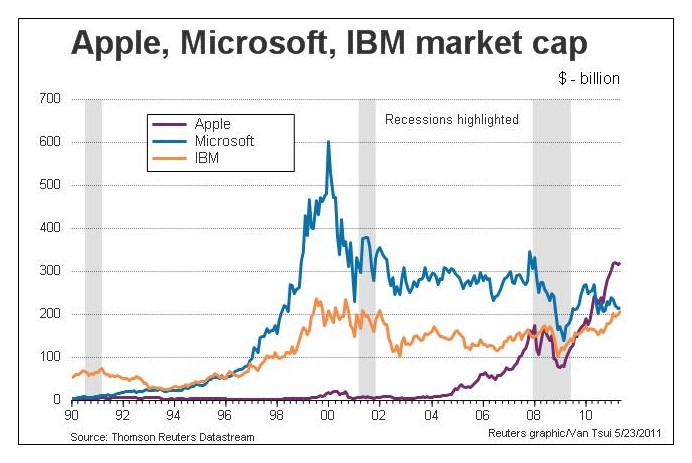
For the first time in 15 years, since 1996, IBM has overtaken Microsoft in market value. It is now the second largest US tech company behind Apple, while Microsoft has dropped to third.

Only a year after Apple had surged past Microsoft in market value, IBM has also powered past Microsoft.

Market capitalisation of Apple, IBM and Microsoft over the past 20 years

Market capitalisation of Apple, IBM and Microsoft over the past 20 years

IBM had been the dominant company in the computer industry for decades until it selected Microsoft to supply the operating system for its personal computers in the eary 80s. Bill Gates managed to turn that opportunity into a dominance of the operating systems market.

Rank Company Market cap 

(billion)

1 Exxon Mobil $397.4
2 Apple $309.2
3 General Electric $205.6
4 IBM $203.8
5 Microsoft $203.7

At its zenith just before the turn of the millennium, Microsoft’s market capitalisation was three times that of IBM’s. It was also the biggest US company then. Now it is the third biggest technology company and fifth biggest US company.

Microsoft is facing challenges in many of its business sectors. Its dominance of the operating systems market, is being challenged by the advent of tablets and Google’s newly introduced Chrome OS, while it has lost its market share in the smartphone market to RIM’s BlackBerry devices, Apple’s iPhones and recently Android based phones.

Microsoft’s decline since 2000 coincides with the burst of the Internet technology bubble and the tenure of Bill Gates’ successor Steve Ballmer as the CEO.

IBM, on the other hand, has reinvented itself from being a predominantly hardware manufacturer into a specialist in enterprise software, servers and consulting. It has even offloaded its PC business to Lenovo in 2002.

Bill Rigby of Reuters observes that “an investor putting $100,000 into both stocks 10 years ago would now have about $143,000 in IBM stock and about $69,000 in Microsoft stock.”