Archive for the ‘Prices’ Category

Adobe Creative Suite 5.5 Now Available Across Southeast Asia

Friday, May 20th, 2011

Adobe Creative Suite 5.5 features advances in HTML5 and Flash authoring for web designers and developers for both content and applications; as well as enhancements in video production and editing.

For digital publishing, content can be delivered to multiple platforms, operating systems, web browsers, smartphones and tablets — including Android, BlackBerry Tablet OS, and Apple iOS devices.

The new Creative Suite product lineup is headlined by Adobe Creative Suite 5.5 Master Collection, which includes, in a single package, all of Adobe’s industry-defining creative tools, such as Photoshop, Illustrator, InDesign, Acrobat, Flash Builder, Flash Catalyst, Flash Professional, Dreamweaver, Adobe Premiere Pro and After Effects.

These products are available separately or as components of one or more of the five Creative Suite editions. The complete Creative Suite 5.5 lineup and their estimated street prices are tabulated below. Upgrade pricing, volume licensing and education pricing are also available.

Creative Suite 5.5 Master Collection: US$3159
Creative Suite 5.5 Design Premium: US$2309
Creative Suite 5.5 Web Premium: US$2185
Creative Suite 5.5 Production Premium: US$2065
Creative Suite 5.5 Design Standard: US$1579

Adobe now plans to have milestone Creative Suite product introductions at 24-month intervals and – starting with Creative Suite 5.5 – major mid-cycle releases between the milestone versions. The major mid-cycle update was announced on April 12 and is available now in Southeast Asia.

Mobile App Development and New HTML5 Capabilities

Focused on the latest wave of mobile devices, this release of Creative Suite gives web designers and developers a complete software solution that allows them to produce stunning HTML5 content in the browser and deliver high-impact mobile applications through sweeping advances in Flash tooling.

Creative Suite 5.5 Web Premium Suite is packed with innovations in HTML5 and Flash authoring tools, empowering customers to create, deliver and monetize rich content and applications for virtually any screen.

Designers and developers can create rich browser-based content across screens using HTML5. Adobe Flash Professional CS5.5, Flash Builder 4.5 Premium and the Flex 4.5 framework allow users to quickly and easily develop, test and deploy high-performance mobile applications for Android, BlackBerry Tablet OS and Apple iOS.

Digital Publishing

Over the last year Adobe and leading publishers, including Condé Nast and Martha Stewart Living Omnimedia, have worked to develop new digital publishing workflows based on Creative Suite and Adobe InDesign.

Creative Suite 5.5 will enable print publishers to create beautiful interactive publications on the latest tablet platforms.

Using Adobe InDesign CS5.5, in combination with the integrated Folio Producer toolset, designers can add new levels of interactivity to their page layouts targeted at tablet devices.

Adobe has also announced the immediate availability of the Professional Edition of Adobe® Digital Publishing Suite, a turnkey solution that includes hosted services and viewer technology that allow publishers to cost-efficiently publish content to Android tablets, BlackBerry PlayBook and Apple iPad.

In addition to advances in mobile authoring and digital publishing, Creative Suite 5.5 Production Premium Suite promises “breakthrough performance, workflow improvements, creative innovations and powerful new audio editing capabilities” to video and audio professionals, broadcasters and filmmakers.

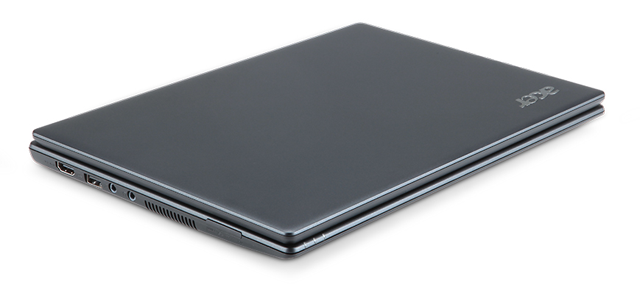
Acer Chromebook with Google Chrome OS

Thursday, May 12th, 2011

Google has unveiled its first two Chrome-based notebooks from Acer and Samsung at the Google I/O conference in San Francisco. They will be available for order online from June 15.

Acer’s Wi-Fi only Chromebook will cost $349, while the Samsung Chromebook will cost $429 for the Wi-Fi only version and $499 for the 3G version.

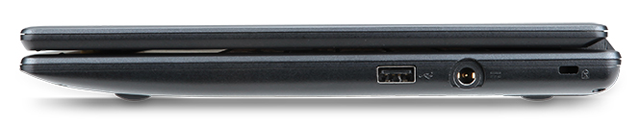
The Acer Chromebook is a netbook running Google’s Chrome OS. It has an 11.6 inch display, 1.66 GHz dual-core Intel Atom N570 processor, 16 GB SSD drive and 2 GB RAM, with 6 hours battery life. It is available in black.

Acer Chromebook running Google's Chrome OS

Acer Chromebook

The price of $349 is for the Wi-Fi only version. 3G will be an additional optional configuration.

Chromebooks will be available online June 15 in the U.S., U.K., France, Germany, Netherlands, Italy and Spain. More countries will follow in the coming months. In the U.S., Chromebooks will be available from Amazon and Best Buy and internationally from leading retailers.

Here are the main specifications:

  • 11.6″ HD (1,366×768) 16:9 Widescreen CineCrystalTM LED-backlit LCD
  • 1.66 GHz dual-core Intel Atom N570 processor
  • Acer Chromebook running Goolge's Chrome OS2GB RAM
  • 16GB SSD drive
  • 6 to 8 hours battery life
  • stereo speakers
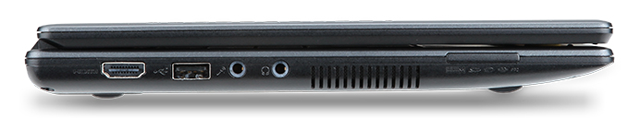
  • 2 USB 2.0 ports
  • Acer Chromebook running Google's Chrome OS4-in-1 memory card slot
  • HDMI port
  • 11.6 x 8.6 x 0.8 inches
  • Acer Chromebook running Google Chrome OS2.95 lbs / 1.34 kg
  • A full-size keyboard
  • Multitouch touch pad
  • Built in dual-band 802.11 b/g/n Wi-Fi and World-mode 3G (optional)
  • 1.3 megapixel HD Webcam with noise cancelling microphone
  • Instant-on from standby, and an 8-second boot time


Samsung Series 5 Chromebook

Wednesday, May 11th, 2011

Google has unveiled today its first Chrome-based notebooks from Acer and Samsung at the Google I/O conference in San Francisco. They will be available for order online from June 15.

The Samsung Chromebook will cost $429 for the Wi-Fi only version and $499 for the 3G version, while Acer’s Wi-Fi only Chromebook will cost $349.

Samsung Series 5 Chromebook, based on Google's Chrome OS

Samsung Series 5 Chromebook

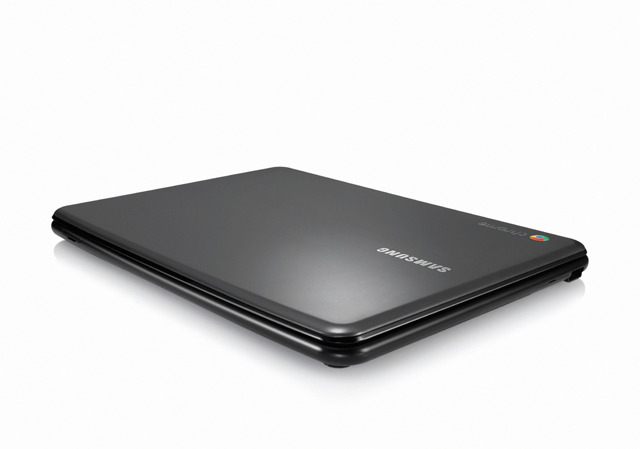
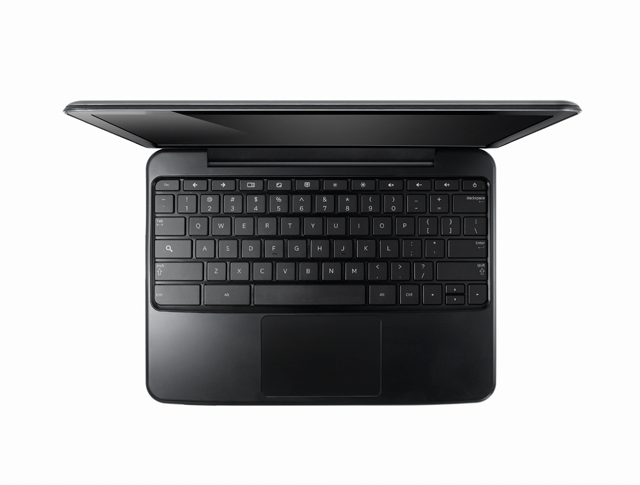
The Samsung Series 5 Chromebook is a netbook running Google’s Chrome OS. It has a 12.1 inch display, 1.66 GHz dual-core Intel Atom N570 processor, 16 GB SSD drive and 2 GB RAM, with 8.5 hours battery life.

Looking similar to the CR-48 prototype, the Series 5 is available either in white or “Titan Silver”.

Chromebooks will be available online June 15 in the U.S., U.K., France, Germany, Netherlands, Italy and Spain. More countries will follow in the coming months. In the U.S., Chromebooks will be available from Amazon and Best Buy and internationally from leading retailers.

Here are the main specifications:

  • A 12.1-inch (1280×800) SuperBright display at 300 nits, with a 16:10 aspect
  • 1.66 GHz dual-core Intel Atom N570 processor
  • Samsung Series 5 Chromebook, based on Google's Chrome OS2GB RAM
  • 16GB SSD drive
  • 8.5 hours battery life
  • Stereo speakers
  • Two USB 2.0 ports
  • SD/SDHC/MMC/SDXC card slot
  • Samsung Series 5 Chromebook, based on Google's Chrome OSMini-VGA port
  • 11.6 x 8.6 x 0.79 inches
  • 3.26 lbs / 1.48 kg
  • A full-size keyboard
  • Multitouch touch pad
  • Built-in dual-band Wi-Fi and World-mode 3G (optional)
  • HD Webcam with noise cancelling microphone
  • Instant-on from standby, and an 8-second boot time


Apple Announces New iMac line of desktop computers

Tuesday, May 3rd, 2011
Starting at S$1,648, the iMac has been updated with next generation quad-core processors, powerful graphics, Thunderbolt I/O Technology and a new FaceTime HD camera.
New iMacs from AppleApple claims that, compared to the previous generation, the new iMac is 70 percent faster and new graphics deliver up to three times the performance of the previous generation.
Apple’s desktop line of computers features quad-core Intel Core i5 processors with an option for customers to choose Core i7 processors up to 3.4 GHz. These next generation processors feature an integrated memory controller for a responsive experience and a powerful new media engine for high-performance video encoding and decoding. The new AMD Radeon HD graphics processors give the new iMac an extremely powerful graphics capability.

Thunderbolt

21.5 or 27 inch brilliant IPS LED-backlit high resolution display

iMac is the first desktop computer on the market to include groundbreaking Thunderbolt I/O technology. Apple had launched its updated MacBook Pro line of notebooks on February 25 earlier this year with the new Thunderbolt I/O technology. It was the  first computer on the market to implement the new technology Apple had developed in collaboration with Intel.

The 21.5-inch iMac has a single Thunderbolt port while the 27-inch model features two ports for even greater expansion. Featuring two bi-directional channels with transfer speeds up to an amazing 10Gbps each, Thunderbolt delivers PCI Express directly to external high performance peripherals such as RAID arrays, and can support FireWire and USB consumer devices, and Gigabit Ethernet networks via adapters.

Thunderbolt also supports DisplayPort for high resolution displays and works with existing adapters for HDMI, DVI and VGA displays. Freely available for implementation on systems, cables and devices, Thunderbolt technology is expected to be widely adopted as a new standard for high performance I/O.

FaceTime

21.5 or 27 inch brilliant IPS LED-backlit high resolution display

The iMac includes a built-in FaceTime HD camera and Apple’s innovative FaceTime software for crisp, widescreen video calling the whole family can enjoy. The new camera supports high definition video calls between all FaceTime HD-enabled Macs and standard resolution calls with iPad 2, iPhone 4, the current generation iPod touch and other Intel-based Macs.

Software

The iMac comes with Mac OS X Snow Leopard and iLife – Apple’s innovative suite of applications for creating and sharing photos, movies and music.

Snow Leopard includes the Mac App Store for finding new apps for the iMac.

iLife ’11 features iPhoto with full screen views for browsing, editing and sharing photos; iMovie with powerful easy-to-use tools to transform home videos into fun theatrical trailers; and GarageBand with new ways to improve your playing and create great sounding songs.

Aluminium enclosure, gorgeous display and all-in-one design.The iMac continues to feature its signature aluminium and glass design, brilliant IPS LED-backlit high resolution display, SD card slot and comes with Apple’s innovative Magic Mouse or Magic Trackpad.
On the Green front, the iMac meets stringent Energy Star 5.2 requirements and achieves EPEAT Gold rating. iMac features LED-backlit displays that are mercury-free and made with arsenic-free glass. iMac uses PVC-free components and cables, contains no brominated flame retardants, uses highly recyclable materials and features material-efficient system and packaging designs.

Pricing & Availability

The new iMac is available through the online Apple Store and Apple Authorised Resellers.

21.5-inch iMac
S$1,648 2.5 GHz quad-core Intel Core i5

AMD Radeon HD 6750M

500GB hard drive

S$2,048 2.7 GHz quad-core Intel Core i5

AMD Radeon HD 6770M

1TB hard drive

27-inch iMac
S$2,348 2.7 GHz quad-core Intel Core i5

AMD Radeon HD 6770M

1TB hard drive

S$2,748 3.1 GHz quad-core Intel Core i5

AMD Radeon HD 6970M

1TB hard drive

Configure-to-order options include faster Intel Core i7 processors up to 3.4 GHz, additional hard drive capacity up to 2TB, a 256GB solid state drive, additional DDR3 memory and AppleCare Protection Plan. Additional technical specifications and configure-to-order options and accessories are available online.

Asus Eee Pad Transformer TF101 arrives in Singapore

Friday, April 29th, 2011
The latest 10.1 inch Android 3.0 tablet from Asus arrived in Singapore today at the launch event at Zirca in Clarke Quay. The 16GB Wi-Fi only version (Eee Pad + Docking keyboard) is priced at S$898.

But as part of its launch promotion, you can get a S$99 discount at S$799. If you choose to purchase only the pad and not the docking station, you can get the 16GB Wi-Fi only version at the launch promotion price of S$699.
The Asus Eee Pad Transformer TF101 arrived in Singapore on April 29, 2011

The Asus Eee Pad Transformer TF101 arrived in Singapore on April 29, 2011

What are the biggest grouses of tablet users today? No Flash, short battery life, no keyboard, no USB ports and card readers. Asus tries to address all these shortcomings in the Asus Eee Pad Transformer TF101.

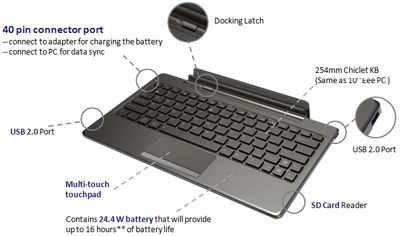
The optional docking station provides a full QWERTY keyboard for work involving intensive typing. It costs S$199 if you purchase it separately, but purchased together with the pad, you need only top up S$100 for it. The docking station makes available an additional 24.4 Wh battery that extends the pad’s 9.5 hours battery life to 16 hours instead.

A card reader (MMC/SD/SDHC) and two USB 2.0 ports are also available on the keyboard. The keyboard also props up the docked pad as a stand.

And finally, Adobe Flash 10.2 is supported, so you can visit all those glitzy sites running Flash animations and video.

The docking station is a full QWERTY keyboard that doubles up as a stand and contains an extra battery to extend the 9.5 hours battery life of the pad to 16 hours. It also contains USB ports and a card reader.

The docking station is a full QWERTY keyboard that doubles up as a stand and contains an extra battery to extend the 9.5 hours battery life of the pad to 16 hours. It also contains USB ports and a card reader.

I played with the Eee Pad on display and found the IPS (In-plane switching) LED backlight screen brilliant and sharp at with 1280×800 pixels packed into the 10.1 inch panel, offering a wide viewing angle of 178 degrees – I could still view the screen display from the side.

The touch screen senses up to 10 fingers for multi-touch - seen here with the Piano app from Android Market.

The touch screen senses up to 10 fingers for multi-touch - seen here with the Piano app from Android Market.

The pad feels slightly heavier than the iPad 2 but comfortable to hold. The book reader app included with the pad was standard fare – offering animated page turning, highlighting and bookmarking etc.

Photos and videos taken with the camera was clear even though the ambient lighting was dark.

Prices and configurations

The 16GB Wi-Fi only tablet is the only configuration available at the moment. Together with the docking station (keyboard), it sells for S$898 at the major retailers in Singapore – Challenger, Best Denki, Harvey Norman etc.

During this launch period, the promotional price for the 16GB Wi-Fi only Transformer sells for S$799 (Eee Pad + Docking station) and S$699 (Eee Pad only). Currently, the docking stations are out of stock and will only be available from the week of May 9 onwards.

The 32GB Wi-Fi only version will also only be available later in May.

“The 3G version is being tested now and will likely be launched in the second or third week of June,” Bernard Wen, Business Operation Manager of Asus Technology told me. “In the meantime, we’ve tested the Pad with USB dongles from SingTel, Starhub and M1 and found that they are all compatible,” he added.

iPad 2 debuts in Asia and arrives in Singapore

Wednesday, April 27th, 2011
The iPad 2 debuts in Asia tomorrow in Japan and will arrive in 11 other countries including Singapore on Friday. China will only see the iPad 2 on May 6 one week later.

The iPad 2 with its Smart Cover arrives in Singapore on Friday - April 29, 2011The iPad 2 was first launched in the US on March 2 and released in 25 more largely European countries on March 25. Tomorrow, it will debut in Japan – the first Asian country to launch it. On Friday, it will arrive in Singapore together with 10 other largely Asian countries. China will only see the iPad 2 with only Wi-Fi on May 6.

Compared to the original iPad, the iPad 2 is 33 percent thinner and up to 15 percent lighter, while sporting the same 9.7-inch LED-backlit LCD screen. iPad 2 features Apple’s new dual-core A5 processor for faster performance and stunning graphics and now includes two cameras, a front-facing VGA camera for FaceTime and Photo Booth, and a rear-facing camera that captures 720p HD video, bringing the FaceTime feature to iPad users for the first time. The iPad 2 promises the same 10 hours of battery life as its predecessor.

Prices and configurations in Singapore

The Smart Cover doubles up as a stand.1. Wi-Fi only versions:

  • 16GB: S$668
  • 32GB: S$798
  • 64GB: S$928

2. Wi-Fi/3G devices:

  • 16GB: S$848
  • 32GB: S$978
  • 64GB: S$1108

iMovie and GarageBand for iPad apps are available for US$4.99 each from the App Store on iPad or www.itunes.com/appstore. The Smart Cover is available in a range of colors in vibrant polyurethane for S$54 or rich leather for S$98.

The iPad 2 will be available in Singapore at select Apple Authorised Resellers, and online through the online Apple Store beginning at 1am local time.

The iPad 2 debuts in Asia in Japan tomorrow - April 28, 2011The 10 other countries getting the iPad 2 together with Singapore on Friday are: Hong Kong, India, Israel, Korea, Macau, Malaysia, Philippines, South Africa, Turkey and UAE.



For those interested, the earlier 25 countries who got their iPad 2 on March 25 are: Australia, Austria, Belgium, Canada, Czech Republic, Denmark, Finland, France, Germany, Greece, Hungary, Iceland, Ireland, Italy, Luxembourg, Mexico, Netherlands, New Zealand, Norway, Poland, Portugal, Spain, Sweden, Switzerland and the UK.

Adobe Creative Suite 5.5 Production Premium suite

Thursday, April 14th, 2011

Adobe Creative Suite 5.5 Production Premium suite is a major mid-cycle update to the software for video and post-production for delivering content to virtually any screen. Performance and workflow have been imporved while powerful new audio editing capabilities have been added.

New component software receiving major updates include Adobe Premiere Pro CS5.5, Adobe After Effects CS5.5, Adobe Flash Professional CS5.5, Adobe Flash Catalyst CS5.5, Adobe Story, Adobe Media Encoder CS5.5, and Adobe Device Central CS5.5.

New to the suite is Adobe Audition CS5.5, bringing its audio-for-video multitrack editing environment to both Mac OS and Windows for the first time.

Estimated street price for the Creative Suite 5.5 Production Premium suite is US$2065. It is one of five suite editions of the Creative Suite 5.5 line of software.

Greater Productivity

Productivity enhancements promise to enable video and audio professionals to dramatically accelerate their workflows. The powerful Adobe Mercury Playback Engine, introduced in Adobe Premiere Pro CS5, broadens its graphics processing unit (GPU) hardware support to include laptops and more supported cards, and allows users to open projects faster, get real-time feedback for more GPU-accelerated features, and work more smoothly at 4k and higher resolutions.

Adobe Premiere Pro CS5.5 boosts performance by providing a smoother editing workflow, enabled by new trimming and editing tools that provide more precision and control.

Dual-system sound support from the new Merge Clips command in Adobe Premiere Pro CS5.5 lets users quickly sync video with high-quality audio recorded on separate devices like location recorders, ideal for DSLR or RED workflows.

Leveraging an integrated workflow with Adobe Audition, Adobe Premiere Pro users can save time by sending individual clips or sequences, including reference videos, directly to Adobe Audition for audio editing and restoration. File-based workflows see enhanced support for RED and other tapeless cameras, including improved RED Source Settings dialog in Premiere Pro and After Effects CS5.5 and native support for up to 5k media from RED Epic cameras via an extension available on Adobe Labs.

As it is a truly native editing solution, users saves time time and eliminates the need to transcode or rewrap footage.

The new 64-bit Adobe Media Encoder CS5.5 has been completely redesigned to deliver Adobe Premiere Pro video sequences, After Effects compositions, and Adobe Encore projects to multiple screen formats quickly, while doing the encoding in the background.

Adobe Media Encoder CS5.5 also introduces new format support such as AVC-Intra and DPX, and watch folders so users can encode a single clip to multiple destinations with a simple drag and drop.

New features

After Effects CS5.5 introduces new features such as the Warp Stabilizer, Camera Lens Blur and Light Falloff to enable users to enhance footage in post-production.

The Warp Stabilizer eliminates unwanted camera movement by steadying shaky footage, making handheld footage appear as smooth as a camera mounted on a mechanical stabilizer.

The Camera Lens Blur effect mimics the properties of physical lenses offering more realistic depth of field blurs. The Light Falloff effect enables users to simulate natural illumination falloff to mimic how light behaves in a 3D scene and can be used to create other light intensity effects.

Video professionals can use the new Adobe Audition in CS5.5 Production Premium on both Mac and Windows platforms. The completely re-written audio engine in Audition offers a robust toolset to record, edit, mix, master, and sweeten audio. With its professional editing and multitrack mixing tools, powerful noise-reduction and effects options, Adobe Audition CS5.5 will be able to handle a wide range of tasks quickly and efficiently.

Improved Collaboration

Adobe Creative Suite 5.5 Production Premium enables users to collaborate with existing workflows, even if they use a variety of tools. Enhanced project exchange support for Final Cut Pro users provides maximum flexibility for video editors, while new or enhanced OMF support in Adobe Premiere Pro and Adobe Audition makes it possible to export high-quality audio projects to Avid Pro Tools, facilitating more efficient collaboration between audio editors, remixers and sound designers.

Access to the new version of Adobe Story, an Adobe CS Live online service, improves collaboration between users with email notifications of new script edits and a faster method of tracking changes through script elements and filters.

The ability to import Adobe Story script data directly into Adobe Premiere Pro further strengthens XML-based metadata support found throughout the Production Premium suite, which is critical for everything from file-based workflows to media asset management.

The metadata-driven workflows, plus the ease and flexibility of communicating with Adobe applications with critical third party solutions from news management systems to playback servers, is a key selling point for broadcasters and other organizations around the world.

Adobe Creative Suite 5.5 Web Premium suite

Wednesday, April 13th, 2011

Adobe Creative Suite 5.5 Web Premium suite is a major mid-cycle update to the software for Web designers and developers. The new version give Web professionals the ability to bring high-impact content experiences and mobile apps to the latest form factors across Android, BlackBerry Tablet OS and iOS platforms.

New in the suite are updated versions of Adobe Dreamweaver, Adobe Flash Professional, Adobe Flash Catalyst, Adobe Flash Builder, the all-new Flex framework for mobile devices, Adobe Device Central and Adobe Acrobat X Pro.

Key enhancements include substantive HTML5 advancements in Dreamweaver, new tablet and smartphone application development capabilities in Flash Professional CS5.5 and Flash Builder Premium 4.5, and enhanced cross-browser testing as well as mobile emulation and on-device debugging.

Estimated street price for the Creative Suite 5.5 Web Premium suite is US$2185. It is one of five suite editions of the Creative Suite 5.5 line of software.

Advances in HTML5

Web Premium CS5.5 advances HTML5 authoring tools, enabling Web designers and developers to create browser-based content that gives end-users a seamless and immersive experience across virtually any screen.

New HTML5 support in Dreamweaver CS5.5 includes jQuery mobile framework integration for browser-based content and PhoneGap integration for native and mobile application design and development.

Enhancements to the multiscreen preview panel in Dreamweaver have also been made, supporting the latest in media queries, WebKit engine updates, and CSS3 attributes, enabling side-by-side renderings of what a single design looks like on different form factors.

“With Adobe the jQuery project has spent a significant amount of time researching and developing user interfaces for mobile browsers, the final result being the creation of the jQuery Mobile framework,” said John Resig, founder of the jQuery Project.

Enhanced Flash tooling

New additions in Flash Professional CS5.5 include content scaling so users can easily scale their content on stage to adapt to different screen sizes, which is a huge timesaver.

Flash Professional CS5.5 also includes a new shared assets feature for more streamlined publishing, as well as more than 20 new code snippets for creating mobile and Adobe AIR applications for accelerometer, multitouch gestures, and save/load data.

Enhanced Application Development for Mobile Devices

Adobe CS5.5 Web Premium includes new mobile application development support to deliver rich interactive applications to the latest Android, BlackBerry Tablet OS and iOS devices.

In the updated Flash Builder 4.5, users have new mobile support for ActionScript and mobile Flex projects, as well as improved designer-developer collaboration throughout application development with a new bi-directional workflow with Flash Catalyst CS5.5 and Flash Professional CS5.5.

New capabilities in Adobe Flash Builder 4.5, Flash Professional CS5.5 and the introduction of the Flex 4.5 framework for mobile devices, let designers and developers build mobile applications that run on iPhone, iPad, Android devices and BlackBerry PlayBook. The apps can be easily deployed through the application markets such as Apple’s iTunes App Store, Android Market and BlackBerry App World.

Enhanced Browser Compatibility Testing

To keep Web developers and designers ahead of rapidly changing technology, Web Premium CS5.5 includes new HTML5 emulation and support for the latest mobile devices in Adobe Device Central, software that simplifies the production of innovative and compelling content for mobile phones and consumer electronics devices.

Adobe BrowserLab, a key component of Adobe CS Live online services, has also been updated for cross-browser compatibility testing for the newest browsers to help ensure Web projects are accurately previewed across a spectrum of browsers.

Adobe CS Live online services are free until April 12, 2012.

Adobe introduces Creative Suite 5.5

Tuesday, April 12th, 2011

Adobe’s major mid-cycle product release targets enhancements across Flash, HTML5, video, mobile App and digital publishing tools. It also extends workflows to include tablets.

Adobe announced today the new Adobe Creative Suite 5.5 product line, enabling designers and developers to target popular and emerging smartphone and tablet platforms, as the revolution in mobile communications fundamentally changes the way content is distributed and consumed.

Today’s launch marks a significant change to Adobe’s product release strategy for Creative Suite, the design and development software catering for print, video, mobile and online media.

Adobe now plans to have milestone Creative Suite product introductions at 24-month intervals and – starting with Creative Suite 5.5 – major mid-cycle releases between the milestone versions.

Product lineup and pricing

The new Creative Suite product lineup is headlined by Adobe Creative Suite 5.5 Master Collection, which includes, in a single package, all of Adobe’s industry-defining creative tools, such as Photoshop, Illustrator, InDesign, Acrobat, Flash Builder, Flash Catalyst, Flash Professional, Dreamweaver, Adobe Premiere Pro and After Effects.

These products are available separately or as components of one or more of the five Creative Suite editions.

The complete Creative Suite 5.5 lineup and their estimated street prices are tabulated below, and is scheduled to ship within 30 days. Upgrade pricing, volume licensing and education pricing are also available.

Creative Suite 5.5 Master Collection: US$3159
Creative Suite 5.5 Design Premium: US$2309
Creative Suite 5.5 Web Premium: US$2185
Creative Suite 5.5 Production Premium: US$2065
Creative Suite 5.5 Design Standard: US$1579

Key enhancements

The new Creative Suite 5.5 Web Premium suite sees enhancements in HTML5 and Adobe Flash authoring tools, allowing users to create, deliver and monetize rich content and applications for virtually any screen.

This release helps enable designers and developers to deliver mobile applications on Android, BlackBerry Tablet OS, iOS and other platforms; create rich browser-based content across screens using HTML5; and leverage Flash Player to deliver premium video content, casual games and rich Internet applications.

Tablet devices are now included in the creative workflow, going beyond the desktop computer. A new scripting engine in Adobe Photoshop and an enhanced Photoshop Software Development Kit (SDK) enable developers to build tablet applications that interact with Photoshop from Android, BlackBerry and iOS devices.

Adobe also announced three new iPad applications that demonstrate the creative possibilities of using tablets to drive common Photoshop workflows – Adobe Color Lava for Photoshop, Adobe Eazel for Photoshop and Adobe Nav for Photoshop.

With the launch of Adobe Flash Builder 4.5 – available as part of the Creative Suite 5.5 Web Premium suite – and the Flex 4.5 framework, developers can easily develop and deploy mobile applications to the over 200 million Android, BlackBerry Playbook and iOS devices anticipated to be in market by the end of 2011.

With more than 131 million smartphones expected to have Flash Player installed by the end of the year, Adobe Flash makes it possible to bring rich content to desktops and devices inside the browser.

Flash Player is supported on Android, HP webOS and Google TV today. BlackBerry Tablet OS, upcoming versions of Windows Phone, Samsung SmartTVs and others are expected to support Flash Player in the near future.

For video and audio professionals, Adobe Creative Suite 5.5 Production Premium suite promises breakthrough performance, workflow improvements, creative innovations, and powerful new audio editing capabilities.

The powerful Adobe Mercury Playback Engine, introduced in Adobe Premiere Pro CS5, broadens its graphics processing unit (GPU) hardware support to include laptops and more supported cards, allowing users to open projects faster, get real-time feedback and work more smoothly at higher resolutions.

Creative Suite 5.5 Design Premium suite includes Adobe’s recent product innovations in digital publishing to create slick digital editions for tablet devices. Using InDesign CS5.5, in combination with the integrated Folio Producer toolset, designers can add new levels of interactivity to their page layouts targeted to tablet devices.

Documents can include video, audio, panoramic views, 360-degree object rotation, pan and zoom of images, integration of HTML and HTML5 content and other interactive overlays. Leading to a much more robust and engaging reading experience.

Creative Suite 5.5 is tightly integrated with Adobe Digital Publishing Suite to support publication, sale and analysis of content on an array of tablet devices.

Adobe Creative Suite 5.5 products integrate with Adobe CS Live, a set of online services that accelerate key aspects of the creative workflow and enable designers to focus on creating their best work. CS Live online services include: Adobe BrowserLab; Adobe CS Review; Acrobat.com; Adobe Story; and Adobe SiteCatalyst NetAverages powered by Omniture. Adobe CS Live is free until April 12,2012.

Creative Suite 5.5 Design Premium and Design Standard suites

Monday, April 11th, 2011

Creative Suite 5.5 Design Premium comprises new versions of Adobe InDesign, Adobe Dreamweaver, Adobe Flash Professional and Adobe Flash Catalyst, as well as Adobe Acrobat X Pro, Adobe Illustrator CS5, Adobe Photoshop CS5 Extended and Adobe Fireworks CS5.

Estimated street price for the Creative Suite 5.5 Design Premium suite is US$2309 while that of the Design Standard suite is US$1579. Both are part of five suite editions of the Creative Suite 5.5 line of software and will ship within 30 days.

The software in the Adobe Creative Suite 5.5 Design Premium suite enables designers to produce content faster and deliver immersive, visually rich experiences to screens of all shapes and sizes. New features in Creative Suite 5.5 Design Premium bolster the many timesaving features that were introduced in Creative Suite 5 to improve efficiency of everyday tasks.

Design for both Tablets and Smartphones

With Creative Suite 5.5 Design Premium, designers can create immersive digital magazines, e-books with accompanying video and audio, websites based on HTML5 and CSS3 standards, and interactive mobile applications built with familiar Flash tools that display consistently across Android, BlackBerry Playbook and iOS devices.

Updates to Dreamweaver CS5.5 (including the Live View mode, CSS panel and Multiscreen Preview panel) streamline the design of websites that need to be optimized for viewing on multiple devices, and let designers preview desktop, tablet and smartphone browsers side-by-side.

With the new Folio Producer tools in InDesign, which work in conjunction with the Adobe Digital Publishing Suite, creative professionals can design interactive, rich media digital magazines, newspapers, corporate publications and advertising for reading on tablet devices such as Apple iPad, BlackBerry PlayBook and a wide variety of Android tablets.

Using InDesign CS5.5 in combination with the integrated Folio Producer toolset, designers can add new levels of interactivity to their page layouts. Documents targeted to tablet devices can include video, audio, panoramic views, 360-degree rotation of objects, pan and zoom of images, integration of HTML5 content and other interactive overlays.

Designers can also easily test how their content will look and feel on a broad array of tablet devices directly from within InDesign. Once content authoring is completed in InDesign, tight integration with Adobe Digital Publishing Suite allows users with a Digital Publishing Suite account (available separately) to efficiently produce, distribute, optimize and monetize content for tablet devices.

A number of features in InDesign have also been enhanced to improve reading experiences on e-book devices, such as Barnes and Noble Nook, Sony Reader and Apple iPad.

Designers can now add refined typography, images that resize automatically to fit virtually any screen, and video and audio for e-book reader applications that support HTML5 video and audio tags.

New capabilities in Flash Professional CS5.5 let designers and developers build mobile applications that run on iPhone, iPad, Android devices and BlackBerry Playbook. The apps can be easily deployed through the application markets such as Apple’s iTunes App Store, Android Market and BlackBerry AppWorld.

Beyond the Desktop

Adobe is continuing to extend productivity with cloud services and new tablet apps.

Creative Suite 5.5 Design Premium works with new tablet applications for Photoshop (available separately) that enhance the creative workflow and extend the design experience beyond the desktop.

A new scripting engine in Adobe Photoshop and an enhanced Photoshop Software Development Kit (SDK) enable developers to build tablet applications that interact with Photoshop from Android, BlackBerry and iOS devices.

Adobe has used the new SDK to deliver three iPad applications that demonstrate the creative possibilities of using tablets to drive common Photoshop workflows – Adobe Color Lava for Photoshop, Adobe Eazel for Photoshop and Adobe Nav for Photoshop.

Creative Suite 5.5 Design Premium also integrates with CS Live, a set of hosted services that accelerate key project workflows such as shared reviews. CS Live online services are free until April 12, 2012.