Archive for the ‘Brands’ Category

Windows 8 developer preview

Wednesday, September 14th, 2011

At the developer-focused BUILD conference, Microsoft has showcased a detailed preview of the next major release of Windows, code-named “Windows 8”, including new tools for developers to write applications for the new operating system.

The ongoing BUILD conference (13-16 September 2011) is being held in the Anaheim Convention Center. Here are some screenshots of the preview. Windows 8 is not expected to be come out of beta until at least the second half of 2012.

Main features

The user interface (UI)  is centred around a touch interface, although it works with a mouse and keyboard too. Microsoft calls the UI “Metro” style – displaying important information first, whilst emphasising simplicity and user control. Internet Explorer 10 aims to provide a fast and fluid touch-browsing experience.

On the start screen, apps form the focal point, the Apps “tiles” fill the entire screen. The apps work together and communicate with each other in Windows 8. For example, photos can be selected and shared from different apps via email, Facebook, Flickr or the hard drive.
The ongoing BUILD conference (13-16 September 2011) is being held in the Anaheim Convention Center.

The ongoing BUILD conference (13-16 September 2011) is being held in the Anaheim Convention Center.

If you use multiple devices, Live roams all the content from the cloud services you use most — photos, email, calendar and contacts — keeping them up-to-date on your devices, be it a desktop, laptop, netbook, tablet or smartphone. With SkyDrive, you can access your files, photos and documents from virtually anywhere with any browser or with Metro style apps in Windows 8.

Windows 8 is an enhanced Windows 7 with lower memory footprint, and runs even on low-end hardware. For PC users, Windows 8 features an enhanced Task Manager and Windows Explorer and new, flexible options for multimonitor setups.

For developers, the Windows Store will allow developers to sell their apps anywhere Windows is sold worldwide, whether they’re creating new games or familiar productivity tools. For games developers, DirectX 11 gaming power underlies Windows 8, allowing the easy creation of full-screen games with smooth, flicker-free action.

Hardware wise, Windows 8 supports ARM-based chipsets, x86 (including x32 and x64) devices, and sensors. It promises instant-on and long battery life for ultrathin PCs and tablets, and is backward compatible with software/devices that run on Windows 7.

Microsoft to demonstrate Windows 8 operating system

Tuesday, September 13th, 2011

The new operating system will run on tablets, desktop and laptop computers via a touch screen, mouse or keyboard. It will also be backward compatible to existing Windows software.

Windows 8 represents Microsoft’s hope of wrestling market share for tablet computers from Apple iPads and Android tablets.

Microsoft will unveil the next iteration of their Windows operating system software today at a developers conference in Anaheim, California. A preview of the design was first released in June this year.

This will be the first time that a Windows operating system is capable of running on chip technology from ARM. Microsoft aims to make Windows 8 capable of running smaller, thinner tablet computers with battery life that can rival that of the market leader – Apple’s iPad.

Out of 60 million media tablets expected to be shipped 2011, 74 percent will be Apple’s iPads, according to an August forecast by IHS. The global market is forecasted to rise to 275.3 million units in 2015, with Apple expected to account for 43.6 percent of the market.

Windows 8 design

The user interface for Windows 8 resembles Microsoft’s Windows Phone 7 smartphone operating system – it uses digital tiles instead of icons to help users navigate between programs. The tiles are on the computer’s home screen can display updated information from inside applications, so that users can see the info at a glance without having to fire up those apps.

TomTom navigation app for iPhone optimised for iPad

Tuesday, September 13th, 2011

The new iPad App was showcased at the TomTom exhibition stand during IFA 2011 in Berlin and will be available in Q4 2011.

“… we have optimised our TomTom App for the iPad. Now customers have one App for all iOS devices.” said Corinne Vigreux, Managing Director at TomTom.Customers who already have the iPhone version of the navigation app will be able to download the new version to their iPads for free.

This latest version will feature enhanced screen resolution, sharpened graphics and more intuitive controls specifically developed for the iPad.

New TomTom app for the iPhone

Monday, September 12th, 2011

The latest version of the TomTom App for iPhone (Version 1.8) now includes the latest maps of countries in Southeast Asia, including Singapore, Malaysia, Brunei, Hong Kong, Macau, Thailand and Indonesia. A new multi-stop routes driving feature is also included.

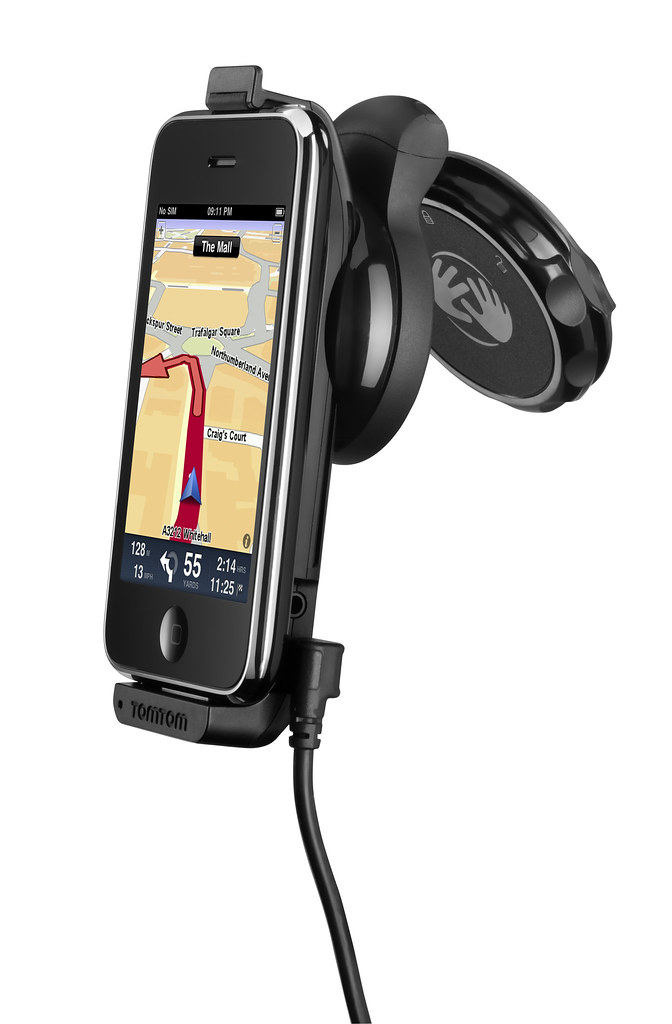
Use the iPhone as a Portable Navigation Device for turn-by-turn navigation.

Use the iPhone as a Portable Navigation Device for turn-by-turn navigation.

Mount your iPhone on the dashboard or windscreen to use it like a traditional PND.The South East Asia, TomTom App for iPhone (Version 1.8) can be downloaded from the App Store for USD $69.99. It works with iPhone 4, iPhone 3GS & iPod touch 3rd Gen running iOS4.

The new multi-stop routes feature makes it easier for drivers to make multiple stops on a single route, by letting them add up to five stop-off points when they plan their journey.

Multi-stop routes enable the driver to stop by a bank or petrol station enroute, or a diversion to pick up a friend as part of a longer journey.

This removes the hassle of entering a new journey for each leg of the trip and means that the driver can get an accurate estimated time of arrival for their final destination.

Company byte: TomTom

Sunday, September 11th, 2011

TomTom (AEX:TOM2) is a major supplier of in-car location and navigation products and services.

TomTom, Europe's largest maker of portable navigation devicesFounded in 1991 and headquartered in Amsterdam, TomTom has over 3,500 employees and sells its products in over 40 countries. Its products include portable navigation devices, in-dash infotainment systems, fleet management solutions, maps and real-time services, including TomTom HD Traffic.

Here is TomTom’s route planner which includes live traffic information (not available for some areas yet, including Singapore).

Read more about TomTom on tech4tea.com.

Viber app for free international phone calls

Saturday, September 10th, 2011

An overseas friend uses the Viber app on her iPhone for free VOIP international voice calls and text messages on her smartphone. I installed the free app on my Android phone and tested it. Setup was swift and quality was superb.
Viber for iPhone and Android phones

I was at the petrol station and the attendant was filling up an almost empty tank with petrol. While waiting, I whipped out my Android phone, searched the Android Market for Viber and installed it. Before the attendant had finished filling up the tank, I was already chatting with my friend in Kuala Lumpur on her iPhone – for free.

Set up was really simple on the Android phone. Once it was downloaded and installed, it gets your permission to access your contacts and sends you a 4-digit access code to activate your account. After that, you’re set to go!

Viber is free and works on the iPhone and Android phones.

Viber is free and works on the iPhone and Android phones.

The interface looks similar to the usual numeric dialpad with tabs to access recent calls, contacts, messages and more activities such as inviting friends, sharing on Facebook, tweeting etc.

Basically, Viber emulates the usual phone calling and sms usage – everything is based on your regualr phone number.

Viber dialpad on Android phone

Viber dialpad on Android phone

Your account id is your phone number. If the party you’re calling has Viber installed on her Android or iPhone, you just dial her usual number, complete with international dialing code, to get connected. Viber is currently only available on the iPhone and Android phones. A BlackBerry version is in the pipeline.

Quality was good. Voice quality was loud and clear, although there was just a split-second lag, which didn’t affect the flow of the conversation in the slightest bit.

If the other party does not have Viber installed yet, the app gives you the option to place a regular call through your carrier.

Conclusion: Fast and easy to set-up and use, call quality is fantastic. The free app is compatible with iPhone 3GS (and later) and Android phones.

BlackBerry DevCon Asia registration open now

Friday, September 9th, 2011

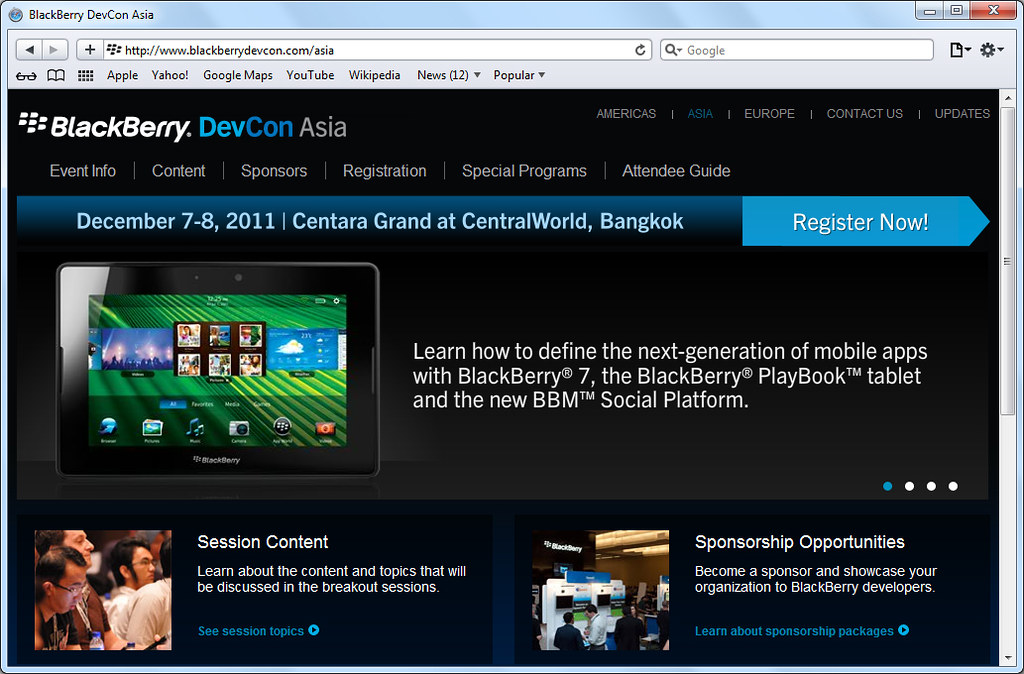
Registration for BlackBerry DevCon Asia in Bangkok is now open. Taking place on 7-8 December 2011, BlackBerry DevCon Asia will be held at Centara Grand at CentralWorld in Bangkok, Thailand. Rates range from $150 to $250 USD.

Discounted rates are available for attendees who book early, as well as for those who qualify for the Academic Rate:

Early Bird Rate $200 USD Expires Friday, November 4, 2011 at 11:59pm ICT
Regular Rate $250 USD Expires Thursday, December 8, 2011
Academic Rate* $150 USD Expires Thursday, December 8, 2011

*Academic passes do not qualify for the Early Bird discount/offer or the Alumni discount. Students and Faculty members must apply to devconasia@blackberryconferences.net with proof of current enrollment or employment.

BlackBerry DevCon Asia in Bangkok, Thailand from 7 to 8 December 2011Those who had attended BlackBerry DevCon Asia in January 2011, BlackBerry DevCon 2010, or BlackBerry DevCon Americas 2011 qualify for the $50 USD Alumni discount.

The Alumni discount will automatically be deducted from the current registration price. To be recognized as Alumni, interested registrant must use the same email alias they used when registering for the aforementioned conferences.

Each package gives participants the following:

  • Access to the BlackBerry DevCon Asia General Session
  • Access to Breakout Sessions
  • Access to Expert areas during open hours
  • Admission to the Welcome Reception
  • Admission to the BlackBerry DevCon Party
  • Admission to the Mobility Pavilion during open hours
  • Lunch, and breaks during the conference dates
  • Complimentary access to Conference Wi-Fi® internet
  • Access to BlackBerry DevCon On-Demand, the online portal for conference content and sponsor information, until the start of the next BlackBerry DevCon Asia
  • Registration gift upon check-in onsite

During the conference, each breakout session will be presented by Research In Motion (RIM) experts and developer community members.

The various sessions will explore the BlackBerry development platform, BlackBerry Platform Services, and best practices, focusing specifically on the topics below:

  • Java Development for BlackBerry 7
  • WebKit and the BlackBerry WebWorks Platform Development
  • BlackBerryPlayBook Tablet OS Development, including Native SDK, Adobe AIR and Adobe Flash, and Android Player
  • BlackBerryPlatform Services and the BBM Social Platform
  • Tips and tools for debugging and optimizing your apps
  • User interface and user experience tools and best practices
  • Developingquality enterprise applications
  • Marketing and distributing your applications

BlackBerry App World 3.0 out of beta and available now

Wednesday, September 7th, 2011

BlackBerry App World 3.0 is now out of beta and available for all BlackBerry smartphone users.

BlackBerry App World is free and works on BlackBerry smartphones running the BlackBerry® 5 OS (Device Software) or higher.

BlackBerry App World is free and works on BlackBerry smartphones running the BlackBerry 5 OS or higher.

BlackBerry App World is free and works on BlackBerry smartphones running the BlackBerry 5 OS or higher.

The BlackBerry App World 3.0 storefront makes discovering and downloading apps, games, and themes easier than before. Users can personalize their BlackBerry smartphone, find the hottest games and entertainment and get apps to stay connected with the people who matter.

New features include:

  • Sleek New Design – The BlackBerry App World experience has been enhanced to help users discover the latest and greatest apps and content, starting right on the BlackBerry App World home screen where rotating spotlight banners show off all that’s new and exciting.
  • New Channels – Apps, Games, and Themes now have their own channels so users can get to what they want even faster.
  • Introduction of My Account – My Account makes managing BlackBerry ID and payment options easy with direct access to all account information from the home screen.
  • New My World Features – My World gives users a streamlined view of their apps and status, and now at a glance, in addition to seeing which apps are installed and uninstalled, users can manage subscription content and services.  When new updates or subscription renewals are available for apps, users will be notified using push technology.
  • App Social Sharing – when a user finds an app they can’t live without, they can share it directly from the app details screen through BBM™ (BlackBerry® Messenger), Facebook®, Twitter™, email and SMS
  • Evolved App Details Screen – At a glance, users can get a quick summary, check out reviews and star ratings, take a look at screen shots, and more
  • More Search Options – Quickly find apps with a Search Bar now appearing on the storefront home screen and search results are presented across Channels as well as My World.  Search Bars are also within each Channel and users have the ability to filter by App Name, Price, Rating, Newest, Best Match, or Popular

PlayStation games that are “Made-in-Singapore”

Monday, September 5th, 2011

Come 2012, the game that you play on your Sony Playstation could be made-in-Singapore. That is the vision for the Memorandum of Understanding signed today between Nanyang Polytechnic and Sony Computer Entertainment Asia.

The 5-year Memorandum of Understanding (MOU) will renew the partnership between Nanyang Polytechnic (NYP) and Sony Computer Entertainment Asia (SCE Asia) a year ahead of the existing agreement signed in December 2009.

Mr. Tetsuhiko Yasuda, President, Sony Computer Entertainment Asia and Mr. Chan Lee Mun, Principal & CEO, Nanyang Polytechnic at the MOU signing ceremony.

Mr. Tetsuhiko Yasuda, President, Sony Computer Entertainment Asia and Mr. Chan Lee Mun, Principal & CEO, Nanyang Polytechnic at the MOU signing ceremony.

Both parties will be nurturing the first ever student-initiated Sony PlayStation Minis game, developed by 21-year-old NYP graduand Hoong Boon Wai. They will also continue their partnership in the NYP Games Resource Centre, the only Sony PlayStation games development and training centre in Southeast Asia.

Mr Hoong Boon Wai (right), Nanyang Polytechnic graduate and Founder of Dark Potato Studios, demonstrating his game to Mr. Tetsuhiko Yasuda.

Mr Hoong Boon Wai (right), Nanyang Polytechnic graduate and Founder of Dark Potato Studios, demonstrating his game to Mr. Tetsuhiko Yasuda.

The S$4 million Games Resource Centre will provide the resources and facilities for lecturers of NYP’s Diploma in Digital Entertainment Technology (Games) and Diploma in Digital Media Design (Games) to guide and mentor students from these courses. By 2015, NYP expects to train at least another 800 students and games development professionals through its two diploma programmes and Specialist Diploma Games Development.

Companies such as Red Hare Studios can also use the development tools in the centre for games development. Dr Koh Wee Lit from Red Hare Studios has developed a game – Spell Caster – in the centre that is planned for release in 2012.

Hoong’s 2D arcade shooter game, called PhaseShift, may also be launched in 2012 by his startup – Dark Potatoes Studios.

Two other local startups setting up taking advantage of the partnership include SBA Mobile Solutions and Gamma Games.

My little haul from COMEX 2011

Sunday, September 4th, 2011

Once a quarter, half of Singapore converges on Suntec City or Singapore Expo to “shop till you drop”. I visited COMEX 2011 on its second of four days to take advantage of promotional prices and to stock up on IT gadgets and peripherals.

Visiting COMEX 2011 on Friday afternoon, the hope was to go in after the initial opening day rush crowd had petered out and before the working folks – who knock off work for the week at five – set in.

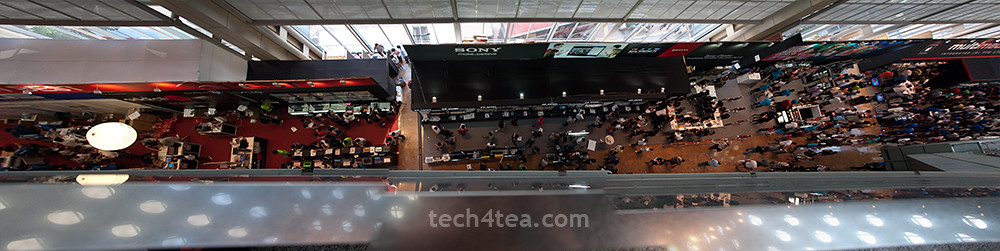
View from Level 6 of COMEX 2011. Combined panorama from 3 photos.

View from Level 6 of COMEX 2011. Combined panorama from 3 photos.

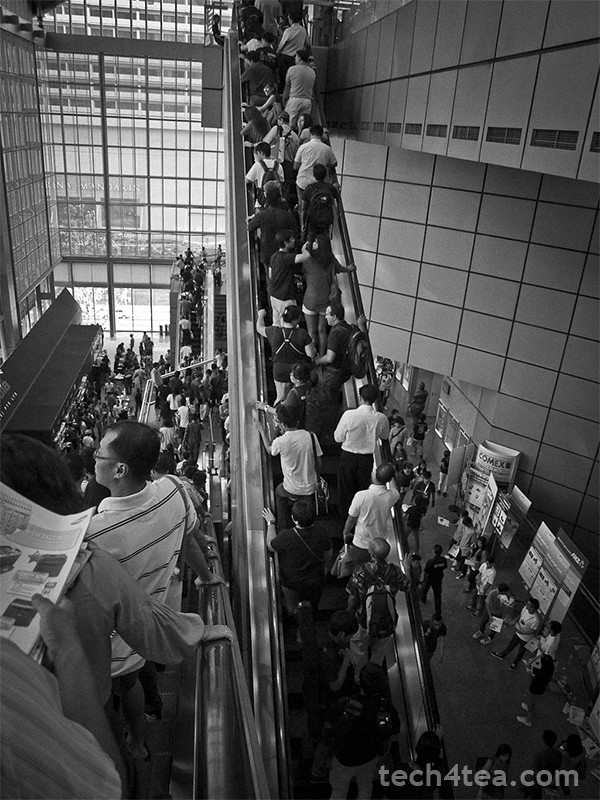
I like to think the ploy worked, though the marketplace was still plenty crowded.

I managed to park the car at Basement 2 of Suntec City itself and dived into the crowd on Level 6 at around half-past-three – shopping list in hand. By 5 pm, people knocking off early from work were streaming into COMEX 2011.I’d listed down beforehand the booth numbers of the vendors selling the stuff I wanted and studied the floor plans to work out an optimal route through the madhouse.

First stop was the Prolink booth where I bought the Prolink PKM-3810B bluetooth keyboard for my BlackBerry PlayBook. The guys at the booth wasn’t sure if it would be compatible with the PlayBook’s OS since it was built for Windows and they’d tested earlier that the keyboard did not play with Android. (Update: I’ve since tested the keyboard with an Android Tab and both worked together without a hitch!)

So I fished out the tablet and tested the display keyboard set. Amazingly both got connected without a hitch, so I became S$48 dollars poorer. And thanks to a cut-out coupon from the Straits Times, I saved S$8 from the original COMEX price of S$56.

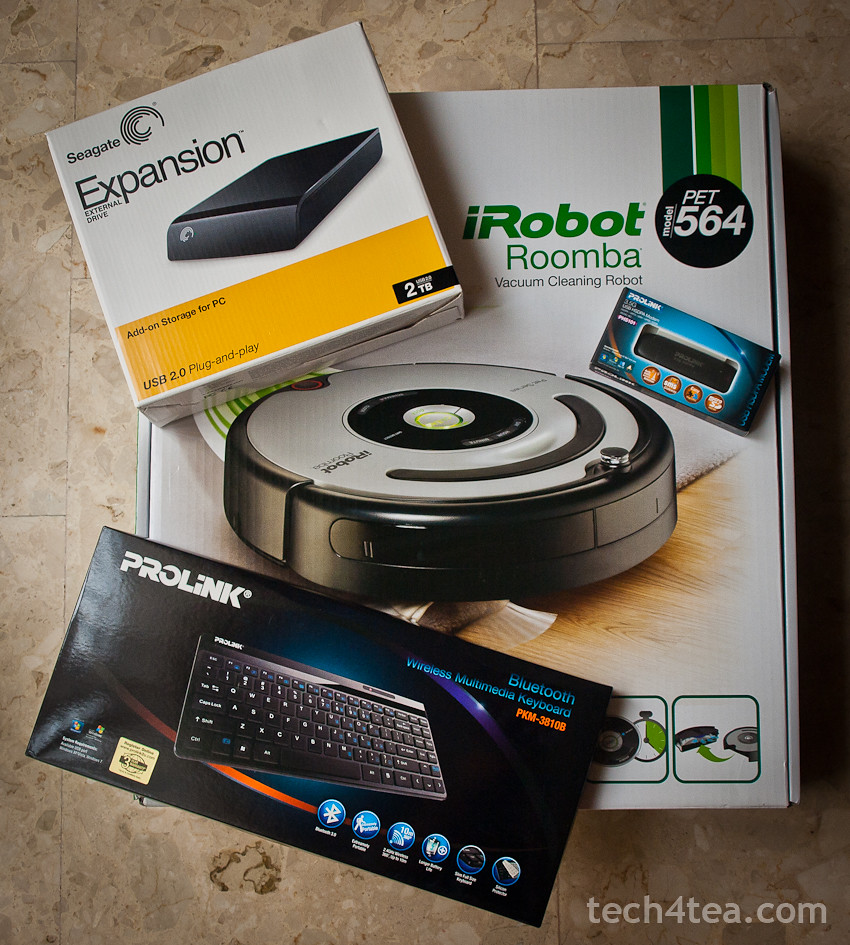
Seagate 2TB 3.5-inch external hard disk, iRobot Roomba, Prolink Bluetooth keyboard and 3.5 G USB modem.

My little haul from COMEX 2011

Since I was at Prolink, I bought a 3.5G USB HSDPA Modem for S$69. I was going to renew my home broadband subscription with SingTel. They’d offered a “free” modem for the mobile 1.5 Mbps on condition that I pay S$4 extra per month (if you use your own modem, you get the 1.5 Mbps and data SIM card for free).

Since that worked out to S$96 over the course of two years for the “free” modem, I figured I might as well purchase my own modem for less. Not a lot of savings, but I didn’t like the idea of being suckered into swallowing SingTel’s “free” modem offer.

Next stop was for an external 3.5” hard disk drive. The sweet spot for such storage disks is at 2 TB, and the cheapest 2 TB disk advertised was the Buffalo Drivestation.

“It’s sold out but we have other models that you may want to consider” – sounds all too familiar?

But it’s no darn good if it’s sold out – the “it’s sold out but we have other models that you may want to consider” sounded all too familiar.

So I headed for Seagate and got myself a 2 TB expansion external 3.5” hard disk for S$120. Basic USB 2.0 with no frills.

Last stop was for a robotic maid. The golden retriever at home was driving us nuts with its beautiful golden fur – strewn all over the floor – and the cleaners only come in once a week.

So I checked out the two booths at COMEX selling robotic vacuum cleaners – iClebo and iRobot. I ended up carting home the latter after parting with S$898 for the Pet series iRobot.

“If looks could kill, we’d both have been dead a million times through”.

On the way out of the lift lobby at the B2 carpark, I got waylaid by this guy who saw me lugging the iRobot box and wanted to know where I’d bought it from – while keeping the people in the lift waiting for him.

If looks could kill, we’d both have been dead a million times through.