Archive for June, 2011

Weinheim to Heilbronn via Mosbach and Bad Wimpfen

Monday, June 13th, 2011

After three nights in Weinheim, we checked out and headed for Heilbronn, stopping by in Mosbach and Bad Wimpfen along the way.

One of four castles in Neckarsteinach, taken with an Olympus E5

One of four castles in Neckarsteinach, taken with an Olympus E5.

Last night, there was some wedding function at the hotel we were staying at. Guests were streaming in over the course of the evening. A few busloads of Japanese tourists also shipped into the hotel. They were still milling around the hotel posing and taking photographs of each other early this morning during breakfast time.

Another of four castles in Neckarsteinach, taken with an Olympus E450

Another of four castles in Neckarsteinach, taken with an Olympus E450.

We checked out around noon, after the kids had completed their daily compo practices. The route recommended by the GPS took us through the hills. We drove through Neckarsteinach – “the town with four castles”, stopping to snap some photos of the castles overlooking the road. We had considered visiting the charming town square and perhaps the castles but Justin was fast asleep in the car and we wanted him to catch up on some sleep so we gave the town a miss.

Yet another of four castles in Neckarsteinach, taken with an Olympus E450

Yet another of four castles in Neckarsteinach, taken with an Olympus E450.

Next stop was a little town named Mosbach. It had a very charming old quarter town square and it was really fun just wandering through the streets, taking in the half-timbered houses lining the streets. We were amazed at how cheap the ice-cream was – 70 Euro cents per scoop in a cone. I vaguely remembered it to be 1.5 to 2 Euros for the same single-scoop cone in France. Naturally, we stuffed ourselves silly – after all, we’d done plenty of walking to justify the extra calories.

Relief on the corner of a building in Mosbach, with half-timbered houses in the background. Taken with an Olympus E5

Relief on the corner of a building in Mosbach, with half-timbered houses in the background. Taken with an Olympus E5

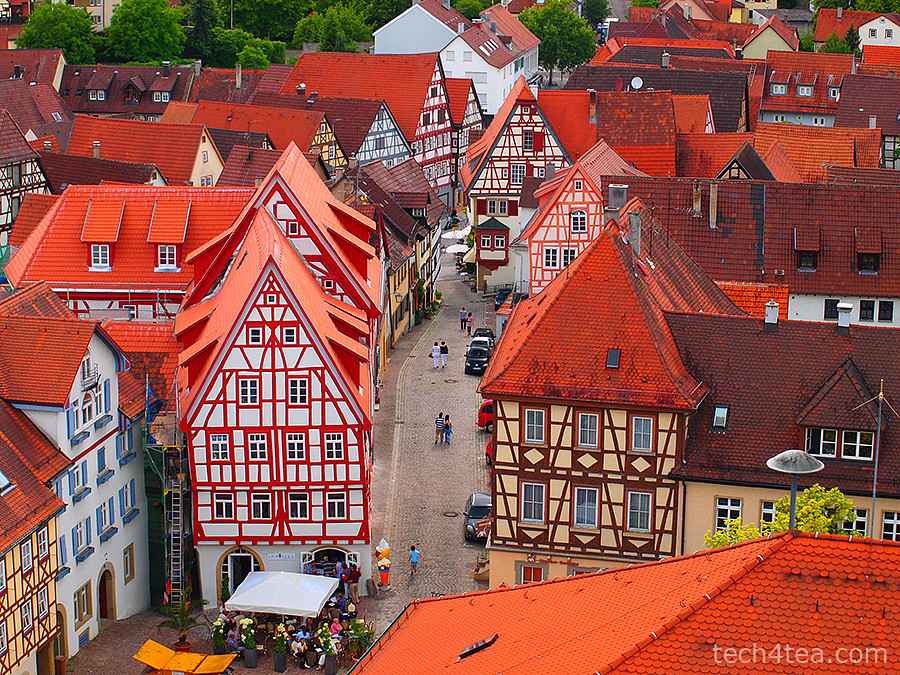
After Mosbach, we stopped by Bad Wimpfen, a town some 15 km to the north of our destination Heilbronn. It was even more charming than Mostback, with a more extensive old town and the castle foundation surrounding it. We went up the Blauer Turm (Blue Tower) which gave us a 360 degrees panoramic view of the surrounding Neckar valley. Justin was really fresh from his nap and made it up and down the steep stairs all on his own.

Roses by the road, with the Blauer Turm in the background. Taken with an Olympus E5

Roses by the road, with the Blauer Turm in the background. Taken with an Olympus E5.

Strolling around the castle walls was very pleasant in the evening hour. It seems that with the longer day, the golden hour around sunrise and sunset has been stretched to last longer by another hour or so – it’s actually a boon to photographers.

View of Bad Wimpfen old quarters from the Blauer Turm. Taken with an Olympus 450 with Pop-Art effect.

View of Bad Wimpfen old quarters from the Blauer Turm. Taken with an Olympus 450 with Pop-Art effect.

After Bad Wimpfen, it took only 20 minutes to arrive at our next hotel at Heilbronn, where we planned to stay for the next two nights.

Schriesheim and Ladenburg near Weinheim

Sunday, June 12th, 2011

On a more relaxed pace, we drove and visited two beautiful towns near where we were staying in Weinheim.

Beautiful rose covered house in Schriesheim

Beautiful rose covered house in Schriesheim. Roses are so plentiful and beautiful in Germany.

After the hectic pace of the first day of sightseeing, we decided to take it easy and adopt a more relaxed pace. We drove to Schriesheim and had pastry and tea for breakfast at Riegler in Schriesheim. It was a small town, and the pace of life was slow on a weekend morning. We strolled through the beautiful streets and stumbled upon a charming house covered in roses. It was absolutely beautiful.

German roses. Olympus E5 at f/4, 108mm (35mm equiv), 14-54 mm lens

German roses. Olympus E5 at f/4, 108mm (35mm equiv), 14-54 mm lens

We then drove over to Ladenburg, only some 10 minutes away. This was a bigger town. There was a Mercedes-Benz vintage car festival by the river on and we headed in looking for that elusive bratwurst stand. We’d thought German towns would be sporting bratwurst stands and restaurants around every street corner so imagine our surprise when we didn’t encounter any during the first day in Mannheim, Schwetzingen and Heidelberg. We finally had our beer and Bratwurst lunch at the festival, ogling at the sexy vintage Benzs on display.

The Germans really love to garden, even on a window sill. There were roses and flowers all along the roadsides and houses along the roads.

The Germans really love to garden, even on a window sill. There were roses and flowers all along the roadsides and houses along the roads.

After lunch, we headed into the old town centre and came across a mini beer festival in a back alley as well as a wedding at the local church.

Sexy Benzs all splayed out at Ladenburg under the fantastic sunny weather.

Sexy Benzs all splayed out at Ladenburg under the fantastic sunny weather.

When we got back to where we had parked the car, we found that the festival organisers had cordoned off the road for the obstacle race for the vintage cars. We tarried to watch the interesting display but realised that it was going to last till evening. Fortunately, the organisers were kind enough to lift the cordon to let us drive our car out since it was parked just inside of the white tape.

Charming timbered houses at Ladenburg under the summer sky.

Charming timbered houses at Ladenburg under the summer sky.

Back at the hotel, we took a nap before heading out to the old town quarters of Weinheim. The good thing about long summer days in Europe is that you get long daylight hours to do the sightseeing. The flip side is you’ve got to get up real early or stay up real late to see a sunrise or sunset. Daylight here in southern Germany is from 4:30 am to 9:30 pm.

Weinheim Rathaus (Town Hall) in twilight. Taken with an Olympus E5 DSLR.

Weinheim Rathaus (Town Hall) in twilight. Taken handheld with an Olympus E5 DSLR.

The old quarters of Weinheim sits at the top of the hill. There was some memorial service in the park with people wearing 18th century uniforms and guskets, after which they marched into the charming town square.

It was rather crowded and I had to lift the camera above their heads to get some snapshots. The articulated LCD screen of the Olympus E5 came in really useful here, because it allowed me to frame the shot on the LCD panel which I folded downwards so I could look at it in live-view mode even though the camera was held high up.

Twilight memorial at Weinheim Schlosspark. Taken with an Olympus E5 DSLR.

Twilight memorial at Weinheim Schlosspark. Taken handheld with an Olympus E5 DSLR.

By now, it was getting dark. The night-shot capability of the E5 also excelled. Focus was fast even in live-view and the picture quality, even at ISO 1600 was really good – sharp and with little noise.

Mannheim – first stop on the castle route

Saturday, June 11th, 2011

Mannheim is the start of the castle route that originally extended to Kulmbach but it’s now been extended all the way to Prague. We also visited Schwetzingen and Heidelberg.

Wasserturm (Water Tower) at Friedrichsplatz in Mannheim

Wasserturm (Water Tower) at Friedrichsplatz in Mannheim. Taken with an Olympus E5 DSLR.

Mannheim was a small fishing hamlet as early as 766 AD. In the eleventh century, a fortress was built at the junction of the rivers Rhine and Neckar. The fishing hamlet grew into a trading settlement and eventually into a town.

The Kunsthalle museum in Mannheim

The Kunsthalle museum in Mannheim. Taken with an Olympus E5.

The sleepy town is the second largest town in the region, with a Baroque palace replacing the former fortress in the eighteenth century. We visited the Wasserturm (Water Tower) and the Kunsthalle museum in Friedrichsplatz. The former is a symbol of Mannheim while the small museum featured many quirky installation art. One involved a room full of junk and fake logs to extoll the need to save the planet from environmental pollution.

Using an Asus EeePad Transformer tablet instead of paper to do museum sketches

Using an Asus EeePad Transformer tablet instead of paper to do museum sketches

The centrepiece for the day was a group of artists positioned around various paraphernalia of daily life. Before we could figure out what it was all about, we had to shuffle the kids out when one of the young nubile artists began to undress herself fully.

Using an Asus EeePad Transformer tablet instead of paper to do museum sketches

Using an Asus EeePad Transformer tablet instead of paper to do museum sketches

There were many German school children visiting, holding paper sketch pads to sketch the paintings and exhibits on display. Erin used her Asus EeePad Transformer tablet instead drawing curious looks from the locals. She was trying out this Android app called “Kids Doodle”.

Schloss Schwetzingen

Schloss Schwetzingen. Olympus E450 with Pop-Art effect.

We decided to give the Baroque palace in Mannheim a miss since we were visiting the more reputed Schloss Schwetzingen. Located between Mannheim and Heidelberg in Schwetzingen, the Baroque-Renaissance palace was built as a summer residence on the site of a medieval castle. The original hunting lodge was converted into the main building with two curved side wings added. The palace garden was originally modeled after Versailles palace but converted into an English style garden.

It was a pleasant park visit and we had our picnic lunch by the lake.

Partially scaffolded Heidelberg Castle overlooking the Neckar river

Partially scaffolded Heidelberg Castle overlooking the Neckar river.

After Schwetzingen, we headed for Heidelberg. Sitting right by the river Neckar, it is one of Germany’s most beautiful towns. Germany’s first university was established here in 1386, while the ruins of the castle sits on a hill overlooking the town. Originally a Gothic castle, it repeatedly extended between the 13th and 17th century. It was remodelled in the 16th century into a beautiful Renaissance residence, before being destroyed in the 17th century as a result of the Thirty Years’ Was and the 1689 war with France.

Getting to the first hotel in Weinheim

Friday, June 10th, 2011

Upon arrival at Frankfurt, we’d picked up the rental car and driven the 64km from the airport to Weinheim in slightly less than an hour. Thanks to the GPS, finding the hotel was a breeze.

This is the first time I’m using a TomTom GPS and so far so good. The GO 750 is easy to use and the turn by turn navigation for the dedicated GPS device is clear and timely.

NH Hotel Weinheim

NH Hotel Weinheim, a good base to explore Mannheim, Schwetzingen, Heidelberg and the surrounding region. Photo from www.nh-hotels.com

I remember the first time I’d used a GPS years ago, the voice instructions came so late I frequently missed turnings.

What does one look for in a navigational GPS device? Here are some things I look out for from my own experience.

  • Good database so that the hotel or sight you’re looking for is in the map data. Good road database also helps in planning a good route from start point to destination. I had this GPS in the past that repeatedly tried to direct me to enter an expressway by driving into a one-way EXIT from the expressway. I had to take things into my own hads and figure out how to get onto that expressway in France.
  • Good user interface so you can find that hotel or sight and select it for navigation. The “point of interest” (POI) is only useful only if you can dig it out from the map data. I’ve used devices in the past where I tore my hair out just to locate a specific hotel to get to but can’t find it – only to discover later that it was in the database after all. I couldn’t find it because I didn’t have the exact address down to the door number. Then again, in Japan you can just key in the phone number of that establishment, and the GPS gives you the location and route to that specific hotel or sight.
  • Intelligent route planning to give you the shortest or fastest or least congested (based on live traffic data) route, with quick adjustment of the route should you make a wrong turn. Again the GPS that came with the rental car in Japan was exemplary, it was dead accurate on estimating time of arrival – after taking into account the traffic congestions along the way.
Nice spacious rooms with plenty of power outlets.

Nice spacious rooms with plenty of power outlets. www.nh-hotels.com

Pre-planning

While still on the flight, I keyed in the six hotels that we are going to stay in for this vacation and saved them as my personal “Favourites”. It was a breeze on the GO 750. By simply keying in the postal code, the menu gave a list of streets to choose from. You can then type in the house number if you had it.

TomTom GO 750 dedicated turn-by-turn navigational GPS

TomTom GO 750 dedicated turn-by-turn navigational GPS

It helped that I had consolidated all the full addresses of the hotels in a summary sheet, so that I didn’t have to rifle through reams of booking vouchers to find the addresses of the hotels.

By the way, in that summary, I find it useful to include other pertinent information like prices, phone numbers, check-in dates and time.

Having stored the hotel as a POI, I could set it as the destination the moment I got into the car and drive off. Rather than start fiddling with the GPS in the confines of the car park.

Road trip to Germany and Prague

Thursday, June 9th, 2011

On my driving vacation in Europe, I’ll see how much of my digital lifestyle I can bring along, and how much I can live without.

It’s that time of the year again, when we uproot the entire family and squeeze ourselves into a four wheeler and drive around a new country. For this school holiday, we’d decided to visit Germany and Prague in the Czech Republic.

For our 16-day escape from the grunt of daily routine, we will be visiting the castles in southern Germany and the historic city of Prague. The romantic lanterns on Charles Bridge had left such a deep impression for my wife that we’d decided to revisit it again someday.

But would you believe it – for the longest time, we hadn’t hear much about Germany in the media. Then suddenly, just weeks prior to setting off, it started making its way into the news for all the wrong reasons.

Empty seats on the SQ 326 from Singapore to Frankfurt

Empty seats on the SQ 326 from Singapore to Frankfurt

First it was the ash cloud from Iceland that threatened to scuttle our plans. Fortunately, that blew away soon enough. Then it’s now the E Coli outbreak that is still plaguing the country. We’ve decided to stick to our plans however – I’m hoping to steer clear of tomatoes, cucumbers and other raw greens.

Right now I’m on flight SQ325 from Singapore Changi Terminal 3 to Frankfurt Rhein Main International Airport Terminal 1. We took off almost half an hour later than the designated 1355. I’m wondering if we’ll be on time to arrive in Frankfurt at 2040.

The economy class of the flight looks almost empty. I estimate at most 10% occupancy in the Economy class. There’s plenty of space for passengers to lie astride the three seats in each section of the Boeing 777-300ER.

Empty because it's a weekday flight or due to the E Coli?

Empty seats on the SQ 326 from Singapore to Frankfurt

I asked the cabin crew whether this flight was always this empty or was it due to the outbreak in Germany. She replied that it wasn’t due to the outbreak and that weekday flights during the day tend to be less full than evening flight – because vacationers prefer to take the night flight to save one day’s accomodation upon arrival.

Made sense – we too used to take night flights and start the vacation upon arrival. But the kids usually stayed awake throughout the flight playing games and watching shows and wifey couldn’t sleep well on board. So we’d decided to try the day flight, sleep on arrival and start fresh on a new day.

The business class looks 75% full. Guess there is less impetus for these passengers to save money for their companies.

Anyway, the movie selection seems really boring even thoough there’re more than 150 shows on offer. There seems to be a dirth of good flicks during this period.

This is the first time I’m typing on a laptop during a flight. The abundance of space makes it less painful to set up a laptop and there’s no worry that someone is peering at what you’re typing. The next passenger is a few rows to the front and behind.

There’s no Internet access while on board so I’ll have to wait till the next time I get access to post this. The stewardess mentioned that Internet access should be available soon in the near future. Good thing there’s a power outlet on the seat handle to plug in the laptops though.

LG monitors at the PC Show 2011

Thursday, June 9th, 2011

I had the chance to try out the 23-inch LG2360V LED LCD monitor for the past two weeks. Pretty bright and pin sharp display, and easy to set-up.

I’ll be doing a more in-depth review when I get back from Germany at the end of the month. For now LG’s promoting their monitors at the ongoing PC Show. The LG2360V is going for S$298 along with some free gifts.

LG monitors on promotion at the PC Show 2011

LG monitors on promotion at the PC Show 2011

BlackBerry PlayBook launched in Singapore

Wednesday, June 8th, 2011

Singapore is the first country in Asia where RIM has launched the 7″ tablet computer. Orders can be placed starting tomorrow with delivery by the end of June.

Official launch of the RIM BlackBerry PlayBook in Singapore

Official launch of the RIM BlackBerry PlayBook in Singapore. Hosted by Venetta Lopez and The Flying Dutchman.

Singapore is an important market for Research In Motion (RIM)  – one that demands high-quality and high-performance technology. The BlackBerry PlayBook is targeted to please both consumers and business customers.

Gary from RIM showing how compact the 7 inch PlayBook is in the hands

Gary from RIM showing how compact the 7 inch PlayBook is in the hands.

For the moment, RIM is working with carrier partners, distributers and retailers sell authentic cases and accessories throughout the island nation. A list of retailers from which to pre-register and pre-order the tablet can be found here.

Retail prices and promotions will be revealed during the PC Show tomorrow. 3G/4G is still being developed and will likely be launched in the US first.

Come July, the PlayBook will get its own native email, contacts and calendar apps instead of relying completely on a companion BlackBerry smartphone. However, to access enterprise email, coupling with a BlackBerry smartphone will still be necessary for security reasons.

The PlayBook was launched at the Red Dot Museum. That's Irene Ang and Patricia Mok planking on the reception desk.

The PlayBook was launched at the Red Dot Museum. That's Irene Ang and Patricia Mok planking on the reception desk.

The launch event was held at the Red Dot Museum at 7:30 pm today.

Apple previews iOS 5 at WWDC 2011

Tuesday, June 7th, 2011

The new version of iOS for Apple’s iPhone, iPad and iPod touch includes Notification Center, iMessage, Newsstand, Twitter integration among 200 New Features.

iOS 5 for Apple iPhone, iPad and iPod touchAt the Worldwide Developers Conference (WWDC) 2011 today, Scott Forstall – Apple’s senior vice president of iOS – paraded 10 of the promised 200 new features for the iPhone, iPad, and iPod Touch. Although customers will only be receiving the update in autumn, developers will get their version of iOS 5 today.

Main new iOS 5 features

Notification Center, a new way to easily view and manage notifications in one place without interruption.

iMessage, a new messaging service that lets users easily send text messages, photos and videos between all iOS devices.

Newsstand, a new way to purchase and organise a user’s newspaper and magazine subscriptions.

PC Free feature, iOS 5 users can activate and set up their iOS device right out of the box and get software updates over the air with no computer required.

“iOS 5 has some great new features, such as Notification Center, iMessage and Newsstand and we can’t wait to see what our developers do with its 1,500 new APIs,” said Steve Jobs, Apple’s CEO. “Perhaps iOS 5’s paramount feature is that it’s built to seamlessly work with iCloud in the Post PC revolution that Apple is leading.”

The details

With iOS 5 and iCloud, you just enter your Apple ID and password and iCloud will seamlessly integrate with your apps to automatically and wirelessly keep all of your mail, contacts, calendars, photos, apps, books, music and more, up-to-date across all your devices without ever having to connect to a computer.

Notification Center in Apple iOS 5Notification Center provides iOS 5 users with an innovative way to easily access all notifications―text messages, missed calls, calendar alerts, app alerts and more, all in one place, from anywhere in iOS 5. When they arrive, notifications appear briefly at the top of the screen without interrupting what you’re doing. With one swipe you can see all your notifications, and a simple tap will take you right to its app for more detail. Notifications also appear on the lock screen, with the ability to be taken to the notifying app with just one swipe. This is similar to the consolidated notification alert bar and window on newer BlackBerry devices like the Torch.

Newsstand in Apple iOS 5Newsstand is an easy-to-organise bookshelf displaying the covers of all your newspaper and magazine subscriptions in one place. A new section of the App Store features just subscription titles, and allows users to quickly find the most popular newspapers and magazines in the world. For subscribed titles, new issues appear in the Newsstand and are updated automatically in the background so you always have the latest issue and the most recent cover art.

Safari gets new features in iOS 5Safari sees new features for the browser in iOS 5. Safari Reader will strip down poorly formatted pages into an RSS-like view, and provides a link that allows you to e-mail the entire text of a story from within Safari. Reading List lets you save articles to read later and they automatically show up on all your iOS devices. Tabbed browsing is now available on the iPad making it easy to flip between multiple web pages on the tablet.

Twitter integration in Apple iOS 5iOS 5 includes built-in Twitter integration, so you can sign in once and then tweet directly from all your Twitter-enabled apps, including Photos, Camera, Safari, YouTube and Maps with a single tap. New APIs give third party developers the ability to take advantage of the single sign-on capability for their own iOS 5 apps.

iMessage in Apple iOS 5iMessage in iOS 5 brings the functionality of iPhone messaging to all of your iOS devices―iPhone, iPad and iPod touch. Built right into the Messages app, iMessage allows you to easily send text messages, photos, videos or contact information to a person or a group on other iOS 5 devices over Wi-Fi or 3G. iMessages are automatically pushed to all your iOS 5 devices, making it easy to maintain one conversation across your iPhone, iPad and iPod touch. iMessage also features delivery and read receipts, typing indication and secure end-to-end encryption.

The new Reminders app helps you manage your tasks; create and group related tasks together; and set time or location-based reminder alerts, priorities and due dates, so you can be reminded of a task as its deadline approaches, or when you arrive or depart a given location. Reminders can also be viewed in iCal and Outlook and are updated automatically.

New features in the Camera and Photos apps give you instant access to the camera right from the lock screen, and you can use the volume-up button to quickly snap a photo. Optional grid lines help line up your shot and a simple tap locks focus and exposure on one subject. The new Photos app lets you crop, rotate, enhance and remove red-eye, and organise your photos into albums right on your device to share them on the go.

PC Free feature in Apple iOS 5With the new PC Free feature, iOS 5 users can activate and set up their iOS device right out of the box with no computer required, and iOS software updates are delivered over the air and installed with just a tap. Wi-Fi Sync in iOS 5 transfers and backs up your content securely over SSL and wirelessly syncs purchased content from your device to your iTunes library.

Additional new features in iOS 5

Game Center in Apple iOS 5Game Center, now with the ability to add photos to your profile, purchase new games from within the Game Center app and easier ways to find friends and new games.

Mail enhancements which include the ability to compose messages using draggable addresses, and a new formatting bar with bold, italics, underline and indention controls; and

• a system-wide split keyboard to make it even easier to type on your iPad.

Availability

Beta software and SDK for Apple iOS 5The iOS 5 beta software and SDK are available immediately for iOS Developer Program members at developer.apple.com. iOS 5 will be available as a free software update for iPhone 4, iPhone 3GS, iPad 2, iPad, iPod touch (fourth generation) and iPod touch (third generation) this autumn. Some features may not be available on all products.


Steve Jobs unveils Apple’s new iCloud at WWDC 2011

Tuesday, June 7th, 2011

Steve Jobs personally unveiled the much anticipated iCloud during the keynote address at the annual Worldwide Developers Conference (WWDC) 2011 in San Francisco.

ON 6 June 10 am PST (local time 7 June, 1 am), Steve Jobs revealed the set of free cloud services that promises to work seamlessly with applications on the iPhone, iPad, iPod touch, Mac or PC to automatically and wirelessly store a user’s content in iCloud and again automatically and wirelessly push it to all of the same user’s devices. When anything changes on any one of the devices, all of the user’s other devices are wirelessly updated almost instantly.

New Apple iCloud services unveiled by Steve Jobs at WWDC 2011“Today it is a real hassle and very frustrating to keep all your information and content up-to-date across all your devices,” said Steve Jobs, Apple’s CEO. “iCloud keeps your important information and content up to date across all your devices. All of this happens automatically and wirelessly, and because it’s integrated into our apps you don’t even need to think about it—it all just works.”

iCloud services

• The former MobileMe services — Contacts, Calendar and Mail — are all completely re-architected and rewritten to work seamlessly with iCloud. Users can share calendars with friends and family, and the ad-free push Mail account is hosted at me.com. A user’s inbox and mailboxes are kept up-to-date across all of the user’s iOS devices and computers.

New Apple iCloud services unveiled by Steve Jobs• The App Store and iBookstore can now download purchased iOS apps and books to all a user’s devices, not just to the device they were purchased on. Simply tapping the iCloud icon will download any apps and books to any iOS device (up to 10 devices) at no additional cost. The App Store and iBookstore now let a user see his/her purchase history.

• iCloud Backup automatically and securely backs up a user’s iOS devices to iCloud daily over Wi-Fi when the iPhone, iPad or iPod touch is charged. Backed up content includes purchased music, apps and books, Camera Roll (photos and videos), device settings and app data. If a user replaces an iOS device, simply entering his Apple ID and password during setup will prompt iCloud to restore the new device.

iCloud Storage• iCloud Storage seamlessly stores all documents created using iCloud Storage APIs, and automatically pushes them to all of a user’s devices. When document is altered on any device, iCloud automatically pushes the changes to all the other devices. Apple’s Pages, Numbers and Keynote apps are already using iCloud Storage. Users get up to 5GB of free storage for their mail, documents and backup — and this does not include the storage for music, apps and books purchased from Apple, as well as the storage required by Photo Stream. Users will be able to buy even more storage, with details announced when iCloud ships this fall.


• iCloud’s Photo Stream service automatically uploads the photos taken or imported on any of your devices and wirelessly pushes them to all of the user’s other devices and computers. Imagine taking a bunch of photos with your iPhone at a birthday party and seeing them ready to share on your iPad when you return home. Photo Stream is built into the photo apps on all iOS devices, iPhoto on Macs, and saved to the Pictures folder on a PC. To save space, the last 1,000 photos are stored on each device so they can be viewed or moved to an album to save forever. Macs and PCs will store all photos from the Photo Stream, since they have more storage. iCloud will store each photo in the cloud for 30 days, which gives users ample time to connect devices to iCloud and automatically download the latest photos from Photo Stream via Wi-Fi.

• iTunes in the Cloud lets you download previously purchased iTunes music to all of your iOS devices at no additional cost, and new music purchases can be downloaded automatically to all your devices. In addition, music not purchased from iTunes can get gain an improvement in quality by using iTunes Match, a service that replaces your music with a 256 kbps AAC DRM-free version if the service can match it to the over 18 million songs in the iTunes Store. It makes the matched music available in minutes (instead of weeks to upload your entire music library), and uploads only the small percentage of unmatched music. iTunes Match will be available this autumn (only in the US) for a US$24.99 annual fee. Apple today is releasing a free beta version of iTunes in the Cloud, without iTunes Match, for iPhone, iPad and iPod touch users running iOS 4.3. iTunes in the Cloud will support all iPhones that iOS 5 supports in autumn.

Apple is ready to ramp iCloud in its three data centers, including the third recently completed in Maiden, NC. Apple has invested over $500 million in its Maiden data center to support the expected customer demand for the free iCloud services.

Pricing & Availability

The iCloud beta and Cloud Storage APIs are available immediately to iOS and Mac Developer Program members at developer.apple.com. iCloud will be available this autumn concurrently with iOS 5. Users can sign up for iCloud for free on an iPhone, iPad or iPod touch running iOS 5 or a Mac running Mac OS X Lion with a valid Apple ID. iCloud includes 5GB of free cloud storage for Mail, Document Storage and Backup. Purchased music, apps, books and Photo Stream do not count against the storage limit. iTunes Match will be available for US$24.99 per year (US only).

iTunes in the Cloud is available today in the US and requires iTunes 10.3 and iOS 4.3.3. Automatic download of apps and books is available today. Using iCloud with a PC requires Windows Vista or Windows 7. Outlook 2010 or 2007 is recommended for accessing contacts and calendars.

Apple reveals Mac OS X Lion at WWDC 2011

Tuesday, June 7th, 2011

Mac OS X Lion has 250 new features and can be downloaded in July from the Mac App Store for US$29.99.
Mac OS X Lion fromApple
The eighth major release of Apple’s desktop operating system will feature more than 250 new features and 3,000 new developer APIs.

Main new features of the Mac OS X Lion
  • New Multi-Touch gestures
  • System-wide support for full screen apps
  • Mission Control, an innovative view of everything running on your Mac
  • The Mac App Store will now be built right into the OS
  • Launchpad, a new home for all your apps
  • A completely redesigned Mail app

“The Mac has outpaced the PC industry every quarter for five years running and with OS X Lion we plan to keep extending our lead,” said Philip Schiller, Apple’s senior vice president of Worldwide Product Marketing, who briefed WWDC 2011 attendees on Lion. “The best version of OS X yet, Lion is packed with innovative features such as new Multi-Touch gestures, system-wide support for full screen apps, and Mission Control for instantly accessing everything running on your Mac.”

Mac OS X Lion from Apple

Mac OS X Lion from Apple

The details

New Multi-Touch gestures and fluid animations built into Lion let you interact directly with content on the screen for a more intuitive way to use your Mac. New gestures include momentum scrolling, tapping or pinching your fingers to zoom in on a web page or image, and swiping left or right to turn a page or switch between full screen apps. All Mac notebooks ship with Multi-Touch trackpads and desktop Macs can use Apple’s Magic Trackpad.

Full screen apps take advantage of the entire display and are perfect for reading email, surfing the web or browsing photos, especially on a MacBook Air or MacBook Pro. With a single click your app fills the display and you can swipe from one window to another, between full screen apps, or back to your Desktop, Dashboard or Spaces® without ever leaving full screen. iWork and iLife apps, as well as Safari, iTunes, Mail, FaceTime and others, all take advantage of Lion’s system-wide support for full screen apps.

Mission Control combines Exposé, full screen apps, Dashboard and Spaces into one unified experience for a bird’s eye view of every app and window running on your Mac. With a simple swipe, your desktop zooms out to display your open windows grouped by app, thumbnails of your full screen apps and your Dashboard, and allows you to instantly navigate anywhere with a tap.

The Mac App Store is now built into Lion and is the place to browse for new Mac apps, buy them with your iTunes account, download and install them. Apps automatically install directly to Launchpad, and with Lion’s release, the Mac App Store will be able to deliver smaller “delta” app updates and new apps that can take advantage of features like In-App Purchase and Push Notifications.

Launchpad makes it easier than ever to find and launch any app. With a single Multi-Touch gesture, all your Mac apps are displayed in a stunning full screen layout. You can organise apps in any order or into folders and swipe through unlimited pages of apps to find the one you want.

Lion includes a completely redesigned Mail app with an elegant widescreen layout. The new Conversations feature groups related messages into an easily scrollable timeline, intelligently hiding repeated text so the conversation is easy to follow, and retaining graphics and attachments as they were originally sent. An powerful new search feature allows you to refine your search and suggests matches by person, subject and label as you type. Mail includes built-in support for Microsoft Exchange 2010.

Additional new features in Lion

Resume, which conveniently brings your apps back exactly how you left them when you restart your Mac or quit and relaunch an app.

Auto Save, which automatically and continuously saves your documents as you work.

Versions, which automatically records the history of your document as you create it, and gives you an easy way to browse, revert and even copy and paste from previous versions.

AirDrop, which finds nearby Macs and automatically sets up a peer-to-peer wireless connection to make transferring files quick and easy.

Pricing & Availability

Mac OS X Lion will be available in July as an upgrade to Mac OS X version 10.6 Snow Leopard from the Mac App Store for US$29.99. At about 4GB, it is the size of an HD movie from the iTunes Store. Mac OS X Lion Server requires Lion and will be available in July from the Mac App Store for US$49.99.

Lion requires an Intel-based Mac with a Core 2 Duo, i3, i5, i7 or Xeon processor and 2GB of RAM. The Lion upgrade can be installed on all your authorised personal Macs.

The Mac OS X Lion Up-To-Date upgrade is available at no additional charge via the Mac App Store to all customers who purchased a qualifying new Mac system from Apple or an Apple Authorised Reseller on or after June 6, 2011. Users must request their Up-To-Date upgrade within 30 days of purchase of their Mac computer. Customers who purchase a qualifying Mac between June 6, 2011 and the date when Lion is available in the Mac App Store will have 30 days from Lion’s official release date to make a request.